7 Upgrade - does install index?

GEWB

New member
Guru
VIP
Local time
7:59 AM
Messages
1,030
Location
Denver, Colorado
I have ordered Win7 Pro Upgrade - will run against my existing Vista Business workstation. Need to update, NOT install fresh.

When the Win7 upgrade installer runs, does it by default run the dreaded indexing utility during the install? I ask because the workstation has almost 700,000 files on it and if the installer tries to index the workstation as part of the install, it could take a very long time!

:sleepy: :sleepy: :sleepy: :sleepy:


Regards,
GEWB
 

My Computer

Computer type
PC/Desktop
Computer Manufacturer/Model Number
(7 different computers booting up to 10 systems)
OS
Linux Mint / XP / Win7 Home, Pro, Ultimate / Win8.1 / Win10
Other Info
Four desktops, two laptops, one notebook and one tablet
Put your worries to rest... :doh:
 

My Computer

Computer type
PC/Desktop
Computer Manufacturer/Model Number
LENOVO K450 @3.0GHZ
OS
64-bit Windows 8.1 Pro
CPU
Core(TM) i5 CPU 4330 Haswell @ 3.20GHz
Motherboard
LENOVO
Memory
12.00 GB
Graphics Card(s)
Intel(R) HD Graphics
Sound Card
Intel HD integtrated
Monitor(s) Displays
HP 25' ISP Monitor
Screen Resolution
1900/1020
Hard Drives
(1) ST1000DM003-1CH162 (2) Generic STORAGE DEVICE USB Device (3) Generic STORAGE DEVICE USB Device
Internet Speed
100mb down/10mb up
i would make sure you dont index the entire drive. It doesn't index on install.
 

My Computer

Computer Manufacturer/Model Number
HP Pavillion dv-7 1005 Tx
OS
Win 8 Release candidate 8400
CPU
[email protected]
Memory
4 gigs
Graphics Card(s)
Nvidia 9600M
Sound Card
HD built-in
Monitor(s) Displays
17" Wxga
Screen Resolution
1440x900
Cooling
none
Internet Speed
45Mb down 5Mb up
Put your worries to rest... :doh:
I'll take that as "no, it doesn't try to index during install" -THANKS!

Regards,
GEWB
 

My Computer

Computer type
PC/Desktop
Computer Manufacturer/Model Number
(7 different computers booting up to 10 systems)
OS
Linux Mint / XP / Win7 Home, Pro, Ultimate / Win8.1 / Win10
Other Info
Four desktops, two laptops, one notebook and one tablet
i would make sure you dont index the entire drive. It doesn't index on install.

Thanks - you got that right!

First task after upgrade: make sure indexing is turned off.

Regards,
GEWB
 

My Computer

Computer type
PC/Desktop
Computer Manufacturer/Model Number
(7 different computers booting up to 10 systems)
OS
Linux Mint / XP / Win7 Home, Pro, Ultimate / Win8.1 / Win10
Other Info
Four desktops, two laptops, one notebook and one tablet
I think Windows 7 by default will generally only index the files in the documents and application data folders. You have 700,000 files there?
 

My Computer

Computer Manufacturer/Model Number
Too many to list.
OS
XP, Seven, 2008R2
CPU
AMD, Intel, VIA
Motherboard
Various
Memory
Corsair, Kingston, etc.
Graphics Card(s)
ATI, NVIDIA
Monitor(s) Displays
Samsung
Hard Drives
Maxtor, Western Digital
Keyboard
qwerty
Internet Speed
22 Mb/s @ home, 1 Gb/s @ server
Other Info
All of my systems still run fastest on XP 32-bit for the most part. Win7 is fun to play with, but I still prefer XP for raw speed, security, and functionality.
I think Windows 7 by default will generally only index the files in the documents and application data folders. You have 700,000 files there?

Thanks - I'll empty the Vista folders before doing the upgrade!

Yes, I have that may files. :rolleyes:

I think I'll get another HD to back everything up (again) - over 300GB worth of work files.

Regards,
GEWB
 

My Computer

Computer type
PC/Desktop
Computer Manufacturer/Model Number
(7 different computers booting up to 10 systems)
OS
Linux Mint / XP / Win7 Home, Pro, Ultimate / Win8.1 / Win10
Other Info
Four desktops, two laptops, one notebook and one tablet
Hi GEWB and welcome to the SevenForums.

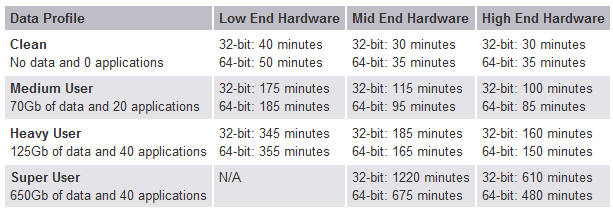
As one of the not so many upgraders here, I would like to warn you it is going to take a lot of time.

upgrade_time.PNG
(Full story)

My last upgrade took nearly four hours, Vista Ultimate to Seven on a quite high end machine. But I'm still thinking it was worth of the time consumed.

Kari
 

My Computer

Computer type
Laptop
Computer Manufacturer/Model Number
HP ENVY 17-1150eg
OS
Windows 10 Pro x64 EN-GB
CPU
1.6 GHz Intel Core i7-720QM Processor
Memory
6 GB
Graphics Card(s)
ATI Mobility Radeon HD 5850 Graphics
Sound Card
Beats sound system with integrated subwoofer
Monitor(s) Displays
17" laptop display, 22" LED and 32" Full HD TV through HDMI
Screen Resolution
1600*900 (1), 1920*1080 (2&3)
Hard Drives
Internal: 2 x 500 GB SATA Hard Disk Drive 7200 rpm
External: 2TB for backups, 3TB USB3 network drive for media
Cooling
As Envy runs a bit warm, I have it on a Cooler Master pad
Keyboard
Logitech diNovo Media Desktop Laser (bluetooth)
Mouse
Logitech Performance Mouse MX
Internet Speed
50/10 Mbps VDSL
Antivirus
Windows Defender 4.3.9431.0
Browser
Maxthon 3.5.2., IE11
Hi GEWB and welcome to the SevenForums.

As one of the not so many upgraders here, I would like to warn you it is going to take a lot of time.

View attachment 30499
(Full story)

My last upgrade took nearly four hours, Vista Ultimate to Seven on a quite high end machine. But I'm still thinking it was worth of the time consumed.

Kari

Hello Kari -

Thanks for the chart - I guesstimated it would take about 12 hours and the chart confirms it.

Regards,
GEWB
 

My Computer

Computer type
PC/Desktop
Computer Manufacturer/Model Number
(7 different computers booting up to 10 systems)
OS
Linux Mint / XP / Win7 Home, Pro, Ultimate / Win8.1 / Win10
Other Info
Four desktops, two laptops, one notebook and one tablet
Back
Top