PabloFajita
New member
- Local time
- 6:52 PM
- Messages
- 12
For the last 8 months I've been having what started off as general Color Banding, and has turned into I don't even know what now.
Firstly, though I have had and have absolutely 0 performance or stability issues with this rig. Everything runs fast, everything runs smooth, temps are stellar on both GPU and the CPU. This computer runs like a dream in that regard. Which is good and bad. Good because the well, a fast stable rig is good, bad though because it doesn't help me pinpoint the problem which is omnipresent.
To start off, I've attached some jpg images of the problem. It's not related to just one game, I can find the issue in every game I'll play. I can even see banding on this forums background, it's not severe due to the backgrounds light colors but it's there. In the screenshots it might be hard to see if you have your monitor really dark though. Also you should make the picture fullscreen, 1920x1080.
Also possible related, is streamed videos lately appear somewhat grainy/pixelated, not all, but some. And they seam be constantly refreshing every .25 seconds. You have to really look to see it. Like even a stable background of stream, you'll see it constantly sync into place as is the best I can describe it. Like it will be clear, then .25 seconds it will refresh grainy to clear. Just general streamed video crappiness, that wasn't there 8 months ago. Also you know that default Windows 7 HD video that is installed of the horse running, ya that looks like shit and definitely not HD.
Anyhoo, this problem originate when my old monitor apparently out of the blue died. The left side went darkish/purple. I confirmed it was the monitor by hooking it up a different computer.
When a new monitor(same make/model) was sent to me, as I was checking it for dead pixels and general problems I noticed some color banding on gradients. I was then shipped another monitor, which produced the same results and then finally another one, again with the same results. I then hooked up an older known working monitor, which also produced this problem.
I then tried different input cables, HDMI/DVI/VGA, all produced the same results. I tried different cables for each input as well, same results.
Then I tried 4 different Nvidia drivers, clean installing each. Using known working versions I had previously used. All produced the same problems. I swept each of them after each install, everything was installed clean.
At this point I tried everything that I possibly could figure to be related, in both the Nvidia control panel options and the Windows Color Management options. Through here, I could "minimize" the problem, but it was still there, I was just bandaiding it by ****ing up colors to try bare though it. And yes the first thing I made sure of was that I was in 32bit Truecolor mode on both the GPU and Windows.
Obviously I vigorously checked for malware/viruses/whatever. Also my chdsk and countless other things as well.
My next step was contacting my GPU manufacturer as this was the most logical solution. I was sent out another GPU same make/model, at the time this was a (EVGA GTX 670FTW 2gb). The new GPU produced the same result. EVGA was nice enough to send me out yet another card just rule out, a strange coincidence that 2 cards were producing the same problem. The 3rd card produced the same result.
Here I was kinda losing it and getting frustrated. My next logical step was reinstalled Windows, a full clean install, nothing remained from the previous version including my data/etc. Knew it didn't work just by the Windows Screen I could see minor banding from when you get to the Ctrl-Alt-Del background of Windows.
And now completely losing it, and after some help from various companies and what not we tried a different PSU. It was an off shot, but was "possible". The new PSU, produced the same results.
Having very few options left, EVGA and a few other said it was "possible" it could be my Mobo. Either a faulty PCI slot or various other things. Here I was hesitant but I tried everything else. And let me add, ASRock has absolutely non-existant customer support. Anyhoo, I had to buy another mobo, and due to me trying to rule out conflicts, I purchased the same make/model. I was planning on reinstalling Windows again just rule out any odd issues that arose. The new mobo worked without a Windows reinstall, but the banding issue still persisted. So I again reinstalled Windows, completely clean yet again, the issue was still there.
At this junction, I once again tested my RAM(I had previously done this, but forgot to mention it earlier), both through memtest and then just trying each stick in different slots to see if any would lessen/increase the banding issues. I tried each stick seperate and in different slots. Every combination produced the same banding.
One last Hail Mary, and again EVGA is absolutely fantastic, I was sent another GPU this time a different model an EVGA GTX 770SC. Because in reality, the issue thought by me and almost everyone else I talked too, made it seem like it HAD to be the GPU. Well finally got the new GPU and take a guess, yep, the banding is present.
So here I am... 8 months ago and prior to that for 1 year, I had absolutely 0 issues like this or anything even remotely related.
It all began with a monitor dying, or at least the monitor dying made me look for the problem. It is possible it was there prior or began slightly prior.
Every single thing in this Rig has been swapped out, except the CPU and SSD. I would have swapped those out, but was told from dozens of people, that the issue I'm having could not be related to those 2 components. And in all honesty, I don't think it could have been related to a few other parts I'd already swapped out.
So ya... Oh, and before I forget here's a list of some other oddball things I personally checked to try to rule out the problem.
-Tried different Electrical Outlets, surge protectors, power cables ruling out some bad juice from my house. Tried 4 different rooms.
-Moved everything and anything that could possibly cause some sort of magnetic interference.
-Took out my wireless card, disabled the wireless in the house, ruling out some other sort of interference.
-Tried random mouse/keyboards/usb devices thinking maybe something could interfere as well.
-Obviously checked all chipset drivers other stuff.
-Updated Mobo's BIOS.
-Checked various BIOS settings. Even though everything in my Rig is Stock no OC'ing or anything.
-Swapped most if not all the cables in my rig. Basically every modular cable not attached to a part. Even the non-modular cables were swapped when like I said before I swapped out basically every part in my rig.
There's probably 100 more things I've tried that I can't think of right now, over the course of the last 8 months.
I'm just looking for some help here. What I think and I'm probably wrong though, is there is something in Windows that is causing this, some setting or something.
The problem is most pronounced on alot of game's "vignetting" and in smoky/hazy effects/areas, the screenshots I included should show you. Also light sources seem to produce the banding around them, glowy effects you'll see the pulsing banding.
Alot of website background gradients you can see it, I know some are due to the compression of the imagine, but some aren't. Steam's Client will band, if anyone is familiar. The Windows Aero Glass effect will band with a solid black ground and transparency set.
What's kinda funny though is a game like FTL with it's retro design, doesn't appear to band even on their gradient changes.
I think my current specs are listed on this site's information I just updated them.
Also someone at Blizzard looked through my msinfo and dxdiag and didn't see anything that could cause the issue of the pictures I sent them. They assumed it was the GPU/Drivers, obviously.
I personally don't know what to do next. Short of building a brand new rig, with completely brand new unrelated parts. I can't fix this problem. And I'm too broke to even consider that option.
If anyone, has any suggestion, and I mean anything... That would greatly appreciated. I have no clue what is going on, I've tried everything, and I'm at the point where I dread using this computer that I used to spend so much time on, because the constant in my face taunting of this banding issue everywhere I look.
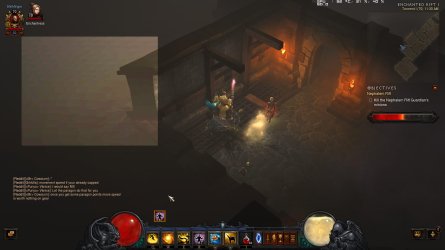
Sorry for that long rant. Here you can see a sample of the issue in the game Diablo 3. It's in every game, dark/hazy games most notably. Any game with "vignetting" even bright games you can see it if you really look in the corners as well.
What's strange is everything in the center of the screen is crystal clear and crisp. This is true for nearly every game, except DayZ-SA in nighttime maps. In that game at night everything is washed out and banding at night. During the daytime you can see vignetting at the corners but at night everything is banding together and washed out grays/blacks.
1st Picture: You'll see the banding around the game's light source around the character and the game's vignetting. The oval camera like design around the center of the screen.
EDIT: This first picture when I open it up from this site after uploading it, the banding is there but rather minimal(compared to what I'm used to), when I open this picture up on computer with Paint/Windows Media/whatever, the banding is EXTREMELY pronounced. I don't know what this means, or if it's a good sign, or means nothing. If I save the image to my computer the banding comes back just like the original, but if it's opened through this forum it's minimized. Coincidence???
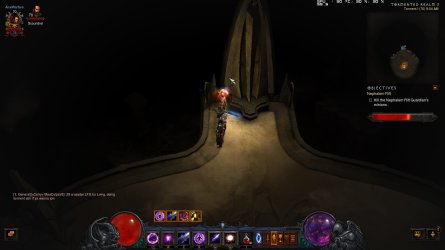
2nd Picture: This just seems like something's f'd up, over the bridge to the right of the character, the hazy area just bands in weird directions.
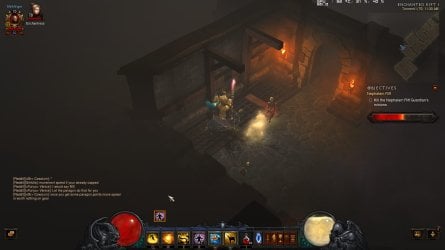
3rd Picture: To the left top left, the gray hazy area, just seems off. It has banding but in no direction it seems to cross itself and stuff doesn't seem clear in the smoke.
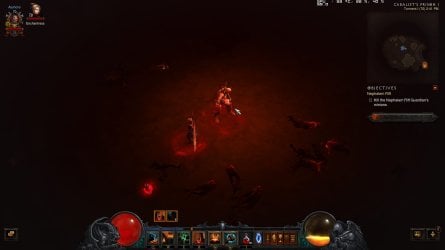
4th Picture: General Vignette banding, most notable towards corners of the screen as it gets darker.
Firstly, though I have had and have absolutely 0 performance or stability issues with this rig. Everything runs fast, everything runs smooth, temps are stellar on both GPU and the CPU. This computer runs like a dream in that regard. Which is good and bad. Good because the well, a fast stable rig is good, bad though because it doesn't help me pinpoint the problem which is omnipresent.
To start off, I've attached some jpg images of the problem. It's not related to just one game, I can find the issue in every game I'll play. I can even see banding on this forums background, it's not severe due to the backgrounds light colors but it's there. In the screenshots it might be hard to see if you have your monitor really dark though. Also you should make the picture fullscreen, 1920x1080.
Also possible related, is streamed videos lately appear somewhat grainy/pixelated, not all, but some. And they seam be constantly refreshing every .25 seconds. You have to really look to see it. Like even a stable background of stream, you'll see it constantly sync into place as is the best I can describe it. Like it will be clear, then .25 seconds it will refresh grainy to clear. Just general streamed video crappiness, that wasn't there 8 months ago. Also you know that default Windows 7 HD video that is installed of the horse running, ya that looks like shit and definitely not HD.
Anyhoo, this problem originate when my old monitor apparently out of the blue died. The left side went darkish/purple. I confirmed it was the monitor by hooking it up a different computer.
When a new monitor(same make/model) was sent to me, as I was checking it for dead pixels and general problems I noticed some color banding on gradients. I was then shipped another monitor, which produced the same results and then finally another one, again with the same results. I then hooked up an older known working monitor, which also produced this problem.
I then tried different input cables, HDMI/DVI/VGA, all produced the same results. I tried different cables for each input as well, same results.
Then I tried 4 different Nvidia drivers, clean installing each. Using known working versions I had previously used. All produced the same problems. I swept each of them after each install, everything was installed clean.
At this point I tried everything that I possibly could figure to be related, in both the Nvidia control panel options and the Windows Color Management options. Through here, I could "minimize" the problem, but it was still there, I was just bandaiding it by ****ing up colors to try bare though it. And yes the first thing I made sure of was that I was in 32bit Truecolor mode on both the GPU and Windows.
Obviously I vigorously checked for malware/viruses/whatever. Also my chdsk and countless other things as well.
My next step was contacting my GPU manufacturer as this was the most logical solution. I was sent out another GPU same make/model, at the time this was a (EVGA GTX 670FTW 2gb). The new GPU produced the same result. EVGA was nice enough to send me out yet another card just rule out, a strange coincidence that 2 cards were producing the same problem. The 3rd card produced the same result.
Here I was kinda losing it and getting frustrated. My next logical step was reinstalled Windows, a full clean install, nothing remained from the previous version including my data/etc. Knew it didn't work just by the Windows Screen I could see minor banding from when you get to the Ctrl-Alt-Del background of Windows.
And now completely losing it, and after some help from various companies and what not we tried a different PSU. It was an off shot, but was "possible". The new PSU, produced the same results.
Having very few options left, EVGA and a few other said it was "possible" it could be my Mobo. Either a faulty PCI slot or various other things. Here I was hesitant but I tried everything else. And let me add, ASRock has absolutely non-existant customer support. Anyhoo, I had to buy another mobo, and due to me trying to rule out conflicts, I purchased the same make/model. I was planning on reinstalling Windows again just rule out any odd issues that arose. The new mobo worked without a Windows reinstall, but the banding issue still persisted. So I again reinstalled Windows, completely clean yet again, the issue was still there.
At this junction, I once again tested my RAM(I had previously done this, but forgot to mention it earlier), both through memtest and then just trying each stick in different slots to see if any would lessen/increase the banding issues. I tried each stick seperate and in different slots. Every combination produced the same banding.
One last Hail Mary, and again EVGA is absolutely fantastic, I was sent another GPU this time a different model an EVGA GTX 770SC. Because in reality, the issue thought by me and almost everyone else I talked too, made it seem like it HAD to be the GPU. Well finally got the new GPU and take a guess, yep, the banding is present.
So here I am... 8 months ago and prior to that for 1 year, I had absolutely 0 issues like this or anything even remotely related.
It all began with a monitor dying, or at least the monitor dying made me look for the problem. It is possible it was there prior or began slightly prior.
Every single thing in this Rig has been swapped out, except the CPU and SSD. I would have swapped those out, but was told from dozens of people, that the issue I'm having could not be related to those 2 components. And in all honesty, I don't think it could have been related to a few other parts I'd already swapped out.
So ya... Oh, and before I forget here's a list of some other oddball things I personally checked to try to rule out the problem.
-Tried different Electrical Outlets, surge protectors, power cables ruling out some bad juice from my house. Tried 4 different rooms.
-Moved everything and anything that could possibly cause some sort of magnetic interference.
-Took out my wireless card, disabled the wireless in the house, ruling out some other sort of interference.
-Tried random mouse/keyboards/usb devices thinking maybe something could interfere as well.
-Obviously checked all chipset drivers other stuff.
-Updated Mobo's BIOS.
-Checked various BIOS settings. Even though everything in my Rig is Stock no OC'ing or anything.
-Swapped most if not all the cables in my rig. Basically every modular cable not attached to a part. Even the non-modular cables were swapped when like I said before I swapped out basically every part in my rig.
There's probably 100 more things I've tried that I can't think of right now, over the course of the last 8 months.
I'm just looking for some help here. What I think and I'm probably wrong though, is there is something in Windows that is causing this, some setting or something.
The problem is most pronounced on alot of game's "vignetting" and in smoky/hazy effects/areas, the screenshots I included should show you. Also light sources seem to produce the banding around them, glowy effects you'll see the pulsing banding.
Alot of website background gradients you can see it, I know some are due to the compression of the imagine, but some aren't. Steam's Client will band, if anyone is familiar. The Windows Aero Glass effect will band with a solid black ground and transparency set.
What's kinda funny though is a game like FTL with it's retro design, doesn't appear to band even on their gradient changes.
I think my current specs are listed on this site's information I just updated them.
Also someone at Blizzard looked through my msinfo and dxdiag and didn't see anything that could cause the issue of the pictures I sent them. They assumed it was the GPU/Drivers, obviously.
I personally don't know what to do next. Short of building a brand new rig, with completely brand new unrelated parts. I can't fix this problem. And I'm too broke to even consider that option.
If anyone, has any suggestion, and I mean anything... That would greatly appreciated. I have no clue what is going on, I've tried everything, and I'm at the point where I dread using this computer that I used to spend so much time on, because the constant in my face taunting of this banding issue everywhere I look.
Sorry for that long rant. Here you can see a sample of the issue in the game Diablo 3. It's in every game, dark/hazy games most notably. Any game with "vignetting" even bright games you can see it if you really look in the corners as well.
What's strange is everything in the center of the screen is crystal clear and crisp. This is true for nearly every game, except DayZ-SA in nighttime maps. In that game at night everything is washed out and banding at night. During the daytime you can see vignetting at the corners but at night everything is banding together and washed out grays/blacks.
1st Picture: You'll see the banding around the game's light source around the character and the game's vignetting. The oval camera like design around the center of the screen.
EDIT: This first picture when I open it up from this site after uploading it, the banding is there but rather minimal(compared to what I'm used to), when I open this picture up on computer with Paint/Windows Media/whatever, the banding is EXTREMELY pronounced. I don't know what this means, or if it's a good sign, or means nothing. If I save the image to my computer the banding comes back just like the original, but if it's opened through this forum it's minimized. Coincidence???
2nd Picture: This just seems like something's f'd up, over the bridge to the right of the character, the hazy area just bands in weird directions.
3rd Picture: To the left top left, the gray hazy area, just seems off. It has banding but in no direction it seems to cross itself and stuff doesn't seem clear in the smoke.
4th Picture: General Vignette banding, most notable towards corners of the screen as it gets darker.
Attachments

Last edited:
My Computer
At a glance
Windows 7 Home Premiumi5-3570k2x4GB Crucial @1600EVGA Nvidia GeForce GTX 770SC
- Computer type
- PC/Desktop
- Computer Manufacturer/Model Number
- Custom Build
- OS
- Windows 7 Home Premium
- CPU
- i5-3570k
- Motherboard
- AsRock Z77 Extreme4
- Memory
- 2x4GB Crucial @1600
- Graphics Card(s)
- EVGA Nvidia GeForce GTX 770SC
- Sound Card
- Onboard, I think
- Monitor(s) Displays
- Acer 22inch
- Screen Resolution
- 1920x1080
- Hard Drives
- Crucial 256gb SSD M4 2.5 SATA6GB
- PSU
- Thermaltake 750w Smart Series
- Case
- CoolserMaster HAF 912
- Cooling
- CoolerMaster Hyper 212 Evo
- Keyboard
- Microsoft Ergnomic 4000
- Mouse
- Razer DeathAdder 3.5g
- Internet Speed
- 15/1
- Antivirus
- Malwarebytes
- Browser
- Mozilla Firefox