Solved A way to download KB3035583?

I've got a question...

This is regarding my ASUS Tablet with Windows 8.1 Pro x86 (Windows is activated of course).

The Tablet currently has Windows 10 reserved and after looking at this post, i took a curious look at the KB used to reserve it and noticed that KB2952664 was applied.

Now why was KB2952664 applied (via Windows Update) to reserve Windows 10 for this Tablet when that KB is for Windows 7 x86?

I am a very well versed (never a Master) in Computer Hardware and Software but, this kinda takes the cake for me.

I would love to know as a lesson learned as to why.

Thanks a bunch!
 

My Computer My Computer

At a glance

Windows 8.1 Pro {x64}
Computer type
PC/Desktop
Computer Manufacturer/Model Number
Few Custom Built Systems & A Few Brand Named Systems
OS
Windows 8.1 Pro {x64}
I'm glad it helped, I reserved my copy but am still undecided whether I'll actually install it... I may wait about a month & see what the consensus is, bugs get worked out, etc.

I've been dual-booting it with Win7 ever since the first build was made public, and every build since. IMO they have a lot of work to do in the next couple of months. I'll probably do a clean install with the final version on a separate partition and test drive it for a while before I let it upgrade my Win7 installation. In any case, you can't beat the price! ;)


You get what you pay for. ;)
 

My Computer My Computer

At a glance

Windows 7 Home Premium 64 bit
Computer type
PC/Desktop
Computer Manufacturer/Model Number
HP
OS
Windows 7 Home Premium 64 bit
Antivirus
avast free
Hey, so i downloaded the first file in this thread for Windows 7 x64, it was successful at showing me the icon, the problem is when i click it, the window with "please wait" pops out for about 1 second and disappears, so i can't progress any further.

I was wondering, maybe its because my windows is Windows 7 Professional, and i need a different KB file ?
Thank you for help!
 

My Computer My Computer

At a glance

Windows 7 Professional x64
Computer type
PC/Desktop
OS
Windows 7 Professional x64
Hey guys, Any chance to have the Win 10 App (reservation I mean) by installing this KB3035583 update on my 8.1 Enterprise? :o Any help on this?
 

My Computer My Computer

At a glance

windows 8.1 Enterprise x64
Computer type
Laptop
Computer Manufacturer/Model Number
Asus
OS
windows 8.1 Enterprise x64
Enterprise versions can't use the free upgrade offer.
 

My Computer My Computer

At a glance

Windows 7 Ultimate x64 SP1AMD Phenom 2 1090T2x8GB Kingston HyperX Fury Black 1600Mhz Unga...MSI GTX 970 Gaming 4G
Computer type
PC/Desktop
Computer Manufacturer/Model Number
Custom Build
OS
Windows 7 Ultimate x64 SP1
CPU
AMD Phenom 2 1090T
Motherboard
Gigabyte GA-890FXA-UD5
Memory
2x8GB Kingston HyperX Fury Black 1600Mhz Unganged
Graphics Card(s)
MSI GTX 970 Gaming 4G
Sound Card
Realtek On-Board HD 7.1 Audio / Logitech G35
Monitor(s) Displays
3xAcer GD245HQ
Screen Resolution
1920x1080
Hard Drives
Samsung 850 Pro 512GB SSD - OS /
WD Caviar Black SATA 3 - 1 TBx2 - Dynamic RAID 0 /
WD Caviar Green SATA 2 - 640GBx2 - Dynamic RAID 0 /
WD Caviar Green SATA 2 - 640GB - Internal Backup /
Seagate Barracude SATA 3 - 3TB - External Backup/ Sync
PSU
HighPower 1000W
Case
Cooler Master HAF 932
Cooling
Noctua NH-D14
Keyboard
Logitech G19
Mouse
Logitech G500
Internet Speed
100/4 Mbit Cable (100GB quota)
Antivirus
ZoneAlarm Extreme Security / MBAM Pro / MBAE Free / SAS Free
Browser
IE 11 - Firefox - Chrome
Other Info
Logitech F710/ G27/ G940/ Z5500 // TrackIR 5 // Nvidia 3D Surround Vision
Back when that round of updates came out to implement the Windows 10 update scheme, I dutifully removed them and hid them. Now I'm curious to see how it all works, so I went to unhide and update again. All of the updates that I'd hidden were there, except 3035583 - it seems to have vanished!

I went to the MS site, but it seems the only way they make it available is through WU. Does anyone know of a standalone file I can download? Might it still be on my system somewhere? Or is there some way I can cajole WU to find it again?

TIA...

I grabbed a direct d/l link (x64) from Windows Update log:

http://download.windowsupdate.com/d..._d6308e28c41fcbd15695343d83709ed1c4bf5812.msu

HTH :)

I had the same problem, and this worked for me. Thanks.
 

My Computer My Computer

At a glance

Windows 7 Home Premium x64AMD FX-6300 Vishera 6-Core 3.5 GHz (no overcl...G.Skill Ares 16 GB (2 x 8 GB) DDR3 1866Zotac ZT-70605-10M GeForce GTX 750 Ti, 2GB DDR5
Computer Manufacturer/Model Number
Custom Built By Me (10/23/2015)
OS
Windows 7 Home Premium x64
CPU
AMD FX-6300 Vishera 6-Core 3.5 GHz (no overclocking)
Motherboard
ASUS M5A97 R2.0
Memory
G.Skill Ares 16 GB (2 x 8 GB) DDR3 1866
Graphics Card(s)
Zotac ZT-70605-10M GeForce GTX 750 Ti, 2GB DDR5
Monitor(s) Displays
23" Hannspree HD LCD
Screen Resolution
1920x1080
Hard Drives
SDD Silicon Power S60, 240 GB, SATA III
HDD Western Digital 1TB SATA
PSU
Rosewill ARC-M650, 650-Watt
Case
DIYPC Ranger-R5-B ATX Mid Tower
Internet Speed
Comcast Cable
Other Info
Speakers: Logitech Z560 THX 4.1 Speaker System, Optical Drive: DVD-Burner
guys i have windows 7 ultimate 64 bit , registered but im not getting no windows 10 icon, my updates are all up to date...any ideas why im not getting the windows 10 icon option ?..cheers
 

My Computer My Computer

At a glance

windows 7
OS
windows 7
Please start a new thread of your own, and post an MGADiag report.
 

My Computer My Computer

At a glance

Win 7 x64 Home Premium (and x86 VirtualBox VM...i3 370M/i7 6500U8GB - finally :)/8GBit's an i3, dude!/dual Intel&nVidia
Computer type
Laptop
Computer Manufacturer/Model Number
Asus K52F or Lenovo B51-80
OS
Win 7 x64 Home Premium (and x86 VirtualBox VM)/Win10
CPU
i3 370M/i7 6500U
Motherboard
Asus/Lenovo
Memory
8GB - finally :)/8GB
Graphics Card(s)
it's an i3, dude!/dual Intel&nVidia
Sound Card
onboard
Monitor(s) Displays
15.6" built-in
Screen Resolution
1366x768/1920x1080
Hard Drives
750GB Seagate internal
Sundry external drives attached to other computers on the local network
1TB SSD on the Lenovo
PSU
n/a
Internet Speed
as much as I can get - usually on a dongle/phone, so <1MB/s
Antivirus
MSE/Defender
Browser
IE11/12/Edge/Chrome/FF(if I must)

My Computer My Computer

At a glance

Windows 7 Ultimate x64 SP1AMD Phenom 2 1090T2x8GB Kingston HyperX Fury Black 1600Mhz Unga...MSI GTX 970 Gaming 4G
Computer type
PC/Desktop
Computer Manufacturer/Model Number
Custom Build
OS
Windows 7 Ultimate x64 SP1
CPU
AMD Phenom 2 1090T
Motherboard
Gigabyte GA-890FXA-UD5
Memory
2x8GB Kingston HyperX Fury Black 1600Mhz Unganged
Graphics Card(s)
MSI GTX 970 Gaming 4G
Sound Card
Realtek On-Board HD 7.1 Audio / Logitech G35
Monitor(s) Displays
3xAcer GD245HQ
Screen Resolution
1920x1080
Hard Drives
Samsung 850 Pro 512GB SSD - OS /
WD Caviar Black SATA 3 - 1 TBx2 - Dynamic RAID 0 /
WD Caviar Green SATA 2 - 640GBx2 - Dynamic RAID 0 /
WD Caviar Green SATA 2 - 640GB - Internal Backup /
Seagate Barracude SATA 3 - 3TB - External Backup/ Sync
PSU
HighPower 1000W
Case
Cooler Master HAF 932
Cooling
Noctua NH-D14
Keyboard
Logitech G19
Mouse
Logitech G500
Internet Speed
100/4 Mbit Cable (100GB quota)
Antivirus
ZoneAlarm Extreme Security / MBAM Pro / MBAE Free / SAS Free
Browser
IE 11 - Firefox - Chrome
Other Info
Logitech F710/ G27/ G940/ Z5500 // TrackIR 5 // Nvidia 3D Surround Vision
Ok cheers, I'll start my own thread with logfile
 

My Computer My Computer

At a glance

windows 7
OS
windows 7

My Computer My Computer

At a glance

windows 8 64 bit
Computer type
Laptop
Computer Manufacturer/Model Number
acer
OS
windows 8 64 bit
Not able to update windows7 Ultimate sp1

I'm using windows 7 Ultimate sp1 32bit
The windows 10 app didn't apper on my system notification tray after installing all the available updates from microsoft. (kb295664 is already installed)
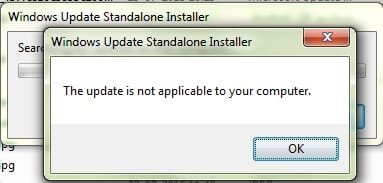
When i tried installing manually (windows6.1-kb3035583-x86), it showed
"the update is not applicable to your computer" (screen-shot attached)

Please suggest why its not for this computer and can I still update it.

Thanks
 

Attachments

  • Untitled.jpg
    Untitled.jpg
    12.2 KB · Views: 27

My Computer My Computer

At a glance

Windows 7 Ultimate 32bitintel core 2 duo e75002 GB
Computer type
PC/Desktop
Computer Manufacturer/Model Number
custom build
OS
Windows 7 Ultimate 32bit
CPU
intel core 2 duo e7500
Memory
2 GB
Hard Drives
300 GB
Antivirus
AVG Free
Browser
Chrome, internet explorer
Please post an MGADiag report.
we need to see a full copy of the report produced by the MGADiag tool (download and save to desktop - http://go.microsoft.com/fwlink/?linkid=52012 )
Once saved, run the tool.
Click on the Continue button, which will produce the report.
To copy the report to your response, click on the Copy button in the tool (ignore any error messages at this point), and then paste (using either r-click/Paste, or Ctrl+V ) into your response.x
 

My Computer My Computer

At a glance

Win 7 x64 Home Premium (and x86 VirtualBox VM...i3 370M/i7 6500U8GB - finally :)/8GBit's an i3, dude!/dual Intel&nVidia
Computer type
Laptop
Computer Manufacturer/Model Number
Asus K52F or Lenovo B51-80
OS
Win 7 x64 Home Premium (and x86 VirtualBox VM)/Win10
CPU
i3 370M/i7 6500U
Motherboard
Asus/Lenovo
Memory
8GB - finally :)/8GB
Graphics Card(s)
it's an i3, dude!/dual Intel&nVidia
Sound Card
onboard
Monitor(s) Displays
15.6" built-in
Screen Resolution
1366x768/1920x1080
Hard Drives
750GB Seagate internal
Sundry external drives attached to other computers on the local network
1TB SSD on the Lenovo
PSU
n/a
Internet Speed
as much as I can get - usually on a dongle/phone, so <1MB/s
Antivirus
MSE/Defender
Browser
IE11/12/Edge/Chrome/FF(if I must)
first of all, Thanks a lot for the quick reply :)
Report as you satated:
Code:
Diagnostic Report (1.9.0027.0):
-----------------------------------------
Windows Validation Data-->

Validation Code: 0
Cached Online Validation Code: 0x0
Windows Product Key: *****-*****-JG9TV-YK2B2-QCHV3
Windows Product Key Hash: mxK2NrdKon8JJ5y/bT3dUY30IuQ=
Windows Product ID: 00426-069-3226285-86236
Windows Product ID Type: 5
Windows License Type: Retail
Windows OS version: 6.1.7601.2.00010100.1.0.001
ID: {8C3E02DC-B579-46D4-B0FA-D2444F12451D}(1)
Is Admin: Yes
TestCab: 0x0
LegitcheckControl ActiveX: N/A, hr = 0x80070002
Signed By: N/A, hr = 0x80070002
Product Name: Windows 7 Ultimate
Architecture: 0x00000000
Build lab: 7601.win7sp1_gdr.150525-0603
TTS Error: 
Validation Diagnostic: 
Resolution Status: N/A

Vista WgaER Data-->
ThreatID(s): N/A, hr = 0x80070002
Version: N/A, hr = 0x80070002

Windows XP Notifications Data-->
Cached Result: N/A, hr = 0x80070002
File Exists: No
Version: N/A, hr = 0x80070002
WgaTray.exe Signed By: N/A, hr = 0x80070002
WgaLogon.dll Signed By: N/A, hr = 0x80070002

OGA Notifications Data-->
Cached Result: N/A, hr = 0x80070002
Version: N/A, hr = 0x80070002
OGAExec.exe Signed By: N/A, hr = 0x80070002
OGAAddin.dll Signed By: N/A, hr = 0x80070002

OGA Data-->
Office Status: 109 N/A
OGA Version: N/A, 0x80070002
Signed By: N/A, hr = 0x80070002
Office Diagnostics: B4D0AA8B-604-645_025D1FF3-364-80041010_025D1FF3-229-80041010_025D1FF3-230-1_025D1FF3-517-80040154_025D1FF3-237-80040154_025D1FF3-238-2_025D1FF3-244-80070002_025D1FF3-258-3

Browser Data-->
Proxy settings: 10.31.31.10:3128
User Agent: Mozilla/4.0 (compatible; MSIE 8.0; Win32)
Default Browser: C:\Program Files\Google\Chrome\Application\chrome.exe
Download signed ActiveX controls: Prompt
Download unsigned ActiveX controls: Disabled
Run ActiveX controls and plug-ins: Allowed
Initialize and script ActiveX controls not marked as safe: Disabled
Allow scripting of Internet Explorer Webbrowser control: Disabled
Active scripting: Allowed
Script ActiveX controls marked as safe for scripting: Allowed

File Scan Data-->

Other data-->
Office Details: <GenuineResults><MachineData><UGUID>{8C3E02DC-B579-46D4-B0FA-D2444F12451D}</UGUID><Version>1.9.0027.0</Version><OS>6.1.7601.2.00010100.1.0.001</OS><Architecture>x32</Architecture><PKey>*****-*****-*****-*****-QCHV3</PKey><PID>00426-069-3226285-86236</PID><PIDType>5</PIDType><SID>S-1-5-21-1587494317-851535651-3400532830</SID><SYSTEM><Manufacturer>KBS</Manufacturer><Model>Impression</Model></SYSTEM><BIOS><Manufacturer>Intel Corp.</Manufacturer><Version>RQG4110H.86A.0015.2010.0614.1352</Version><SMBIOSVersion major="2" minor="4"/><Date>20100614000000.000000+000</Date></BIOS><HWID>93983407018400F8</HWID><UserLCID>4009</UserLCID><SystemLCID>0409</SystemLCID><TimeZone>India Standard Time(GMT+05:30)</TimeZone><iJoin>0</iJoin><SBID><stat>3</stat><msppid></msppid><name></name><model></model></SBID><OEM/><GANotification/></MachineData><Software><Office><Result>109</Result><Products/><Applications/></Office></Software></GenuineResults>  

Spsys.log Content: 0x80070002

Licensing Data-->
Software licensing service version: 6.1.7601.17514

Name: Windows(R) 7, Ultimate edition
Description: Windows Operating System - Windows(R) 7, RETAIL channel
Activation ID: a0cde89c-3304-4157-b61c-c8ad785d1fad
Application ID: 55c92734-d682-4d71-983e-d6ec3f16059f
Extended PID: 00426-00172-069-322628-00-16393-7600.0000-2292012
Installation ID: 001023370394485336213930217256424913941730296261049725
Processor Certificate URL: [url=http://go.microsoft.com/fwlink/?LinkID=88338]SpcService Web Service[/url]
Machine Certificate URL: [url=http://go.microsoft.com/fwlink/?LinkID=88339]RacService Web Service[/url]
Use License URL: [url=http://go.microsoft.com/fwlink/?LinkID=88341]UseLicenseService Web Service[/url]
Product Key Certificate URL: [url=http://go.microsoft.com/fwlink/?LinkID=88340]PkcService Web Service[/url]
Partial Product Key: QCHV3
License Status: Licensed
Remaining Windows rearm count: 4
Trusted time: 04-08-2015 10:36:26

Windows Activation Technologies-->
HrOffline: 0x00000000
HrOnline: 0x00000000
HealthStatus: 0x0000000000000000
Event Time Stamp: 12:11:2014 09:47
ActiveX: Registered, Version: 7.1.7600.16395
Admin Service: Registered, Version: 7.1.7600.16395
HealthStatus Bitmask Output:


HWID Data-->
HWID Hash Current: MAAAAAEABAABAAEAAAABAAAAAQABAAEAJJRQPeBpqnZuspi7SOTYjbAvbE9UgkbK

OEM Activation 1.0 Data-->
N/A

OEM Activation 2.0 Data-->
BIOS valid for OA 2.0: yes, but no SLIC table
Windows marker version: N/A
OEMID and OEMTableID Consistent: N/A
BIOS Information: 
  ACPI Table Name	OEMID Value	OEMTableID Value
  APIC			INTEL 		DG41RQ  
  FACP			INTEL		DG41RQ
  HPET			INTEL 		DG41RQ  
  MCFG			INTEL 		DG41RQ
 

My Computer My Computer

At a glance

Windows 7 Ultimate 32bitintel core 2 duo e75002 GB
Computer type
PC/Desktop
Computer Manufacturer/Model Number
custom build
OS
Windows 7 Ultimate 32bit
CPU
intel core 2 duo e7500
Memory
2 GB
Hard Drives
300 GB
Antivirus
AVG Free
Browser
Chrome, internet explorer
Unable to get Windows 10 icon

Here is the diagnostic info:

Code:
Diagnostic Report (1.9.0027.0):
-----------------------------------------
Windows Validation Data-->
 
Validation Code: 0x8004FE21
Cached Online Validation Code: 0x0
Windows Product Key: *****-*****-WJ2H8-R6B6D-7QJB7
Windows Product Key Hash: ckKNc+BBPDWmo1LUlOkraNjlQ34=
Windows Product ID: 00359-OEM-8992687-00006
Windows Product ID Type: 2
Windows License Type: OEM SLP
Windows OS version: 6.1.7601.2.00010300.1.0.003
ID: {AE2A036F-352F-43C2-942D-1CDBB05AA5B6}(1)
Is Admin: Yes
TestCab: 0x0
LegitcheckControl ActiveX: N/A, hr = 0x80070002
Signed By: N/A, hr = 0x80070002
Product Name: Windows 7 Home Premium
Architecture: 0x00000009
Build lab: 7601.win7sp1_gdr.130828-1532
TTS Error: 
Validation Diagnostic: 
Resolution Status: N/A
 
Vista WgaER Data-->
ThreatID(s): N/A, hr = 0x80070002
Version: N/A, hr = 0x80070002
 
Windows XP Notifications Data-->
Cached Result: N/A, hr = 0x80070002
File Exists: No
Version: N/A, hr = 0x80070002
WgaTray.exe Signed By: N/A, hr = 0x80070002
WgaLogon.dll Signed By: N/A, hr = 0x80070002
 
OGA Notifications Data-->
Cached Result: N/A, hr = 0x80070002
Version: N/A, hr = 0x80070002
OGAExec.exe Signed By: N/A, hr = 0x80070002
OGAAddin.dll Signed By: N/A, hr = 0x80070002
 
OGA Data-->
Office Status: 109 N/A
OGA Version: N/A, 0x80070002
Signed By: N/A, hr = 0x80070002
Office Diagnostics: 77F760FE-153-80070002_7E90FEE8-175-80070002_B4D0AA8B-604-645_025D1FF3-364-80041010_025D1FF3-229-80041010_025D1FF3-230-1_025D1FF3-517-80040154_025D1FF3-237-80040154_025D1FF3-238-2_025D1FF3-244-80070002_025D1FF3-258-3
 
Browser Data-->
Proxy settings: N/A
User Agent: Mozilla/4.0 (compatible; MSIE 8.0; Win32)
Default Browser: C:\Program Files (x86)\Google\Chrome\Application\chrome.exe
Download signed ActiveX controls: Prompt
Download unsigned ActiveX controls: Disabled
Run ActiveX controls and plug-ins: Allowed
Initialize and script ActiveX controls not marked as safe: Disabled
Allow scripting of Internet Explorer Webbrowser control: Disabled
Active scripting: Allowed
Script ActiveX controls marked as safe for scripting: Allowed
 
File Scan Data-->
File Mismatch: C:\Windows\system32\wat\watadminsvc.exe[7.1.7600.16395], Hr = 0x80092003
File Mismatch: C:\Windows\system32\wat\watux.exe[7.1.7600.16395], Hr = 0x80092003
File Mismatch: C:\Windows\system32\sppobjs.dll[6.1.7601.17514], Hr = 0x80092003
File Mismatch: C:\Windows\system32\sppc.dll[6.1.7601.17514], Hr = 0x800b0100
File Mismatch: C:\Windows\system32\sppcext.dll[6.1.7600.16385], Hr = 0x800b0100
File Mismatch: C:\Windows\system32\sppwinob.dll[6.1.7601.17514], Hr = 0x80092003
File Mismatch: C:\Windows\system32\slc.dll[6.1.7600.16385], Hr = 0x800b0100
File Mismatch: C:\Windows\system32\slcext.dll[6.1.7600.16385], Hr = 0x800b0100
File Mismatch: C:\Windows\system32\sppuinotify.dll[6.1.7600.16385], Hr = 0x80092003
File Mismatch: C:\Windows\system32\slui.exe[6.1.7601.17514], Hr = 0x80092003
File Mismatch: C:\Windows\system32\sppcomapi.dll[6.1.7601.17514], Hr = 0x800b0100
File Mismatch: C:\Windows\system32\sppcommdlg.dll[6.1.7600.16385], Hr = 0x800b0100
File Mismatch: C:\Windows\system32\sppsvc.exe[6.1.7601.17514], Hr = 0x80092003
File Mismatch: C:\Windows\system32\drivers\spsys.sys[6.1.7127.0], Hr = 0x80092003
File Mismatch: C:\Windows\system32\drivers\spldr.sys[6.1.7127.0], Hr = 0x80092003
File Mismatch: C:\Windows\system32\systemcpl.dll[6.1.7601.17514], Hr = 0x800b0100
File Mismatch: C:\Windows\system32\user32.dll[6.1.7601.17514], Hr = 0x800b0100
 
Other data-->
Office Details: <GenuineResults><MachineData><UGUID>{AE2A036F-352F-43C2-942D-1CDBB05AA5B6}</UGUID><Version>1.9.0027.0</Version><OS>6.1.7601.2.00010300.1.0.003</OS><Architecture>x64</Architecture><PKey>*****-*****-*****-*****-7QJB7</PKey><PID>00359-OEM-8992687-00006</PID><PIDType>2</PIDType><SID>S-1-5-21-3820554891-2324838796-1743488508</SID><SYSTEM><Manufacturer>Gateway        </Manufacturer><Model>NV59                           </Model></SYSTEM><BIOS><Manufacturer>Phoenix Technologies LTD</Manufacturer><Version>V1.09          </Version><SMBIOSVersion major="2" minor="6"/><Date>20091126000000.000000+000</Date></BIOS><HWID>B3D93A07018400FC</HWID><UserLCID>0409</UserLCID><SystemLCID>0409</SystemLCID><TimeZone>Pacific Standard Time(GMT-08:00)</TimeZone><iJoin>0</iJoin><SBID><stat>3</stat><msppid></msppid><name></name><model></model></SBID><OEM><OEMID>ACRSYS</OEMID><OEMTableID>ACRPRDCT</OEMTableID></OEM><GANotification/></MachineData><Software><Office><Result>109</Result><Products/><Applications/></Office></Software></GenuineResults>  
 
Spsys.log Content: 0x80070002
 
Licensing Data-->
Software licensing service version: 6.1.7601.17514
 
Name: Windows(R) 7, HomePremium edition
Description: Windows Operating System - Windows(R) 7, OEM_SLP channel
Activation ID: d2c04e90-c3dd-4260-b0f3-f845f5d27d64
Application ID: 55c92734-d682-4d71-983e-d6ec3f16059f
Extended PID: 00359-00178-926-800006-02-1033-7600.0000-3092009
Installation ID: 011313551061960321829310041976617045990466867470881271
Processor Certificate URL: [URL="http://go.microsoft.com/fwlink/?LinkID=88338"]SpcService Web Service[/URL]
Machine Certificate URL: [URL="http://go.microsoft.com/fwlink/?LinkID=88339"]RacService Web Service[/URL]
Use License URL: [URL="http://go.microsoft.com/fwlink/?LinkID=88341"]UseLicenseService Web Service[/URL]
Product Key Certificate URL: [URL="http://go.microsoft.com/fwlink/?LinkID=88340"]PkcService Web Service[/URL]
Partial Product Key: 7QJB7
License Status: Licensed
Remaining Windows rearm count: 2
Trusted time: 8/4/2015 4:13:45 PM
 
Windows Activation Technologies-->
HrOffline: 0x8004FE21
HrOnline: N/A
HealthStatus: 0x000000000001EFF0
Event Time Stamp: 8:2:2015 05:27
ActiveX: Registered, Version: 7.1.7600.16395
Admin Service: Registered, Version: 7.1.7600.16395
HealthStatus Bitmask Output:
Tampered File: %systemroot%\system32\sppobjs.dll
Tampered File: %systemroot%\system32\sppc.dll|sppc.dll.mui
Tampered File: %systemroot%\system32\sppcext.dll|sppcext.dll.mui
Tampered File: %systemroot%\system32\sppwinob.dll
Tampered File: %systemroot%\system32\slc.dll|slc.dll.mui
Tampered File: %systemroot%\system32\slcext.dll|slcext.dll.mui
Tampered File: %systemroot%\system32\sppuinotify.dll|sppuinotify.dll.mui
Tampered File: %systemroot%\system32\slui.exe|slui.exe.mui|COM Registration
Tampered File: %systemroot%\system32\sppcomapi.dll|sppcomapi.dll.mui
Tampered File: %systemroot%\system32\sppcommdlg.dll|sppcommdlg.dll.mui
Tampered File: %systemroot%\system32\sppsvc.exe|sppsvc.exe.mui
Tampered File: %systemroot%\system32\drivers\spsys.sys
 
 
HWID Data-->
HWID Hash Current: MAAAAAEAAQABAAEAAAACAAAAAwABAAEA6GHEYNIY3hFyRJi87L8E1lQioFBKtlxd
 
OEM Activation 1.0 Data-->
N/A
 
OEM Activation 2.0 Data-->
BIOS valid for OA 2.0: yes
Windows marker version: 0x20001
OEMID and OEMTableID Consistent: yes
BIOS Information: 
  ACPI Table Name    OEMID Value    OEMTableID Value
  APIC            PTLTD              APIC  
  FACP            INTEL         CALPELLA
  HPET            INTEL         CALPELLA
  BOOT            PTLTD         $SBFTBL$
  MCFG            INTEL         CALPELLA
  SLIC            ACRSYS        ACRPRDCT
  SSDT            PmRef        CpuPm

I also see that the Background Intelligence Service shows Started, not Running
The same is also true for the Windows Update service.
I have stopped/started and Restarted them and they still come up the same.

Under Windows Update in the Control Panel, for Most Recent Check for Updates and Updates were Installed it shows Never.

Any Ideas?
 
Last edited by a moderator:

My Computer My Computer

At a glance

Windows 7 Home Premium 64 bit
Computer type
Laptop
Computer Manufacturer/Model Number
Gateway
OS
Windows 7 Home Premium 64 bit
Hard Drives
500 GB
Antivirus
Norton 360
Browser
Chrome, Firefox
first of all, Thanks a lot for the quick reply :)
Report as you satated:
Code:
Diagnostic Report (1.9.0027.0):
-----------------------------------------
Windows Validation Data-->

Validation Code: 0
Cached Online Validation Code: 0x0
Windows Product Key: *****-*****-JG9TV-YK2B2-QCHV3
Windows Product Key Hash: mxK2NrdKon8JJ5y/bT3dUY30IuQ=
Windows Product ID: 00426-069-3226285-86236

The install is counterfeit - and doesn't qualify for the Upgrade anyhow.

The Key in use is an MSDN Key from a not-for-resale MSDN account.
Unless you are an MSDN subscriber, you are not entitled to use the Key – and whoever sold it to you was not entitled to do so.
You need to claim an immediate refund from the vendor - do NOT accept the offer of a new key (all they are trying to do is to get past the 45-day claims window or avoid you sending the evidence of their crimes to the authorities)

Please read the following posts.... .................................

Blocked Product Keys

and

Advice on Safe Software Shopping (revised 4/10/2011)

The pirates have got VERY good at this over the past few years, as the price of equipment for manufacturing the packages drops, and as factories open in less well-policed countries.

see also this post....

The New York Times - Chasing Pirates: Inside Microsoft’s War Room


Also - have a look at this video....


Bogus Windows 7 warning - YouTube

You may be able to get a complimentary copy of the OS from Microsoft - fill in the Counterfeit report here...
How to Tell - Home
 

My Computer My Computer

At a glance

Win 7 x64 Home Premium (and x86 VirtualBox VM...i3 370M/i7 6500U8GB - finally :)/8GBit's an i3, dude!/dual Intel&nVidia
Computer type
Laptop
Computer Manufacturer/Model Number
Asus K52F or Lenovo B51-80
OS
Win 7 x64 Home Premium (and x86 VirtualBox VM)/Win10
CPU
i3 370M/i7 6500U
Motherboard
Asus/Lenovo
Memory
8GB - finally :)/8GB
Graphics Card(s)
it's an i3, dude!/dual Intel&nVidia
Sound Card
onboard
Monitor(s) Displays
15.6" built-in
Screen Resolution
1366x768/1920x1080
Hard Drives
750GB Seagate internal
Sundry external drives attached to other computers on the local network
1TB SSD on the Lenovo
PSU
n/a
Internet Speed
as much as I can get - usually on a dongle/phone, so <1MB/s
Antivirus
MSE/Defender
Browser
IE11/12/Edge/Chrome/FF(if I must)
Here is the diagnostic info:

Code:
Diagnostic Report (1.9.0027.0):
-----------------------------------------
Windows Validation Data-->
 
Validation Code: 0x8004FE21
Cached Online Validation Code: 0x0
Windows Product Key: *****-*****-WJ2H8-R6B6D-7QJB7
Windows Product Key Hash: ckKNc+BBPDWmo1LUlOkraNjlQ34=
Windows Product ID: 00359-OEM-8992687-00006
Windows Product ID Type: 2
Windows License Type: OEM SLP
Windows OS version: 6.1.7601.2.00010300.1.0.003
ID: {AE2A036F-352F-43C2-942D-1CDBB05AA5B6}(1)
Is Admin: Yes
TestCab: 0x0
LegitcheckControl ActiveX: N/A, hr = 0x80070002
Signed By: N/A, hr = 0x80070002
Product Name: Windows 7 Home Premium
Architecture: 0x00000009
Build lab: 7601.win7sp1_gdr.130828-1532
TTS Error: 
Validation Diagnostic: 
Resolution Status: N/A
 
Vista WgaER Data-->
ThreatID(s): N/A, hr = 0x80070002
Version: N/A, hr = 0x80070002
 
Windows XP Notifications Data-->
Cached Result: N/A, hr = 0x80070002
File Exists: No
Version: N/A, hr = 0x80070002
WgaTray.exe Signed By: N/A, hr = 0x80070002
WgaLogon.dll Signed By: N/A, hr = 0x80070002
 
OGA Notifications Data-->
Cached Result: N/A, hr = 0x80070002
Version: N/A, hr = 0x80070002
OGAExec.exe Signed By: N/A, hr = 0x80070002
OGAAddin.dll Signed By: N/A, hr = 0x80070002
 
OGA Data-->
Office Status: 109 N/A
OGA Version: N/A, 0x80070002
Signed By: N/A, hr = 0x80070002
Office Diagnostics: 77F760FE-153-80070002_7E90FEE8-175-80070002_B4D0AA8B-604-645_025D1FF3-364-80041010_025D1FF3-229-80041010_025D1FF3-230-1_025D1FF3-517-80040154_025D1FF3-237-80040154_025D1FF3-238-2_025D1FF3-244-80070002_025D1FF3-258-3
 
Browser Data-->
Proxy settings: N/A
User Agent: Mozilla/4.0 (compatible; MSIE 8.0; Win32)
Default Browser: C:\Program Files (x86)\Google\Chrome\Application\chrome.exe
Download signed ActiveX controls: Prompt
Download unsigned ActiveX controls: Disabled
Run ActiveX controls and plug-ins: Allowed
Initialize and script ActiveX controls not marked as safe: Disabled
Allow scripting of Internet Explorer Webbrowser control: Disabled
Active scripting: Allowed
Script ActiveX controls marked as safe for scripting: Allowed
 
File Scan Data-->
File Mismatch: C:\Windows\system32\wat\watadminsvc.exe[7.1.7600.16395], Hr = 0x80092003
File Mismatch: C:\Windows\system32\wat\watux.exe[7.1.7600.16395], Hr = 0x80092003
File Mismatch: C:\Windows\system32\sppobjs.dll[6.1.7601.17514], Hr = 0x80092003
File Mismatch: C:\Windows\system32\sppc.dll[6.1.7601.17514], Hr = 0x800b0100
File Mismatch: C:\Windows\system32\sppcext.dll[6.1.7600.16385], Hr = 0x800b0100
File Mismatch: C:\Windows\system32\sppwinob.dll[6.1.7601.17514], Hr = 0x80092003
File Mismatch: C:\Windows\system32\slc.dll[6.1.7600.16385], Hr = 0x800b0100
File Mismatch: C:\Windows\system32\slcext.dll[6.1.7600.16385], Hr = 0x800b0100
File Mismatch: C:\Windows\system32\sppuinotify.dll[6.1.7600.16385], Hr = 0x80092003
File Mismatch: C:\Windows\system32\slui.exe[6.1.7601.17514], Hr = 0x80092003
File Mismatch: C:\Windows\system32\sppcomapi.dll[6.1.7601.17514], Hr = 0x800b0100
File Mismatch: C:\Windows\system32\sppcommdlg.dll[6.1.7600.16385], Hr = 0x800b0100
File Mismatch: C:\Windows\system32\sppsvc.exe[6.1.7601.17514], Hr = 0x80092003
File Mismatch: C:\Windows\system32\drivers\spsys.sys[6.1.7127.0], Hr = 0x80092003
File Mismatch: C:\Windows\system32\drivers\spldr.sys[6.1.7127.0], Hr = 0x80092003
File Mismatch: C:\Windows\system32\systemcpl.dll[6.1.7601.17514], Hr = 0x800b0100
File Mismatch: C:\Windows\system32\user32.dll[6.1.7601.17514], Hr = 0x800b0100
 
Other data-->
Office Details: <GenuineResults><MachineData><UGUID>{AE2A036F-352F-43C2-942D-1CDBB05AA5B6}</UGUID><Version>1.9.0027.0</Version><OS>6.1.7601.2.00010300.1.0.003</OS><Architecture>x64</Architecture><PKey>*****-*****-*****-*****-7QJB7</PKey><PID>00359-OEM-8992687-00006</PID><PIDType>2</PIDType><SID>S-1-5-21-3820554891-2324838796-1743488508</SID><SYSTEM><Manufacturer>Gateway        </Manufacturer><Model>NV59                           </Model></SYSTEM><BIOS><Manufacturer>Phoenix Technologies LTD</Manufacturer><Version>V1.09          </Version><SMBIOSVersion major="2" minor="6"/><Date>20091126000000.000000+000</Date></BIOS><HWID>B3D93A07018400FC</HWID><UserLCID>0409</UserLCID><SystemLCID>0409</SystemLCID><TimeZone>Pacific Standard Time(GMT-08:00)</TimeZone><iJoin>0</iJoin><SBID><stat>3</stat><msppid></msppid><name></name><model></model></SBID><OEM><OEMID>ACRSYS</OEMID><OEMTableID>ACRPRDCT</OEMTableID></OEM><GANotification/></MachineData><Software><Office><Result>109</Result><Products/><Applications/></Office></Software></GenuineResults>  
 
Spsys.log Content: 0x80070002
 
Licensing Data-->
Software licensing service version: 6.1.7601.17514
 
Name: Windows(R) 7, HomePremium edition
Description: Windows Operating System - Windows(R) 7, OEM_SLP channel
Activation ID: d2c04e90-c3dd-4260-b0f3-f845f5d27d64
Application ID: 55c92734-d682-4d71-983e-d6ec3f16059f
Extended PID: 00359-00178-926-800006-02-1033-7600.0000-3092009
Installation ID: 011313551061960321829310041976617045990466867470881271
Processor Certificate URL: [URL="http://go.microsoft.com/fwlink/?LinkID=88338"]SpcService Web Service[/URL]
Machine Certificate URL: [URL="http://go.microsoft.com/fwlink/?LinkID=88339"]RacService Web Service[/URL]
Use License URL: [URL="http://go.microsoft.com/fwlink/?LinkID=88341"]UseLicenseService Web Service[/URL]
Product Key Certificate URL: [URL="http://go.microsoft.com/fwlink/?LinkID=88340"]PkcService Web Service[/URL]
Partial Product Key: 7QJB7
License Status: Licensed
Remaining Windows rearm count: 2
Trusted time: 8/4/2015 4:13:45 PM
 
Windows Activation Technologies-->
HrOffline: 0x8004FE21
HrOnline: N/A
HealthStatus: 0x000000000001EFF0
Event Time Stamp: 8:2:2015 05:27
ActiveX: Registered, Version: 7.1.7600.16395
Admin Service: Registered, Version: 7.1.7600.16395
HealthStatus Bitmask Output:
Tampered File: %systemroot%\system32\sppobjs.dll
Tampered File: %systemroot%\system32\sppc.dll|sppc.dll.mui
Tampered File: %systemroot%\system32\sppcext.dll|sppcext.dll.mui
Tampered File: %systemroot%\system32\sppwinob.dll
Tampered File: %systemroot%\system32\slc.dll|slc.dll.mui
Tampered File: %systemroot%\system32\slcext.dll|slcext.dll.mui
Tampered File: %systemroot%\system32\sppuinotify.dll|sppuinotify.dll.mui
Tampered File: %systemroot%\system32\slui.exe|slui.exe.mui|COM Registration
Tampered File: %systemroot%\system32\sppcomapi.dll|sppcomapi.dll.mui
Tampered File: %systemroot%\system32\sppcommdlg.dll|sppcommdlg.dll.mui
Tampered File: %systemroot%\system32\sppsvc.exe|sppsvc.exe.mui
Tampered File: %systemroot%\system32\drivers\spsys.sys
 
 
HWID Data-->
HWID Hash Current: MAAAAAEAAQABAAEAAAACAAAAAwABAAEA6GHEYNIY3hFyRJi87L8E1lQioFBKtlxd
 
OEM Activation 1.0 Data-->
N/A
 
OEM Activation 2.0 Data-->
BIOS valid for OA 2.0: yes
Windows marker version: 0x20001
OEMID and OEMTableID Consistent: yes
BIOS Information: 
  ACPI Table Name    OEMID Value    OEMTableID Value
  APIC            PTLTD              APIC  
  FACP            INTEL         CALPELLA
  HPET            INTEL         CALPELLA
  BOOT            PTLTD         $SBFTBL$
  MCFG            INTEL         CALPELLA
  SLIC            ACRSYS        ACRPRDCT
  SSDT            PmRef        CpuPm

I also see that the Background Intelligence Service shows Started, not Running
The same is also true for the Windows Update service.
I have stopped/started and Restarted them and they still come up the same.

Under Windows Update in the Control Panel, for Most Recent Check for Updates and Updates were Installed it shows Never.

Any Ideas?
This may simply be caused by a bad set of Intel Rapid Storage Technology drivers -

Installing the Intel Rapid Storage Drivers
try downloading and installing them from here - https://downloadcenter.intel.com/Detail_Desc.aspx?agr=Y&ProdId=2101&DwnldID=22194

(you want the iata_enu.exe download)

Once complete, please reboot twice, then post another MGADiag report.
 
Last edited by a moderator:

My Computer My Computer

At a glance

Win 7 x64 Home Premium (and x86 VirtualBox VM...i3 370M/i7 6500U8GB - finally :)/8GBit's an i3, dude!/dual Intel&nVidia
Computer type
Laptop
Computer Manufacturer/Model Number
Asus K52F or Lenovo B51-80
OS
Win 7 x64 Home Premium (and x86 VirtualBox VM)/Win10
CPU
i3 370M/i7 6500U
Motherboard
Asus/Lenovo
Memory
8GB - finally :)/8GB
Graphics Card(s)
it's an i3, dude!/dual Intel&nVidia
Sound Card
onboard
Monitor(s) Displays
15.6" built-in
Screen Resolution
1366x768/1920x1080
Hard Drives
750GB Seagate internal
Sundry external drives attached to other computers on the local network
1TB SSD on the Lenovo
PSU
n/a
Internet Speed
as much as I can get - usually on a dongle/phone, so <1MB/s
Antivirus
MSE/Defender
Browser
IE11/12/Edge/Chrome/FF(if I must)

My Computer My Computer

At a glance

64-bit Windows 11 Pro for WorkstationsIntel i7-8700K OC'd to 5 GHz64 GB (4x16GB) G.SKILL TridentZ RGB DDR4 3600...ASUS ROG-STRIX-GTX1080TI-O11G-GAMING
Computer type
PC/Desktop
Computer Manufacturer/Model Number
Self built custom
OS
64-bit Windows 11 Pro for Workstations
CPU
Intel i7-8700K OC'd to 5 GHz
Motherboard
ASUS ROG Maximus XI Formula Z390
Memory
64 GB (4x16GB) G.SKILL TridentZ RGB DDR4 3600 MHz
Graphics Card(s)
ASUS ROG-STRIX-GTX1080TI-O11G-GAMING
Sound Card
Integrated
Monitor(s) Displays
2 x Samsung Odyssey G7 27"
Screen Resolution
2560x1440
Hard Drives
1TB Samsung 990 PRO M.2,
4TB Samsung 990 PRO PRO M.2,
TerraMaster F8 SSD Plus NAS
PSU
Seasonic Prime Titanium 850W
Case
Thermaltake Core P3
Cooling
Corsair Hydro H115i
Keyboard
Logitech wireless K800
Mouse
Logitech MX Master 4
Internet Speed
2 Gb/s Download and 100 Mb/s Upload
Antivirus
Malwarebyte Anti-Malware Premium
Browser
Google Chrome
Other Info
Logitech Z625 speaker system,
Logitech BRIO 4K Pro webcam,
HP Color LaserJet Pro MFP M477fdn,
APC SMART-UPS RT 1000 XL - SURT1000XLI,
Galaxy S23 Plus phone
Back when that round of updates came out to implement the Windows 10 update scheme, I dutifully removed them and hid them. Now I'm curious to see how it all works, so I went to unhide and update again. All of the updates that I'd hidden were there, except 3035583 - it seems to have vanished!

I went to the MS site, but it seems the only way they make it available is through WU. Does anyone know of a standalone file I can download? Might it still be on my system somewhere? Or is there some way I can cajole WU to find it again?

TIA...

I grabbed a direct d/l link (x64) from Windows Update log:

http://download.windowsupdate.com/d..._d6308e28c41fcbd15695343d83709ed1c4bf5812.msu

HTH :)

I tried your link and it says I already have 3035583 downloaded. But when I look at my Windows Update list, this has been failing since early July. I get the error code 80070570. I even tried resetting Windows Update components and ran the little Fix It dude but it came back saying it didn't fix the Windows Update error. I am confused. I am running W7 Home Premium x64. I don't have the "Get Windows 10" app and I have my Updates set to automatic. This Update won't download but yet your link says I already have it :shock:

Please help, thanks!
 

My Computer My Computer

At a glance

Windows 7 Home Premium 648gbNvidia
Computer type
PC/Desktop
Computer Manufacturer/Model Number
Dell XPS 15
OS
Windows 7 Home Premium 64
Memory
8gb
Graphics Card(s)
Nvidia
Hard Drives
SSD
Antivirus
MSE, Malwarebytes
Browser
Chrome and Firefox
Thanks for the clarification

first of all, Thanks a lot for the quick reply :)
Report as you satated:
Code:
Diagnostic Report (1.9.0027.0):
-----------------------------------------
Windows Validation Data-->

Validation Code: 0
Cached Online Validation Code: 0x0
Windows Product Key: *****-*****-JG9TV-YK2B2-QCHV3
Windows Product Key Hash: mxK2NrdKon8JJ5y/bT3dUY30IuQ=
Windows Product ID: 00426-069-3226285-86236

The install is counterfeit - and doesn't qualify for the Upgrade anyhow.

The Key in use is an MSDN Key from a not-for-resale MSDN account.
Unless you are an MSDN subscriber, you are not entitled to use the Key – and whoever sold it to you was not entitled to do so.
You need to claim an immediate refund from the vendor - do NOT accept the offer of a new key (all they are trying to do is to get past the 45-day claims window or avoid you sending the evidence of their crimes to the authorities)

Please read the following posts.... .................................

Blocked Product Keys

and

Advice on Safe Software Shopping (revised 4/10/2011)

The pirates have got VERY good at this over the past few years, as the price of equipment for manufacturing the packages drops, and as factories open in less well-policed countries.

see also this post....

The New York Times - Chasing Pirates: Inside Microsoft’s War Room


Also - have a look at this video....


Bogus Windows 7 warning - YouTube

You may be able to get a complimentary copy of the OS from Microsoft - fill in the Counterfeit report here...
How to Tell - Home


Thanks a lot guys :)
 

My Computer My Computer

At a glance

Windows 7 Ultimate 32bitintel core 2 duo e75002 GB
Computer type
PC/Desktop
Computer Manufacturer/Model Number
custom build
OS
Windows 7 Ultimate 32bit
CPU
intel core 2 duo e7500
Memory
2 GB
Hard Drives
300 GB
Antivirus
AVG Free
Browser
Chrome, internet explorer
Back
Top