acer 5738Z hibernate problem

MohsenAria

New member
Local time
7:54 AM
Messages
12
hi to all,

i have an acer 5738z laptop with Windows 7 64 bit ultimate bulid 7600 and windows is updated. all drivers are installed and updated.everything is ok but when i click on the hibernate button the screen just dims and after a few seconds it returns to the windows plz help. all answers are appreciated.:)
 

My Computer My Computer

OS
Win 7 x86
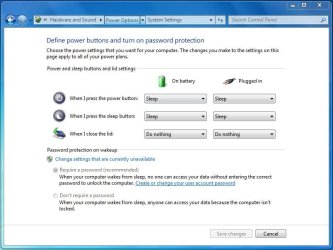
Go To : Control Panel\Hardware and Sound\Power Options

Then click choose what power buttons do.

Then change the option for "When I press the sleep button".

Capture.JPG
 

My Computer My Computer

Computer Manufacturer/Model Number
Fujitsu Siemens
OS
Windows 7 Professional
Memory
2gb
Graphics Card(s)
1gb
Sound Card
265
Monitor(s) Displays
1080p
Hard Drives
1 external 1tb
Cooling
fan

My Computer My Computer

OS
Win 7 x86
Is this an in-place Upgrade install?

Where did you get Win7?

Have you tried changing Sleep modes (S1-S3) in BIOS to see if it helps?
 
Is this an in-place Upgrade install?

Where did you get Win7?

Have you tried changing Sleep modes (S1-S3) in BIOS to see if it helps?

it's a new install.:)
my friends have got the same version at the same market and it works very well.:geek:

Have you tried changing Sleep modes (S1-S3) in BIOS to see if it helps?

can't understand u.explain more.:confused:
 

My Computer My Computer

OS
Win 7 x86
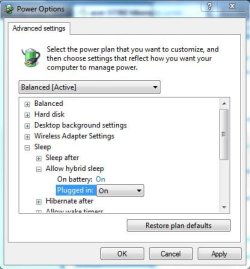
i have enabled hybrid sleep in power option. hibernate disappeared from start menu and sleep won't work anymore.
 

Attachments

  • Capture.JPG
    Capture.JPG
    34.9 KB · Views: 1

My Computer My Computer

OS
Win 7 x86
Sleep issues are hard to troubleshoot. That's why as soon as I get them fixed I set a REstore point and make a System Image to get back to them.

First thing to check is Display driver. Try every available Win7 and Vista driver starting with latest and working backward. Even install Vista drivers in Compatibiliity Mode: rightclick on .exe file>Properties

Check for any driver that has Power Mnagement tab on Driver in Device Manager. Disable ability to wake from sleep.

Others will have further suggestions. It is a long and arduous process but almost always can be solved. Patience.

Ask all the questions you need, but remember to also google them to get all of the world's knowledge. You only have to know how to ask the question right.
 
thanks for all helps. Maybe i should wait for a miracle!:cool:
 

My Computer My Computer

OS
Win 7 x86
Back
Top