Acrobat Reader Problem

imacken

New member
Power User
VIP
Local time
11:03 PM
Messages
288
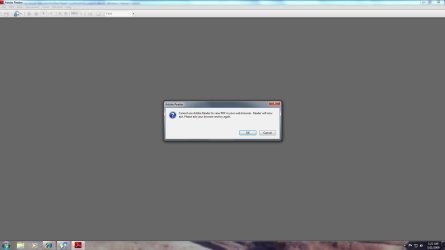
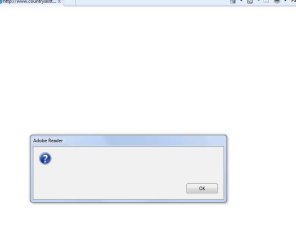
Whenever I click on a pdf link on a site, I get an error (screenshot).
If I right-click and select 'Open Link' then the files open OK.
Any ideas?
 

Attachments

  • AR error.jpg
    AR error.jpg
    20.5 KB · Views: 228

My Computer

OS
Windows 7 64-bit
CPU
Intel i7 920 @ 4GHz
Motherboard
Asus P6T Deluxe V2
Memory
6Gb
Graphics Card(s)
nVidia GTX 285
Sound Card
X-Fi Extreme Audio PCIe
Screen Resolution
1900x1200
Whenever I click on a pdf link on a site, I get an error (screenshot).
If I right-click and select 'Open Link' then the files open OK.
Any ideas?
that happened to me earlier for a while, i then clicked okay. nothing happened. then i went to Start > All Programs > Adobe Reader and it opened fine. I restarted the browser and tried again and it worked fine. Try it?
 

My Computer

Computer Manufacturer/Model Number
eMachines W3503
OS
7 Pro Build 7600.16385x64 [2.0 WEI]
CPU
Intel(R) Celeron(R) D CPU 3.33GHz
Memory
2.00 GB RAM (1.87 GB usable)
Graphics Card(s)
ATI Radeon™ X300 based integrated graphics
Sound Card
6-channel (5.1) ATI High Definition Audio
Monitor(s) Displays
eMachines® 17" LCD Flat Panel Monitor (17F3)
Screen Resolution
1024 x 768 @ 85Hz
Hard Drives
160GB HDD (7200rpm, 2MB cache)
Thanks a lot. That worked!
I wonder what that's all about?
 

My Computer

OS
Windows 7 64-bit
CPU
Intel i7 920 @ 4GHz
Motherboard
Asus P6T Deluxe V2
Memory
6Gb
Graphics Card(s)
nVidia GTX 285
Sound Card
X-Fi Extreme Audio PCIe
Screen Resolution
1900x1200
Sounds like file association problem. Use windows explorer to check the file association for .pdf.
 

My Computer

Computer Manufacturer/Model Number
self built
OS
Windows 7 Professional 64-bit
CPU
Intel E8400 3GHz
Motherboard
Intel DX48BT2
Memory
Kingston PC3-10700H 4Gb
Graphics Card(s)
XFX Radeon HD 5850 BlackEd.
Sound Card
Asus Xonar DG
Monitor(s) Displays
2x Samsung SM-T220HD 22"
Screen Resolution
1680x1050 on two monitors
Hard Drives
OCZ Vertex 2 120gb 3.5" (OS)
Seagate Momentus XT 500gb
Samsung F3 1Tb (games)
2x Samsung F1 1Tb
PSU
Thermaltake ToughPower 850w
Case
Thermaltake Armor
Cooling
Scythe Mugen II
Keyboard
Microsoft Comfort Curve USB
Mouse
Razer Diamondback 3G
Internet Speed
8128/443
Thanks, but it's not that. As I said, if I right-clicked and did 'open link' everything was OK.
Anyway, andythecurefan's solution worked, so all's well.
 

My Computer

OS
Windows 7 64-bit
CPU
Intel i7 920 @ 4GHz
Motherboard
Asus P6T Deluxe V2
Memory
6Gb
Graphics Card(s)
nVidia GTX 285
Sound Card
X-Fi Extreme Audio PCIe
Screen Resolution
1900x1200
Maybe try reinstalling reader.
 

My Computer

Computer Manufacturer/Model Number
self built
OS
Windows 7 Professional 64-bit
CPU
Intel E8400 3GHz
Motherboard
Intel DX48BT2
Memory
Kingston PC3-10700H 4Gb
Graphics Card(s)
XFX Radeon HD 5850 BlackEd.
Sound Card
Asus Xonar DG
Monitor(s) Displays
2x Samsung SM-T220HD 22"
Screen Resolution
1680x1050 on two monitors
Hard Drives
OCZ Vertex 2 120gb 3.5" (OS)
Seagate Momentus XT 500gb
Samsung F3 1Tb (games)
2x Samsung F1 1Tb
PSU
Thermaltake ToughPower 850w
Case
Thermaltake Armor
Cooling
Scythe Mugen II
Keyboard
Microsoft Comfort Curve USB
Mouse
Razer Diamondback 3G
Internet Speed
8128/443
Hello Imacken,

When I get this, I click on OK, and then sometimes will need to also refresh that webpage again for it to display the PDF file.

Hope this helps,
Shawn
 

My Computer

Computer type
PC/Desktop
Computer Manufacturer/Model Number
Self built custom
OS
64-bit Windows 11 Pro for Workstations
CPU
Intel i7-8700K OC'd to 5 GHz
Motherboard
ASUS ROG Maximus XI Formula Z390
Memory
64 GB (4x16GB) G.SKILL TridentZ RGB DDR4 3600 MHz
Graphics Card(s)
ASUS ROG-STRIX-GTX1080TI-O11G-GAMING
Sound Card
Integrated
Monitor(s) Displays
2 x Samsung Odyssey G7 27"
Screen Resolution
2560x1440
Hard Drives
1TB Samsung 990 PRO M.2,
4TB Samsung 990 PRO PRO M.2,
TerraMaster F8 SSD Plus NAS
PSU
Seasonic Prime Titanium 850W
Case
Thermaltake Core P3
Cooling
Corsair Hydro H115i
Keyboard
Logitech wireless K800
Mouse
Logitech MX Master 4
Internet Speed
2 Gb/s Download and 100 Mb/s Upload
Antivirus
Malwarebyte Anti-Malware Premium
Browser
Google Chrome
Other Info
Logitech Z625 speaker system,
Logitech BRIO 4K Pro webcam,
HP Color LaserJet Pro MFP M477fdn,
APC SMART-UPS RT 1000 XL - SURT1000XLI,
Galaxy S23 Plus phone
Yep, same for me. I can click on OK, then refresh the page, and everything is OK.
 

My Computer

OS
Windows 7 64-bit
CPU
Intel i7 920 @ 4GHz
Motherboard
Asus P6T Deluxe V2
Memory
6Gb
Graphics Card(s)
nVidia GTX 285
Sound Card
X-Fi Extreme Audio PCIe
Screen Resolution
1900x1200
Glad to hear it Imacken. Seems that there is still a minor bug with Adobe Reader and Windows 7.
 

My Computer

Computer type
PC/Desktop
Computer Manufacturer/Model Number
Self built custom
OS
64-bit Windows 11 Pro for Workstations
CPU
Intel i7-8700K OC'd to 5 GHz
Motherboard
ASUS ROG Maximus XI Formula Z390
Memory
64 GB (4x16GB) G.SKILL TridentZ RGB DDR4 3600 MHz
Graphics Card(s)
ASUS ROG-STRIX-GTX1080TI-O11G-GAMING
Sound Card
Integrated
Monitor(s) Displays
2 x Samsung Odyssey G7 27"
Screen Resolution
2560x1440
Hard Drives
1TB Samsung 990 PRO M.2,
4TB Samsung 990 PRO PRO M.2,
TerraMaster F8 SSD Plus NAS
PSU
Seasonic Prime Titanium 850W
Case
Thermaltake Core P3
Cooling
Corsair Hydro H115i
Keyboard
Logitech wireless K800
Mouse
Logitech MX Master 4
Internet Speed
2 Gb/s Download and 100 Mb/s Upload
Antivirus
Malwarebyte Anti-Malware Premium
Browser
Google Chrome
Other Info
Logitech Z625 speaker system,
Logitech BRIO 4K Pro webcam,
HP Color LaserJet Pro MFP M477fdn,
APC SMART-UPS RT 1000 XL - SURT1000XLI,
Galaxy S23 Plus phone
I had this problem until I removed acrobat reader 9.1 and installed version 8. None of the tricks (including those on this page) seemed to work. The funny thing is it worked a few times before and just quit for whatever reason. Anyway I now get the error shown.

But then everything works fine after I hit ok. I can live with that.
 

Attachments

  • acrobat error.jpg
    acrobat error.jpg
    40.9 KB · Views: 667

My Computer

OS
windows 7 (beta-7000 build)
The way I got around this with 9.1.2 is to do the following:

Open Acrobat Reader by itself (not in IE)
Select Edit, then Preferences
On the left side click "Internet"
Uncheck "Display PDF in browser"

This way when I click on a pdf link it opens Acrobat reader in a separate application outside of IE.
 

My Computer

OS
Windows 7 RC

My Computer

Computer type
PC/Desktop
Computer Manufacturer/Model Number
Me
OS
Win 7 Ultimate x64
CPU
FX-8350 @ 4.6 GHz so far
Motherboard
Asus M5A97 EVO
Memory
ADATA XPG V1 Series Black 8GB DDR3 1600
Graphics Card(s)
Sapphire R9 270x Dual-X
Sound Card
Xonar DGX w/ Corsair Vengence 1300
Monitor(s) Displays
Acer S232HL Abid
Screen Resolution
1920x1080
Hard Drives
120 GB OCZ Vertex 3
500 GB Seagate 7200.12
PSU
Antec Earthwatts 650W Green
Case
Antec Three Hundred
Cooling
Cooler Master 212 EVO
Keyboard
Logitech G510
Mouse
Logitech G500s
Internet Speed
35000/3000
The way I got around this with 9.1.2 is to do the following:

Open Acrobat Reader by itself (not in IE)
Select Edit, then Preferences
On the left side click "Internet"
Uncheck "Display PDF in browser"

This way when I click on a pdf link it opens Acrobat reader in a separate application outside of IE.

Excellent!! I was thinking of a way to do this but didn't even think of checking the preferences. Thanks for the tip, it solved the issue for me.
 

My Computer

OS
windows 7 (beta-7000 build)
I just ran into the same error message problem with Acrobat 9.1 on Win 7 64bit.
I then launched acrobat first and it worked on the link.
Then after closing all programs it stopped working.
Then I tried Firefox 3.5 and Acrobat worked in it.
Then it stopped working.

I did try the preference change and it seems to work in IE8.
It does NOT correct the problem in Firefox.

Anyone have any other ideas?
Thanks.
 

My Computer

OS
win 7
Another recommendation from me for Foxit.
Adobe's PDF reader is pure bloatware by comparison.

You can also run Foxit as a standalone .exe (3MB or so) so no install needed.
 

My Computer

Computer Manufacturer/Model Number
Homebuild
OS
Windows 7 (RC)
CPU
Intel E6600 (2.4Ghz C2D)
Motherboard
Asus P5W DH Deluxe
Memory
2 x 2GB 800Mhz
Graphics Card(s)
ATI X1800 GT
Sound Card
Onboard
Monitor(s) Displays
LG 22"
Hard Drives
2 x 250GB WD (RAID0)
1 x 400GB WD
1 x 1000GB Samsung
PSU
500W
Case
Antec Sonata
Cooling
CPU - Aero7
OK. Nevermind.

Adobe Updater just pushed me update 9.1.3 and this seemed to resolve the problem on both IE8 and Firefox. Plus, I was able to undo the change to the preferences I previously made and the pfd's now display in a web page correctly.
 

My Computer

OS
win 7
9.1.3 still has the same problem for me in ie8 and Firefox.
It almost cost me money as I had to print a voucher and the problem occurred. I tried to refresh and it didn't work. I sorted it out eventually, but I can't see why this issue has not been fixed by now.
 

My Computer

OS
Windows 7 64-bit
CPU
Intel i7 920 @ 4GHz
Motherboard
Asus P6T Deluxe V2
Memory
6Gb
Graphics Card(s)
nVidia GTX 285
Sound Card
X-Fi Extreme Audio PCIe
Screen Resolution
1900x1200
Mine is still working in both browsers. But you are right, it could stop again at any minute, just as it did before.

Given the worldwide use of pdfs, one would think that this would have been one of the first applications to get right with Win 7.
 

My Computer

OS
win 7
Foxit reader is the only way to go

Don't believe it? Go try it, I quit using Adobe a long time ago and have never regretted it. Foxit is much much faster.
 

My Computer

Computer Manufacturer/Model Number
Systemax N2000 Gaming PC
OS
Windows 7 Ultimate x64
CPU
Q6600 @2.4ghz (G0 stepping)
Motherboard
XFX nforce 680i LT
Memory
8 gb OCZ vista essential sli PC-6400
Graphics Card(s)
Dual 9800gt in SLI mode
Sound Card
Integrated 8.1 High Definition Audio
Monitor(s) Displays
Dual Sceptre x246w 24 inch monitors
Screen Resolution
1920 x 1200 each monitor
Hard Drives
500 GB SATA II / 7500 rpm
PSU
Cooler Master Real Power Pro 1250W
Case
N2000 server tower
Cooling
Thermaltake Bigwater 760 is
Keyboard
MS Intelitype 6000 v2.0
Mouse
MS Intelipoint 6000
Internet Speed
Wi-power 1.5GB up / 512k down
Other Info
Windows 7 Ultimate x64, Windows 7 Pro x64, Windows Home Premium X86, Windows XP pro, Windows Home Server x86, Ubuntu 10.4 x86 and x64, Ubuntu server 10.4, SQL Server 2005, MySQL 5.0
Back
Top