Action Center - Change Message Settings

How to Change the Action Center Message Settings in Windows 7

   Information
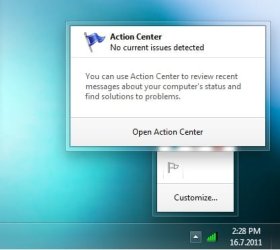
Windows 7 will check areas selected by you for problems on a regular basis. You will receive a message, from the Action Center system icon, if Windows 7 detects any problems. This will show you how to add or remove areas for the Action Center to monitor and send a message about any problems with it.

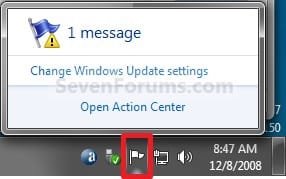
EXAMPLE: Message from Action Center Icon on the Taskbar
NOTE: You can click on the Action Center system icon anytime to see any current messages about problems. For example, I have a message below about Windows Updates not having Automatic Updates enabled. Solution_System_Icon.jpg
EXAMPLE: Action Center
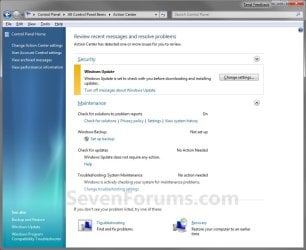
NOTE: This is what will open when you click on the message or Open Action Center link. You can then view the message about what the problem is that Windows 7 found.
Windows_Solution_Center.jpg


Here's How: 1. Open the Control Panel (Icons View).

2. Click on the Action Center icon.

3. Sometimes you may have a message about a problem (ex: Windows Update) that is already highlighted in Action Center. You can click on the link (ex: Turn off messaged about Windows Update) to apply the action if that is what you want to have applied for that item. (see screenshot below step 4)

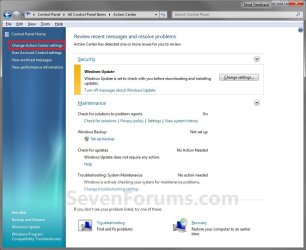
4. Click on the Change Action Center settings link at the top of the left pane corner. (see screenshot below)
NOTE: Some of the listed areas in Windows Solution Center will have a settings link that you can click on to change settings for that specific item. Windows_Solution_Center2.jpg
5. To Unselect an Area for Action Center to not Monitor A) Uncheck the item you want to not be monitored. (see screenshot below step 7)

B) Go to step 7.
6. To Select an Area for Action Center to Monitor A) Check the item you want monitored. (see screenshot below step 7)
NOTE: Repeat to select another item.
7. Click on OK. (see screenshot below) Message_Settings.jpg
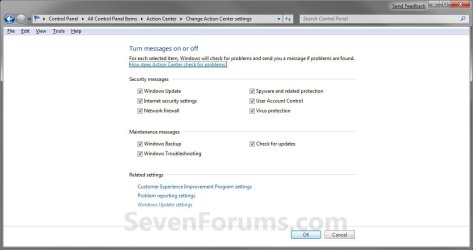
8. Close the Action Center window. (see screenshot below step 4)
That's it,
Shawn


Last edited:
Hello

This trick doesn't work for me.

I always get the red sided message "insert removable media" instead of default "set up backup" yellow sided message.

Even if I untick windows backup message, I always get this f**** message "insert removable media" with red cross on flag.
 

My Computer

Computer type
PC/Desktop
OS
Windows 8.1 Professional x64
CPU
Intel Core i7 3770T
Motherboard
Intel DQ77KB
Memory
2 x Crucial Sodimm DDR3 1600MHz / Total 16GB
Graphics Card(s)
Intel HD Graphics 4000
Sound Card
Realtek ALC892
Monitor(s) Displays
HP 23xi
Screen Resolution
Full HD (1920X1080)
Hard Drives
SSD : Intel 330 Series 240GB
HDD : WD Scorpio Blue 1TB
PSU
Fortron NB Lite 90W
Case
Streacom F7C
Cooling
Noctua NH-L9i
Keyboard
Cherry Strait
Mouse
Hama Mirano
Internet Speed
ADSL2+ @ 28Mbps
Antivirus
None
Browser
Internet Explorer 11
Other Info
Livebox
Hello Tim,

I'm sorry, but I'm not sure where or what you mean by "untick windows backup message" in reference to this tutorial. Could you please explain this more?

Thank you,
Shawn
 

My Computer

Computer type
PC/Desktop
Computer Manufacturer/Model Number
Self built custom
OS
64-bit Windows 11 Pro for Workstations
CPU
Intel i7-8700K OC'd to 5 GHz
Motherboard
ASUS ROG Maximus XI Formula Z390
Memory
64 GB (4x16GB) G.SKILL TridentZ RGB DDR4 3600 MHz
Graphics Card(s)
ASUS ROG-STRIX-GTX1080TI-O11G-GAMING
Sound Card
Integrated
Monitor(s) Displays
2 x Samsung Odyssey G7 27"
Screen Resolution
2560x1440
Hard Drives
1TB Samsung 990 PRO M.2,
4TB Samsung 990 PRO PRO M.2,
TerraMaster F8 SSD Plus NAS
PSU
Seasonic Prime Titanium 850W
Case
Thermaltake Core P3
Cooling
Corsair Hydro H115i
Keyboard
Logitech wireless K800
Mouse
Logitech MX Master 4
Internet Speed
2 Gb/s Download and 100 Mb/s Upload
Antivirus
Malwarebyte Anti-Malware Premium
Browser
Google Chrome
Other Info
Logitech Z625 speaker system,
Logitech BRIO 4K Pro webcam,
HP Color LaserJet Pro MFP M477fdn,
APC SMART-UPS RT 1000 XL - SURT1000XLI,
Galaxy S23 Plus phone
Hello Brink ;)

There are two pictures to explain my problem :


If I untick "Windows Backup" message, the action center continues to display the following important message which would normally disappear (insert removable media) :

(this capture is in french language, my own language) :


My Computer

Computer type
PC/Desktop
OS
Windows 8.1 Professional x64
CPU
Intel Core i7 3770T
Motherboard
Intel DQ77KB
Memory
2 x Crucial Sodimm DDR3 1600MHz / Total 16GB
Graphics Card(s)
Intel HD Graphics 4000
Sound Card
Realtek ALC892
Monitor(s) Displays
HP 23xi
Screen Resolution
Full HD (1920X1080)
Hard Drives
SSD : Intel 330 Series 240GB
HDD : WD Scorpio Blue 1TB
PSU
Fortron NB Lite 90W
Case
Streacom F7C
Cooling
Noctua NH-L9i
Keyboard
Cherry Strait
Mouse
Hama Mirano
Internet Speed
ADSL2+ @ 28Mbps
Antivirus
None
Browser
Internet Explorer 11
Other Info
Livebox
Ok, Tim.

I moved our posts to this tutorial instead since this is what you were referring to instead. ;)

Did you do the tutorial that you had originally posted this in to reset backup to see if it would also remove this Action Center message?
 

My Computer

Computer type
PC/Desktop
Computer Manufacturer/Model Number
Self built custom
OS
64-bit Windows 11 Pro for Workstations
CPU
Intel i7-8700K OC'd to 5 GHz
Motherboard
ASUS ROG Maximus XI Formula Z390
Memory
64 GB (4x16GB) G.SKILL TridentZ RGB DDR4 3600 MHz
Graphics Card(s)
ASUS ROG-STRIX-GTX1080TI-O11G-GAMING
Sound Card
Integrated
Monitor(s) Displays
2 x Samsung Odyssey G7 27"
Screen Resolution
2560x1440
Hard Drives
1TB Samsung 990 PRO M.2,
4TB Samsung 990 PRO PRO M.2,
TerraMaster F8 SSD Plus NAS
PSU
Seasonic Prime Titanium 850W
Case
Thermaltake Core P3
Cooling
Corsair Hydro H115i
Keyboard
Logitech wireless K800
Mouse
Logitech MX Master 4
Internet Speed
2 Gb/s Download and 100 Mb/s Upload
Antivirus
Malwarebyte Anti-Malware Premium
Browser
Google Chrome
Other Info
Logitech Z625 speaker system,
Logitech BRIO 4K Pro webcam,
HP Color LaserJet Pro MFP M477fdn,
APC SMART-UPS RT 1000 XL - SURT1000XLI,
Galaxy S23 Plus phone
Did you do the tutorial that you had originally posted this in to reset backup to see if it would also remove this Action Center message?

Yes.

I removed additionnal entries into task scheduler too (windowsbackup section of TS).

But no effect, even with a reboot. There is always the same message.

Need to delete another entry in registry ? Or a configuration file in c:\windows\**** ?
 

My Computer

Computer type
PC/Desktop
OS
Windows 8.1 Professional x64
CPU
Intel Core i7 3770T
Motherboard
Intel DQ77KB
Memory
2 x Crucial Sodimm DDR3 1600MHz / Total 16GB
Graphics Card(s)
Intel HD Graphics 4000
Sound Card
Realtek ALC892
Monitor(s) Displays
HP 23xi
Screen Resolution
Full HD (1920X1080)
Hard Drives
SSD : Intel 330 Series 240GB
HDD : WD Scorpio Blue 1TB
PSU
Fortron NB Lite 90W
Case
Streacom F7C
Cooling
Noctua NH-L9i
Keyboard
Cherry Strait
Mouse
Hama Mirano
Internet Speed
ADSL2+ @ 28Mbps
Antivirus
None
Browser
Internet Explorer 11
Other Info
Livebox
Tim,

If you have a backup setup to run on a schedule, double check to make sure that it is not set to be saved to this removable media.

If not, and this message only started not to long ago, then you might consider a system restore using a restore point dated before it showed up.

If all else fails, a repair install should fix it without losing anything.
 

My Computer

Computer type
PC/Desktop
Computer Manufacturer/Model Number
Self built custom
OS
64-bit Windows 11 Pro for Workstations
CPU
Intel i7-8700K OC'd to 5 GHz
Motherboard
ASUS ROG Maximus XI Formula Z390
Memory
64 GB (4x16GB) G.SKILL TridentZ RGB DDR4 3600 MHz
Graphics Card(s)
ASUS ROG-STRIX-GTX1080TI-O11G-GAMING
Sound Card
Integrated
Monitor(s) Displays
2 x Samsung Odyssey G7 27"
Screen Resolution
2560x1440
Hard Drives
1TB Samsung 990 PRO M.2,
4TB Samsung 990 PRO PRO M.2,
TerraMaster F8 SSD Plus NAS
PSU
Seasonic Prime Titanium 850W
Case
Thermaltake Core P3
Cooling
Corsair Hydro H115i
Keyboard
Logitech wireless K800
Mouse
Logitech MX Master 4
Internet Speed
2 Gb/s Download and 100 Mb/s Upload
Antivirus
Malwarebyte Anti-Malware Premium
Browser
Google Chrome
Other Info
Logitech Z625 speaker system,
Logitech BRIO 4K Pro webcam,
HP Color LaserJet Pro MFP M477fdn,
APC SMART-UPS RT 1000 XL - SURT1000XLI,
Galaxy S23 Plus phone
I solved my problem.

I made a new scheduled backup, then I canceled this in left panel.

Finally, I deleted the corresponding entries in task scheduler.

Thank you for trying to help me ;)
 

My Computer

Computer type
PC/Desktop
OS
Windows 8.1 Professional x64
CPU
Intel Core i7 3770T
Motherboard
Intel DQ77KB
Memory
2 x Crucial Sodimm DDR3 1600MHz / Total 16GB
Graphics Card(s)
Intel HD Graphics 4000
Sound Card
Realtek ALC892
Monitor(s) Displays
HP 23xi
Screen Resolution
Full HD (1920X1080)
Hard Drives
SSD : Intel 330 Series 240GB
HDD : WD Scorpio Blue 1TB
PSU
Fortron NB Lite 90W
Case
Streacom F7C
Cooling
Noctua NH-L9i
Keyboard
Cherry Strait
Mouse
Hama Mirano
Internet Speed
ADSL2+ @ 28Mbps
Antivirus
None
Browser
Internet Explorer 11
Other Info
Livebox
Tim,

I'm happy to hear that you got it sorted. Thank you for posting back your solution and results. :)
 

My Computer

Computer type
PC/Desktop
Computer Manufacturer/Model Number
Self built custom
OS
64-bit Windows 11 Pro for Workstations
CPU
Intel i7-8700K OC'd to 5 GHz
Motherboard
ASUS ROG Maximus XI Formula Z390
Memory
64 GB (4x16GB) G.SKILL TridentZ RGB DDR4 3600 MHz
Graphics Card(s)
ASUS ROG-STRIX-GTX1080TI-O11G-GAMING
Sound Card
Integrated
Monitor(s) Displays
2 x Samsung Odyssey G7 27"
Screen Resolution
2560x1440
Hard Drives
1TB Samsung 990 PRO M.2,
4TB Samsung 990 PRO PRO M.2,
TerraMaster F8 SSD Plus NAS
PSU
Seasonic Prime Titanium 850W
Case
Thermaltake Core P3
Cooling
Corsair Hydro H115i
Keyboard
Logitech wireless K800
Mouse
Logitech MX Master 4
Internet Speed
2 Gb/s Download and 100 Mb/s Upload
Antivirus
Malwarebyte Anti-Malware Premium
Browser
Google Chrome
Other Info
Logitech Z625 speaker system,
Logitech BRIO 4K Pro webcam,
HP Color LaserJet Pro MFP M477fdn,
APC SMART-UPS RT 1000 XL - SURT1000XLI,
Galaxy S23 Plus phone
Hey guys !!!
I know it's possible to hide the Action Center flag from System tray, but my question is, is it possible to hide Action Center flag from my system tray when there is no messages in it, i mean I would still like to be warned about the problems, by Action Center, but when there is nothing to worn, i don't wanna see the flag in my system tray.
 

Attachments

  • Untitled.jpg
    Untitled.jpg
    17.9 KB · Views: 14,295

My Computer

Computer Manufacturer/Model Number
SONY VAIO VPCEB1S1E
OS
Windows 7 SP1 Ultimate x64
CPU
Intel Core i5 M430 2.27 GHz 2.27 GHz
Motherboard
Intel Ibex Peak-M HM55, Intel Arrandale
Memory
3952 MB (DDR3-1066 DDR3 SDRAM)
Graphics Card(s)
ATI Mobility Radeon HD 5650 (1024 MB)
Sound Card
Realtek ALC269 @ Intel Ibex Peak PCH - High Definition Audio
Monitor(s) Displays
Generic PnP Monitor [NoDB]
Screen Resolution
1366x768
Hard Drives
Toshiba MK-5055GSX 500 Gb
Hey guys !!!
I know it's possible to hide the Action Center flag from System tray, but my question is, is it possible to hide Action Center flag from my system tray when there is no messages in it, i mean I would still like to be warned about the problems, by Action Center, but when there is nothing to worn, i don't wanna see the flag in my system tray.

Hello Hikeman,

If you already have Action Center set to Only show notifications, then you might see if resetting the notifications area icons may help. However, I find that Action Center tends to not pay attention to what you have it set as.
 
Last edited:

My Computer

Computer type
PC/Desktop
Computer Manufacturer/Model Number
Self built custom
OS
64-bit Windows 11 Pro for Workstations
CPU
Intel i7-8700K OC'd to 5 GHz
Motherboard
ASUS ROG Maximus XI Formula Z390
Memory
64 GB (4x16GB) G.SKILL TridentZ RGB DDR4 3600 MHz
Graphics Card(s)
ASUS ROG-STRIX-GTX1080TI-O11G-GAMING
Sound Card
Integrated
Monitor(s) Displays
2 x Samsung Odyssey G7 27"
Screen Resolution
2560x1440
Hard Drives
1TB Samsung 990 PRO M.2,
4TB Samsung 990 PRO PRO M.2,
TerraMaster F8 SSD Plus NAS
PSU
Seasonic Prime Titanium 850W
Case
Thermaltake Core P3
Cooling
Corsair Hydro H115i
Keyboard
Logitech wireless K800
Mouse
Logitech MX Master 4
Internet Speed
2 Gb/s Download and 100 Mb/s Upload
Antivirus
Malwarebyte Anti-Malware Premium
Browser
Google Chrome
Other Info
Logitech Z625 speaker system,
Logitech BRIO 4K Pro webcam,
HP Color LaserJet Pro MFP M477fdn,
APC SMART-UPS RT 1000 XL - SURT1000XLI,
Galaxy S23 Plus phone
Hey Brink. thanks for response!
I don't really get it what is this resting doing? as I understood it is hiding all the programs, which I've set "show only notifications" from System tray! correct me pleas, if I am wrong. If that's what it's doing then I guess I will not do the reset.
Thanks man
 

My Computer

Computer Manufacturer/Model Number
SONY VAIO VPCEB1S1E
OS
Windows 7 SP1 Ultimate x64
CPU
Intel Core i5 M430 2.27 GHz 2.27 GHz
Motherboard
Intel Ibex Peak-M HM55, Intel Arrandale
Memory
3952 MB (DDR3-1066 DDR3 SDRAM)
Graphics Card(s)
ATI Mobility Radeon HD 5650 (1024 MB)
Sound Card
Realtek ALC269 @ Intel Ibex Peak PCH - High Definition Audio
Monitor(s) Displays
Generic PnP Monitor [NoDB]
Screen Resolution
1366x768
Hard Drives
Toshiba MK-5055GSX 500 Gb
The reset will only clear the cache for the notification area icons to remove old ones. It will not change your settings, but may cause the Action Center to not display without a message to match your settings again.
 

My Computer

Computer type
PC/Desktop
Computer Manufacturer/Model Number
Self built custom
OS
64-bit Windows 11 Pro for Workstations
CPU
Intel i7-8700K OC'd to 5 GHz
Motherboard
ASUS ROG Maximus XI Formula Z390
Memory
64 GB (4x16GB) G.SKILL TridentZ RGB DDR4 3600 MHz
Graphics Card(s)
ASUS ROG-STRIX-GTX1080TI-O11G-GAMING
Sound Card
Integrated
Monitor(s) Displays
2 x Samsung Odyssey G7 27"
Screen Resolution
2560x1440
Hard Drives
1TB Samsung 990 PRO M.2,
4TB Samsung 990 PRO PRO M.2,
TerraMaster F8 SSD Plus NAS
PSU
Seasonic Prime Titanium 850W
Case
Thermaltake Core P3
Cooling
Corsair Hydro H115i
Keyboard
Logitech wireless K800
Mouse
Logitech MX Master 4
Internet Speed
2 Gb/s Download and 100 Mb/s Upload
Antivirus
Malwarebyte Anti-Malware Premium
Browser
Google Chrome
Other Info
Logitech Z625 speaker system,
Logitech BRIO 4K Pro webcam,
HP Color LaserJet Pro MFP M477fdn,
APC SMART-UPS RT 1000 XL - SURT1000XLI,
Galaxy S23 Plus phone
Hey man! Thanks for clarifying this for me :) BTW I found the Tray resenting function in CCleaner as well, you think it is a same as your suggestion? and is it safe to do that trough CCleaner?
Thanks
 

My Computer

Computer Manufacturer/Model Number
SONY VAIO VPCEB1S1E
OS
Windows 7 SP1 Ultimate x64
CPU
Intel Core i5 M430 2.27 GHz 2.27 GHz
Motherboard
Intel Ibex Peak-M HM55, Intel Arrandale
Memory
3952 MB (DDR3-1066 DDR3 SDRAM)
Graphics Card(s)
ATI Mobility Radeon HD 5650 (1024 MB)
Sound Card
Realtek ALC269 @ Intel Ibex Peak PCH - High Definition Audio
Monitor(s) Displays
Generic PnP Monitor [NoDB]
Screen Resolution
1366x768
Hard Drives
Toshiba MK-5055GSX 500 Gb
You're welcome. Yep, it's the same and safe to use in CCleaner as well. :)
 

My Computer

Computer type
PC/Desktop
Computer Manufacturer/Model Number
Self built custom
OS
64-bit Windows 11 Pro for Workstations
CPU
Intel i7-8700K OC'd to 5 GHz
Motherboard
ASUS ROG Maximus XI Formula Z390
Memory
64 GB (4x16GB) G.SKILL TridentZ RGB DDR4 3600 MHz
Graphics Card(s)
ASUS ROG-STRIX-GTX1080TI-O11G-GAMING
Sound Card
Integrated
Monitor(s) Displays
2 x Samsung Odyssey G7 27"
Screen Resolution
2560x1440
Hard Drives
1TB Samsung 990 PRO M.2,
4TB Samsung 990 PRO PRO M.2,
TerraMaster F8 SSD Plus NAS
PSU
Seasonic Prime Titanium 850W
Case
Thermaltake Core P3
Cooling
Corsair Hydro H115i
Keyboard
Logitech wireless K800
Mouse
Logitech MX Master 4
Internet Speed
2 Gb/s Download and 100 Mb/s Upload
Antivirus
Malwarebyte Anti-Malware Premium
Browser
Google Chrome
Other Info
Logitech Z625 speaker system,
Logitech BRIO 4K Pro webcam,
HP Color LaserJet Pro MFP M477fdn,
APC SMART-UPS RT 1000 XL - SURT1000XLI,
Galaxy S23 Plus phone
thanks ;)
 

My Computer

Computer Manufacturer/Model Number
SONY VAIO VPCEB1S1E
OS
Windows 7 SP1 Ultimate x64
CPU
Intel Core i5 M430 2.27 GHz 2.27 GHz
Motherboard
Intel Ibex Peak-M HM55, Intel Arrandale
Memory
3952 MB (DDR3-1066 DDR3 SDRAM)
Graphics Card(s)
ATI Mobility Radeon HD 5650 (1024 MB)
Sound Card
Realtek ALC269 @ Intel Ibex Peak PCH - High Definition Audio
Monitor(s) Displays
Generic PnP Monitor [NoDB]
Screen Resolution
1366x768
Hard Drives
Toshiba MK-5055GSX 500 Gb
Hello, I was wondering about:

"5. To Unselect an Area for Action Center to not Monitor
A) Uncheck the item you want to not be monitored."

is there a way to change this via registry ???

thanks
 

My Computer

OS
XP pro x32, 7 x32 & x64 mostly Ultimate but some times anothers
Hello Cybercontroler, and welcome to Seven Forums.

I narrowed the settings for these to be in the registry key below, but I am unable to have REG files in the tutorial since the values are different on each system I tested it on when I turned them on and off. Because of this, it's to system specific to be used universally. :(

HKEY_CURRENT_USER\Software\Microsoft\Windows\CurrentVersion\Action Center\Checks
 

My Computer

Computer type
PC/Desktop
Computer Manufacturer/Model Number
Self built custom
OS
64-bit Windows 11 Pro for Workstations
CPU
Intel i7-8700K OC'd to 5 GHz
Motherboard
ASUS ROG Maximus XI Formula Z390
Memory
64 GB (4x16GB) G.SKILL TridentZ RGB DDR4 3600 MHz
Graphics Card(s)
ASUS ROG-STRIX-GTX1080TI-O11G-GAMING
Sound Card
Integrated
Monitor(s) Displays
2 x Samsung Odyssey G7 27"
Screen Resolution
2560x1440
Hard Drives
1TB Samsung 990 PRO M.2,
4TB Samsung 990 PRO PRO M.2,
TerraMaster F8 SSD Plus NAS
PSU
Seasonic Prime Titanium 850W
Case
Thermaltake Core P3
Cooling
Corsair Hydro H115i
Keyboard
Logitech wireless K800
Mouse
Logitech MX Master 4
Internet Speed
2 Gb/s Download and 100 Mb/s Upload
Antivirus
Malwarebyte Anti-Malware Premium
Browser
Google Chrome
Other Info
Logitech Z625 speaker system,
Logitech BRIO 4K Pro webcam,
HP Color LaserJet Pro MFP M477fdn,
APC SMART-UPS RT 1000 XL - SURT1000XLI,
Galaxy S23 Plus phone
Brink brother thanks so much for replying I love this forum it is may be the best I seen and help me so much in my project for making a version personalized unattended of windows and application deploying tool I will run some test with this key very helpful and also a command line via would help me
best regards
 

My Computer

OS
XP pro x32, 7 x32 & x64 mostly Ultimate but some times anothers
You're welcome Cybercontroler. Please let us know how your testing goes. :)
 

My Computer

Computer type
PC/Desktop
Computer Manufacturer/Model Number
Self built custom
OS
64-bit Windows 11 Pro for Workstations
CPU
Intel i7-8700K OC'd to 5 GHz
Motherboard
ASUS ROG Maximus XI Formula Z390
Memory
64 GB (4x16GB) G.SKILL TridentZ RGB DDR4 3600 MHz
Graphics Card(s)
ASUS ROG-STRIX-GTX1080TI-O11G-GAMING
Sound Card
Integrated
Monitor(s) Displays
2 x Samsung Odyssey G7 27"
Screen Resolution
2560x1440
Hard Drives
1TB Samsung 990 PRO M.2,
4TB Samsung 990 PRO PRO M.2,
TerraMaster F8 SSD Plus NAS
PSU
Seasonic Prime Titanium 850W
Case
Thermaltake Core P3
Cooling
Corsair Hydro H115i
Keyboard
Logitech wireless K800
Mouse
Logitech MX Master 4
Internet Speed
2 Gb/s Download and 100 Mb/s Upload
Antivirus
Malwarebyte Anti-Malware Premium
Browser
Google Chrome
Other Info
Logitech Z625 speaker system,
Logitech BRIO 4K Pro webcam,
HP Color LaserJet Pro MFP M477fdn,
APC SMART-UPS RT 1000 XL - SURT1000XLI,
Galaxy S23 Plus phone
Back
Top