
Action Center - Change Message Settings

How to Change the Action Center Message Settings in Windows 7

   Information
Windows 7 will check areas selected by you for problems on a regular basis. You will receive a message, from the Action Center system icon, if Windows 7 detects any problems. This will show you how to add or remove areas for the Action Center to monitor and send a message about any problems with it.

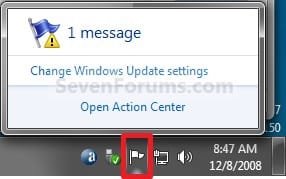
EXAMPLE: Message from Action Center Icon on the Taskbar
NOTE: You can click on the Action Center system icon anytime to see any current messages about problems. For example, I have a message below about Windows Updates not having Automatic Updates enabled. Solution_System_Icon.jpg
EXAMPLE: Action Center
NOTE: This is what will open when you click on the message or Open Action Center link. You can then view the message about what the problem is that Windows 7 found.
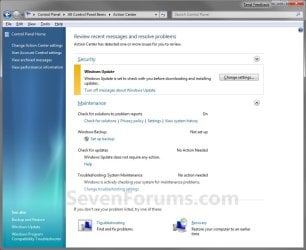
Windows_Solution_Center.jpg


Here's How: 1. Open the Control Panel (Icons View).

2. Click on the Action Center icon.

3. Sometimes you may have a message about a problem (ex: Windows Update) that is already highlighted in Action Center. You can click on the link (ex: Turn off messaged about Windows Update) to apply the action if that is what you want to have applied for that item. (see screenshot below step 4)

4. Click on the Change Action Center settings link at the top of the left pane corner. (see screenshot below)
NOTE: Some of the listed areas in Windows Solution Center will have a settings link that you can click on to change settings for that specific item. Windows_Solution_Center2.jpg
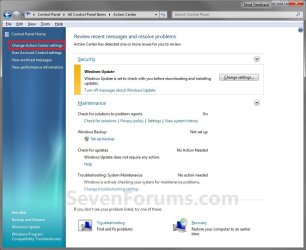
5. To Unselect an Area for Action Center to not Monitor A) Uncheck the item you want to not be monitored. (see screenshot below step 7)

B) Go to step 7.
6. To Select an Area for Action Center to Monitor A) Check the item you want monitored. (see screenshot below step 7)
NOTE: Repeat to select another item.
7. Click on OK. (see screenshot below) Message_Settings.jpg
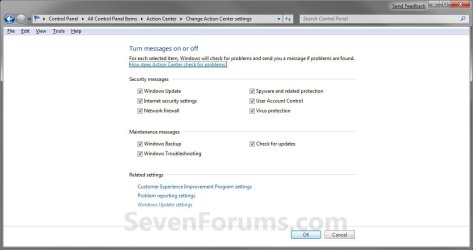
8. Close the Action Center window. (see screenshot below step 4)
That's it,
Shawn


Last edited:
thanks Brink exactly like you said did a backup of this key in a 7x64 then manually I unchecked all (screen shot step 7) and export the key again when I import each reg file then restart PC in same computer where I did exportation at first it work perfect but if y use those reg files in another PC also 7x64 the settings change diferent you can se some checked and some not, also I tried on a 7x32 and I got same results, but I know that if I change following register:
;==========================================================
Windows Registry Editor Version 5.00

[HKEY_CURRENT_USER\Software\Microsoft\Windows\CurrentVersion\Policies\Explorer]
"HideSCAHealth"=dword:00000001
;==========================================================
I can hide the flag, but what I would love to know is if I got what am looking for that is make that system do not do more things that I want so I win performance also I use to disable the "Security Center" service cuz in addition to win performance I avoid gimmies from my users who used to scare about they do not understand happen that mostly they do not read...
regards

BTW Brink is there a XP forums like this your or some one good you knows thanks
 
Last edited by a moderator:

My Computer

OS
XP pro x32, 7 x32 & x64 mostly Ultimate but some times anothers

My Computer

Computer type
PC/Desktop
Computer Manufacturer/Model Number
Self built custom
OS
64-bit Windows 11 Pro for Workstations
CPU
Intel i7-8700K OC'd to 5 GHz
Motherboard
ASUS ROG Maximus XI Formula Z390
Memory
64 GB (4x16GB) G.SKILL TridentZ RGB DDR4 3600 MHz
Graphics Card(s)
ASUS ROG-STRIX-GTX1080TI-O11G-GAMING
Sound Card
Integrated
Monitor(s) Displays
2 x Samsung Odyssey G7 27"
Screen Resolution
2560x1440
Hard Drives
1TB Samsung 990 PRO M.2,
4TB Samsung 990 PRO PRO M.2,
TerraMaster F8 SSD Plus NAS
PSU
Seasonic Prime Titanium 850W
Case
Thermaltake Core P3
Cooling
Corsair Hydro H115i
Keyboard
Logitech wireless K800
Mouse
Logitech MX Master 4
Internet Speed
2 Gb/s Download and 100 Mb/s Upload
Antivirus
Malwarebyte Anti-Malware Premium
Browser
Google Chrome
Other Info
Logitech Z625 speaker system,
Logitech BRIO 4K Pro webcam,
HP Color LaserJet Pro MFP M477fdn,
APC SMART-UPS RT 1000 XL - SURT1000XLI,
Galaxy S23 Plus phone
Thanks Brink but what I more worry about is is I win some performance doing it...
 

My Computer

OS
XP pro x32, 7 x32 & x64 mostly Ultimate but some times anothers
No, it's not going to have any noticable affect on performance having Action Center enabled or disabled. :(
 

My Computer

Computer type
PC/Desktop
Computer Manufacturer/Model Number
Self built custom
OS
64-bit Windows 11 Pro for Workstations
CPU
Intel i7-8700K OC'd to 5 GHz
Motherboard
ASUS ROG Maximus XI Formula Z390
Memory
64 GB (4x16GB) G.SKILL TridentZ RGB DDR4 3600 MHz
Graphics Card(s)
ASUS ROG-STRIX-GTX1080TI-O11G-GAMING
Sound Card
Integrated
Monitor(s) Displays
2 x Samsung Odyssey G7 27"
Screen Resolution
2560x1440
Hard Drives
1TB Samsung 990 PRO M.2,
4TB Samsung 990 PRO PRO M.2,
TerraMaster F8 SSD Plus NAS
PSU
Seasonic Prime Titanium 850W
Case
Thermaltake Core P3
Cooling
Corsair Hydro H115i
Keyboard
Logitech wireless K800
Mouse
Logitech MX Master 4
Internet Speed
2 Gb/s Download and 100 Mb/s Upload
Antivirus
Malwarebyte Anti-Malware Premium
Browser
Google Chrome
Other Info
Logitech Z625 speaker system,
Logitech BRIO 4K Pro webcam,
HP Color LaserJet Pro MFP M477fdn,
APC SMART-UPS RT 1000 XL - SURT1000XLI,
Galaxy S23 Plus phone
Back
Top