Add EditPlus program to list of Default Programs?

dcampbe1

New member
Local time
12:38 PM
Messages
23
I've spent several days trying to get several files extensions to be the default file association for EditPlus (EP). I've used a standalone program that manually sets the registry to point to the full path of the program, "C:\Program Files\EditPlus 3", and tried setting it myself to the correct path. The results are that I can then double click on a txt file and have EP load, BUT that very process causes the associations to be reset to "EDITPLUS.EXE" with no path and an incorrect file name -- it should be "EditPlus 3".

The mystery is not so much as to how to register EP to be associated with .txt (and others), but why, when I do get it set, it bounces back the first time I use it, as if I hadn't changed it at all.
 

My Computer

Computer type
PC/Desktop
Computer Manufacturer/Model Number
Dell Vostro 460
OS
Win 7 Ultimate 64 bit
CPU
Intel i7
Memory
8gB
Default program

It sounds like you are using the program folder path rather than the executable file path:

C:\Program Files\EditPlus 3

instead of

C:\Program Files\EditPlus 3\editplus.exe

Right click on a text file (.txt) then from the context menu choose "Open with" > "Choose Defualt Program" then hit the plus sign [+] on the right hand side to expand "Other Programs" and if EditPlus isn't in the list browse to the executable shown above rather than the program folder.
 
Last edited:

My Computer

Computer type
Laptop
Computer Manufacturer/Model Number
ASUS
OS
Microsoft Windows 7 Home Premium 64-bit 7601 Multiprocessor Free Service Pack 1
CPU
AMD C-60 APU with Radeon(tm) HD Graphics
Motherboard
ASUSTeK COMPUTER INC. X501U
Memory
4.00 GB
Graphics Card(s)
AMD Radeon HD 6290 Graphics
Sound Card
(1) AMD High Definition Audio Device (2) Realtek High Defi
Screen Resolution
1366 x 768 x 32 bits (4294967296 colors) @ 60 Hz
Hard Drives
Hitachi HTS545050A7E380 SATA Disk Device
Antivirus
Comodo CIS & FW, SecureAplus App Whitelisting, Threatfire
Browser
Cyberfox 64bit, Opera 64bit, Airfox
Other Info
Spy-The-Spy, HitmanPro.Alert, Norton Connect Safe, MJRegWatcher, BitDefender TrafficLight, Voodoo Shield, Zemana AntiMalware
Thanks for the tip. Following your instructions to a "T" it works and EP is indeed loaded, BUT it reverts back to Notepad the next time I double click a .txt file. There's something going on that's resetting the default I'd love to put my finger on.
 

My Computer

Computer type
PC/Desktop
Computer Manufacturer/Model Number
Dell Vostro 460
OS
Win 7 Ultimate 64 bit
CPU
Intel i7
Memory
8gB
Something to check

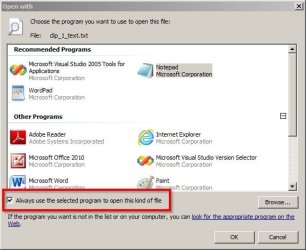
I missed a step! Check rhat "Always use this program...." is selected.

Open with.jpg

Other than that - you don't say the name the program that it reverts to as default.

Perhaps check that program's settings to see if there's a setting like "Always check that (name of program) is the default program for this type of file" or "Check on startup that this program....." or something similar.
 

My Computer

Computer type
Laptop
Computer Manufacturer/Model Number
ASUS
OS
Microsoft Windows 7 Home Premium 64-bit 7601 Multiprocessor Free Service Pack 1
CPU
AMD C-60 APU with Radeon(tm) HD Graphics
Motherboard
ASUSTeK COMPUTER INC. X501U
Memory
4.00 GB
Graphics Card(s)
AMD Radeon HD 6290 Graphics
Sound Card
(1) AMD High Definition Audio Device (2) Realtek High Defi
Screen Resolution
1366 x 768 x 32 bits (4294967296 colors) @ 60 Hz
Hard Drives
Hitachi HTS545050A7E380 SATA Disk Device
Antivirus
Comodo CIS & FW, SecureAplus App Whitelisting, Threatfire
Browser
Cyberfox 64bit, Opera 64bit, Airfox
Other Info
Spy-The-Spy, HitmanPro.Alert, Norton Connect Safe, MJRegWatcher, BitDefender TrafficLight, Voodoo Shield, Zemana AntiMalware
Thanks, yes I did specifically check the "always" box. The default program that comes up after initially working is Notepad.
 

My Computer

Computer type
PC/Desktop
Computer Manufacturer/Model Number
Dell Vostro 460
OS
Win 7 Ultimate 64 bit
CPU
Intel i7
Memory
8gB
Default

What is the name of the program that comes up as default after settings refuse to stick?

It looks like the problem might be associated with a registry key. Busy at the moment so will ask for more info later.
 
Last edited:

My Computer

Computer type
Laptop
Computer Manufacturer/Model Number
ASUS
OS
Microsoft Windows 7 Home Premium 64-bit 7601 Multiprocessor Free Service Pack 1
CPU
AMD C-60 APU with Radeon(tm) HD Graphics
Motherboard
ASUSTeK COMPUTER INC. X501U
Memory
4.00 GB
Graphics Card(s)
AMD Radeon HD 6290 Graphics
Sound Card
(1) AMD High Definition Audio Device (2) Realtek High Defi
Screen Resolution
1366 x 768 x 32 bits (4294967296 colors) @ 60 Hz
Hard Drives
Hitachi HTS545050A7E380 SATA Disk Device
Antivirus
Comodo CIS & FW, SecureAplus App Whitelisting, Threatfire
Browser
Cyberfox 64bit, Opera 64bit, Airfox
Other Info
Spy-The-Spy, HitmanPro.Alert, Norton Connect Safe, MJRegWatcher, BitDefender TrafficLight, Voodoo Shield, Zemana AntiMalware
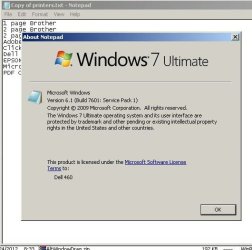
The program is Microsoft's Windows 7 Ultimate Notepad.exe.
 

Attachments

  • PS0279.jpg
    PS0279.jpg
    52.1 KB · Views: 24

My Computer

Computer type
PC/Desktop
Computer Manufacturer/Model Number
Dell Vostro 460
OS
Win 7 Ultimate 64 bit
CPU
Intel i7
Memory
8gB
Default program listed in registry

Would you try posting screenshots of the following registry key and subkeys?

HKEY_CURRENT_USER\Software\Microsoft\Windows\CurrentVersion\Explorer\FileExts\.txt

Or alternatively right click and choose Export then save the file to your desktop and give it a name like txt.reg then upload it and attach it to your next post.
 

Attachments

  • Registry Editor.jpg
    Registry Editor.jpg
    30.4 KB · Views: 0

My Computer

Computer type
Laptop
Computer Manufacturer/Model Number
ASUS
OS
Microsoft Windows 7 Home Premium 64-bit 7601 Multiprocessor Free Service Pack 1
CPU
AMD C-60 APU with Radeon(tm) HD Graphics
Motherboard
ASUSTeK COMPUTER INC. X501U
Memory
4.00 GB
Graphics Card(s)
AMD Radeon HD 6290 Graphics
Sound Card
(1) AMD High Definition Audio Device (2) Realtek High Defi
Screen Resolution
1366 x 768 x 32 bits (4294967296 colors) @ 60 Hz
Hard Drives
Hitachi HTS545050A7E380 SATA Disk Device
Antivirus
Comodo CIS & FW, SecureAplus App Whitelisting, Threatfire
Browser
Cyberfox 64bit, Opera 64bit, Airfox
Other Info
Spy-The-Spy, HitmanPro.Alert, Norton Connect Safe, MJRegWatcher, BitDefender TrafficLight, Voodoo Shield, Zemana AntiMalware

My Computer

Computer type
Laptop
Computer Manufacturer/Model Number
ASUS
OS
Microsoft Windows 7 Home Premium 64-bit 7601 Multiprocessor Free Service Pack 1
CPU
AMD C-60 APU with Radeon(tm) HD Graphics
Motherboard
ASUSTeK COMPUTER INC. X501U
Memory
4.00 GB
Graphics Card(s)
AMD Radeon HD 6290 Graphics
Sound Card
(1) AMD High Definition Audio Device (2) Realtek High Defi
Screen Resolution
1366 x 768 x 32 bits (4294967296 colors) @ 60 Hz
Hard Drives
Hitachi HTS545050A7E380 SATA Disk Device
Antivirus
Comodo CIS & FW, SecureAplus App Whitelisting, Threatfire
Browser
Cyberfox 64bit, Opera 64bit, Airfox
Other Info
Spy-The-Spy, HitmanPro.Alert, Norton Connect Safe, MJRegWatcher, BitDefender TrafficLight, Voodoo Shield, Zemana AntiMalware
Wow, this one was an important partial success! I entered txt, inf, ini, log, nfo, sav into the box. As a result double clicking on a .txt or an .sav brings up EP predictably. The others open up on WE with an EP icon but continue bringing up Notepad.

Here's the exported reg file you asked for. It was created before I saw this post.
 

My Computer

Computer type
PC/Desktop
Computer Manufacturer/Model Number
Dell Vostro 460
OS
Win 7 Ultimate 64 bit
CPU
Intel i7
Memory
8gB
More ideas

I've got more ideas but will be busy for another couple of hours. I'll post later. I might even try downloading EditPlus when I get home. Currently I'm on a work computer.

I don't see a reg file attached but just wanted to check that there is nothing out of the ordinary in that registry key!
 

My Computer

Computer type
Laptop
Computer Manufacturer/Model Number
ASUS
OS
Microsoft Windows 7 Home Premium 64-bit 7601 Multiprocessor Free Service Pack 1
CPU
AMD C-60 APU with Radeon(tm) HD Graphics
Motherboard
ASUSTeK COMPUTER INC. X501U
Memory
4.00 GB
Graphics Card(s)
AMD Radeon HD 6290 Graphics
Sound Card
(1) AMD High Definition Audio Device (2) Realtek High Defi
Screen Resolution
1366 x 768 x 32 bits (4294967296 colors) @ 60 Hz
Hard Drives
Hitachi HTS545050A7E380 SATA Disk Device
Antivirus
Comodo CIS & FW, SecureAplus App Whitelisting, Threatfire
Browser
Cyberfox 64bit, Opera 64bit, Airfox
Other Info
Spy-The-Spy, HitmanPro.Alert, Norton Connect Safe, MJRegWatcher, BitDefender TrafficLight, Voodoo Shield, Zemana AntiMalware
I just updated the posting, hopefully WITH attachment this time.
 

My Computer

Computer type
PC/Desktop
Computer Manufacturer/Model Number
Dell Vostro 460
OS
Win 7 Ultimate 64 bit
CPU
Intel i7
Memory
8gB
I just updated the posting, hopefully WITH attachment this time.

Here's another attachment attempt.

I went through the attachment process again but see no indication that its attached. I guess I need practice.
 

Attachments

My Computer

Computer type
PC/Desktop
Computer Manufacturer/Model Number
Dell Vostro 460
OS
Win 7 Ultimate 64 bit
CPU
Intel i7
Memory
8gB
EP Settings

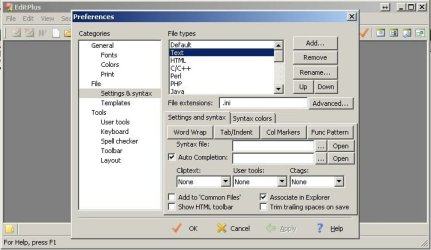
Okay so I downloaded the trial version and applying settings like this works:

For .ini files:

Preferences.jpg

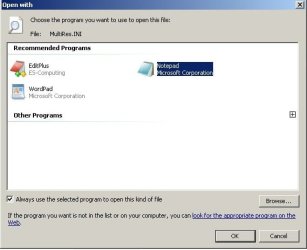
Then I see this when right clicking an .ini file:

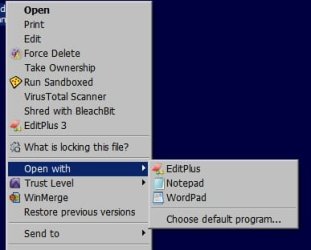
Open With.jpg

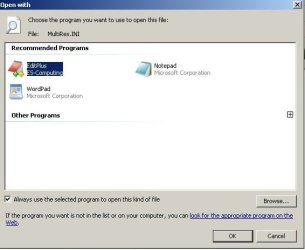
And this when checking the default program:

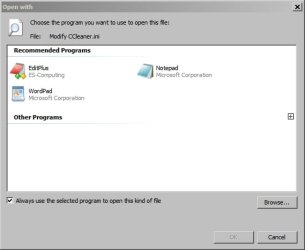
Open with Default.jpg

It opens with EP by default with no further steps needed.

In addition - once you've set EP to work with specific file types as shown in the first screenshot you can manage programs that open types of files using:

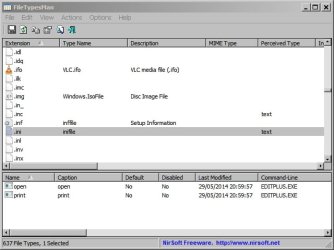
FileTypesMan

If you see a warning from your security software - ignore it and allow. Some Nirsoft products get flagged up as a few of them are could essentially be classed as undesirable if they've been installed by other users without your knowledge as they can be used as hacking tools. This doesn't apply to FileTypesMan though.

You need the 64bit download: Link near the bottom of the page.

Run the file and you'll see something like this:

FileTypesMan.jpg

If you scroll down to .ini and double click you'll see the following:

FileTypesMan 2.jpg

On the UserChoice drop down list you can simply change the default program that's used to open the file type.
 
Last edited:

My Computer

Computer type
Laptop
Computer Manufacturer/Model Number
ASUS
OS
Microsoft Windows 7 Home Premium 64-bit 7601 Multiprocessor Free Service Pack 1
CPU
AMD C-60 APU with Radeon(tm) HD Graphics
Motherboard
ASUSTeK COMPUTER INC. X501U
Memory
4.00 GB
Graphics Card(s)
AMD Radeon HD 6290 Graphics
Sound Card
(1) AMD High Definition Audio Device (2) Realtek High Defi
Screen Resolution
1366 x 768 x 32 bits (4294967296 colors) @ 60 Hz
Hard Drives
Hitachi HTS545050A7E380 SATA Disk Device
Antivirus
Comodo CIS & FW, SecureAplus App Whitelisting, Threatfire
Browser
Cyberfox 64bit, Opera 64bit, Airfox
Other Info
Spy-The-Spy, HitmanPro.Alert, Norton Connect Safe, MJRegWatcher, BitDefender TrafficLight, Voodoo Shield, Zemana AntiMalware
Looks okay

I just updated the posting, hopefully WITH attachment this time.

Here's another attachment attempt.

I went through the attachment process again but see no indication that its attached. I guess I need practice.


Got it this time. Here's what I see:

[HKEY_CURRENT_USER\Software\Microsoft\Windows\CurrentVersion\Explorer\FileExts\.txt]

[HKEY_CURRENT_USER\Software\Microsoft\Windows\CurrentVersion\Explorer\FileExts\.txt\OpenWithList]
"a"="NOTEPAD.EXE"
"MRUList"="dbca"
"b"="editplus.exe"
"c"="readdir.exe"
"d"="dopus.exe"

[HKEY_CURRENT_USER\Software\Microsoft\Windows\CurrentVersion\Explorer\FileExts\.txt\OpenWithProgids]
"txtfile"=hex(0):

[HKEY_CURRENT_USER\Software\Microsoft\Windows\CurrentVersion\Explorer\FileExts\.txt\UserChoice]
"Progid"="Applications\\editplus.exe"


Basically it means that a,b,c,d are the programs that can be selected to open a .txt file and the bottom line means that you've elected to set EditPlus as default.
 

My Computer

Computer type
Laptop
Computer Manufacturer/Model Number
ASUS
OS
Microsoft Windows 7 Home Premium 64-bit 7601 Multiprocessor Free Service Pack 1
CPU
AMD C-60 APU with Radeon(tm) HD Graphics
Motherboard
ASUSTeK COMPUTER INC. X501U
Memory
4.00 GB
Graphics Card(s)
AMD Radeon HD 6290 Graphics
Sound Card
(1) AMD High Definition Audio Device (2) Realtek High Defi
Screen Resolution
1366 x 768 x 32 bits (4294967296 colors) @ 60 Hz
Hard Drives
Hitachi HTS545050A7E380 SATA Disk Device
Antivirus
Comodo CIS & FW, SecureAplus App Whitelisting, Threatfire
Browser
Cyberfox 64bit, Opera 64bit, Airfox
Other Info
Spy-The-Spy, HitmanPro.Alert, Norton Connect Safe, MJRegWatcher, BitDefender TrafficLight, Voodoo Shield, Zemana AntiMalware
Following your example, I set EP type to .ini:
PS0280.jpg
Then right click on in .ini file:
PS0281.jpg
Then click on the EP icon to make sure that's the one to use:
PS0282.jpg
Then enter brings it up in EP:
PS0283.jpg
But, double clicking the file name brings it up in Notepad:
PS0284.jpg

There's just something causing it to revert back to default of Notepad afterwards.

PS It took me a while to figure out how this attachment thing works. The only thing I couldn't figure out was how to delete an uploaded file. By quitting completely and starting all over I was able to get a clean slate. Is that the only way?
 

My Computer

Computer type
PC/Desktop
Computer Manufacturer/Model Number
Dell Vostro 460
OS
Win 7 Ultimate 64 bit
CPU
Intel i7
Memory
8gB
Attachments

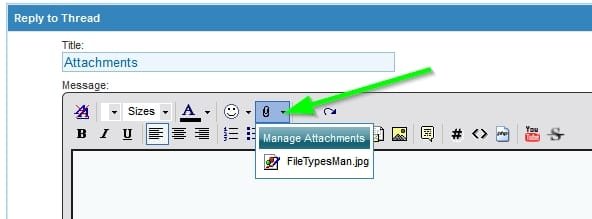
Removing an attachment:
Click as shown and choose "Manage Attachments"

Attachment Manager.jpg

In the window that open click "Remove"

Attachment Manager 2.jpg

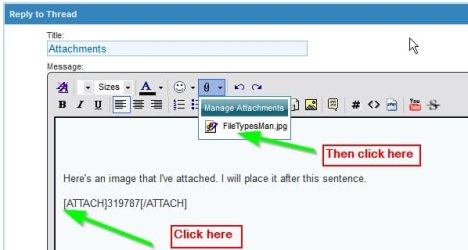
To place an attachment to appear where you need it:

Click where you want to place it then click the attachment's file name.

Attachment Manager 3.jpg
 

My Computer

Computer type
Laptop
Computer Manufacturer/Model Number
ASUS
OS
Microsoft Windows 7 Home Premium 64-bit 7601 Multiprocessor Free Service Pack 1
CPU
AMD C-60 APU with Radeon(tm) HD Graphics
Motherboard
ASUSTeK COMPUTER INC. X501U
Memory
4.00 GB
Graphics Card(s)
AMD Radeon HD 6290 Graphics
Sound Card
(1) AMD High Definition Audio Device (2) Realtek High Defi
Screen Resolution
1366 x 768 x 32 bits (4294967296 colors) @ 60 Hz
Hard Drives
Hitachi HTS545050A7E380 SATA Disk Device
Antivirus
Comodo CIS & FW, SecureAplus App Whitelisting, Threatfire
Browser
Cyberfox 64bit, Opera 64bit, Airfox
Other Info
Spy-The-Spy, HitmanPro.Alert, Norton Connect Safe, MJRegWatcher, BitDefender TrafficLight, Voodoo Shield, Zemana AntiMalware

My Computer

Computer type
Laptop
Computer Manufacturer/Model Number
ASUS
OS
Microsoft Windows 7 Home Premium 64-bit 7601 Multiprocessor Free Service Pack 1
CPU
AMD C-60 APU with Radeon(tm) HD Graphics
Motherboard
ASUSTeK COMPUTER INC. X501U
Memory
4.00 GB
Graphics Card(s)
AMD Radeon HD 6290 Graphics
Sound Card
(1) AMD High Definition Audio Device (2) Realtek High Defi
Screen Resolution
1366 x 768 x 32 bits (4294967296 colors) @ 60 Hz
Hard Drives
Hitachi HTS545050A7E380 SATA Disk Device
Antivirus
Comodo CIS & FW, SecureAplus App Whitelisting, Threatfire
Browser
Cyberfox 64bit, Opera 64bit, Airfox
Other Info
Spy-The-Spy, HitmanPro.Alert, Norton Connect Safe, MJRegWatcher, BitDefender TrafficLight, Voodoo Shield, Zemana AntiMalware
Let's try another method

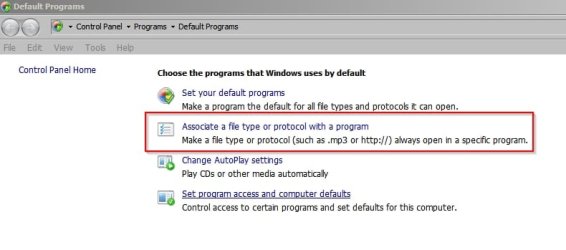
Try START> Default Programs

Then select the following:

Default Programs.jpg

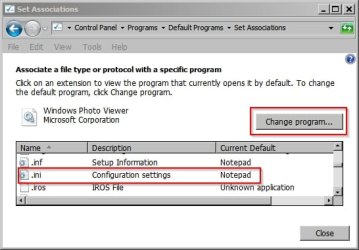
Scroll down to .ini and select Change Program

Set Associations.jpg

Select EditPlus and this time you should see that the "Always use this program" checkbox is greyed out. This is because the Set Associations control panel is used make system-wide file association changes.

Click OK

Post a reply here if it still doesn't work!
 

My Computer

Computer type
Laptop
Computer Manufacturer/Model Number
ASUS
OS
Microsoft Windows 7 Home Premium 64-bit 7601 Multiprocessor Free Service Pack 1
CPU
AMD C-60 APU with Radeon(tm) HD Graphics
Motherboard
ASUSTeK COMPUTER INC. X501U
Memory
4.00 GB
Graphics Card(s)
AMD Radeon HD 6290 Graphics
Sound Card
(1) AMD High Definition Audio Device (2) Realtek High Defi
Screen Resolution
1366 x 768 x 32 bits (4294967296 colors) @ 60 Hz
Hard Drives
Hitachi HTS545050A7E380 SATA Disk Device
Antivirus
Comodo CIS & FW, SecureAplus App Whitelisting, Threatfire
Browser
Cyberfox 64bit, Opera 64bit, Airfox
Other Info
Spy-The-Spy, HitmanPro.Alert, Norton Connect Safe, MJRegWatcher, BitDefender TrafficLight, Voodoo Shield, Zemana AntiMalware
It worked like gangbusters -- the first time. I returned to WE after the procedure and double clicked on an .ini file and was greeted by EP. But, after rebooting and repeating that last step, it came up with Notepad, insisting on reverting back to Notepad as a default.

Regarding the removal of attachments, that worked too! I don't understand how I missed that huge Removal button, but that was the trick.

Regarding the attachments not being attached, you're right on target. Hitting the OK button was the culprit as I later discovered.
 

My Computer

Computer type
PC/Desktop
Computer Manufacturer/Model Number
Dell Vostro 460
OS
Win 7 Ultimate 64 bit
CPU
Intel i7
Memory
8gB
Back
Top