Adding Windows Media Center to 'open with' list

PCGeorge

New member
Local time
1:03 AM
Messages
3
When you right click on a file, you are given an option of what program to use to open the file type with using 'open with' options. I am attempting to open an 'avi' video file with 'Windows Media Center' but the option is not there. Windows Media Player is there as well as a few others. I don't know where to find 'Windows Media Center' to add to the programs that would open a 'avi' file type. I can open WMC, find the video file and play it that way but want it added to the 'open with' list.

How do you add Windows Media Center to the programs available to 'open with'?
 

My Computer My Computer

OS
Windows 7 64 Bit

My Computer My Computer

Computer type
PC/Desktop
Computer Manufacturer/Model Number
Dell XPS 420
OS
Windows 10, Home Clean Install
CPU
Intel Core2 processsor Q8200(2.33Ghz 1333FSB) Quad Core Tech
Motherboard
Dell
Memory
6 gb
Graphics Card(s)
ATI Radeon 256MB HD3650
Sound Card
Intergrated 7.1 Channel Audio
Monitor(s) Displays
Dell SP2009W 20"
Hard Drives
640 GB Serial ATA Hard drive
Cooling
Fan
Keyboard
Dell USB Keyboard
Mouse
Dell Premium Optical USB
Internet Speed
DSL 2.85
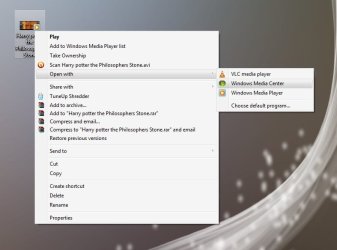
Like this ?

Untitled.jpg

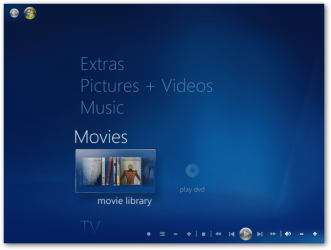
There is two ways (as I know ) to do it. First, add the AVI movie to media center library. To do this , opem media center, Click on movies
sshot-2.png
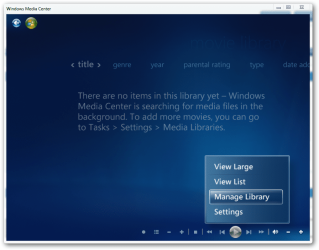
Now right click on the screen, and select manage libreary
sshot-3.png
Click add folder > next > on the computer > next .... and browse to the avi. Add it .

Otherwise, right click on the avi file, select properties. Change open with option to media center. if media center is not in recommend programs list, browse it in other programs, and if it is not in other programs too, browse it to your C:\Windows\ehome\ehshell .

By diong it , media center is the default program to open avi files. If you dont want it to be the default, just be there in open with list, change the open with option to WMP or VLC in the same procedure described above. Media center will still be there in the right click option, as in my shot, where WMP is the default, bet media center is still there.

Hope it helps.
 

My Computer My Computer

Computer type
PC/Desktop
Computer Manufacturer/Model Number
Self Assembled
OS
Microsoft Windows 10 Pro Insider Preview 64-bit
CPU
Intel(R) Core(TM) i3-4130 CPU @ 3.40GHz
Motherboard
Gigabyte Technology Co., Ltd. B85M-D3H
Memory
Corsair Vengence 4GB x2 (8.00GB Dual-Channel DDR3 @ 798MHz)
Graphics Card(s)
2047MB GeForce GTS 450 (ZOTAC International)
Sound Card
Onboard (Realtek High Definition Audio)
Monitor(s) Displays
LG Flatron E2040T
Screen Resolution
1600x900
Hard Drives
Western Digital 1 TB
Seagate 500 GB
PSU
Corsair VS550
Case
Cooler Master K380
Cooling
Cooler Master Seidon 120V Plus
Keyboard
Logitech MK260r
Mouse
Logitech MK260r
Internet Speed
PMPL Broadband
Antivirus
Windows Defender + MBAM
Browser
Firefox
Other Info
Dell Studio 15" Laptop
Sorry, that has nothing to do with my issue. I want to add 'Windows Media Center' to a right click 'open with' list for an 'avi' file type.
 

My Computer My Computer

OS
Windows 7 64 Bit
Sorry, that has nothing to do with my issue. I want to add 'Windows Media Center' to a right click 'open with' list for an 'avi' file type.
Please read my post carefully, try it , and comment then. I have done it in this way (You see the screenshot). The video is a avi file, obviously, that has media center in its right click open with option.

The second method is must to do it.
 

My Computer My Computer

Computer type
PC/Desktop
Computer Manufacturer/Model Number
Self Assembled
OS
Microsoft Windows 10 Pro Insider Preview 64-bit
CPU
Intel(R) Core(TM) i3-4130 CPU @ 3.40GHz
Motherboard
Gigabyte Technology Co., Ltd. B85M-D3H
Memory
Corsair Vengence 4GB x2 (8.00GB Dual-Channel DDR3 @ 798MHz)
Graphics Card(s)
2047MB GeForce GTS 450 (ZOTAC International)
Sound Card
Onboard (Realtek High Definition Audio)
Monitor(s) Displays
LG Flatron E2040T
Screen Resolution
1600x900
Hard Drives
Western Digital 1 TB
Seagate 500 GB
PSU
Corsair VS550
Case
Cooler Master K380
Cooling
Cooler Master Seidon 120V Plus
Keyboard
Logitech MK260r
Mouse
Logitech MK260r
Internet Speed
PMPL Broadband
Antivirus
Windows Defender + MBAM
Browser
Firefox
Other Info
Dell Studio 15" Laptop
Thank you Arc. adding the 'C:\Windows\ehome\ehshell' was the location I was looking for. Thanks for the quick response.

My initial reply was to the 1st reply from 'richc46' about the 'startup' programs which was unrelated to my issue, not your response.
 

My Computer My Computer

OS
Windows 7 64 Bit
Thank you Arc. adding the 'C:\Windows\ehome\ehshell' was the location I was looking for. Thanks for the quick response.

My initial reply was to the 1st reply from 'richc46' about the 'startup' programs which was unrelated to my issue, not your response.
You are most welcome, pal ! we would be happy if it worked for you perfectly, and your needs are fully satisfied. That's why we are here :D
 

My Computer My Computer

Computer type
PC/Desktop
Computer Manufacturer/Model Number
Self Assembled
OS
Microsoft Windows 10 Pro Insider Preview 64-bit
CPU
Intel(R) Core(TM) i3-4130 CPU @ 3.40GHz
Motherboard
Gigabyte Technology Co., Ltd. B85M-D3H
Memory
Corsair Vengence 4GB x2 (8.00GB Dual-Channel DDR3 @ 798MHz)
Graphics Card(s)
2047MB GeForce GTS 450 (ZOTAC International)
Sound Card
Onboard (Realtek High Definition Audio)
Monitor(s) Displays
LG Flatron E2040T
Screen Resolution
1600x900
Hard Drives
Western Digital 1 TB
Seagate 500 GB
PSU
Corsair VS550
Case
Cooler Master K380
Cooling
Cooler Master Seidon 120V Plus
Keyboard
Logitech MK260r
Mouse
Logitech MK260r
Internet Speed
PMPL Broadband
Antivirus
Windows Defender + MBAM
Browser
Firefox
Other Info
Dell Studio 15" Laptop
Back
Top