Solved Administrator Problem In Windows 7

dakshjain

New member
Local time
2:26 AM
Messages
19
A few days ago I noticed a problem in my windows 7 computer. I wanted to download something from my browser and I got the following message, "You don't have the permission to save in this location. Contact the administrator to obtain permission."
However, I can download it by running the browser as administrator.
On spending some hours in finding and trying the solution, all the methods failed. I also tried the following method which was the most popular.
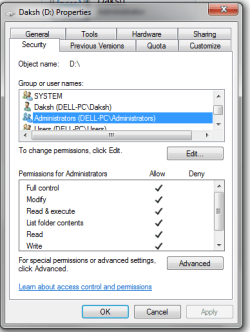
I went to the drive properties and in that, I went to security tab and then denied and allowed the permissions for administrator and users. I get the message that said that an error occurred while applying security information to some folder. It did not work.
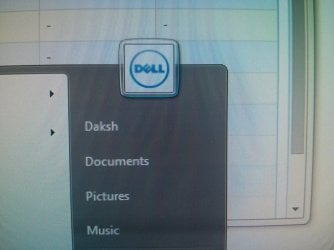
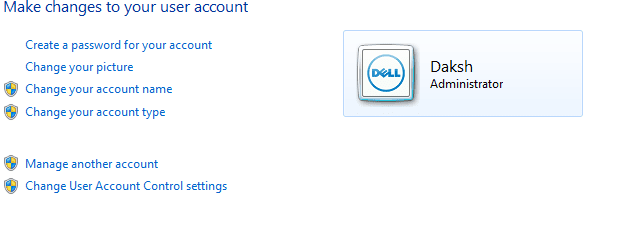
However, I noticed something. In the control panel under user account and also in the start menu I could see my username and 'administrator' beneath the name. But when I went to the drive properties and then to security, I found a different name beside Administrators.
To see if it was some problem, I checked this in my laptop and found the username were same in both the places in my laptop except that the letters were in caps in the security tab in properties.
I have also posted the screenshots.
I think this is the problem.
 

Attachments
  • Capture.PNG
    Capture.PNG
    17.8 KB · Views: 52
  • Capture1.PNG
    Capture1.PNG
    41.6 KB · Views: 52
  • IMG_20150411_172513.jpg
    IMG_20150411_172513.jpg
    1 MB · Views: 0

My Computer

Computer type
PC/Desktop
Computer Manufacturer/Model Number
Dell
OS
Windows 7 64 bit
CPU
core i5
Memory
8 GB
Graphics Card(s)
GT 640 1GB DDR5
I wanted to download something from my browser and I got the following message, "You don't have the permission to save in this location. Contact the administrator to obtain permission."
However, I can download it by running the browser as administrator.

Your whole post talks about Administrator this and Administrators that, but in actual fact, the permissions the Administrators group has on this D drive of yours is the least relevant piece of information you can possibly provide.

Here's a hint, to avoid the message, "You don't have the permission to save in this location. Contact the administrator to obtain permission.", focus on giving access to the Users group.
 

My Computer

Computer type
PC/Desktop
OS
Windows 10, Windows 8.1 Pro, Windows 7 Professional, OS X El Capitan
Tried with users also but same message pops up "an errror occurred while applying security information to..."
 

My Computer

Computer type
PC/Desktop
Computer Manufacturer/Model Number
Dell
OS
Windows 7 64 bit
CPU
core i5
Memory
8 GB
Graphics Card(s)
GT 640 1GB DDR5
ACL changes may still take place despite that error message.

Are you able to save to D drive without any problems?

If not, would you like to open a command prompt and post back the results of the below command,
Code:
icacls D:\
 

My Computer

Computer type
PC/Desktop
OS
Windows 10, Windows 8.1 Pro, Windows 7 Professional, OS X El Capitan
No, I am not able to download now also and it happens in other drive also.

Here is the result of CMD:
Microsoft Windows [Version 6.1.7601]
Copyright (c) 2009 Microsoft Corporation. All rights reserved.

C:\Windows\system32>icacls D:\
D:\ NT AUTHORITY\Authenticated Users: (OI)(CI)(F)
NT AUTHORITY\SYSTEM: (OI)(CI)(F)
DELL-PC\Daksh: (OI)(CI)(F)
BUILTIN\Administrators: (OI)(CI)(F)
BUILTIN\Users: (OI)(CI)(F)

Successfully processed 1 files; Failed processing 0 files

C:\Windows\system32>
 
Last edited:

My Computer

Computer type
PC/Desktop
Computer Manufacturer/Model Number
Dell
OS
Windows 7 64 bit
CPU
core i5
Memory
8 GB
Graphics Card(s)
GT 640 1GB DDR5
[...] it happens in other drive also.
If it's happening in multiple locations it may suggest that it is your application, your browser that is at fault. Have you tried Internet Explorer? Do you get a similar error message when you download from that browser?


Permissions on your D drive look good. It could be the folder you are trying to save to that the permissions aren't right.

Where exactly are you trying to saving to? Would you be able to run the same command as above but instead for the folder you attempted to save to when you received the error message described in your OP?
 
Last edited:

My Computer

Computer type
PC/Desktop
OS
Windows 10, Windows 8.1 Pro, Windows 7 Professional, OS X El Capitan
[...] it happens in other drive also.
If it's happening in multiple locations it may suggest that it is your application, your browser that is at fault. Have you tried Internet Explorer? Do you get a similar error message when you download from that browser?


Permissions on your D drive look good. It could be the folder you are trying to save to that the permissions aren't right.

Where are exactly are you trying to saving to? Would you be able to run the same command as above but instead for the folder you attempted to save to when you received the error message described in your OP?


It is happening in Internet Explorer also. I have tried to place the download both in a folder and outside the folder (in the root) but the same message occurs.
Here is what you asked for:
Microsoft Windows [Version 6.1.7601]
Copyright (c) 2009 Microsoft Corporation. All rights reserved.

C:\Windows\system32>icacls D:\Songs
D:\Songs BUILTIN\Administrators: (F)
DELL-PC\Daksh: (OI)(CI)(NP)(F)
NT AUTHORITY\Authenticated Users: (I)(OI)(CI)(F)
NT AUTHORITY\SYSTEM: (I)(OI)(CI)(F)
DELL-PC\Daksh: (I)(OI)(CI)(F)
BUILTIN\Administrators: (I)(OI)(CI)(F)
BUILTIN\Users: (I)(OI)(CI)(F)

Successfully processed 1 files; Failed processing 0 files

C:\Windows\system32>
 

My Computer

Computer type
PC/Desktop
Computer Manufacturer/Model Number
Dell
OS
Windows 7 64 bit
CPU
core i5
Memory
8 GB
Graphics Card(s)
GT 640 1GB DDR5
Very, very odd. You have full access to this location yet your browsers deny you from saving to it?

There is indeed an 'Administrator Problem' going on.

Dakshjain, hold on and I'll see if I can call another to help you with this issue you face...

In the mean time, would you be able to post a screen capture of Disk Management as it may help others better locate the problem.
 
Last edited:

My Computer

Computer type
PC/Desktop
OS
Windows 10, Windows 8.1 Pro, Windows 7 Professional, OS X El Capitan
Last edited:

My Computer

Computer type
PC/Desktop
Computer Manufacturer/Model Number
n/a
OS
W7 Ultimate SP1, LM19.2 MATE, W10 Home 1703, W10 Pro 1703 VM, #All 64 bit
CPU
AMD Phenom II x6 1100T, 3.3 GHz
Motherboard
ASUS M4A88T-M/USB3 (AM3)
Memory
12GB DDR3 1333 G-Skill (4GB x 2), G-Skill (2GB x 2)
Graphics Card(s)
NVIDIA GeForce GTX 660
Sound Card
Realtek?
Monitor(s) Displays
Samsung S23B350
Screen Resolution
1920x1080
Hard Drives
WD Green 2TB (SATA), WD Green 3TB (SATA), WD Blue 4TB (SATA), WD Blue 6TB (SATA)
PSU
Cooler Master
Case
Antec GX300 Tower
Cooling
3x Antec TRICOOL 120mm Fans
Mouse
Wired Optical
Internet Speed
DSL
Antivirus
Avast
Browser
Pale Moon (64 bit)
Other Info
2018-12-27 Upgraded HDDs
2015-12-10 Upgraded case, graphics card, storage
2015-08-15 Upgraded motherboard & RAM
2015-07-15 Upgraded LM17.1 to LM17.2
Yes, I can create new folders and files using windows explorer.

Microsoft Windows [Version 6.1.7601]
Copyright (c) 2009 Microsoft Corporation. All rights reserved.

C:\Windows\system32>sfc /scannow

Beginning system scan. This process will take some time.

Beginning verification phase of system scan.
Verification 100% complete.

Windows Resource Protection did not find any integrity violations.

C:\Windows\system32>^A^A
 

My Computer

Computer type
PC/Desktop
Computer Manufacturer/Model Number
Dell
OS
Windows 7 64 bit
CPU
core i5
Memory
8 GB
Graphics Card(s)
GT 640 1GB DDR5
Dakshjain, could you go up to the folder D:\Songs, right-click it > Properties > Security (tab) > Advanced > Effective Permissions (tab) > Select..., type your user account name into the dialogue that pops up, then press OK.

Observe the Effective Permissions list for your user on this folder.

Now press Select... again and type "Administrators" into the dialogue, hit OK.

Compare this list with the one before. Are the lists the same? If they're not, could you post an image of both these lists.
 

My Computer

Computer type
PC/Desktop
OS
Windows 10, Windows 8.1 Pro, Windows 7 Professional, OS X El Capitan
No, there is no difference.
 

My Computer

Computer type
PC/Desktop
Computer Manufacturer/Model Number
Dell
OS
Windows 7 64 bit
CPU
core i5
Memory
8 GB
Graphics Card(s)
GT 640 1GB DDR5
The lack of difference proves that you have exactly the same rights as the administrators group would for this folder.

I'm not sure why you are not able to save to this non-system folder location.

You can try things such as disabling UAC or disabling your firewall, and see if your browsers will let you save after that.

Also, it may be worth a try to grant the Everyone group an explicit full control permission to this folder with the command,
icacls "D:\Songs" /grant Everyone:F

Is the error message raised by your prefered browser the same as what IE produces? Feel free to post the exact error message you mention.
 

My Computer

Computer type
PC/Desktop
OS
Windows 10, Windows 8.1 Pro, Windows 7 Professional, OS X El Capitan
The code that you posted worked!!
Thank you so much Pyprohly and lehnerus2000 :)

Just one question, if the problem didn't solve so would it be eradicated if I updated my computer to Windows 10?
 

My Computer

Computer type
PC/Desktop
Computer Manufacturer/Model Number
Dell
OS
Windows 7 64 bit
CPU
core i5
Memory
8 GB
Graphics Card(s)
GT 640 1GB DDR5
The code that you posted worked!!
Actually?? Your user "Daksh" already had full control... Are you sure you are not using some other user account???


Just one question, if the problem didn't solve so would it be eradicated if I updated my computer to Windows 10?
Not sure what is being asked. What would be eradicated? Could you clarify that part?
 

My Computer

Computer type
PC/Desktop
OS
Windows 10, Windows 8.1 Pro, Windows 7 Professional, OS X El Capitan
The code that you posted worked!!
Actually?? Your user "Daksh" already had full control... Are you sure you are not using some other user account???


Just one question, if the problem didn't solve so would it be eradicated if I updated my computer to Windows 10?
Not sure what is being asked. What would be eradicated? Could you clarify that part?


I was using Daksh and I don't have any other account in my computer. It may be a bug or something.


I was asking that lets just say that this problem did not solve so would it solve if I update my computer to Windows 10 in the coming months?
 

My Computer

Computer type
PC/Desktop
Computer Manufacturer/Model Number
Dell
OS
Windows 7 64 bit
CPU
core i5
Memory
8 GB
Graphics Card(s)
GT 640 1GB DDR5

My Computer

Computer type
PC/Desktop
Computer Manufacturer/Model Number
n/a
OS
W7 Ultimate SP1, LM19.2 MATE, W10 Home 1703, W10 Pro 1703 VM, #All 64 bit
CPU
AMD Phenom II x6 1100T, 3.3 GHz
Motherboard
ASUS M4A88T-M/USB3 (AM3)
Memory
12GB DDR3 1333 G-Skill (4GB x 2), G-Skill (2GB x 2)
Graphics Card(s)
NVIDIA GeForce GTX 660
Sound Card
Realtek?
Monitor(s) Displays
Samsung S23B350
Screen Resolution
1920x1080
Hard Drives
WD Green 2TB (SATA), WD Green 3TB (SATA), WD Blue 4TB (SATA), WD Blue 6TB (SATA)
PSU
Cooler Master
Case
Antec GX300 Tower
Cooling
3x Antec TRICOOL 120mm Fans
Mouse
Wired Optical
Internet Speed
DSL
Antivirus
Avast
Browser
Pale Moon (64 bit)
Other Info
2018-12-27 Upgraded HDDs
2015-12-10 Upgraded case, graphics card, storage
2015-08-15 Upgraded motherboard & RAM
2015-07-15 Upgraded LM17.1 to LM17.2
I was using Daksh and I don't have any other account in my computer. It may be a bug or something.


I was asking that lets just say that this problem did not solve so would it solve if I update my computer to Windows 10 in the coming months?
Likely. If the problem was due to a bug that is.


Using the results you were able to provide from Icacls, I managed to create a "New folder" folder that mimics the permission of your D:\Songs. I was able to download to "New folder" without any trouble, using both Chrome and IE.

Something is different.

Is D: an external device? There could potentually be an issue with it.
 

My Computer

Computer type
PC/Desktop
OS
Windows 10, Windows 8.1 Pro, Windows 7 Professional, OS X El Capitan
No, it is an internal drive and I couldn't save the file to any location in D and J drive, but now I can.
 

My Computer

Computer type
PC/Desktop
Computer Manufacturer/Model Number
Dell
OS
Windows 7 64 bit
CPU
core i5
Memory
8 GB
Graphics Card(s)
GT 640 1GB DDR5
Hm. Is it a separate disk from your C?
 

My Computer

Computer type
PC/Desktop
OS
Windows 10, Windows 8.1 Pro, Windows 7 Professional, OS X El Capitan
Back
Top