Advice thread - upgrading HDD, SSD, RAM

DoctorObviously

Expert Coffee Maker
Local time
4:46 AM
Messages
27
Hello everyone! I think this is the best place to post these kinds of questions, but if it isn't though, please feel free to move or remove the thread.

The system I have is the one you should see on my profile. I would like to buy a brand new HDD and an SSD. I've heard SSDs can dramatically increase my computer's start-up speed (and for games as well) so I'd like to give it a shot. I've had my eyes on a 1TB Seagate HDD and a Samsung 250 GB SSD. I've noticed in recent games that my small amount of RAM doesn't really cut it anymore, so I'd like to upgrade that too with 16 Gigs of Corsair RAM.

The problem I have is that I'm not savvy with putting computer hardware together: I'm often scared certain hardware components aren't compatible with certain cases or hardware. I'm always afraid it'll break when I try to put it in, even when I know these things are very sturdy. Do you guys think the aforementioned hardware are good upgrades? Should I upgrade anything else? Do I need a new MOBO for the new RAM? Is DDR3 the right stuff for my PC?
 

My Computer

Computer type
PC/Desktop
Computer Manufacturer/Model Number
Custom build
OS
Windows 7 Home Premium 64-bit
CPU
Intel Core i7 920 @ 2.67 GHz
Motherboard
GA EX58-UD3R
Memory
6Gb RAM
Graphics Card(s)
MSI 660Ti OC PE
Monitor(s) Displays
1
Screen Resolution
1680x1050
Hard Drives
SATA MAXTOR STM310003 1TB
Intenso External Harddrive 1TB
PSU
Corsair GS800
Case
Antec Nine Hundred Ultimate
Cooling
Corsair GS800
Keyboard
Labtec Ultra Flat
Mouse
Logitech Proteus Core G502
Internet Speed
n/a
Antivirus
MSE
Browser
Google Chrome & Mozilla Firefox
Just a note on the ssd, I put a 250 evo in the laptop - its awsome. I used to think dollar for dollar memory was the best upgrade and it does seem to make sence to have at least 8 gigs but you can hit a good ssd sale or deal on newegg or whereever and they are the way to go. Check some of the performance ratings and reviews not all ssd's are created equal but imo the evo is hard to beat. Good luck.
 

My Computer

Computer type
PC/Desktop
Computer Manufacturer/Model Number
Self - Build | Asus K53e Laptop
OS
10 x64 | 7 x64
CPU
AMD FX-9590 Vishera 4.7 | i5 Sandy Bridge
Motherboard
MSI 990 FXA | K53e
Memory
16 gigs Crucial Ballistix | 8 gigs Adata ddr3 1600
Graphics Card(s)
RX-570 4gd5 | Intel HD 3000
Sound Card
Realtek HD OnBoard Audio
Monitor(s) Displays
Samsung 22" & 37" Toshiba | 15.6
Hard Drives
ADATA 240 ssd & 750 Caviar Black 7200 sata | 250 840 EVO ssd & samsung ssd
PSU
Thermaltake 700 | 65w
Case
CoolMaster Centurion 534+
Cooling
Corsair H60
Keyboard
Rosewill RK-800G PS/2 Gaming Keyboard | Asus Chiclet
Mouse
Ventus | MS w/side buttons
Internet Speed
RoadRunner
Other Info
I hate the smell of friggin corn chip butt breath snacks.
Just a note on the ssd, I put a 250 evo in the laptop - its awsome. I used to think dollar for dollar memory was the best upgrade and it does seem to make sence to have at least 8 gigs but you can hit a good ssd sale or deal on newegg or whereever and they are the way to go. Check some of the performance ratings and reviews not all ssd's are created equal but imo the evo is hard to beat. Good luck.

Thanks for the reply!!
 

My Computer

Computer type
PC/Desktop
Computer Manufacturer/Model Number
Custom build
OS
Windows 7 Home Premium 64-bit
CPU
Intel Core i7 920 @ 2.67 GHz
Motherboard
GA EX58-UD3R
Memory
6Gb RAM
Graphics Card(s)
MSI 660Ti OC PE
Monitor(s) Displays
1
Screen Resolution
1680x1050
Hard Drives
SATA MAXTOR STM310003 1TB
Intenso External Harddrive 1TB
PSU
Corsair GS800
Case
Antec Nine Hundred Ultimate
Cooling
Corsair GS800
Keyboard
Labtec Ultra Flat
Mouse
Logitech Proteus Core G502
Internet Speed
n/a
Antivirus
MSE
Browser
Google Chrome & Mozilla Firefox
I would not be afraid for the upgrade work. The disks are simple - just 2 connectors. Make sure you order a Sata cable with the SSD. Something like this. And check whether you have an extra 15 pin Sata power connector. Else you will have to split one.

Installing RAM Dimms is a bit trickier. You have to be careful with the latches on the side. Watch the videos on Youtube. Make sure you get exactly the same dimms as the ones you have - else replace the whole lot.
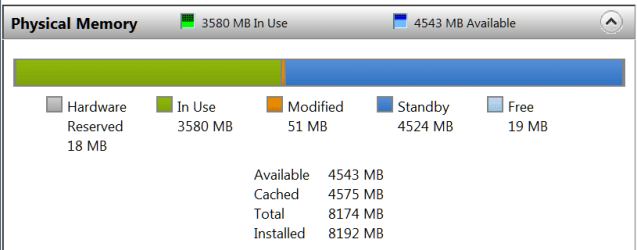
Btw - I would not bother with the RAM. 8GB is ample and that is mostly empty. Check that in Resource Monitor > Memory tab. You will get a picture like this - everything in blue (light or dark) is available RAM):
 

Attachments

  • 2014-12-30_1739.png
    2014-12-30_1739.png
    8 KB · Views: 0

My Computer

Computer Manufacturer/Model Number
HP, Dell, Gateway, Toshiba - 4 laptops and 2 desktops
OS
Vista, Windows7, Mint Mate, Zorin, Windows 8
CPU
from 1.6GHz Duo to i7
Monitor(s) Displays
2x HP w2207
Hard Drives
5x HDD, 7x SSD, 12x Externals
Keyboard
with trackball - no mices
Mouse
Trackball mice
Internet Speed
DSL 6000
Btw - I would not bother with the RAM. 8GB is ample and that is mostly empty. Check that in Resource Monitor > Memory tab. You will get a picture like this - everything in blue (light or dark) is available RAM):

Thank you for your input. I never knew about the Resource Monitor tool, so thanks to you I'm actually learning more. It's interesting when you mention that 8 Gigs of RAM is good enough for today's standards, because you are completely correct. When I tested the "heaviest" game I own (Lords of the Fallen) I still had a good 1100MB of RAM left, and that's with six gigabytes of five year-old RAM hardware, not eight. So, should I then, attribute my slowdowns to bad optimization of high-end games (Lords of the Fallen and Call of Duty: AW both make my PC cry) or just old age of hardware? What's odd is that I - surprisingly enough - can run most recent titles at a brisk pace, often reaching my desired 60 frames per second on the usual medium settings.
 

My Computer

Computer type
PC/Desktop
Computer Manufacturer/Model Number
Custom build
OS
Windows 7 Home Premium 64-bit
CPU
Intel Core i7 920 @ 2.67 GHz
Motherboard
GA EX58-UD3R
Memory
6Gb RAM
Graphics Card(s)
MSI 660Ti OC PE
Monitor(s) Displays
1
Screen Resolution
1680x1050
Hard Drives
SATA MAXTOR STM310003 1TB
Intenso External Harddrive 1TB
PSU
Corsair GS800
Case
Antec Nine Hundred Ultimate
Cooling
Corsair GS800
Keyboard
Labtec Ultra Flat
Mouse
Logitech Proteus Core G502
Internet Speed
n/a
Antivirus
MSE
Browser
Google Chrome & Mozilla Firefox
I know nothing about Games but in terms of RAM you should be OK. The RAM usage in my picture is only so high because I have a virtual machine with Windows 8.1 running besides the Win7 host. Normally I am below 2GB and I am always running a lot of stuff.

Concentrate on the SSD and see how that improves things. You can always consider a RAM upgrade. Here is a tutorial I made that may be useful when you migrate your system to the SSD.

http://www.sevenforums.com/tutorials/149969-ssd-install-transfer-operating-system.html
 

My Computer

Computer Manufacturer/Model Number
HP, Dell, Gateway, Toshiba - 4 laptops and 2 desktops
OS
Vista, Windows7, Mint Mate, Zorin, Windows 8
CPU
from 1.6GHz Duo to i7
Monitor(s) Displays
2x HP w2207
Hard Drives
5x HDD, 7x SSD, 12x Externals
Keyboard
with trackball - no mices
Mouse
Trackball mice
Internet Speed
DSL 6000
Installing a SSD is quite simple you will have no problems do it.

A nice little video on installing a ssd.

Learning Center,Internal SSDs - Newegg.com

Then use whs tutorial and you will be on your way to happy computing.

The only bad news is you be be angry at yourself for not doing it sooner.

WARNING:
SSD's are habit forming.
 

My Computer

Computer type
PC/Desktop
Computer Manufacturer/Model Number
Home made Desktop
OS
Windows 10 Pro. 64/ version 1709 Windows 7 Pro/64
CPU
Intel i7-6800K @ 4.3
Motherboard
ASUS X-99 Deluxe II
Memory
Corsair Platinum 16 gig @2400
Graphics Card(s)
EVGA GTX 1070 OC
Monitor(s) Displays
Asus 27" LED LCD/VE278Q
Screen Resolution
1920-1080 or 1280-720 HDMI
Hard Drives
INTEL SSD 730-240 Gb Sata 3.0/
PSU
EVGA Platium 1200W
Case
Phanteks Luxe Tempered Glass 8 fans/ one radiator
Cooling
XSPC/ Water Cooled CPU
Keyboard
Das 4 Professional
Mouse
Logitech M705/MX Anywhere 2-S
Internet Speed
100 mbits
Antivirus
Microsoft Security Essentials/ Malwarebytes Premium 3.0/ SAS
Browser
I.E. 11 default/Firefox/ ISP Time Warner Cable/Spectrum
Other Info
LG BluRay Burner/
Sound system-KLipsch-THX/
Icy Dock ssd Hot Swap bays.
Hello everyone! I think this is the best place to post these kinds of questions, but if it isn't though, please feel free to move or remove the thread.

The system I have is the one you should see on my profile. I would like to buy a brand new HDD and an SSD. I've heard SSDs can dramatically increase my computer's start-up speed (and for games as well) so I'd like to give it a shot. I've had my eyes on a 1TB Seagate HDD and a Samsung 250 GB SSD. I've noticed in recent games that my small amount of RAM doesn't really cut it anymore, so I'd like to upgrade that too with 16 Gigs of Corsair RAM.

The problem I have is that I'm not savvy with putting computer hardware together: I'm often scared certain hardware components aren't compatible with certain cases or hardware. I'm always afraid it'll break when I try to put it in, even when I know these things are very sturdy. Do you guys think the aforementioned hardware are good upgrades? Should I upgrade anything else? Do I need a new MOBO for the new RAM? Is DDR3 the right stuff for my PC?

Hello DoctorObviously :)

Both the HDD and SSD you mentioned are absolutely the perfect choice as so far I haven't seen any better reviews than a Samsung EVO 840 series SSD Drives and the Seagate 1TB HDD is also great in terms of performance though they are a bit loud under operation and startup's than a WD drives but if you also take a look at WD Black drives they are also a bit noisy as I have experienced using all WD greens, blues and blacks except red one's and I now personally prefer Seagate over WD now ;)

I personally love installing each and every piece of hardware my self and I really suggest you to start playing with your system as well by replacing new devices with old one's and yes you aren't going to damage anything unless you really scratch the thing over them hardly and yes they are sturdy and little bit bumping and pushing ain't gonna hurt anything ;)
 

My Computer

Computer type
PC/Desktop
Computer Manufacturer/Model Number
Self Built
OS
Windows 10 Pro
CPU
Core i5 9600K
Motherboard
ASUS ROG Strix Z390-F Gaming
Memory
Corsair Vengeance Pro 2x 8GB (16GB) 3200MHz DDR4
Graphics Card(s)
MSI GTX 1070 Gaming X 8GB
Sound Card
ASRock A-Style Purity Sound
Monitor(s) Displays
ASUS VX239H IPS
Screen Resolution
1920x1080
Hard Drives
XPG SPECTRIX S40G 2566GB M.2 NVMe | Patriot P210 512GB SSD | Seagate BarraCuda 4TB 5400RPM
PSU
Thermaltake Smart 600w RGB 80Plus
Case
NZXT H500 with 3x Corsair HD120 RGB w/Node Pro
Cooling
Cryorig H7
Keyboard
Corsair K70 RapidFire RGB (Cherry MX Speed)
Mouse
Logitech G402 Hyperion Fury
Internet Speed
20MB Cable Broadband
Browser
Chrome
Other Info
Corsair MM300 Extended Anti-Fray Mouse Pad | Edifier C2 2.1ch Sound System | XBOX One S Controller | XBOX 360 Wireless Controller for Windows | APC SUA1000i Smart-UPS | PS4 Slim 500GB [Region 1 - USA]
Just a quick note regards the RAM, your motherboard is X58 chipset running original first generation i7 cpu
These boards have extra ram slots as they run in triple channel mode unlike almost all other motherboards, this is why you currently have 6gb installed (3x2gb) so keep that in mind if you are going to upgrade
I still have a machine with the exact same cpu and similar Gigabyte mobo you have and I can tell you it is extremely fussy about what ram goes in it and caused me no end of problems when I was building it from incompatible ram modules

I would strongly advise you to thoroughly research this before you consider buying any extra ram, your board can drop back to dual channel mode running pairs of ram sticks instead but make sure you read the mobo manual and check Gigabytes website for the QVL list of ram for your board
 

My Computer

Computer type
PC/Desktop
Computer Manufacturer/Model Number
Pauly Special
OS
Win7 Ultimate X64
CPU
Intel i5 3570K
Motherboard
Gigabyte Z77X-DS3H
Memory
8GB DDR3 1600
Graphics Card(s)
Onboard
Sound Card
Onboard
Screen Resolution
1280x1024
Hard Drives
Samsung 840 Evo SSD (OS)
1TB Spinner (Data)
PSU
800W Arctic
Case
Cooler Master
Cooling
3x120mm Fans
Keyboard
MS Wireless
Mouse
MS Wireless
Internet Speed
20M
Back
Top