
You are using an out of date browser. It may not display this or other websites correctly.
You should upgrade or use an alternative browser.
You should upgrade or use an alternative browser.
Solved adware how to remove
- Thread starter keviny6
- Start date


My Computer
- Computer type
- PC/Desktop
- OS
- Windows 10 Home x64
- CPU
- INTEL Core i5-750 Quad-Core 3.37GHz
- Motherboard
- ASUS P7P55D
- Memory
- HyperX Fury Black Series 8GB (2 x 4GB) 1866Mhz
- Graphics Card(s)
- EVGA GeForce GTX 750 Superclocked 1GB 128-Bit GDDR5
- Monitor(s) Displays
- LG 32MA68HY 32" IPS
- Screen Resolution
- 1920 x 1080
- Hard Drives
- Samsung 840 Evo 120GB, SEAGATE 500GB Barracuda® 7200.12, SATA 3 Gb/s, 7200 RPM, 16MB cache
- PSU
- ANTEC TruePower New TP-550, 80 PLUS, 550W
- Case
- ANTEC Three Hundred Illusion
- Cooling
- COOLER MASTER Hyper 212 Plus, 4 x 120mm 1 x 140mm Noctua's
- Internet Speed
- 85 + Mbps
- Antivirus
- Avast
- Browser
- Vivaldi
any others that are free , this answer wanted me to pay before anything was done , didn't even say how much
My Computer
- Computer type
- PC/Desktop
- Computer Manufacturer/Model Number
- hp
- OS
- 64 bit

Its free.....just click the correct download link.
My Computer
- Computer type
- PC/Desktop
- Computer Manufacturer/Model Number
- Golden Mk. I.4
- OS
- Windows 10 Pro x64 ; Xubuntu x64
- CPU
- Intel i7 860 @ 2.80 GHz O/C'ed to 4.0GHz
- Motherboard
- Gigabyte P55A-UD3R Rev.1. Award BIOS F13
- Memory
- 16GB Corsair Vengance DDR3 @ 661 MHz Dual Channel (9-9-9-24)
- Graphics Card(s)
- EVGA NVidia GTX 560 1024MB
- Sound Card
- Realtek Integrated
- Monitor(s) Displays
- Dual Samsung SyncMaster 2494HS
- Screen Resolution
- 1920*1080 and 1920*1080
- Hard Drives
- 1*Samsung 840 EVO 120GB SSD;
1*OCZ Vertex 2 60GB SSD;
2*Samsung F3 SpinPoint 1TB in RAID0;
1*Samsung F1 SpinPoint 1TB;
2*Western Digital 1TB External USB 3.0
1*Western Digital 500GB External USB 3.0
1*Seagate 500GB External USB 2.0
- PSU
- Thermaltake ToughPower QFan 750W
- Case
- Thermaltake Element S VK60001W2Z
- Cooling
- Corsair H60 Water Cooling, 2*230mm and 2*80mm case fans
- Keyboard
- Logitech G110
- Mouse
- Logitech MX518
Its free.....just click the correct download link.
another one wanted $29 Australian
My Computer
- Computer type
- PC/Desktop
- Computer Manufacturer/Model Number
- hp
- OS
- 64 bit
Your clicking the wrong links...all these programs are free. Follow these: (they will download automatically - do NOT click anything)
Downloading RKill
Downloading AdwCleaner
Downloading RKill
Downloading AdwCleaner
My Computer
- Computer type
- PC/Desktop
- Computer Manufacturer/Model Number
- Golden Mk. I.4
- OS
- Windows 10 Pro x64 ; Xubuntu x64
- CPU
- Intel i7 860 @ 2.80 GHz O/C'ed to 4.0GHz
- Motherboard
- Gigabyte P55A-UD3R Rev.1. Award BIOS F13
- Memory
- 16GB Corsair Vengance DDR3 @ 661 MHz Dual Channel (9-9-9-24)
- Graphics Card(s)
- EVGA NVidia GTX 560 1024MB
- Sound Card
- Realtek Integrated
- Monitor(s) Displays
- Dual Samsung SyncMaster 2494HS
- Screen Resolution
- 1920*1080 and 1920*1080
- Hard Drives
- 1*Samsung 840 EVO 120GB SSD;
1*OCZ Vertex 2 60GB SSD;
2*Samsung F3 SpinPoint 1TB in RAID0;
1*Samsung F1 SpinPoint 1TB;
2*Western Digital 1TB External USB 3.0
1*Western Digital 500GB External USB 3.0
1*Seagate 500GB External USB 2.0
- PSU
- Thermaltake ToughPower QFan 750W
- Case
- Thermaltake Element S VK60001W2Z
- Cooling
- Corsair H60 Water Cooling, 2*230mm and 2*80mm case fans
- Keyboard
- Logitech G110
- Mouse
- Logitech MX518
any others that are free , this answer wanted me to pay before anything was done , didn't even say how much
Huh, there's nothing to pay? Perhaps you were redirected by your malware?
A Guy
My Computer
- Computer type
- PC/Desktop
- OS
- Windows 10 Home x64
- CPU
- INTEL Core i5-750 Quad-Core 3.37GHz
- Motherboard
- ASUS P7P55D
- Memory
- HyperX Fury Black Series 8GB (2 x 4GB) 1866Mhz
- Graphics Card(s)
- EVGA GeForce GTX 750 Superclocked 1GB 128-Bit GDDR5
- Monitor(s) Displays
- LG 32MA68HY 32" IPS
- Screen Resolution
- 1920 x 1080
- Hard Drives
- Samsung 840 Evo 120GB, SEAGATE 500GB Barracuda® 7200.12, SATA 3 Gb/s, 7200 RPM, 16MB cache
- PSU
- ANTEC TruePower New TP-550, 80 PLUS, 550W
- Case
- ANTEC Three Hundred Illusion
- Cooling
- COOLER MASTER Hyper 212 Plus, 4 x 120mm 1 x 140mm Noctua's
- Internet Speed
- 85 + Mbps
- Antivirus
- Avast
- Browser
- Vivaldi
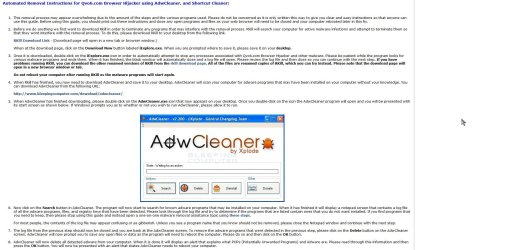
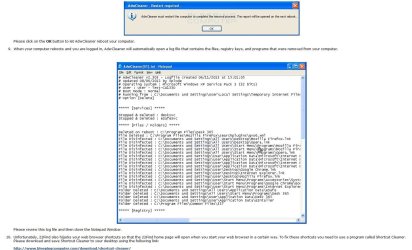
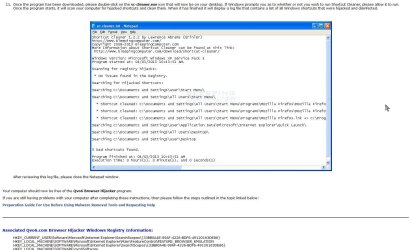
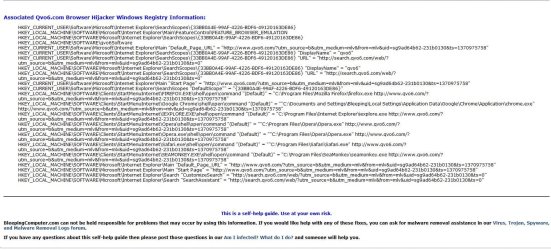
In case you are not seeing the correct page, and are being redirected. Once you have the downloads Golden linked, here are the instructions
A Guy
A Guy
My Computer
- Computer type
- PC/Desktop
- OS
- Windows 10 Home x64
- CPU
- INTEL Core i5-750 Quad-Core 3.37GHz
- Motherboard
- ASUS P7P55D
- Memory
- HyperX Fury Black Series 8GB (2 x 4GB) 1866Mhz
- Graphics Card(s)
- EVGA GeForce GTX 750 Superclocked 1GB 128-Bit GDDR5
- Monitor(s) Displays
- LG 32MA68HY 32" IPS
- Screen Resolution
- 1920 x 1080
- Hard Drives
- Samsung 840 Evo 120GB, SEAGATE 500GB Barracuda® 7200.12, SATA 3 Gb/s, 7200 RPM, 16MB cache
- PSU
- ANTEC TruePower New TP-550, 80 PLUS, 550W
- Case
- ANTEC Three Hundred Illusion
- Cooling
- COOLER MASTER Hyper 212 Plus, 4 x 120mm 1 x 140mm Noctua's
- Internet Speed
- 85 + Mbps
- Antivirus
- Avast
- Browser
- Vivaldi

- Local time
- 4:47 PM
- Messages
- 6,830
Take a look at the link below on a clean PC .
:ar: Remove Qvo6.com virus (Removal Guide)
Use a
 save the applications on the link to the USB drive . Plug the USB drive to the PC with the infection and drag the apps from your flash drive to your Desktop and follow the steps on the above link .
:ar: Remove Qvo6.com virus (Removal Guide)
Use a
My Computer
- Computer Manufacturer/Model Number
- Custom Built
- OS
- Windows 7 Ultimate 32-Bit & Windows 7 Ultimate 64-Bit
- CPU
- Intel Core i7 CPU 950 @ 3.07GHz
- Motherboard
- ASUS P6T DELUXE V2
- Memory
- OCZ 6GB (3 x 2GB) 240-Pin DDR3 SDRAM DDR3 1600 OCZ3X1600R2
- Graphics Card(s)
- ATI Radeon HD 5700 Series
- Sound Card
- OnBoard
- Hard Drives
- WD6400AACS-00M3B0 (640GB SATA )
- PSU
- CORSAIR 850w
- Case
- NZXT LEXA
- Cooling
- Intel Stock Heatsink Fan
- Keyboard
- Microsoft Wireless Laser Keyboard 7000
- Mouse
- Microsoft Wireless Laser Mouse 7000

- Local time
- 4:47 PM
- Messages
- 8,608
This is a direct download from the Author's site : ADWCLEANER DOWNLOAD LINK
This is what Bleeping Computer.com had to say about their download link to AdwCleaner-->
This is what Bleeping Computer.com had to say about their download link to AdwCleaner-->
- Unfortunately, 22Find also hijacks your web browser shortcuts so that the 22Find home page will open when you start your web browser in a certain way. To fix these shortcuts you need to use a program called Shortcut Cleaner. Please download and save Shortcut Cleaner to your desktop using the following link:
http://www.bleepingcomputer.com/download/shortcut-cleaner/- Once the program has been downloaded, please double-click on the sc-cleaner.exe icon that will now be on your desktop. If Windows prompts you as to whether or not you wish to run Shortcut Cleaner, please allow it to run. Once the program starts, it will scan your computer for hijacked shortcuts and clean them. When it has finished it will display a log file that contains a list of all Windows shortcuts that were hijacked and disinfected.
My Computer
- Computer type
- PC/Desktop
- Computer Manufacturer/Model Number
- Bruce ... somewhere in his 40's
- OS
- Windows 7 Ultimate 32bit SP1
- CPU
- Intel(R) Core(TM)2 Quad CPU @ 2.40GHz, 2400 MHz
- Motherboard
- INTEL/D975XBX2
- Memory
- 4 GB
- Graphics Card(s)
- ATI Radeon HD 2600 Pro
- Monitor(s) Displays
- Samsung SyncMaster 914v
- Screen Resolution
- 1280 x 1024
- Hard Drives
- 2/500GB each ... ST3500630AS ATA Device.
One is not connected
- PSU
- Rocketfish 700 W
- Case
- G.Skill Gigabyte Chassis
- Keyboard
- Standard PS/2 Keyboard
- Mouse
- Microsoft PS/2 Mouse
- Internet Speed
- DSL
- Antivirus
- Avira Internet Security
- Browser
- IE 11
- Other Info
- ATI HDMI Audio
This is a direct download from the Author's site : ADWCLEANER DOWNLOAD LINK
This is what Bleeping Computer.com had to say about their download link to AdwCleaner-->
- Unfortunately, 22Find also hijacks your web browser shortcuts so that the 22Find home page will open when you start your web browser in a certain way. To fix these shortcuts you need to use a program called Shortcut Cleaner. Please download and save Shortcut Cleaner to your desktop using the following link:
http://www.bleepingcomputer.com/download/shortcut-cleaner/- Once the program has been downloaded, please double-click on the sc-cleaner.exe icon that will now be on your desktop. If Windows prompts you as to whether or not you wish to run Shortcut Cleaner, please allow it to run. Once the program starts, it will scan your computer for hijacked shortcuts and clean them. When it has finished it will display a log file that contains a list of all Windows shortcuts that were hijacked and disinfected.
shortcut cleaner -----ran that but did not get rid of it
My Computer
- Computer type
- PC/Desktop
- Computer Manufacturer/Model Number
- hp
- OS
- 64 bit
- Local time
- 4:47 PM
- Messages
- 6,830
Right click on each of your Browsers select Properties then on the Shortcut Tab you will see Target what does it say in the box ?
My Computer
- Computer Manufacturer/Model Number
- Custom Built
- OS
- Windows 7 Ultimate 32-Bit & Windows 7 Ultimate 64-Bit
- CPU
- Intel Core i7 CPU 950 @ 3.07GHz
- Motherboard
- ASUS P6T DELUXE V2
- Memory
- OCZ 6GB (3 x 2GB) 240-Pin DDR3 SDRAM DDR3 1600 OCZ3X1600R2
- Graphics Card(s)
- ATI Radeon HD 5700 Series
- Sound Card
- OnBoard
- Hard Drives
- WD6400AACS-00M3B0 (640GB SATA )
- PSU
- CORSAIR 850w
- Case
- NZXT LEXA
- Cooling
- Intel Stock Heatsink Fan
- Keyboard
- Microsoft Wireless Laser Keyboard 7000
- Mouse
- Microsoft Wireless Laser Mouse 7000
thanks to all who helped ---not exactly how I did it shortcut cleaner corrected a fair few things but didn't mention qvo6 as such , hen I downloaded free AVG and ran full scan, it found 6 virus"s and deleted 5 , left me to get the last one , when I went to internet explore found it working ok with no qvo6 taking over .
once again thank you all
once again thank you all
My Computer
- Computer type
- PC/Desktop
- Computer Manufacturer/Model Number
- hp
- OS
- 64 bit
- Local time
- 4:47 PM
- Messages
- 6,830
Run
 Farbar Recovery Scan Tool
64-Bit Version OS Farbar Recovery Scan Tool x64 <===== Download Link
Drag the FRST64.exe from the Downloads folder to your Desktop
Right click on FRST64.exe and choose

When the tool opens click Yes on the disclaimer window .
Press Scan button.
FRST will let you know when the scan is complete and has written the FRST.txt to file
Please upload both logs in your reply.(FRST.txt and Addition.txt)
:note: FRST.txt and Addition.txt will be on the Desktop :note:
Upload a File
Click on the Go Advanced button under the Message box . Scroll down to Additional Options then click on Manage Attachments in the Attach Files sections . Click the Browse button locate the file then click on the Open button . In the Upload File from your Computer section click on the Upload button . Wait until it finishes uploading then close the window . Then click Submit Reply .
64-Bit Version OS Farbar Recovery Scan Tool x64 <===== Download Link
Drag the FRST64.exe from the Downloads folder to your Desktop
Right click on FRST64.exe and choose
When the tool opens click Yes on the disclaimer window .
Press Scan button.
FRST will let you know when the scan is complete and has written the FRST.txt to file
Note
The first time Farbar Recovery Scan Tool is run, it makes also another log Addition.txt
Please upload both logs in your reply.(FRST.txt and Addition.txt)
:note: FRST.txt and Addition.txt will be on the Desktop :note:
Upload a File
Click on the Go Advanced button under the Message box . Scroll down to Additional Options then click on Manage Attachments in the Attach Files sections . Click the Browse button locate the file then click on the Open button . In the Upload File from your Computer section click on the Upload button . Wait until it finishes uploading then close the window . Then click Submit Reply .
My Computer
- Computer Manufacturer/Model Number
- Custom Built
- OS
- Windows 7 Ultimate 32-Bit & Windows 7 Ultimate 64-Bit
- CPU
- Intel Core i7 CPU 950 @ 3.07GHz
- Motherboard
- ASUS P6T DELUXE V2
- Memory
- OCZ 6GB (3 x 2GB) 240-Pin DDR3 SDRAM DDR3 1600 OCZ3X1600R2
- Graphics Card(s)
- ATI Radeon HD 5700 Series
- Sound Card
- OnBoard
- Hard Drives
- WD6400AACS-00M3B0 (640GB SATA )
- PSU
- CORSAIR 850w
- Case
- NZXT LEXA
- Cooling
- Intel Stock Heatsink Fan
- Keyboard
- Microsoft Wireless Laser Keyboard 7000
- Mouse
- Microsoft Wireless Laser Mouse 7000
Similar threads

- Replies
- 0
- Views
- 230


- Replies
- 3
- Views
- 3K

