aero glass problems

feuxfollets

New member
Local time
1:05 AM
Messages
7
I'm having trouble getting aero glass to work in the start menu and taskbar.. it works fine in windows borders however it refuses to work in the start menu/taskbar, which are just a solid shade of gray / dark gray respectively (however the border around the start menu is transparent...)

The built-in troubleshooter doesn't come up with anything. All the settings are correct as far as I can tel; it just doesn't work.

Would appreciate if anyone has a solution to this.
 

My Computer

OS
Windows 7 Home Premium

My Computer

Computer Manufacturer/Model Number
HP M9077c
OS
Windows 7 Home Premium 64bit
CPU
Intel(R)Core(TM)2 quad [email protected] 2.39GHz
Motherboard
ASUSeK
Memory
6GB DDR2 6400
Graphics Card(s)
GeForce 8500/512MB
Sound Card
Realtek High Def Audio
Monitor(s) Displays
HP w2408 LCD 24" widescreen
Screen Resolution
1920x1200
Cooling
6 pack of Bud
Keyboard
MS wireless Inteli
Mouse
MS wireless Inteli
As I said the built-in aero troubleshooter doesn't come up with anything. And there's nothing relevant under tutorials.
 

My Computer

OS
Windows 7 Home Premium

My Computer

Computer Manufacturer/Model Number
HP M9077c
OS
Windows 7 Home Premium 64bit
CPU
Intel(R)Core(TM)2 quad [email protected] 2.39GHz
Motherboard
ASUSeK
Memory
6GB DDR2 6400
Graphics Card(s)
GeForce 8500/512MB
Sound Card
Realtek High Def Audio
Monitor(s) Displays
HP w2408 LCD 24" widescreen
Screen Resolution
1920x1200
Cooling
6 pack of Bud
Keyboard
MS wireless Inteli
Mouse
MS wireless Inteli
Is that the only option now?

It seems to me the windows style may have been set to classic or some other style that doesn't support transparent glass on the right pane of the start menu. However I cannot find such settings anywhere.
 

My Computer

OS
Windows 7 Home Premium
I'm not sure but you have gone into control panel/personalization/and check all items (dark blue print left side) to see if any of those helped correct?
 

My Computer

Computer Manufacturer/Model Number
HP M9077c
OS
Windows 7 Home Premium 64bit
CPU
Intel(R)Core(TM)2 quad [email protected] 2.39GHz
Motherboard
ASUSeK
Memory
6GB DDR2 6400
Graphics Card(s)
GeForce 8500/512MB
Sound Card
Realtek High Def Audio
Monitor(s) Displays
HP w2408 LCD 24" widescreen
Screen Resolution
1920x1200
Cooling
6 pack of Bud
Keyboard
MS wireless Inteli
Mouse
MS wireless Inteli
Was it ever working correctly? If so do a restore back to when it was ok.
If not make sure you back up system, make sure all drives are updated from manufactures site, run AV and have a clean system if and when you do a repair install.
Post back and let us know the outcome.
 

My Computer

Computer Manufacturer/Model Number
HP M9077c
OS
Windows 7 Home Premium 64bit
CPU
Intel(R)Core(TM)2 quad [email protected] 2.39GHz
Motherboard
ASUSeK
Memory
6GB DDR2 6400
Graphics Card(s)
GeForce 8500/512MB
Sound Card
Realtek High Def Audio
Monitor(s) Displays
HP w2408 LCD 24" widescreen
Screen Resolution
1920x1200
Cooling
6 pack of Bud
Keyboard
MS wireless Inteli
Mouse
MS wireless Inteli
Um there's nothing to "check" on the left side, it just says Control Panel Home, Change Desktop Icons, Change mouse pointers, Change your account picture, and at the bottom See also, Display, Taskbar and Start Menu, Ease of Access Center.... and it's not dark blue either?
I've been through all of those options and nothing works.
 

My Computer

OS
Windows 7 Home Premium
Wrong choice of words....check...I meant to click on them and review to see if there was anything there that might help.
 

My Computer

Computer Manufacturer/Model Number
HP M9077c
OS
Windows 7 Home Premium 64bit
CPU
Intel(R)Core(TM)2 quad [email protected] 2.39GHz
Motherboard
ASUSeK
Memory
6GB DDR2 6400
Graphics Card(s)
GeForce 8500/512MB
Sound Card
Realtek High Def Audio
Monitor(s) Displays
HP w2408 LCD 24" widescreen
Screen Resolution
1920x1200
Cooling
6 pack of Bud
Keyboard
MS wireless Inteli
Mouse
MS wireless Inteli
Capture3.PNG

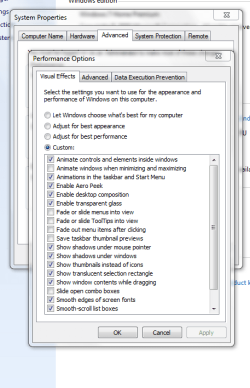
You might look here in Sytems.
 

My Computer

Computer Manufacturer/Model Number
HP M9077c
OS
Windows 7 Home Premium 64bit
CPU
Intel(R)Core(TM)2 quad [email protected] 2.39GHz
Motherboard
ASUSeK
Memory
6GB DDR2 6400
Graphics Card(s)
GeForce 8500/512MB
Sound Card
Realtek High Def Audio
Monitor(s) Displays
HP w2408 LCD 24" widescreen
Screen Resolution
1920x1200
Cooling
6 pack of Bud
Keyboard
MS wireless Inteli
Mouse
MS wireless Inteli
It was working correctly before, I think Starcraft Brood War may have gradually screwed it up or something. Unfortunately I don't have any restore points which work...

And for some reason I CAN'T DO A CLEAN INSTALL... when I boot from a DVD image of windows 7 it says loading files, then shows the windows 7 splash screen, and then the screen goes completely blank and becomes unresponsive (sometimes the mouse pointer flashes for about 0.4 seconds). I submitted this boot issue to hp a few minutes ago.

edit.

I've already looked at that place in systems and checked everything; still doesn't work.

Something strange; when I go to the windows help and support --> customize start menu, the image of the start menu there is completely different from what mine looks like... which makes me think a style or something somewhere was changed. The image has a white background on the left panel with a blueish background on the right panel; however mine is just a solid gray. Also the image has a user icon in the start menu while mine is on the border and hangs halfway out...
 
Last edited:

My Computer

OS
Windows 7 Home Premium
Perhaps you can post an image and show us what you're talking about?

Also since you list no system specs, what video card do you have? That's plays a major role as to whether Aero works or not.

Thanks.
 

My Computer

Computer type
PC/Desktop
Computer Manufacturer/Model Number
Custom built by me.
OS
Windows 10 Pro
CPU
Intel Core i7-4770K (3.5Ghz)
Motherboard
Gigabyte G1 Sniper 5 (F10 Bios)
Memory
32 gig Corsair Dominator Platinum (4x8Gig)
Graphics Card(s)
Sapphire Tri-X R9 Fury
Sound Card
Soundblaster ZXR
Monitor(s) Displays
NEC PA242W 24" LCD Monitor
Screen Resolution
1920 x 1200
Hard Drives
Primary - Samsung 850 Pro (512gig), Samsung 840 Pro (256gig), 2TB WD Caviar Black.
PSU
EVGA Supernova 1000 G2
Case
Cooler Master HAF X
Cooling
Corsair H100i with Corsair Air Series SP120 Quiet Fans
Keyboard
Logitech Wireless Wave
Mouse
Logitech Performance MX
Internet Speed
High Speed Cable
Antivirus
Norton Security
Browser
IE11
Other Info
Memory Timings - 1866MHz @ 9-9-9-27-1T @ 1.5 volts
I'm using an Envy 14. i5 450m, Radeon HD 5650 + Intel HD Graphics (and it doesn't work on either of them), 160GB Intel X25-M, 4GB RAM

I'm uploading pictures and will post them shortly.
 

My Computer

OS
Windows 7 Home Premium
Right click on Desktop>Personalize, choose an Aero Theme (again if necessary) then set up your Desktop Background (slideshow) again and see if it helps.

Test your Memory using memtest86 CD for 5-6 passes. Swap RAM sticks. Test your HD using maker's bootable full diag/repair CD scan: http://www.tacktech.com/display.cfm?ttid=287

Make sure you have the latest BIOS version update. Update video card driver, or reinstall.

Check Event Viewer>Admin view to google repeat errors to solution.

I'd try running the http://www.sevenforums.com/tutorials/3413-repair-install.html?ltr=R next as you can likely fix this while keeping all of your programs, files and settings in place.
 
Back
Top