Aero Peek will not turn off

rosawoodsii

New member
Local time
2:04 AM
Messages
78
Location
midcoast Maine, USA
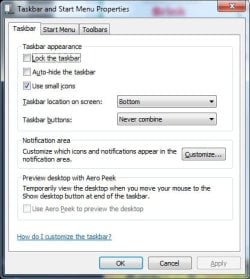
I got a new program, Auslogics Speedboost, and tweaked the computer so that Aero Peek would not work. Instead, it won't shut off. All the settings say "off", but if I go to Start> Properties>Taskbar, "Use Aero Peek ... " is grayed out. I used the registry change download here to turn it off, and even the grayed out box is unchecked now, but I STILL get the previews. HOW do I turn this off once and for all? And yes, I did reboot.
 

My Computer My Computer

Computer type
Laptop
Computer Manufacturer/Model Number
Acer Aspire 5250 Windows 7, HP 15-f272wm Windows 10
OS
Windows 7 Home Premium 64 bit, Windows 10 64 bit
CPU
AMD E-300 APU dual processors with Radion graphiics
Memory
4 GB
Internet Speed
15 Mbps on a good day
Antivirus
Norton Internet Security
Browser
Firefox, Chrome
Hello Rosa,

It may be the way that Auslogics Speedboost set it that is the cause. Try turning it off in all of the options in that same tutorial to see if that may help.
 

My Computer My Computer

Computer type
PC/Desktop
Computer Manufacturer/Model Number
Self built custom
OS
64-bit Windows 11 Pro for Workstations
CPU
Intel i7-8700K OC'd to 5 GHz
Motherboard
ASUS ROG Maximus XI Formula Z390
Memory
64 GB (4x16GB) G.SKILL TridentZ RGB DDR4 3600 MHz
Graphics Card(s)
ASUS ROG-STRIX-GTX1080TI-O11G-GAMING
Sound Card
Integrated
Monitor(s) Displays
2 x Samsung Odyssey G7 27"
Screen Resolution
2560x1440
Hard Drives
1TB Samsung 990 PRO M.2,
4TB Samsung 990 PRO PRO M.2,
TerraMaster F8 SSD Plus NAS
PSU
Seasonic Prime Titanium 850W
Case
Thermaltake Core P3
Cooling
Corsair Hydro H115i
Keyboard
Logitech wireless K800
Mouse
Logitech MX Master 4
Internet Speed
2 Gb/s Download and 100 Mb/s Upload
Antivirus
Malwarebyte Anti-Malware Premium
Browser
Google Chrome
Other Info
Logitech Z625 speaker system,
Logitech BRIO 4K Pro webcam,
HP Color LaserJet Pro MFP M477fdn,
APC SMART-UPS RT 1000 XL - SURT1000XLI,
Galaxy S23 Plus phone
Actually, I already tried that. I turned everything off, then turned everything on, rebooting between times.

What registry settings could cause the option to be grayed out under Taskbar properties? I think that's where I need to start.
 

My Computer My Computer

Computer type
Laptop
Computer Manufacturer/Model Number
Acer Aspire 5250 Windows 7, HP 15-f272wm Windows 10
OS
Windows 7 Home Premium 64 bit, Windows 10 64 bit
CPU
AMD E-300 APU dual processors with Radion graphiics
Memory
4 GB
Internet Speed
15 Mbps on a good day
Antivirus
Norton Internet Security
Browser
Firefox, Chrome
Actually, I already tried that. I turned everything off, then turned everything on, rebooting between times.

What registry settings could cause the option to be grayed out under Taskbar properties? I think that's where I need to start.
Read Brinks post.
Problem may be Speedboost.
 

My Computer My Computer

Computer Manufacturer/Model Number
Hopalong/ Godzilla
OS
Windows7 Pro 64bit SP-1; Windows XP Pro 32bit
CPU
Intel Core i7-870 Lynnfield 2.93GHz LGA 1156 95W Quad-Core
Motherboard
ASUS P7P55D-E PRO
Memory
8GB@1400MHz Crucial Ballistix DDR3-1600 4x2GB
Graphics Card(s)
ASUS ENGTX460 DirectCU/2DI/1GD5 1GB 256-bit GDDR5
Sound Card
VIA Onboard
Monitor(s) Displays
Asus VS248H-P 24"; Samsung SyncMaster 941BW 19"ws
Screen Resolution
1920x1080; 1440x900
Hard Drives
Samsung 830 120GB SSD
Intel 320 120GB SSD
Western Digital Caviar Black WD7501AALS 750GB 7200 RPM SATA 3.0Gb/s
Western Digital Caviar Black WD6401AALS 640GB 7200 RPM SATA 3.0Gb/s
PSU
COOLER MASTER Silent Pro RS850-AMBAJ3-US 850W Modular
Case
COOLER MASTER HAF 932 RC-932-KKN5-GP Black
Cooling
Scythe "Mugen-2 Rev.B" (2 ScytheKaze-Jyuni PWM fans)
Keyboard
Logitech K-320
Mouse
Kensington
Antivirus
Avast Inernet Suite
Browser
IE 9 ; Chrome
Actually, I already tried that. I turned everything off, then turned everything on, rebooting between times.

What registry settings could cause the option to be grayed out under Taskbar properties? I think that's where I need to start.
Read Brinks post.
Problem may be Speedboost.

I did read his post. My reply was to his post.

Even if the problem is the Auslogics program, apparently in order to fix it I need to know where in the registry options are grayed out. Since I am comfortable playing around in the registry, that's a reasonable request.
 

My Computer My Computer

Computer type
Laptop
Computer Manufacturer/Model Number
Acer Aspire 5250 Windows 7, HP 15-f272wm Windows 10
OS
Windows 7 Home Premium 64 bit, Windows 10 64 bit
CPU
AMD E-300 APU dual processors with Radion graphiics
Memory
4 GB
Internet Speed
15 Mbps on a good day
Antivirus
Norton Internet Security
Browser
Firefox, Chrome
Uninstall the Speedboost and see if it works properly.

If it does then the problem is Speedboost and playing with the registry will not help.
 

My Computer My Computer

Computer Manufacturer/Model Number
Hopalong/ Godzilla
OS
Windows7 Pro 64bit SP-1; Windows XP Pro 32bit
CPU
Intel Core i7-870 Lynnfield 2.93GHz LGA 1156 95W Quad-Core
Motherboard
ASUS P7P55D-E PRO
Memory
8GB@1400MHz Crucial Ballistix DDR3-1600 4x2GB
Graphics Card(s)
ASUS ENGTX460 DirectCU/2DI/1GD5 1GB 256-bit GDDR5
Sound Card
VIA Onboard
Monitor(s) Displays
Asus VS248H-P 24"; Samsung SyncMaster 941BW 19"ws
Screen Resolution
1920x1080; 1440x900
Hard Drives
Samsung 830 120GB SSD
Intel 320 120GB SSD
Western Digital Caviar Black WD7501AALS 750GB 7200 RPM SATA 3.0Gb/s
Western Digital Caviar Black WD6401AALS 640GB 7200 RPM SATA 3.0Gb/s
PSU
COOLER MASTER Silent Pro RS850-AMBAJ3-US 850W Modular
Case
COOLER MASTER HAF 932 RC-932-KKN5-GP Black
Cooling
Scythe "Mugen-2 Rev.B" (2 ScytheKaze-Jyuni PWM fans)
Keyboard
Logitech K-320
Mouse
Kensington
Antivirus
Avast Inernet Suite
Browser
IE 9 ; Chrome
I restored all backup files, then uninstalled Auslotics Speedboost, rebooted, and AeroPeek is gone, but the taskbar option under properties is still grayed out AND the box for AeroPeek is checked. Instead of getting the full "peek", when I move my cursor over, say, the browser window icon, a description pops up.

Then I restored a registry backup from before Auslogic installation using ERUNT and still no change, except that I got a lot of error notices while restoring the previous backup--missing files and so forth.

I'm still stumped about how the Aero gray-out change was made, because I know it hasn't always been that way.
 

My Computer My Computer

Computer type
Laptop
Computer Manufacturer/Model Number
Acer Aspire 5250 Windows 7, HP 15-f272wm Windows 10
OS
Windows 7 Home Premium 64 bit, Windows 10 64 bit
CPU
AMD E-300 APU dual processors with Radion graphiics
Memory
4 GB
Internet Speed
15 Mbps on a good day
Antivirus
Norton Internet Security
Browser
Firefox, Chrome
The only suggestion I have is to try sfc /scannow.
This MAY repair the files if it finds the problem.

Option Two- #2. > http://www.sevenforums.com/tutorials/1538-sfc-scannow-command-system-file-checker.html
It has to be run as Administrator or as in tutorial "Elevated command prompt"

When done with the first run or it stops while scanning and says it "can not fix all files" leave the CMD window open and type in the sfc /command again.
Run it up to 3-4 times if it continues to find errors.

You already may know this but if not.
There is a space after "sfc" and the "/scannow". sfc /scannow not sfc/scannow.

Worth a try.
Mike
 

My Computer My Computer

Computer Manufacturer/Model Number
Hopalong/ Godzilla
OS
Windows7 Pro 64bit SP-1; Windows XP Pro 32bit
CPU
Intel Core i7-870 Lynnfield 2.93GHz LGA 1156 95W Quad-Core
Motherboard
ASUS P7P55D-E PRO
Memory
8GB@1400MHz Crucial Ballistix DDR3-1600 4x2GB
Graphics Card(s)
ASUS ENGTX460 DirectCU/2DI/1GD5 1GB 256-bit GDDR5
Sound Card
VIA Onboard
Monitor(s) Displays
Asus VS248H-P 24"; Samsung SyncMaster 941BW 19"ws
Screen Resolution
1920x1080; 1440x900
Hard Drives
Samsung 830 120GB SSD
Intel 320 120GB SSD
Western Digital Caviar Black WD7501AALS 750GB 7200 RPM SATA 3.0Gb/s
Western Digital Caviar Black WD6401AALS 640GB 7200 RPM SATA 3.0Gb/s
PSU
COOLER MASTER Silent Pro RS850-AMBAJ3-US 850W Modular
Case
COOLER MASTER HAF 932 RC-932-KKN5-GP Black
Cooling
Scythe "Mugen-2 Rev.B" (2 ScytheKaze-Jyuni PWM fans)
Keyboard
Logitech K-320
Mouse
Kensington
Antivirus
Avast Inernet Suite
Browser
IE 9 ; Chrome
...but the taskbar option under properties is still grayed out AND the box for AeroPeek is checked. Instead of getting the full "peek", when I move my cursor over, say, the browser window icon, a description pops up.

Rosa,

Could you post a screenshot of this for me to see what the issue may be for this? :)
 

My Computer My Computer

Computer type
PC/Desktop
Computer Manufacturer/Model Number
Self built custom
OS
64-bit Windows 11 Pro for Workstations
CPU
Intel i7-8700K OC'd to 5 GHz
Motherboard
ASUS ROG Maximus XI Formula Z390
Memory
64 GB (4x16GB) G.SKILL TridentZ RGB DDR4 3600 MHz
Graphics Card(s)
ASUS ROG-STRIX-GTX1080TI-O11G-GAMING
Sound Card
Integrated
Monitor(s) Displays
2 x Samsung Odyssey G7 27"
Screen Resolution
2560x1440
Hard Drives
1TB Samsung 990 PRO M.2,
4TB Samsung 990 PRO PRO M.2,
TerraMaster F8 SSD Plus NAS
PSU
Seasonic Prime Titanium 850W
Case
Thermaltake Core P3
Cooling
Corsair Hydro H115i
Keyboard
Logitech wireless K800
Mouse
Logitech MX Master 4
Internet Speed
2 Gb/s Download and 100 Mb/s Upload
Antivirus
Malwarebyte Anti-Malware Premium
Browser
Google Chrome
Other Info
Logitech Z625 speaker system,
Logitech BRIO 4K Pro webcam,
HP Color LaserJet Pro MFP M477fdn,
APC SMART-UPS RT 1000 XL - SURT1000XLI,
Galaxy S23 Plus phone
I went into themes yesterday, and turned everything on, then manually disabled Aero. At the end I still had the grayed out box and Aeropeek was still enabled. I applied the registry fix again, and the grayed-out box is now unchecked, but I still have the peek.

I also checked to see if DWM.exe is running, and it is, and is in automatic mode. Could that be the problem? I hesitate to set the Desktop Windows Manager to disabled, because I don't know what else it will affect, that I may actually want.

I just went into the registry to find where AeroPeek is referenced, and found HKEY_CURRENT_USER\Software\Microsoft\Windows\CurrentVersion\Explorer\VisualEffects\DWMAeroPeekEnabled DefaultApplied REG_DWORD 0x00000001 (1)

Could this be the reason for the strange behavior?
 

Attachments

  • Aeropeek.jpg
    Aeropeek.jpg
    31.4 KB · Views: 15
Last edited:

My Computer My Computer

Computer type
Laptop
Computer Manufacturer/Model Number
Acer Aspire 5250 Windows 7, HP 15-f272wm Windows 10
OS
Windows 7 Home Premium 64 bit, Windows 10 64 bit
CPU
AMD E-300 APU dual processors with Radion graphiics
Memory
4 GB
Internet Speed
15 Mbps on a good day
Antivirus
Norton Internet Security
Browser
Firefox, Chrome
Rosa,

No that registry entry is not the issue. It is pefectly normal for that option in Taskbar properties to be grayed out like that when you have aero peek disabled using the method in either OPTION THREE or OPTION FOUR in the tutorial.

I thought that you has aero peek disabled after uninstalling Aulogics Speedboost. I'm not sure why you tried to disabled it again. Go through each option in the tutorial again to make sure each one is set to disable aero peek to see if that may help.
 

My Computer My Computer

Computer type
PC/Desktop
Computer Manufacturer/Model Number
Self built custom
OS
64-bit Windows 11 Pro for Workstations
CPU
Intel i7-8700K OC'd to 5 GHz
Motherboard
ASUS ROG Maximus XI Formula Z390
Memory
64 GB (4x16GB) G.SKILL TridentZ RGB DDR4 3600 MHz
Graphics Card(s)
ASUS ROG-STRIX-GTX1080TI-O11G-GAMING
Sound Card
Integrated
Monitor(s) Displays
2 x Samsung Odyssey G7 27"
Screen Resolution
2560x1440
Hard Drives
1TB Samsung 990 PRO M.2,
4TB Samsung 990 PRO PRO M.2,
TerraMaster F8 SSD Plus NAS
PSU
Seasonic Prime Titanium 850W
Case
Thermaltake Core P3
Cooling
Corsair Hydro H115i
Keyboard
Logitech wireless K800
Mouse
Logitech MX Master 4
Internet Speed
2 Gb/s Download and 100 Mb/s Upload
Antivirus
Malwarebyte Anti-Malware Premium
Browser
Google Chrome
Other Info
Logitech Z625 speaker system,
Logitech BRIO 4K Pro webcam,
HP Color LaserJet Pro MFP M477fdn,
APC SMART-UPS RT 1000 XL - SURT1000XLI,
Galaxy S23 Plus phone
Rosa,

No that registry entry is not the issue. It is pefectly normal for that option in Taskbar properties to be grayed out like that when you have aero peek disabled using the method in either OPTION THREE or OPTION FOUR in the tutorial.

I thought that you has aero peek disabled after uninstalling Aulogics Speedboost. I'm not sure why you tried to disabled it again. Go through each option in the tutorial again to make sure each one is set to disable aero peek to see if that may help.

The option was grayed out before I disabled it. The gray-out previously showed it checked as active. That was the first place I went to disable it, but wasn't able to.

After I uninstalled auslogics Speedboost, I kept searching for a reason why that option was grayed-out, and since I had uninstalled speedboost, I also had to re-tweak some of the changes I wanted to make, such as no transparency, etc., so I did it manually. When I clicked on themes, AeroPeek reappeared, so I was back to square one, even though it was disabled.

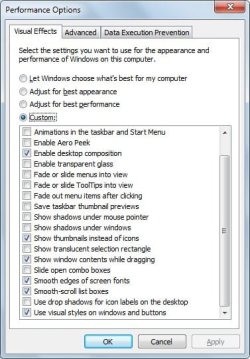
I've attached the settings for visual effects. I've reset this every way to Sunday but I can't seem to get rid of AeroPeek again.
 

Attachments

  • Aeropeek.jpg
    Aeropeek.jpg
    44.4 KB · Views: 11
Last edited:

My Computer My Computer

Computer type
Laptop
Computer Manufacturer/Model Number
Acer Aspire 5250 Windows 7, HP 15-f272wm Windows 10
OS
Windows 7 Home Premium 64 bit, Windows 10 64 bit
CPU
AMD E-300 APU dual processors with Radion graphiics
Memory
4 GB
Internet Speed
15 Mbps on a good day
Antivirus
Norton Internet Security
Browser
Firefox, Chrome
It appears that you may have set it using some other option possibly one in Speedboost. If you have a restore point available, then doing a system restore using a restore point dated before this issue may be able to undo it so that you may be able to disable it afterwards.
 

My Computer My Computer

Computer type
PC/Desktop
Computer Manufacturer/Model Number
Self built custom
OS
64-bit Windows 11 Pro for Workstations
CPU
Intel i7-8700K OC'd to 5 GHz
Motherboard
ASUS ROG Maximus XI Formula Z390
Memory
64 GB (4x16GB) G.SKILL TridentZ RGB DDR4 3600 MHz
Graphics Card(s)
ASUS ROG-STRIX-GTX1080TI-O11G-GAMING
Sound Card
Integrated
Monitor(s) Displays
2 x Samsung Odyssey G7 27"
Screen Resolution
2560x1440
Hard Drives
1TB Samsung 990 PRO M.2,
4TB Samsung 990 PRO PRO M.2,
TerraMaster F8 SSD Plus NAS
PSU
Seasonic Prime Titanium 850W
Case
Thermaltake Core P3
Cooling
Corsair Hydro H115i
Keyboard
Logitech wireless K800
Mouse
Logitech MX Master 4
Internet Speed
2 Gb/s Download and 100 Mb/s Upload
Antivirus
Malwarebyte Anti-Malware Premium
Browser
Google Chrome
Other Info
Logitech Z625 speaker system,
Logitech BRIO 4K Pro webcam,
HP Color LaserJet Pro MFP M477fdn,
APC SMART-UPS RT 1000 XL - SURT1000XLI,
Galaxy S23 Plus phone
Back
Top