
Aero Shake - Enable or Disable

How to Enable or Disable Aero Shake in Windows 7 and Windows 8


   Information
This tutorial will show you how to enable or disable Aero Shake for all or specific users in Windows 7 and Windows 8.

   Warning
Aero Requirements to be Enabled in Windows 7
NOTE: If Aero is not enabled, then Aero Shake will still not work even when enabled or turned on.


  • Aero is not included in Windows 7 Starter or Home Basic, so you must have Windows 7 Home Premium, Professional, Ultimate, or Enterprise installed.
  • 1 GHz 32-bit or 64-bit processor
  • 1 GB of system memory
  • A graphics card with support for DirectX 9 graphics with at least 128 MB of memory.
  • The graphics card must support Pixel Shader 2.0 and the Windows Display Driver Model (WDDM).
  • The Desktop Window Manager Session Manager and Themes Services need to be set as Started and Automatic.
  • You must be have True Color (32 bit) set instead of High Color (16 bit).
  • Desktop composition needs to be enabled (checked) in Visual Effects.
  • Refresh or update your WEI score.


OPTION ONE

To Enable or Disable "Aero Shake" using a REG File

1. Do step 2 or 3 below for what you would like to do.

2. To Enable Aero Shake for All Users
NOTE: This is the default setting. A) Click/tap on the Download button below to download the file below, and go to step 4 below. Enable_Aero_Shake.reg

Download


3. To Disable Aero Shake for All Users A) Click/tap on the Download button below to download the file below, and go to step 4 below. Disable_Aero_Shake.reg

Download


4. Save the .reg file to your desktop.

5. Double click/tap on the downloaded .reg file to merge it.

6. If prompted, click/tap on Run, Yes (UAC), Yes, and OK to approve the merge.

7. Log off and log on, or restart the computer to apply.

8. When done, you can delete the downloaded .reg file if you like.


OPTION TWO

To Enable or Disable "Aero Shake" in Group Policy

1. Open the all users, specific users or groups, or all users except administrators Local Group Policy Editor for how you want this policy applied.

2. In the left pane, click/tap on to expand User Configuration, Administrative Templates, and Desktop. (See screenshot below) GPEDIT-1.jpg
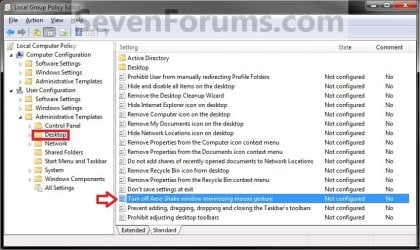
3. In the right pane of Desktop, double click/tap on Turn off Aero Shake window minimizing mouse gesture to edit it. (See screenshot above)

4. Do step 5 or 6 below for what you would like to do.

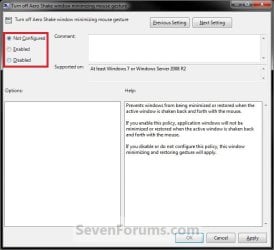
5. To Enable Aero Shake A) Select (dot) either Not Configured or Disabled, and go to step 7 below. (See screenshot below step 7)
NOTE: Not Configured is the default setting.
6. To Disable Aero Shake A) Select (dot) Enabled, and go to step 7 below. (See screenshot below step 7)
7. Click/tap on OK. (See screenshot below) GPEDIT-2.jpg
8. Close the Local Group Policy Editor window.
That's it,
Shawn


Attachments

Last edited:
Why would you want to disable a feature of me? ;)
 

My Computer

Computer Manufacturer/Model Number
HP Pavilion DV6-6090
OS
Windows 7 Ultimate 64-Bit
CPU
Intel Core i7-2630QM 2.0 - 2.9 GHZ
Motherboard
Unknown
Memory
8GB Ram
Graphics Card(s)
AMD Radeon 6770M + Switchable Intel Graphics
Sound Card
Beats Audio
Screen Resolution
1366 x 768
Hard Drives
Laptop Hard Drive: 1TB
FreeAgent Go: 250GB
FreeAgent 2: 1TB
PSU
Stock
Case
Stock
Cooling
Stock
Keyboard
Stock
Mouse
Some generic HP mouse XD
Internet Speed
Download:125Kbps
Other Info
USB 3.0, LED Screen, Fingerprint Reader, Beats Audio 4 Speakers, Blu-Ray Drive.
You're most welcome. :)
 

My Computer

Computer type
PC/Desktop
Computer Manufacturer/Model Number
Self built custom
OS
64-bit Windows 11 Pro for Workstations
CPU
Intel i7-8700K OC'd to 5 GHz
Motherboard
ASUS ROG Maximus XI Formula Z390
Memory
64 GB (4x16GB) G.SKILL TridentZ RGB DDR4 3600 MHz
Graphics Card(s)
ASUS ROG-STRIX-GTX1080TI-O11G-GAMING
Sound Card
Integrated
Monitor(s) Displays
2 x Samsung Odyssey G7 27"
Screen Resolution
2560x1440
Hard Drives
1TB Samsung 990 PRO M.2,
4TB Samsung 990 PRO PRO M.2,
TerraMaster F8 SSD Plus NAS
PSU
Seasonic Prime Titanium 850W
Case
Thermaltake Core P3
Cooling
Corsair Hydro H115i
Keyboard
Logitech wireless K800
Mouse
Logitech MX Master 4
Internet Speed
2 Gb/s Download and 100 Mb/s Upload
Antivirus
Malwarebyte Anti-Malware Premium
Browser
Google Chrome
Other Info
Logitech Z625 speaker system,
Logitech BRIO 4K Pro webcam,
HP Color LaserJet Pro MFP M477fdn,
APC SMART-UPS RT 1000 XL - SURT1000XLI,
Galaxy S23 Plus phone
How is it done with W7 Home Premium ?
 

My Computer

Computer Manufacturer/Model Number
Look in my Signature.
OS
Win7 H.Prem. 32bit+SP1

My Computer

Computer Manufacturer/Model Number
Vostro
OS
Windows 7 Ultimate (SP1)
CPU
AMD Sempron 3600+
Graphics Card(s)
ATI Radeon Xpress 1150
Screen Resolution
1200 x 800
Hard Drives
WD Scorpio Blue 500 GB
It was how to disable I wanted.
 

My Computer

Computer Manufacturer/Model Number
Look in my Signature.
OS
Win7 H.Prem. 32bit+SP1

My Computer

Computer Manufacturer/Model Number
Vostro
OS
Windows 7 Ultimate (SP1)
CPU
AMD Sempron 3600+
Graphics Card(s)
ATI Radeon Xpress 1150
Screen Resolution
1200 x 800
Hard Drives
WD Scorpio Blue 500 GB
It was how to disable I wanted.

You would do either one of the To Disable Aero Shake steps in either OPTION ONE or OPTION TWO to do so. ;)
 

My Computer

Computer type
PC/Desktop
Computer Manufacturer/Model Number
Self built custom
OS
64-bit Windows 11 Pro for Workstations
CPU
Intel i7-8700K OC'd to 5 GHz
Motherboard
ASUS ROG Maximus XI Formula Z390
Memory
64 GB (4x16GB) G.SKILL TridentZ RGB DDR4 3600 MHz
Graphics Card(s)
ASUS ROG-STRIX-GTX1080TI-O11G-GAMING
Sound Card
Integrated
Monitor(s) Displays
2 x Samsung Odyssey G7 27"
Screen Resolution
2560x1440
Hard Drives
1TB Samsung 990 PRO M.2,
4TB Samsung 990 PRO PRO M.2,
TerraMaster F8 SSD Plus NAS
PSU
Seasonic Prime Titanium 850W
Case
Thermaltake Core P3
Cooling
Corsair Hydro H115i
Keyboard
Logitech wireless K800
Mouse
Logitech MX Master 4
Internet Speed
2 Gb/s Download and 100 Mb/s Upload
Antivirus
Malwarebyte Anti-Malware Premium
Browser
Google Chrome
Other Info
Logitech Z625 speaker system,
Logitech BRIO 4K Pro webcam,
HP Color LaserJet Pro MFP M477fdn,
APC SMART-UPS RT 1000 XL - SURT1000XLI,
Galaxy S23 Plus phone
Thank you both, I should have read it better.
 

My Computer

Computer Manufacturer/Model Number
Look in my Signature.
OS
Win7 H.Prem. 32bit+SP1

My Computer

Computer Manufacturer/Model Number
Vostro
OS
Windows 7 Ultimate (SP1)
CPU
AMD Sempron 3600+
Graphics Card(s)
ATI Radeon Xpress 1150
Screen Resolution
1200 x 800
Hard Drives
WD Scorpio Blue 500 GB
No problem George. We're glad to have helped. :)
 

My Computer

Computer type
PC/Desktop
Computer Manufacturer/Model Number
Self built custom
OS
64-bit Windows 11 Pro for Workstations
CPU
Intel i7-8700K OC'd to 5 GHz
Motherboard
ASUS ROG Maximus XI Formula Z390
Memory
64 GB (4x16GB) G.SKILL TridentZ RGB DDR4 3600 MHz
Graphics Card(s)
ASUS ROG-STRIX-GTX1080TI-O11G-GAMING
Sound Card
Integrated
Monitor(s) Displays
2 x Samsung Odyssey G7 27"
Screen Resolution
2560x1440
Hard Drives
1TB Samsung 990 PRO M.2,
4TB Samsung 990 PRO PRO M.2,
TerraMaster F8 SSD Plus NAS
PSU
Seasonic Prime Titanium 850W
Case
Thermaltake Core P3
Cooling
Corsair Hydro H115i
Keyboard
Logitech wireless K800
Mouse
Logitech MX Master 4
Internet Speed
2 Gb/s Download and 100 Mb/s Upload
Antivirus
Malwarebyte Anti-Malware Premium
Browser
Google Chrome
Other Info
Logitech Z625 speaker system,
Logitech BRIO 4K Pro webcam,
HP Color LaserJet Pro MFP M477fdn,
APC SMART-UPS RT 1000 XL - SURT1000XLI,
Galaxy S23 Plus phone
Back
Top