Aero theme disappeared!

Gumgo

New member
Local time
7:00 PM
Messages
10
Hello,
I just recently got a new HP ENVY 15 running Windows 7. Up until yesterday everything was running fine. I believe I compiled a LaTeX document, and a package was missing, so I launched the package manager, and suddenly a message appeared that said that the aero color scheme had been disabled. Since then, I have been unable to reenable the aero glass effect or any of the other fancy features. I doubt LaTeX is what caused the problem, but that's the last thing I was doing at the time.

Since then, I've tried EVERYTHING to try to fix this, and nothing has worked! I've restarted my computer several times. I've closed all programs and disabled all unnecessary processes and tried to reenable aero and that didn't work.

I believe the issue is that for some reason Desktop Composition is disabled, so the Desktop Window Manager isn't working. I tried editing the Composition and CompositionPolicy in the registry - they immediately switch back! I tried doing net stop uxsms followed by net start uxsms, and that didn't work either. I tried updating my drivers but they are already up to date. I tried rerunning the Windows Experience Index which did not do anything.

The event viewer shows some suspicious messages. At about the time where the issue started, an event is listed:

A request to disable the Desktop Window Manager was made by process (Skype)

However, I've tried ending Skype with no results, and also, I had been using Skype for the last few days with no problems. Following that message are numerous of these:

The Desktop Window Manager has exited with code (0x40010004)
The Desktop Window Manager was unable to start because the desktop composition setting is disabled
The Desktop Window Manager has exited with code (0xc00002fe)
The Desktop Window Manager was unable to start because the desktop composition setting is disabled
The Desktop Window Manager has exited with code (0x80070224)

etc.

I've also tried going to control panel > system and security > find and fix problems > appearance and personalization > display aero desktop effects, and running the troubleshooter, but it said that the problem couldn't be detected.

Does anyone have any idea what could be wrong? I've tried every suggestion I can find on the web and nothing has worked.
 

My Computer

Computer Manufacturer/Model Number
HP ENVY 15
OS
Windows 7
CPU
Intel i7 Q720 1.6GHz
Memory
6GB
Graphics Card(s)
ATI Mobility Radeon HD 4830
Have you gone into Services and tried to enable and start the Desktop Window Manager Session Manager there?

EDIT: I have no idea of why Skype disabled it, because I did have Skype until recently, and it never disabled that for me.
 

My Computer

Computer Manufacturer/Model Number
DIY
OS
W7x64 Pro, SuSe 12.1/** W7 x64 Pro, XP MCE
CPU
Phenom II 1090T w/Noctua NH-D14 /**4400+ X2 w/CM Hyper TX 3
Motherboard
ASRock 890FX Deluxe 4/**A8N-SLI
Memory
2 x 2GB Patriot PGS34g1600LLKA/**4x1GB Corsair VS
Graphics Card(s)
EVGA GTX460 SC/**EVGA 8800GTS
Sound Card
Asus Xonar D2X/**Xonar D1
Monitor(s) Displays
Acer X233H, Dell E152FPc /**LG M237-WD
Screen Resolution
1920x1080 & 1024x768/**1980x1080
Hard Drives
WDC 2TB, 1.5TB, 1TB, 500GB,Seagate 500GB , Maxtor 80GB /**500GB Seagate & WDC 1TB Black
PSU
CM RS600 w/ APC BX1000G/**Antec 500 TP w/ APC BX1000
Case
HAF922/**Antec 1040IIB
Cooling
3x200mm, 1x140 and 1x120mm/**5x80mm fans
Keyboard
Logitech Media USB/**Saitek Eclipse
Mouse
Cordless Trackman Wheel/**Ditto
Internet Speed
3.3Mbps
Other Info
SB 560 5.1 w/ Sennheiser RS140/**Creative T20 speakers, Dvico FusionHDTV7 Gold RT, Cisco E3000, HP 5510V AIO, Linksys E3000, Belkin F5U237 hub and **F5D8055 adapter
(** = 2nd rig)
Yep, I tried that... no results though...
 

My Computer

Computer Manufacturer/Model Number
HP ENVY 15
OS
Windows 7
CPU
Intel i7 Q720 1.6GHz
Memory
6GB
Graphics Card(s)
ATI Mobility Radeon HD 4830
If it were me, I would uninstall Skype and then try restarting the service from services again.
 

My Computer

Computer Manufacturer/Model Number
DIY
OS
W7x64 Pro, SuSe 12.1/** W7 x64 Pro, XP MCE
CPU
Phenom II 1090T w/Noctua NH-D14 /**4400+ X2 w/CM Hyper TX 3
Motherboard
ASRock 890FX Deluxe 4/**A8N-SLI
Memory
2 x 2GB Patriot PGS34g1600LLKA/**4x1GB Corsair VS
Graphics Card(s)
EVGA GTX460 SC/**EVGA 8800GTS
Sound Card
Asus Xonar D2X/**Xonar D1
Monitor(s) Displays
Acer X233H, Dell E152FPc /**LG M237-WD
Screen Resolution
1920x1080 & 1024x768/**1980x1080
Hard Drives
WDC 2TB, 1.5TB, 1TB, 500GB,Seagate 500GB , Maxtor 80GB /**500GB Seagate & WDC 1TB Black
PSU
CM RS600 w/ APC BX1000G/**Antec 500 TP w/ APC BX1000
Case
HAF922/**Antec 1040IIB
Cooling
3x200mm, 1x140 and 1x120mm/**5x80mm fans
Keyboard
Logitech Media USB/**Saitek Eclipse
Mouse
Cordless Trackman Wheel/**Ditto
Internet Speed
3.3Mbps
Other Info
SB 560 5.1 w/ Sennheiser RS140/**Creative T20 speakers, Dvico FusionHDTV7 Gold RT, Cisco E3000, HP 5510V AIO, Linksys E3000, Belkin F5U237 hub and **F5D8055 adapter
(** = 2nd rig)
I will try that, though I don't think Skype is the issue. One thing I notice is that if I go to computer > properties > advanced system properties > performance > settings, and I select "custom" and check "Enable Desktop Composition", and then I hit click Okay, when I go back into the settings, "Enable Desktop Composition" is unchecked, as if something is either blocking it, or immediately disabling it! Is there any way to tell what is causing this interference? The event viewer doesn't seem to say.
 

My Computer

Computer Manufacturer/Model Number
HP ENVY 15
OS
Windows 7
CPU
Intel i7 Q720 1.6GHz
Memory
6GB
Graphics Card(s)
ATI Mobility Radeon HD 4830
if all else fails use your installation disc to restore system files.
 

My Computer

Computer Manufacturer/Model Number
Custom
OS
Windows 7 Ultimate Signature Edition
CPU
Intel Core i7 Extreme 3.33GHz
Motherboard
EVGA X-58 SLI Classified
Memory
12GB DDR3
Graphics Card(s)
2x EVGA 285 2GB in SLI
Sound Card
Creative Labs X-Fi ExtremeGamer
Monitor(s) Displays
30" Viewsonic
Hard Drives
2x1TB Western Digital 7200RPM in RAID 0/1TB WD My Book External HDD
PSU
Thermaltake 1000w supporting quad SLI
Case
Thermaltake Armor Full Tower
Cooling
Thermaltake V1 CPU+DIY Liquid cooling
I don't know of any set procedure to diagnose a problem like this, it would just be a matter of trial and error. If it gets to the point that you get tired of it, then valtonray's advise about a system restore may be the best path to take (assuming that you have a restore point available that correlates to a time just prior to the onset of the problem).
 

My Computer

Computer Manufacturer/Model Number
DIY
OS
W7x64 Pro, SuSe 12.1/** W7 x64 Pro, XP MCE
CPU
Phenom II 1090T w/Noctua NH-D14 /**4400+ X2 w/CM Hyper TX 3
Motherboard
ASRock 890FX Deluxe 4/**A8N-SLI
Memory
2 x 2GB Patriot PGS34g1600LLKA/**4x1GB Corsair VS
Graphics Card(s)
EVGA GTX460 SC/**EVGA 8800GTS
Sound Card
Asus Xonar D2X/**Xonar D1
Monitor(s) Displays
Acer X233H, Dell E152FPc /**LG M237-WD
Screen Resolution
1920x1080 & 1024x768/**1980x1080
Hard Drives
WDC 2TB, 1.5TB, 1TB, 500GB,Seagate 500GB , Maxtor 80GB /**500GB Seagate & WDC 1TB Black
PSU
CM RS600 w/ APC BX1000G/**Antec 500 TP w/ APC BX1000
Case
HAF922/**Antec 1040IIB
Cooling
3x200mm, 1x140 and 1x120mm/**5x80mm fans
Keyboard
Logitech Media USB/**Saitek Eclipse
Mouse
Cordless Trackman Wheel/**Ditto
Internet Speed
3.3Mbps
Other Info
SB 560 5.1 w/ Sennheiser RS140/**Creative T20 speakers, Dvico FusionHDTV7 Gold RT, Cisco E3000, HP 5510V AIO, Linksys E3000, Belkin F5U237 hub and **F5D8055 adapter
(** = 2nd rig)
The ENVY 15 doesn't have a CD drive >.<
I'm going to buy an external one soon though, but I'd like to find a fix for this anyway.
 
Last edited by a moderator:

My Computer

Computer Manufacturer/Model Number
HP ENVY 15
OS
Windows 7
CPU
Intel i7 Q720 1.6GHz
Memory
6GB
Graphics Card(s)
ATI Mobility Radeon HD 4830
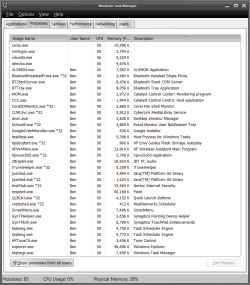
Here are my currently running processes. Anything in this list look suspicious? (I realize there is a Skype thing there - I disabled it, but it didn't have any effect.)
 

Attachments

  • processes.png
    processes.png
    33.8 KB · Views: 411

My Computer

Computer Manufacturer/Model Number
HP ENVY 15
OS
Windows 7
CPU
Intel i7 Q720 1.6GHz
Memory
6GB
Graphics Card(s)
ATI Mobility Radeon HD 4830
It's not that a particular program or process would look more suspicious than another, but scanning down the list, the question rises whether you really need all of those processes on a regular basis? I have no way to know what you do need, so I can make any particular recommendations, except that I doubt that you need 2 x taskengs running, and probably not even one. realsched is something that I would get rid of, along with the Google Crash Handler, the Corel and iTunes helper. I also doubt that you need all of those HP processes along with some others that I don't recognize. The only process that should appear in the Task Manager are those that are system critical or belong to programs that you are currently using.

EDIT: I forgot another that need to go to file 13...justsched.
 

My Computer

Computer Manufacturer/Model Number
DIY
OS
W7x64 Pro, SuSe 12.1/** W7 x64 Pro, XP MCE
CPU
Phenom II 1090T w/Noctua NH-D14 /**4400+ X2 w/CM Hyper TX 3
Motherboard
ASRock 890FX Deluxe 4/**A8N-SLI
Memory
2 x 2GB Patriot PGS34g1600LLKA/**4x1GB Corsair VS
Graphics Card(s)
EVGA GTX460 SC/**EVGA 8800GTS
Sound Card
Asus Xonar D2X/**Xonar D1
Monitor(s) Displays
Acer X233H, Dell E152FPc /**LG M237-WD
Screen Resolution
1920x1080 & 1024x768/**1980x1080
Hard Drives
WDC 2TB, 1.5TB, 1TB, 500GB,Seagate 500GB , Maxtor 80GB /**500GB Seagate & WDC 1TB Black
PSU
CM RS600 w/ APC BX1000G/**Antec 500 TP w/ APC BX1000
Case
HAF922/**Antec 1040IIB
Cooling
3x200mm, 1x140 and 1x120mm/**5x80mm fans
Keyboard
Logitech Media USB/**Saitek Eclipse
Mouse
Cordless Trackman Wheel/**Ditto
Internet Speed
3.3Mbps
Other Info
SB 560 5.1 w/ Sennheiser RS140/**Creative T20 speakers, Dvico FusionHDTV7 Gold RT, Cisco E3000, HP 5510V AIO, Linksys E3000, Belkin F5U237 hub and **F5D8055 adapter
(** = 2nd rig)
The ENVY 15 doesn't have a CD drive >.<
I'm going to buy an external one soon though, but I'd like to find a fix for this anyway.

You don't need a CD drive to do a System Restore. Just type it into the Start Menu's search window and open the wizard and follow it's cues. The second window displays the restore points that are available, so that you can tell if there is one that would be convenient.
 
Last edited by a moderator:

My Computer

Computer Manufacturer/Model Number
DIY
OS
W7x64 Pro, SuSe 12.1/** W7 x64 Pro, XP MCE
CPU
Phenom II 1090T w/Noctua NH-D14 /**4400+ X2 w/CM Hyper TX 3
Motherboard
ASRock 890FX Deluxe 4/**A8N-SLI
Memory
2 x 2GB Patriot PGS34g1600LLKA/**4x1GB Corsair VS
Graphics Card(s)
EVGA GTX460 SC/**EVGA 8800GTS
Sound Card
Asus Xonar D2X/**Xonar D1
Monitor(s) Displays
Acer X233H, Dell E152FPc /**LG M237-WD
Screen Resolution
1920x1080 & 1024x768/**1980x1080
Hard Drives
WDC 2TB, 1.5TB, 1TB, 500GB,Seagate 500GB , Maxtor 80GB /**500GB Seagate & WDC 1TB Black
PSU
CM RS600 w/ APC BX1000G/**Antec 500 TP w/ APC BX1000
Case
HAF922/**Antec 1040IIB
Cooling
3x200mm, 1x140 and 1x120mm/**5x80mm fans
Keyboard
Logitech Media USB/**Saitek Eclipse
Mouse
Cordless Trackman Wheel/**Ditto
Internet Speed
3.3Mbps
Other Info
SB 560 5.1 w/ Sennheiser RS140/**Creative T20 speakers, Dvico FusionHDTV7 Gold RT, Cisco E3000, HP 5510V AIO, Linksys E3000, Belkin F5U237 hub and **F5D8055 adapter
(** = 2nd rig)
I'm probably going to end up formatting the disk and reinstalling Windows 7 from scratch... but I'd still like to find a fix for this, because it is quite irritating.
 

My Computer

Computer Manufacturer/Model Number
HP ENVY 15
OS
Windows 7
CPU
Intel i7 Q720 1.6GHz
Memory
6GB
Graphics Card(s)
ATI Mobility Radeon HD 4830
Your processes are full of crapware - have you cleaned out the rubbish HP put on it, and from your msconfig tab? You can use Autoruns too for the startup entries.
 

My Computer

Computer Manufacturer/Model Number
Sony Vaio Z46GDU
OS
Windows 7 Ultimate x86-64
CPU
[email protected] 1066MHz FSB
Motherboard
Sony branded
Memory
6GB DDR3 1066MHz
Graphics Card(s)
9300M GS 256MB Dedicated (Speed) + Intel4500MHD (Stamina)
Sound Card
Realtek HD Audio
Monitor(s) Displays
13.1' WXGA
Screen Resolution
1600x900
Hard Drives
320GB 7200RPM w/ 16MB cache
Internet Speed
1MB/s
hmm...
I don't know if this helps but, go in the Start Menu then search Aero.

The 3rd entry should be "Find and fix problems with transparency and other visual effects". Click on that entry. Click next. Windows will now search for Aero problems. If it finds some, the window will show the problems. Accept the changes. Report back if it's working or not. :P

(more in depth article here : How to Turn On and Enable Aero in Windows 7 (Enable Aero Peek) My Digital Life )
 

My Computer

Computer type
PC/Desktop
Computer Manufacturer/Model Number
Custom build
OS
Windows 10 Professional 64-bit
CPU
Ryzen 9 5900X
Motherboard
Gigabyte X570 Aorus Master
Memory
G.Skill 3600Mhz CL16 16GB × 4
Graphics Card(s)
EVGA GeForce RTX 3070 Ti FTW3 Ultra Gaming
Sound Card
On-board
Monitor(s) Displays
Dell Alienware AW3418DW
Screen Resolution
3440x1440
Hard Drives
1×Sabrent Rocket 4 Plus 2TB nvme SSD (System, internal)
2x4TB Western Digital Blue (Internal)
1x4TB HDST 7200RPM (Internal)
PSU
Seasonic Focus Plus 850W Platinum
Case
Corsair 680X
Cooling
Stock fans + 3× Corsair QL120, Corsair H100i Platinum
Keyboard
Logitech K350
Mouse
Logitech M510
Internet Speed
120Mbits dl - 20Mbits up
Antivirus
ESET NOD32 Antivirus
Browser
Firefox (latest version)
Other Info
Headphones : Audio-Technica ATH-M50x
Scanner : Canon Canoscan LiDE 220 + Plustek OptiBook 4800
Unfortunately, that did not work, it reports "issue not present" for everything.
 

My Computer

Computer Manufacturer/Model Number
HP ENVY 15
OS
Windows 7
CPU
Intel i7 Q720 1.6GHz
Memory
6GB
Graphics Card(s)
ATI Mobility Radeon HD 4830
Try a sfc /scannow from an elevated command prompt and post back your results
 

My Computer

Computer Manufacturer/Model Number
Compal JFT02 (Custom Build Laptop)
OS
Windows 7 Home Premium x64 - Mac OS X 10.6.4 x64
CPU
Intel Core 2 Duo T9300 2.5 GHz
Motherboard
JFT02
Memory
4GB Kingston DDR2-800
Graphics Card(s)
NVIDIA Geforce 8600M GT (512MB Model)
Sound Card
Realtek HD Audio
Monitor(s) Displays
WUXGA Standard Laptop Display
Screen Resolution
1680*1050
Hard Drives
Toshiba 320GB 5400RPM Laptop HD
PSU
Standard Laptop Power Supply
Case
Standard Laptop Case
Cooling
Standard Laptop Cooling
Keyboard
Standard Laptop 105 Key-Keyboard
Mouse
Synaptics Touchpad
Internet Speed
Verizion Online DSL 3360/864 kbs (dl/up)
I ran sfc /scannow and it returned that it found corrupt files and that they would be repaired when I reboot. It output CBS.log but I seem to be denied access to it (I am the administrator though...).

I'm gonna do a reboot in a sec.

EDIT:
Nope, I rebooted but nothing is different. Should I post the log file? It's around 4 MB...

Any ideas on how to track what is causing Desktop Composition to become disabled immediately, or never become enabled? As in, I check the "Enable Desktop Composition" box and click Okay, and then view the settings again and it is immediately disabled.
 
Last edited:

My Computer

Computer Manufacturer/Model Number
HP ENVY 15
OS
Windows 7
CPU
Intel i7 Q720 1.6GHz
Memory
6GB
Graphics Card(s)
ATI Mobility Radeon HD 4830
Hello,
I just recently got a new HP ENVY 15 running Windows 7. Up until yesterday everything was running fine. I believe I compiled a LaTeX document, and a package was missing, so I launched the package manager, and suddenly a message appeared that said that the aero color scheme had been disabled. Since then, I have been unable to reenable the aero glass effect or any of the other fancy features. I doubt LaTeX is what caused the problem, but that's the last thing I was doing at the time.

Since then, I've tried EVERYTHING to try to fix this, and nothing has worked! I've restarted my computer several times. I've closed all programs and disabled all unnecessary processes and tried to reenable aero and that didn't work.

I believe the issue is that for some reason Desktop Composition is disabled, so the Desktop Window Manager isn't working. I tried editing the Composition and CompositionPolicy in the registry - they immediately switch back! I tried doing net stop uxsms followed by net start uxsms, and that didn't work either. I tried updating my drivers but they are already up to date. I tried rerunning the Windows Experience Index which did not do anything.

The event viewer shows some suspicious messages. At about the time where the issue started, an event is listed:

A request to disable the Desktop Window Manager was made by process (Skype)

However, I've tried ending Skype with no results, and also, I had been using Skype for the last few days with no problems. Following that message are numerous of these:

The Desktop Window Manager has exited with code (0x40010004)
The Desktop Window Manager was unable to start because the desktop composition setting is disabled
The Desktop Window Manager has exited with code (0xc00002fe)
The Desktop Window Manager was unable to start because the desktop composition setting is disabled
The Desktop Window Manager has exited with code (0x80070224)

etc.

I've also tried going to control panel > system and security > find and fix problems > appearance and personalization > display aero desktop effects, and running the troubleshooter, but it said that the problem couldn't be detected.

Does anyone have any idea what could be wrong? I've tried every suggestion I can find on the web and nothing has worked.

Why not use System Restore to go back before the problem happened?
 

My Computer

Computer Manufacturer/Model Number
Custom
OS
Windows 7 Ultimate RTM (Technet)
CPU
3.00 gigahertz Intel Core2 Duo E8400
Motherboard
ASUSTeK Computer INC. P5K/EPU Rev 1.xx
Memory
4GB
Graphics Card(s)
ATI Radeon X1950 Pro
Sound Card
Built in HD Audio
Monitor(s) Displays
22" Gateway LCD
Screen Resolution
1920 x 1200
Hard Drives
ST3160023A [Hard drive] (160.04 GB) -- drive 0, rev 8.01, ST3500630AS [Hard drive] (500.11 GB) -- drive 2, rev 3.AAK
ST3500630AS [Hard drive] (500.11 GB) -- drive 1, rev 3.AAK
Keyboard
Logitech G11
Mouse
Microsoft Wireless Laser Mouse 5000
Internet Speed
13.44 Mbps
Well, I did a system restore, which "worked" I suppose... still don't love the idea of this being the only solution, but whatever... I'm probably going to reinstall windows without all the HP stuff pretty soon anyway, once I get a CD drive.
 

My Computer

Computer Manufacturer/Model Number
HP ENVY 15
OS
Windows 7
CPU
Intel i7 Q720 1.6GHz
Memory
6GB
Graphics Card(s)
ATI Mobility Radeon HD 4830
Never mind. System restore worked for a little bit, but only restored the transparency effects and such, and flip 3d, not the actual look of the windows.

And just now I tried switching back to basic and then back to aero, and the same problem occurred. So it seems that it ins't a program causing this, but rather there's a bug which prevents ever returning to aero!
 

My Computer

Computer Manufacturer/Model Number
HP ENVY 15
OS
Windows 7
CPU
Intel i7 Q720 1.6GHz
Memory
6GB
Graphics Card(s)
ATI Mobility Radeon HD 4830
Back
Top