aero transparency

hondavee4

New member
Local time
12:39 AM
Messages
21
hello guys, found you by chance this morning so this is my 1st post:)

ive just built my 1st pc and have installed win7 64 bit which seems to work very wel

didnt really know what aero transparency is but i occured to me mine wasnt working correctly, so i downloaded the driver again for my graphic card (ATI Radeon HD 4850) installed it and presto, it was so much better

but i have to install this driver everytime i reboot cos it reverts back to how it was

ive searched quite a bit through google but nothing i see remedies this

ive ran the aero trouble shooter and it says windows desktop manager is disabled and the problem has now been corrected, but it hasnt

the only way to get aero back is to reinstall the driver

one guy on another forum (where i bought my kit from) suggested i did this

I would do the old gem of uninstalling the drivers, rebooting into safe mode and then running Driver Sweeper.

Once you have done that reboot and do a fresh install of the drivers and see if that has done anything to help matters.

i thought that had cured the problem because after the final boot it was up and running...but later i booted again and it was back as it was

driving me nuts this is :shock:

anyone got any ideas?
 
Last edited:

My Computer

OS
Windows 7 Home Premium
CPU
AMD Phenom II x4 955 3.2 GHz
Motherboard
Gigabyte GA-MA770-UD3 AMD 770 (Socket AM3/AM2+) PCI-Express
Memory
4.00 GB
Graphics Card(s)
ATI Radeon HD 4850
Monitor(s) Displays
Samsung T220
Hard Drives
2 x 1TB WD10EADS
PSU
Be Quiet! Straight Power 650W Power Supply
Case
Cooler Master Elite 335
It could be Malware on the system, especially if just installed stuff.

Scan with Malwarebytes.

Or it could be from some service installed. Maybe antivirus or firewall. If you have AVG, definitely start by uninstalling that. Or any antivirus should be uninstalled to test.
 

My Computer

Computer Manufacturer/Model Number
self built
OS
7600.20510 x86
CPU
P4 550 3.4 GHz HT running at 3.5 GHz
Motherboard
MSI PM8M3-V (MS-7211 v1.x) Micro-ATX mainboard
Memory
OCZ 2 GB(2x1GB) DDR400mHz running @ 414 mHz
Graphics Card(s)
HIS Radeon HD 3850 IceQ 3 Turbo HDMI Dual DL-DVI AGP
Sound Card
MOTU Traveler firewire studio interface 192 kHz 24 bit
Monitor(s) Displays
22" widescreen Acer X223W LCD, 17" Compaq P75 CRT
Screen Resolution
1680x1050 and 1280x1024
Hard Drives
SATA I x2 WD, 400 GB and 120 GB, SATA 2 WD Caviar Black 1 TB
PSU
350W generic
Case
Cybertronpc, it glows blue
Cooling
stock cpu fan, Ice-Q 3 gpu and system, many case fans
Keyboard
Logitch Classical Keyboard 200
Mouse
Logitech Mediaplay cordless
Internet Speed
1792/448 kbits/sec
Other Info
SATA II PCI fake RAID adapter, 1 GB Readyboost, original ATI Remote Wonder (even works with WMC perfectly), Logitech Rumblepad 2 game controller x2
hi, cheers for that, will give malwarebytes a go,

i am using avast antivirus at the mo
 

My Computer

OS
Windows 7 Home Premium
CPU
AMD Phenom II x4 955 3.2 GHz
Motherboard
Gigabyte GA-MA770-UD3 AMD 770 (Socket AM3/AM2+) PCI-Express
Memory
4.00 GB
Graphics Card(s)
ATI Radeon HD 4850
Monitor(s) Displays
Samsung T220
Hard Drives
2 x 1TB WD10EADS
PSU
Be Quiet! Straight Power 650W Power Supply
Case
Cooler Master Elite 335
Have you had a look at Windows Update, to see if it offers a driver for your GFX card? Maybe it needs a WDDM driver?

Just a thought.
 

My Computer

Computer Manufacturer/Model Number
Custom Build
OS
W7 RTM Ultimate x64
CPU
Intel Q8400 @ 2.66GHZ
Motherboard
Gigabyte GA-EG45M-UD2H
Memory
4GB DDR2-800
Graphics Card(s)
Gainward GTS 450 GLH 1GB Edition
Sound Card
Integrated 8 Channel
Monitor(s) Displays
AOC 23.6 Inch Widescreen LCD
Screen Resolution
1920x1080
Hard Drives
Seagate 500GB Internal
Western Digital 1TB Internal

Hitachi 1TB External
PSU
Apevia Java Power 500W
Case
Cooler Master HAF 922 Black
Cooling
Stock Intel CPU Fan
Keyboard
HP SK-2960 Multimedia Keyboard
Mouse
Logitech M350 Wireless Gaming Mouse
Internet Speed
1.5MB
Have you had a look at Windows Update, to see if it offers a driver for your GFX card? Maybe it needs a WDDM driver?

Just a thought.

WU is the worst for video card drivers. Quickest way to harm a system - software speaking that is.

Always NVIDIA or ATI for video drivers.
 

My Computer

Computer Manufacturer/Model Number
self built
OS
7600.20510 x86
CPU
P4 550 3.4 GHz HT running at 3.5 GHz
Motherboard
MSI PM8M3-V (MS-7211 v1.x) Micro-ATX mainboard
Memory
OCZ 2 GB(2x1GB) DDR400mHz running @ 414 mHz
Graphics Card(s)
HIS Radeon HD 3850 IceQ 3 Turbo HDMI Dual DL-DVI AGP
Sound Card
MOTU Traveler firewire studio interface 192 kHz 24 bit
Monitor(s) Displays
22" widescreen Acer X223W LCD, 17" Compaq P75 CRT
Screen Resolution
1680x1050 and 1280x1024
Hard Drives
SATA I x2 WD, 400 GB and 120 GB, SATA 2 WD Caviar Black 1 TB
PSU
350W generic
Case
Cybertronpc, it glows blue
Cooling
stock cpu fan, Ice-Q 3 gpu and system, many case fans
Keyboard
Logitch Classical Keyboard 200
Mouse
Logitech Mediaplay cordless
Internet Speed
1792/448 kbits/sec
Other Info
SATA II PCI fake RAID adapter, 1 GB Readyboost, original ATI Remote Wonder (even works with WMC perfectly), Logitech Rumblepad 2 game controller x2
right, things aint going to well at the mo..


ive ran malwarebytes and this is the log

Malwarebytes' Anti-Malware 1.41
Database version: 3260
Windows 6.1.7600
30/11/2009 10:36:12
mbam-log-2009-11-30 (10-36-12).txt
Scan type: Quick Scan
Objects scanned: 91246
Time elapsed: 1 minute(s), 53 second(s)
Memory Processes Infected: 0
Memory Modules Infected: 0
Registry Keys Infected: 0
Registry Values Infected: 0
Registry Data Items Infected: 1
Folders Infected: 0
Files Infected: 1
Memory Processes Infected:
(No malicious items detected)
Memory Modules Infected:
(No malicious items detected)
Registry Keys Infected:
(No malicious items detected)
Registry Values Infected:
(No malicious items detected)
Registry Data Items Infected:
HKEY_LOCAL_MACHINE\SOFTWARE\Microsoft\Windows\CurrentVersion\Policies\Explorer\NoActiveDesktopChanges (Hijack.DisplayProperties) -> Bad: (1) Good: (0) -> Quarantined and deleted successfully.
Folders Infected:
(No malicious items detected)
Files Infected:
C:\Users\Lee\Local Settings\Temporary Internet Files\Silverlight.exe (Trojan.Agent) -> Quarantined and deleted successfully.


so i then removed the old driver and ran driver sweeper and then tried to install the catalyst

everytime it stop saying it couldnt find the inf file

so i tried it via safe mode and that threw up a different error

so at the mo i havnt got any gpu drivers running whatsoever and as you can imagine its not too pretty to look at:(
 

My Computer

OS
Windows 7 Home Premium
CPU
AMD Phenom II x4 955 3.2 GHz
Motherboard
Gigabyte GA-MA770-UD3 AMD 770 (Socket AM3/AM2+) PCI-Express
Memory
4.00 GB
Graphics Card(s)
ATI Radeon HD 4850
Monitor(s) Displays
Samsung T220
Hard Drives
2 x 1TB WD10EADS
PSU
Be Quiet! Straight Power 650W Power Supply
Case
Cooler Master Elite 335

My Computer

Computer Manufacturer/Model Number
self built
OS
7600.20510 x86
CPU
P4 550 3.4 GHz HT running at 3.5 GHz
Motherboard
MSI PM8M3-V (MS-7211 v1.x) Micro-ATX mainboard
Memory
OCZ 2 GB(2x1GB) DDR400mHz running @ 414 mHz
Graphics Card(s)
HIS Radeon HD 3850 IceQ 3 Turbo HDMI Dual DL-DVI AGP
Sound Card
MOTU Traveler firewire studio interface 192 kHz 24 bit
Monitor(s) Displays
22" widescreen Acer X223W LCD, 17" Compaq P75 CRT
Screen Resolution
1680x1050 and 1280x1024
Hard Drives
SATA I x2 WD, 400 GB and 120 GB, SATA 2 WD Caviar Black 1 TB
PSU
350W generic
Case
Cybertronpc, it glows blue
Cooling
stock cpu fan, Ice-Q 3 gpu and system, many case fans
Keyboard
Logitch Classical Keyboard 200
Mouse
Logitech Mediaplay cordless
Internet Speed
1792/448 kbits/sec
Other Info
SATA II PCI fake RAID adapter, 1 GB Readyboost, original ATI Remote Wonder (even works with WMC perfectly), Logitech Rumblepad 2 game controller x2
hi ive just read that, ive downloaded the drivers from the sticky, ive ran that and it rebooted and the aero is working...

the big test is now as up to now the next time i boot it goes back to normal...
 

My Computer

OS
Windows 7 Home Premium
CPU
AMD Phenom II x4 955 3.2 GHz
Motherboard
Gigabyte GA-MA770-UD3 AMD 770 (Socket AM3/AM2+) PCI-Express
Memory
4.00 GB
Graphics Card(s)
ATI Radeon HD 4850
Monitor(s) Displays
Samsung T220
Hard Drives
2 x 1TB WD10EADS
PSU
Be Quiet! Straight Power 650W Power Supply
Case
Cooler Master Elite 335
ok, it didnt work, ive rebooted and its how it was before

no aero and no transparency:(
 

My Computer

OS
Windows 7 Home Premium
CPU
AMD Phenom II x4 955 3.2 GHz
Motherboard
Gigabyte GA-MA770-UD3 AMD 770 (Socket AM3/AM2+) PCI-Express
Memory
4.00 GB
Graphics Card(s)
ATI Radeon HD 4850
Monitor(s) Displays
Samsung T220
Hard Drives
2 x 1TB WD10EADS
PSU
Be Quiet! Straight Power 650W Power Supply
Case
Cooler Master Elite 335
Type msinfo32 in the start menu, hit enter. Use ctrl+s on the screen that opens. Zip or rar the saved file and attach to a post using the paperclip.

I'll probably be able to see why you're having troubles.
 

My Computer

Computer Manufacturer/Model Number
self built
OS
7600.20510 x86
CPU
P4 550 3.4 GHz HT running at 3.5 GHz
Motherboard
MSI PM8M3-V (MS-7211 v1.x) Micro-ATX mainboard
Memory
OCZ 2 GB(2x1GB) DDR400mHz running @ 414 mHz
Graphics Card(s)
HIS Radeon HD 3850 IceQ 3 Turbo HDMI Dual DL-DVI AGP
Sound Card
MOTU Traveler firewire studio interface 192 kHz 24 bit
Monitor(s) Displays
22" widescreen Acer X223W LCD, 17" Compaq P75 CRT
Screen Resolution
1680x1050 and 1280x1024
Hard Drives
SATA I x2 WD, 400 GB and 120 GB, SATA 2 WD Caviar Black 1 TB
PSU
350W generic
Case
Cybertronpc, it glows blue
Cooling
stock cpu fan, Ice-Q 3 gpu and system, many case fans
Keyboard
Logitch Classical Keyboard 200
Mouse
Logitech Mediaplay cordless
Internet Speed
1792/448 kbits/sec
Other Info
SATA II PCI fake RAID adapter, 1 GB Readyboost, original ATI Remote Wonder (even works with WMC perfectly), Logitech Rumblepad 2 game controller x2
cheers, hope ive done that right
 

Attachments

My Computer

OS
Windows 7 Home Premium
CPU
AMD Phenom II x4 955 3.2 GHz
Motherboard
Gigabyte GA-MA770-UD3 AMD 770 (Socket AM3/AM2+) PCI-Express
Memory
4.00 GB
Graphics Card(s)
ATI Radeon HD 4850
Monitor(s) Displays
Samsung T220
Hard Drives
2 x 1TB WD10EADS
PSU
Be Quiet! Straight Power 650W Power Supply
Case
Cooler Master Elite 335
Alright. I see.

Start menu | All Programs | Startup folder

Delete:

Adobe Gamma
Logitech . Product Registration
LightScribe Control Panel
Asus Smart Doctor
Microsoft Office
NCProTray
Bluebirds <<< likely the cause ...uninstall this recommended...it's Adware

Reboot.

You also have many services starting with the PC that aren't needed. If the above doesn't fix it let me know. It could also be your Avast but probably not.
 

My Computer

Computer Manufacturer/Model Number
self built
OS
7600.20510 x86
CPU
P4 550 3.4 GHz HT running at 3.5 GHz
Motherboard
MSI PM8M3-V (MS-7211 v1.x) Micro-ATX mainboard
Memory
OCZ 2 GB(2x1GB) DDR400mHz running @ 414 mHz
Graphics Card(s)
HIS Radeon HD 3850 IceQ 3 Turbo HDMI Dual DL-DVI AGP
Sound Card
MOTU Traveler firewire studio interface 192 kHz 24 bit
Monitor(s) Displays
22" widescreen Acer X223W LCD, 17" Compaq P75 CRT
Screen Resolution
1680x1050 and 1280x1024
Hard Drives
SATA I x2 WD, 400 GB and 120 GB, SATA 2 WD Caviar Black 1 TB
PSU
350W generic
Case
Cybertronpc, it glows blue
Cooling
stock cpu fan, Ice-Q 3 gpu and system, many case fans
Keyboard
Logitch Classical Keyboard 200
Mouse
Logitech Mediaplay cordless
Internet Speed
1792/448 kbits/sec
Other Info
SATA II PCI fake RAID adapter, 1 GB Readyboost, original ATI Remote Wonder (even works with WMC perfectly), Logitech Rumblepad 2 game controller x2
sorry, do you mean remove shortcut?

or actually open startup folder..
 

My Computer

OS
Windows 7 Home Premium
CPU
AMD Phenom II x4 955 3.2 GHz
Motherboard
Gigabyte GA-MA770-UD3 AMD 770 (Socket AM3/AM2+) PCI-Express
Memory
4.00 GB
Graphics Card(s)
ATI Radeon HD 4850
Monitor(s) Displays
Samsung T220
Hard Drives
2 x 1TB WD10EADS
PSU
Be Quiet! Straight Power 650W Power Supply
Case
Cooler Master Elite 335
Go to the startup folder on the start menu how I said. Delete the shortcuts there I listed and then reboot.

Before reboot though, you should uninstall Bluebird.
 

My Computer

Computer Manufacturer/Model Number
self built
OS
7600.20510 x86
CPU
P4 550 3.4 GHz HT running at 3.5 GHz
Motherboard
MSI PM8M3-V (MS-7211 v1.x) Micro-ATX mainboard
Memory
OCZ 2 GB(2x1GB) DDR400mHz running @ 414 mHz
Graphics Card(s)
HIS Radeon HD 3850 IceQ 3 Turbo HDMI Dual DL-DVI AGP
Sound Card
MOTU Traveler firewire studio interface 192 kHz 24 bit
Monitor(s) Displays
22" widescreen Acer X223W LCD, 17" Compaq P75 CRT
Screen Resolution
1680x1050 and 1280x1024
Hard Drives
SATA I x2 WD, 400 GB and 120 GB, SATA 2 WD Caviar Black 1 TB
PSU
350W generic
Case
Cybertronpc, it glows blue
Cooling
stock cpu fan, Ice-Q 3 gpu and system, many case fans
Keyboard
Logitch Classical Keyboard 200
Mouse
Logitech Mediaplay cordless
Internet Speed
1792/448 kbits/sec
Other Info
SATA II PCI fake RAID adapter, 1 GB Readyboost, original ATI Remote Wonder (even works with WMC perfectly), Logitech Rumblepad 2 game controller x2
ok ive done all that except LightScribe Control Panel & Asus Smart Doctor as they wasnt in my startup folder...going to reboot now
 

My Computer

OS
Windows 7 Home Premium
CPU
AMD Phenom II x4 955 3.2 GHz
Motherboard
Gigabyte GA-MA770-UD3 AMD 770 (Socket AM3/AM2+) PCI-Express
Memory
4.00 GB
Graphics Card(s)
ATI Radeon HD 4850
Monitor(s) Displays
Samsung T220
Hard Drives
2 x 1TB WD10EADS
PSU
Be Quiet! Straight Power 650W Power Supply
Case
Cooler Master Elite 335
Hello Hondavee4,

Welcome to 7 Forums.

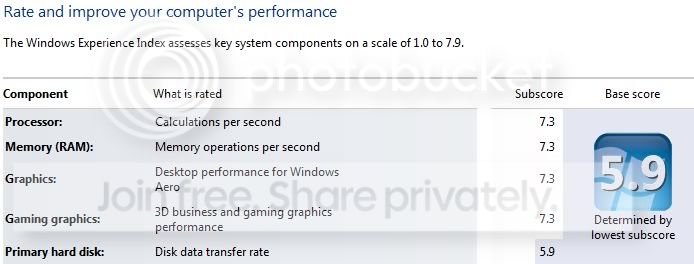
Just a thought. Have you run the WEI (Windows Experience Index) yet. Control Panel\All Control Panel Items\Performance Information and Tools. Windows uses this to determine that your comp is capable of aero.

Gary
 

My Computer

Computer Manufacturer/Model Number
Dell XPS420
OS
Vista Ult 64 bit Seven Ult RTM x64
CPU
Intel Core2 Quad Q6600 2.40 gigahertz
Memory
Crucial Ballistix 4x2GB PC2 6400
Graphics Card(s)
NVIDIA GeForce 8600 GTS 256 MB
Sound Card
Creative SB X-Fi audio
Monitor(s) Displays
HP w2207 + HPvs15
Screen Resolution
1680x1050 + 1024x768
Hard Drives
2-WD5000AAKS-500 GB
WD5000AAV-500 GB external
Keyboard
Microsoft Comfort Curve
Mouse
MX Revolution
Other Info
Wacom Intuos 2 Graphics Tablet
Experience Index=5.5
hello gary, yes mate it was one of the 1st things i did

performance.jpg


ive done it a few times since, last time it detected "a new hardware" but there wasnt anything new

ive done the above steps, reinstalled driver, rebooted and ....back to how it was before:(
 

My Computer

OS
Windows 7 Home Premium
CPU
AMD Phenom II x4 955 3.2 GHz
Motherboard
Gigabyte GA-MA770-UD3 AMD 770 (Socket AM3/AM2+) PCI-Express
Memory
4.00 GB
Graphics Card(s)
ATI Radeon HD 4850
Monitor(s) Displays
Samsung T220
Hard Drives
2 x 1TB WD10EADS
PSU
Be Quiet! Straight Power 650W Power Supply
Case
Cooler Master Elite 335
ive gone into msconfig and disabled everything in the startup except the operating system (i guess this was kinda important)

but install driver and reboot its exactly the same

http://www.youtube.com/watch?v=06ZmzsyT8WI


this was taken yesterday but its no different:(
 

My Computer

OS
Windows 7 Home Premium
CPU
AMD Phenom II x4 955 3.2 GHz
Motherboard
Gigabyte GA-MA770-UD3 AMD 770 (Socket AM3/AM2+) PCI-Express
Memory
4.00 GB
Graphics Card(s)
ATI Radeon HD 4850
Monitor(s) Displays
Samsung T220
Hard Drives
2 x 1TB WD10EADS
PSU
Be Quiet! Straight Power 650W Power Supply
Case
Cooler Master Elite 335
Don't know if this will help but go to control panel/personalization, select the color option at bottom of screen, make sure you have ck'd Enable transparency, clk on advanced settings and notice that it says aero and transparency will not work if you haven't selected a windows theme. hit the back button until you get back to the first personalization screen up top it will say unsaved theme clk on the save theme over at the right side. this worked for me. also aero will not work for any windows 7 version below home premium.
P.S. also ck control panel/performance info and tools/ adjust visual effects. check let windows decide whats best but make sure
Enable glass transparency and Enable Aero peek options are both checked
 

My Computer

OS
dual boot vista 64 ultimate and windows 7
is the "desktop windows manager " in services
set to automatic rather than manual?

or try stopping the service and then start the service again and see if you get any errors when you re-enable it
 

My Computer

OS
7 RTM 64bit
CPU
AMD Phenom 965 B3
Motherboard
ASUS M3A79-T DELUXE
Memory
Corsair 4GB (2x2GB) DDR2 800MHz/PC2-6400 XMS2 Memory Kit CL5
Graphics Card(s)
PowerColour HD 5770 CF 16x-16x
Monitor(s) Displays
32"
Screen Resolution
1920-1080
Hard Drives
Hitachi

1tb 7200rpm
PSU
Be Quiet Straight Power 650wat
Case
Asus TA-M series
Cooling
CoolIT Eco ALC Water Cooling System
Keyboard
Microsoft wireless Keyboard
Mouse
Microsoft wireless mouse
Back
Top