All Browsers Crashing Randomly

I ran SpyHunter in safe mode and it found this:

Quick-Seeker.com (1 infection)
Description: "It uses misleading practises to hijack your browser search results and another internet settings. Once installed Quick-Seeker.com may lock your settings to their servers and may intercept and track your web searches and other data"

i removed it and for 10 hours i thought everything fixed, no crashes. Just before few minutes start again crashes, i run again spyhunter and i see again the same infection from Quick-Seeker.com.

I will remove it again but surprise me that after 1st removal it appeared again.
 

My Computer My Computer

Computer type
Laptop
Computer Manufacturer/Model Number
Asus
OS
Microsoft Windows 7 Home Premium 64-bit 7601 Multiprocessor Free Service Pack 1
CPU
Intel(R) Core(TM) i3-2310M CPU @ 2.10GHz
Motherboard
ASUSTeK Computer Inc. K53SJ
Memory
4.00 GB
Graphics Card(s)
(1) Intel(R) HD Graphics 3000 (2) NVIDIA GeForce GT 520M
Sound Card
(1) Realtek High Definition Audio (2) Intel(R) Display Aud
Screen Resolution
0 x 0 x 0 bits (0 colors) @ 0 Hz
Hard Drives
HGST HTS721010A9E630
If I may make a statement.

As long as you keep all that stuff you show in post #15 and #17 you will keep getting your problem.
 

My Computer My Computer

Computer type
PC/Desktop
Computer Manufacturer/Model Number
Home made Desktop
OS
Windows 10 Pro. 64/ version 1709 Windows 7 Pro/64
CPU
Intel i7-6800K @ 4.3
Motherboard
ASUS X-99 Deluxe II
Memory
Corsair Platinum 16 gig @2400
Graphics Card(s)
EVGA GTX 1070 OC
Monitor(s) Displays
Asus 27" LED LCD/VE278Q
Screen Resolution
1920-1080 or 1280-720 HDMI
Hard Drives
INTEL SSD 730-240 Gb Sata 3.0/
PSU
EVGA Platium 1200W
Case
Phanteks Luxe Tempered Glass 8 fans/ one radiator
Cooling
XSPC/ Water Cooled CPU
Keyboard
Das 4 Professional
Mouse
Logitech M705/MX Anywhere 2-S
Internet Speed
100 mbits
Antivirus
Microsoft Security Essentials/ Malwarebytes Premium 3.0/ SAS
Browser
I.E. 11 default/Firefox/ ISP Time Warner Cable/Spectrum
Other Info
LG BluRay Burner/
Sound system-KLipsch-THX/
Icy Dock ssd Hot Swap bays.
I have disable from start up, all services from Canon, Nikon, Acronis, Quick Time. All the other which i dont know what is i cannot disable unless if someone could suggest me which are not necessary.

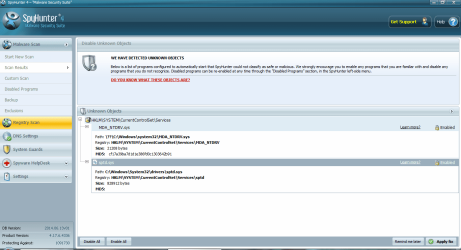
When try to remove threats with SpyHunter, it reports: "We have detected unkown objects" and there are some files ( i attach screenshot)
 

Attachments

  • 1.png
    1.png
    50.6 KB · Views: 2

My Computer My Computer

Computer type
Laptop
Computer Manufacturer/Model Number
Asus
OS
Microsoft Windows 7 Home Premium 64-bit 7601 Multiprocessor Free Service Pack 1
CPU
Intel(R) Core(TM) i3-2310M CPU @ 2.10GHz
Motherboard
ASUSTeK Computer Inc. K53SJ
Memory
4.00 GB
Graphics Card(s)
(1) Intel(R) HD Graphics 3000 (2) NVIDIA GeForce GT 520M
Sound Card
(1) Realtek High Definition Audio (2) Intel(R) Display Aud
Screen Resolution
0 x 0 x 0 bits (0 colors) @ 0 Hz
Hard Drives
HGST HTS721010A9E630
Questions I want answered:

-What is your homepage set to?
-What web sites are you accessing when it crashes? Any website?
-When did this problem start? Did you install or uninstall any software recently when the problem occurred?
-By crashing, is the browser closing and actually crashing? Or it says the browser failed to load the page like stated on first post?
-How old is your modem/router?
picture.php

- My home page is set to Google
- Crashes are to any website, including yahoo.com and google results page.
- The problem have start 1-2 months ago, i cannot remember exact changes i have made during this time but i cannot connect the problem with a specific change i made at least from what i remember. Things that i could mention is that i have move to live in Asia so problems started during the period i am here but not from the time when i initially arrived here. Other thing is that once the internet provider replaced me my router because it was not working but anyway i dont think is problem of network or router because i was connecting through my mobile telephone and the same crashes occured.
- Crashes is like i mention in my first post, internet browser failed to open the page but with refresh it loads.
 

My Computer My Computer

Computer type
Laptop
Computer Manufacturer/Model Number
Asus
OS
Microsoft Windows 7 Home Premium 64-bit 7601 Multiprocessor Free Service Pack 1
CPU
Intel(R) Core(TM) i3-2310M CPU @ 2.10GHz
Motherboard
ASUSTeK Computer Inc. K53SJ
Memory
4.00 GB
Graphics Card(s)
(1) Intel(R) HD Graphics 3000 (2) NVIDIA GeForce GT 520M
Sound Card
(1) Realtek High Definition Audio (2) Intel(R) Display Aud
Screen Resolution
0 x 0 x 0 bits (0 colors) @ 0 Hz
Hard Drives
HGST HTS721010A9E630
I know nothing of spyhunter. I don't see it recommended by our security experts so I won't use it.

You are running two anti virus which is a no no. (Avast and AVG) I would remove both and install MSE.
You have a BUNCH of programs that in my opinion are trash.
Here are a few.
Any thing Apple
Serif Web+
Xenus Link Sleuth
AVG Tune up
Fast boot
IM Magic
Most don't need Java but if you need it update it.
Quick Time
* I don't use a cell phone but do you really need all those phone apps.
Windows live mesh active X I think stopped in 2013.
I would only keep the Asus stuff needed to keep my laptop things working like keyboard and pad ect. You have all kinds of auto updates by Google and others that are not needed. You basically have a mess.

Read through this tutorial to do some more bloat ware removal.

http://www.sevenforums.com/tutorials/219576-clean-up-factory-bloatware.html


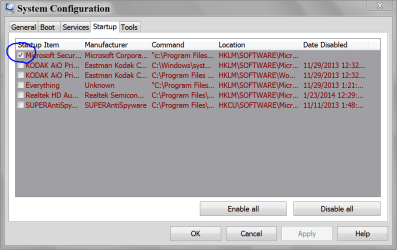
This is my MSCONFIG Startup (System Configure) and it works quite well.
You DO NOT need all those things starting at boot.

MSCONFIG STARTUP.PNG
 

My Computer My Computer

Computer type
PC/Desktop
Computer Manufacturer/Model Number
Home made Desktop
OS
Windows 10 Pro. 64/ version 1709 Windows 7 Pro/64
CPU
Intel i7-6800K @ 4.3
Motherboard
ASUS X-99 Deluxe II
Memory
Corsair Platinum 16 gig @2400
Graphics Card(s)
EVGA GTX 1070 OC
Monitor(s) Displays
Asus 27" LED LCD/VE278Q
Screen Resolution
1920-1080 or 1280-720 HDMI
Hard Drives
INTEL SSD 730-240 Gb Sata 3.0/
PSU
EVGA Platium 1200W
Case
Phanteks Luxe Tempered Glass 8 fans/ one radiator
Cooling
XSPC/ Water Cooled CPU
Keyboard
Das 4 Professional
Mouse
Logitech M705/MX Anywhere 2-S
Internet Speed
100 mbits
Antivirus
Microsoft Security Essentials/ Malwarebytes Premium 3.0/ SAS
Browser
I.E. 11 default/Firefox/ ISP Time Warner Cable/Spectrum
Other Info
LG BluRay Burner/
Sound system-KLipsch-THX/
Icy Dock ssd Hot Swap bays.
Thanks for the suggestions, from these i have already remove AVG but from the other most i need them: SerifWeb+ is website software program, Xenus is a link broken checker tool, IM Magic is a partition tool i used it lately to organise my harddisk. I will try later to clean the things with start up programs but i am sure is not this the problem with crashes because the same programs i have for almost 2-3 years and i never had problem before.
 

My Computer My Computer

Computer type
Laptop
Computer Manufacturer/Model Number
Asus
OS
Microsoft Windows 7 Home Premium 64-bit 7601 Multiprocessor Free Service Pack 1
CPU
Intel(R) Core(TM) i3-2310M CPU @ 2.10GHz
Motherboard
ASUSTeK Computer Inc. K53SJ
Memory
4.00 GB
Graphics Card(s)
(1) Intel(R) HD Graphics 3000 (2) NVIDIA GeForce GT 520M
Sound Card
(1) Realtek High Definition Audio (2) Intel(R) Display Aud
Screen Resolution
0 x 0 x 0 bits (0 colors) @ 0 Hz
Hard Drives
HGST HTS721010A9E630
Just because you uncheck an item from startup doesn't mean it will not start eventually,
The bazar thing is you have more startup items than service items :)

I believe Andrew was inquiring about what you have done in the last couple of days that has corrupted the new admin account not the original account,

To see what was installed in the last couple of months you'd have to post a new Uninstall a program list showing the page view as Details,

As far as im magic goes ?
I used a partition tool once it took 30 minutes or less and it was not needed anymore what in the world can you be using it for so often and Where do you download stuff from,
All of these corruptions probably came from another download from a particular site (which you have not stated)
Cheers.
 

My Computer My Computer

Computer type
PC/Desktop
Computer Manufacturer/Model Number
Custom assembled by me :}
OS
Win-7-Pro64bit 7-H-Prem-64bit
CPU
i7-5930K 2nd i9-9940x both water blocked VRM's too
Motherboard
ASUS SABERTOOTH X99 2nd ASUS x299 Apex
Memory
Trident-z 3200C14 2nd Trident-z 3600C16
Graphics Card(s)
EVGA 1080ti ftw3 2nd Titan Xp both water blocked
Sound Card
Built-in Realtek
Monitor(s) Displays
1-AOC G2460PG 24"G-Sync 144Hz/ 2nd 1-ASUS VG248QE 24" 144Hz
Screen Resolution
1920 x 1080 144Hz
Hard Drives
2-Samsung M.2 Evo & Evo Plus
2-Samsung 850 EVO 500GB SSD's/ 3-2.5 W.D. Black 1tb-&3-1tb/3-3.5 WD Black 1tb hdd's
PSU
EVGA SuperNOVA 1000-P2 2nd 1200-P2
Case
2-Corsair Obsidian Series 450D Black ATX Mid Tower
Cooling
Custom water loops
Keyboard
Logitech G710+/ 2nd Logitech G910
Mouse
2-RedDragon M901 Perdition 16400 dpi Gaming mouse = wired
Internet Speed
Comcast Ping 19ms 89.31mbps download speed 6.12mbps upload
Antivirus
Malwarebytes Pro/ Superantispyware Pro
Browser
FireFox & Pale moon
Other Info
2nd ASUS X299 Apex/Intel i9-9940x with Custom water loop/7H-Prem-x64/Corsair 450D case/Ram Trident-z 3600C16 4x8gb / Samsung970Evo plus 500gb SSD/Dual ssd EZ swap evo/PSU EVGA SuperNova 1200w-P2 80+Platinum/GPU Titan Xp /8-ML-140 on push-pull on 2-280GTX rads
Ok, thank you for the info. Where is the dds log as stated in post 39? I see you edited out my quote and removed it.

1.) Here are the directions again:

Download DDS:

DDS.com

Save the file to your pc. Then open the dds icon to run the tool.
When done, DDS will open two (2) logs:
DDS.txt
Attach.txt

Save both reports to your desktop.
Include the contents of both logs in your next post by using the paperclip

picture.php


2.) Also your spyhunter software is not exactly good software at all....even wot thinks it is bad:

https://www.mywot.com/en/scorecard/enigmasoftware.com?utm_source=addon&utm_content=popup

Virus total does not show the site as being bad currently:

https://www.virustotal.com/en/url/2...ef2fe27494b5f4b31f929b18/analysis/1402855573/

But from everything I have read, and according to some website checkers, it has hosted malware 90 days ago. I would not touch that software with a ten foot pole. Uninstall it.

3.) In order to remove quick seeker, this tutorial will walk you through the entire process of removing it:

Remove Quick-Seeker.com hijack (Virus Removal Guide)
 

My Computer My Computer

Computer type
PC/Desktop
Computer Manufacturer/Model Number
Custom Built
OS
Windows 10 Pro
CPU
AMD Ryzen 5 2400G Processor with Radeon RX Vega 11 Graphics
Motherboard
ASRock X470 Master SLI/AC AM4 AMD Promontory X470 SATA 6Gb/s
Memory
G.SKILL Ripjaws V Series 16GB (2 x 8GB) 288-Pin DDR4 SDRAM D
Graphics Card(s)
2047MB NVIDIA GeForce GTX 1060 6GB (EVGA)
Sound Card
Motherboard Built in
Monitor(s) Displays
Acer R240HY bidx 23.8-Inch IPS HDMI DVI VGA (1920 x 1080) Wi
Screen Resolution
1920 x 1080
Hard Drives
1TB Sandisk SSD PLUS (Main drive)
500 GB Seagate 7200 RPM (Games)
500 GB Western Digital 7200 RPM (Virtual Machines)
PSU
CORSAIR TX Series TX650M 650W 80+ Gold Modular Power Supply
Case
CORSAIR CARBIDE SPEC-02 Mid-Tower Gaming Case, Red LED Fan
Cooling
220mm, two 120mm, and four 60mm fans
Keyboard
Wired Dell keyboard
Mouse
Wireless Logitech mouse
Internet Speed
250mb down, 30mb up
Antivirus
Panda Cloud Antivirus
Browser
Chrome-ish x64
Other Info
Your awesome for reading this.
Ok looks unde control.
 
Last edited:

My Computer My Computer

Computer type
PC/Desktop
Computer Manufacturer/Model Number
Own build (new) Desk1 / Asus ROG Win 7 / Desk2 1st build
OS
Desk1 7 Home Prem / Desk2 10 Pro / Main lap Asus ROG 10 Pro 2 laptop Toshiba 7 Pro Asus P2520 7 & 10
CPU
Desk1 i5 3750K / Laptop i7 GTX 860M / Desk2 i5 2500
Motherboard
Desk1 Asus P877-V / Desk2 Gigabyte H67 UD3H / Laptop ?
Memory
Desk1 8GB (1866) / Desk2 16GB (1333) / Laptop 8Gb DDR3
Graphics Card(s)
Desk 1& 2NVidia GTX 650 & Laptops on board Intel
Sound Card
Desk 1 & 2 -XONAR DG Realtek High Def audio Laptop
Monitor(s) Displays
Desk 1 Benq HD 2450 / Desk2 Philips 24" / Laptop 17.5"
Screen Resolution
1920x1080 D1 & D2 & Laptop 1
Hard Drives
Desk1 Samsung 120GB 830 SSD
Asus ROG 256GB 850 Pro SSD
Desk2 Samsung 840 256 SSD
Toshiba 120GB EVO
PSU
Desk 1 Corsair HX 1050/ Laptop ? / Desk 2 Corsair HX 650
Case
Desk 1 Cooler HAF XM ? Toshiba laptop / Desk2 Coolermaster
Cooling
Fans on all Desk1 -2 Desk2 - all Coolermasters 5 Laptop ?
Keyboard
Desk 1 MS Sidewinder X6 Desk 2 MS Sidewinder X 4
Mouse
Desk 1&2 - Gigabyte MS 900 gamer - laptop - Logitec wireless
Internet Speed
ADSL2+
Other Info
One other Desktop (tester) and spare Toshba laptop both with SSD's
Running Kaspersky 2016 ISS on all machines config'd identically
Logitec audio stereo systems on each machine (x3)
Canon MG5250MFC
Router/modem TP-Link running WPA2SK
Here are the DDS reports.

I have read about Spyhunter and i have remove. Sorry for the delay in my responses, i try with every change i made to wait some time to see if problem fixed. For now i feel my computer more fast and for last hours not any crash, i will report later after more time of use.

@TrashZone: About the new admin user i had created, i didnt add anything on it, after creation i was only browsing on internet, no toolbars, no extensions no and installation. After crashes came i removed it and i have keep my old admin.
 

Attachments

My Computer My Computer

Computer type
Laptop
Computer Manufacturer/Model Number
Asus
OS
Microsoft Windows 7 Home Premium 64-bit 7601 Multiprocessor Free Service Pack 1
CPU
Intel(R) Core(TM) i3-2310M CPU @ 2.10GHz
Motherboard
ASUSTeK Computer Inc. K53SJ
Memory
4.00 GB
Graphics Card(s)
(1) Intel(R) HD Graphics 3000 (2) NVIDIA GeForce GT 520M
Sound Card
(1) Realtek High Definition Audio (2) Intel(R) Display Aud
Screen Resolution
0 x 0 x 0 bits (0 colors) @ 0 Hz
Hard Drives
HGST HTS721010A9E630
unfortunately few crashes came again
 

My Computer My Computer

Computer type
Laptop
Computer Manufacturer/Model Number
Asus
OS
Microsoft Windows 7 Home Premium 64-bit 7601 Multiprocessor Free Service Pack 1
CPU
Intel(R) Core(TM) i3-2310M CPU @ 2.10GHz
Motherboard
ASUSTeK Computer Inc. K53SJ
Memory
4.00 GB
Graphics Card(s)
(1) Intel(R) HD Graphics 3000 (2) NVIDIA GeForce GT 520M
Sound Card
(1) Realtek High Definition Audio (2) Intel(R) Display Aud
Screen Resolution
0 x 0 x 0 bits (0 colors) @ 0 Hz
Hard Drives
HGST HTS721010A9E630
Try OPTION ONE in http://www.sevenforums.com/tutorial...ation-conflicts-performing-clean-startup.html

This will temporarily disable all startup items and all non-MS services. Temporarily until you follow OPTION TWO and finally OPTION THREE. The idea is to eliminate everything as a cause first, then slowly add services back in in an attempt to find the culprit.

During the trouble shooting, you'll want to run the system for a while with each "set" of services (or no non-MS services) enabled. Try a few programs that you think or know are causing the crashes (games?). If things run well, add a few more services in until you get a crash (or better no crash-but that's unlikely)

Too many people follow the tutorial and add everything back in at once - make changes in small chunks.

Bill
.
 

My Computer My Computer

Computer type
Laptop
Computer Manufacturer/Model Number
HP Pavilion dv6-6c10us
OS
x64 (6.3.9600) Win8.1 Pro & soon dual boot x64 (6.1.7601) Win7_SP1 HomePrem
CPU
AMD A6-3420M APU with Radeon(tm) HD Graphics
Motherboard
Hewlett-Packard 1805
Memory
6.00 GB
Graphics Card(s)
AMD Radeon(TM) HD 6520G
Sound Card
(1) AMD High Definition Audio Device (2) IDT High Definiti
Monitor(s) Displays
HP W2072a 20" LCD (1600 x 900) @ 60 Hz
Screen Resolution
1366 x 768 x 32 bits (4294967296 colors) @ 60 Hz
Hard Drives
ST640LM0 00 HM641JI SATA Disk Device
Keyboard
Logitech k520 wireless KB
Mouse
Logitech m320 wireless mouse (bundled with KB)
Internet Speed
15/5 | 54 MB Wireless 'n'
Antivirus
Realtime: Defender or Avast | On-demand: Malwarebytes, ESET
Browser
IE 11 on Win8, IE 10 on win 7
Other Info
Media: [Gimp, Audacity, VLC] || Comm: [WEmail 2012, Skype] || Productivity: [OpenOffice,| Textpad] || Utils: [Sysinternals, cCleaner, Speccy, Defraggler]
I have try this before, even with all startup items and all non-MS services disabled it was crashes.
 

My Computer My Computer

Computer type
Laptop
Computer Manufacturer/Model Number
Asus
OS
Microsoft Windows 7 Home Premium 64-bit 7601 Multiprocessor Free Service Pack 1
CPU
Intel(R) Core(TM) i3-2310M CPU @ 2.10GHz
Motherboard
ASUSTeK Computer Inc. K53SJ
Memory
4.00 GB
Graphics Card(s)
(1) Intel(R) HD Graphics 3000 (2) NVIDIA GeForce GT 520M
Sound Card
(1) Realtek High Definition Audio (2) Intel(R) Display Aud
Screen Resolution
0 x 0 x 0 bits (0 colors) @ 0 Hz
Hard Drives
HGST HTS721010A9E630
I have try this before, even with all startup items and all non-MS services disabled it was crashes.

Ok, did you also post the information from the crash.

I'm sorry, I'm being lazy and not tracking through the thread.

When trouble shooting a difficult to identify issue, it's better to keep changes to a minimum. What I mean is if your machine still crashed with a minimal startup, then leave it that way and pursue other investigations.

When I run up against a wall on my machine, I often take it down to the bare necessities (Out of the box Hardware (HW), no memory upgrades, no extra internal HDs, no external devices, drivers rolled back to the base MS driver, uninstall applications as long as I know that I can reinstall them, .... ).

It is time consuming in both directions - stripping the machine down and then building it back up.

Sometimes, it's easier to do a clean re-install, but that doesn't guarantee success if the issue is HW related.

Easier is a subjective term - it still can be a lot of work depending on what you have installed on your system.

Bill
.
 

My Computer My Computer

Computer type
Laptop
Computer Manufacturer/Model Number
HP Pavilion dv6-6c10us
OS
x64 (6.3.9600) Win8.1 Pro & soon dual boot x64 (6.1.7601) Win7_SP1 HomePrem
CPU
AMD A6-3420M APU with Radeon(tm) HD Graphics
Motherboard
Hewlett-Packard 1805
Memory
6.00 GB
Graphics Card(s)
AMD Radeon(TM) HD 6520G
Sound Card
(1) AMD High Definition Audio Device (2) IDT High Definiti
Monitor(s) Displays
HP W2072a 20" LCD (1600 x 900) @ 60 Hz
Screen Resolution
1366 x 768 x 32 bits (4294967296 colors) @ 60 Hz
Hard Drives
ST640LM0 00 HM641JI SATA Disk Device
Keyboard
Logitech k520 wireless KB
Mouse
Logitech m320 wireless mouse (bundled with KB)
Internet Speed
15/5 | 54 MB Wireless 'n'
Antivirus
Realtime: Defender or Avast | On-demand: Malwarebytes, ESET
Browser
IE 11 on Win8, IE 10 on win 7
Other Info
Media: [Gimp, Audacity, VLC] || Comm: [WEmail 2012, Skype] || Productivity: [OpenOffice,| Textpad] || Utils: [Sysinternals, cCleaner, Speccy, Defraggler]
I did ask before but one last time run the Kaspersky rescue disk - nothing to lose and it may well pick something up it may not and it does not take long to run.

Download Kaspersky Rescue Disk 10
 

My Computer My Computer

Computer type
PC/Desktop
Computer Manufacturer/Model Number
Own build (new) Desk1 / Asus ROG Win 7 / Desk2 1st build
OS
Desk1 7 Home Prem / Desk2 10 Pro / Main lap Asus ROG 10 Pro 2 laptop Toshiba 7 Pro Asus P2520 7 & 10
CPU
Desk1 i5 3750K / Laptop i7 GTX 860M / Desk2 i5 2500
Motherboard
Desk1 Asus P877-V / Desk2 Gigabyte H67 UD3H / Laptop ?
Memory
Desk1 8GB (1866) / Desk2 16GB (1333) / Laptop 8Gb DDR3
Graphics Card(s)
Desk 1& 2NVidia GTX 650 & Laptops on board Intel
Sound Card
Desk 1 & 2 -XONAR DG Realtek High Def audio Laptop
Monitor(s) Displays
Desk 1 Benq HD 2450 / Desk2 Philips 24" / Laptop 17.5"
Screen Resolution
1920x1080 D1 & D2 & Laptop 1
Hard Drives
Desk1 Samsung 120GB 830 SSD
Asus ROG 256GB 850 Pro SSD
Desk2 Samsung 840 256 SSD
Toshiba 120GB EVO
PSU
Desk 1 Corsair HX 1050/ Laptop ? / Desk 2 Corsair HX 650
Case
Desk 1 Cooler HAF XM ? Toshiba laptop / Desk2 Coolermaster
Cooling
Fans on all Desk1 -2 Desk2 - all Coolermasters 5 Laptop ?
Keyboard
Desk 1 MS Sidewinder X6 Desk 2 MS Sidewinder X 4
Mouse
Desk 1&2 - Gigabyte MS 900 gamer - laptop - Logitec wireless
Internet Speed
ADSL2+
Other Info
One other Desktop (tester) and spare Toshba laptop both with SSD's
Running Kaspersky 2016 ISS on all machines config'd identically
Logitec audio stereo systems on each machine (x3)
Canon MG5250MFC
Router/modem TP-Link running WPA2SK
But there is written "It should be used when it is impossible to boot the operating system." i dont have any problem with booting the OS. Anyway i will downlowad it, it will take more than 9 hours so from tomorrow i can try it. Thanks!!
 

My Computer My Computer

Computer type
Laptop
Computer Manufacturer/Model Number
Asus
OS
Microsoft Windows 7 Home Premium 64-bit 7601 Multiprocessor Free Service Pack 1
CPU
Intel(R) Core(TM) i3-2310M CPU @ 2.10GHz
Motherboard
ASUSTeK Computer Inc. K53SJ
Memory
4.00 GB
Graphics Card(s)
(1) Intel(R) HD Graphics 3000 (2) NVIDIA GeForce GT 520M
Sound Card
(1) Realtek High Definition Audio (2) Intel(R) Display Aud
Screen Resolution
0 x 0 x 0 bits (0 colors) @ 0 Hz
Hard Drives
HGST HTS721010A9E630
I know it says that but I run it anyway because the thing scans from power on as it were so unlikely to miss much. All the times I have used it the scan has only ever taken a half hour or thereabouts but I guess it depends on the machine specs fast/slow or what.
 

My Computer My Computer

Computer type
PC/Desktop
Computer Manufacturer/Model Number
Own build (new) Desk1 / Asus ROG Win 7 / Desk2 1st build
OS
Desk1 7 Home Prem / Desk2 10 Pro / Main lap Asus ROG 10 Pro 2 laptop Toshiba 7 Pro Asus P2520 7 & 10
CPU
Desk1 i5 3750K / Laptop i7 GTX 860M / Desk2 i5 2500
Motherboard
Desk1 Asus P877-V / Desk2 Gigabyte H67 UD3H / Laptop ?
Memory
Desk1 8GB (1866) / Desk2 16GB (1333) / Laptop 8Gb DDR3
Graphics Card(s)
Desk 1& 2NVidia GTX 650 & Laptops on board Intel
Sound Card
Desk 1 & 2 -XONAR DG Realtek High Def audio Laptop
Monitor(s) Displays
Desk 1 Benq HD 2450 / Desk2 Philips 24" / Laptop 17.5"
Screen Resolution
1920x1080 D1 & D2 & Laptop 1
Hard Drives
Desk1 Samsung 120GB 830 SSD
Asus ROG 256GB 850 Pro SSD
Desk2 Samsung 840 256 SSD
Toshiba 120GB EVO
PSU
Desk 1 Corsair HX 1050/ Laptop ? / Desk 2 Corsair HX 650
Case
Desk 1 Cooler HAF XM ? Toshiba laptop / Desk2 Coolermaster
Cooling
Fans on all Desk1 -2 Desk2 - all Coolermasters 5 Laptop ?
Keyboard
Desk 1 MS Sidewinder X6 Desk 2 MS Sidewinder X 4
Mouse
Desk 1&2 - Gigabyte MS 900 gamer - laptop - Logitec wireless
Internet Speed
ADSL2+
Other Info
One other Desktop (tester) and spare Toshba laptop both with SSD's
Running Kaspersky 2016 ISS on all machines config'd identically
Logitec audio stereo systems on each machine (x3)
Canon MG5250MFC
Router/modem TP-Link running WPA2SK
Ok, It is going to take awhile to look at those dds logs.

Give me some time.

In the meantime, I ask that you do the following:

-Connect your computer directly to your modem, and not the router. Do the crashes still occur?
-show a screenshot or video of what happens when the browser crashes.
 

My Computer My Computer

Computer type
PC/Desktop
Computer Manufacturer/Model Number
Custom Built
OS
Windows 10 Pro
CPU
AMD Ryzen 5 2400G Processor with Radeon RX Vega 11 Graphics
Motherboard
ASRock X470 Master SLI/AC AM4 AMD Promontory X470 SATA 6Gb/s
Memory
G.SKILL Ripjaws V Series 16GB (2 x 8GB) 288-Pin DDR4 SDRAM D
Graphics Card(s)
2047MB NVIDIA GeForce GTX 1060 6GB (EVGA)
Sound Card
Motherboard Built in
Monitor(s) Displays
Acer R240HY bidx 23.8-Inch IPS HDMI DVI VGA (1920 x 1080) Wi
Screen Resolution
1920 x 1080
Hard Drives
1TB Sandisk SSD PLUS (Main drive)
500 GB Seagate 7200 RPM (Games)
500 GB Western Digital 7200 RPM (Virtual Machines)
PSU
CORSAIR TX Series TX650M 650W 80+ Gold Modular Power Supply
Case
CORSAIR CARBIDE SPEC-02 Mid-Tower Gaming Case, Red LED Fan
Cooling
220mm, two 120mm, and four 60mm fans
Keyboard
Wired Dell keyboard
Mouse
Wireless Logitech mouse
Internet Speed
250mb down, 30mb up
Antivirus
Panda Cloud Antivirus
Browser
Chrome-ish x64
Other Info
Your awesome for reading this.
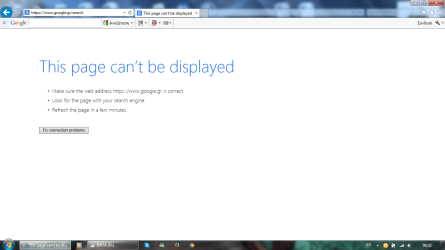
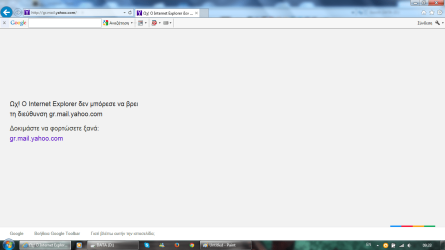
Here two screenshots. I had tryied to connect directly with cable to modem with not any success. I will retry again later.

1.png

2.png
 

My Computer My Computer

Computer type
Laptop
Computer Manufacturer/Model Number
Asus
OS
Microsoft Windows 7 Home Premium 64-bit 7601 Multiprocessor Free Service Pack 1
CPU
Intel(R) Core(TM) i3-2310M CPU @ 2.10GHz
Motherboard
ASUSTeK Computer Inc. K53SJ
Memory
4.00 GB
Graphics Card(s)
(1) Intel(R) HD Graphics 3000 (2) NVIDIA GeForce GT 520M
Sound Card
(1) Realtek High Definition Audio (2) Intel(R) Display Aud
Screen Resolution
0 x 0 x 0 bits (0 colors) @ 0 Hz
Hard Drives
HGST HTS721010A9E630
( I have not looked into the dds logs a thorough 100% look through yet. I will report on that then)

Ok your browsers are not crashing, just not loading....I just want to be sure here.....

How comfortable are you with following a slightly advanced process?

I would like you to boot into a ubuntu live cd. This way, if ubuntu firefox browser is able to load web pages, we know its malware/something with windows. If it fails to load pages as well like google.com or yahoo or cnet.com or something, we know its hardware related. Like a modem, Ethernet cable or some other issue.

So, see if you can follow these directions to download a ubuntu live cd. This will not modify anything on your computer. It will not change anything. It boots the entire OS from a cd. You will need one blank dvd-r.

Here is how to create the disk:

How to Create an Ubuntu Live Cd: 9 Steps (with Pictures)

How to boot from the dvd that was created:

Put the disk in your pc and restart your computer. Choose to boot from the disk, and choose run live cd. Start ubuntu without installing.

Try Ubuntu before you install it | Ubuntu

Troubleshooting not being able to boot from disk:

https://help.ubuntu.com/community/BootFromCD
 

My Computer My Computer

Computer type
PC/Desktop
Computer Manufacturer/Model Number
Custom Built
OS
Windows 10 Pro
CPU
AMD Ryzen 5 2400G Processor with Radeon RX Vega 11 Graphics
Motherboard
ASRock X470 Master SLI/AC AM4 AMD Promontory X470 SATA 6Gb/s
Memory
G.SKILL Ripjaws V Series 16GB (2 x 8GB) 288-Pin DDR4 SDRAM D
Graphics Card(s)
2047MB NVIDIA GeForce GTX 1060 6GB (EVGA)
Sound Card
Motherboard Built in
Monitor(s) Displays
Acer R240HY bidx 23.8-Inch IPS HDMI DVI VGA (1920 x 1080) Wi
Screen Resolution
1920 x 1080
Hard Drives
1TB Sandisk SSD PLUS (Main drive)
500 GB Seagate 7200 RPM (Games)
500 GB Western Digital 7200 RPM (Virtual Machines)
PSU
CORSAIR TX Series TX650M 650W 80+ Gold Modular Power Supply
Case
CORSAIR CARBIDE SPEC-02 Mid-Tower Gaming Case, Red LED Fan
Cooling
220mm, two 120mm, and four 60mm fans
Keyboard
Wired Dell keyboard
Mouse
Wireless Logitech mouse
Internet Speed
250mb down, 30mb up
Antivirus
Panda Cloud Antivirus
Browser
Chrome-ish x64
Other Info
Your awesome for reading this.
Back
Top