ALternate OD Scanner to MalwareBytes?

remm

New member
Pro User
Local time
7:58 AM
Messages
373
Recently updated MBytes and I don't like the new version. There are no options when it detects something to right-click and Ignore or Add To White List or ... whatever. From what I can tell, either check the box and let MB delete, or uncheck and A> go thru the trouble to make a note of the key or file and path for every false detection and manually add those to the exclusion list, or B> let MB find it all over again next time.

Is there an alternate OD scanner that has shell integration that is respected? Is the free version of SUPERAntispyware any better?

Thanks.
 

My Computer My Computer

OS
Win 7 Ultimate 64-bit
Recently updated MBytes and I don't like the new version. There are no options when it detects something to right-click and Ignore or Add To White List or ... whatever.
Thanks.

Hi:

Actually, that's not exactly true.
The Quarantine "flow" was changed in version 2.1.
It's not entirely intuitive and this has been discussed at the MBAM forums.
(I am just a home user myself, so I take neither credit nor blame for the new flow.)

However it is certainly possible to exclude or whitelist items from the quarantine list.

TMALSS, the new flow will automatically select ALL detections for removal.
If one wants to ignore/keep a particular item in the list, then one needs to un-select it (remove the check-mark).
That will generate a dialog, asking the user how to proceed.
IIRC the options include the equivalent of "ignore this one time", "ignore permanently" and perhaps one other selection.

Stay tuned -- I will post back with more details shortly.

Thanks,
 

My Computer My Computer

Computer type
PC/Desktop
Computer Manufacturer/Model Number
Dell Studio XPS 8500
OS
OEM Windows 7 Ult (x64) SP1
CPU
Intel Core-i7 3770 @ 3.4 GHz
Motherboard
"Dell" branded
Memory
16 GB DDR3 SDRAM @ 1333 MHz
Graphics Card(s)
NVidia GeForce GT620 1 GB
Sound Card
THX TruStudio PC
Monitor(s) Displays
Dell U2410 Full HD
Hard Drives
2.0 TB SATA2 @ 7200 RPM
PSU
350W
Keyboard
MS 4000 Ergon - Wired
Mouse
Logitech Anywhere MX
Internet Speed
Cable HSI w/Turbo (router)
Antivirus
KIS-MBAM Premium-MBAE Premium
Browser
Fx (current version); IE
Other Info
And a Win7/64 Pro laptop; And a Win10/64 Pro desktop.
Follow-up:


Here is the original announcement:
https://forums.malwarebytes.org/ind...ebytes-anti-malware-214-released/#entry948845

Simplified Quarantine flow – threats detected are pre-selected for removal and users are presented with a single “Remove Selected” button. Clicking “Remove Selected” quarantines all checked items. If you uncheck any threats you will see a new dialog asking what action should be taken on the unselected items: Ignore Once, Ignore Always, Cancel.

Excerpt from the User Guide >>HERE<<

More info about v2.1.6 HERE
More info about v2.1.4 HERE
User Guide ONLINE
User Guide PDF
FAQ: Common Questions, Issues, and their Solutions

Thank you again,
 

My Computer My Computer

Computer type
PC/Desktop
Computer Manufacturer/Model Number
Dell Studio XPS 8500
OS
OEM Windows 7 Ult (x64) SP1
CPU
Intel Core-i7 3770 @ 3.4 GHz
Motherboard
"Dell" branded
Memory
16 GB DDR3 SDRAM @ 1333 MHz
Graphics Card(s)
NVidia GeForce GT620 1 GB
Sound Card
THX TruStudio PC
Monitor(s) Displays
Dell U2410 Full HD
Hard Drives
2.0 TB SATA2 @ 7200 RPM
PSU
350W
Keyboard
MS 4000 Ergon - Wired
Mouse
Logitech Anywhere MX
Internet Speed
Cable HSI w/Turbo (router)
Antivirus
KIS-MBAM Premium-MBAE Premium
Browser
Fx (current version); IE
Other Info
And a Win7/64 Pro laptop; And a Win10/64 Pro desktop.
Thanks Moxie... I did uncheck mine and get no such dialogs. Using the latest 2.16... will read the links above to see what I am doing wrong, and will report back here.

EDIT: Yup, isn't working for me plain and simple. Like I said in the OP, I unchecked the fp's and .... nothing. I tried to right-click... highlight... nothing.

The thing I really don't like is it's hard to see the whole path, especially when a reg key. I had to really work at expanding the window and moving columns... in (for example) the old A-Squared, all you did was mouse over a detected threat and you could see the entire path in the mouse over text.

Unfortunately A-Squared is now Emsisoft, and I do like a lot of features about their free OD scanner EXCEPT updating the virus db takes FOREVER... that's how they get you to want to get the paid version. Apparently that version updates quickly but they have the server for the free version throttled back to a drip.

Will try a couple more things with MB... but I'm not sure what. I wouldn't even mind using v 1.7x again, but don't want to deal with this again later if they retire that version and suddenly require an update to the program before the AV db can be updated.
 

My Computer My Computer

OS
Win 7 Ultimate 64-bit
OK, sounds like a plan.

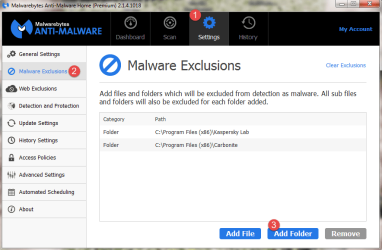
BTW, I assume that you know that you can add "Malware Exclusions" from the dashboard > "Settings" > "Malware Exclusions"?

Just another suggestion,
 

Attachments

  • MalwareExclusion-2015-04-19_7-17-46.png
    MalwareExclusion-2015-04-19_7-17-46.png
    32.9 KB · Views: 1

My Computer My Computer

Computer type
PC/Desktop
Computer Manufacturer/Model Number
Dell Studio XPS 8500
OS
OEM Windows 7 Ult (x64) SP1
CPU
Intel Core-i7 3770 @ 3.4 GHz
Motherboard
"Dell" branded
Memory
16 GB DDR3 SDRAM @ 1333 MHz
Graphics Card(s)
NVidia GeForce GT620 1 GB
Sound Card
THX TruStudio PC
Monitor(s) Displays
Dell U2410 Full HD
Hard Drives
2.0 TB SATA2 @ 7200 RPM
PSU
350W
Keyboard
MS 4000 Ergon - Wired
Mouse
Logitech Anywhere MX
Internet Speed
Cable HSI w/Turbo (router)
Antivirus
KIS-MBAM Premium-MBAE Premium
Browser
Fx (current version); IE
Other Info
And a Win7/64 Pro laptop; And a Win10/64 Pro desktop.
Yes. But that doesn't address when it finds fp's that are not already in the exclusion list. Like I say, it's a hassle to note the path and add to the exclusion list manually. Any basic AV should have a way to send it immed to whitelist or ignore or whatever. Apparently MB does too, but it's not working for me. I am getting the feeling this program is simply going downhill from what it was (and has been) up to v1.7. Another thing I loathe about this version... it does not save my config settings for custom scan. Maybe this is again only a problem on my machine, but the coding of this thing seems whack.

So my original query stands: any alternatives anyone would like to suggest for an OD scanner (free)?

Thanks!
 

My Computer My Computer

OS
Win 7 Ultimate 64-bit
MBAM - personally I'd keep it. Other scanners?

EEK - I use it and like you said, updates take forever to download. I just used it today. I keep it for occasional use.

HerdProtect - herdProtect - Anti-Malware Multiscanning Platform in the Cloud

9-Lab Removal Tool - Free malware remover - 9-lab - watch out for false positive detections.

Crystal Security - http://www.crystalsecurity.eu/ - only use stable version and only run on demand.

Edit: If trying Crystal Security add known false positives and excluded folders to whitelist. Configure not to auto- remove anything.

Crystal Security.jpg
 
Last edited:

My Computer My Computer

Computer type
Laptop
Computer Manufacturer/Model Number
ASUS
OS
Microsoft Windows 7 Home Premium 64-bit 7601 Multiprocessor Free Service Pack 1
CPU
AMD C-60 APU with Radeon(tm) HD Graphics
Motherboard
ASUSTeK COMPUTER INC. X501U
Memory
4.00 GB
Graphics Card(s)
AMD Radeon HD 6290 Graphics
Sound Card
(1) AMD High Definition Audio Device (2) Realtek High Defi
Screen Resolution
1366 x 768 x 32 bits (4294967296 colors) @ 60 Hz
Hard Drives
Hitachi HTS545050A7E380 SATA Disk Device
Antivirus
Comodo CIS & FW, SecureAplus App Whitelisting, Threatfire
Browser
Cyberfox 64bit, Opera 64bit, Airfox
Other Info
Spy-The-Spy, HitmanPro.Alert, Norton Connect Safe, MJRegWatcher, BitDefender TrafficLight, Voodoo Shield, Zemana AntiMalware
@ Callender Is MBAM keeping your settings for custom scans? Is it opening the dialog in the history list when you uncheck an item, to ignore or whitelist or whatever it's supposed to be doing?

EDIT: Thanks for tip about Crystal
 

My Computer My Computer

OS
Win 7 Ultimate 64-bit
Yes. But that doesn't address when it finds fp's that are not already in the exclusion list.
Sorry, but I'm not sure what you mean by that.
I volunteer at the Malwarebytes forum and do not see any reports there of the same problems you describe.

If you have what you think is a bonafide False Positive (something MBAM detects that you think ought not to be detected), then the suggested way to handle that would be the following:

  1. Start with the advice in this pinned topic >>HERE<<
  2. Report the suspected False Positive in a new thread in the dedicated forum here: File Detections - FP
  3. The Research Team will analyze the file and determine if the detection is appropriate or not.
You could try a clean reinstall, as this often resolves minor issues.
Best practices for that are here: MBAM Clean Removal Process 2x

Alternatively, the staff and forum experts would be more than happy to assist you with configuring and troubleshooting MBAM at the Help forum >>HERE<<.

I'm sorry I wasn't able to resolve your issues.

I'll leave the passionate debate about alternative scanners to the other forum members.:)

Thank you again,
 

My Computer My Computer

Computer type
PC/Desktop
Computer Manufacturer/Model Number
Dell Studio XPS 8500
OS
OEM Windows 7 Ult (x64) SP1
CPU
Intel Core-i7 3770 @ 3.4 GHz
Motherboard
"Dell" branded
Memory
16 GB DDR3 SDRAM @ 1333 MHz
Graphics Card(s)
NVidia GeForce GT620 1 GB
Sound Card
THX TruStudio PC
Monitor(s) Displays
Dell U2410 Full HD
Hard Drives
2.0 TB SATA2 @ 7200 RPM
PSU
350W
Keyboard
MS 4000 Ergon - Wired
Mouse
Logitech Anywhere MX
Internet Speed
Cable HSI w/Turbo (router)
Antivirus
KIS-MBAM Premium-MBAE Premium
Browser
Fx (current version); IE
Other Info
And a Win7/64 Pro laptop; And a Win10/64 Pro desktop.
Yes. But that doesn't address when it finds fp's that are not already in the exclusion list.
Sorry, but I'm not sure what you mean by that.

Sorry for not being clear. I mean I have things entered into the exclusion list, that I put there before doing any scans. Things I know trip fp's.

But when MBAM runs a scan and finds a new fp's, I want to be able to send it to the exclusion list with a click... not make a mental note of the path and add it manually. And while I understand all I should have to do in uncheck a 'threat' in the History window, and a dialog should popup asking me what I want to do, that's not happening. I am not getting any choices.

I hope that's clearer. I am not looking to report anything to MBAM... I just want an OD scanner that works to use alongside Sandboxie on those infrequent occasions I need it. And if I should choose to run a scan, it would be nice (and not asking much) if the custom scan config settings were saved between sessions. MBAM is not saving my settings. All reasons I am looking for alternatives...

Thanks again.
 

My Computer My Computer

OS
Win 7 Ultimate 64-bit
MBAM Settings

@ Callender Is MBAM keeping your settings for custom scans? Is it opening the dialog in the history list when you uncheck an item, to ignore or whitelist or whatever it's supposed to be doing?

EDIT: Thanks for tip about Crystal

Yes it's working fine. It remembers scan settings and exclusions. It was clean installed after problems with all those Beta releases a while back. Those other scanners - just scan and don't remove anything if you use them. Check the results and make your own decisions.
 

My Computer My Computer

Computer type
Laptop
Computer Manufacturer/Model Number
ASUS
OS
Microsoft Windows 7 Home Premium 64-bit 7601 Multiprocessor Free Service Pack 1
CPU
AMD C-60 APU with Radeon(tm) HD Graphics
Motherboard
ASUSTeK COMPUTER INC. X501U
Memory
4.00 GB
Graphics Card(s)
AMD Radeon HD 6290 Graphics
Sound Card
(1) AMD High Definition Audio Device (2) Realtek High Defi
Screen Resolution
1366 x 768 x 32 bits (4294967296 colors) @ 60 Hz
Hard Drives
Hitachi HTS545050A7E380 SATA Disk Device
Antivirus
Comodo CIS & FW, SecureAplus App Whitelisting, Threatfire
Browser
Cyberfox 64bit, Opera 64bit, Airfox
Other Info
Spy-The-Spy, HitmanPro.Alert, Norton Connect Safe, MJRegWatcher, BitDefender TrafficLight, Voodoo Shield, Zemana AntiMalware
Hi, again:

Sorry, but I don't know why it's not saving/honoring your settings.
That is not normal behavior and it's not something we see reported often/at all.
It could be something amiss with your recent upgrade, something with the settings themselves, software conflicts, etc.

We would be happy to help you over at the MBAM forum, if you wish.

Cheers,
 

My Computer My Computer

Computer type
PC/Desktop
Computer Manufacturer/Model Number
Dell Studio XPS 8500
OS
OEM Windows 7 Ult (x64) SP1
CPU
Intel Core-i7 3770 @ 3.4 GHz
Motherboard
"Dell" branded
Memory
16 GB DDR3 SDRAM @ 1333 MHz
Graphics Card(s)
NVidia GeForce GT620 1 GB
Sound Card
THX TruStudio PC
Monitor(s) Displays
Dell U2410 Full HD
Hard Drives
2.0 TB SATA2 @ 7200 RPM
PSU
350W
Keyboard
MS 4000 Ergon - Wired
Mouse
Logitech Anywhere MX
Internet Speed
Cable HSI w/Turbo (router)
Antivirus
KIS-MBAM Premium-MBAE Premium
Browser
Fx (current version); IE
Other Info
And a Win7/64 Pro laptop; And a Win10/64 Pro desktop.
OK... thanks to both Callender and Moxie.

I know the routine re: uninstalling/use MBAM removal tool/etc... so will try that again. But did it once already and it did no good.

I have been in a TeamViewer session all day trying to get MBAM to work on the remote machines, but having these problems, which is why I tried updating my own MBAM (I had v1.7x installed, which worked fine) to see of the newest MBAM worked fine here and just something odd on the remotes. But I have the same problems. Hence my post here to just look for an alternative.

I am surprised no one has suggested SUEPRAntiSpyware OD free... does it have a bad rep or is there some other problem with it?

And to Moxie, since you seem to be affiliated closely with MBAM... do you know if they plan to retire v1.7x anytime soon?
 

My Computer My Computer

OS
Win 7 Ultimate 64-bit
SuperAntiSpyware (SAS) is an excellent program (I use the free version and recommend it) but it doesn't look for the same nasties that MBAM does.
 

My Computer My Computer

Computer type
PC/Desktop
Computer Manufacturer/Model Number
Custom Build
OS
Win 7 Ultimate 64 bit
CPU
Intel i7-3930K
Motherboard
ASUS P9X79 WS
Memory
Kingston HyperX Genesis 32GB Kit (8x4GB Modules) 1600MHz DDR
Graphics Card(s)
MSI R7850 Twin Frozr 2GD5/OC Radeon HD 7850 2GB 256-bit GDDR
Sound Card
Asus Xonar Essence STX
Monitor(s) Displays
3x Asus VG248QE 24", Vizio 32" TV
Screen Resolution
1920 x 1080, ?
Hard Drives
Samsung 128GB 840 Pro SSD (1),
Samsung 4TB 850 EVO SSDs (4)
Samsung 4TB 850 EVO SSDs (16) external backup drives used in 2.5" hot swap bays in the computer.
PSU
Corsair HX750w
Case
Antec Two Hundred v2 (modified)
Cooling
Cooler Master GeminII S524 120mm (fan replaced with a 140mm)
Keyboard
Logitech G510s
Mouse
Logitech M525 (two in use)
Internet Speed
=< 32Mbps down, 8Mbps up
Antivirus
AVAST!, MBAM, SAS, Spybot S&D (all but MBAM free) Glary Util
Browser
IE11
Other Info
LSI 9211-8i HBA card (8 SATA III ports), 2.5" & 3.5" Hot Swap Bays, HooToo HT-CR001 PCI-E to USB 3.0 Internal Hub + 6 Slot Card Reader, and LG Model CH12LS28 BD-ROM Optical Drive. Also, ScanSnap S1500 ADF duplexing scanner, Canon 9000F flat bed scanner, Corsair SP2500 2.1 speakers, Samsung CLP 415nw laser color printer, Cyberpower PP2200SW UPS
It's more spyware and adware vs viruses?
 

My Computer My Computer

OS
Win 7 Ultimate 64-bit

My Computer My Computer

Computer type
PC/Desktop
Computer Manufacturer/Model Number
Custom Build
OS
Win 7 Ultimate 64 bit
CPU
Intel i7-3930K
Motherboard
ASUS P9X79 WS
Memory
Kingston HyperX Genesis 32GB Kit (8x4GB Modules) 1600MHz DDR
Graphics Card(s)
MSI R7850 Twin Frozr 2GD5/OC Radeon HD 7850 2GB 256-bit GDDR
Sound Card
Asus Xonar Essence STX
Monitor(s) Displays
3x Asus VG248QE 24", Vizio 32" TV
Screen Resolution
1920 x 1080, ?
Hard Drives
Samsung 128GB 840 Pro SSD (1),
Samsung 4TB 850 EVO SSDs (4)
Samsung 4TB 850 EVO SSDs (16) external backup drives used in 2.5" hot swap bays in the computer.
PSU
Corsair HX750w
Case
Antec Two Hundred v2 (modified)
Cooling
Cooler Master GeminII S524 120mm (fan replaced with a 140mm)
Keyboard
Logitech G510s
Mouse
Logitech M525 (two in use)
Internet Speed
=< 32Mbps down, 8Mbps up
Antivirus
AVAST!, MBAM, SAS, Spybot S&D (all but MBAM free) Glary Util
Browser
IE11
Other Info
LSI 9211-8i HBA card (8 SATA III ports), 2.5" & 3.5" Hot Swap Bays, HooToo HT-CR001 PCI-E to USB 3.0 Internal Hub + 6 Slot Card Reader, and LG Model CH12LS28 BD-ROM Optical Drive. Also, ScanSnap S1500 ADF duplexing scanner, Canon 9000F flat bed scanner, Corsair SP2500 2.1 speakers, Samsung CLP 415nw laser color printer, Cyberpower PP2200SW UPS
^^ I don't know why you're having so many problems with so many systems. ^^

If that's the case, then I would suggest getting some help back at the MBAM forums.

For your own MBAM installation on your own personal computers, there is a Help Forum >>HERE<<.

If, as your last post here suggests, you are a computer tech/repair shop, then your Business/Technician License entitles you to free, one-on-one support from the Business Support Team.
There is a separate forum for Business users >>HERE<<.
Or you may wish to log a ticket for the other, remote computers directly at the Business Help Desk >>HERE<<.

As far as support for version 1.75, there was a recent update about that here: MBAM 1.75 vs. 2.0
However, it would be advisable/preferable to resolve your issues with version 2 before support for version 1.75 ends.

P.S. For the record, I am not in any way affiliated with Malwarebytes.
I am just a lowly home user.

Cheers,
 

My Computer My Computer

Computer type
PC/Desktop
Computer Manufacturer/Model Number
Dell Studio XPS 8500
OS
OEM Windows 7 Ult (x64) SP1
CPU
Intel Core-i7 3770 @ 3.4 GHz
Motherboard
"Dell" branded
Memory
16 GB DDR3 SDRAM @ 1333 MHz
Graphics Card(s)
NVidia GeForce GT620 1 GB
Sound Card
THX TruStudio PC
Monitor(s) Displays
Dell U2410 Full HD
Hard Drives
2.0 TB SATA2 @ 7200 RPM
PSU
350W
Keyboard
MS 4000 Ergon - Wired
Mouse
Logitech Anywhere MX
Internet Speed
Cable HSI w/Turbo (router)
Antivirus
KIS-MBAM Premium-MBAE Premium
Browser
Fx (current version); IE
Other Info
And a Win7/64 Pro laptop; And a Win10/64 Pro desktop.
Moxie, I am a lowly home user too. Just been a computer freak since the late 80s... so I administer my friends' machines when they have issues or need something they don't know how to do -- and one of my friends lives many thousands of miles away. (TeamViewer is an EXCELLENT, free remote program. Free to home users anyway... I think corp's have to buy a lic.)

She had MBAM v1.7 installed before, just like I did. (I set her machines up for her.) So maybe the upgrade from 1.7 to 2.x has something to do with it.

I will work it out on my machine before I address hers... hopefully the answer/glitch will be the same for all.

Thanks for the info on v1.7 -- want to avoid installing versions on her machine that will be retired, so will move forward with this. As for the MBAM forum... if I need help I will go there but it's usually faster for me to troubleshoot things myself. :D

No good deed goes unpunished. :D
 

My Computer My Computer

OS
Win 7 Ultimate 64-bit
...P.S. For the record, I am not in any way affiliated with Malwarebytes.
I am just a lowly home user.

Cheers,

Horse feathers! There is nothing lowly about you!
 

My Computer My Computer

Computer type
PC/Desktop
Computer Manufacturer/Model Number
Custom Build
OS
Win 7 Ultimate 64 bit
CPU
Intel i7-3930K
Motherboard
ASUS P9X79 WS
Memory
Kingston HyperX Genesis 32GB Kit (8x4GB Modules) 1600MHz DDR
Graphics Card(s)
MSI R7850 Twin Frozr 2GD5/OC Radeon HD 7850 2GB 256-bit GDDR
Sound Card
Asus Xonar Essence STX
Monitor(s) Displays
3x Asus VG248QE 24", Vizio 32" TV
Screen Resolution
1920 x 1080, ?
Hard Drives
Samsung 128GB 840 Pro SSD (1),
Samsung 4TB 850 EVO SSDs (4)
Samsung 4TB 850 EVO SSDs (16) external backup drives used in 2.5" hot swap bays in the computer.
PSU
Corsair HX750w
Case
Antec Two Hundred v2 (modified)
Cooling
Cooler Master GeminII S524 120mm (fan replaced with a 140mm)
Keyboard
Logitech G510s
Mouse
Logitech M525 (two in use)
Internet Speed
=< 32Mbps down, 8Mbps up
Antivirus
AVAST!, MBAM, SAS, Spybot S&D (all but MBAM free) Glary Util
Browser
IE11
Other Info
LSI 9211-8i HBA card (8 SATA III ports), 2.5" & 3.5" Hot Swap Bays, HooToo HT-CR001 PCI-E to USB 3.0 Internal Hub + 6 Slot Card Reader, and LG Model CH12LS28 BD-ROM Optical Drive. Also, ScanSnap S1500 ADF duplexing scanner, Canon 9000F flat bed scanner, Corsair SP2500 2.1 speakers, Samsung CLP 415nw laser color printer, Cyberpower PP2200SW UPS
Back
Top