Hi,
Now I'm imaging too
But I would like to knw if I'm in the right dircection and doing the right thing!
1- In the XP laptop I have free Macrium (I ended with this version!) and I already made the recovery CD and make a full image of C! I,ve no partitions! I assume that if anything go wrong I would be able to restore it to the image date state (and I mean everything....SW and settings/preferences specially).
2- In the Win7 Pro laptop I went another direction! I use the built in Backup/Restore utility using the Seagate Momentus 7200.4 500GB hdd that I removed (replaced by the M5P 512GB ssd) for the images backup (the hdd is connected via USB 3.0). Please let me know if this is correct:
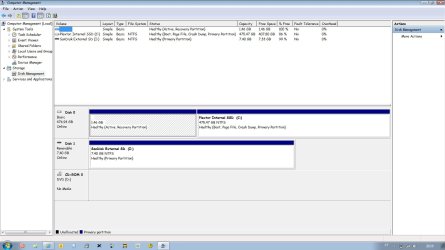
(note: my disc 0 have only the main partition and a 1.46 GB active partition automatically created when I restore the ssd to the factory state)
2.1- Backup and Restore / Create a System Image opens a window showing that the following drives will be backed up: Plextor internal ssd (C): (System) and System (System). Backup location: Seagate external hdd.
2.2- Next will start the backup. A folder named WindowsImageBackup is created in the external hdd. The backup finish all the time without any issue (what did not happen when I used a Iomega Prestige 1 TB USB3.0 external hdd !!!).
2.3- I rename the WindowsImageBackup as WindowsImageBackup-copy-n.
(currently n=3).
Is everything correct until now?
I'm I backing up everything in my laptop?
Now for the restore part (that I never did!). In the case I need to restore my laptop for a previous state would be these steps correct (and yes I've created 2 copies of the System Reapair Disc) :
2.4- Rename the WindowsImageBackup-copy-n I want to restore to WindowsImageBackup. This could be done via a Command Prompt (Brink's tutorial) or, if I've another computer, I could connect the external drive to that computer and rename the folder easly before connecting the external to the computer that needs to be restored.
2.5- Proceed with the restore in Windows (if windows boots) or using the System Reapair Disc (if windows do not boots).
Is this correct? Any thing I should know?
Many thanks,
paulo
Now I'm imaging too
But I would like to knw if I'm in the right dircection and doing the right thing!
1- In the XP laptop I have free Macrium (I ended with this version!) and I already made the recovery CD and make a full image of C! I,ve no partitions! I assume that if anything go wrong I would be able to restore it to the image date state (and I mean everything....SW and settings/preferences specially).
2- In the Win7 Pro laptop I went another direction! I use the built in Backup/Restore utility using the Seagate Momentus 7200.4 500GB hdd that I removed (replaced by the M5P 512GB ssd) for the images backup (the hdd is connected via USB 3.0). Please let me know if this is correct:
(note: my disc 0 have only the main partition and a 1.46 GB active partition automatically created when I restore the ssd to the factory state)
2.1- Backup and Restore / Create a System Image opens a window showing that the following drives will be backed up: Plextor internal ssd (C): (System) and System (System). Backup location: Seagate external hdd.
2.2- Next will start the backup. A folder named WindowsImageBackup is created in the external hdd. The backup finish all the time without any issue (what did not happen when I used a Iomega Prestige 1 TB USB3.0 external hdd !!!).
2.3- I rename the WindowsImageBackup as WindowsImageBackup-copy-n.
(currently n=3).
Is everything correct until now?
I'm I backing up everything in my laptop?
Now for the restore part (that I never did!). In the case I need to restore my laptop for a previous state would be these steps correct (and yes I've created 2 copies of the System Reapair Disc) :
2.4- Rename the WindowsImageBackup-copy-n I want to restore to WindowsImageBackup. This could be done via a Command Prompt (Brink's tutorial) or, if I've another computer, I could connect the external drive to that computer and rename the folder easly before connecting the external to the computer that needs to be restored.
2.5- Proceed with the restore in Windows (if windows boots) or using the System Reapair Disc (if windows do not boots).
Is this correct? Any thing I should know?
Many thanks,
paulo
My Computer
- Computer Manufacturer/Model Number
- Toshiba Tecra R840
- OS
- Windows 7 Professional 64 bit
- CPU
- I7 2640M
- Memory
- 8 GB
- Graphics Card(s)
- AMD Radeo HD 6450M
- Monitor(s) Displays
- HD+ 14 inch
- Hard Drives
- HDD 500GB 7200 rpm