
I THINK this is the right place to post this, hopefully it is. Anyhow, I am having some trouble getting "Amnesia Dark Descent" to run from GEF. I've read the tutorial before, and managed to make several games work in it, with proper icons and all, however:
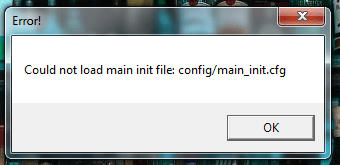
When I try to run Amnesia from the GEF, it says displays the message in the image I attached.
The only thing I could think to try without completely changing it's game ID and doing the ENTIRE process (which even then I don't think would do much considering it likely STILL won't find the file) was to change AppExePath to the actual path of the .exe.
That didn't work though. Any ideas? The game runs fine from the main directory, but I don't want to have to go to it every time (I'm sure you guys understand )
)
edit: Oh, and my Bioshock shortcut in GEF has no icon, how can I add one without doing the whole process of changing game id and such also, because doing so only made it get listed as "Unspecified", and it wouldn't refresh. Let me know if I can just add a boxart string or something like that.
Any help's greatly appreciated, thanks in advance
When I try to run Amnesia from the GEF, it says displays the message in the image I attached.
The only thing I could think to try without completely changing it's game ID and doing the ENTIRE process (which even then I don't think would do much considering it likely STILL won't find the file) was to change AppExePath to the actual path of the .exe.
That didn't work though. Any ideas? The game runs fine from the main directory, but I don't want to have to go to it every time (I'm sure you guys understand
)edit: Oh, and my Bioshock shortcut in GEF has no icon, how can I add one without doing the whole process of changing game id and such also, because doing so only made it get listed as "Unspecified", and it wouldn't refresh. Let me know if I can just add a boxart string or something like that.
Any help's greatly appreciated, thanks in advance
Attachments
My Computer
- Computer Manufacturer/Model Number
- MSI/MS-7309
- OS
- Windows 7 Ultimate x64
- Graphics Card(s)
- Radeon HD 4830
- Other Info
- Don't know enough about computers to fill in the rest, if any important info is missing, feel free to message me on where or how to find the details.