Announcing: 7stacks - stacks for 7 (freeware)

great maybe one more thing. Can you allow PNG or JPG images as the Icons like RocketDock and others do?

FInding and making a ICO file are a pain in the ass.

Well, not really. See, RocketDock and ObjectDock allow you to place items in specific slots, and you can then associate PNGs with those slots. Meanwhile, 7stacks is a file browser, and whatever files appear, appear.

So basically, they work opposite to one another. RocketDock starts with icons, and you associate them with files. 7stacks starts with files, and it retrieves their associated ICOs.

One day, I might add the ability to arrange icons. So, instead of pointing to a folder, you'd point to a settings file, which contained the icons and files you want. But that's much more complex, both in programming, and for the end user.

And BTW, if you want an easy to use icon editor, try IcoFX. It lets you just drop-in PNGs (from places like WinCustomize) and save them as ICOs. Takes like 20 secs. I use it all the time.

UPDATE: Uhh, disregard most of this post. See the next one, below.
 
Last edited:

My Computer My Computer

Computer Manufacturer/Model Number
Custom Built
OS
Windows 7 RC build 7100
CPU
Core 2 Quad Q6600 (OC to 3.0 GHz)
Motherboard
DFI Lanparty DK P35-T2RS
Memory
2GB DDR2 800
Graphics Card(s)
GF 8600 GT
Monitor(s) Displays
22" Acer LCD
Screen Resolution
1680x1050
Hard Drives
640 GB Western Digital
After thinking about the above post for a few hours, the following occurred to me:

7stacks could maintain a database of PNG icon "overrides", allowing you to say "Replace this file's icon with this PNG". There's no reason you couldn't do this with whole filetypes (like *.doc), also.

We'll have to see. I'll do some experimentation later on and check the feasability of it.
 

My Computer My Computer

Computer Manufacturer/Model Number
Custom Built
OS
Windows 7 RC build 7100
CPU
Core 2 Quad Q6600 (OC to 3.0 GHz)
Motherboard
DFI Lanparty DK P35-T2RS
Memory
2GB DDR2 800
Graphics Card(s)
GF 8600 GT
Monitor(s) Displays
22" Acer LCD
Screen Resolution
1680x1050
Hard Drives
640 GB Western Digital
Very nice app Alastria ... great job :)
 

My Computer My Computer

Computer Manufacturer/Model Number
Custom Desktop & HP G60-120US
OS
Windows 7 Pro x64 & Win7 Pre x64 / Ubuntu 9.10 Beta
CPU
Q6600 Quad Core 2 - 2.4Ghz
Motherboard
EVGA - 680i SLI
Memory
4GB Kingston DDR2 800
Graphics Card(s)
XFX 8800GT Alpha Dog Ed. X 2 SLI
Sound Card
On Board
Monitor(s) Displays
24"Dell Wide Screen and Gateway 17" Widescreen & HP 15.4"
Screen Resolution
1920 x1200 (Dell) 1440 x 900(Gateway) & 1366x768 (HP Laptop)
Hard Drives
WD 500GB, Seagate 1.5 TB
PSU
Rosewell RX750
Case
Antec 900
Cooling
Zalman 8700
Keyboard
Saitek Cyborg & Logitech wireless
Mouse
Logitech G5 & Logitech wireless
Internet Speed
Cable - 20Mbs/sec DOWN 5Mbs/s UP
I think he was referring to the shorcut icons, not files being browsed.
 

My Computer My Computer

OS
7264x64/7260x86
Version 1.2 is now available. See the OP for info on what's been updated.
 

My Computer My Computer

Computer Manufacturer/Model Number
Custom Built
OS
Windows 7 RC build 7100
CPU
Core 2 Quad Q6600 (OC to 3.0 GHz)
Motherboard
DFI Lanparty DK P35-T2RS
Memory
2GB DDR2 800
Graphics Card(s)
GF 8600 GT
Monitor(s) Displays
22" Acer LCD
Screen Resolution
1680x1050
Hard Drives
640 GB Western Digital
Very nice update.

Couple things:

Stack still shows up where the cursor is, instead of where the stack is.

The options under preferences are under edit as well, seems a little redudant.

Is it possible to add the active state to the taskbar icon?
Awesome stuff man.
 

My Computer My Computer

OS
7264x64/7260x86
Very nice update.

Couple things:

Stack still shows up where the cursor is, instead of where the stack is.

The options under preferences are under edit as well, seems a little redudant.

Is it possible to add the active state to the taskbar icon?
Awesome stuff man.

1) As far as I know, there's no way to determine what are the coordinates of the icon on the taskbar. But, I can infer that if you're clicking on it, it's where your mouse cursor is. So that's why I use the mouse coordinates as the basis of where to display it.

I've heard from some keyboardies who use Win+# to launch their shortcuts, and I respect that and wish I had a better answer. But at present, there's no way around this :(

2) The preferences button on the Create/Edit Stack window is the same as the jumplist entry. It's just another way to get to the Preferences .. use either one you want. The button has to be on the Create/Edit window, because there's no other way for Vista and XP users to access this (since they have no jumplist).

3) Unfortunately, 7stacks can never use the "running indicator" halo effect that other normal apps use because the thumbnail window previews get in the way of the stack itself. Therefore, I make 7stacks hide itself from the taskbar to prevent this thumbnail from appearing.
 

My Computer My Computer

Computer Manufacturer/Model Number
Custom Built
OS
Windows 7 RC build 7100
CPU
Core 2 Quad Q6600 (OC to 3.0 GHz)
Motherboard
DFI Lanparty DK P35-T2RS
Memory
2GB DDR2 800
Graphics Card(s)
GF 8600 GT
Monitor(s) Displays
22" Acer LCD
Screen Resolution
1680x1050
Hard Drives
640 GB Western Digital
How can I restore the default stacks that come with a fresh install of Win7? I removed the stacks and toolbar when I first installed and created a quick launch bar to replace it. I find myself wanting this functionality now...
 

My Computer My Computer

Computer type
PC/Desktop
Computer Manufacturer/Model Number
Alienware Aurora-R4
OS
Windows 7 Professional x64
CPU
Intel(R) Core(TM) i7-3820 CPU, 4 Cores, 8 Logical Cores
Motherboard
Alienware
Memory
32 GB DDR3 1600
Graphics Card(s)
ATI Radeon HD 8950 3GB vDDR5 & ATI Radeon HD 7950 3GB vDDR5
Sound Card
Realtek 7.1 Audio
Monitor(s) Displays
Dell SP2309W 23 inch
Screen Resolution
2048x1152
Hard Drives
7.3 TB in 4 drives (Raid 0), 2TB NAS backup drive.
PSU
875w
Case
ALX Chasis with active venting
Cooling
Liquid cooled with active venting and fans.
Keyboard
Alienware TactX
Mouse
Alienware TactX
Internet Speed
15mb Cable
Antivirus
Malwarebytes
Browser
Pale Moon (Optimized Mozilla Based)
Other Info
http://www.y0himba.net
Hi there!

Ive read the whole thread, really nice app. But im wondering why no one complained about this: speed.
Everytime i click on a stack ill have to wait 1 or 2 seconds until the stack is showing up. That really kills the fun for me. Is there a way to speed it up a bit?

Phil
 

My Computer My Computer

OS
Windows 7 RTM
CPU
Core2Duo E6400 @ 2,8GHz
Motherboard
P5N32E-SLI
Memory
4 GB DDR2800
Graphics Card(s)
GeForce 8800GTS 320MB
Sound Card
Onboard
Monitor(s) Displays
22" Samsung T220HD
Hard Drives
WD RaptorX 150GB
Samsung 1TB
Hi there!

Ive read the whole thread, really nice app. But im wondering why no one complained about this: speed.
Everytime i click on a stack ill have to wait 1 or 2 seconds until the stack is showing up. That really kills the fun for me. Is there a way to speed it up a bit?

Phil

I hear a lot of complaints about speed, and that's one of the biggest things I'm working on. In addition to v1.5 already displaying items much faster than v1.2, the new version will give you the option of running a tray app which will precache stack contents for faster display (i.e. sacrifice memory for more speed).

V1.5 will be out before the Oct. 22 release of Win 7, and it will also be in public beta sometime before that. Subscribe to my twitter feed for updates.
 

My Computer My Computer

Computer Manufacturer/Model Number
Custom Built
OS
Windows 7 RC build 7100
CPU
Core 2 Quad Q6600 (OC to 3.0 GHz)
Motherboard
DFI Lanparty DK P35-T2RS
Memory
2GB DDR2 800
Graphics Card(s)
GF 8600 GT
Monitor(s) Displays
22" Acer LCD
Screen Resolution
1680x1050
Hard Drives
640 GB Western Digital
Hi there!

Ive read the whole thread, really nice app. But im wondering why no one complained about this: speed.
Everytime i click on a stack ill have to wait 1 or 2 seconds until the stack is showing up. That really kills the fun for me. Is there a way to speed it up a bit?

Phil

I hear a lot of complaints about speed, and that's one of the biggest things I'm working on. In addition to v1.5 already displaying items much faster than v1.2, the new version will give you the option of running a tray app which will precache stack contents for faster display (i.e. sacrifice memory for more speed).

V1.5 will be out before the Oct. 22 release of Win 7, and it will also be in public beta sometime before that. Subscribe to my twitter feed for updates.

Sounds really perfect to me. Spending a little bit of my RAM for 7stacks should be possible ;) ...

Thanks and keep up the good work!
 

My Computer My Computer

OS
Windows 7 RTM
CPU
Core2Duo E6400 @ 2,8GHz
Motherboard
P5N32E-SLI
Memory
4 GB DDR2800
Graphics Card(s)
GeForce 8800GTS 320MB
Sound Card
Onboard
Monitor(s) Displays
22" Samsung T220HD
Hard Drives
WD RaptorX 150GB
Samsung 1TB
TBH, I don't think it spends much of any RAM at all. I am running it now and nothing is showing in Process hacker at all regarding 7Stacks.

7Stacks #1.PNG

The Fix icon and the Thunderbird icon are actually 7stacks.

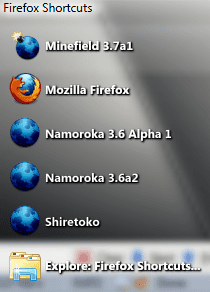
7Stacks #2.PNG

The Firefox Stack....yes, I am really testing all 5 versions, just not simultaneously.
 

My Computers My Computers

System One System Two

  • Computer type
    PC/Desktop
    Computer Manufacturer/Model Number
    The Beast Model A (homebrew)
    OS
    Windows 11 21H2 Current build
    CPU
    AMD Ryzen 9 3950X
    Motherboard
    MSI MEG X570 GODLIKE
    Memory
    4 * 32 GB - Corsair Vengeance 3600 MHz
    Graphics Card(s)
    EVGA GeForce RTX 3080 Ti XC3 ULTRA GAMING (12G-P5-3955-KR)
    Sound Card
    Realtek® ALC1220 Codec
    Monitor(s) Displays
    2x Eve Spectrum ES07D03 4K Gaming Monitor (Matte) | Eve Spec
    Screen Resolution
    3x 3840 x 2160
    Hard Drives
    3x Samsung 980 Pro NVMe PCIe 4 M.2 2 TB SSD (MZ-V8P2T0B/AM) } 3x Sabrent Rocket NVMe 4.0 1 TB SSD
    PSU
    PC Power & Cooling’s Silencer Series 1050 Watt, 80 Plus Plat
    Case
    Fractal Design Define 7 XL Dark ATX Full Tower Case
    Cooling
    SteelSeries Apex Pro Wired Gaming Keyboard
    Keyboard
    SteelSeries Apex Pro
    Mouse
    Logitech MX Master 3S | MX Master 3 for business
    Internet Speed
    AT&T LightSpeed Gigabit Duplex Ftth
    Antivirus
    Windows Defender + MB 3
    Browser
    Nightly (default) + Firefox (stable),Chrome, Edge
  • Computer type
    PC/Desktop
    System Manufacturer/Model Number
    Dell Latitude E5470
    OS
    ChromeOS Flex Dev Channel (current)
    CPU
    Intel(R) Core(TM) i5-6300U CPU @ 2.40GHz, 2501 Mhz, 2 Core(s), 4 Logical Processor(s)
    Motherboard
    Dell
    Memory
    16 GB
    Graphics Card(s)
    Intel(R) HD Graphics 520
    Sound Card
    Intel(R) HD Graphics 520 + RealTek Audio
    Monitor(s) Displays
    Dell laptop display 15"
    Screen Resolution
    1920 * 1080
    Hard Drives
    Toshiba 128GB M.2 22300 drive
    INTEL Cherryville 520 Series SSDSC2CW180A 180 GB SATA III SSD
    PSU
    Dell
    Case
    Dell
    Cooling
    Dell
    Keyboard
    Dell
    Mouse
    Logitech MX Master 3S (shared w. Sys 1) | Dell TouchPad
    Internet Speed
    AT&T LightSpeed Gigabit Duplex Ftth
Hello all,

I've been trying to get 7Stacks to work. It installs OK, I run it, fill in the info, the program creates the shortcut on my desktop, I can pin it to my taskbar, but when I click on it i get the busy sign on my cursor for a few seconds and that's it...any ideas?

I have Windows 7 Enterpirse 64bit (7600)

Many thanks
 

My Computer My Computer

Computer Manufacturer/Model Number
Sony Vaio VPCF1
OS
Windows 7 Enterprise 64bit
CPU
i7 Q740
Memory
8GB DDR3
Graphics Card(s)
Nvidia GT 425M
Screen Resolution
1920x1080
If anyone using the RTM (build 7600) is having problems, and is willing to be a guinea pig, please email me via my website's contact form.
 

My Computer My Computer

Computer Manufacturer/Model Number
Custom Built
OS
Windows 7 RC build 7100
CPU
Core 2 Quad Q6600 (OC to 3.0 GHz)
Motherboard
DFI Lanparty DK P35-T2RS
Memory
2GB DDR2 800
Graphics Card(s)
GF 8600 GT
Monitor(s) Displays
22" Acer LCD
Screen Resolution
1680x1050
Hard Drives
640 GB Western Digital
If anyone using the RTM (build 7600) is having problems, and is willing to be a guinea pig, please email me via my website's contact form.
Well i'm not using it on Rtm yet, but in a few minutes i will ;) I would be willing to be your test dummy, if you need one ;)
 
TBH, I don't think it spends much of any RAM at all. I am running it now and nothing is showing in Process hacker at all regarding 7Stacks.

View attachment 27565

The Fix icon and the Thunderbird icon are actually 7stacks.

View attachment 27566

The Firefox Stack....yes, I am really testing all 5 versions, just not simultaneously.

I am intrigued by your corner radius.

I would like to know more.
starshiptroopers.jpg
 

My Computer My Computer

OS
7264x64/7260x86
Hello all,

I've been trying to get 7Stacks to work. It installs OK, I run it, fill in the info, the program creates the shortcut on my desktop, I can pin it to my taskbar, but when I click on it i get the busy sign on my cursor for a few seconds and that's it...any ideas?

I have Windows 7 Enterpirse 64bit (7600)

Many thanks

I am using it on Windows 7 Ultimate RTM 64bit without any problems. hopefully, sometime tomorrow I'll have it working on the laptop (also Ultimate RTM 64bit). It is pretty simple to use - assuming that you have already copied shortcuts into the folder....

If anyone using the RTM (build 7600) is having problems, and is willing to be a guinea pig, please email me via my website's contact form.

I'll test for sure. It's what I do....

If anyone using the RTM (build 7600) is having problems, and is willing to be a guinea pig, please email me via my website's contact form.
Well i'm not using it on Rtm yet, but in a few minutes i will ;) I would be willing to be your test dummy, if you need one ;)

Ditto....

TBH, I don't think it spends much of any RAM at all. I am running it now and nothing is showing in Process hacker at all regarding 7Stacks.

View attachment 27565

The Fix icon and the Thunderbird icon are actually 7stacks.

View attachment 27566

The Firefox Stack....yes, I am really testing all 5 versions, just not simultaneously.

I am intrigued by your corner radius.

I would like to know more.
starshiptroopers.jpg

That corner radius is actually a different visual style - SiCo Big - that I am using AveStyler to load.

the theme / style *I* am using: SiCo for Win7 RC 7100 x86 by ~alkhan on deviantART

And updated version: SiCo for Windows 7 RC by ~alkhan on deviantART

here is a link to all of Alkhan's stuff: alkhan's Gallery

AveStyler: AveStyler
 

My Computers My Computers

System One System Two

  • Computer type
    PC/Desktop
    Computer Manufacturer/Model Number
    The Beast Model A (homebrew)
    OS
    Windows 11 21H2 Current build
    CPU
    AMD Ryzen 9 3950X
    Motherboard
    MSI MEG X570 GODLIKE
    Memory
    4 * 32 GB - Corsair Vengeance 3600 MHz
    Graphics Card(s)
    EVGA GeForce RTX 3080 Ti XC3 ULTRA GAMING (12G-P5-3955-KR)
    Sound Card
    Realtek® ALC1220 Codec
    Monitor(s) Displays
    2x Eve Spectrum ES07D03 4K Gaming Monitor (Matte) | Eve Spec
    Screen Resolution
    3x 3840 x 2160
    Hard Drives
    3x Samsung 980 Pro NVMe PCIe 4 M.2 2 TB SSD (MZ-V8P2T0B/AM) } 3x Sabrent Rocket NVMe 4.0 1 TB SSD
    PSU
    PC Power & Cooling’s Silencer Series 1050 Watt, 80 Plus Plat
    Case
    Fractal Design Define 7 XL Dark ATX Full Tower Case
    Cooling
    SteelSeries Apex Pro Wired Gaming Keyboard
    Keyboard
    SteelSeries Apex Pro
    Mouse
    Logitech MX Master 3S | MX Master 3 for business
    Internet Speed
    AT&T LightSpeed Gigabit Duplex Ftth
    Antivirus
    Windows Defender + MB 3
    Browser
    Nightly (default) + Firefox (stable),Chrome, Edge
  • Computer type
    PC/Desktop
    System Manufacturer/Model Number
    Dell Latitude E5470
    OS
    ChromeOS Flex Dev Channel (current)
    CPU
    Intel(R) Core(TM) i5-6300U CPU @ 2.40GHz, 2501 Mhz, 2 Core(s), 4 Logical Processor(s)
    Motherboard
    Dell
    Memory
    16 GB
    Graphics Card(s)
    Intel(R) HD Graphics 520
    Sound Card
    Intel(R) HD Graphics 520 + RealTek Audio
    Monitor(s) Displays
    Dell laptop display 15"
    Screen Resolution
    1920 * 1080
    Hard Drives
    Toshiba 128GB M.2 22300 drive
    INTEL Cherryville 520 Series SSDSC2CW180A 180 GB SATA III SSD
    PSU
    Dell
    Case
    Dell
    Cooling
    Dell
    Keyboard
    Dell
    Mouse
    Logitech MX Master 3S (shared w. Sys 1) | Dell TouchPad
    Internet Speed
    AT&T LightSpeed Gigabit Duplex Ftth
Thanks for this app. Havent tried it yet but it looks great. Look forward to new versions!

EDIT 1:Tried it out, I LOVE IT! Very usefull. The only thing it seems to lack in the stacks is the ability to right click. This is very vital to me. Any chance this will be added in future releases?

EDIT: Drag and drop capabilities would be nice, but nothing I care about that much. Just a suggestion others might find useful.
 
Last edited:

My Computer My Computer

OS
Windows 7 Ultimate x64 RTM
CPU
Intel Core i7 860
Motherboard
MSI P55-GD64
Memory
2x2GB G.Skill Ripjaws
Graphics Card(s)
Sapphire Raedon HD 4890
Monitor(s) Displays
Dell 2208 WFP
Screen Resolution
1680x1050
Hard Drives
2x80 GB Intel X25M G2 SSDs RAID0
1x1 TB WD Caviar Black
1x1 TB WD Caviar Green
1x2 TB Caviar Black
1x2 TB Caviar Green
PSU
Corsair HX520
Case
Thermaltake Mozart TX
Keyboard
Saitek Cyborg
Mouse
Razer Copperhead
Internet Speed
6 Mb/s
Back
Top