Solved Any suggestion: Windows 7 OS transfer from SATA SSD to NVMe SSD

siliconbeaver

Member
Guru
VIP
Local time
4:35 PM
Messages
353
Is it possible?

It's well-known, clean install is best choice.

Well, these Windows 7 PCs are old, to activate Windows 7 key is NOT a problem. but to activate Office licenses will see a big problem. some old Office licenses (2007, 2010/3), likely need to phone call-in to activate one-by-one.

I am wondering if it is feasible to transfer it from SATA SSD to NVMe SSD. Present Windows 7 OS is missing NVMe driver (Windows 10/11 no this issue)

If the Windows 7 install was using SIW2's media, which contained NVMe driver, does the transfer still have the problem or not?
 

My Computers My Computers

  • At a glance

    Windows 7 Pro 64-bitI7-970032 GB
    Computer type
    PC/Desktop
    Computer Manufacturer/Model Number
    HP Elite 800 G5
    OS
    Windows 7 Pro 64-bit
    CPU
    I7-9700
    Memory
    32 GB
  • At a glance

    Windows 7 Pro 64-bit
    Computer type
    Laptop
    System Manufacturer/Model Number
    ASUS UX305C
    OS
    Windows 7 Pro 64-bit
If the os does not already have nvme support, then install the two msu files before migrating from sata ssd to nvme .

they are attached to the bottom of all my posts.
 

My Computers My Computers

  • At a glance

    7 X64i5 84002x8gb 3200mhz
    Computer type
    PC/Desktop
    OS
    7 X64
    CPU
    i5 8400
    Motherboard
    gigabyte b365m ds3h
    Memory
    2x8gb 3200mhz
    Hard Drives
    various
    PSU
    pure power 11 400w cm
    Case
    Coolermaster
    Cooling
    cryorig m9i
  • At a glance

    7x64g54008gb ddr4 2400
    Computer type
    PC/Desktop
    OS
    7x64
    CPU
    g5400
    Motherboard
    ga b365m ds3h
    Memory
    8gb ddr4 2400
    PSU
    xfx pro 450w

My Computers My Computers

  • At a glance

    Windows 7 Pro 64-bitI7-970032 GB
    Computer type
    PC/Desktop
    Computer Manufacturer/Model Number
    HP Elite 800 G5
    OS
    Windows 7 Pro 64-bit
    CPU
    I7-9700
    Memory
    32 GB
  • At a glance

    Windows 7 Pro 64-bit
    Computer type
    Laptop
    System Manufacturer/Model Number
    ASUS UX305C
    OS
    Windows 7 Pro 64-bit
Install the NVMe drive and boot from the SATA drive.
Windows will ask for the NVMe drive. Install it and then clone the SATA to the NVMe. It should boot normally.

I always use UEFI-GPT on NVMe drives. If the computer has UEFI BIOS and your SATA drive is Legacy-MBR you can convert it to UEFI-GPT using a Win 10 USB installation drive and MBR2GPT.exe (Yes, it does the convertion on a Win 7 x64 drive)
Convert Windows 10 from Legacy BIOS to UEFI without Data Loss | Tutorials
 

My Computers My Computers

  • At a glance

    Windows 7 HP 64i5 6600K - 800MHz to 4200MHz4+4G GSkill DDR4 3000IG - Intel 530
    Computer type
    PC/Desktop
    Computer Manufacturer/Model Number
    custom build
    OS
    Windows 7 HP 64
    CPU
    i5 6600K - 800MHz to 4200MHz
    Motherboard
    GA-Z170-HD3P
    Memory
    4+4G GSkill DDR4 3000
    Graphics Card(s)
    IG - Intel 530
    Monitor(s) Displays
    Samsung 226BW
    Screen Resolution
    1680x1050
    Hard Drives
    (1) -1 SM951 – 128GB M.2 AHCI PCIe SSD drive for Windows 7 and Lubuntu
    (2) -1 WD SATA 3 - 1T for Data
    (3) -1 WD SATA 3 - 1T for backup
    PSU
    Thermaltake 450W TR2 gold
    Keyboard
    Old and good Chicony mechanical keyboard
    Mouse
    Logitech mX performance - 9 buttons (had to disable some)
    Internet Speed
    500Mb/s
    Browser
    Firefox 64
    Other Info
    TinyWall firewall
  • At a glance

    Windows 7 Proi7-4500U 800MHz to 3.0GHz(4+4)G DDR3 1600IG intel 4400 + NVIDIA GeForce GT 745M
    Computer type
    Laptop
    System Manufacturer/Model Number
    Asus Q550LF
    OS
    Windows 7 Pro
    CPU
    i7-4500U 800MHz to 3.0GHz
    Motherboard
    Asus Q550LF
    Memory
    (4+4)G DDR3 1600
    Graphics Card(s)
    IG intel 4400 + NVIDIA GeForce GT 745M
    Sound Card
    Realtek
    Monitor(s) Displays
    LG Display LP156WF4-SPH1
    Screen Resolution
    1920 x 1080
    Hard Drives
    BX500 120G SSD for Windows and programs +
    1T HDD for data
    Internet Speed
    500 Mb/s
    Browser
    Firefox
    Other Info
    TinyWall firewall
Interesting,

MBR2GPT.exe does the conversion on Win 7 x64. wish I knew this early.
(I was using DiskGenius. data partition conversion was easy. but OS conversion took awhile to finish)

my post was there. https://www.sevenforums.com/general...repair-disk-not-compatible-3.html#post3519872

Brink posted two options. One in Windows. another in boot.
have you tried them? which could run on Windows 7? Within that thread, there were many discussions on conversion failure or repair, on move between C and D.

Minitool free ver, I was using it to move or merge partitions. in my practice, it occasionally failed (losing partition during or after). that was fatal to my data partition. hence unless necessary, I avoid it (after losing data several times :cry: )
 

My Computers My Computers

  • At a glance

    Windows 7 Pro 64-bitI7-970032 GB
    Computer type
    PC/Desktop
    Computer Manufacturer/Model Number
    HP Elite 800 G5
    OS
    Windows 7 Pro 64-bit
    CPU
    I7-9700
    Memory
    32 GB
  • At a glance

    Windows 7 Pro 64-bit
    Computer type
    Laptop
    System Manufacturer/Model Number
    ASUS UX305C
    OS
    Windows 7 Pro 64-bit
To convert a Win 7 (or 10) drive from Legacy - MBR to UEFI - GPT I have done under WinPE (booting from a Win 10 installation drive) opening a CMD window (press Shift+F10 simultaneously) and typing the commands:
MBR2GPT /validate
If ok
MBR2GPT /convert

I strongly recommend to create a disk image backup and to detach any other drives before you begin.
 
Last edited:

My Computers My Computers

  • At a glance

    Windows 7 HP 64i5 6600K - 800MHz to 4200MHz4+4G GSkill DDR4 3000IG - Intel 530
    Computer type
    PC/Desktop
    Computer Manufacturer/Model Number
    custom build
    OS
    Windows 7 HP 64
    CPU
    i5 6600K - 800MHz to 4200MHz
    Motherboard
    GA-Z170-HD3P
    Memory
    4+4G GSkill DDR4 3000
    Graphics Card(s)
    IG - Intel 530
    Monitor(s) Displays
    Samsung 226BW
    Screen Resolution
    1680x1050
    Hard Drives
    (1) -1 SM951 – 128GB M.2 AHCI PCIe SSD drive for Windows 7 and Lubuntu
    (2) -1 WD SATA 3 - 1T for Data
    (3) -1 WD SATA 3 - 1T for backup
    PSU
    Thermaltake 450W TR2 gold
    Keyboard
    Old and good Chicony mechanical keyboard
    Mouse
    Logitech mX performance - 9 buttons (had to disable some)
    Internet Speed
    500Mb/s
    Browser
    Firefox 64
    Other Info
    TinyWall firewall
  • At a glance

    Windows 7 Proi7-4500U 800MHz to 3.0GHz(4+4)G DDR3 1600IG intel 4400 + NVIDIA GeForce GT 745M
    Computer type
    Laptop
    System Manufacturer/Model Number
    Asus Q550LF
    OS
    Windows 7 Pro
    CPU
    i7-4500U 800MHz to 3.0GHz
    Motherboard
    Asus Q550LF
    Memory
    (4+4)G DDR3 1600
    Graphics Card(s)
    IG intel 4400 + NVIDIA GeForce GT 745M
    Sound Card
    Realtek
    Monitor(s) Displays
    LG Display LP156WF4-SPH1
    Screen Resolution
    1920 x 1080
    Hard Drives
    BX500 120G SSD for Windows and programs +
    1T HDD for data
    Internet Speed
    500 Mb/s
    Browser
    Firefox
    Other Info
    TinyWall firewall
I eventually got Windows 7 up on NVMe SSD 1st time.

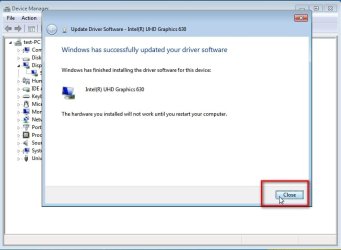
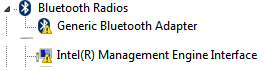
however I have seen some strange things. There are three yellow question marks: Bluetooth, graphics (HD530) and ME.
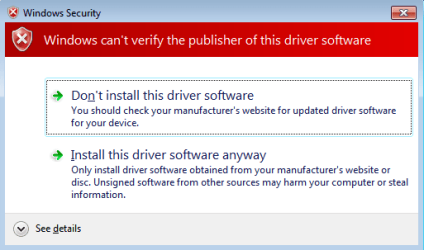
I re-installed Windows 7 drivers several times after Windows 7 is up. Just the problem couldn't get fixed. In question mark Properties, I can read the problem is related to digital signature.

The three question marks didn't occur when Windows 7 running on SATA SSD.
If I changed to run Windows 11 on the PC NVMe SSD, no question marks. (yhes, Windows 11 uses different Intel drivers).

Anyone has seen this problem? is it NVMe SSD related? how to fix?

Thanks,
 

My Computers My Computers

  • At a glance

    Windows 7 Pro 64-bitI7-970032 GB
    Computer type
    PC/Desktop
    Computer Manufacturer/Model Number
    HP Elite 800 G5
    OS
    Windows 7 Pro 64-bit
    CPU
    I7-9700
    Memory
    32 GB
  • At a glance

    Windows 7 Pro 64-bit
    Computer type
    Laptop
    System Manufacturer/Model Number
    ASUS UX305C
    OS
    Windows 7 Pro 64-bit
after-sysprep-have -disk1.jpg

after-sysprep-have -disk2.jpg

after-sysprep-have -disk3.jpg

after-sysprep-have -disk4.jpg

after-sysprep-have -disk5.jpg
 

My Computers My Computers

  • At a glance

    7 X64i5 84002x8gb 3200mhz
    Computer type
    PC/Desktop
    OS
    7 X64
    CPU
    i5 8400
    Motherboard
    gigabyte b365m ds3h
    Memory
    2x8gb 3200mhz
    Hard Drives
    various
    PSU
    pure power 11 400w cm
    Case
    Coolermaster
    Cooling
    cryorig m9i
  • At a glance

    7x64g54008gb ddr4 2400
    Computer type
    PC/Desktop
    OS
    7x64
    CPU
    g5400
    Motherboard
    ga b365m ds3h
    Memory
    8gb ddr4 2400
    PSU
    xfx pro 450w

My Computers My Computers

  • At a glance

    Windows 7 HP 64i5 6600K - 800MHz to 4200MHz4+4G GSkill DDR4 3000IG - Intel 530
    Computer type
    PC/Desktop
    Computer Manufacturer/Model Number
    custom build
    OS
    Windows 7 HP 64
    CPU
    i5 6600K - 800MHz to 4200MHz
    Motherboard
    GA-Z170-HD3P
    Memory
    4+4G GSkill DDR4 3000
    Graphics Card(s)
    IG - Intel 530
    Monitor(s) Displays
    Samsung 226BW
    Screen Resolution
    1680x1050
    Hard Drives
    (1) -1 SM951 – 128GB M.2 AHCI PCIe SSD drive for Windows 7 and Lubuntu
    (2) -1 WD SATA 3 - 1T for Data
    (3) -1 WD SATA 3 - 1T for backup
    PSU
    Thermaltake 450W TR2 gold
    Keyboard
    Old and good Chicony mechanical keyboard
    Mouse
    Logitech mX performance - 9 buttons (had to disable some)
    Internet Speed
    500Mb/s
    Browser
    Firefox 64
    Other Info
    TinyWall firewall
  • At a glance

    Windows 7 Proi7-4500U 800MHz to 3.0GHz(4+4)G DDR3 1600IG intel 4400 + NVIDIA GeForce GT 745M
    Computer type
    Laptop
    System Manufacturer/Model Number
    Asus Q550LF
    OS
    Windows 7 Pro
    CPU
    i7-4500U 800MHz to 3.0GHz
    Motherboard
    Asus Q550LF
    Memory
    (4+4)G DDR3 1600
    Graphics Card(s)
    IG intel 4400 + NVIDIA GeForce GT 745M
    Sound Card
    Realtek
    Monitor(s) Displays
    LG Display LP156WF4-SPH1
    Screen Resolution
    1920 x 1080
    Hard Drives
    BX500 120G SSD for Windows and programs +
    1T HDD for data
    Internet Speed
    500 Mb/s
    Browser
    Firefox
    Other Info
    TinyWall firewall
I was using your method. it couldn't work. yellow question mark when installing driver done.

my guess it's a PCIe bus conflict issue on PC motherboard (because NVMe, Graphics, WIFI all are PCIe devices). Just no proof.
It's no solution on Windows 7 level. but Microsoft offers I2C solution on Windows 8/8.1 or higher (10/11). Right like TouchPad issue of new modern laptop.


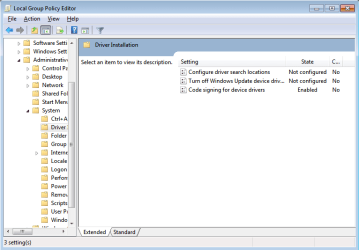
I followed the pdf file option#3 to install new drivers after reboot. however, warning sign still pop-up


Attachments

  • enabled.png
    enabled.png
    14.3 KB · Views: 0
  • digital sign.png
    digital sign.png
    9.5 KB · Views: 8

My Computers My Computers

  • At a glance

    Windows 7 Pro 64-bitI7-970032 GB
    Computer type
    PC/Desktop
    Computer Manufacturer/Model Number
    HP Elite 800 G5
    OS
    Windows 7 Pro 64-bit
    CPU
    I7-9700
    Memory
    32 GB
  • At a glance

    Windows 7 Pro 64-bit
    Computer type
    Laptop
    System Manufacturer/Model Number
    ASUS UX305C
    OS
    Windows 7 Pro 64-bit
click "install this driver software anyway"

If the driver is not signed for that os, it asks your permission to install. It is normal.
 

My Computers My Computers

  • At a glance

    7 X64i5 84002x8gb 3200mhz
    Computer type
    PC/Desktop
    OS
    7 X64
    CPU
    i5 8400
    Motherboard
    gigabyte b365m ds3h
    Memory
    2x8gb 3200mhz
    Hard Drives
    various
    PSU
    pure power 11 400w cm
    Case
    Coolermaster
    Cooling
    cryorig m9i
  • At a glance

    7x64g54008gb ddr4 2400
    Computer type
    PC/Desktop
    OS
    7x64
    CPU
    g5400
    Motherboard
    ga b365m ds3h
    Memory
    8gb ddr4 2400
    PSU
    xfx pro 450w
I did, then got yellow mark when done.

the PC OS install no issue when 1. Windows 7 on SATA SSD. 2. Windows 11 on NVMe SSD. but see problems when Windows 7 on NVMe SSD.
 

Attachments

  • yellow marks.png
    yellow marks.png
    1.8 KB · Views: 11

My Computers My Computers

  • At a glance

    Windows 7 Pro 64-bitI7-970032 GB
    Computer type
    PC/Desktop
    Computer Manufacturer/Model Number
    HP Elite 800 G5
    OS
    Windows 7 Pro 64-bit
    CPU
    I7-9700
    Memory
    32 GB
  • At a glance

    Windows 7 Pro 64-bit
    Computer type
    Laptop
    System Manufacturer/Model Number
    ASUS UX305C
    OS
    Windows 7 Pro 64-bit
What method did you use to get win7 onto the nvme disk?

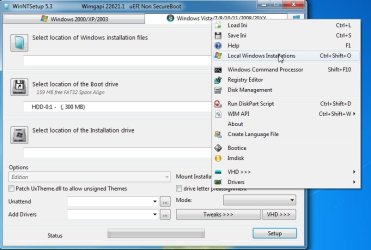
If you have the nvme updates in your win7 on the sata ssd, you could use Wincopy to copy the os partition from the sata ssd to another partition on the nvme disk and see if that does it.

WinNTSetup_v531a.rar

click the little blue icon at top right and select "local windows installations"

wincopy01.jpg

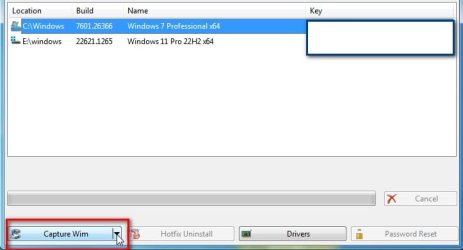
click the os you want to copy to highlight it in blue

wincopy2.jpg

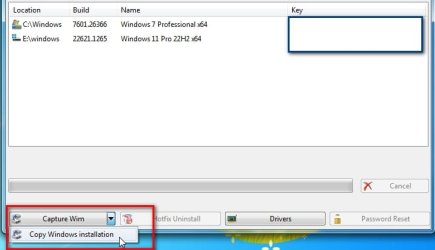
then select "Copy Windows Installation"

wincopy3.jpg


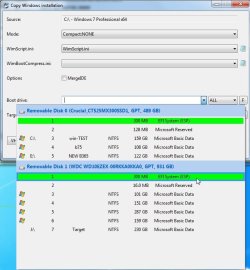
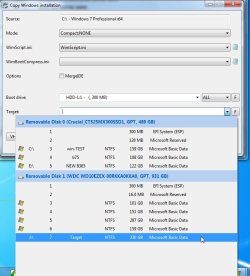
click the litttle dropdown arrow on "Boot drive" and select the esp partition on the target disk ( in your case the esp partition on the nvme disk )

wincopy-aelct-boot-drive2.jpg

click the arrow on "Target drive" and select your new partition on the nvme disk

wincopy-select-target-drive.jpg

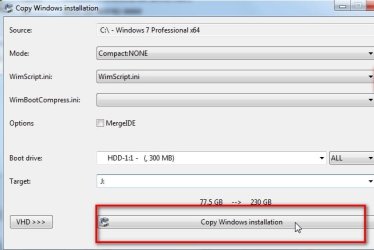
make sure MODE Compact:NONE

then just click the button "Copy Windows Installation"

2023-04-30_02334a.jpg
 
Last edited:

My Computers My Computers

  • At a glance

    7 X64i5 84002x8gb 3200mhz
    Computer type
    PC/Desktop
    OS
    7 X64
    CPU
    i5 8400
    Motherboard
    gigabyte b365m ds3h
    Memory
    2x8gb 3200mhz
    Hard Drives
    various
    PSU
    pure power 11 400w cm
    Case
    Coolermaster
    Cooling
    cryorig m9i
  • At a glance

    7x64g54008gb ddr4 2400
    Computer type
    PC/Desktop
    OS
    7x64
    CPU
    g5400
    Motherboard
    ga b365m ds3h
    Memory
    8gb ddr4 2400
    PSU
    xfx pro 450w
Thanks,

I am getting Win 7 SATA SSD back to try your method.
 

My Computers My Computers

  • At a glance

    Windows 7 Pro 64-bitI7-970032 GB
    Computer type
    PC/Desktop
    Computer Manufacturer/Model Number
    HP Elite 800 G5
    OS
    Windows 7 Pro 64-bit
    CPU
    I7-9700
    Memory
    32 GB
  • At a glance

    Windows 7 Pro 64-bit
    Computer type
    Laptop
    System Manufacturer/Model Number
    ASUS UX305C
    OS
    Windows 7 Pro 64-bit
It doesn't format the target , it copies, adjusts the osvolumevalue and creates a boot menu entry.

So you need to have a formatted target partition already.
 
Last edited:

My Computers My Computers

  • At a glance

    7 X64i5 84002x8gb 3200mhz
    Computer type
    PC/Desktop
    OS
    7 X64
    CPU
    i5 8400
    Motherboard
    gigabyte b365m ds3h
    Memory
    2x8gb 3200mhz
    Hard Drives
    various
    PSU
    pure power 11 400w cm
    Case
    Coolermaster
    Cooling
    cryorig m9i
  • At a glance

    7x64g54008gb ddr4 2400
    Computer type
    PC/Desktop
    OS
    7x64
    CPU
    g5400
    Motherboard
    ga b365m ds3h
    Memory
    8gb ddr4 2400
    PSU
    xfx pro 450w
With struggles and endeavors, I re-thought of my strategy. decided to clean-install rather than transfer.
it's surprisingly easy and quick (on NVMe SSD)

1. install media offered by HP Cloud Recovery (SIW2's link HP Cloud Recovery)
2. run Simplix (update of hotfixes, a step longest time)
3. install drivers
4. apps

Windows 7 is up on NVMe SSD now. Its boot and start much faster than run on HDD. Sometimes even crashing. I was kidding, Microsoft adds long waiting on Windows 10/11 start while spinning circle of dots. Microsoft must be slowing down the start to avoid its crashing on NVMe SSD.

Thanks SIW2 and Megahertz07 for your help,
 

My Computers My Computers

  • At a glance

    Windows 7 Pro 64-bitI7-970032 GB
    Computer type
    PC/Desktop
    Computer Manufacturer/Model Number
    HP Elite 800 G5
    OS
    Windows 7 Pro 64-bit
    CPU
    I7-9700
    Memory
    32 GB
  • At a glance

    Windows 7 Pro 64-bit
    Computer type
    Laptop
    System Manufacturer/Model Number
    ASUS UX305C
    OS
    Windows 7 Pro 64-bit
Good to know you did it. There is nothing like a clean install.
Did you install as Legacy- MBR or UEFI-GPT?
 

My Computers My Computers

  • At a glance

    Windows 7 HP 64i5 6600K - 800MHz to 4200MHz4+4G GSkill DDR4 3000IG - Intel 530
    Computer type
    PC/Desktop
    Computer Manufacturer/Model Number
    custom build
    OS
    Windows 7 HP 64
    CPU
    i5 6600K - 800MHz to 4200MHz
    Motherboard
    GA-Z170-HD3P
    Memory
    4+4G GSkill DDR4 3000
    Graphics Card(s)
    IG - Intel 530
    Monitor(s) Displays
    Samsung 226BW
    Screen Resolution
    1680x1050
    Hard Drives
    (1) -1 SM951 – 128GB M.2 AHCI PCIe SSD drive for Windows 7 and Lubuntu
    (2) -1 WD SATA 3 - 1T for Data
    (3) -1 WD SATA 3 - 1T for backup
    PSU
    Thermaltake 450W TR2 gold
    Keyboard
    Old and good Chicony mechanical keyboard
    Mouse
    Logitech mX performance - 9 buttons (had to disable some)
    Internet Speed
    500Mb/s
    Browser
    Firefox 64
    Other Info
    TinyWall firewall
  • At a glance

    Windows 7 Proi7-4500U 800MHz to 3.0GHz(4+4)G DDR3 1600IG intel 4400 + NVIDIA GeForce GT 745M
    Computer type
    Laptop
    System Manufacturer/Model Number
    Asus Q550LF
    OS
    Windows 7 Pro
    CPU
    i7-4500U 800MHz to 3.0GHz
    Motherboard
    Asus Q550LF
    Memory
    (4+4)G DDR3 1600
    Graphics Card(s)
    IG intel 4400 + NVIDIA GeForce GT 745M
    Sound Card
    Realtek
    Monitor(s) Displays
    LG Display LP156WF4-SPH1
    Screen Resolution
    1920 x 1080
    Hard Drives
    BX500 120G SSD for Windows and programs +
    1T HDD for data
    Internet Speed
    500 Mb/s
    Browser
    Firefox
    Other Info
    TinyWall firewall
Previously, too many failures. hence I didn't try MBR this time.

UEFI-GPT

HP setup its own features. hence no idea what's wrong in my last failure. for example, USB 3/3.1 looked fine after Windows 7 up and Simplix updated. however when I was testing to use HP driver. it did, after HP USB 3/3.1 driver install, PC re-started once more. I was thinking this un-necessary.

USB2 was same. re-taking HP driver in my test. so was audio driver, 1st done by Microsoft, next by HP. no idea which one is the real to fix a problem.

- - - Updated - - -

I cannot make a clone/image of this finished Windows 7 install. No tool working on it.

Macrium Reflect free version (V8), no USB 3/3.1 support. boot no problem. however, when under windows environment, USB keyboard/mouse are stopping working. I tested several times.

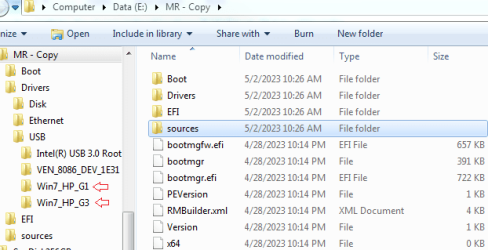
Then I added HP G1/G3 USB 3/3.1 driver, re-made Macrium Reflect. but still failed on HP G1/G3.
image.png

with a PS/2 mouse, I got HP G1 to run Macrium Reflect. ok to image/clone.
but HP G3 no PS/2 port. IMO, only solution is to add HP G3 USB 3/3.1 driver into Macrium Reflect free version.

Any suggestion how to do it correctly? my last test (adding driver to USB folder) was NOT working.

Should I add USB 3/3.1 driver into boot.wim of Macrium Reflect? According to Update your Win 7 installation media by SIW2, he actually added Windows 7 drivers into .wim of boot/install two files.
 

My Computers My Computers

  • At a glance

    Windows 7 Pro 64-bitI7-970032 GB
    Computer type
    PC/Desktop
    Computer Manufacturer/Model Number
    HP Elite 800 G5
    OS
    Windows 7 Pro 64-bit
    CPU
    I7-9700
    Memory
    32 GB
  • At a glance

    Windows 7 Pro 64-bit
    Computer type
    Laptop
    System Manufacturer/Model Number
    ASUS UX305C
    OS
    Windows 7 Pro 64-bit
Back
Top