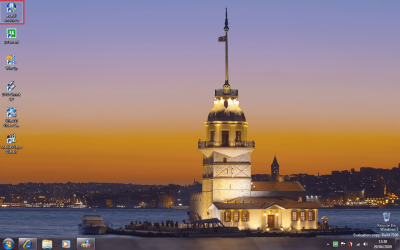
Anyone know how to get rid of these dots?!?!?

thenext8seconds

New member
Member
Local time
12:12 AM
Messages
46
I realize this might be a dumb thing to nitpick about, but it's always been like this for me at least since Windows XP. When I click on the desktop, the icon that was last clicked on or if there's just one icon on the desktop then that one, it gets a little dotted outline around it. There must be a way to keep this from happening? Because I thought it was fixed cuz when I first installed Windows 7, it wouldn't do this, but after a few days, now it's doing it again. :(

I can make it go away if I right click on the desktop and choose refresh, but as soon as I click on the taskbar and then click on the desktop again, it comes back.

*edit* okay, so now it's gone away for now, even when I do click on the taskbar and back on the desktop, but still, has anyone else noticed this peculiarity before in Windows, or am I just cursed?
 

Attachments
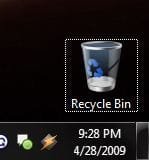
  • Capture.JPG
    Capture.JPG
    10.9 KB · Views: 917

My Computer My Computer

At a glance

Windows 7, of course.
OS
Windows 7, of course.
It's common. It's basically just the selection box still there but not highlighted is all. If you choose another icon or unselect that icon, it'll go away.
 

My Computer My Computer

At a glance

Windows 7Pentium D 2.664 gigs DDR2BFG nVidia 8600 GT OC
Computer Manufacturer/Model Number
Custom
OS
Windows 7
CPU
Pentium D 2.66
Motherboard
Asus P5ND2-SLi
Memory
4 gigs DDR2
Graphics Card(s)
BFG nVidia 8600 GT OC
Sound Card
nForce 4 (realtek)
Monitor(s) Displays
Samsung 204B
Screen Resolution
1600x1200
Hard Drives
Western Digital Raptor 150
Western Digital 320 (both SATA)
PSU
BFG 600 watt
Cooling
fan
Keyboard
MS Natural
Mouse
MS Sidewinder
Internet Speed
10 mb
It's common. It's basically just the selection box still there but not highlighted is all. If you choose another icon or unselect that icon, it'll go away.

Well actually, the icon is obviously not selected, and that's the ony icon i keep on my desktop. grrr :mad:
 

My Computer My Computer

At a glance

Windows 7, of course.
OS
Windows 7, of course.
I don't get the 'dots' as your pic shows ... have you tried using 'single click', in folder options? It works the same on the desktop.
 

My Computer My Computer

At a glance

Windows 7 Ultimate 32bit SP1Intel(R) Core(TM)2 Quad CPU @ 2.40GHz, 2400 MHz4 GBATI Radeon HD 2600 Pro
Computer type
PC/Desktop
Computer Manufacturer/Model Number
Bruce ... somewhere in his 40's
OS
Windows 7 Ultimate 32bit SP1
CPU
Intel(R) Core(TM)2 Quad CPU @ 2.40GHz, 2400 MHz
Motherboard
INTEL/D975XBX2
Memory
4 GB
Graphics Card(s)
ATI Radeon HD 2600 Pro
Monitor(s) Displays
Samsung SyncMaster 914v
Screen Resolution
1280 x 1024
Hard Drives
2/500GB each ... ST3500630AS ATA Device.
One is not connected
PSU
Rocketfish 700 W
Case
G.Skill Gigabyte Chassis
Keyboard
Standard PS/2 Keyboard
Mouse
Microsoft PS/2 Mouse
Internet Speed
DSL
Antivirus
Avira Internet Security
Browser
IE 11
Other Info
ATI HDMI Audio
Could the dots have to do with screen resolution?
 

My Computer My Computer

At a glance

Win7 Enterprise, Win7 x86 (Ult 7600), Win7 x6...AMD fx8350 4ghz, AMD-32 2400mhz, AMD-64 3200m...2gb, 4gb on the Ult 7600, 4gb on Technet RTM,...Draw my own Graphics, several nVidia cards
Computer type
PC/Desktop
Computer Manufacturer/Model Number
Built them myself, Science Experiments !
OS
Win7 Enterprise, Win7 x86 (Ult 7600), Win7 x64 Ult 7600, TechNet RTM on AMD x64 (2.8Ghz)
CPU
AMD fx8350 4ghz, AMD-32 2400mhz, AMD-64 3200mhz, AMDx64 2.8G
Motherboard
SIS 755, ECS-K8M890M-M (Ult 7600), GigaByte & others
Memory
2gb, 4gb on the Ult 7600, 4gb on Technet RTM, 32gb on FX8350
Graphics Card(s)
Draw my own Graphics, several nVidia cards
Sound Card
on motherboard
Monitor(s) Displays
19" flat scr, 28" I-Inc widescr,22" Emprex Widescr, 23" Acer
Screen Resolution
1280 x 1024, 1440 x 900, 1920 x 1080
Hard Drives
6 pata Ide HD's & 2 Sata HD's
added 80gb external on Ult 7600 computer,
numerous extra 1tb, 2TB, 3Tb SATA HD's
A collection of ext HD Docks w/ HDs
PSU
430w, 550w, 600w, 700, 800, etc
Case
All Generic Full Towers
Cooling
Open Air & a few fans, some w/ colored LEDs
Keyboard
Compaq & Dell recycled from GoodWill
Mouse
Made in China Optical Wired Mouse
Internet Speed
Fast Cable InterNet
Antivirus
AVG Free on 24 different Desktops, NO Problems!
Browser
IE 8 is preferred, but use FireFox sometimes
Other Info
Linksys Routers, switches, & Hubs
Too Many USB Flash Drives to count, Biggest is 64GB !
Eight computers in my home network.
Sixteen computers at my business network.
Linked via TeamViewer !
Lots of old used spare computer parts everywhere!
to the 2 questions above, no and no. i have had 3 different monitors in the last several years all with different resolutions and it's always happened.... and i don't have single click enabled, nor do i like it enabled but either way, it doesn't have any effect on the dotted outline.
 

My Computer My Computer

At a glance

Windows 7, of course.
OS
Windows 7, of course.
Check "show translucent selection rectangle" in the visual effects settings.
 

My Computer My Computer

At a glance

Win 7
OS
Win 7
Don't worry about it I've seen them on my desktop plenty of times.
 

My Computer My Computer

At a glance

Windows 7 Ultimate x64.i5 760 @ 4.2Ghz. 1.18v4g Corsair xms3 ddr3, 1600Mhz.Gigabyte GTX-560Ti soc edition
Computer Manufacturer/Model Number
Custom Build.
OS
Windows 7 Ultimate x64.
CPU
i5 760 @ 4.2Ghz. 1.18v
Motherboard
Gigabyte - H55M-USB3
Memory
4g Corsair xms3 ddr3, 1600Mhz.
Graphics Card(s)
Gigabyte GTX-560Ti soc edition
Sound Card
Asus Xonar Dx - Logitech Z5500.
Monitor(s) Displays
Acer 22" LCD Wide screen 1680-1050 -Samsung 42" Plasma....
Screen Resolution
1680/1050 -----1920/1080p.
Hard Drives
2x 2TB Seagate Go Flex,
1x 1TB Seagate,
1x 640WD Black,
x16 Gig sandisc flash drive,
1x8Gig sandisc flash drive.
PSU
XigmaTek 80plus NRP-PC702 - 700w dual 30a.
Case
Venus Gamers Midi Tower Case with LED Display
Cooling
Arctic Freezer 7 Pro Rev 2... x2 Arctic F8 case fans........
Keyboard
Logitech G15-v2 Gaming.
Mouse
Microsoft Sidewinder X8.
Internet Speed
Virgin Media - 50mb down- 8mb up.
Other Info
x2 Xbox 360 wireless controllers...

Dual layer optical disc drive...

Chrome 79million

A.V = MSE
i know this is more of a work-around than a proper solution, but if you install Fences from Stardock, it gives you the ability to double-click on your desktop and hide all the icons. another double-click brings them back. you don't have to actually use the 'Fences' bit to get this feature (though they do look quite nice).

it integrates into the shell, so it has no running process to take up resources. works fine with 7100.
 

My Computer My Computer

At a glance

7600 x86Core 2 Duo e7200, 2.53 ghz2x DDR2 PC5300 1gb, 667 mhzGeForce 9500gt, 512mb
OS
7600 x86
CPU
Core 2 Duo e7200, 2.53 ghz
Motherboard
Micro-Star MS-7529
Memory
2x DDR2 PC5300 1gb, 667 mhz
Graphics Card(s)
GeForce 9500gt, 512mb
Monitor(s) Displays
22" LG Flatron w2234s
Screen Resolution
1680x1050
Hard Drives
Excelstor SATA-II 250gb 7200rpm, 8mb cache
PSU
CoolerMaster M520
Internet Speed
30/20 mbits
It is actually the selection band still being there. You can verify this by having a second icon. Create a short cut to the recycle bin on the desktop. Select it. Now click on the taskbar. Click on the other icon on the desktop. Click on the taskbar. Notice that the dots will change which icon their around.
 

My Computer My Computer

At a glance

Windows 7Pentium D 2.664 gigs DDR2BFG nVidia 8600 GT OC
Computer Manufacturer/Model Number
Custom
OS
Windows 7
CPU
Pentium D 2.66
Motherboard
Asus P5ND2-SLi
Memory
4 gigs DDR2
Graphics Card(s)
BFG nVidia 8600 GT OC
Sound Card
nForce 4 (realtek)
Monitor(s) Displays
Samsung 204B
Screen Resolution
1600x1200
Hard Drives
Western Digital Raptor 150
Western Digital 320 (both SATA)
PSU
BFG 600 watt
Cooling
fan
Keyboard
MS Natural
Mouse
MS Sidewinder
Internet Speed
10 mb
It's just a default selection icon. I've seen it present since XP too. It just shows the last icon on the desktop selected, even if you didn't run anything. In everyday running you'll actually not even notice it (how many times do you just 'click' the desktop?)..
 

Attachments

  • Untitled.png
    Untitled.png
    338.7 KB · Views: 48

My Computer My Computer

At a glance

Windows 7 Ultimate x64AMD Sempron Dual Core3GBNVIDIA GeForce 6150SE nForce 430
Computer Manufacturer/Model Number
Compaq Desktop
OS
Windows 7 Ultimate x64
CPU
AMD Sempron Dual Core
Memory
3GB
Graphics Card(s)
NVIDIA GeForce 6150SE nForce 430
Screen Resolution
1024x768
Hard Drives
150GB Sata
with all this talk of how normal it is i'm starting to wonder why i don't have it :sarc:
:p
 

My Computer My Computer

At a glance

Windows 7 Ultimate x86AMD Sempron 3600+ATI Radeon Xpress 1150
Computer Manufacturer/Model Number
Dell Vostro 1000
OS
Windows 7 Ultimate x86
CPU
AMD Sempron 3600+
Graphics Card(s)
ATI Radeon Xpress 1150
Monitor(s) Displays
Generic PnP Monitor
Screen Resolution
1200 x 800
Hard Drives
WD Scorpio Blue 500 GB (WD5000BEVT)
Mouse
Logitech V320 Cordless Optical Mouse
That feature was introduced back with windows 3.1! It shows the currently active object. It was particularly useful if you didnt have a mouse which was more common in those days, so that you knew that when you pressed spacebar it would action that object.

In previous various of windows other objects such as dialog buttons also had those dots, again to help you with the navigation.
 

My Computer My Computer

At a glance

Windows 7 Professional 64-bitIntel E8400 3GHzKingston PC3-10700H 4GbXFX Radeon HD 5850 BlackEd.
Computer Manufacturer/Model Number
self built
OS
Windows 7 Professional 64-bit
CPU
Intel E8400 3GHz
Motherboard
Intel DX48BT2
Memory
Kingston PC3-10700H 4Gb
Graphics Card(s)
XFX Radeon HD 5850 BlackEd.
Sound Card
Asus Xonar DG
Monitor(s) Displays
2x Samsung SM-T220HD 22"
Screen Resolution
1680x1050 on two monitors
Hard Drives
OCZ Vertex 2 120gb 3.5" (OS)
Seagate Momentus XT 500gb
Samsung F3 1Tb (games)
2x Samsung F1 1Tb
PSU
Thermaltake ToughPower 850w
Case
Thermaltake Armor
Cooling
Scythe Mugen II
Keyboard
Microsoft Comfort Curve USB
Mouse
Razer Diamondback 3G
Internet Speed
8128/443
The dots are still there when you expand the 'More Details' section when copying files.
 

Attachments

  • Untitled.png
    Untitled.png
    14.3 KB · Views: 7

My Computer My Computer

At a glance

Windows 7 Ultimate x64AMD Sempron Dual Core3GBNVIDIA GeForce 6150SE nForce 430
Computer Manufacturer/Model Number
Compaq Desktop
OS
Windows 7 Ultimate x64
CPU
AMD Sempron Dual Core
Memory
3GB
Graphics Card(s)
NVIDIA GeForce 6150SE nForce 430
Screen Resolution
1024x768
Hard Drives
150GB Sata
Sounds like someone likes a real clean desktop. Me too! I use iconoid to make everything (except gadgets) disappear from the desktop after 5 seconds. Only problem is it won't work if you are using a slideshow for your desktop background. There is a workaround though. :D
 

My Computer My Computer

At a glance

Windows7 x64 7600 16385Intel I7 9206GB DDR3ATI Radeon HD4350
Computer Manufacturer/Model Number
Dell / Studio xps
OS
Windows7 x64 7600 16385
CPU
Intel I7 920
Motherboard
Dell
Memory
6GB DDR3
Graphics Card(s)
ATI Radeon HD4350
Sound Card
Integrated 7.1 channel
Hard Drives
Hitachi HDT721064SLA360 (596 GB)
Keyboard
Logitech EX110
Mouse
Logitech LX8
For the people that want this feature, this is what you do.......

Click any icon on the desktop once, press ctrl on keboard and scroll mouse so as to make icons bigger and there you go, click taskbar to remove the dots.......:huh:

;)
 

My Computer My Computer

At a glance

MS Windows 7 Professional 64-bit SP1AMD FX(tm)-6100 Six-Core Processor Socket AM3...8.00 GB Dual-Channel DDR3 @ 802MHz (11-11-11-...NVIDIA GeForce GTX 560 Ti
Computer type
PC/Desktop
Computer Manufacturer/Model Number
Self Build
OS
MS Windows 7 Professional 64-bit SP1
CPU
AMD FX(tm)-6100 Six-Core Processor Socket AM3+ (942)
Motherboard
ASUSTeK COMPUTER INC. SABERTOOTH 990FX (AM3r2)
Memory
8.00 GB Dual-Channel DDR3 @ 802MHz (11-11-11-36) 1.5Volts
Graphics Card(s)
NVIDIA GeForce GTX 560 Ti
Sound Card
Onboard Realtek HD
Monitor(s) Displays
shimian (1920x1080@60Hz)
Screen Resolution
1920*1080
Hard Drives
OCZ-AGIL ITY3 SATA Disk Device 120GB
PSU
Corsair TX 750
Case
Corsair
Cooling
WaterCooled
Keyboard
Microsoft Wired
Mouse
Logitech USB Optical TiltWheel Mouse
Internet Speed
Realtek PCIe GBE Family Controller 20MB*1MB
Antivirus
Avast
Browser
Firefox
Other Info
150GB Internal Hard Drive for Backing Up Important Files -
Hauppauge Nova-DT Dual DVB-T Tuner Device (+IR) -
USB PC Camera with Mic (SN9C105)
Here's an idea, right click on the desktop, then find the selection to turn off viewing desktop icons - problem solved.
 

My Computer My Computer

At a glance

Dual boot WindowsXP/Windows 7Intel Pentium 4 3.2GHz HT1 GBnVidia GeForce FX 5500
Computer Manufacturer/Model Number
Dell B-110
OS
Dual boot WindowsXP/Windows 7
CPU
Intel Pentium 4 3.2GHz HT
Memory
1 GB
Graphics Card(s)
nVidia GeForce FX 5500
Sound Card
Creative Soundblaster Audigy 2 ZS
Screen Resolution
1024 X 768 32bit
Hard Drives
2 WD - 80/160 GB
Other Info
Highly upgraded from Dell stock unit
Attempted to create the same effect, but was unable. Seen this on XP but never Win 7 or Vista. HMMMMMMMMMMMMMMMMMMM! :confused:
 

My Computer My Computer

At a glance

Win 7 Pro x64, VM Win XP, Win7 Pro Sandbox, K...AMD Athlon(tm) II X4 640 @ 3.0 Gbz12GB 1066MHz DDR3 SDRAM - 2x4GB, 2x2GBATI Radeon HD 4350 HD Graphics/Audio with 512MB
Computer Manufacturer/Model Number
HP Pavilion a4302f
OS
Win 7 Pro x64, VM Win XP, Win7 Pro Sandbox, Kubuntu 11
CPU
AMD Athlon(tm) II X4 640 @ 3.0 Gbz
Memory
12GB 1066MHz DDR3 SDRAM - 2x4GB, 2x2GB
Graphics Card(s)
ATI Radeon HD 4350 HD Graphics/Audio with 512MB
Sound Card
Realtek High Definition Audio
Monitor(s) Displays
1. Dell 23" SP2307, 2. Mitsublishi 40" HDTV, Hannspree 25"
Screen Resolution
1. 2048x1152, 2. 1920-1080, 3. 1920x1200
Hard Drives
Int: 1 120 Gig SSD i
1 - 2.5" 500 USB External HDD
1 -1 Tb USB External HDD
Case
Mid Tower
Cooling
Standard Fans - 5 fans (very quiet)
Keyboard
Microsoft Wireless 2000
Mouse
Microsoft Wireless Mouse 5000
Internet Speed
10 Mbit (realistically 500 Kbit - 1.2 Mbit)
Other Info
Speakers - Bose Desktop (Excellent Sound)
1 external CD|DVD\Blue-ray Recorders/Players (Sony)
Attempted to create the same effect, but was unable. Seen this on XP but never Win 7 or Vista. HMMMMMMMMMMMMMMMMMMM! :confused:

Because most vista and win 7 have the blue translucent selection on by default. Go to the visual effects settings deselect "show translucent selection rectangle" if you want to see the dotted outline.
 

My Computer My Computer

At a glance

Win 7
OS
Win 7
This has something to do with the last Object you clicked on. Even all the folder Icons turn to an outline when you click off of them. Just more dumbing down of the OS for people who can't remember what they were doing 2 seconds ago. lol I agree it is annoying on the desktop.
 

My Computer My Computer

At a glance

Win7 7100 x86
OS
Win7 7100 x86
Back
Top