Anyway to disable Autoplay?

Wii Master 64

New member
Power User
VIP
Local time
5:49 AM
Messages
301
Since my SD card slot is crapping out on me for some reason, I need a way to disable Autoplay so that pop-up window won't pop up every time my computer re-detects my SD card. I have Windows 7 Home Premium.
 

My Computer My Computer

At a glance

Windows 7 Home Premium2 AMD Athlon 64 X2NVIDIA GeForce 8200M G graphics
Computer Manufacturer/Model Number
Compaq Presario CQ60-215DX
OS
Windows 7 Home Premium
CPU
2 AMD Athlon 64 X2
Graphics Card(s)
NVIDIA GeForce 8200M G graphics

My Computer My Computer

At a glance

Vista, Windows7, Mint Mate, Zorin, Windows 8from 1.6GHz Duo to i7
Computer Manufacturer/Model Number
HP, Dell, Gateway, Toshiba - 4 laptops and 2 desktops
OS
Vista, Windows7, Mint Mate, Zorin, Windows 8
CPU
from 1.6GHz Duo to i7
Monitor(s) Displays
2x HP w2207
Hard Drives
5x HDD, 7x SSD, 12x Externals
Keyboard
with trackball - no mices
Mouse
Trackball mice
Internet Speed
DSL 6000
Sweet, thanks!
 

My Computer My Computer

At a glance

Windows 7 Home Premium2 AMD Athlon 64 X2NVIDIA GeForce 8200M G graphics
Computer Manufacturer/Model Number
Compaq Presario CQ60-215DX
OS
Windows 7 Home Premium
CPU
2 AMD Athlon 64 X2
Graphics Card(s)
NVIDIA GeForce 8200M G graphics
Removed

The page that links to was removed...
 

My Computer My Computer

At a glance

Windows 7 Home Premium x64
OS
Windows 7 Home Premium x64
Yeah right, sorry. It used to work. I wonder why it got removed.
 

My Computer My Computer

At a glance

Vista, Windows7, Mint Mate, Zorin, Windows 8from 1.6GHz Duo to i7
Computer Manufacturer/Model Number
HP, Dell, Gateway, Toshiba - 4 laptops and 2 desktops
OS
Vista, Windows7, Mint Mate, Zorin, Windows 8
CPU
from 1.6GHz Duo to i7
Monitor(s) Displays
2x HP w2207
Hard Drives
5x HDD, 7x SSD, 12x Externals
Keyboard
with trackball - no mices
Mouse
Trackball mice
Internet Speed
DSL 6000
Not your fault. I just thought you might no what it said or where it went.
 

My Computer My Computer

At a glance

Windows 7 Home Premium x64
OS
Windows 7 Home Premium x64
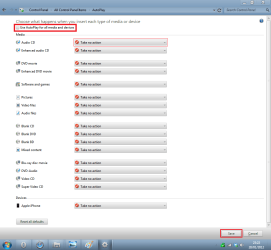
Click Start > Control Panel > AutoPlay

Select Take No Action for Each Device.

Then De-Select Use Auto-Play for all media and devices.
 

Attachments

  • AutoPlay.png
    AutoPlay.png
    29 KB · Views: 37
Last edited:

My Computer My Computer

At a glance

Windows 7 Ultimate SP1 - 64 BitIntel Core i5 2500k2x4GB DDR3 1333HzAti Radeon 6770
Computer type
PC/Desktop
Computer Manufacturer/Model Number
Novatech iRush Pro
OS
Windows 7 Ultimate SP1 - 64 Bit
CPU
Intel Core i5 2500k
Motherboard
Foxconn H67M-S/H67M-V/H67
Memory
2x4GB DDR3 1333Hz
Graphics Card(s)
Ati Radeon 6770
Sound Card
None
Monitor(s) Displays
Samsung S22B150
Screen Resolution
1920x1080
Hard Drives
2x500GB
PSU
500W
Cooling
Fan
Keyboard
HP KU0316
Mouse
Wireless Logitech M185
Internet Speed
20MB/s
Antivirus
Avast Free
Browser
Google Chrome
Other Info
Logitech M185 Mouse
KU-M316 Keyboard
That disables it for everything. I only want it disabled for the sd card/slot.
 

My Computer My Computer

At a glance

Windows 7 Home Premium x64
OS
Windows 7 Home Premium x64

My Computer My Computer

At a glance

Windows 7 Ultimate SP1 - 64 BitIntel Core i5 2500k2x4GB DDR3 1333HzAti Radeon 6770
Computer type
PC/Desktop
Computer Manufacturer/Model Number
Novatech iRush Pro
OS
Windows 7 Ultimate SP1 - 64 Bit
CPU
Intel Core i5 2500k
Motherboard
Foxconn H67M-S/H67M-V/H67
Memory
2x4GB DDR3 1333Hz
Graphics Card(s)
Ati Radeon 6770
Sound Card
None
Monitor(s) Displays
Samsung S22B150
Screen Resolution
1920x1080
Hard Drives
2x500GB
PSU
500W
Cooling
Fan
Keyboard
HP KU0316
Mouse
Wireless Logitech M185
Internet Speed
20MB/s
Antivirus
Avast Free
Browser
Google Chrome
Other Info
Logitech M185 Mouse
KU-M316 Keyboard
I have been there as well. The .inf does not work, and I'm looking at the program now, but have no wish to pay for it.
 

My Computer My Computer

At a glance

Windows 7 Home Premium x64
OS
Windows 7 Home Premium x64
The first does not work. The third may lead somewhere, but the posts themselves do not.
 

My Computer My Computer

At a glance

Windows 7 Home Premium x64
OS
Windows 7 Home Premium x64
Post #7 should work - works here.
 

My Computer My Computer

At a glance

Vista, Windows7, Mint Mate, Zorin, Windows 8from 1.6GHz Duo to i7
Computer Manufacturer/Model Number
HP, Dell, Gateway, Toshiba - 4 laptops and 2 desktops
OS
Vista, Windows7, Mint Mate, Zorin, Windows 8
CPU
from 1.6GHz Duo to i7
Monitor(s) Displays
2x HP w2207
Hard Drives
5x HDD, 7x SSD, 12x Externals
Keyboard
with trackball - no mices
Mouse
Trackball mice
Internet Speed
DSL 6000
If you had read further (#8), you would understand that I am aware of that option, and choose not to use it because I want to disable autoplay for SD cards only.
 

My Computer My Computer

At a glance

Windows 7 Home Premium x64
OS
Windows 7 Home Premium x64
OK, my bad.
 

My Computer My Computer

At a glance

Vista, Windows7, Mint Mate, Zorin, Windows 8from 1.6GHz Duo to i7
Computer Manufacturer/Model Number
HP, Dell, Gateway, Toshiba - 4 laptops and 2 desktops
OS
Vista, Windows7, Mint Mate, Zorin, Windows 8
CPU
from 1.6GHz Duo to i7
Monitor(s) Displays
2x HP w2207
Hard Drives
5x HDD, 7x SSD, 12x Externals
Keyboard
with trackball - no mices
Mouse
Trackball mice
Internet Speed
DSL 6000
Try disabling Mixed Content and report back.
 

My Computer My Computer

At a glance

Windows 7 Ultimate SP1 - 64 BitIntel Core i5 2500k2x4GB DDR3 1333HzAti Radeon 6770
Computer type
PC/Desktop
Computer Manufacturer/Model Number
Novatech iRush Pro
OS
Windows 7 Ultimate SP1 - 64 Bit
CPU
Intel Core i5 2500k
Motherboard
Foxconn H67M-S/H67M-V/H67
Memory
2x4GB DDR3 1333Hz
Graphics Card(s)
Ati Radeon 6770
Sound Card
None
Monitor(s) Displays
Samsung S22B150
Screen Resolution
1920x1080
Hard Drives
2x500GB
PSU
500W
Cooling
Fan
Keyboard
HP KU0316
Mouse
Wireless Logitech M185
Internet Speed
20MB/s
Antivirus
Avast Free
Browser
Google Chrome
Other Info
Logitech M185 Mouse
KU-M316 Keyboard
Autoplay still ran.
 

My Computer My Computer

At a glance

Windows 7 Home Premium x64
OS
Windows 7 Home Premium x64

My Computer My Computer

At a glance

Windows 7 Ultimate SP1 - 64 BitIntel Core i5 2500k2x4GB DDR3 1333HzAti Radeon 6770
Computer type
PC/Desktop
Computer Manufacturer/Model Number
Novatech iRush Pro
OS
Windows 7 Ultimate SP1 - 64 Bit
CPU
Intel Core i5 2500k
Motherboard
Foxconn H67M-S/H67M-V/H67
Memory
2x4GB DDR3 1333Hz
Graphics Card(s)
Ati Radeon 6770
Sound Card
None
Monitor(s) Displays
Samsung S22B150
Screen Resolution
1920x1080
Hard Drives
2x500GB
PSU
500W
Cooling
Fan
Keyboard
HP KU0316
Mouse
Wireless Logitech M185
Internet Speed
20MB/s
Antivirus
Avast Free
Browser
Google Chrome
Other Info
Logitech M185 Mouse
KU-M316 Keyboard
That seems to be disabling autoplay entirely, which I do not want to do.

However, in the registry, I found the folder CancelAutoplay, which may be useful. Still playing with that...

HKEY_LOCAL_MACHINE\SOFTWARE\Microsoft\Windows\CurrentVersion\Explorer\AutoplayHandlers\CancelAutoplay
 

My Computer My Computer

At a glance

Windows 7 Home Premium x64
OS
Windows 7 Home Premium x64
Well thanks for the help guys. Hopefully someone will find an answer...
I'm giving up for now, and suggesting to Microsoft that device specific autoplay disabling become a feature of windows 8.

Edit1: If I can find where to suggest it, that is...
 

My Computer My Computer

At a glance

Windows 7 Home Premium x64
OS
Windows 7 Home Premium x64
Use Panda USB Vaccine. It's free.
 

My Computer My Computer

At a glance

Windows 7 Home Premium x64
OS
Windows 7 Home Premium x64
Back
Top