

- Local time
- 12:06 PM
- Messages
- 51
Hello
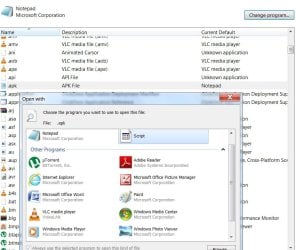
I wanted to take a quick look at a APK file so I just right click on it and selected open with the wrong one.
Now I cant get them back to the way they were so I can open them in APKtool.
I found this on the net and before I try this can someone let me know its safe.
...............................
regedit (Registry Editor) opens, on the left pane (side), click on (Click on HKEY_CURRENT_USER first, then the list expands. You keep clicking until you get to where you need to go) HKEY_CURRENT_USER\Software\Microsoft\Windows\CurrentVersion?\Explorer\FileExts?\. Then, after expanding 'FileExts?' in the previously mentioned location, find the '.apk' extension, right click it and click delete. Restart your computer, then it should work. All I had to do was delete that from the registry and the icons switched right back to the apk icons.
.................................
Thanks for any info. you can give.
I wanted to take a quick look at a APK file so I just right click on it and selected open with the wrong one.
Now I cant get them back to the way they were so I can open them in APKtool.
I found this on the net and before I try this can someone let me know its safe.
...............................
regedit (Registry Editor) opens, on the left pane (side), click on (Click on HKEY_CURRENT_USER first, then the list expands. You keep clicking until you get to where you need to go) HKEY_CURRENT_USER\Software\Microsoft\Windows\CurrentVersion?\Explorer\FileExts?\. Then, after expanding 'FileExts?' in the previously mentioned location, find the '.apk' extension, right click it and click delete. Restart your computer, then it should work. All I had to do was delete that from the registry and the icons switched right back to the apk icons.
.................................
Thanks for any info. you can give.
Attachments

My Computer
At a glance
Windows 7 Ultimate x64i7 2600k8G Corsair-DDR3GTX 260 Evga
- Computer Manufacturer/Model Number
- Samurai Jack Special
- OS
- Windows 7 Ultimate x64
- CPU
- i7 2600k
- Motherboard
- Asus-P67-Sabertooth
- Memory
- 8G Corsair-DDR3
- Graphics Card(s)
- GTX 260 Evga
- Monitor(s) Displays
- HP 2711x
- Hard Drives
- 3 Samsung.. 500G/250/250/
- PSU
- Corsair
- Case
- Antec
- Cooling
- 5 Fans
- Other Info
- Laptop Asus G75VW. A little heavy but its a Beast...


