
Solved app windows not refreshing

bawldiggle

GrayGhost2 ret.
Pro User
VIP
Local time
11:25 PM
Messages
895
Location
Australia
When I drag/move Win Explorer window it leaves a trail of black rectangles until dragging stops.
Is also happening with portable text reader Metapad.

"Printscreen" does not capture problem.

Would appreciate any help, thank you :)
 

My Computer My Computer

At a glance

XP Pro (x86) | 7 HP (x86) & (x64) | 7 Pro (x64)
Computer type
PC/Desktop
Computer Manufacturer/Model Number
Toshiba, Lenovo (laptops) + 4 rigs
OS
XP Pro (x86) | 7 HP (x86) & (x64) | 7 Pro (x64)
It could be the monitor going bad. Any other problems in full screen mode? Like games or youtube?
You could try a simple diagnostic test for video...
 

My Computer My Computer

At a glance

Windows 10 ProAMD Ryzen 5 2400G Processor with Radeon RX Ve...G.SKILL Ripjaws V Series 16GB (2 x 8GB) 288-P...2047MB NVIDIA GeForce GTX 1060 6GB (EVGA)
Computer type
PC/Desktop
Computer Manufacturer/Model Number
Custom Built
OS
Windows 10 Pro
CPU
AMD Ryzen 5 2400G Processor with Radeon RX Vega 11 Graphics
Motherboard
ASRock X470 Master SLI/AC AM4 AMD Promontory X470 SATA 6Gb/s
Memory
G.SKILL Ripjaws V Series 16GB (2 x 8GB) 288-Pin DDR4 SDRAM D
Graphics Card(s)
2047MB NVIDIA GeForce GTX 1060 6GB (EVGA)
Sound Card
Motherboard Built in
Monitor(s) Displays
Acer R240HY bidx 23.8-Inch IPS HDMI DVI VGA (1920 x 1080) Wi
Screen Resolution
1920 x 1080
Hard Drives
1TB Sandisk SSD PLUS (Main drive)
500 GB Seagate 7200 RPM (Games)
500 GB Western Digital 7200 RPM (Virtual Machines)
PSU
CORSAIR TX Series TX650M 650W 80+ Gold Modular Power Supply
Case
CORSAIR CARBIDE SPEC-02 Mid-Tower Gaming Case, Red LED Fan
Cooling
220mm, two 120mm, and four 60mm fans
Keyboard
Wired Dell keyboard
Mouse
Wireless Logitech mouse
Internet Speed
250mb down, 30mb up
Antivirus
Panda Cloud Antivirus
Browser
Chrome-ish x64
Other Info
Your awesome for reading this.
Go into Mouse Properties and look if you have Display Pointer Trails checked.
 

My Computer My Computer

At a glance

Windows 10 Pro. 64/ version 1709 Windows 7 Pr...Intel i7-6800K @ 4.3Corsair Platinum 16 gig @2400EVGA GTX 1070 OC
Computer type
PC/Desktop
Computer Manufacturer/Model Number
Home made Desktop
OS
Windows 10 Pro. 64/ version 1709 Windows 7 Pro/64
CPU
Intel i7-6800K @ 4.3
Motherboard
ASUS X-99 Deluxe II
Memory
Corsair Platinum 16 gig @2400
Graphics Card(s)
EVGA GTX 1070 OC
Monitor(s) Displays
Asus 27" LED LCD/VE278Q
Screen Resolution
1920-1080 or 1280-720 HDMI
Hard Drives
INTEL SSD 730-240 Gb Sata 3.0/
PSU
EVGA Platium 1200W
Case
Phanteks Luxe Tempered Glass 8 fans/ one radiator
Cooling
XSPC/ Water Cooled CPU
Keyboard
Das 4 Professional
Mouse
Logitech M705/MX Anywhere 2-S
Internet Speed
100 mbits
Antivirus
Microsoft Security Essentials/ Malwarebytes Premium 3.0/ SAS
Browser
I.E. 11 default/Firefox/ ISP Time Warner Cable/Spectrum
Other Info
LG BluRay Burner/
Sound system-KLipsch-THX/
Icy Dock ssd Hot Swap bays.
Thank you andrew129260 for your response. :)

It could be the monitor going bad. Any other problems in full screen mode? Like games or youtube?
You could try a simple diagnostic test for video...
How would I do a "simple diagnostic test for video" ?
.
 

My Computer My Computer

At a glance

XP Pro (x86) | 7 HP (x86) & (x64) | 7 Pro (x64)
Computer type
PC/Desktop
Computer Manufacturer/Model Number
Toshiba, Lenovo (laptops) + 4 rigs
OS
XP Pro (x86) | 7 HP (x86) & (x64) | 7 Pro (x64)
Hi Layback Bear :)

Mouse pointer settings are:-
[ ] Enable pointe shadow
[ ] Display pointer trails
[x] Disable internal pointing device when external USB pointing device is attached
- was "False" now "True"
- screenupdating has got worse.
----
Am using a wireless mouse + keyboard
[ ] Disable internal pointing device when external USB pointing device is attached
- disconnected both -- only using laptop keyboard and mouse-pad
- problem persists
-----
Screen updating is lagging. ie, when I drag any small window over another the "other" is slow to refresh.
I think it is getting worse.
Toshiba is 14 months old. I didn't take it out of the box until 8 months ago.

Would appreciate any help.

SPECS
Toshiba Satellite C665 (laptop)
Model/part num:= PSC55A
Win7 32 bit (Toshiba preloaded)
UI:=Classic Shell Start + Classic Explorer
 

My Computer My Computer

At a glance

XP Pro (x86) | 7 HP (x86) & (x64) | 7 Pro (x64)
Computer type
PC/Desktop
Computer Manufacturer/Model Number
Toshiba, Lenovo (laptops) + 4 rigs
OS
XP Pro (x86) | 7 HP (x86) & (x64) | 7 Pro (x64)
You didn't answer my questions....

1.) Any other problems in full screen mode?
Like games or youtube?

2.) Google ;) How to Test a Video Graphics Card | eHow

Here is one article with some tools you can try. You can also try using Toshiba website to see if they have a diagnostic tool for their brand. Even though this is asus, you could use their video tests, wouldn't harm anything:

http://www.softpedia.com/get/System/System-Info/ASUS-PC-Diagnostics.shtml

If any weird lines appear, or your computer restarts, you have a problem.
 

My Computer My Computer

At a glance

Windows 10 ProAMD Ryzen 5 2400G Processor with Radeon RX Ve...G.SKILL Ripjaws V Series 16GB (2 x 8GB) 288-P...2047MB NVIDIA GeForce GTX 1060 6GB (EVGA)
Computer type
PC/Desktop
Computer Manufacturer/Model Number
Custom Built
OS
Windows 10 Pro
CPU
AMD Ryzen 5 2400G Processor with Radeon RX Vega 11 Graphics
Motherboard
ASRock X470 Master SLI/AC AM4 AMD Promontory X470 SATA 6Gb/s
Memory
G.SKILL Ripjaws V Series 16GB (2 x 8GB) 288-Pin DDR4 SDRAM D
Graphics Card(s)
2047MB NVIDIA GeForce GTX 1060 6GB (EVGA)
Sound Card
Motherboard Built in
Monitor(s) Displays
Acer R240HY bidx 23.8-Inch IPS HDMI DVI VGA (1920 x 1080) Wi
Screen Resolution
1920 x 1080
Hard Drives
1TB Sandisk SSD PLUS (Main drive)
500 GB Seagate 7200 RPM (Games)
500 GB Western Digital 7200 RPM (Virtual Machines)
PSU
CORSAIR TX Series TX650M 650W 80+ Gold Modular Power Supply
Case
CORSAIR CARBIDE SPEC-02 Mid-Tower Gaming Case, Red LED Fan
Cooling
220mm, two 120mm, and four 60mm fans
Keyboard
Wired Dell keyboard
Mouse
Wireless Logitech mouse
Internet Speed
250mb down, 30mb up
Antivirus
Panda Cloud Antivirus
Browser
Chrome-ish x64
Other Info
Your awesome for reading this.
andrew129260 +1 :)

  • No gamers -- Toshiba is a business PC. For web browsing, emails and SMS send/receive only.
    And a regular user of sevenforums.com
  • All users are prehistoric. Past use-by-date.
  • youtube in full screen and normal is OK.
  • Most data is allocated to an external HDD
  • Both cold boot and reboot are perfect -- no video problems that I can see
Toshiba was a factory rebuild -- one dead pixel from day one.
Laptop has been getting slow start and shutdown/reboot in about the last 6 weeks.
Defragged system files (MyDefrag) -- took two hours !!
I have been too busy to even think of defrag
Ran out of patience to defrag the little bit of data in "C:\"
Reboot

... problem fixed. :party:
===========
EDIT 1-Oct-2013 18:06 hrs (local time)
TOO EARLY to celebrate -- not fixed
===========
I will follow up both your "video test" suggestions, because I am on a mission ... to manage my own PCs.
Will report back here with results tomorrow. :geek:

I do appreciate your support, thank you :)
.
 
Last edited:

My Computer My Computer

At a glance

XP Pro (x86) | 7 HP (x86) & (x64) | 7 Pro (x64)
Computer type
PC/Desktop
Computer Manufacturer/Model Number
Toshiba, Lenovo (laptops) + 4 rigs
OS
XP Pro (x86) | 7 HP (x86) & (x64) | 7 Pro (x64)
Tried How to Test a Video Graphics Card | eHow
Result:= OK no problems detected

Tried http://www.softpedia.com/get/System/...gnostics.shtml
ASUS PC Diagnostics is a comprehensive tool designed to retrieve system information from key areas of your computer. It supports only ASUS systems, as the name implies.

I have googled for Toshiba graphics card tester, but all finds were pre Win-7 -- too old.
One find was way over my head, for serious gamers. It envolved downloading a game.

I treat my PCs like a mistress, keep her happy without pushing my luck ;)


Have discovered "Metapad" I have been using since 1999 and its later incarnations might be the culprit.
Metapad is portable but I have file associations directed to "Metapad 3.5 LE"
For about 3 years Metapad 3.6 was beta. Just discovered it is now elevated to a "go-er"
Ran Metapad 3.6 last night (as portable) ran a treat, until I ran 3.5 LE.
3.5 and 3.6 share same registry key. Am about to remove 3.5 and clean the registry etc, and start with a clean slate.

Look after my girlfriend while I am away ! :cool:
 

My Computer My Computer

At a glance

XP Pro (x86) | 7 HP (x86) & (x64) | 7 Pro (x64)
Computer type
PC/Desktop
Computer Manufacturer/Model Number
Toshiba, Lenovo (laptops) + 4 rigs
OS
XP Pro (x86) | 7 HP (x86) & (x64) | 7 Pro (x64)
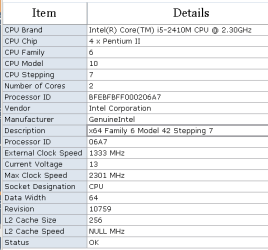
This Toshiba laptop is starting to concern me
Fan is running most of the time. Dual core temperatures are reading as approx 40° C when the PC is idle.
CPU temp hits app 60°C during active YouTube streams.

I have noticed some portable programs (located on the laptops C drive) are leaving a trail of white or black filled rectangle as the program's-window is dragged.
1. Metapad 3.5 LE
2. System Spec 3.06

Occasionally Win-Explorer leaves the same "trail" ... lagging screen refresh ... but not all the time :confused:

I have installed "CoreTemp" app and set the "alarm" temperature as 60° C
With very little knowledge ... is my 60°C alarm setting too low? Am I being paranoid ?

The screen refresh lag is really a worry, because if this Toshiba laptop falls over I don't have any other internet access.

I have found some tutorials How to clean a Toshiba Satellite ... with one particular ...
How to Clean Dusty Fan in a Toshiba Satellite Laptop (Part 1)
... a mammoth job to strip down the Toshiba Satellite, just to clean the fan and CPU(?)
Like removing the engine of a car to empty the ash-tray.

Would appreciate any help :)

-----
Toshiba Satellite C665
Model/part num:= PSC55A
Win7 32 bit (Toshiba preloaded)
UI:=Classic Shell Start + Classic Explorer

Tosh-cpu-props.PNG

.
 
Last edited:

My Computer My Computer

At a glance

XP Pro (x86) | 7 HP (x86) & (x64) | 7 Pro (x64)
Computer type
PC/Desktop
Computer Manufacturer/Model Number
Toshiba, Lenovo (laptops) + 4 rigs
OS
XP Pro (x86) | 7 HP (x86) & (x64) | 7 Pro (x64)
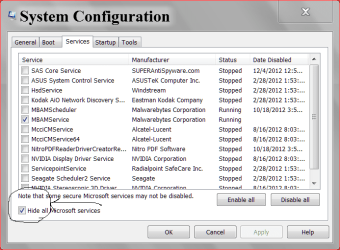
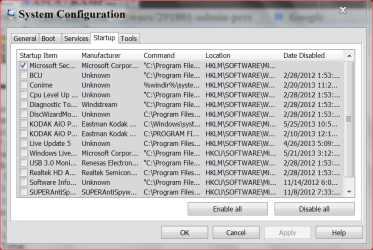
You could look at something basic that might be putting a strain on your computer making things lag.

msconfig/Start up.
Give us a a picture please.

msconfig start up5 29 2013.PNG
 

My Computer My Computer

At a glance

Windows 10 Pro. 64/ version 1709 Windows 7 Pr...Intel i7-6800K @ 4.3Corsair Platinum 16 gig @2400EVGA GTX 1070 OC
Computer type
PC/Desktop
Computer Manufacturer/Model Number
Home made Desktop
OS
Windows 10 Pro. 64/ version 1709 Windows 7 Pro/64
CPU
Intel i7-6800K @ 4.3
Motherboard
ASUS X-99 Deluxe II
Memory
Corsair Platinum 16 gig @2400
Graphics Card(s)
EVGA GTX 1070 OC
Monitor(s) Displays
Asus 27" LED LCD/VE278Q
Screen Resolution
1920-1080 or 1280-720 HDMI
Hard Drives
INTEL SSD 730-240 Gb Sata 3.0/
PSU
EVGA Platium 1200W
Case
Phanteks Luxe Tempered Glass 8 fans/ one radiator
Cooling
XSPC/ Water Cooled CPU
Keyboard
Das 4 Professional
Mouse
Logitech M705/MX Anywhere 2-S
Internet Speed
100 mbits
Antivirus
Microsoft Security Essentials/ Malwarebytes Premium 3.0/ SAS
Browser
I.E. 11 default/Firefox/ ISP Time Warner Cable/Spectrum
Other Info
LG BluRay Burner/
Sound system-KLipsch-THX/
Icy Dock ssd Hot Swap bays.
Thanks "Layback Bear" for your response. :) :)
So glad you asked about "Startup" ... I have felt uneasy about posing such a basic question on this forum.
I really appreciate your personal involvement.

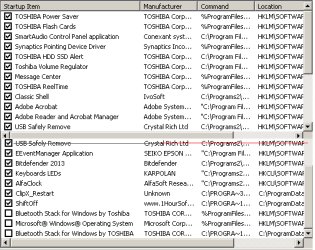
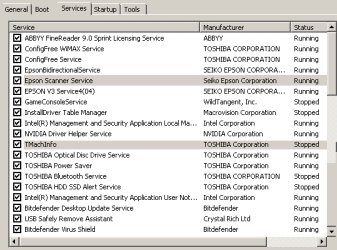
Here is my Run > msconfig > Startup ... list
I have never been game enough to tackle it without some guidance.

Startup_comb.png

I have my doubts about ...
1. All the Toshiba stuff
2. Synaptics Pointing Device ... I have disabled mouse pad, and am using a Wireless Mouse/keyboard
3. Message Center ... not sure what this is for
4. Adobe Reader ... I have set "PDFXchange" as default PDF reader
5. EEventManager Application (Seiko Epson) ... WiFi Printer ... barely used by this Toshiba laptop

Bluetooth is disabled because it interfered with WiFi
... but why "Microsoft® Windows® Operating System" is disabled ... I do not know why?!

Items that should be in Startup (?)
Classic Shell
USB Safely Remove
Bitdefender
Keyboards LEDs ... on screen display of CAPS-LOCK status
ClipX ... my can't-live-without clipboard manager
-----
Is order of listing the run-order at boot ?
I have read somewhere about "delayed start". What are your views?

Thank you again for your help :)
Regards
Russell
 

My Computer My Computer

At a glance

XP Pro (x86) | 7 HP (x86) & (x64) | 7 Pro (x64)
Computer type
PC/Desktop
Computer Manufacturer/Model Number
Toshiba, Lenovo (laptops) + 4 rigs
OS
XP Pro (x86) | 7 HP (x86) & (x64) | 7 Pro (x64)
You have way to many starting up at boot in my opinion. You can use your last post as a guide. You can see that I have just my security checked. You could try that and see how things work. Many do it that way and have no problems.
Let us know how that works for you and then we can work on NON Microsoft Services.
Let me explain how this helps and works.

The things you uncheck will still work when you or Windows 7 requires them to work. They just won't start when you boot and run in the background when not needed.

PS: Never feel that you can't or shouldn't ask a question.

High tech, low tech, medium tech questions; we will help with all.
Just post the question.
 

My Computer My Computer

At a glance

Windows 10 Pro. 64/ version 1709 Windows 7 Pr...Intel i7-6800K @ 4.3Corsair Platinum 16 gig @2400EVGA GTX 1070 OC
Computer type
PC/Desktop
Computer Manufacturer/Model Number
Home made Desktop
OS
Windows 10 Pro. 64/ version 1709 Windows 7 Pro/64
CPU
Intel i7-6800K @ 4.3
Motherboard
ASUS X-99 Deluxe II
Memory
Corsair Platinum 16 gig @2400
Graphics Card(s)
EVGA GTX 1070 OC
Monitor(s) Displays
Asus 27" LED LCD/VE278Q
Screen Resolution
1920-1080 or 1280-720 HDMI
Hard Drives
INTEL SSD 730-240 Gb Sata 3.0/
PSU
EVGA Platium 1200W
Case
Phanteks Luxe Tempered Glass 8 fans/ one radiator
Cooling
XSPC/ Water Cooled CPU
Keyboard
Das 4 Professional
Mouse
Logitech M705/MX Anywhere 2-S
Internet Speed
100 mbits
Antivirus
Microsoft Security Essentials/ Malwarebytes Premium 3.0/ SAS
Browser
I.E. 11 default/Firefox/ ISP Time Warner Cable/Spectrum
Other Info
LG BluRay Burner/
Sound system-KLipsch-THX/
Icy Dock ssd Hot Swap bays.
My current "Startup" settings
x_Startup_1.PNG

On same "System Configuration" dialog -> "Systems" tab
There are 70 services (eg, Adobe) ... Running
I started typing up a list of running services (12 screen-shots) ... maybe I am premature ?

Reboot has improved.
I still have the screen refresh lag, although I think better than it was. :)
 

My Computer My Computer

At a glance

XP Pro (x86) | 7 HP (x86) & (x64) | 7 Pro (x64)
Computer type
PC/Desktop
Computer Manufacturer/Model Number
Toshiba, Lenovo (laptops) + 4 rigs
OS
XP Pro (x86) | 7 HP (x86) & (x64) | 7 Pro (x64)
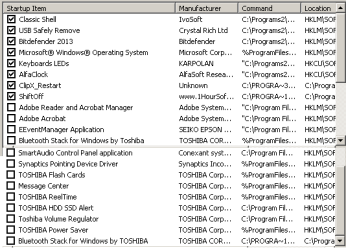
I recommend not doing anything with Microsoft Services.
Please notice the check mark in the lower left of the picture.
After a check mark is put their we can work with the rest.


services msconfig.PNG
 

My Computer My Computer

At a glance

Windows 10 Pro. 64/ version 1709 Windows 7 Pr...Intel i7-6800K @ 4.3Corsair Platinum 16 gig @2400EVGA GTX 1070 OC
Computer type
PC/Desktop
Computer Manufacturer/Model Number
Home made Desktop
OS
Windows 10 Pro. 64/ version 1709 Windows 7 Pro/64
CPU
Intel i7-6800K @ 4.3
Motherboard
ASUS X-99 Deluxe II
Memory
Corsair Platinum 16 gig @2400
Graphics Card(s)
EVGA GTX 1070 OC
Monitor(s) Displays
Asus 27" LED LCD/VE278Q
Screen Resolution
1920-1080 or 1280-720 HDMI
Hard Drives
INTEL SSD 730-240 Gb Sata 3.0/
PSU
EVGA Platium 1200W
Case
Phanteks Luxe Tempered Glass 8 fans/ one radiator
Cooling
XSPC/ Water Cooled CPU
Keyboard
Das 4 Professional
Mouse
Logitech M705/MX Anywhere 2-S
Internet Speed
100 mbits
Antivirus
Microsoft Security Essentials/ Malwarebytes Premium 3.0/ SAS
Browser
I.E. 11 default/Firefox/ ISP Time Warner Cable/Spectrum
Other Info
LG BluRay Burner/
Sound system-KLipsch-THX/
Icy Dock ssd Hot Swap bays.
Thanks Layback Bear, :cool:

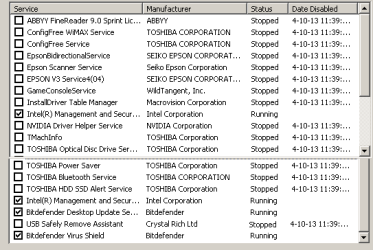
Done! -- my Services with all Microsoft hidden
- none on this list show a disabled date.

x_Services_1-1.PNG

Would appreciate your thoughts on my observations ... ;)

  • ABBYY Finereader ... (doubt I need it to be running ? Epson printer came with its own OCR software/feature)
  • Epson Scanner Service ... (not used by this laptop, printer/scanner is two rooms away a USB connected PC))
  • GameConsoleService ... (we are not gamers, in fact I am considering uninstalling Toshiba games ?)
  • NVIDIA Driver Help Service ... (help file for something I don't understand nor touch ?)
  • TOSHIBA Power Saver ... (does this monitor battery/mains power for laptop ?)
  • Bitdefender Desktop Update Service ... (desktop? this is a laptop. I manually update every day, else BD updates every 2 hours 24/7 -- updating has hogged resources)
  • USB Safely Remove Assistant ... (not sure?, USB-SR shows various msgs depending on the disconnection state of a drive. ie, List of apps/services disallowing disconnection of a device)
Thank you :)
 

My Computer My Computer

At a glance

XP Pro (x86) | 7 HP (x86) & (x64) | 7 Pro (x64)

Computer type
PC/Desktop
Computer Manufacturer/Model Number
Toshiba, Lenovo (laptops) + 4 rigs
OS
XP Pro (x86) | 7 HP (x86) & (x64) | 7 Pro (x64)
If it was my computer I would keep the anti virus (Bitdefender).

You could also read this security by Intel and see if you want it.

Laptop Security with Intel® Anti-Theft Technology

To me the rest of the things don't need to be checked marked.

I don't use any automatic updates. I do my updates manually.
My Non Microsoft Services are as post #14.
Remember you can alway put the check mark back if you decide later you want to use a service.
 

My Computer My Computer

At a glance

Windows 10 Pro. 64/ version 1709 Windows 7 Pr...Intel i7-6800K @ 4.3Corsair Platinum 16 gig @2400EVGA GTX 1070 OC
Computer type
PC/Desktop
Computer Manufacturer/Model Number
Home made Desktop
OS
Windows 10 Pro. 64/ version 1709 Windows 7 Pro/64
CPU
Intel i7-6800K @ 4.3
Motherboard
ASUS X-99 Deluxe II
Memory
Corsair Platinum 16 gig @2400
Graphics Card(s)
EVGA GTX 1070 OC
Monitor(s) Displays
Asus 27" LED LCD/VE278Q
Screen Resolution
1920-1080 or 1280-720 HDMI
Hard Drives
INTEL SSD 730-240 Gb Sata 3.0/
PSU
EVGA Platium 1200W
Case
Phanteks Luxe Tempered Glass 8 fans/ one radiator
Cooling
XSPC/ Water Cooled CPU
Keyboard
Das 4 Professional
Mouse
Logitech M705/MX Anywhere 2-S
Internet Speed
100 mbits
Antivirus
Microsoft Security Essentials/ Malwarebytes Premium 3.0/ SAS
Browser
I.E. 11 default/Firefox/ ISP Time Warner Cable/Spectrum
Other Info
LG BluRay Burner/
Sound system-KLipsch-THX/
Icy Dock ssd Hot Swap bays.

My Computer My Computer

At a glance

Windows 10 ProAMD Ryzen 5 2400G Processor with Radeon RX Ve...G.SKILL Ripjaws V Series 16GB (2 x 8GB) 288-P...2047MB NVIDIA GeForce GTX 1060 6GB (EVGA)
Computer type
PC/Desktop
Computer Manufacturer/Model Number
Custom Built
OS
Windows 10 Pro
CPU
AMD Ryzen 5 2400G Processor with Radeon RX Vega 11 Graphics
Motherboard
ASRock X470 Master SLI/AC AM4 AMD Promontory X470 SATA 6Gb/s
Memory
G.SKILL Ripjaws V Series 16GB (2 x 8GB) 288-Pin DDR4 SDRAM D
Graphics Card(s)
2047MB NVIDIA GeForce GTX 1060 6GB (EVGA)
Sound Card
Motherboard Built in
Monitor(s) Displays
Acer R240HY bidx 23.8-Inch IPS HDMI DVI VGA (1920 x 1080) Wi
Screen Resolution
1920 x 1080
Hard Drives
1TB Sandisk SSD PLUS (Main drive)
500 GB Seagate 7200 RPM (Games)
500 GB Western Digital 7200 RPM (Virtual Machines)
PSU
CORSAIR TX Series TX650M 650W 80+ Gold Modular Power Supply
Case
CORSAIR CARBIDE SPEC-02 Mid-Tower Gaming Case, Red LED Fan
Cooling
220mm, two 120mm, and four 60mm fans
Keyboard
Wired Dell keyboard
Mouse
Wireless Logitech mouse
Internet Speed
250mb down, 30mb up
Antivirus
Panda Cloud Antivirus
Browser
Chrome-ish x64
Other Info
Your awesome for reading this.
Layback Bear +1 :D

Looks like success. Screen refresh shadowing has ceased. :party:
Ideally I would like to do a clean-install of the Win7 OEM and dump all the Toshiba bloatware.
But at the moment i have my daughters Dell that I am part way thru downgrading from Win8 to Win7. (Getting lots of help on this forum)
-----
HOW I did it:-
Start > Search:- msconfig > Result:= msconfig.exe > RClick > "Run as Administrator"
... OR...
WinExplorer > C:\Windows\System32\msconfig.exe > RClick > "Run as Administrator"
---
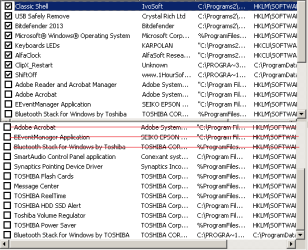
Startup (tab)
- disable all irrelevant items, kept only AV + Windows + my special apps
- disabled all Toshiba "features"
Services (tab)
- with "Hide all Microsoft Services" checkbox as [x] ... true
- disabled all remaining irrelevant items, including the WiFi printer + Help files for "USB Safely Remove"
- retained "Intel" items
-----

For Toshiba Satellite laptop, these are my current settings ...

STARTUP:-

x_Startup_1.1.PNG

SERVICES:-

x_Services_1.1.PNG

Thank you, once again, for your help :)
 
Last edited:

My Computer My Computer

At a glance

XP Pro (x86) | 7 HP (x86) & (x64) | 7 Pro (x64)
Computer type
PC/Desktop
Computer Manufacturer/Model Number
Toshiba, Lenovo (laptops) + 4 rigs
OS
XP Pro (x86) | 7 HP (x86) & (x64) | 7 Pro (x64)
Thank you andrew129260 for your response :)

When I get some time I intend clean installing Win7 onto the Toshiba without all the Toshiba "features" ;)
"GregRocker" has drilled that one into me while I downgrade my daughters "Dell" laptop, from Win8 to Win7.

Atleast with all Toshiba stuff in a coma (and Startup+Services fine tuned), performance has improved and the screen-refresh lag has gone!
I hope !

Thank you for your help :)
 

My Computer My Computer

At a glance

XP Pro (x86) | 7 HP (x86) & (x64) | 7 Pro (x64)
Computer type
PC/Desktop
Computer Manufacturer/Model Number
Toshiba, Lenovo (laptops) + 4 rigs
OS
XP Pro (x86) | 7 HP (x86) & (x64) | 7 Pro (x64)
PROBLEM

I have no sound.
Have reactivated everything back to default.
Still no sound.

YouTube videos -- volume icon is disabled.

No sound.PNG

+++++ Edit: 6-Oct-2013
RESOLVED: YouTube audio down for 14 hours, world wide)
+++++
 
Last edited:

My Computer My Computer

At a glance

XP Pro (x86) | 7 HP (x86) & (x64) | 7 Pro (x64)
Computer type
PC/Desktop
Computer Manufacturer/Model Number
Toshiba, Lenovo (laptops) + 4 rigs
OS
XP Pro (x86) | 7 HP (x86) & (x64) | 7 Pro (x64)
Back
Top