
You are using an out of date browser. It may not display this or other websites correctly.
You should upgrade or use an alternative browser.
You should upgrade or use an alternative browser.
Asus N76 UEFI - W7 64 Install Hangs on Logo (DVD UEFI Boot)
- Thread starter rwx
- Start date

- Local time
- 7:03 AM
- Messages
- 50,634
Always understand the return and Support policy terms before buying. It should be in writing.
You can call them anonymously first as though an interested customer to find out before pursuiing it.
Be aware that I only tried to help you with bypassing EFI, so Theog might be able to help you further getting installed using EFI per his Downgrade tutorial.
Let us know what happens.
You can call them anonymously first as though an interested customer to find out before pursuiing it.
Be aware that I only tried to help you with bypassing EFI, so Theog might be able to help you further getting installed using EFI per his Downgrade tutorial.
Let us know what happens.
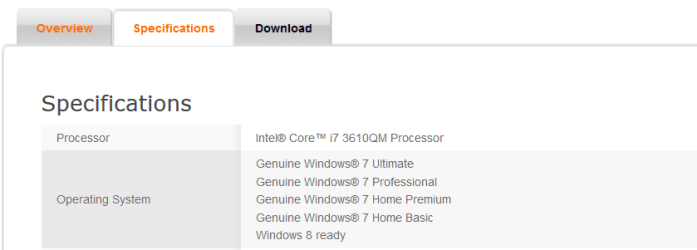
According to ASUS, the model supports Windows 7 - see below, this is why I got it.
ASUS - Notebooks- ASUS N76VM
ASUS - Notebooks- ASUS N76VM
Attachments
My Computer
At a glance
Windows 7 Ultimate 64-bit
- OS
- Windows 7 Ultimate 64-bit
- Local time
- 7:03 AM
- Messages
- 50,634
I would call Asus.
I hope they are open on weekends.
Anyway, I won't be able to refund the laptop.
My only way from here would be getting W8 OEM and doing a clean install on the SSD. Although this laptop is superior compared to the old one, it runs slower because of the slow HD and all the bloat! Even after I remove the bloat, it runs slow.
Anyway, I won't be able to refund the laptop.
My only way from here would be getting W8 OEM and doing a clean install on the SSD. Although this laptop is superior compared to the old one, it runs slower because of the slow HD and all the bloat! Even after I remove the bloat, it runs slow.
Last edited:
My Computer
At a glance
Windows 7 Ultimate 64-bit
- OS
- Windows 7 Ultimate 64-bit
- Local time
- 7:03 AM
- Messages
- 50,634
You can replicate Win7 all but Aero in Win8 and it's somewhat faster since Metro (nor Aero) isn't loaded when you install Windows 7 Start Menu for Windows 8.
Replica gadgets which can be undocked from sidebar to free float are at 8GadgetPack - Gadgets for Windows 8.
This is almost exactly Win7, some say a little snappier.
Replica gadgets which can be undocked from sidebar to free float are at 8GadgetPack - Gadgets for Windows 8.
This is almost exactly Win7, some say a little snappier.
Yea I already turned off the stupid Metro screen and have a third party start menu so now it feels like running Windows 7 but I am upset because I can't get the real thing but especially upset because I can't use my SSD (yet) so I have to spend more money to get yet *another* copy of Windows 8 
Perhaps I can clone the HD to my SSD but are there any tools there that boot in UEFI mode?? All of the ones I know - I am not sure if they boot in UEFI. I will need to find out.
Also the tool would need to "resize" the partitions automatically because my SSD is 240GB and the HD is 1TB.
Perhaps I can clone the HD to my SSD but are there any tools there that boot in UEFI mode?? All of the ones I know - I am not sure if they boot in UEFI. I will need to find out.
Also the tool would need to "resize" the partitions automatically because my SSD is 240GB and the HD is 1TB.
Last edited:
My Computer
At a glance
Windows 7 Ultimate 64-bit
- OS
- Windows 7 Ultimate 64-bit
- Local time
- 7:03 AM
- Messages
- 50,634
No, you never have to buy another copy of the OS than the one which comes preinstalled, which in the case of Win8 stores it's key in the BIOS. You own that copy for the life of the machine and should be able to reinstall it or at the very least run Factory Recovery.
I think the factory restore will restore the OS onto the same HD and will not give me an option to change the drive which is what I want to do - use the SSD. This is why I need a new disk so I can tell the install where to install.
My Computer
At a glance
Windows 7 Ultimate 64-bit
- OS
- Windows 7 Ultimate 64-bit


- Local time
- 9:03 AM
- Messages
- 207
This is not completely related to this post, but if nothing works you can make Windows 8 look like WIndows 7. Check this.
My Computer
At a glance
Windows XP Professional SP3/Windows 7 Ultimat...Intel Pentium 4 3.06GHz Northwood/Intel Core ...2 Gb RDRAM Dual Channel/GSkill 32GB DDR3 1866ATI ALL-IN-WONDER X800 XT AGP/MSI GTX 660 Ti PE
- Computer type
- PC/Desktop
- Computer Manufacturer/Model Number
- Dell Dimension 8200/Personal Build
- OS
- Windows XP Professional SP3/Windows 7 Ultimate x64
- CPU
- Intel Pentium 4 3.06GHz Northwood/Intel Core i7 3770K
- Motherboard
- North Bridge:Intel Tehama i850(E)/Asus P8Z77-V Deluxe
- Memory
- 2 Gb RDRAM Dual Channel/GSkill 32GB DDR3 1866
- Graphics Card(s)
- ATI ALL-IN-WONDER X800 XT AGP/MSI GTX 660 Ti PE
- Sound Card
- Voyetra Turtle Beach Santa Cruz PCI/Onboard Realtek HD
- Monitor(s) Displays
- Viewsonic VP230mb ViewPanel
- Screen Resolution
- 1600x1200 32bit
- Hard Drives
- Western Digital 500Gb IDE drive (main drive) (XP PC)/Samsung 512GB 840 Pro Series SSD main+Western Digital Caviar Black 2 TB SATA III 7200 RPM 64 MB Cache as 2nd internal (Win 7 PC)
- PSU
- Dell OEM/Thermaltake Toughpower Grand 850W TPG-850M
- Case
- Dell OEM/Corsair Obsidian 650DW-1 Midtower
- Cooling
- Dell OEM/Noctua NH-D14
- Keyboard
- Dell Multimedia keyboard
- Mouse
- Logitech Cordless MouseMan® Optical M-RM63
Hello all,
First, it is not the DVD. There is nothing wrong with the DVD. I have used this DVD elsewhere, as I said, it just hasn't been activated. I know it "looks" like as if the DVD is corrupted but let me assure you, it is not. This is an authentic W7 DVD. I managed to install W7 on the SSD from within Windows 8 but when the system booted and when I selected to continue with the Windows 7 installation, it again froze at the Windows logo....Same as what happens when the DVD boots. I think *there must be somethng* in the EFI that prevents Windows 7 from booting.
Anyway, I finally had enough.....
I took the original hard disk out and I put the SSD. Downloaded Windows 8 Enterprise 90-day Demo and did a clean install. I started having random crashes. Intuition told me that the OS confuses itself between the built-in VGA adapter and the NVIDIA one (screen was flickering) so I disabled the Intel one as I don't need it. That resolved the crashes. Some of the ASUS software must have been some sort of driver that manages my dual VGA adapters....
Anyway, I installed a third party Start Menu and now I feel comfortable again, however I still wait for ASUS to respond to my inquiry about
- How to boot in MBR Legacy Mode (since every EFI BIOS is supposed to have this)
- Explain why W7 install freezes
Hopefully I hear from them.
First, it is not the DVD. There is nothing wrong with the DVD. I have used this DVD elsewhere, as I said, it just hasn't been activated. I know it "looks" like as if the DVD is corrupted but let me assure you, it is not. This is an authentic W7 DVD. I managed to install W7 on the SSD from within Windows 8 but when the system booted and when I selected to continue with the Windows 7 installation, it again froze at the Windows logo....Same as what happens when the DVD boots. I think *there must be somethng* in the EFI that prevents Windows 7 from booting.
Anyway, I finally had enough.....
I took the original hard disk out and I put the SSD. Downloaded Windows 8 Enterprise 90-day Demo and did a clean install. I started having random crashes. Intuition told me that the OS confuses itself between the built-in VGA adapter and the NVIDIA one (screen was flickering) so I disabled the Intel one as I don't need it. That resolved the crashes. Some of the ASUS software must have been some sort of driver that manages my dual VGA adapters....
Anyway, I installed a third party Start Menu and now I feel comfortable again, however I still wait for ASUS to respond to my inquiry about
- How to boot in MBR Legacy Mode (since every EFI BIOS is supposed to have this)
- Explain why W7 install freezes
Hopefully I hear from them.
Last edited:
My Computer
At a glance
Windows 7 Ultimate 64-bit
- OS
- Windows 7 Ultimate 64-bit
- Local time
- 7:03 AM
- Messages
- 50,634
They can most likely help you over at EightForums.com to clean reinstall your licensed version on the SSD, so you don't need to use Enterprise when you own another version. Theog may already know this as he's helping at both Forums.
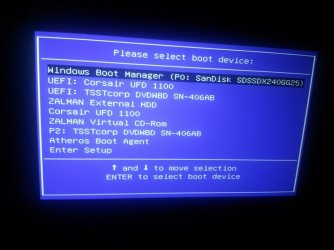
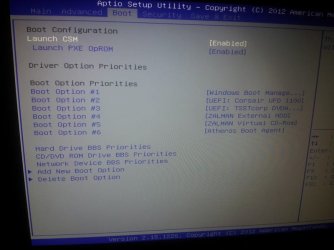
GOT Legacy MBR GOING!!!  YES!!
YES!!
I found the setting for Legacy MBR Support!!! It was under a menu called "Launch CSM"!!
Have a look and this was thx to a Linux article!
Linux on the Asus Vivobook S200 (x202e)
Who would have thought this? I found CSM curious and I searched it on the net!
YES!!I found the setting for Legacy MBR Support!!! It was under a menu called "Launch CSM"!!
Have a look and this was thx to a Linux article!
Linux on the Asus Vivobook S200 (x202e)
Who would have thought this? I found CSM curious and I searched it on the net!
Attachments

Last edited:
My Computer
At a glance
Windows 7 Ultimate 64-bit
- OS
- Windows 7 Ultimate 64-bit
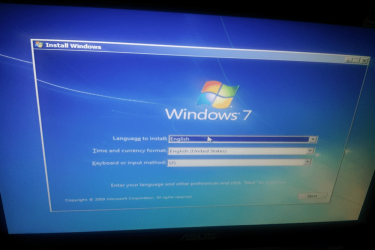
W7 Install booted fine!!
I am SO going back to Windows 7!
Mark this thread as solved!
Thank you Greg for trying to help me! I mean it, thanks for your time!
I am SO going back to Windows 7!
Mark this thread as solved!
Thank you Greg for trying to help me! I mean it, thanks for your time!
Attachments
Last edited:
My Computer
At a glance
Windows 7 Ultimate 64-bit
- OS
- Windows 7 Ultimate 64-bit
- Local time
- 7:03 AM
- Messages
- 50,634
Good work! 
I'm curious if after Launch CSM if the regular (not UEFI) DVD drive and (not Windows Boot Manager) HD became available to choose, as that's what we've seen mostly so far wtih UEFI mobos?
If not were you able to boot UEFI DVD and install to Windows Boot Manager HD bypassing UEFI even though these Boot Options are normally associated only with UEFI install and disappear when Legacy BIOS is enabled?
I'm curious if after Launch CSM if the regular (not UEFI) DVD drive and (not Windows Boot Manager) HD became available to choose, as that's what we've seen mostly so far wtih UEFI mobos?
If not were you able to boot UEFI DVD and install to Windows Boot Manager HD bypassing UEFI even though these Boot Options are normally associated only with UEFI install and disappear when Legacy BIOS is enabled?
Well, I have a multiboot USB Flash Drive, it is multi-partitioned and it is an MBR based and I successfully booted from it! I think the regular internal drives are not in the screen as an MBR option because they are GPT based.
I have an internal MBR drive in my ZALMAN USB HD 2.5" enclosure and as you can see, it appears on the list so I can boot from. I am sure once I convert my SSD to an MBR drive (and I will during install), it will appear on the list.
I will have to do this later though as I have to go to work now I will let you know how I go and you can ask away any questions if you have. This was a big relief from me.
Now that I know what happens, I think I understand why W7 install kept hanging on the logo.
After I clean installed Windows 8, when Windows 8 was launching, it did *not* show me the Windows logo on the splash screen, the flag but instead I kept seeing the ASUS logo all the way until the Windows login screen appeared. So I think there must some sort of internal splash screen in the EFI storage that gets automatically pulled when Legacy MBR is turned OFF *and* Windows is loading and only W8 has this functionality and it makes the W7 incompatible.
To confirm my theory, I will launch W7 install again in UEFI mode while I have Legacy MBR enabled and see if it works.
I have an internal MBR drive in my ZALMAN USB HD 2.5" enclosure and as you can see, it appears on the list so I can boot from. I am sure once I convert my SSD to an MBR drive (and I will during install), it will appear on the list.
I will have to do this later though as I have to go to work now
I will let you know how I go and you can ask away any questions if you have. This was a big relief from me.Now that I know what happens, I think I understand why W7 install kept hanging on the logo.
After I clean installed Windows 8, when Windows 8 was launching, it did *not* show me the Windows logo on the splash screen, the flag but instead I kept seeing the ASUS logo all the way until the Windows login screen appeared. So I think there must some sort of internal splash screen in the EFI storage that gets automatically pulled when Legacy MBR is turned OFF *and* Windows is loading and only W8 has this functionality and it makes the W7 incompatible.
To confirm my theory, I will launch W7 install again in UEFI mode while I have Legacy MBR enabled and see if it works.
Last edited:
My Computer
At a glance
Windows 7 Ultimate 64-bit
- OS
- Windows 7 Ultimate 64-bit
You can install Windows 8 x64, Windows 7 x64, & linux in uEFI mode. No need for Legacy BIOS/MBR.
https://help.ubuntu.com/community/UEFIBooting
https://help.ubuntu.com/community/UEFIBooting
My Computer
At a glance
ME/XP/Vista/Win7
- OS
- ME/XP/Vista/Win7
I have successfully installed Windows 7 (finally) on my new laptop on the SSD using Legacy MBR Mode. So at this point, I am running in full MBR mode. Again, to do this, I had to enable "Launch CSM". UEFI and secure boot is turned off.
I will use the original HD (1TB) for backup in the second HD bay and will format the whole disk as MBR/NTFS.
FYI, I tried to boot the DVD in UEFI mode while Legacy MBR is turned on, by selecting UEFI DVD option, it did not boot. Instead, it went straight to the internal HD.
As suspected, once the internal HD became MBR based, it now appears on the Boot Menu.
I will use the original HD (1TB) for backup in the second HD bay and will format the whole disk as MBR/NTFS.
FYI, I tried to boot the DVD in UEFI mode while Legacy MBR is turned on, by selecting UEFI DVD option, it did not boot. Instead, it went straight to the internal HD.
As suspected, once the internal HD became MBR based, it now appears on the Boot Menu.
Last edited:
My Computer
At a glance
Windows 7 Ultimate 64-bit
- OS
- Windows 7 Ultimate 64-bit
Similar threads
- Replies
- 10
- Views
- 9K
- Replies
- 10
- Views
- 22K
- Replies
- 7
- Views
- 3K
- Replies
- 13
- Views
- 9K

- Replies
- 15
- Views
- 17K