Asus N76 UEFI - W7 64 Install Hangs on Logo (DVD UEFI Boot)

Guess they took it out . You did before .
 

My Computer My Computer

At a glance

Windows 7 Ultimate 32-Bit & Windows 7 Ultimat...Intel Core i7 CPU 950 @ 3.07GHzOCZ 6GB (3 x 2GB) 240-Pin DDR3 SDRAM DDR3 160...ATI Radeon HD 5700 Series
Computer Manufacturer/Model Number
Custom Built
OS
Windows 7 Ultimate 32-Bit & Windows 7 Ultimate 64-Bit
CPU
Intel Core i7 CPU 950 @ 3.07GHz
Motherboard
ASUS P6T DELUXE V2
Memory
OCZ 6GB (3 x 2GB) 240-Pin DDR3 SDRAM DDR3 1600 OCZ3X1600R2
Graphics Card(s)
ATI Radeon HD 5700 Series
Sound Card
OnBoard
Hard Drives
WD6400AACS-00M3B0 (640GB SATA )
PSU
CORSAIR 850w
Case
NZXT LEXA
Cooling
Intel Stock Heatsink Fan
Keyboard
Microsoft Wireless Laser Keyboard 7000
Mouse
Microsoft Wireless Laser Mouse 7000
Not at Walmart no, but thanks for bringing that up, I will call HH Gregg tomorrow about that, I forgot to ask. If I have to pay restocking fee then I will probably just keep the laptop. I'm not in the mood to give my money away.
 

My Computer My Computer

At a glance

Windows 7 Home Premium
Computer type
PC/Desktop
OS
Windows 7 Home Premium
rwx,

Way back on page 1 of this thread, during the large series of BIOS screen shots , what is offered to you if you are on the BOOT menu and select ADD A NEW BOOT OPTION, please?

I didn't see that mentioned, and wondered what it offered up, if anything, that might also be helpful, since, basically the issue was with BOOTING.

Glad it worked out, my mind turned to mush on page 9, and posted this. :sleepy:
 

My Computer My Computer

At a glance

Windows 7 Ultimate Retail Box (64-bit install...AMD FX-8350 CPU v1.15 (or 1.0F) BIOS was requ...8G CAS-7 G-Skill DDR3 @1333 (2 fours) [mobo n...Radeon HD 7950 [3 gigs of GDDR5] MSI Twin Fro...
Computer type
PC/Desktop
Computer Manufacturer/Model Number
Self Built Custom
OS
Windows 7 Ultimate Retail Box (64-bit installed) + Service Pack 1
CPU
AMD FX-8350 CPU v1.15 (or 1.0F) BIOS was required!
Motherboard
MSI 890FXA-GD70
Memory
8G CAS-7 G-Skill DDR3 @1333 (2 fours) [mobo nonOC max rec'd]
Graphics Card(s)
Radeon HD 7950 [3 gigs of GDDR5] MSI Twin Frozr model
Sound Card
Realtek High Definition Audio (onboard mobo, ALC-889 chip)
Monitor(s) Displays
2 WS LED Monitors: One LG One Viewsonic
Screen Resolution
1920 by 1080
Hard Drives
SSD for OS: Samsung 840 Pro
SSD for VM and utilities: Adata SX900
7200 RPM SATA HDs for the rest: Hitachi and Seagate
PSU
Corsair TX850 - 850W max, in service since August 2010.
Case
Thermaltake Armor A90
Cooling
Thermaltake Spin Q CPU Cooler, in service since August 2010
Keyboard
Logitech G11
Mouse
Logitech M310 Wireless
Internet Speed
100 Megabit broadband supposedly upgraded from 50 (Cable)
Antivirus
Bitdefender Internet Security 2014 suite
Browser
Pale Moon 64-bit main, also IceDragon, Opera, and Maxthon.
Other Info
CompTIA A+ certified (220-800 series) in July 2013.
A little late to the party on this one. Two comments.

Although, he probably is no longer tuning in, I found the attitude of poster ShaneCurtis extremely lacking in graciousness (to say the least). Not only does he somewhat 'hijack' rwx's thread, but would make it appear that HE had discovered the key to his problem while in fact the solution to his problem was offered to him with GregRocker's very first post #56: "you may have to delete all partitions". Not very good form.

That said, Shane's 'solution' didn't ask a couple of pertinent questions as to how EFI might work. So to either he or the crew here: What is the implication of windows 'needing unallocated space'? This must be to create an EFI partition for Win 7. But then, if I understood his initial plan of attack, he wanted to keep his original Win 8 recovery/set-up (not clear). Does this mean that theoretically he would now have two EFI partitions (one each for 7 & 8)? I'd thought that the EFI partition was large enough to accommodate two or more boot scenarios. Or at the very least the Win 7 install would overwrite Win 8 EFI partition. Would we have expected the same behavior had Shane been trying the reverse: install Win 8 over Win 7? Partly due to the poster's hit-and-run problem solving approach we don't know. Could also very well be that this is part of Microsoft's Windows clampdown that is intentionally made to make life difficult for those who wish to escape the entrapment of Win 8 Maybe Greg or Og already have answers to some of these questions...and, by the way, as I've suggested before, would be a little research project you guys could test at home as well.

 

My Computer My Computer

At a glance

windows home premium 64
OS
windows home premium 64
Hi,

I hope you guys can help me. I have the exact same problem as the topic starter. Also have the same laptop. Asus N76. I read all the post but I dont understand how to get into legacy mode. Maybe I first have to tell what I have done.

I had win7 preinstalled. I did made a dual boot win7 on a new SSD with new partition. Then I installed the upgrade from win8. (Never should have done that) But anyway. windows8 didnt install properly. In the bootmenu I got windows7 two time and a win8 boot and win8 setup boot. I thought oke so these boots deny acces to boot the windows dvd. So I deleted the win8 and win 8 setup boot menu. Still no luck.

And since then I really have a problem. I can't install anything. The installer hangs at the same moment as TS. I searched and came across this topic.
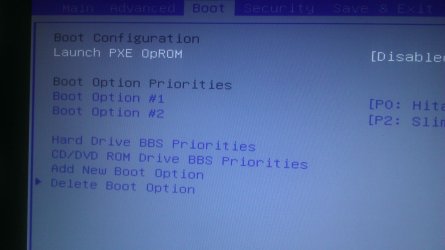
The thing is I read all info but I cant get into legacy mode bios. Can anyone tell me how to? If I go into bios I don't have the launch csm option in bios. (only the launch pxeoprom option is there) How do I get this option in bios?

Thanks in advance
 

My Computer My Computer

At a glance

windows 7 home 64 bit
Computer type
PC/Desktop
OS
windows 7 home 64 bit
Hi,

I hope you guys can help me. I have the exact same problem as the topic starter. Also have the same laptop. Asus N76. I read all the post but I dont understand how to get into legacy mode. Maybe I first have to tell what I have done.

I had win7 preinstalled. I did made a dual boot win7 on a new SSD with new partition. Then I installed the upgrade from win8. (Never should have done that) But anyway. windows8 didnt install properly. In the bootmenu I got windows7 two time and a win8 boot and win8 setup boot. I thought oke so these boots deny acces to boot the windows dvd. So I deleted the win8 and win 8 setup boot menu. Still no luck.

And since then I really have a problem. I can't install anything. The installer hangs at the same moment as TS. I searched and came across this topic.
The thing is I read all info but I cant get into legacy mode bios. Can anyone tell me how to? If I go into bios I don't have the launch csm option in bios. (only the launch pxeoprom option is there) How do I get this option in bios?

Thanks in advance

1) The thread is about downgrading from Windows 8 Pre-installed to Windows 7.

2) Dual Boot Installation - Windows 8 and Windows 7 or Vista

3) Is the Windows 7 Pre-installed, installed in UEFI mode?
 

My Computer My Computer

At a glance

ME/XP/Vista/Win7
OS
ME/XP/Vista/Win7
Thanks for the fast reply

To explain more detailed. I had a win7 home edition pre installed on a HDD. I also had an upgrade of windows 8. So I decided to keep the pre installed win7 version on the HDD and buy a new SSD. I installed a new second windows 7 version on the ssd. Then I did a upgrade to win8. This failed but it did install the win8 bootloader. As mentiod by TS. I had win 8 and a win 8 setup boot in the loader. When i tried to install win7 again I couldnt because it hangs at te same moment as TS. I tried to delete the win8 bootloader. format the SSD. I removed the whole partition.

New thing is. I deleted the partition of the SSD. Now the dvd boots to the install screen but says the device drivers aren't correct. Also my bootscreen is different from topicstarter. I don't have the csm option in bios.

1) Because I installed win8 it changed something in bios. win8 is formatted on the SSD.
2) Had a dual boot this seems to be the problem
3) I dont know if it was pre installed in UEFI mode.
 

My Computer My Computer

At a glance

windows 7 home 64 bit
Computer type
PC/Desktop
OS
windows 7 home 64 bit
Thanks for the fast reply

To explain more detailed. I had a win7 home edition pre installed on a HDD. I also had an upgrade of windows 8. So I decided to keep the pre installed win7 version on the HDD and buy a new SSD. I installed a new second windows 7 version on the ssd. Then I did a upgrade to win8. This failed but it did install the win8 bootloader. As mentiod by TS. I had win 8 and a win 8 setup boot in the loader. When i tried to install win7 again I couldnt because it hangs at te same moment as TS. I tried to delete the win8 bootloader. format the SSD. I removed the whole partition.

New thing is. I deleted the partition of the SSD. Now the dvd boots to the install screen but says the device drivers aren't correct. Also my bootscreen is different from topicstarter. I don't have the csm option in bios.

1) Because I installed win8 it changed something in bios. win8 is formatted on the SSD.
2) Had a dual boot this seems to be the problem
3) I dont know if it was pre installed in UEFI mode.

When you reinstalled Windows7,
did install this way?
http://www.sevenforums.com/tutorials/1649-clean-install-windows-7-a.html
or this way?
http://www.sevenforums.com/tutorial...e-firmware-interface-install-windows-7-a.html
 

My Computer My Computer

At a glance

ME/XP/Vista/Win7
OS
ME/XP/Vista/Win7
I did a complete clean install of windows7 retail dvd 64bit on the new SSD drive. I guess no uefi install. I just followed instructions as usual. The old windows 7 was on the HDD (still is as i'm typing this with win7 on it). I then installed an upgrade version of win8 over the win7 on the SSD.

Edit: I added a photo of my bios screen without the csm option
 

Attachments

  • IMAG0396.jpg
    IMAG0396.jpg
    392.2 KB · Views: 1

My Computer My Computer

At a glance

windows 7 home 64 bit
Computer type
PC/Desktop
OS
windows 7 home 64 bit
I did a complete clean install of windows7 retail dvd 64bit on the new SSD drive. I guess no uefi install. I just followed instructions as usual. The old windows 7 was on the HDD (still is as i'm typing this with win7 on it). I then installed an upgrade version of win8 over the win7 on the SSD.

Edit: I added a photo of my bios screen without the csm option

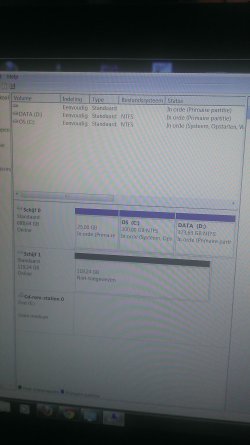
Can you post a screen shot of Disk management?
of the HDD & SSD.
http://www.sevenforums.com/tutorials/9733-screenshots-files-upload-post-seven-forums.html
http://www.sevenforums.com/tutorials/274797-disk-management-post-screen-capture-image.html
 

My Computer My Computer

At a glance

ME/XP/Vista/Win7
OS
ME/XP/Vista/Win7
It's in dutch. So hope you understand. I formated the SSD and deleted the drive letter. So the SSD is not assigned, Dics 1 (schijf 1)
Disc 0 is the old win 7 instal.
 

Attachments

  • IMAG0398.jpg
    IMAG0398.jpg
    301.2 KB · Views: 4

My Computer My Computer

At a glance

windows 7 home 64 bit
Computer type
PC/Desktop
OS
windows 7 home 64 bit
It's in dutch. So hope you understand. I formated the SSD and deleted the drive letter. So the SSD is not assigned, Dics 1 (schijf 1)
Disc 0 is the old win 7 instal.


Windows 7 is install in Legacy mode.
 

My Computer My Computer

At a glance

ME/XP/Vista/Win7
OS
ME/XP/Vista/Win7
Yeah I think it is installed in legacy mode. But I don't know for sure. Since this is the first time I had this problem and didnt know that win7 is such a pain in the ... to reinstall. But what does this mean? And what do I have to do to make win7 install work again? Thanks again!
 

My Computer My Computer

At a glance

windows 7 home 64 bit
Computer type
PC/Desktop
OS
windows 7 home 64 bit

My Computer My Computer

At a glance

ME/XP/Vista/Win7
OS
ME/XP/Vista/Win7
The clean install will not work because when I boot via dvd it stops at the point TS says. When I removed the partition and drive letter from the SSD the installer says can't find device drivers. Also my old win7 installation is very slow now.

Edit. Same screen as TS. DVD starts and doesn't go further then you see on the screen.
 

Attachments

  • IMAG0399.jpg
    IMAG0399.jpg
    175.7 KB · Views: 1

My Computer My Computer

At a glance

windows 7 home 64 bit
Computer type
PC/Desktop
OS
windows 7 home 64 bit
Where do you buy your Windows 7 x64 DVD from?
 

My Computer My Computer

At a glance

ME/XP/Vista/Win7
OS
ME/XP/Vista/Win7
win7 Retail dvd from the pc shop. Win8 Upgrade from the internet. Copied to iso. It's the same problem Topic starter had. I would like to know how to get the launch CSM menu in bios.
 

My Computer My Computer

At a glance

windows 7 home 64 bit
Computer type
PC/Desktop
OS
windows 7 home 64 bit
Clean the DVD & DVD drive.

CSM is not need as your Pre-installed Windows 7 is installed in Legacy mode already & booting.
 

My Computer My Computer

At a glance

ME/XP/Vista/Win7
OS
ME/XP/Vista/Win7
Did clean the dvd allready. Also used an external dvd drive. I'm out of options. I guess i'm going to bring the laptop back where I purchased it.

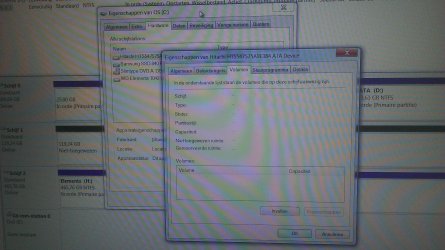
I did some searching and I discovered this. See photo.
When in disk managment I went to OS C: properties. Then properties of disk and then tab volumes. There is nothing there. The SSD disk has info. Its has partitionstyle MBR. The normal HDD I first have to tick the box fill in so the info appears. I was forced a restart. Does this make sense?

CSM is not need as your Pre-installed Windows 7 is installed in Legacy mode already & booting.

It was a dual boot with old win7 on the HDD and a new win7 on the ssd. I used an upgrade version of win8 over the new win7 SSD. The old version of win7 still was there. Does Win8 change the way the disks behave?
 

Attachments

  • IMAG0400.jpg
    IMAG0400.jpg
    451.3 KB · Views: 3

My Computer My Computer

At a glance

windows 7 home 64 bit
Computer type
PC/Desktop
OS
windows 7 home 64 bit
Back
Top