Asus SupremeFX X-FI

I don't smoke, but thanks.

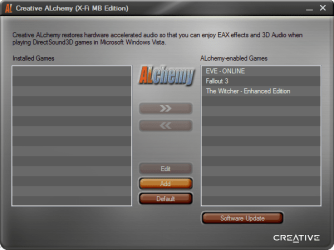
This is what I'm talking about. I had to activate this using the key from my ASUS installation disc.

I don't have anything else installed. The drivers and the X-Fi 'utility' from ASUS for the Rampage Extreme.
 

Attachments

  • Alchemy.png
    Alchemy.png
    38.1 KB · Views: 439

My Computer My Computer

Computer type
PC/Desktop
Computer Manufacturer/Model Number
Custom Build/Mod
OS
Windows 7 Home Premium x64
CPU
Intel QX9650 Extreme 4.0 GHz
Motherboard
ASUS Rampage Extreme Rev2
Memory
8GB (4x2) Corsair Dominator DDR3
Graphics Card(s)
2x Radeon R390X [8GB]
Sound Card
SupremeFX X-Fi
Monitor(s) Displays
Dell 2408WFP 26" Panel
Screen Resolution
1920x1200
Hard Drives
4x WD 2TB (8TB+ Total)
2x Crucial SSD 128GB (RAID-0)
1x LG Blu-ray read/write
1x Phillips LightScribe DVD read/write
PSU
Corsair HX1000
Case
CoolerMaster - Cosmos S
Cooling
Custom Liquid - 320mm rad w/ 3x 80mm fans, CPU/NB/SB Blocks
Keyboard
Logitech Illuminater Pro
Mouse
Logitech
Internet Speed
Fractional T1 - 125Mbps
Antivirus
ESET Security Suite / Microsoft Security Essentials
Browser
Cyberfox Intel x64
Other Info
OC'd to 5.0GHz @ 44c under full load
i have downloaded windows 7 RC x64 from microsoft web site 2 days ago it should be the same s.o

maybe you need to activate admin account 1st.
Bild: sinttulon3kx.png - abload.de

-then uinstal xfi utility and soundmax driver
-reboot your machine
-instal orginal driver (SoundMAXAudio610X6480_Vista) from asus web site for
775 maximus 2 formula
-reboot pc
-download 1366 rampage 2 gene xfi utility from asus site unzip the file (SB_XFi_V10) and go inside to setup properties and select compatibility mode windows vista (service pack 1)
-double click on the setup and instal it
-reboot your pc and when you back to windows double click on the sound panel to activation xfi utility
-use internet explorer for activation , with firefox i have somes issues

 
Last edited:

My Computer My Computer

OS
windows
Wow, I have never seen that Alchamy program before. The version I have is so different. I guess I will get the Rampage version and see if it is the same. If that doesn't work, I will enable the admin account. What you posted was a Spanish version, but no worries, my wife is Mexican, she can translate haha.
 

My Computer My Computer

OS
Windows 7 (Build 7068)
Update: I got everything to install without an error. Even though the version numbers of the Maximus II Formula X-Fi MB are IDENTICAL to the Rampage Gene version, for some reason only the Rampage Gene driver worked...strange...but then again, that is Creative for ya.
Now that I can get to the creative volume panel, I come to realize that is its 100% useless in what it was designed to do. You can't even change the speaker settings!!! I am really really hating this Vista/7 sound driver setup. It completely nulls use for higher end sound cards for DJ/Production. Can't even configure the sound channels to run independently...the damn surround channels are mixed into the front channels and there is no way to change that (same in vista, not a 7 glitch)....on XP you could!!!! Hah, even went back to my dual boot XP and lookie lookie, independent sound channels.
So after all this struggle to get the creative console to work, I discover it just functions, but is unable to actually change any sound card settings....just like in Vista. FN Microsoft...why the F did they change the sound card architecture...it was FLAWLESS in XP!
 

My Computer My Computer

OS
Windows 7 (Build 7068)
Has anyone come up with a working solution to this? The SupremeFX X-Fi solution on the card (and especially the drivers from ASUS) have proven to be useless. Time for a Xonar or is there still hope..?
 

My Computer My Computer

Computer type
PC/Desktop
Computer Manufacturer/Model Number
Custom Build/Mod
OS
Windows 7 Home Premium x64
CPU
Intel QX9650 Extreme 4.0 GHz
Motherboard
ASUS Rampage Extreme Rev2
Memory
8GB (4x2) Corsair Dominator DDR3
Graphics Card(s)
2x Radeon R390X [8GB]
Sound Card
SupremeFX X-Fi
Monitor(s) Displays
Dell 2408WFP 26" Panel
Screen Resolution
1920x1200
Hard Drives
4x WD 2TB (8TB+ Total)
2x Crucial SSD 128GB (RAID-0)
1x LG Blu-ray read/write
1x Phillips LightScribe DVD read/write
PSU
Corsair HX1000
Case
CoolerMaster - Cosmos S
Cooling
Custom Liquid - 320mm rad w/ 3x 80mm fans, CPU/NB/SB Blocks
Keyboard
Logitech Illuminater Pro
Mouse
Logitech
Internet Speed
Fractional T1 - 125Mbps
Antivirus
ESET Security Suite / Microsoft Security Essentials
Browser
Cyberfox Intel x64
Other Info
OC'd to 5.0GHz @ 44c under full load
Has anyone come up with a working solution to this? The SupremeFX X-Fi solution on the card (and especially the drivers from ASUS) have proven to be useless. Time for a Xonar or is there still hope..?
You are going to change sound cards because there is not a drive for W7 yet when it is not even a complete product? LOL your call dude. But the answer is no for the full creative functions, but not it at least recognizes the card. As for the driver, you are doing something wrong because it has ALWAYS worked.
 

My Computer My Computer

OS
Windows 7 (Build 7068)
You are going to change sound cards because there is not a drive for W7 yet when it is not even a complete product? LOL your call dude. But the answer is no for the full creative functions, but not it at least recognizes the card. As for the driver, you are doing something wrong because it has ALWAYS worked.

Yes, actually. And, for the record, it's not a real sound card. The riser is creative's idea of software emulation, it's yet another cheap gimmick (like SpeedingHDD) from ASUS. The drivers have worked on XP but are flakey on W7.

I built this system from a pile of boxes and wires, I think I know how to install and troubleshoot a driver.

The good news is that I managed to use the REX-II drivers and it's worked without any problems, it even allowed me to activate using my old key.

Regardless, time to buy a real sound card.
 

My Computer My Computer

Computer type
PC/Desktop
Computer Manufacturer/Model Number
Custom Build/Mod
OS
Windows 7 Home Premium x64
CPU
Intel QX9650 Extreme 4.0 GHz
Motherboard
ASUS Rampage Extreme Rev2
Memory
8GB (4x2) Corsair Dominator DDR3
Graphics Card(s)
2x Radeon R390X [8GB]
Sound Card
SupremeFX X-Fi
Monitor(s) Displays
Dell 2408WFP 26" Panel
Screen Resolution
1920x1200
Hard Drives
4x WD 2TB (8TB+ Total)
2x Crucial SSD 128GB (RAID-0)
1x LG Blu-ray read/write
1x Phillips LightScribe DVD read/write
PSU
Corsair HX1000
Case
CoolerMaster - Cosmos S
Cooling
Custom Liquid - 320mm rad w/ 3x 80mm fans, CPU/NB/SB Blocks
Keyboard
Logitech Illuminater Pro
Mouse
Logitech
Internet Speed
Fractional T1 - 125Mbps
Antivirus
ESET Security Suite / Microsoft Security Essentials
Browser
Cyberfox Intel x64
Other Info
OC'd to 5.0GHz @ 44c under full load
Ok, well I followed what the other guys said and it works, have no issues. But as for a Xonar, they are shat, I actually am a DJ as my name suggests. Frankly, there are no real good soundcards around since the original Audigy 2. If you find one that actually works good, does not have screwed up drivers...or console like the Xonar, and actually produces accurate sound, let me know.
 

My Computer My Computer

OS
Windows 7 (Build 7068)
i have asus striker extreme with windows 7 7127 x64 with supremefx
are there any other levels on sound playback control panel for you ?
i have only speakers, line in, microphone and cd player
i used to have wav i think bass boost subwoofer and many others
i hear low sounds now
i install drivers for striker extreme x64
 

My Computer My Computer

OS
7127
OK, here is the deal, now that I have set up the Alchamy and used the Gene drivers on my Formula board, sound crackles in bass and voice. Before the sound was fine, but no X-Fi. Come the F on MS/Creative.
 

My Computer My Computer

OS
Windows 7 (Build 7068)
Seeing as no one has actually come out and said it in this thread, Creative in no way has anything to do with the drivers for the Asus Supreme/Rampage/whatever X-Fi as it is not a X-Fi at all but a SoundMax/ADI based sound card/chip, that only gets to use some of the X-Fi software.

You want working/compatible drivers you need to get on Asus' case to get them, and get on them to go after Creative for an updated version of the X-Fi MB.

One thing you can try is this,

Daniel_K: SB X-Fi MB for Windows 7, Vista and XP and proper Realtek HD Audio driver

and use the license key that came with your motherboard and see if it will activate.
 

My Computer My Computer

Computer type
PC/Desktop
Computer Manufacturer/Model Number
Me
OS
Win 7 Ultimate x64
CPU
FX-8350 @ 4.6 GHz so far
Motherboard
Asus M5A97 EVO
Memory
ADATA XPG V1 Series Black 8GB DDR3 1600
Graphics Card(s)
Sapphire R9 270x Dual-X
Sound Card
Xonar DGX w/ Corsair Vengence 1300
Monitor(s) Displays
Acer S232HL Abid
Screen Resolution
1920x1080
Hard Drives
120 GB OCZ Vertex 3
500 GB Seagate 7200.12
PSU
Antec Earthwatts 650W Green
Case
Antec Three Hundred
Cooling
Cooler Master 212 EVO
Keyboard
Logitech G510
Mouse
Logitech G500s
Internet Speed
35000/3000
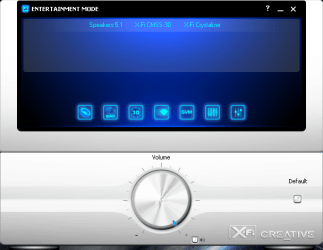
I've found a working solution, might be similar to the one above. The key that comes with the ASUS board (Rampage Extreme rev2, in my case) worked fine. AND, it works flawlessly. Finally, working panels and full surround support, no tweaking or mind-numbing hacks to get it to work. 2-step, easy instructions are included.

Contains:
- SB X-Fi Volume Panel
- SB X-Fi CMSS 3D
- SB X-Fi Crystalizer
- Smart Volume Management
- Graphic EQ
- Full Funtion Mixer

and of course, full EAX for your games/movies.

Full pack is here.

Oh by the way...

Seeing as no one has actually come out and said it in this thread...

I refer you to this. ;)
 

Attachments

  • Creative_X-Fi.png
    Creative_X-Fi.png
    43 KB · Views: 1,254
Last edited:

My Computer My Computer

Computer type
PC/Desktop
Computer Manufacturer/Model Number
Custom Build/Mod
OS
Windows 7 Home Premium x64
CPU
Intel QX9650 Extreme 4.0 GHz
Motherboard
ASUS Rampage Extreme Rev2
Memory
8GB (4x2) Corsair Dominator DDR3
Graphics Card(s)
2x Radeon R390X [8GB]
Sound Card
SupremeFX X-Fi
Monitor(s) Displays
Dell 2408WFP 26" Panel
Screen Resolution
1920x1200
Hard Drives
4x WD 2TB (8TB+ Total)
2x Crucial SSD 128GB (RAID-0)
1x LG Blu-ray read/write
1x Phillips LightScribe DVD read/write
PSU
Corsair HX1000
Case
CoolerMaster - Cosmos S
Cooling
Custom Liquid - 320mm rad w/ 3x 80mm fans, CPU/NB/SB Blocks
Keyboard
Logitech Illuminater Pro
Mouse
Logitech
Internet Speed
Fractional T1 - 125Mbps
Antivirus
ESET Security Suite / Microsoft Security Essentials
Browser
Cyberfox Intel x64
Other Info
OC'd to 5.0GHz @ 44c under full load
Oh by the way...


I refer you to this. ;)

Ok so everyone can get to that dude, show us a small video of you changing the speaker settings. So far you only show the panel which works with the Rampage II download, but we need a screen shot showing W7 with version number, and WITH the pull down of speaker selection before we believe you.
 

My Computer My Computer

OS
Windows 7 (Build 7068)
Which is why I said this,

the Asus Supreme/Rampage/whatever X-Fi as it is not a X-Fi at all but a SoundMax/ADI based sound card/chip, that only gets to use some of the X-Fi software.

it might have the software, but that is all that it has. The drivers still have to come from ADI/SoundMax through Asus, and if ADI doesn't provide an update neither does Asus.
 

My Computer My Computer

Computer type
PC/Desktop
Computer Manufacturer/Model Number
Me
OS
Win 7 Ultimate x64
CPU
FX-8350 @ 4.6 GHz so far
Motherboard
Asus M5A97 EVO
Memory
ADATA XPG V1 Series Black 8GB DDR3 1600
Graphics Card(s)
Sapphire R9 270x Dual-X
Sound Card
Xonar DGX w/ Corsair Vengence 1300
Monitor(s) Displays
Acer S232HL Abid
Screen Resolution
1920x1080
Hard Drives
120 GB OCZ Vertex 3
500 GB Seagate 7200.12
PSU
Antec Earthwatts 650W Green
Case
Antec Three Hundred
Cooling
Cooler Master 212 EVO
Keyboard
Logitech G510
Mouse
Logitech G500s
Internet Speed
35000/3000
Which is why I said this,


it might have the software, but that is all that it has. The drivers still have to come from ADI/SoundMax through Asus, and if ADI doesn't provide an update neither does Asus.

What I have found is the ADI (2000 to be technical) chipset driver works fine. There is nothing wrong and it installs and works without a hitch. It's the proprietary X-Fi addon that will not work right. It is a combination between Creative getting it together, then ASUS can release a fix. So really, yes ASUS has to get on Creatives case to provide them with the solution so they can taylor it to the ROG cards.
 

My Computer My Computer

OS
Windows 7 (Build 7068)
Well the Asus supremfx x-fi drivers' are indeed working well for the RC.
 

My Computer My Computer

Computer Manufacturer/Model Number
Self-Build
OS
Windows 7 RC 7100
CPU
Intel c2q6600 oc'd @4239Mhz 1.68v w/mod'd VapoChill LS
Motherboard
Asus Rampage Extreme
Memory
2gb Ocz Flex II DDR3 2000 8-8-8-24 2.2v
Graphics Card(s)
2x Asus 3870x2 Tops in quad xfire
Sound Card
Asus SupremeFX X-FI
Monitor(s) Displays
1-HP 2408 24'' LCD & 1-Viewsonic VG2230wm 22'' LCD
Screen Resolution
1920x1200 & 1600x1200
Hard Drives
2x WD Caviar 160gb in Raid0
1x 1TB backup

Opticals:

Sony optical drive
Samsung optical drive
PSU
1x Apevia 680watt & 1x Logisys 550watt
Case
2x Custom Plexiglass cases 1-PC & 1- LS Phase Change
Cooling
Aqua Computer 360xt single loop north/south & Flex II DDR3
Keyboard
Logitech Di Novo Edge Keyboard & Optimus Mini 3 Keyboard
Mouse
Saitek Obsidian mouse & 3D Connexion Space Pilot 3D mouse
Internet Speed
not worth mentioning
Other Info
Upek Fingerprint reader
Plantronic 590 Bluetooth headset
HP 7550 Photo Printer
HP 4670 See-Thru Scanner
NextEngine 3D Scanner
Enzotech north, south and mosfet blocks, 4xDanger Den Maze-5 vga blocks, //UPGRADES COMING SOON//
Koolance liquid-cooled psu, i7 975, Rampage II Extreme

My Computer My Computer

Computer type
PC/Desktop
Computer Manufacturer/Model Number
Me
OS
Win 7 Ultimate x64
CPU
FX-8350 @ 4.6 GHz so far
Motherboard
Asus M5A97 EVO
Memory
ADATA XPG V1 Series Black 8GB DDR3 1600
Graphics Card(s)
Sapphire R9 270x Dual-X
Sound Card
Xonar DGX w/ Corsair Vengence 1300
Monitor(s) Displays
Acer S232HL Abid
Screen Resolution
1920x1080
Hard Drives
120 GB OCZ Vertex 3
500 GB Seagate 7200.12
PSU
Antec Earthwatts 650W Green
Case
Antec Three Hundred
Cooling
Cooler Master 212 EVO
Keyboard
Logitech G510
Mouse
Logitech G500s
Internet Speed
35000/3000
^^ Yes, I used his fix but compiled my own driver pack by using the REX II and Formula drivers.
 

My Computer My Computer

Computer type
PC/Desktop
Computer Manufacturer/Model Number
Custom Build/Mod
OS
Windows 7 Home Premium x64
CPU
Intel QX9650 Extreme 4.0 GHz
Motherboard
ASUS Rampage Extreme Rev2
Memory
8GB (4x2) Corsair Dominator DDR3
Graphics Card(s)
2x Radeon R390X [8GB]
Sound Card
SupremeFX X-Fi
Monitor(s) Displays
Dell 2408WFP 26" Panel
Screen Resolution
1920x1200
Hard Drives
4x WD 2TB (8TB+ Total)
2x Crucial SSD 128GB (RAID-0)
1x LG Blu-ray read/write
1x Phillips LightScribe DVD read/write
PSU
Corsair HX1000
Case
CoolerMaster - Cosmos S
Cooling
Custom Liquid - 320mm rad w/ 3x 80mm fans, CPU/NB/SB Blocks
Keyboard
Logitech Illuminater Pro
Mouse
Logitech
Internet Speed
Fractional T1 - 125Mbps
Antivirus
ESET Security Suite / Microsoft Security Essentials
Browser
Cyberfox Intel x64
Other Info
OC'd to 5.0GHz @ 44c under full load
i have downloaded windows 7 RC x64 from microsoft web site 2 days ago it should be the same s.o

maybe you need to activate admin account 1st.
Bild: sinttulon3kx.png - abload.de

-then uinstal xfi utility and soundmax driver
-reboot your machine
-instal orginal driver (SoundMAXAudio610X6480_Vista) from asus web site for
775 maximus 2 formula
-reboot pc
-download 1366 rampage 2 gene xfi utility from asus site unzip the file (SB_XFi_V10) and go inside to setup properties and select compatibility mode windows vista (service pack 1)
-double click on the setup and instal it
-reboot your pc and when you back to windows double click on the sound panel to activation xfi utility
-use internet explorer for activation , with firefox i have somes issues

hi there, i have used this metod with my asus maximus II formula and the 5 spearks are working. the sub woofer don't work...i have tried the last 3 metods today, and only this one putted the system in 5.1.
in properties the sub woofer works, but with music, stream or mp3, it never works!

any sugestion please?
thanks in advance
 

My Computer My Computer

OS
win 7
Thay may be an issue with the media you are using. Have you tried a movie with a proper AC3 5.1 soundtrack...with AC3 Filter set up in the output format to "AS IS (no change)" and see if there is sub output. As you say, it does work in the sound panel. The reason why you don't get sub output on this soundcard with mp3 and stream is because they are only 2.0. Analog output just mixes the stereo channels into the sub, whereas 5.1 NEEDS to have a full seperate sound channel specifically with the 0.1 channel. If you try this with AC3 Filter, and there is sub, then that is why....which in that case your sound is actully reproducing the mp3 properly. Some amps will pre mix this, and some sound cards do such as the Razer AC1. Hopefully that helped.
 

My Computer My Computer

OS
Windows 7 (Build 7068)
Back
Top