ATI Radeon drivers install, but fail to initialize

Wow!

You are like...the messiah of win7. Awesome.

Thanks so much. A month of agony and figuring out what was wrong...ended in a matter of minutes. You even beat out win7 tech support 'cause they couldn't figure out a resolution. They just had me deactivate the driver and work around the problem. thanks again.
 

My Computer My Computer

Computer Manufacturer/Model Number
HP
OS
Windows 7
CPU
AMD Phenom 9850 Quad Core processor 2.49 ghz
Memory
4 GB
Monitor(s) Displays
HP 2159m
Hard Drives
AMD 1+0 RAID ready SCSI Disk Device
lol glad it's working for ya.

That's mostly skill built up from following others around here and what they've said since the beta testing times.
 

My Computer My Computer

Computer Manufacturer/Model Number
self built
OS
7600.20510 x86
CPU
P4 550 3.4 GHz HT running at 3.5 GHz
Motherboard
MSI PM8M3-V (MS-7211 v1.x) Micro-ATX mainboard
Memory
OCZ 2 GB(2x1GB) DDR400mHz running @ 414 mHz
Graphics Card(s)
HIS Radeon HD 3850 IceQ 3 Turbo HDMI Dual DL-DVI AGP
Sound Card
MOTU Traveler firewire studio interface 192 kHz 24 bit
Monitor(s) Displays
22" widescreen Acer X223W LCD, 17" Compaq P75 CRT
Screen Resolution
1680x1050 and 1280x1024
Hard Drives
SATA I x2 WD, 400 GB and 120 GB, SATA 2 WD Caviar Black 1 TB
PSU
350W generic
Case
Cybertronpc, it glows blue
Cooling
stock cpu fan, Ice-Q 3 gpu and system, many case fans
Keyboard
Logitch Classical Keyboard 200
Mouse
Logitech Mediaplay cordless
Internet Speed
1792/448 kbits/sec
Other Info
SATA II PCI fake RAID adapter, 1 GB Readyboost, original ATI Remote Wonder (even works with WMC perfectly), Logitech Rumblepad 2 game controller x2

My Computer My Computer

Computer Manufacturer/Model Number
self built
OS
7600.20510 x86
CPU
P4 550 3.4 GHz HT running at 3.5 GHz
Motherboard
MSI PM8M3-V (MS-7211 v1.x) Micro-ATX mainboard
Memory
OCZ 2 GB(2x1GB) DDR400mHz running @ 414 mHz
Graphics Card(s)
HIS Radeon HD 3850 IceQ 3 Turbo HDMI Dual DL-DVI AGP
Sound Card
MOTU Traveler firewire studio interface 192 kHz 24 bit
Monitor(s) Displays
22" widescreen Acer X223W LCD, 17" Compaq P75 CRT
Screen Resolution
1680x1050 and 1280x1024
Hard Drives
SATA I x2 WD, 400 GB and 120 GB, SATA 2 WD Caviar Black 1 TB
PSU
350W generic
Case
Cybertronpc, it glows blue
Cooling
stock cpu fan, Ice-Q 3 gpu and system, many case fans
Keyboard
Logitch Classical Keyboard 200
Mouse
Logitech Mediaplay cordless
Internet Speed
1792/448 kbits/sec
Other Info
SATA II PCI fake RAID adapter, 1 GB Readyboost, original ATI Remote Wonder (even works with WMC perfectly), Logitech Rumblepad 2 game controller x2
Only exclamation point is at PCI standard 1/3 PCI-to-PCI bridge (This device cannot find enough free resources that it can use. (Code 12)). problem is, that I couldn't find (Vista/win7)drivers for my MB (ASUS P4R8L, Pundit-R Barebone) except Original CD which is for XP (throws an error during installation, that OS is not supported)
 

My Computer My Computer

OS
Windows Seven
CPU
P4 3.2GHz HT
Graphics Card(s)
3DClub ATI Radeon HD2400 PRO PCI
Only exclamation point is at PCI standard 1/3 PCI-to-PCI bridge

There' the problem. You need that working well. Find driver for it or no go.

Update your bios to latest made as well. After, disable all unused ports such as floppy, serial, parallel...etc...
 

My Computer My Computer

Computer Manufacturer/Model Number
self built
OS
7600.20510 x86
CPU
P4 550 3.4 GHz HT running at 3.5 GHz
Motherboard
MSI PM8M3-V (MS-7211 v1.x) Micro-ATX mainboard
Memory
OCZ 2 GB(2x1GB) DDR400mHz running @ 414 mHz
Graphics Card(s)
HIS Radeon HD 3850 IceQ 3 Turbo HDMI Dual DL-DVI AGP
Sound Card
MOTU Traveler firewire studio interface 192 kHz 24 bit
Monitor(s) Displays
22" widescreen Acer X223W LCD, 17" Compaq P75 CRT
Screen Resolution
1680x1050 and 1280x1024
Hard Drives
SATA I x2 WD, 400 GB and 120 GB, SATA 2 WD Caviar Black 1 TB
PSU
350W generic
Case
Cybertronpc, it glows blue
Cooling
stock cpu fan, Ice-Q 3 gpu and system, many case fans
Keyboard
Logitch Classical Keyboard 200
Mouse
Logitech Mediaplay cordless
Internet Speed
1792/448 kbits/sec
Other Info
SATA II PCI fake RAID adapter, 1 GB Readyboost, original ATI Remote Wonder (even works with WMC perfectly), Logitech Rumblepad 2 game controller x2
Only exclamation point is at PCI standard 1/3 PCI-to-PCI bridge

There' the problem. You need that working well. Find driver for it or no go.

Update your bios to latest made as well. After, disable all unused ports such as floppy, serial, parallel...etc...

I'm using latest BIOS version. I also tried to disable various stuff (serial ports, CardBuss, 1394, etc) - no success.
There are 3 PCI-to-PCI bridge devices in win7 and 2 in winXP (dual boot).

I tried to disable one of bridges via Device Manager and 1st one lost its exclamation icon... however, that device was for LAN - i lost connection to internet. Rebooted, but devices restored themselves - 1st not enough resources, LAN ok...

I think I need to free up one PCI slot, but there are only 2, and one is free (other for graphics card)... But I might be wrong here...

Any ideas?
 

My Computer My Computer

OS
Windows Seven
CPU
P4 3.2GHz HT
Graphics Card(s)
3DClub ATI Radeon HD2400 PRO PCI
Any ideas?

Yeah. You're going to need some kind of chipset update compared to what's running now. If you can't find one or none available, unfortunately, it's not going to work.
 

My Computer My Computer

Computer Manufacturer/Model Number
self built
OS
7600.20510 x86
CPU
P4 550 3.4 GHz HT running at 3.5 GHz
Motherboard
MSI PM8M3-V (MS-7211 v1.x) Micro-ATX mainboard
Memory
OCZ 2 GB(2x1GB) DDR400mHz running @ 414 mHz
Graphics Card(s)
HIS Radeon HD 3850 IceQ 3 Turbo HDMI Dual DL-DVI AGP
Sound Card
MOTU Traveler firewire studio interface 192 kHz 24 bit
Monitor(s) Displays
22" widescreen Acer X223W LCD, 17" Compaq P75 CRT
Screen Resolution
1680x1050 and 1280x1024
Hard Drives
SATA I x2 WD, 400 GB and 120 GB, SATA 2 WD Caviar Black 1 TB
PSU
350W generic
Case
Cybertronpc, it glows blue
Cooling
stock cpu fan, Ice-Q 3 gpu and system, many case fans
Keyboard
Logitch Classical Keyboard 200
Mouse
Logitech Mediaplay cordless
Internet Speed
1792/448 kbits/sec
Other Info
SATA II PCI fake RAID adapter, 1 GB Readyboost, original ATI Remote Wonder (even works with WMC perfectly), Logitech Rumblepad 2 game controller x2
Yeah. You're going to need some kind of chipset update compared to what's running now. If you can't find one or none available, unfortunately, it's not going to work.
What exactly you mean by chipset?
 

My Computer My Computer

OS
Windows Seven
CPU
P4 3.2GHz HT
Graphics Card(s)
3DClub ATI Radeon HD2400 PRO PCI
big thank you

Thank you torrentg it was really appreciate for your big help and it really rare that you can see people share there experience.
 

My Computer My Computer

OS
windows 7

My Computer My Computer

Computer Manufacturer/Model Number
self built
OS
7600.20510 x86
CPU
P4 550 3.4 GHz HT running at 3.5 GHz
Motherboard
MSI PM8M3-V (MS-7211 v1.x) Micro-ATX mainboard
Memory
OCZ 2 GB(2x1GB) DDR400mHz running @ 414 mHz
Graphics Card(s)
HIS Radeon HD 3850 IceQ 3 Turbo HDMI Dual DL-DVI AGP
Sound Card
MOTU Traveler firewire studio interface 192 kHz 24 bit
Monitor(s) Displays
22" widescreen Acer X223W LCD, 17" Compaq P75 CRT
Screen Resolution
1680x1050 and 1280x1024
Hard Drives
SATA I x2 WD, 400 GB and 120 GB, SATA 2 WD Caviar Black 1 TB
PSU
350W generic
Case
Cybertronpc, it glows blue
Cooling
stock cpu fan, Ice-Q 3 gpu and system, many case fans
Keyboard
Logitch Classical Keyboard 200
Mouse
Logitech Mediaplay cordless
Internet Speed
1792/448 kbits/sec
Other Info
SATA II PCI fake RAID adapter, 1 GB Readyboost, original ATI Remote Wonder (even works with WMC perfectly), Logitech Rumblepad 2 game controller x2
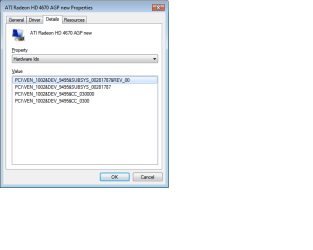
I'm yet another person with a problem. I have an AGP HD4670 with an ID of 9495. I've attached a screen dump. I also have Win7 Ultimate 64bit (the Evaluation version).

I downloaded the 9.11 drivers which, of course, have different file names.

I added the following line to file CH_91527.inf
"ATI Radeon HD 4650 AGP new" = ati2mtag_R7X, PCI\VEN_1002&DEV_9495
and installed it according to the instructions on the front page. However, it still failed with an error
Windows has stopped this device because it is reporting problems. (Code 43).

I read your previous advice about code 43 and updating the chipset drivers, so I downloaded them from nf123xp stuff - . It didn't make any difference.

I set the serial, parallel etc to inactive in the BIOS

I also read your previous advice that the nForce3 chipset on my GA-K8NS Ultra 939 would not be able to support hardware acceleration. That's odd, because it worked OK with my AGP nVidia 6600GT. The problems have only happened since I installed the HD4670. In fact, when the HD4670 is installed, the Device Manager shows a yellow triangle for the System Devices / High Definition Audio Controller with a message Code 12 - cannot find enough free resources. It does not show the triangle (or even the device) when the 6600GT is re-installed.

Is it a problem that I used the 9.11 drivers rather than the 9.10? Did I edit the correct file (CH_91527.inf)?

I really would like to use the HD5670 if possible. Do you have any suggestions, or should I just revert to XP?

Regards

James from Canberra

Thanks for the effort you're putting into this torrentg. The Internet needs more people like you.
 

Attachments

  • 4670 AGP Device IDs.png
    4670 AGP Device IDs.png
    8.9 KB · Views: 197

My Computer My Computer

Computer Manufacturer/Model Number
Home Built
OS
Window7 Ultimate Eval
CPU
AMD 64 4200x2
Motherboard
Gigabyte GA-K8NS Ultra 939 with Nforce 3 chipset
Memory
2GB
Graphics Card(s)
Nvidia AGP 6600GT (works) ATI AGP 4670 (doesn't)
Sound Card
onboard
Monitor(s) Displays
Dell 17" LCD
Hard Drives
300GB Seagate
PSU
Numan 500W
I also read your previous advice that the nForce3 chipset on my GA-K8NS Ultra 939 would not be able to support hardware acceleration. That's odd, because it worked OK with my AGP nVidia 6600GT. The problems have only happened since I installed the HD4670. In fact, when the HD4670 is installed, the Device Manager shows a yellow triangle for the System Devices / High Definition Audio Controller with a message Code 12 - cannot find enough free resources. It does not show the triangle (or even the device) when the 6600GT is re-installed.

You're welcome.

That's because 6600GT is an nVidia card on the not-so-working-well nVidia chipset.

See here for most info.

Now take this with a grain of salt because I do not know if it's true - Users have claimed that if they install Windows and then load a proper video driver before ever allowing the machine online or to Windows Update, it will work. If you try this, use a Vista WDDM 1.0 driver for video, instead. Use the hotfix from ATI.
 

My Computer My Computer

Computer Manufacturer/Model Number
self built
OS
7600.20510 x86
CPU
P4 550 3.4 GHz HT running at 3.5 GHz
Motherboard
MSI PM8M3-V (MS-7211 v1.x) Micro-ATX mainboard
Memory
OCZ 2 GB(2x1GB) DDR400mHz running @ 414 mHz
Graphics Card(s)
HIS Radeon HD 3850 IceQ 3 Turbo HDMI Dual DL-DVI AGP
Sound Card
MOTU Traveler firewire studio interface 192 kHz 24 bit
Monitor(s) Displays
22" widescreen Acer X223W LCD, 17" Compaq P75 CRT
Screen Resolution
1680x1050 and 1280x1024
Hard Drives
SATA I x2 WD, 400 GB and 120 GB, SATA 2 WD Caviar Black 1 TB
PSU
350W generic
Case
Cybertronpc, it glows blue
Cooling
stock cpu fan, Ice-Q 3 gpu and system, many case fans
Keyboard
Logitch Classical Keyboard 200
Mouse
Logitech Mediaplay cordless
Internet Speed
1792/448 kbits/sec
Other Info
SATA II PCI fake RAID adapter, 1 GB Readyboost, original ATI Remote Wonder (even works with WMC perfectly), Logitech Rumblepad 2 game controller x2
It sounds like I'm chasing shadows, and have very little chance of success. There are much more experienced people than me who have looked at this, and if they don't have a reliable answer, I have Buckleys of finding one myself.

I'm going back to the comfortable world of XP, with its clunky drivers and cruddy interface. But at least it works with the nForce3 chipset and AGP!

I can't add much knowledge to the pool, but I did find one link that might be interesting to people who are thinking of using the F8 route (which I tried, but it made no difference). This ASRock link says the F8 only works for nVidia cards, not ATI, for this motherboard. If that happens on more motherboards, it might explain why it made no difference to me. Well, that and the lack of underlying drivers :)

Good luck to everyone else trying to get theirs working, and I really appreciate torrentg's help, time and advice.
 

My Computer My Computer

Computer Manufacturer/Model Number
Home Built
OS
Window7 Ultimate Eval
CPU
AMD 64 4200x2
Motherboard
Gigabyte GA-K8NS Ultra 939 with Nforce 3 chipset
Memory
2GB
Graphics Card(s)
Nvidia AGP 6600GT (works) ATI AGP 4670 (doesn't)
Sound Card
onboard
Monitor(s) Displays
Dell 17" LCD
Hard Drives
300GB Seagate
PSU
Numan 500W
ATI Catalyst wont install

Just a point of intrest for those with ATI sortware. After talkig with ATI, any of there drivers posted on their site is only for ATI cards, they do not support or will install on Laptops with video on the motherboard. I have a Gateway with a 2600HD Radeon card on the Motherboard. The only way to get the catalyst to install with no problem is to install the ATI software that came with you're computer prior to ungrading to Windows 7, In my case was Windows Vista.
 

My Computer My Computer

OS
windows 7
That's just their "official stance." They're not going to tell you how to modify drivers.
 

My Computer My Computer

Computer Manufacturer/Model Number
self built
OS
7600.20510 x86
CPU
P4 550 3.4 GHz HT running at 3.5 GHz
Motherboard
MSI PM8M3-V (MS-7211 v1.x) Micro-ATX mainboard
Memory
OCZ 2 GB(2x1GB) DDR400mHz running @ 414 mHz
Graphics Card(s)
HIS Radeon HD 3850 IceQ 3 Turbo HDMI Dual DL-DVI AGP
Sound Card
MOTU Traveler firewire studio interface 192 kHz 24 bit
Monitor(s) Displays
22" widescreen Acer X223W LCD, 17" Compaq P75 CRT
Screen Resolution
1680x1050 and 1280x1024
Hard Drives
SATA I x2 WD, 400 GB and 120 GB, SATA 2 WD Caviar Black 1 TB
PSU
350W generic
Case
Cybertronpc, it glows blue
Cooling
stock cpu fan, Ice-Q 3 gpu and system, many case fans
Keyboard
Logitch Classical Keyboard 200
Mouse
Logitech Mediaplay cordless
Internet Speed
1792/448 kbits/sec
Other Info
SATA II PCI fake RAID adapter, 1 GB Readyboost, original ATI Remote Wonder (even works with WMC perfectly), Logitech Rumblepad 2 game controller x2
I just bought a Radeon HD 4650 from HIS and seem to be having the same problems. I upgraded from an Nvidia Geforce 6200 that worked well. I download the hotfix from ATI but that did nothing. Any help would be great!!
 

My Computer My Computer

OS
Windows 7 Ultimate
CPU
P4 2.4 Ghz
Memory
2.5 GB
I know this is an old thread...

Hi guys,

I know that this is an old thread, but it's the closest thing I've found to a solution on the web for this issue!

Torrentg, I need your expertise ;)

I was reading through this thread, and tried out the steps you provided for other people, but it doesn't seem to work for me, maybe you can inf where I went wrong:

I have Windows 7 Ultime 64 bit and an ATI Radeon HD 3600 card.

Installed CCC & drivers etc from the install package (10_10 I think it was)

Installed to c:\ATI as suggested

On reboot, get the error "drivers failed to initialize"

If I go to Device Manager > ATI Radeon 3600 > Properties > Details > Hardware ID I can see this:

PCI\VEN_1002&DEV_9598&SUBSYS_95981002&REV_00
PCI\VEN_1002&DEV_9598&SUBSYS_95981002
PCI\VEN_1002&DEV_9598&CC_030000
PCI\VEN_1002&DEV_9598&CC_0300

So, I tried editing the .inf file in
C:\ATI\Support\10-10_vista64_win7_64_dd_ccc_enu\Packages\Drivers\Display\W76A_INF

That's the only .inf file I could find (maybe this was the problem). I added this line in:

"ATI Radeon HD 3600 Series " = ati2mtag_M76, PCI\VEN_1002&DEV_9598&SUBSYS_3000148C

The tried updating the drivers myself, chose this location manually.

Reboot, same error. Can you see anything I missed/ did wrong?

Thanks in advance if you find this thread again dude,

Twis
 
Last edited:

My Computer My Computer

OS
Windows 7 Ultimate 64bit
Internet Speed
crap
Hello, I recently bought a new game called ' Cities in Motion ' but I can not play it, i think it's becuase my ATI RADEON X850 XT is not up to date, Is there anyway you can bring the spec's of my PC up with paying alot? And if so could some body tell me.
Thank you .

Chris.
 

My Computer My Computer

OS
Windows Xp 32 bit
Back
Top