Solved Attention: cottonball, virus deleted all SD photos

My Computer My Computer

At a glance

Windows 7 Home Premium 64bitAMD
Computer type
Laptop
Computer Manufacturer/Model Number
HP
OS
Windows 7 Home Premium 64bit
CPU
AMD
ducat1base,

You are still infected, and it changed its name. Let's see if we can nuke this from outside of Windows, but with access to the Registry.

Please do the following...

Since the computer boots, let's run the Farbar Recovery Scan Tool from the hard drive that contains your Operating System (normally C:\).
(Doing this, since you may not have another computer.)

Please print these instructions, and read them once, so you have an idea of what you are doing.
Do follow them step by step.

Here we go...

:info: FRST64.exe was previously saved to the Desktop

Right-click Start, and select: Open Windows Explorer
Look for drive C:\, or the drive that contains your Operating System (OS).
Now, go to the Desktop, right-click FRST64.exe just once and hold it, then drag FRST64 right into C:

~~~~
Next, remove the fixlist.txt previously on the Desktop. (To avoid confusion)
Open Notepad once again (Start > All Programs > Accessories > Notepad)
Copy the entire contents of the code box below to Notepad:

Code:
start
HKCU\...\CurrentVersion\Windows: [Load] C:\Users\Owner\LOCALS~1\Temp\msuamr.cmd <===== ATTENTION!
C:\Users\Owner\LOCALS~1\Temp\msuamr.cmd 
end

Name it: fixlist.txt
Save it on C:, which is the same place where FRST64 is at!

>>> Restart the computer.

As soon as the BIOS is loaded begin tapping the F8 key until the Advanced Boot Options menu appears.
Use the arrow keys to select the Repair your Computer menu item.
Select your language settings, and click: Next
Select your User account and click: OK/Next (If you did not set a password, leave blank.)

On the System Recovery Options menu you get the following options:
Startup Repair
System Restore
Windows Complete PC Restore
Windows Memory Diagnostic Tool
Scan your computer's memory for errors.
Command Prompt

Select: Command Prompt

~~~~
In the Command Prompt window, at the bliking cursor type: notepad
(Note: Make sure the NumLk key is not active. If it is, you are not able to type correctly at the Command Prompt. If NumLk is active, press the Fn key and then the NumLk to deactivate it.)
Press: Enter

In Notepad, under the File menu select: Open
Double-click: Computer (on the left side), find the drive letter that has the Operating System, and remember what letter it has.
(Note: Once in this special mode you booted into, the drive containing the Operating System (OS) may not be C:\ (or the particular drive that has your OS).
You need to examine the drives carefully, and determine which one is the correct drive.)

Click on the OS drive
In Files of Type, select: All files
Press: Open
Confirm that FRST.exe is there!

~~~~
Now, click the Command Prompt window.
Type the following: ?:\frst64.exe, and press: Enter
(Note: Replace the ? with the drive letter that contains the OS.)

The tool starts and prepares to run. Follow the prompts.
Click Yes to the disclaimer.

~~~~
When the FRST console appears, press the Fix button, just once, and wait.
The tool creates a report called: Fixlog.txt

~~~~
Back at System Recovery Options, press: Restart

~~~~
After the computer restarts, and you are back in Windows, do a search for: Fixlog.txt

:ar: Please post the Fixlog.txt in your reply.


:info: Double-click on the Unhide program icon on the Desktop to run the program.
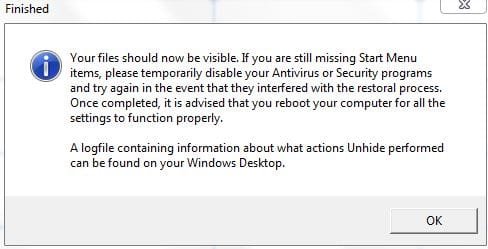
When done, the program displays an alert stating that your files are restored.

:ar: Post back on whether Unhide gave you this alert!

Reboot your computer for the settings to go into effect.

:info: Check the SD card, and see if the images show.

 
Last edited:

My Computer My Computer

At a glance

Windows 7 Home Premium
Computer type
PC/Desktop
Computer Manufacturer/Model Number
An ol' eMachines
OS
Windows 7 Home Premium
Internet Speed
Fine for me...I'm retired!

My Computer My Computer

At a glance

Windows 7 Home Premium 64bitAMD
Computer type
Laptop
Computer Manufacturer/Model Number
HP
OS
Windows 7 Home Premium 64bit
CPU
AMD
Deleted post
 
Last edited:

My Computer My Computer

At a glance

Windows 7 Ultimate 32-Bit & Windows 7 Ultimat...Intel Core i7 CPU 950 @ 3.07GHzOCZ 6GB (3 x 2GB) 240-Pin DDR3 SDRAM DDR3 160...ATI Radeon HD 5700 Series
Computer Manufacturer/Model Number
Custom Built
OS
Windows 7 Ultimate 32-Bit & Windows 7 Ultimate 64-Bit
CPU
Intel Core i7 CPU 950 @ 3.07GHz
Motherboard
ASUS P6T DELUXE V2
Memory
OCZ 6GB (3 x 2GB) 240-Pin DDR3 SDRAM DDR3 1600 OCZ3X1600R2
Graphics Card(s)
ATI Radeon HD 5700 Series
Sound Card
OnBoard
Hard Drives
WD6400AACS-00M3B0 (640GB SATA )
PSU
CORSAIR 850w
Case
NZXT LEXA
Cooling
Intel Stock Heatsink Fan
Keyboard
Microsoft Wireless Laser Keyboard 7000
Mouse
Microsoft Wireless Laser Mouse 7000
ducat1base,

Before going any further, please do the following:

Download MiniRegTool64.zip
Unzip it.
  • Run the tool
  • Copy and paste the following into the edit box:

    HKCU\Software\Microsoft\Windows NT\CurrentVersion\Windows
  • Click the List Permissions button.
  • Press the Go button, and post the result in your reply.
Also realized that you had FRST in the Downloads folder, and fixlist.txt on the Desktop.
The fixlist and FRST64 must be located in the same directory!!

As a result, when we tried the fix, got the following:
HKCU\Software\Microsoft\Windows NT\CurrentVersion\Windows\\Load: Error setting value

Currently, FRST is in C:, so, the fixlist.txt must be tplaced here also.


:info: This time, just run FRST and press Fix without going to the Command Prompt, etc.

The entry needs to be fixed oin Windows, outside the recovery mode.

Make sure you use the following text for the fixlist:

Code:
start
Unlock: HKCU\Software\Microsoft\Windows NT\CurrentVersion\Windows
HKCU\...\CurrentVersion\Windows: [Load] C:\Users\Owner\LOCALS~1\Temp\msuamr.cmd <===== ATTENTION!
C:\Users\Owner\LOCALS~1\Temp\msuamr.cmd 
end

:ar: When done, please post the fixlog.txt in your reply.

:info: Last, but not least, right-click the J: drive (SD card) and select: Properties

Please post an image of the Removable Disk J: Properties
 
Last edited:

My Computer My Computer

At a glance

Windows 7 Home Premium
Computer type
PC/Desktop
Computer Manufacturer/Model Number
An ol' eMachines
OS
Windows 7 Home Premium
Internet Speed
Fine for me...I'm retired!
forgive me if I'm being stupid here, i just sorta skimmed thru this post. Can't we, if the files were deleted as it appears to me, use an undelete program to recover the photos and then format the USB, since it seems it might contain a potential virus, wouldn't it remove the virus? Also, if we look into an undelete program, and they show up, we should know that they're no longer on the USB, correct? Or is the problem inside windows? even then we can still try an undelete program right?
 

My Computer My Computer

At a glance

.
Computer type
PC/Desktop
OS
.
redfang337,

Thanks for the info. :)

Can't we, if the files were deleted as it appears to me, use an undelete program to recover the photos

What is your idea of an "Undelete program"?
Just want to make sure we are on the same page.


...is the problem inside windows
The problem appears to be inside Windows at this point, but there could also be a problem in the USB drive. The most logical place would be in the autorun file, but we can't open it.
 

My Computer My Computer

At a glance

Windows 7 Home Premium
Computer type
PC/Desktop
Computer Manufacturer/Model Number
An ol' eMachines
OS
Windows 7 Home Premium
Internet Speed
Fine for me...I'm retired!
ducat1base,

After performing the actions in Post #25, please do the following:

:info: Please download UsbFix (free) - Download the latest version for Windows in english on Kioskea

Go to the small green button with: Download Free Version (1MB)
Right-click the downloaded file and select: Run as Administrator
Connect your SD Card when requested.
Press: Listing

When done, the program closes on its own, and a report appears.

Please post the USBFix Listing report in your reply.
 

My Computer My Computer

At a glance

Windows 7 Home Premium
Computer type
PC/Desktop
Computer Manufacturer/Model Number
An ol' eMachines
OS
Windows 7 Home Premium
Internet Speed
Fine for me...I'm retired!
why not recuva? scan the SD with portable recuva, recover the files to a specified folder on the desktop, then format the usb to get rid of the virus. Sounds like a simple fix to me, or am i missing something still?
 

My Computer My Computer

At a glance

.
Computer type
PC/Desktop
OS
.
@redfang337,

Ah!! A data recovery program. When you mentioned "Undelete" program, was not sure of what you had in mind.

At this point, IMO, the images are hidden by malware, and hopefully we will find out some more details about them when ducat1base posts back.

If it is not the case, then, other options will need to be explored.
However, the OP needs to remain on course until the malware is taken care of.
 

My Computer My Computer

At a glance

Windows 7 Home Premium
Computer type
PC/Desktop
Computer Manufacturer/Model Number
An ol' eMachines
OS
Windows 7 Home Premium
Internet Speed
Fine for me...I'm retired!
yessir, it would just b a quick and easy way to Actually SEE if the files were deleted, that way we could know if we should extinguish the virus and get data back, or see if we must unhide the files. I would not recommend sticking that usb in the OS again, i would recommend making a windows LivePE, booting from that, then stick the usb in :)
 

My Computer My Computer

At a glance

.
Computer type
PC/Desktop
OS
.
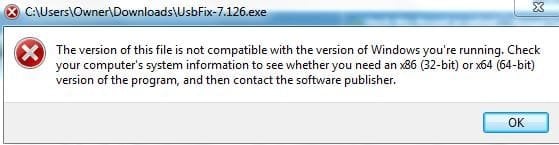
Gave USBFix a shot but I got this notice:

USBFix_alert.JPG

Tried to find a different download button for a 64-bit but there's just one generic download button. Any recommendations?

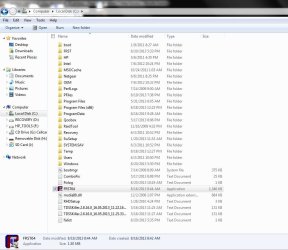
Sorry FRST and fixlist.txt weren't in the same drive. I really thought I had done that part right. Here's what the C drive looks like on my screen. I just dragged and dropped FRST and the fixlist.txt into C.

CDrive.JPG

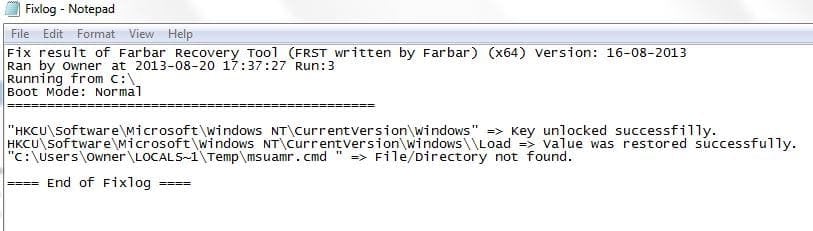
What I got after running it again...

fixlog.JPG

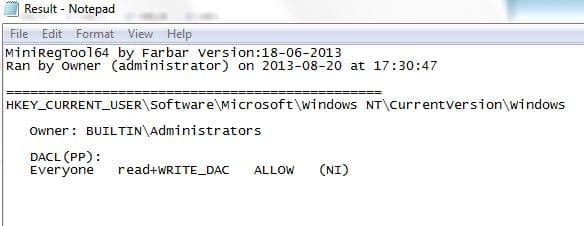
From MiniReg:

mini_reg.JPG

And the J drive

fixlog.JPG
 

Attachments

  • Properties_J.JPG
    Properties_J.JPG
    19.5 KB · Views: 10

My Computer My Computer

At a glance

Windows 7 Home Premium 64bitAMD
Computer type
Laptop
Computer Manufacturer/Model Number
HP
OS
Windows 7 Home Premium 64bit
CPU
AMD
ducat1base,

Thanks for the info. No worries about mistakes, we all take part in them. :)

Try USBFix from here:
http://www.infospyware.com/utiles/usbfix/
It is a Spanish language website, but the program is in English.

To download. press the button that says: Descagar

Then follow the same instructions.

If still no-go, then try runing the program in Safe Mode.

See how that goes.
 

My Computer My Computer

At a glance

Windows 7 Home Premium
Computer type
PC/Desktop
Computer Manufacturer/Model Number
An ol' eMachines
OS
Windows 7 Home Premium
Internet Speed
Fine for me...I'm retired!
Were the images in a folder, or just in J:?

The Webroot Security Anywhere that you use, by any chance does it have the images it its Quarantine?
 
Last edited:

My Computer My Computer

At a glance

Windows 7 Home Premium
Computer type
PC/Desktop
Computer Manufacturer/Model Number
An ol' eMachines
OS
Windows 7 Home Premium
Internet Speed
Fine for me...I'm retired!
I believe only images were in J. If they were in a separate folder, it was the DCIM folder which was created automatically. Quarantine only displays this:

quarantine.JPG
 

My Computer My Computer

At a glance

Windows 7 Home Premium 64bitAMD
Computer type
Laptop
Computer Manufacturer/Model Number
HP
OS
Windows 7 Home Premium 64bit
CPU
AMD
:info: Please go to Start > Control Panel > Folder Options
Click the View tab.
Under Advanced settings, click: Show hidden files, folders, and drives, and then click OK.
Uncheck: Hide protected operating system file
Close out by pressing: OK

:info: Run USBFix once again.
This time press: Deletion
You are prompted to connect storage devices (SD card)
At the end of the scan a report shows.
:ar: Please post the USBFix Deletion report in your reply.

:info: Last, go to Start > All Programs > Accessories > Command Prompt
Right-click on the Command Prompt and select: Run As Administrator
At the blinking cursor of the Command Prompt, type in (or copy/paste with mouse) the following commands inside the code box, and press Enter:

Code:
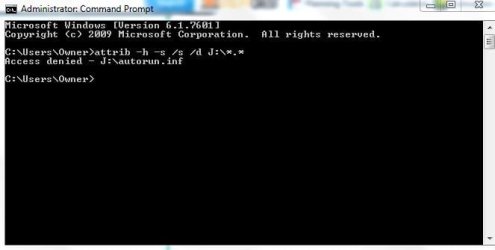
attrib -h -s /s /d J:\*.*

Check the SD Card. Any luck?
 

My Computer My Computer

At a glance

Windows 7 Home Premium
Computer type
PC/Desktop
Computer Manufacturer/Model Number
An ol' eMachines
OS
Windows 7 Home Premium
Internet Speed
Fine for me...I'm retired!
Nope, still no luck with it. Here's what I got from USBFix

View attachment UsbFix [Clean 1] OWNER-HP.txt

And when I ran CMD, access was still denied

access_denied.JPG

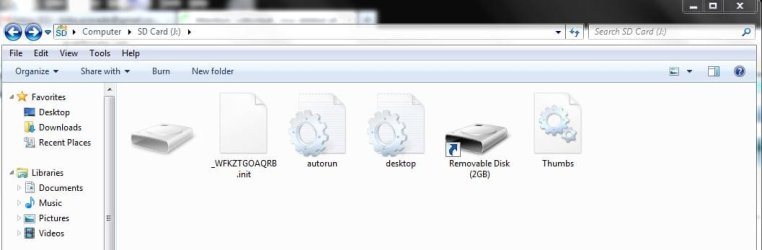
But I do notice some folders and files have either been created or rearranged. This is what it looks like now

SD_J.JPG
 

My Computer My Computer

At a glance

Windows 7 Home Premium 64bitAMD
Computer type
Laptop
Computer Manufacturer/Model Number
HP
OS
Windows 7 Home Premium 64bit
CPU
AMD
Did you open an elevated command prompt ?

When you do the command prompt opens to

C:\Windows\System32>_
 

My Computer My Computer

At a glance

Windows 7 Ultimate 32-Bit & Windows 7 Ultimat...Intel Core i7 CPU 950 @ 3.07GHzOCZ 6GB (3 x 2GB) 240-Pin DDR3 SDRAM DDR3 160...ATI Radeon HD 5700 Series
Computer Manufacturer/Model Number
Custom Built
OS
Windows 7 Ultimate 32-Bit & Windows 7 Ultimate 64-Bit
CPU
Intel Core i7 CPU 950 @ 3.07GHz
Motherboard
ASUS P6T DELUXE V2
Memory
OCZ 6GB (3 x 2GB) 240-Pin DDR3 SDRAM DDR3 1600 OCZ3X1600R2
Graphics Card(s)
ATI Radeon HD 5700 Series
Sound Card
OnBoard
Hard Drives
WD6400AACS-00M3B0 (640GB SATA )
PSU
CORSAIR 850w
Case
NZXT LEXA
Cooling
Intel Stock Heatsink Fan
Keyboard
Microsoft Wireless Laser Keyboard 7000
Mouse
Microsoft Wireless Laser Mouse 7000
Yup, I clicked Run as Administrator. Tried it again just to be sure and am getting the same screen, not C:\Windows\System32>_
 

My Computer My Computer

At a glance

Windows 7 Home Premium 64bitAMD
Computer type
Laptop
Computer Manufacturer/Model Number
HP
OS
Windows 7 Home Premium 64bit
CPU
AMD
Back
Top