Audigy Fuzz..or crackle..Fixed maybe...

bleeds

New member
Local time
4:19 PM
Messages
6
Audigy Fuzz..or crackle..Fixed maybe...

Google the Daniel_K driver download...fixed mine 100%!

Audigy 2 ZS 64bit win7
Bleeds
 

My Computer My Computer

OS
Windows 7 (7000)
Have you spent a fair amount of time with continuous sound playing? I installed these drivers on my Audigy 4, but it didn't help.
 

My Computer My Computer

Computer Manufacturer/Model Number
Home made/ MSI Neo-F P965 Express
OS
Windows 7, Windows Vista Ultimate, Ubuntu 9.04
CPU
2.4 Core2
Motherboard
MSI P965 Neo
Memory
4 GB
Graphics Card(s)
nVidia 7950 GT
Sound Card
Audigy 4 with Klipsch Promedia THX 2.1
Monitor(s) Displays
Samsung 930b
Screen Resolution
1280 x 1024
Hard Drives
260 GB SATA, 500 GB SATA (Data)
PSU
400 W
Case
Ultra something or another
Cooling
Fans
Keyboard
Dell quite-key
Mouse
MS Optical USB
Internet Speed
Comcast Broadband 13 MBPS
I have played hours of gaming.. and not a hitch.. before.. every game.. all the time..
Bleeds
 

My Computer My Computer

OS
Windows 7 (7000)
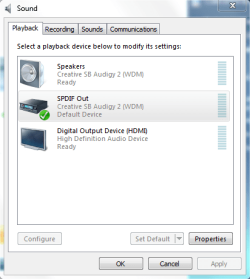
I was experiencing something like this, where after a long time, it would briefly cut into a weird distortion. I guess you could call it a crackle or fuzz. I fixed it by selecting SPDIF Out in my Sound Devices in Control Panel. Haven't heard anything wrong since.

 

Attachments

  • sound.PNG
    sound.PNG
    16 KB · Views: 177

My Computer My Computer

Computer Manufacturer/Model Number
Dell 8400
OS
Windows 7 Beta 1 b7000
CPU
Intel Pentium 4
Memory
4GB
Graphics Card(s)
ATI Radeon HD3450
Sound Card
Creative SoundBlaster Audigy 2
Monitor(s) Displays
Acer AL2016W
Screen Resolution
1680x1050
Hard Drives
1x500GB
1x100GB
Case
Dell 8400
Cooling
Standard
Keyboard
Dell Multimedia Keyboard
Mouse
Logitech MediaPlay
Internet Speed
Comcastic!
The Daniel K drivers did the fix for me as well. Audigy 2 started doing it upon going to dual Core cpu. Did it on Vista too so it's not an OS issue. Anytime CPU got taxed a little, crackle would appear. Noticeable when my raid did anything too. I use Logitec 5.1 speakers and surround sound crackling is finally gone. Can finally listen to music again while gaming.
 

My Computer My Computer

OS
windows 7
In your Bios make sure HDMI is Disengaged.
Made all the difference for me.
 

My Computer My Computer

OS
win7
Back
Top