Aurora Screen Saver - Restore

How to Restore "Aurora Screen Saver" Back in Windows 7 and Windows 8

   Information
This tutorial will show you how to restore the Aurora screen saver back into Windows 7 and Windows 8.

You must be logged in as an administrator to be able to do the steps in this tutorial.


EXAMPLE: Aurora screen saver
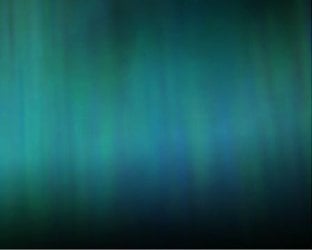
Aurora_Example.jpg
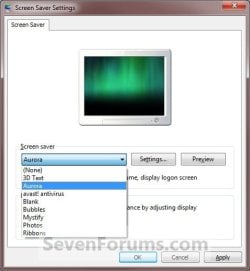
EXAMPLE: Screen Saver Settings
NOTE: If restored, the Aurora screen saver will be added back to the Screen Saver Settings screen to be available to select.
Settings.jpgAurora.jpg


Here's How:
1. Click/tap on the Download button below to download the Aurora.zip file below.

Download


2. Save the .zip file to the desktop.

3. Open the .zip file and extract (drag and drop) the Aurora.scr file to your desktop.

4. Right click or press and hold on the Aurora.scr file and click/tap on Properties, General tab, and the Unblock button. (See screenshot below)
NOTE: If the unblock button is not there, then the Aurora.scr file is already set to be unblocked. Continue on to step 5.
Unblock.jpg
5. In Windows Explorer, navigate to C:\Windows\System32 and copy and paste the Aurora.scr file (right click) here. (See screenshot below)
Aurora_Explorer.jpg
6. Click/tap on Continue and Yes to approve copying the Aurora.scr file.

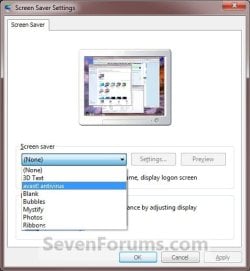
7. The Aurora screen saver is now available to change your screen saver to. (See screenshot below)
Aurora.jpg
8. When done, you can delete the downloaded Aurora.scr and .zip files on the desktop if you like.
That's it,
Shawn


Attachments

Last edited:
More screensavers!
 

My Computer

Computer type
Laptop
Computer Manufacturer/Model Number
Apple
OS
El Capitan / Windows 10
CPU
i7-4980HQ
Memory
16GB
Graphics Card(s)
Iris 5200
:(

How come i cant download it? its saying the download is privileged, and i have no access.
 

My Computer

Computer Manufacturer/Model Number
Toshiba Satellite L-305-5955
OS
Windows 7 Ultimate
Hello Jhordnn, and welcome to Seven Forums.

All downloads here at Seven Forums are freely available even to non-members, so you should be able to download it without a problem normally.

Do you have any restrictions set on your computer that may not allow you to download it? For example, security program, you are part of a restricted domain, you are in a standard account that is restricted by Parental Controls, etc........
 

My Computer

Computer type
PC/Desktop
Computer Manufacturer/Model Number
Self built custom
OS
64-bit Windows 11 Pro for Workstations
CPU
Intel i7-8700K OC'd to 5 GHz
Motherboard
ASUS ROG Maximus XI Formula Z390
Memory
64 GB (4x16GB) G.SKILL TridentZ RGB DDR4 3600 MHz
Graphics Card(s)
ASUS ROG-STRIX-GTX1080TI-O11G-GAMING
Sound Card
Integrated
Monitor(s) Displays
2 x Samsung Odyssey G7 27"
Screen Resolution
2560x1440
Hard Drives
1TB Samsung 990 PRO M.2,
4TB Samsung 990 PRO PRO M.2,
TerraMaster F8 SSD Plus NAS
PSU
Seasonic Prime Titanium 850W
Case
Thermaltake Core P3
Cooling
Corsair Hydro H115i
Keyboard
Logitech wireless K800
Mouse
Logitech MX Master 4
Internet Speed
2 Gb/s Download and 100 Mb/s Upload
Antivirus
Malwarebyte Anti-Malware Premium
Browser
Google Chrome
Other Info
Logitech Z625 speaker system,
Logitech BRIO 4K Pro webcam,
HP Color LaserJet Pro MFP M477fdn,
APC SMART-UPS RT 1000 XL - SURT1000XLI,
Galaxy S23 Plus phone
I'm glad I'm not the only one who missed this beautiful screen saver. One of the first things I did upon upgrade to seven was find it (elsewhere) and add it. Thanks for this tutorial, I'm sure others will be thrilled too.
 

My Computer

Computer type
PC/Desktop
Computer Manufacturer/Model Number
HP Pavillion Elite HPE-590t
OS
Win7 Home Premium x64
CPU
Intel Core i7 Extreme 990X @ 3.47GHz x6
Motherboard
PEGATRON CORPORATION 2A86
Memory
16GB DDR3
Graphics Card(s)
NVidia GeForce GTX460
Monitor(s) Displays
Samsung SyncMaster 2443ewx
Screen Resolution
1920x1200
Hard Drives
160 GB SSD @ 2 TB 7200 Internal
750 GB HP, 2 TB WD, 2 TB Samsung External & 3 TB G-Tech firewire external
You're most welcome Zoloft.
 

My Computer

Computer type
PC/Desktop
Computer Manufacturer/Model Number
Self built custom
OS
64-bit Windows 11 Pro for Workstations
CPU
Intel i7-8700K OC'd to 5 GHz
Motherboard
ASUS ROG Maximus XI Formula Z390
Memory
64 GB (4x16GB) G.SKILL TridentZ RGB DDR4 3600 MHz
Graphics Card(s)
ASUS ROG-STRIX-GTX1080TI-O11G-GAMING
Sound Card
Integrated
Monitor(s) Displays
2 x Samsung Odyssey G7 27"
Screen Resolution
2560x1440
Hard Drives
1TB Samsung 990 PRO M.2,
4TB Samsung 990 PRO PRO M.2,
TerraMaster F8 SSD Plus NAS
PSU
Seasonic Prime Titanium 850W
Case
Thermaltake Core P3
Cooling
Corsair Hydro H115i
Keyboard
Logitech wireless K800
Mouse
Logitech MX Master 4
Internet Speed
2 Gb/s Download and 100 Mb/s Upload
Antivirus
Malwarebyte Anti-Malware Premium
Browser
Google Chrome
Other Info
Logitech Z625 speaker system,
Logitech BRIO 4K Pro webcam,
HP Color LaserJet Pro MFP M477fdn,
APC SMART-UPS RT 1000 XL - SURT1000XLI,
Galaxy S23 Plus phone
Im the only user on my laptop...... I'll disable my net security but i downloaded the other screensavers the same way.

Oh and where do i go for help on a good antivirus software? I have COMODO, but i swear it has too much false positives. (Student in college, limited funds.) :confused:


UPDATE - The download worked. I dont wanna sound like a noob but i have no clue as to why it worked just now. Thanks!
 

My Computer

Computer Manufacturer/Model Number
Toshiba Satellite L-305-5955
OS
Windows 7 Ultimate
You're welcome Jhordnn. I'm happy to hear that you got it downloaded. :)

A great free antivirus program is Avast Home Edition. You have to register to get a license key good for one year before having to register again, but it's completely free. In addition, running MSE with it is a good idea as well for extra safety. They are designed to work together without conflict.
 

My Computer

Computer type
PC/Desktop
Computer Manufacturer/Model Number
Self built custom
OS
64-bit Windows 11 Pro for Workstations
CPU
Intel i7-8700K OC'd to 5 GHz
Motherboard
ASUS ROG Maximus XI Formula Z390
Memory
64 GB (4x16GB) G.SKILL TridentZ RGB DDR4 3600 MHz
Graphics Card(s)
ASUS ROG-STRIX-GTX1080TI-O11G-GAMING
Sound Card
Integrated
Monitor(s) Displays
2 x Samsung Odyssey G7 27"
Screen Resolution
2560x1440
Hard Drives
1TB Samsung 990 PRO M.2,
4TB Samsung 990 PRO PRO M.2,
TerraMaster F8 SSD Plus NAS
PSU
Seasonic Prime Titanium 850W
Case
Thermaltake Core P3
Cooling
Corsair Hydro H115i
Keyboard
Logitech wireless K800
Mouse
Logitech MX Master 4
Internet Speed
2 Gb/s Download and 100 Mb/s Upload
Antivirus
Malwarebyte Anti-Malware Premium
Browser
Google Chrome
Other Info
Logitech Z625 speaker system,
Logitech BRIO 4K Pro webcam,
HP Color LaserJet Pro MFP M477fdn,
APC SMART-UPS RT 1000 XL - SURT1000XLI,
Galaxy S23 Plus phone
ok. thanks! you guys are the best. My computer is sooooo customized... and its all your fault. :D
Keep up the good work. Hopefully you'd dig up some more useful stuff!
 

My Computer

Computer Manufacturer/Model Number
Toshiba Satellite L-305-5955
OS
Windows 7 Ultimate
Could someone please explain to me how to "copy" the aruroa file into C:\Windows\System32? Thanks in advance for any help.
 

My Computer

OS
Windows 7
Hello Carol, and welcome to Seven Forums.

When you get to step five, you will right click on the Aurora.scr file and click on Copy, then right click on a empty space in the C:\Windows\System32 folder and click on Paste. Afterwards, proceed to step 6 and the rest of the steps.

Hope this helps,
Shawn
 

My Computer

Computer type
PC/Desktop
Computer Manufacturer/Model Number
Self built custom
OS
64-bit Windows 11 Pro for Workstations
CPU
Intel i7-8700K OC'd to 5 GHz
Motherboard
ASUS ROG Maximus XI Formula Z390
Memory
64 GB (4x16GB) G.SKILL TridentZ RGB DDR4 3600 MHz
Graphics Card(s)
ASUS ROG-STRIX-GTX1080TI-O11G-GAMING
Sound Card
Integrated
Monitor(s) Displays
2 x Samsung Odyssey G7 27"
Screen Resolution
2560x1440
Hard Drives
1TB Samsung 990 PRO M.2,
4TB Samsung 990 PRO PRO M.2,
TerraMaster F8 SSD Plus NAS
PSU
Seasonic Prime Titanium 850W
Case
Thermaltake Core P3
Cooling
Corsair Hydro H115i
Keyboard
Logitech wireless K800
Mouse
Logitech MX Master 4
Internet Speed
2 Gb/s Download and 100 Mb/s Upload
Antivirus
Malwarebyte Anti-Malware Premium
Browser
Google Chrome
Other Info
Logitech Z625 speaker system,
Logitech BRIO 4K Pro webcam,
HP Color LaserJet Pro MFP M477fdn,
APC SMART-UPS RT 1000 XL - SURT1000XLI,
Galaxy S23 Plus phone
Awesome

This screensaver is pretty dope. Thank you for the explaining how to get it!
 

My Computer

Computer Manufacturer/Model Number
EEE PC 1015PN
OS
Windows 7 Ultimate
CPU
Intel Atom 1.5 GHz
Motherboard
Integrated
Memory
2GB Corsair DDR3
Graphics Card(s)
GMA350/Invidia Ion
Sound Card
Integrated
Monitor(s) Displays
LCD Screen
Screen Resolution
1024x600
Hard Drives
Seagate 500GB SATA3
PSU
Integrated
Case
Integrated
Cooling
Integrated Fan
Keyboard
Integrated
Mouse
Microsoft USB Optical for Notebooks
Internet Speed
Fiber
You're most welcome Jagooch. :)
 

My Computer

Computer type
PC/Desktop
Computer Manufacturer/Model Number
Self built custom
OS
64-bit Windows 11 Pro for Workstations
CPU
Intel i7-8700K OC'd to 5 GHz
Motherboard
ASUS ROG Maximus XI Formula Z390
Memory
64 GB (4x16GB) G.SKILL TridentZ RGB DDR4 3600 MHz
Graphics Card(s)
ASUS ROG-STRIX-GTX1080TI-O11G-GAMING
Sound Card
Integrated
Monitor(s) Displays
2 x Samsung Odyssey G7 27"
Screen Resolution
2560x1440
Hard Drives
1TB Samsung 990 PRO M.2,
4TB Samsung 990 PRO PRO M.2,
TerraMaster F8 SSD Plus NAS
PSU
Seasonic Prime Titanium 850W
Case
Thermaltake Core P3
Cooling
Corsair Hydro H115i
Keyboard
Logitech wireless K800
Mouse
Logitech MX Master 4
Internet Speed
2 Gb/s Download and 100 Mb/s Upload
Antivirus
Malwarebyte Anti-Malware Premium
Browser
Google Chrome
Other Info
Logitech Z625 speaker system,
Logitech BRIO 4K Pro webcam,
HP Color LaserJet Pro MFP M477fdn,
APC SMART-UPS RT 1000 XL - SURT1000XLI,
Galaxy S23 Plus phone
Thank you so much, Shawn, I really appreciate your help....it worked like a charm!
 

My Computer

OS
Windows 7
You're most welcome Carol. :)
 

My Computer

Computer type
PC/Desktop
Computer Manufacturer/Model Number
Self built custom
OS
64-bit Windows 11 Pro for Workstations
CPU
Intel i7-8700K OC'd to 5 GHz
Motherboard
ASUS ROG Maximus XI Formula Z390
Memory
64 GB (4x16GB) G.SKILL TridentZ RGB DDR4 3600 MHz
Graphics Card(s)
ASUS ROG-STRIX-GTX1080TI-O11G-GAMING
Sound Card
Integrated
Monitor(s) Displays
2 x Samsung Odyssey G7 27"
Screen Resolution
2560x1440
Hard Drives
1TB Samsung 990 PRO M.2,
4TB Samsung 990 PRO PRO M.2,
TerraMaster F8 SSD Plus NAS
PSU
Seasonic Prime Titanium 850W
Case
Thermaltake Core P3
Cooling
Corsair Hydro H115i
Keyboard
Logitech wireless K800
Mouse
Logitech MX Master 4
Internet Speed
2 Gb/s Download and 100 Mb/s Upload
Antivirus
Malwarebyte Anti-Malware Premium
Browser
Google Chrome
Other Info
Logitech Z625 speaker system,
Logitech BRIO 4K Pro webcam,
HP Color LaserJet Pro MFP M477fdn,
APC SMART-UPS RT 1000 XL - SURT1000XLI,
Galaxy S23 Plus phone
Hi, thanks a lot for posting this! It's one of my top 10 things I installed when I saw it wasn't included.
One thing though, the screen saver seems to be acting kind of choppy / slow. I have a good graphics card with the latest drivers, do you have any idea why it would be doing this?

My quick specs: Core i7 920 OC'd to 3.3GHz, 12GB DDR3 1600MHz ram, Radeon 3870 512MB 256bit card + 4350 256MB 64bit secondary card, I'm running 4 monitors 1x 1920x1080, 2x 1680x1050, 1x 1280x1024.

On Vista Aurora wasn't choppy at all.
Thanks for your help and input!
 

My Computer

OS
Windows 7 Pro 64bit
Hello Modsiw, and welcome to Seven Forums.

Not sure why it would be choppy for you, but it seems to be running fine for me. You might check to make sure that you have the latest ATI video drivers installed. If you do, then you might uninstall and reinstall it to see if that may help.

Hope this helps,
Shawn
 

My Computer

Computer type
PC/Desktop
Computer Manufacturer/Model Number
Self built custom
OS
64-bit Windows 11 Pro for Workstations
CPU
Intel i7-8700K OC'd to 5 GHz
Motherboard
ASUS ROG Maximus XI Formula Z390
Memory
64 GB (4x16GB) G.SKILL TridentZ RGB DDR4 3600 MHz
Graphics Card(s)
ASUS ROG-STRIX-GTX1080TI-O11G-GAMING
Sound Card
Integrated
Monitor(s) Displays
2 x Samsung Odyssey G7 27"
Screen Resolution
2560x1440
Hard Drives
1TB Samsung 990 PRO M.2,
4TB Samsung 990 PRO PRO M.2,
TerraMaster F8 SSD Plus NAS
PSU
Seasonic Prime Titanium 850W
Case
Thermaltake Core P3
Cooling
Corsair Hydro H115i
Keyboard
Logitech wireless K800
Mouse
Logitech MX Master 4
Internet Speed
2 Gb/s Download and 100 Mb/s Upload
Antivirus
Malwarebyte Anti-Malware Premium
Browser
Google Chrome
Other Info
Logitech Z625 speaker system,
Logitech BRIO 4K Pro webcam,
HP Color LaserJet Pro MFP M477fdn,
APC SMART-UPS RT 1000 XL - SURT1000XLI,
Galaxy S23 Plus phone
Hi, right after installing W7 I went on ATI's Website to get the latest drivers, so I don't think that should be an issue.

Thanks for the input though, I'll keep trying stuff. :)
 

My Computer

OS
Windows 7 Pro 64bit
Been there, tried that; no go:

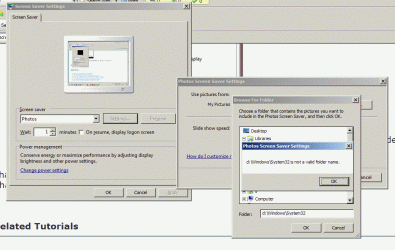
My HQ IQ505 s a D:\Windows\System directory into which I put the aurora.scrn file, but it would not then let me use it. I have set full-access privileges for the D:\ partition, but I still, even as full administrator, get the result pictured in screen shot attached as file

Dee Windows_System32 not valid folder name .gif

I'm stumped. Guidance, please. :D

Thanks!

-SteveL-
 

Attachments

  • Dee Windows_System32 not valid folder name .gif
    Dee Windows_System32 not valid folder name .gif
    109.2 KB · Views: 314

My Computer

Computer Manufacturer/Model Number
HP TouchSmart Pavilion IQ505, Model KZ631AAR-ABA IQ505 ACPI64
OS
Windows 7 Home Premium 64bit, Version 6.1.7600 Build 7600
CPU
Intel(R) Core(TM)2 Duo CPU T5850 @ 2.16GHz, 2167MHz
Motherboard
? Model KZ631AAR-ABA IQ505 ??
Memory
Installed Physical Memory (RAM), Kingston 4.00 GB
Graphics Card(s)
Mobile Intel 965 Express Chipset Family
Sound Card
SoundMAX Integrated Digital HD Audio
Monitor(s) Displays
Generic PnP
Hard Drives
Hitachi HDP725050GLA360

Multi Flash Reader USB Device
PSU
Power supply adapter (180-watt) - Input voltage 110-240VAC
Case
?
Cooling
BLOWER, 90X70X15 -LOCAL USE ONLY; Processor (CPU) heat sink
Hello Steve, and welcome to Seven Forums.

Strange, by default the drive/partition that Windows 7 is installed on always has the C: drive letter. Could you post a screenshot of your Disk Management (diskmgmt.msc) window showing all of your drives layout.
 

My Computer

Computer type
PC/Desktop
Computer Manufacturer/Model Number
Self built custom
OS
64-bit Windows 11 Pro for Workstations
CPU
Intel i7-8700K OC'd to 5 GHz
Motherboard
ASUS ROG Maximus XI Formula Z390
Memory
64 GB (4x16GB) G.SKILL TridentZ RGB DDR4 3600 MHz
Graphics Card(s)
ASUS ROG-STRIX-GTX1080TI-O11G-GAMING
Sound Card
Integrated
Monitor(s) Displays
2 x Samsung Odyssey G7 27"
Screen Resolution
2560x1440
Hard Drives
1TB Samsung 990 PRO M.2,
4TB Samsung 990 PRO PRO M.2,
TerraMaster F8 SSD Plus NAS
PSU
Seasonic Prime Titanium 850W
Case
Thermaltake Core P3
Cooling
Corsair Hydro H115i
Keyboard
Logitech wireless K800
Mouse
Logitech MX Master 4
Internet Speed
2 Gb/s Download and 100 Mb/s Upload
Antivirus
Malwarebyte Anti-Malware Premium
Browser
Google Chrome
Other Info
Logitech Z625 speaker system,
Logitech BRIO 4K Pro webcam,
HP Color LaserJet Pro MFP M477fdn,
APC SMART-UPS RT 1000 XL - SURT1000XLI,
Galaxy S23 Plus phone
Back
Top