Aurora Screen Saver - Restore

How to Restore "Aurora Screen Saver" Back in Windows 7 and Windows 8

   Information
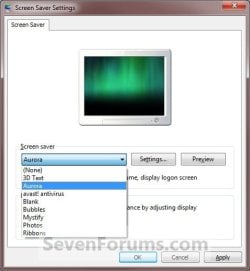
This tutorial will show you how to restore the Aurora screen saver back into Windows 7 and Windows 8.

You must be logged in as an administrator to be able to do the steps in this tutorial.


EXAMPLE: Aurora screen saver

Aurora_Example.jpg
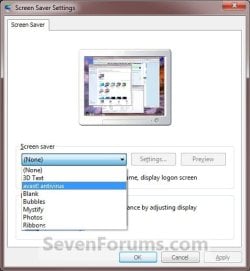
EXAMPLE: Screen Saver Settings
NOTE: If restored, the Aurora screen saver will be added back to the Screen Saver Settings screen to be available to select.
Settings.jpgAurora.jpg


Here's How:
1. Click/tap on the Download button below to download the Aurora.zip file below.

Download


2. Save the .zip file to the desktop.

3. Open the .zip file and extract (drag and drop) the Aurora.scr file to your desktop.

4. Right click or press and hold on the Aurora.scr file and click/tap on Properties, General tab, and the Unblock button. (See screenshot below)
NOTE: If the unblock button is not there, then the Aurora.scr file is already set to be unblocked. Continue on to step 5.
Unblock.jpg
5. In Windows Explorer, navigate to C:\Windows\System32 and copy and paste the Aurora.scr file (right click) here. (See screenshot below)
Aurora_Explorer.jpg
6. Click/tap on Continue and Yes to approve copying the Aurora.scr file.

7. The Aurora screen saver is now available to change your screen saver to. (See screenshot below)
Aurora.jpg
8. When done, you can delete the downloaded Aurora.scr and .zip files on the desktop if you like.
That's it,
Shawn


Attachments

Last edited:
Well, it's C:\Windows\System32 after all, but still crazy ...

Thanks for your kind guidance, Brink. As you can see from attached file

Dee Disk Management .gif

I finally see that it is not D:\Windows\System32 but is instead C:\Windows\System32.

However, even after I aim the screen saver at the correct location for Aurora.scr, it finds no pictures in the *\My Pictures subdirectory. Changing that last "My Pictures" to "Mine" does not help, either.

I fight tooth and nail the demand by various Windows versions that I use their "My This" and "My That" paternalistic directory structures. I much prefer to use my own Directory and Subdirectory structures within the root C:\ directory. But if I have pictures/photos, it won't let me put them where I want them and messes me over every time, needlessly confusing me and making me wonder why I ever bought another Windows product. So, this compounds my problems and perhaps makes clearer to you why I keep getting into trouble. I would REALLY appreciate being taught how to take real command of my own Directory and Subdirectory names, once and for all.

I hope that this helps you to help me.

Thanks! :)

-SteveL-
 

Attachments

  • Dee Disk Management .gif
    Dee Disk Management .gif
    186.1 KB · Views: 333

My Computer

Computer Manufacturer/Model Number
HP TouchSmart Pavilion IQ505, Model KZ631AAR-ABA IQ505 ACPI64
OS
Windows 7 Home Premium 64bit, Version 6.1.7600 Build 7600
CPU
Intel(R) Core(TM)2 Duo CPU T5850 @ 2.16GHz, 2167MHz
Motherboard
? Model KZ631AAR-ABA IQ505 ??
Memory
Installed Physical Memory (RAM), Kingston 4.00 GB
Graphics Card(s)
Mobile Intel 965 Express Chipset Family
Sound Card
SoundMAX Integrated Digital HD Audio
Monitor(s) Displays
Generic PnP
Hard Drives
Hitachi HDP725050GLA360

Multi Flash Reader USB Device
PSU
Power supply adapter (180-watt) - Input voltage 110-240VAC
Case
?
Cooling
BLOWER, 90X70X15 -LOCAL USE ONLY; Processor (CPU) heat sink
Follow-up:

Brink,

I also tried your registry approach at

http://www.sevenforums.com/tutorials/2138-aurora-screen-saver-change-settings.html

while noting in passing:

The default location of the Aurora screen saver file is at:
NOTE: In the Windows 7 (7022) buildand newer, the Aurora, Windows Logo, and Windows Energy screen savers are no longer available.


C:\Windows\System32\Aurora.scr.


I'm not sure whether you're saying that this is the reason I can't find Aurora.scr or whether you're saying that the fix you suggest won't work on Windows 7 versions as recent as my Version 6.1.7600 Build 7600.

In any case, I was told that the change to the registry was completed, but even after a cold boot, I can not find Aurora in the screensaver.

However ... BINGO!
 
Last edited:

My Computer

Computer Manufacturer/Model Number
HP TouchSmart Pavilion IQ505, Model KZ631AAR-ABA IQ505 ACPI64
OS
Windows 7 Home Premium 64bit, Version 6.1.7600 Build 7600
CPU
Intel(R) Core(TM)2 Duo CPU T5850 @ 2.16GHz, 2167MHz
Motherboard
? Model KZ631AAR-ABA IQ505 ??
Memory
Installed Physical Memory (RAM), Kingston 4.00 GB
Graphics Card(s)
Mobile Intel 965 Express Chipset Family
Sound Card
SoundMAX Integrated Digital HD Audio
Monitor(s) Displays
Generic PnP
Hard Drives
Hitachi HDP725050GLA360

Multi Flash Reader USB Device
PSU
Power supply adapter (180-watt) - Input voltage 110-240VAC
Case
?
Cooling
BLOWER, 90X70X15 -LOCAL USE ONLY; Processor (CPU) heat sink
Did "BINGO!" mean that you got it working now? :)
 

My Computer

Computer type
PC/Desktop
Computer Manufacturer/Model Number
Self built custom
OS
64-bit Windows 11 Pro for Workstations
CPU
Intel i7-8700K OC'd to 5 GHz
Motherboard
ASUS ROG Maximus XI Formula Z390
Memory
64 GB (4x16GB) G.SKILL TridentZ RGB DDR4 3600 MHz
Graphics Card(s)
ASUS ROG-STRIX-GTX1080TI-O11G-GAMING
Sound Card
Integrated
Monitor(s) Displays
2 x Samsung Odyssey G7 27"
Screen Resolution
2560x1440
Hard Drives
1TB Samsung 990 PRO M.2,
4TB Samsung 990 PRO PRO M.2,
TerraMaster F8 SSD Plus NAS
PSU
Seasonic Prime Titanium 850W
Case
Thermaltake Core P3
Cooling
Corsair Hydro H115i
Keyboard
Logitech wireless K800
Mouse
Logitech MX Master 4
Internet Speed
2 Gb/s Download and 100 Mb/s Upload
Antivirus
Malwarebyte Anti-Malware Premium
Browser
Google Chrome
Other Info
Logitech Z625 speaker system,
Logitech BRIO 4K Pro webcam,
HP Color LaserJet Pro MFP M477fdn,
APC SMART-UPS RT 1000 XL - SURT1000XLI,
Galaxy S23 Plus phone
Yes, Brink. Thanks!
 

My Computer

Computer Manufacturer/Model Number
HP TouchSmart Pavilion IQ505, Model KZ631AAR-ABA IQ505 ACPI64
OS
Windows 7 Home Premium 64bit, Version 6.1.7600 Build 7600
CPU
Intel(R) Core(TM)2 Duo CPU T5850 @ 2.16GHz, 2167MHz
Motherboard
? Model KZ631AAR-ABA IQ505 ??
Memory
Installed Physical Memory (RAM), Kingston 4.00 GB
Graphics Card(s)
Mobile Intel 965 Express Chipset Family
Sound Card
SoundMAX Integrated Digital HD Audio
Monitor(s) Displays
Generic PnP
Hard Drives
Hitachi HDP725050GLA360

Multi Flash Reader USB Device
PSU
Power supply adapter (180-watt) - Input voltage 110-240VAC
Case
?
Cooling
BLOWER, 90X70X15 -LOCAL USE ONLY; Processor (CPU) heat sink
That's great news Steve. I'm happy to hear that you got it sorted. :)
 

My Computer

Computer type
PC/Desktop
Computer Manufacturer/Model Number
Self built custom
OS
64-bit Windows 11 Pro for Workstations
CPU
Intel i7-8700K OC'd to 5 GHz
Motherboard
ASUS ROG Maximus XI Formula Z390
Memory
64 GB (4x16GB) G.SKILL TridentZ RGB DDR4 3600 MHz
Graphics Card(s)
ASUS ROG-STRIX-GTX1080TI-O11G-GAMING
Sound Card
Integrated
Monitor(s) Displays
2 x Samsung Odyssey G7 27"
Screen Resolution
2560x1440
Hard Drives
1TB Samsung 990 PRO M.2,
4TB Samsung 990 PRO PRO M.2,
TerraMaster F8 SSD Plus NAS
PSU
Seasonic Prime Titanium 850W
Case
Thermaltake Core P3
Cooling
Corsair Hydro H115i
Keyboard
Logitech wireless K800
Mouse
Logitech MX Master 4
Internet Speed
2 Gb/s Download and 100 Mb/s Upload
Antivirus
Malwarebyte Anti-Malware Premium
Browser
Google Chrome
Other Info
Logitech Z625 speaker system,
Logitech BRIO 4K Pro webcam,
HP Color LaserJet Pro MFP M477fdn,
APC SMART-UPS RT 1000 XL - SURT1000XLI,
Galaxy S23 Plus phone
Thanks again, Brink. :-)

-Steve-
 

My Computer

Computer Manufacturer/Model Number
HP TouchSmart Pavilion IQ505, Model KZ631AAR-ABA IQ505 ACPI64
OS
Windows 7 Home Premium 64bit, Version 6.1.7600 Build 7600
CPU
Intel(R) Core(TM)2 Duo CPU T5850 @ 2.16GHz, 2167MHz
Motherboard
? Model KZ631AAR-ABA IQ505 ??
Memory
Installed Physical Memory (RAM), Kingston 4.00 GB
Graphics Card(s)
Mobile Intel 965 Express Chipset Family
Sound Card
SoundMAX Integrated Digital HD Audio
Monitor(s) Displays
Generic PnP
Hard Drives
Hitachi HDP725050GLA360

Multi Flash Reader USB Device
PSU
Power supply adapter (180-watt) - Input voltage 110-240VAC
Case
?
Cooling
BLOWER, 90X70X15 -LOCAL USE ONLY; Processor (CPU) heat sink
Read about Steve's problem, was happy to see he finally got it. However, here's a simple way to install Aurora (or any other screensaver .scr-file):

Simply right click the screensaver file you want to install to open context menu, and choose Install.

Aurora.png

This installs screensaver in right place even if you have moved your system folders and / or when system folders for other reasons are not located in default locations.

Kari
 

My Computer

Computer type
Laptop
Computer Manufacturer/Model Number
HP ENVY 17-1150eg
OS
Windows 10 Pro x64 EN-GB
CPU
1.6 GHz Intel Core i7-720QM Processor
Memory
6 GB
Graphics Card(s)
ATI Mobility Radeon HD 5850 Graphics
Sound Card
Beats sound system with integrated subwoofer
Monitor(s) Displays
17" laptop display, 22" LED and 32" Full HD TV through HDMI
Screen Resolution
1600*900 (1), 1920*1080 (2&3)
Hard Drives
Internal: 2 x 500 GB SATA Hard Disk Drive 7200 rpm
External: 2TB for backups, 3TB USB3 network drive for media
Cooling
As Envy runs a bit warm, I have it on a Cooler Master pad
Keyboard
Logitech diNovo Media Desktop Laser (bluetooth)
Mouse
Logitech Performance Mouse MX
Internet Speed
50/10 Mbps VDSL
Antivirus
Windows Defender 4.3.9431.0
Browser
Maxthon 3.5.2., IE11
Hello Kari,

I just tried this, but it did not copy the .scr file into the System32 folder from the desktop for me. Instead it only added the screen saver from the desktop to be able to be selected from with Screen Saver Settings window for only as long the .scr file remained on the desktop. If removed, it was removed from the Screen Saver Settings window as well. :confused:

Strange.
 

My Computer

Computer type
PC/Desktop
Computer Manufacturer/Model Number
Self built custom
OS
64-bit Windows 11 Pro for Workstations
CPU
Intel i7-8700K OC'd to 5 GHz
Motherboard
ASUS ROG Maximus XI Formula Z390
Memory
64 GB (4x16GB) G.SKILL TridentZ RGB DDR4 3600 MHz
Graphics Card(s)
ASUS ROG-STRIX-GTX1080TI-O11G-GAMING
Sound Card
Integrated
Monitor(s) Displays
2 x Samsung Odyssey G7 27"
Screen Resolution
2560x1440
Hard Drives
1TB Samsung 990 PRO M.2,
4TB Samsung 990 PRO PRO M.2,
TerraMaster F8 SSD Plus NAS
PSU
Seasonic Prime Titanium 850W
Case
Thermaltake Core P3
Cooling
Corsair Hydro H115i
Keyboard
Logitech wireless K800
Mouse
Logitech MX Master 4
Internet Speed
2 Gb/s Download and 100 Mb/s Upload
Antivirus
Malwarebyte Anti-Malware Premium
Browser
Google Chrome
Other Info
Logitech Z625 speaker system,
Logitech BRIO 4K Pro webcam,
HP Color LaserJet Pro MFP M477fdn,
APC SMART-UPS RT 1000 XL - SURT1000XLI,
Galaxy S23 Plus phone
It's not strange, I am starting to be my old self, posting too hastily ;) You are right, it installs the screensaver to be used from the location you have saved it; for instance installing it like I told from desktop and then deleting the scr-file, the screensaver disappears.

Maybe you should remove these last posts? My bad, sorry :o

Kari
 

My Computer

Computer type
Laptop
Computer Manufacturer/Model Number
HP ENVY 17-1150eg
OS
Windows 10 Pro x64 EN-GB
CPU
1.6 GHz Intel Core i7-720QM Processor
Memory
6 GB
Graphics Card(s)
ATI Mobility Radeon HD 5850 Graphics
Sound Card
Beats sound system with integrated subwoofer
Monitor(s) Displays
17" laptop display, 22" LED and 32" Full HD TV through HDMI
Screen Resolution
1600*900 (1), 1920*1080 (2&3)
Hard Drives
Internal: 2 x 500 GB SATA Hard Disk Drive 7200 rpm
External: 2TB for backups, 3TB USB3 network drive for media
Cooling
As Envy runs a bit warm, I have it on a Cooler Master pad
Keyboard
Logitech diNovo Media Desktop Laser (bluetooth)
Mouse
Logitech Performance Mouse MX
Internet Speed
50/10 Mbps VDSL
Antivirus
Windows Defender 4.3.9431.0
Browser
Maxthon 3.5.2., IE11
Not at all Kari. I had naturally thought that it would have copied the file into the system32 folder as well. It wasn't until I deleted the .scr file off the desktop until I noticed it was also gone from the Screen Saver Settings window afterwards.
 

My Computer

Computer type
PC/Desktop
Computer Manufacturer/Model Number
Self built custom
OS
64-bit Windows 11 Pro for Workstations
CPU
Intel i7-8700K OC'd to 5 GHz
Motherboard
ASUS ROG Maximus XI Formula Z390
Memory
64 GB (4x16GB) G.SKILL TridentZ RGB DDR4 3600 MHz
Graphics Card(s)
ASUS ROG-STRIX-GTX1080TI-O11G-GAMING
Sound Card
Integrated
Monitor(s) Displays
2 x Samsung Odyssey G7 27"
Screen Resolution
2560x1440
Hard Drives
1TB Samsung 990 PRO M.2,
4TB Samsung 990 PRO PRO M.2,
TerraMaster F8 SSD Plus NAS
PSU
Seasonic Prime Titanium 850W
Case
Thermaltake Core P3
Cooling
Corsair Hydro H115i
Keyboard
Logitech wireless K800
Mouse
Logitech MX Master 4
Internet Speed
2 Gb/s Download and 100 Mb/s Upload
Antivirus
Malwarebyte Anti-Malware Premium
Browser
Google Chrome
Other Info
Logitech Z625 speaker system,
Logitech BRIO 4K Pro webcam,
HP Color LaserJet Pro MFP M477fdn,
APC SMART-UPS RT 1000 XL - SURT1000XLI,
Galaxy S23 Plus phone
Back
Top