Back up failed to complete

jamtin53

New member
Member
Local time
10:07 AM
Messages
63
http://speccy.piriform.com/results/IXtrta1VYsottwaZZeS4mvA

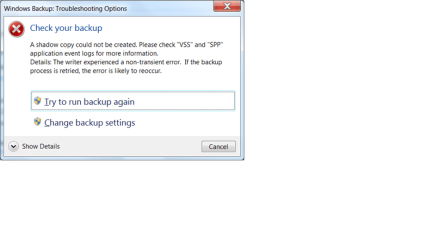
Gooday folks. I have a Samsung Story 2 tb external hard drive and I want to back up my win 7 installation on it. I have tried several times and as the print screen shows there are errors and a retry gets the same results. Could someone help me with this?


Sorry, here is the print screen.
 

Attachments

Last edited by a moderator:

My Computer

Computer Manufacturer/Model Number
Sont Vaio VPCEH13FD
OS
Windows7 Home Premium 64 bit SP1
CPU
INTEL CORE i3/i5/i7 @2.10ghz Sandy Bridge 32nm Technology
Motherboard
Sony Corporation VAIO (N/A)
Memory
6.00gb Dual Channel DDR3 @665 mhz (9-9-9-24)
Graphics Card(s)
Generic PnP Monitor (1366x768 @60 Hz. Intel(R) HD Graphics F
Sound Card
Conexant Smart Audio HD
Hard Drives
625 gb SamsungHM641JI SATA

My Computer

Computer type
PC/Desktop
OS
Windows 10 Home x64
CPU
INTEL Core i5-750 Quad-Core 3.37GHz
Motherboard
ASUS P7P55D
Memory
HyperX Fury Black Series 8GB (2 x 4GB) 1866Mhz
Graphics Card(s)
EVGA GeForce GTX 750 Superclocked 1GB 128-Bit GDDR5
Monitor(s) Displays
LG 32MA68HY 32" IPS
Screen Resolution
1920 x 1080
Hard Drives
Samsung 840 Evo 120GB, SEAGATE 500GB Barracuda® 7200.12, SATA 3 Gb/s, 7200 RPM, 16MB cache
PSU
ANTEC TruePower New TP-550, 80 PLUS, 550W
Case
ANTEC Three Hundred Illusion
Cooling
COOLER MASTER Hyper 212 Plus, 4 x 120mm 1 x 140mm Noctua's
Internet Speed
85 + Mbps
Antivirus
Avast
Browser
Vivaldi
The link in Post #2 opened OK for me with Win 7 x64 and Office 2010.

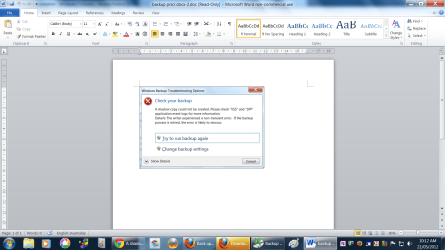
Here is the screen print the OP is trying to show.

W7BUSP01.png
 

My Computer

Computer type
PC/Desktop
Computer Manufacturer/Model Number
home built
OS
Multi-Boot W7_Pro_x64 W8.1_Pro_x64 W10_Pro_x64 +Linux_VMs +Chromium_VM
CPU
AMD Athlon II x4 620
Motherboard
Gigabyte GA-MA785G-UD3H
Memory
6GB GSkill DDR2 800
Graphics Card(s)
AMD 4670 GPU + AMD 4200 IGP
Sound Card
on board Realtek ALC889A
Monitor(s) Displays
RCA 40" LCD TV, Insignia 32" LCD TV, HP 15" LCD monitor
Screen Resolution
1680 x 1050
Hard Drives
OCZ Vertex 3 120GB,
Samsung F3 1TB (3),
Several others - WD, Seagate, Hitachi, ...
PSU
Corsair 500 W
Case
Rosewill mid tower
Cooling
CM 90mm rifle
Keyboard
Gyration wireless, Logitech wireless, Dell USB wired
Mouse
Gyration wireless, Logitech wireless, V7 USB wired
Internet Speed
Spectrum - 100Mbps D / 10Mbps U
Antivirus
Avast, MBAM3, EMET, WinPatrol
Browser
Pale Moon, Firefox, IE
Other Info
2 multi-boot PC's
Mainly HTPC/Office/Gen purpose (no gaming).
Trendnet USB KVM.
LG DVD burner/Blue Ray Player.
Tray system for removable SATA backup drives.

Not currently OCd, under-volted.
I use Hybrid sleep, rarely re-boot or shutdown.

Hauppauge HD-PVR, Avermedia PCIe TV Tuner, Hauppauge PCI TV Tuner.
Yeah it worked for me when I posted it, I checked. Also opened ok for me just now. Pretty sure I followed the instructions ok.
 

My Computer

Computer Manufacturer/Model Number
Sont Vaio VPCEH13FD
OS
Windows7 Home Premium 64 bit SP1
CPU
INTEL CORE i3/i5/i7 @2.10ghz Sandy Bridge 32nm Technology
Motherboard
Sony Corporation VAIO (N/A)
Memory
6.00gb Dual Channel DDR3 @665 mhz (9-9-9-24)
Graphics Card(s)
Generic PnP Monitor (1366x768 @60 Hz. Intel(R) HD Graphics F
Sound Card
Conexant Smart Audio HD
Hard Drives
625 gb SamsungHM641JI SATA
It no doubt did work, but my older office with a compatibility pack would not open it :o Have you looked to see what the VSS and SPP application event logs show for details? A Guy
 

My Computer

Computer type
PC/Desktop
OS
Windows 10 Home x64
CPU
INTEL Core i5-750 Quad-Core 3.37GHz
Motherboard
ASUS P7P55D
Memory
HyperX Fury Black Series 8GB (2 x 4GB) 1866Mhz
Graphics Card(s)
EVGA GeForce GTX 750 Superclocked 1GB 128-Bit GDDR5
Monitor(s) Displays
LG 32MA68HY 32" IPS
Screen Resolution
1920 x 1080
Hard Drives
Samsung 840 Evo 120GB, SEAGATE 500GB Barracuda® 7200.12, SATA 3 Gb/s, 7200 RPM, 16MB cache
PSU
ANTEC TruePower New TP-550, 80 PLUS, 550W
Case
ANTEC Three Hundred Illusion
Cooling
COOLER MASTER Hyper 212 Plus, 4 x 120mm 1 x 140mm Noctua's
Internet Speed
85 + Mbps
Antivirus
Avast
Browser
Vivaldi
jamtin53,

I prefer to insert an image into a post whenever possible.
Inserting a link to a "docx" file means anyone trying to open it has to have a program able to open that file...
If someone can't open the file, they can't help...
;)
 

My Computer

Computer type
PC/Desktop
Computer Manufacturer/Model Number
home built
OS
Multi-Boot W7_Pro_x64 W8.1_Pro_x64 W10_Pro_x64 +Linux_VMs +Chromium_VM
CPU
AMD Athlon II x4 620
Motherboard
Gigabyte GA-MA785G-UD3H
Memory
6GB GSkill DDR2 800
Graphics Card(s)
AMD 4670 GPU + AMD 4200 IGP
Sound Card
on board Realtek ALC889A
Monitor(s) Displays
RCA 40" LCD TV, Insignia 32" LCD TV, HP 15" LCD monitor
Screen Resolution
1680 x 1050
Hard Drives
OCZ Vertex 3 120GB,
Samsung F3 1TB (3),
Several others - WD, Seagate, Hitachi, ...
PSU
Corsair 500 W
Case
Rosewill mid tower
Cooling
CM 90mm rifle
Keyboard
Gyration wireless, Logitech wireless, Dell USB wired
Mouse
Gyration wireless, Logitech wireless, V7 USB wired
Internet Speed
Spectrum - 100Mbps D / 10Mbps U
Antivirus
Avast, MBAM3, EMET, WinPatrol
Browser
Pale Moon, Firefox, IE
Other Info
2 multi-boot PC's
Mainly HTPC/Office/Gen purpose (no gaming).
Trendnet USB KVM.
LG DVD burner/Blue Ray Player.
Tray system for removable SATA backup drives.

Not currently OCd, under-volted.
I use Hybrid sleep, rarely re-boot or shutdown.

Hauppauge HD-PVR, Avermedia PCIe TV Tuner, Hauppauge PCI TV Tuner.
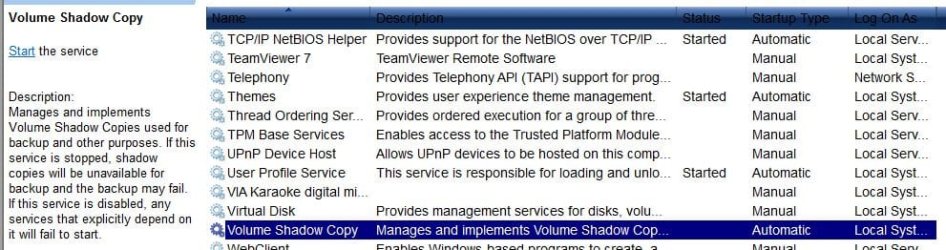
Have you confirmed the Shadow Copy Service is started?

Shadow.jpg

A Guy
 

My Computer

Computer type
PC/Desktop
OS
Windows 10 Home x64
CPU
INTEL Core i5-750 Quad-Core 3.37GHz
Motherboard
ASUS P7P55D
Memory
HyperX Fury Black Series 8GB (2 x 4GB) 1866Mhz
Graphics Card(s)
EVGA GeForce GTX 750 Superclocked 1GB 128-Bit GDDR5
Monitor(s) Displays
LG 32MA68HY 32" IPS
Screen Resolution
1920 x 1080
Hard Drives
Samsung 840 Evo 120GB, SEAGATE 500GB Barracuda® 7200.12, SATA 3 Gb/s, 7200 RPM, 16MB cache
PSU
ANTEC TruePower New TP-550, 80 PLUS, 550W
Case
ANTEC Three Hundred Illusion
Cooling
COOLER MASTER Hyper 212 Plus, 4 x 120mm 1 x 140mm Noctua's
Internet Speed
85 + Mbps
Antivirus
Avast
Browser
Vivaldi
Look in Disk Mgmt to see how much free space is on the 100mb System Reserved partition, if you have it.
 
Thank you all again. Did some posts get removed? I am unsure where to check about the vss and ssp event logs. I just looked in event viewer and couldn't see them. Also, how do I check to see if shadow copy service is started?
I have attached the image from paint but I think that is probably superfluous now. Gregrocker, thank you also. I haven't found that out yet, I am looking for it now.
 

Attachments

  • backupps.png
    backupps.png
    103.6 KB · Views: 10

My Computer

Computer Manufacturer/Model Number
Sont Vaio VPCEH13FD
OS
Windows7 Home Premium 64 bit SP1
CPU
INTEL CORE i3/i5/i7 @2.10ghz Sandy Bridge 32nm Technology
Motherboard
Sony Corporation VAIO (N/A)
Memory
6.00gb Dual Channel DDR3 @665 mhz (9-9-9-24)
Graphics Card(s)
Generic PnP Monitor (1366x768 @60 Hz. Intel(R) HD Graphics F
Sound Card
Conexant Smart Audio HD
Hard Drives
625 gb SamsungHM641JI SATA
Start> In search box type services.msc> Enter> Scroll down to Volume Shadow Copy (see my screen shot above)

Is the service set to automatic?

Greg is onto something, I believe there must be 50mb of free space.

A Guy
 

My Computer

Computer type
PC/Desktop
OS
Windows 10 Home x64
CPU
INTEL Core i5-750 Quad-Core 3.37GHz
Motherboard
ASUS P7P55D
Memory
HyperX Fury Black Series 8GB (2 x 4GB) 1866Mhz
Graphics Card(s)
EVGA GeForce GTX 750 Superclocked 1GB 128-Bit GDDR5
Monitor(s) Displays
LG 32MA68HY 32" IPS
Screen Resolution
1920 x 1080
Hard Drives
Samsung 840 Evo 120GB, SEAGATE 500GB Barracuda® 7200.12, SATA 3 Gb/s, 7200 RPM, 16MB cache
PSU
ANTEC TruePower New TP-550, 80 PLUS, 550W
Case
ANTEC Three Hundred Illusion
Cooling
COOLER MASTER Hyper 212 Plus, 4 x 120mm 1 x 140mm Noctua's
Internet Speed
85 + Mbps
Antivirus
Avast
Browser
Vivaldi
Thanks A Guy. I just turned that to automatic. As for the 100mg that Greg refers to, where am I able to check that? The Samsung external drive has heaps of room, 1.6tb out of 1.8tb available. But I know that is not what he is referring to.
 

My Computer

Computer Manufacturer/Model Number
Sont Vaio VPCEH13FD
OS
Windows7 Home Premium 64 bit SP1
CPU
INTEL CORE i3/i5/i7 @2.10ghz Sandy Bridge 32nm Technology
Motherboard
Sony Corporation VAIO (N/A)
Memory
6.00gb Dual Channel DDR3 @665 mhz (9-9-9-24)
Graphics Card(s)
Generic PnP Monitor (1366x768 @60 Hz. Intel(R) HD Graphics F
Sound Card
Conexant Smart Audio HD
Hard Drives
625 gb SamsungHM641JI SATA
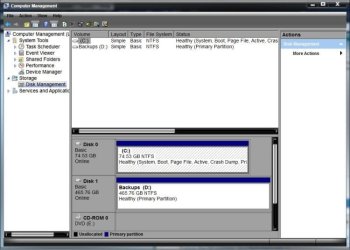
The 100mb is the System Reserved partition. It holds the Boot Manager code and the Boot Configuration Database. If it is too small, or doesn't have enough free space, Windows backup will not work. To post a picture of Disk Management

Start> In search box type Computer management> Enter> On left side click on Disk Management> Post a screen shot of that for Greg (or another) to look at. I will post an example of mine, but don't be concerned that mine does not show the SR partition, as I don't have one ;)

DM.jpg

A Guy
 

My Computer

Computer type
PC/Desktop
OS
Windows 10 Home x64
CPU
INTEL Core i5-750 Quad-Core 3.37GHz
Motherboard
ASUS P7P55D
Memory
HyperX Fury Black Series 8GB (2 x 4GB) 1866Mhz
Graphics Card(s)
EVGA GeForce GTX 750 Superclocked 1GB 128-Bit GDDR5
Monitor(s) Displays
LG 32MA68HY 32" IPS
Screen Resolution
1920 x 1080
Hard Drives
Samsung 840 Evo 120GB, SEAGATE 500GB Barracuda® 7200.12, SATA 3 Gb/s, 7200 RPM, 16MB cache
PSU
ANTEC TruePower New TP-550, 80 PLUS, 550W
Case
ANTEC Three Hundred Illusion
Cooling
COOLER MASTER Hyper 212 Plus, 4 x 120mm 1 x 140mm Noctua's
Internet Speed
85 + Mbps
Antivirus
Avast
Browser
Vivaldi
Thanks again.
 

Attachments

  • computermanagement.png
    computermanagement.png
    71.2 KB · Views: 13

My Computer

Computer Manufacturer/Model Number
Sont Vaio VPCEH13FD
OS
Windows7 Home Premium 64 bit SP1
CPU
INTEL CORE i3/i5/i7 @2.10ghz Sandy Bridge 32nm Technology
Motherboard
Sony Corporation VAIO (N/A)
Memory
6.00gb Dual Channel DDR3 @665 mhz (9-9-9-24)
Graphics Card(s)
Generic PnP Monitor (1366x768 @60 Hz. Intel(R) HD Graphics F
Sound Card
Conexant Smart Audio HD
Hard Drives
625 gb SamsungHM641JI SATA
I'm going to let Greg deal with this. Looks like your Disk 1 is marked as active, and not your disk 0 (C:\). And I'm not sure why that is. Greg will be able to tell you what's up there ;)

A Guy
 

My Computer

Computer type
PC/Desktop
OS
Windows 10 Home x64
CPU
INTEL Core i5-750 Quad-Core 3.37GHz
Motherboard
ASUS P7P55D
Memory
HyperX Fury Black Series 8GB (2 x 4GB) 1866Mhz
Graphics Card(s)
EVGA GeForce GTX 750 Superclocked 1GB 128-Bit GDDR5
Monitor(s) Displays
LG 32MA68HY 32" IPS
Screen Resolution
1920 x 1080
Hard Drives
Samsung 840 Evo 120GB, SEAGATE 500GB Barracuda® 7200.12, SATA 3 Gb/s, 7200 RPM, 16MB cache
PSU
ANTEC TruePower New TP-550, 80 PLUS, 550W
Case
ANTEC Three Hundred Illusion
Cooling
COOLER MASTER Hyper 212 Plus, 4 x 120mm 1 x 140mm Noctua's
Internet Speed
85 + Mbps
Antivirus
Avast
Browser
Vivaldi
Just want to say a special thanks to A Guy and Greg for their expert help. Good on you blokes! I am getting an education here!
 

My Computer

Computer Manufacturer/Model Number
Sont Vaio VPCEH13FD
OS
Windows7 Home Premium 64 bit SP1
CPU
INTEL CORE i3/i5/i7 @2.10ghz Sandy Bridge 32nm Technology
Motherboard
Sony Corporation VAIO (N/A)
Memory
6.00gb Dual Channel DDR3 @665 mhz (9-9-9-24)
Graphics Card(s)
Generic PnP Monitor (1366x768 @60 Hz. Intel(R) HD Graphics F
Sound Card
Conexant Smart Audio HD
Hard Drives
625 gb SamsungHM641JI SATA
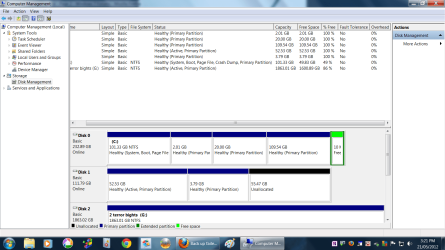
You have five empty partitions on two Hard drives which appear to have no content or drive letter so that they can even be accessed. Do you know how you got these?

Go to Control Panel>Folder Options>View and unhide Hidden and System files. Then in Disk Mgmt rightclick on each unlettered partition to Change Drive Letter, click Add, then give each partition a drive letter long enough to rightclick>Explore its content to see if there's anything on it. If so post back a screenshot.
 
Last edited:
Thanks for the reply Gregrocker. I made the partitions on the drives for use with Linux. On the same drive as the NTFS partition there is a swap partition, 2gb, and the rest are ext4 partitions except for the 10mb free at the end of the line.
On the second drive there are 2 ext 4 partitions and the rest is unallocated. The last is the Samsung 2 tb drive where I want to put the back up.
I am confused by your reference to Sony, as, to my knowledge there are no Sony parts in this particular rig. I do have a Sony Vaio laptop though.
The reason I want to put the back up on the 2 tb disk is so I can do a clean reinstallation of win 7. I want to format the 2 drives and put win 7 on the smaller of the 2 disks by it's self and use the other drive for messing about with linux. I have a win 7 disk I bought at a local computer shop and that is what I will be doing the clean installation with.
My daughter is working on my machine doing a school assignment, so I am unable to give further info or screen shots. I will do that when she has finished. Thanks again, James.
 
Last edited:

My Computer

Computer Manufacturer/Model Number
Sont Vaio VPCEH13FD
OS
Windows7 Home Premium 64 bit SP1
CPU
INTEL CORE i3/i5/i7 @2.10ghz Sandy Bridge 32nm Technology
Motherboard
Sony Corporation VAIO (N/A)
Memory
6.00gb Dual Channel DDR3 @665 mhz (9-9-9-24)
Graphics Card(s)
Generic PnP Monitor (1366x768 @60 Hz. Intel(R) HD Graphics F
Sound Card
Conexant Smart Audio HD
Hard Drives
625 gb SamsungHM641JI SATA
I see now you posted different specs in the OP. What jumps out reading them is AVG bloatware in services. I'd replace it with Microsoft Security Essentials to see if problems go away. There is even an AVG Removal tool which the most bloated AV's require since they are like a bad infection: Download AVG 2012 Removal Tool

It's indeed smartest to put the OS's on separate HD's booted via the BIOS boot order or one-time BIOS Boot Menu key. Be sure to unplug the other HD when you're installing or reimaging.

If dumping AVG doesn't solve your prob I would clean reinstall Win7 to be sure the backup and everything else functions correctly since you already have problems which cannot be assumed to be as a result of the Dual Boot.

If you follow these same steps to Clean Reinstall - Factory OEM Windows 7 deleting all partitions on the target HD with the other unplugged you'll be assured of getting a perfect reinstall. Then after setup capture an image so you never have to reinstall again.
 
Last edited:
http://speccy.piriform.com/results/AqTLSo37uzYgUVoZH85Qn4X
Gooday Greg. I don't know what happened with speccy but here is another snapshot. I am pretty confident that I have all the important stuff off this machine saved elsewhere now so as soon as I have time to spare I will follow your instructions for a clean installation. Thanks, I will post results. James.
 

My Computer

Computer Manufacturer/Model Number
Sont Vaio VPCEH13FD
OS
Windows7 Home Premium 64 bit SP1
CPU
INTEL CORE i3/i5/i7 @2.10ghz Sandy Bridge 32nm Technology
Motherboard
Sony Corporation VAIO (N/A)
Memory
6.00gb Dual Channel DDR3 @665 mhz (9-9-9-24)
Graphics Card(s)
Generic PnP Monitor (1366x768 @60 Hz. Intel(R) HD Graphics F
Sound Card
Conexant Smart Audio HD
Hard Drives
625 gb SamsungHM641JI SATA
http://speccy.piriform.com/results/0utCEQrD3dcevBXFkjS6zxV

Update. I have removed the Samsung drive, formatted the Seagate and clean installed Win7 on it. It's going like greased lightening now.
This does not fix the dilemma of not being able to back up the drive and I will work on that through the week. Many thanks again to all who helped. Unsure about marking this as resolved as it isn't. Advice would be appreciated.
 

My Computer

Computer Manufacturer/Model Number
Sont Vaio VPCEH13FD
OS
Windows7 Home Premium 64 bit SP1
CPU
INTEL CORE i3/i5/i7 @2.10ghz Sandy Bridge 32nm Technology
Motherboard
Sony Corporation VAIO (N/A)
Memory
6.00gb Dual Channel DDR3 @665 mhz (9-9-9-24)
Graphics Card(s)
Generic PnP Monitor (1366x768 @60 Hz. Intel(R) HD Graphics F
Sound Card
Conexant Smart Audio HD
Hard Drives
625 gb SamsungHM641JI SATA
Back
Top