Backup Complete Computer - Create an Image Backup

How to Create a System Image Backup in Windows 7

   Information
A system image is an exact copy of a drive. By default, a system image includes the drives required for Windows to run. A system image would include all NTFS formatted partitions with an operating system installed on it (ex: C ), as well as the System Reserved partition. These system partitions cannot be unselected. It also includes Windows and your system settings, programs, and files. You can use a system image to restore the contents of your computer if your hard disk or computer ever stops working. When you restore your computer from a system image, it's a complete restoration—you can't choose individual items to restore, and all of your current programs, system settings, and files are replaced with the contents of the system image.

This tutorial will show you how to create a system image (clone) backup of the entire hard drive or partition that Windows 7 is on, and any other selected drive or partition. You can use this image to be able to do a system image recovery to restore the hard drive or partition at boot back to the way it was at the time the backup image was created.

If you want to include additional drives in the system image, you can manually create a system image. If you manually create a system image, it can be saved on a USB flash drive, CDs, DVDs, or a hard drive.

If a system image was created through Windows Backup instead with the Include a System Image of Drives box checked, you can set Windows to retain as many system images as it has space for on the backup disk or to only keep the most recent system image.

   Note
Keeping different versions of system images

If you're saving your system images on an internal or external drive, or on CDs or DVDs, you can keep several versions of system images. On internal and external hard drives, older system images will be deleted when the drive runs out of space. To help conserve disk space, you can manually delete older system images.

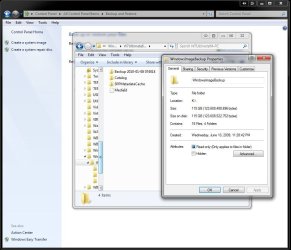
Backup images are saved as backup periods in this format at the selected saved to location like the example below.

drive letter:\WindowsImageBackup\computer name\Backup YYYY-MM-DD HHMMSS

For example, if your computer name is Computer, your backup image location is on hard disk or partition (network or local) D: , and you backed up on 11/22/2008 at 1:00:50 PM (It uses 24 hour time), then that backup image would be located in the folder below.
D:\WindowsImageBackup\Computer\Backup 2008-11-22 130050
If you're saving your system images in a network location, you can only keep the most current system image for each computer. If you have an existing system image for a computer and are creating a new one for the same computer, the new system image will overwrite the existing one.


   Tip
If you want to keep multiple system image versions on the same drive or partition, then you can use either method below to do so.

METHOD ONE:
Change the maximum space used for system images on the drive letter you are saving the Windows Backup to by changing the maximum space used by System Protection for the same drive letter. This is the same setting.

You do not have to have System Protection turned on for the drive letter, but do need to adjust the maximum space to what you like.

The size of a system image can be quite large since it will include all system drives in the image by default plus any drives you have included. If you want to keep multiple system images, be sure to increase the max size accordingly.

METHOD TWO:

1. Navigate to the backup location above for where you saved a system image that you want to keep before creating a new system image.

2. Right click, or press and hold, on the WindowsImageBackup folder, and click/tap on Rename.

3. Rename it to something like WindowsImageBackup-Copy-1, press Enter, and click//tap on Yes if prompted by UAC.
NOTE: This way you can just easily change the 1 an the end of the name to 2, 3, 4, etc... for each new system image that you make a copy of.

4. You now have a different system image version that you can leave at this location to be able to keep multiple versions.


warnsmall.png
NOTE: When you want to restore a system image in a renamed WindowsImageBackup-Copy-1 folder in the future, then you must rename the current WindowsImageBackup folder first, then rename the WindowsImageBackup-Copy-1 folder back to WindowsImageBackup in order to be able to restore it. The WindowsImageBackup folder must be in the root directory of the drive, and not within another folder.

   Warning

  • Windows 7 can only include drives formatted with the NTFS file system in the system image.
  • Windows 7 cannot include the partition or drive that you are saving the backup image to in the image.
  • All "system" or "boot" drives/partitions are included in the system image by default, so you will not be able to save the system image to a system or boot drive/partition.
  • If you are saving the system image to a HDD or partition, then you can only save the system image on a separate hard drive (recommended) or partition than what Windows 7 is installed on. It cannot be saved to the C: drive.
  • Only the Windows 7 Professional, Ultimate, and Enterprise editions can backup to a network location.
  • You cannot restore a 64-bit Windows 7 backup image on a 32-bit system.
  • You cannot restore a 64-bit Windows 7 backup image with a 32 bit Windows 7 installation DVD or recovery partition, or the other way around. You must use the same 32-bit or 64-bit Windows 7 installation DVD or recovery partition as the backup image is.
  • A system image that was created on a computer using EFI cannot be restored on a computer using BIOS. It can only be restored on a computer using EFI.
  • When restoring a system image from a dynamic volume, the disks on your computer cannot be formatted to match the layout of the disks on the backup. To have full functionality, select a volume (partition) on a basic disk as your backup location instead.
  • I would recommend to create a system image on a separate HDD, or a separate partition on a separate HDD, for the best reliability to restore from it. CDs or DVDs are just not as reliable. A scratch one just one of them could ruin the whole image.


Here's How:
1. Open the Control Panel (icons view).

2. Click on the Backup and Restore icon.

3. Click on the Create a system image link. (See screenshot below)
Step1.jpg
4. If prompted by UAC, click on Yes.

5. Select the location to where you would like to save the backup image at, and click on the Next button. (See screenshot below)
NOTE: See the Warning box at the top of the tutorial. Only the Windows 7 Professional, Ultimate, and Enterprise editions can backup to a network location.
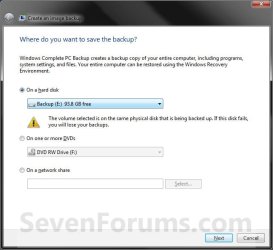
Step2.jpg
6. If available, check any additional hard drives or partitions (ex: Vista) that you would like to include in the backup image with the Windows 7 (System and C: ) partition or hard drive, and click on the Next button. (See screenshot below)
NOTE: See the WARNING box at the top of the tutorial. If you do not want to add any additional hard drives or partitions, then just leave the others unchecked. You will not see this, if you do not have any other OS installed other than Windows 7.
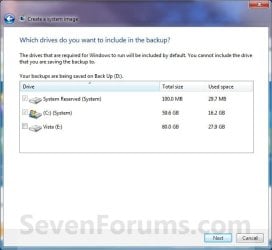
Step3.jpg
7. Click on the Start backup button. (See screenshot below)
Step4.jpg
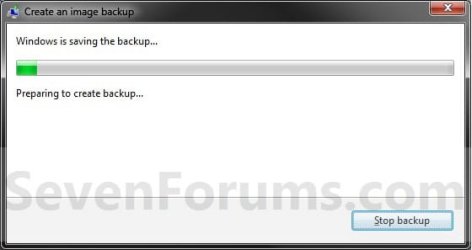
8. You will now see this window. (See screenshot below)
NOTE: If you wish to stop creating the backup image during this point, click on the Stop backup, Stop, and Close buttons.
Step5.jpg
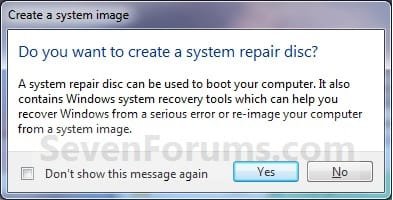
9. When it is finished you will see this create a System Repair disc pop-up window. Click on No. (See screenshot below)
NOTE: For how to always hide or show this message, see this tutorial.
Step7.jpg
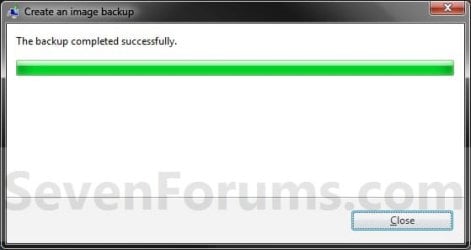
10. Click on the Close button. (See screenshot below)
Step8.jpg
11. Close the Backup and Restore window. (See screenshot below step 3)
That's it,
Shawn


Last edited:
That is probably the best solution.. I just bought a 500gb external drive for $75.00 new so you shouldnt get hurt too bad, just remember to format it to NTFS first.... ;)

yea im looking at a Western Digital 500GB hard drive from 80 dollars...looks like thats the best deal at bestbuy.ca, i remember paying 250 dollars for a seagate 250gb like 4 years ago lol...gotta love technology!
 

My Computer

OS
Microsoft Windows 7
Thats the drive that I bought today .. good form old bean!!!
 

My Computer

Computer type
PC/Desktop
Computer Manufacturer/Model Number
LENOVO K450 @3.0GHZ
OS
64-bit Windows 8.1 Pro
CPU
Core(TM) i5 CPU 4330 Haswell @ 3.20GHz
Motherboard
LENOVO
Memory
12.00 GB
Graphics Card(s)
Intel(R) HD Graphics
Sound Card
Intel HD integtrated
Monitor(s) Displays
HP 25' ISP Monitor
Screen Resolution
1900/1020
Hard Drives
(1) ST1000DM003-1CH162 (2) Generic STORAGE DEVICE USB Device (3) Generic STORAGE DEVICE USB Device
Internet Speed
100mb down/10mb up
i got the wd 1tb for $100- I saw the 500gig for $80 but for $20 and no shipping charges I just felt it was worth it

robin
 

My Computer

Computer type
PC/Desktop
Computer Manufacturer/Model Number
Dell Computers
OS
Windows 7 Pro 32/64 bit and Windows 10 Pro 32 Bit/64bit
Memory
4gigs
Graphics Card(s)
AMD Radeon HD and Nvidia
Monitor(s) Displays
Samsung 24". INC 19". Dell 22 ". Dell 17" & 19"
Hope you didn't get the Green Power 1tb model! I have two of those as well as having pulled a 500gb GP model out of an external casing for testing 7 back when the betas were first out and the GP models work for storage only for some reason.

One problem seen here when trying to make a complete backup with the first 64bit retail install before getting the 1tb WD Black edition model was the image turned out to be 1.2tb in size?! For the new drive now in I would need the WD 2tb model! All this before files(only 20gb) were loaded onto the drive. :(
 

My Computers

System One System Two

  • Computer type
    PC/Desktop
    Computer Manufacturer/Model Number
    Custom builds = 2
    OS
    W7 Ultimate x64/W10 Pro x64/W11 Pro Triple Boot - Main PC W7 Remote PC Micro ATX W7 Pro x64/W11 Pro
    CPU
    AMD Phenom II X4 975 Deneb 3.6ghz - 965 2nd remote pc
    Motherboard
    Gigabyte GA-790XTA-UD4-Gigabyte GA-880GM-D2H remote pc
    Memory
    Kingston Hyper X DDR3 1600 1.5v 16gb - Hyper X Fury 8gb 2nd
    Graphics Card(s)
    MSI HD Radeon 5750 1gb - MSI HD Radeon 6450 on mini tower
    Sound Card
    Creative Labs X-Fi Xtreme Audio P - Realtek onooard 2nd case
    Monitor(s) Displays
    ASUS VW199T-P 19" HP 2082a Main-HP 2082a 20" remote pc
    Screen Resolution
    Asus 1440x900 - HP 1600x900
    Hard Drives
    WD Black 1TB HD per OS W7, W10, and pending W11 presently on 500gb OS Drive - Pending Triple 1TB HDs for Spanned Storage/backup volume
    Single 2TB external USB enclosure, single 1TB System 7 Host/Boot drive, Pending 8TB external HD for system image b
    PSU
    Corsair 750TX - primary / Corsair CX600 - second
    Case
    Antec 900-2 - SSD compatible / NZXT Vulcan mini tower
    Cooling
    Zalman CNPS9900A
    Keyboard
    AZIO L70 Backlit Letters Gaming - ONN Cordless/USB
    Mouse
    MSI DS200 Programmable, Logitech Cordless
    Internet Speed
    30mbps upgrade - primary hard wired - mini tower usb WiFi
    Antivirus
    GFI VIPRE Internet Security 2014 on W7 2016 beta on W10,
    Browser
    Cyberfox, WaterFox 64bit FF variants, FireFox x64, Pale Moon
    Other Info
    Accomdata fan cooled usb 2.0 PIDE/Sata II, III external enclosure.
    Sambient usb/eSata PATA/Sata II, III external enclosure.
  • Computer type
    PC/Desktop
    System Manufacturer/Model Number
    CUSTOM ASSEMBLY
    OS
    W7 Pro x64/W11 Pro
    CPU
    AMD Deneb 3.6ghz - 965
    Motherboard
    Gigabyte GA-880GM-D2H remote pc
    Memory
    Kingston Hyper X Fury 8gb
    Graphics Card(s)
    MSI HD Radeon 6450 DVI Output
    Sound Card
    Realtek onooard Creative or Other separate PENDING
    Monitor(s) Displays
    VIZIO 32" LCD TV Separate LCD Pending
    Screen Resolution
    1600x1080
    Hard Drives
    WD 500GB OS Host/Boot WD Green 1TB Storage/Backup
    PSU
    Corsair 600W - THERMALTAKE 600W spare case
    Case
    NZXT Vulcan mini tower
    Cooling
    Twin 120mm Top Fans - 240mm Side Cover
    Keyboard
    ONN Cordless/USB Logitech Cordless
    Mouse
    ONN USB/Cordless - Logitech Cordless
    Internet Speed
    DSL 5G
    Browser
    MS Edge, FireFox, WaterFox x64, FireFox Nightly
    Other Info
    OS Testing-Remote Access to Main TeamViewer
Wish I'd seen this before now. Would have save a lot of typing!

Thanks, another great one Brink :geek:
 
You're welcome Greg. Thank you. :)
 

My Computer

Computer type
PC/Desktop
Computer Manufacturer/Model Number
Self built custom
OS
64-bit Windows 11 Pro for Workstations
CPU
Intel i7-8700K OC'd to 5 GHz
Motherboard
ASUS ROG Maximus XI Formula Z390
Memory
64 GB (4x16GB) G.SKILL TridentZ RGB DDR4 3600 MHz
Graphics Card(s)
ASUS ROG-STRIX-GTX1080TI-O11G-GAMING
Sound Card
Integrated
Monitor(s) Displays
2 x Samsung Odyssey G7 27"
Screen Resolution
2560x1440
Hard Drives
1TB Samsung 990 PRO M.2,
4TB Samsung 990 PRO PRO M.2,
TerraMaster F8 SSD Plus NAS
PSU
Seasonic Prime Titanium 850W
Case
Thermaltake Core P3
Cooling
Corsair Hydro H115i
Keyboard
Logitech wireless K800
Mouse
Logitech MX Master 4
Internet Speed
2 Gb/s Download and 100 Mb/s Upload
Antivirus
Malwarebyte Anti-Malware Premium
Browser
Google Chrome
Other Info
Logitech Z625 speaker system,
Logitech BRIO 4K Pro webcam,
HP Color LaserJet Pro MFP M477fdn,
APC SMART-UPS RT 1000 XL - SURT1000XLI,
Galaxy S23 Plus phone
Hello. Im new here. Im just trying to make a backup image of the computer in its exact state and put it onto a dvd or two so i can backup. I bought this Dell Inspiron laptop and when i got it in the mail, no windows 7 re installation came with it.

I went to CONTROL PANEL > SYSTEM AND SECURITY > BACKUP AND RESTORE and selected CREATE A SYSTEM IMAGE from the left side panel. Im already on DVD 4....seems like its going to be way to big...

Is there a way for me to do this another way so i can re-install windows 7 in the current state my pc is in if something were to happen to it?

HELP!:D
 

My Computer

Computer Manufacturer/Model Number
Acer Aspire X1301
OS
Windows 7 Home Premium x64
Memory
3.00GB
Graphics Card(s)
NVIDIA GeForce 9200
Sound Card
Realtek High Definition Audio
Monitor(s) Displays
Samsung Syncmaster 225AW
Hard Drives
(1) 320G
Hi DrLangly, welcome to the forums.
I expect it will be at least 10 DVDs, depending on how much bloatware they had installed. the system image copies everything in your HD
The better way to use the system image is to put it in an external HD or another internal HD.

If you want to create a bootable DVD with the system files only, you might try this tutorial
 

My Computer

Computer Manufacturer/Model Number
Wally, Innc.
OS
Windows 7 x64 finally!
CPU
AMD Athlon II X2 240
Motherboard
Biostar TA790GX XE
Memory
OCZ Platinum 4GB DDR2 1066 (will not work past 800MHz)
Graphics Card(s)
MSI R4670-MD1G Radeon HD 4670 1GB 128-bit GDDR3
Sound Card
ATI High Definition Audio Device Realtek ALC888
Monitor(s) Displays
HP w19e
Screen Resolution
1440x900
Hard Drives
Western Digital Caviar Green WD5000AADS 500GB SATA
Western Digital Caviar Blue WD5000AAKS 500GB SATA
PSU
Athena Power Micro ATX 400W
Case
HEC 6T 6T10BB Black MicroATX Mini Tower
Cooling
stock
Keyboard
wired, many keys
Mouse
HP wireless, 2 buttons, 1 wheel
Internet Speed
DSL 2Mb (recently getting 1.65M!)
Wow wally, thank you for such a timely response. Believe it or not, i do computer work freelance at the moment, im just so new to windows 7 and some of the new menu's and such. Although the pc came with quite the amount of bloatware, i've stripped it bare, and installed only essential tools and always maintain a lightweight, clean and smooth running PC or Lappy.

Thank you for the recommendation on that thread, i'll go look at it now.

Again, thanks for such a timely response!
 

My Computer

Computer Manufacturer/Model Number
Acer Aspire X1301
OS
Windows 7 Home Premium x64
Memory
3.00GB
Graphics Card(s)
NVIDIA GeForce 9200
Sound Card
Realtek High Definition Audio
Monitor(s) Displays
Samsung Syncmaster 225AW
Hard Drives
(1) 320G
Hello DrLangly, and welcome to Seven Forums.

Most OEM computers these days do not come with a set of OEM Recovery discs anymore. Usually they will have a option for you to create (burn) your own set through the OEM partition instead. Depending on what type you have, these two links from Dell will help show you how to create a set OEM Windows 7 Recovery discs to be able to use to do a factory restore of Windows 7 with.

Dell - Support

or

Dell - Support


Creating a system image will take up a few DVDs since the backup image will basically be the same size as what is used on your hard drive. Each single sided DVD can hold around 4.7 GB on average. It's usually best to save system image backup onto another hard drive or partition instead because of this.

Hope this helps,
Shawn
 

My Computer

Computer type
PC/Desktop
Computer Manufacturer/Model Number
Self built custom
OS
64-bit Windows 11 Pro for Workstations
CPU
Intel i7-8700K OC'd to 5 GHz
Motherboard
ASUS ROG Maximus XI Formula Z390
Memory
64 GB (4x16GB) G.SKILL TridentZ RGB DDR4 3600 MHz
Graphics Card(s)
ASUS ROG-STRIX-GTX1080TI-O11G-GAMING
Sound Card
Integrated
Monitor(s) Displays
2 x Samsung Odyssey G7 27"
Screen Resolution
2560x1440
Hard Drives
1TB Samsung 990 PRO M.2,
4TB Samsung 990 PRO PRO M.2,
TerraMaster F8 SSD Plus NAS
PSU
Seasonic Prime Titanium 850W
Case
Thermaltake Core P3
Cooling
Corsair Hydro H115i
Keyboard
Logitech wireless K800
Mouse
Logitech MX Master 4
Internet Speed
2 Gb/s Download and 100 Mb/s Upload
Antivirus
Malwarebyte Anti-Malware Premium
Browser
Google Chrome
Other Info
Logitech Z625 speaker system,
Logitech BRIO 4K Pro webcam,
HP Color LaserJet Pro MFP M477fdn,
APC SMART-UPS RT 1000 XL - SURT1000XLI,
Galaxy S23 Plus phone
My pleasure, let us know if that works, then others can benefit from your success!
 

My Computer

Computer Manufacturer/Model Number
Wally, Innc.
OS
Windows 7 x64 finally!
CPU
AMD Athlon II X2 240
Motherboard
Biostar TA790GX XE
Memory
OCZ Platinum 4GB DDR2 1066 (will not work past 800MHz)
Graphics Card(s)
MSI R4670-MD1G Radeon HD 4670 1GB 128-bit GDDR3
Sound Card
ATI High Definition Audio Device Realtek ALC888
Monitor(s) Displays
HP w19e
Screen Resolution
1440x900
Hard Drives
Western Digital Caviar Green WD5000AADS 500GB SATA
Western Digital Caviar Blue WD5000AAKS 500GB SATA
PSU
Athena Power Micro ATX 400W
Case
HEC 6T 6T10BB Black MicroATX Mini Tower
Cooling
stock
Keyboard
wired, many keys
Mouse
HP wireless, 2 buttons, 1 wheel
Internet Speed
DSL 2Mb (recently getting 1.65M!)
Hi Dr Langly,

If you use a FREE 3rd party app. to create the image for you - it will be almost half the size of the Windows one.

Try these :

PARAGON:

Paragon Backup & Recovery 10 Free Edition

How to Create an Image with Paragon B&R 10

How to Restore Data with Paragon B&R 10


MACRIUM:

Macrium Reflect FREE Edition - Information and download

How to create a disk image with Macrium Reflect

How to create the Macrium Linux rescue CD

How to recover your PC using the Linux rescue CD

There are many reports of Windows System Image failing towards the end of placing an image on dvd's :(

You will probabaly find, as Shawn said - you can create a Dell image as well. However that will return you to the state you bought the pc - all your data, programs, and settings will not be restored.

If you make your image using a 3rd party app.- every now and again - you can restore everything as it was at the time you made the image.
 

My Computers

System One System Two

  • Computer type
    PC/Desktop
    OS
    7 X64
    CPU
    i5 8400
    Motherboard
    gigabyte b365m ds3h
    Memory
    2x8gb 3200mhz
    Hard Drives
    various
    PSU
    pure power 11 400w cm
    Case
    Coolermaster
    Cooling
    cryorig m9i
  • Computer type
    PC/Desktop
    OS
    7x64
    CPU
    g5400
    Motherboard
    ga b365m ds3h
    Memory
    8gb ddr4 2400
    PSU
    xfx pro 450w
Okay, the link in the other thread links me to a Atomic MPC website with a description for VLITE as a "Impressive and free antivirus and antispyware package"

Am i looking at the right one?
 

My Computer

Computer Manufacturer/Model Number
Acer Aspire X1301
OS
Windows 7 Home Premium x64
Memory
3.00GB
Graphics Card(s)
NVIDIA GeForce 9200
Sound Card
Realtek High Definition Audio
Monitor(s) Displays
Samsung Syncmaster 225AW
Hard Drives
(1) 320G
Ok, correction mates;

My girlfriend just stated she "just found" the bag of discs that came with it. It comes with a re-installation DVD of Windows 7 and neccesary drivers. Nevermind for the laptop!

But, I have a brand new ACER machine at home. Its a desktop computer and i DONT have a re-installation DVD for that pc. Im weary of using the DELL cd on it in an emergency. Bottom line is i just want a re-installation cd for my ACER now.


I am going to follow this link. Will this work?
 

My Computer

Computer Manufacturer/Model Number
Acer Aspire X1301
OS
Windows 7 Home Premium x64
Memory
3.00GB
Graphics Card(s)
NVIDIA GeForce 9200
Sound Card
Realtek High Definition Audio
Monitor(s) Displays
Samsung Syncmaster 225AW
Hard Drives
(1) 320G
It would be interesting to see what is inside the Dell Recovery partition . You may well find the installation files and be able to make your own bootable installer - as Wally says.

If you have a chance - please post a screenie of the contents of the dell recovery partition.

Thanks.

Wow wally, thank you for such a timely response. Believe it or not, i do computer work freelance at the moment, im just so new to windows 7 and some of the new menu's and such. Although the pc came with quite the amount of bloatware, i've stripped it bare, and installed only essential tools and always maintain a lightweight, clean and smooth running PC or Lappy.

Thank you for the recommendation on that thread, i'll go look at it now.

Again, thanks for such a timely response!
 

My Computers

System One System Two

  • Computer type
    PC/Desktop
    OS
    7 X64
    CPU
    i5 8400
    Motherboard
    gigabyte b365m ds3h
    Memory
    2x8gb 3200mhz
    Hard Drives
    various
    PSU
    pure power 11 400w cm
    Case
    Coolermaster
    Cooling
    cryorig m9i
  • Computer type
    PC/Desktop
    OS
    7x64
    CPU
    g5400
    Motherboard
    ga b365m ds3h
    Memory
    8gb ddr4 2400
    PSU
    xfx pro 450w
The 'Contents' of the recovery partition? Explain:confused:


It would be interesting to see what is inside the Dell Recovery partition . You may well find the installation files and be able to make your own bootable installer - as Wally says.

If you have a chance - please post a screenie of the contents of the dell recovery partition.

Thanks.

Wow wally, thank you for such a timely response. Believe it or not, i do computer work freelance at the moment, im just so new to windows 7 and some of the new menu's and such. Although the pc came with quite the amount of bloatware, i've stripped it bare, and installed only essential tools and always maintain a lightweight, clean and smooth running PC or Lappy.

Thank you for the recommendation on that thread, i'll go look at it now.

Again, thanks for such a timely response!
 

My Computer

Computer Manufacturer/Model Number
Acer Aspire X1301
OS
Windows 7 Home Premium x64
Memory
3.00GB
Graphics Card(s)
NVIDIA GeForce 9200
Sound Card
Realtek High Definition Audio
Monitor(s) Displays
Samsung Syncmaster 225AW
Hard Drives
(1) 320G
Yes it is glitch on the MPC site - the download is fine.

Just d/l v1.6 and you're good.

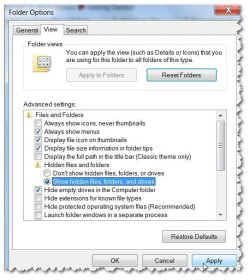
You may need to give the recovery partition a drive letter just rt click it in Disk Management and assign whatever letter it offers.

It is worth showing Hidden files as well - go to Folder Options>View>Dot Show Hidden Files and Untick Hide protected operating system files . Apply, OK.

FOLDER OPTIONS-2010-01-07_202455.jpg

You should then be able to see what's in it like any other partition.

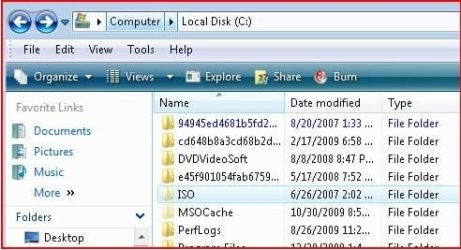
In the same way this guy took a shot of his C partition:

HP-ISO-FOUND-2009-12-28_042346.jpg

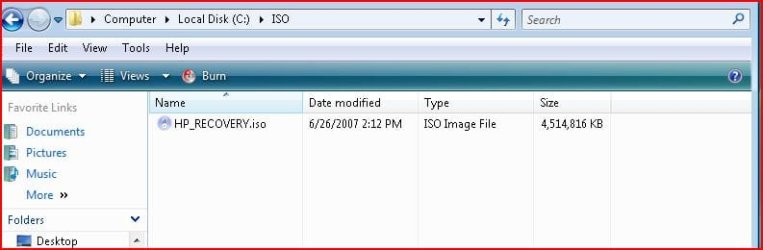
That is an HP machine - he found an .iso ( which he burned to dvd and used to reinstall). Strangely, it was in a Hidden Folder on the C drive.

HP-530 Notebook-ISOfound.jpg

It would be more normal to find either an .iso, or the actual installation files - in the recovery partition.
 

My Computers

System One System Two

  • Computer type
    PC/Desktop
    OS
    7 X64
    CPU
    i5 8400
    Motherboard
    gigabyte b365m ds3h
    Memory
    2x8gb 3200mhz
    Hard Drives
    various
    PSU
    pure power 11 400w cm
    Case
    Coolermaster
    Cooling
    cryorig m9i
  • Computer type
    PC/Desktop
    OS
    7x64
    CPU
    g5400
    Motherboard
    ga b365m ds3h
    Memory
    8gb ddr4 2400
    PSU
    xfx pro 450w
Anybody got an HP notebook - want to have a look and see if you have an.iso in a Hidden folder on the root of C?
 

My Computers

System One System Two

  • Computer type
    PC/Desktop
    OS
    7 X64
    CPU
    i5 8400
    Motherboard
    gigabyte b365m ds3h
    Memory
    2x8gb 3200mhz
    Hard Drives
    various
    PSU
    pure power 11 400w cm
    Case
    Coolermaster
    Cooling
    cryorig m9i
  • Computer type
    PC/Desktop
    OS
    7x64
    CPU
    g5400
    Motherboard
    ga b365m ds3h
    Memory
    8gb ddr4 2400
    PSU
    xfx pro 450w
There's one here with Vista presently on it if that helps any? The recovery partition there is about 7gb in size likely being everything compressed to save on drive space however.

The manufacturer's guide is usually the best method for preinstalled OSs while still seeing the bloatware they add into the mix unfortunately. :sarc: That maintains all of the serial number and other information including the preactivation for that machine something to consider.

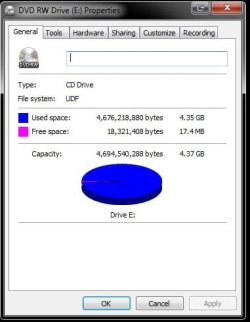
A slight update here now seeing some 131gb involved for a complete backup of the 1tb host/boot drive onto dvd-rw media. Think 11 blanks will be enough? 47.85gb between the 11 was the total amount available.

Time to get some more new blanks I guess! :eek: Sometime optical media simply doesn't suffice! :(

Meanwhile I simply went from there to the actual backup folder first used on the RC. :D
 

Attachments

  • Create 4.jpg
    Create 4.jpg
    61.8 KB · Views: 178
  • Create 6B Disk Space Used.jpg
    Create 6B Disk Space Used.jpg
    28.8 KB · Views: 266
  • Create 7B Blank Disk Fails to Read.jpg
    Create 7B Blank Disk Fails to Read.jpg
    54 KB · Views: 174
  • Create 17 Backup Complete.jpg
    Create 17 Backup Complete.jpg
    85.2 KB · Views: 169
Last edited:

My Computers

System One System Two

  • Computer type
    PC/Desktop
    Computer Manufacturer/Model Number
    Custom builds = 2
    OS
    W7 Ultimate x64/W10 Pro x64/W11 Pro Triple Boot - Main PC W7 Remote PC Micro ATX W7 Pro x64/W11 Pro
    CPU
    AMD Phenom II X4 975 Deneb 3.6ghz - 965 2nd remote pc
    Motherboard
    Gigabyte GA-790XTA-UD4-Gigabyte GA-880GM-D2H remote pc
    Memory
    Kingston Hyper X DDR3 1600 1.5v 16gb - Hyper X Fury 8gb 2nd
    Graphics Card(s)
    MSI HD Radeon 5750 1gb - MSI HD Radeon 6450 on mini tower
    Sound Card
    Creative Labs X-Fi Xtreme Audio P - Realtek onooard 2nd case
    Monitor(s) Displays
    ASUS VW199T-P 19" HP 2082a Main-HP 2082a 20" remote pc
    Screen Resolution
    Asus 1440x900 - HP 1600x900
    Hard Drives
    WD Black 1TB HD per OS W7, W10, and pending W11 presently on 500gb OS Drive - Pending Triple 1TB HDs for Spanned Storage/backup volume
    Single 2TB external USB enclosure, single 1TB System 7 Host/Boot drive, Pending 8TB external HD for system image b
    PSU
    Corsair 750TX - primary / Corsair CX600 - second
    Case
    Antec 900-2 - SSD compatible / NZXT Vulcan mini tower
    Cooling
    Zalman CNPS9900A
    Keyboard
    AZIO L70 Backlit Letters Gaming - ONN Cordless/USB
    Mouse
    MSI DS200 Programmable, Logitech Cordless
    Internet Speed
    30mbps upgrade - primary hard wired - mini tower usb WiFi
    Antivirus
    GFI VIPRE Internet Security 2014 on W7 2016 beta on W10,
    Browser
    Cyberfox, WaterFox 64bit FF variants, FireFox x64, Pale Moon
    Other Info
    Accomdata fan cooled usb 2.0 PIDE/Sata II, III external enclosure.
    Sambient usb/eSata PATA/Sata II, III external enclosure.
  • Computer type
    PC/Desktop
    System Manufacturer/Model Number
    CUSTOM ASSEMBLY
    OS
    W7 Pro x64/W11 Pro
    CPU
    AMD Deneb 3.6ghz - 965
    Motherboard
    Gigabyte GA-880GM-D2H remote pc
    Memory
    Kingston Hyper X Fury 8gb
    Graphics Card(s)
    MSI HD Radeon 6450 DVI Output
    Sound Card
    Realtek onooard Creative or Other separate PENDING
    Monitor(s) Displays
    VIZIO 32" LCD TV Separate LCD Pending
    Screen Resolution
    1600x1080
    Hard Drives
    WD 500GB OS Host/Boot WD Green 1TB Storage/Backup
    PSU
    Corsair 600W - THERMALTAKE 600W spare case
    Case
    NZXT Vulcan mini tower
    Cooling
    Twin 120mm Top Fans - 240mm Side Cover
    Keyboard
    ONN Cordless/USB Logitech Cordless
    Mouse
    ONN USB/Cordless - Logitech Cordless
    Internet Speed
    DSL 5G
    Browser
    MS Edge, FireFox, WaterFox x64, FireFox Nightly
    Other Info
    OS Testing-Remote Access to Main TeamViewer
Back
Top