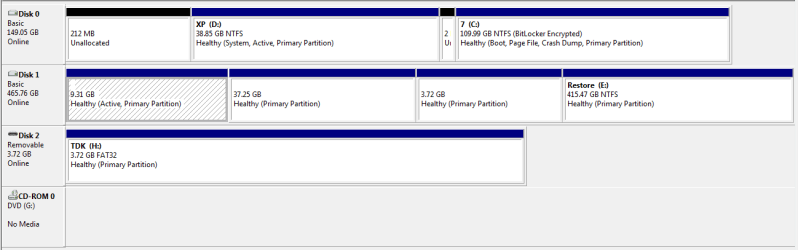
I would immediately mark the first partition on DISK0 Inactive or else swap the data cables between Disk0 and Disk1, as a repair will derail System boot files to first Active partition.
Here is what I would do to try to solve your problem:
When you have separate HD's it is always best to place each OS on a different HD with its own System boot files, then set the preferred OS as first to boot in BIOS setup, trigger the other OS when needed at boot by tapping the one-time BIOS Boot Menu key which almost every computer has.
CHeck now on your first boot screen or in your setup literature or Manual if you have such a key called also a BBS (Bios Boot Screen) key. If so, I would reimage XP to another HD, then recover the System Active boot files into Win7 by marking Win7 Active, deleting the same-HD XP partition, boot Win7 DVD Repair console or Repair CD to
http://www.sevenforums.com/tutorials/105541-startup-repair-run-3-separate-times.html
You can mark Win7 Active from the XP partition first, or use Diskpart from the DVD:
http://www.sevenforums.com/tutorials/71432-partition-mark-active.html
http://www.sevenforums.com/tutorials/119713-diskpart-pc-startup.html?ltr=D
Or you can use free Partition Wizard bootable CD to mark Win7 active, delete XP, even Resize Win7 partition to the left into the deleted XP partition space:
Free Download Magic Partition Manager Software - Partition Wizard Online
If you do not have a one-time BIOS Boot Menu key for your mobo, then your options if you want to use separate HD's as suggested are to install EasyBCD 2.02 to Win7 once you start it up, then add XP on the Add OS tab to get a Dual Boot menu, or if you want to keep the partitioning you have now then I would mark Win7 partition Active and run the three Startup Repairs to start it up, then add XP using EasyBCD 2.02 so that Win7 is better configured to run its native backup.