
You are using an out of date browser. It may not display this or other websites correctly.
You should upgrade or use an alternative browser.
You should upgrade or use an alternative browser.
Solved Backup Error code: 0x81000019
- Thread starter socrgy9
- Start date

- Local time
- 8:41 AM
- Messages
- 50,634
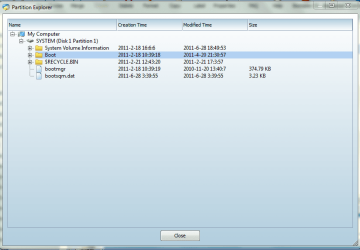
Expand the folders with the + next to them.
What size is SysVolInfo?
What size is SysVolInfo?
- Local time
- 8:41 AM
- Messages
- 50,634
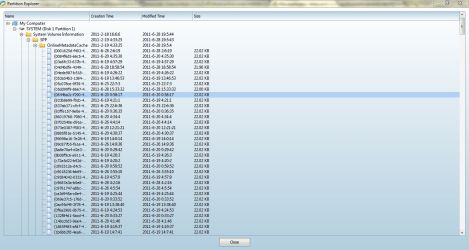
What size on disk does PW show for the partition?
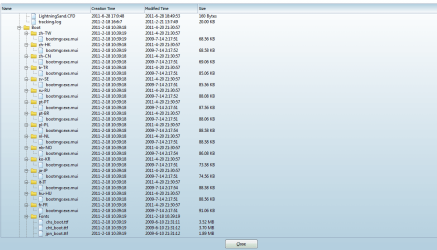
Are there any anomalous files in SysVol except the type shown in screenshot?
What is in the other folders?
We need to see that you have 40mb free space at least, taking into account the hidden files which weren't tallied in Disk Mgmt.
Are there any anomalous files in SysVol except the type shown in screenshot?
What is in the other folders?
We need to see that you have 40mb free space at least, taking into account the hidden files which weren't tallied in Disk Mgmt.


My Computer
- OS
- windows 7 ultimate x64
- Local time
- 8:41 AM
- Messages
- 50,634
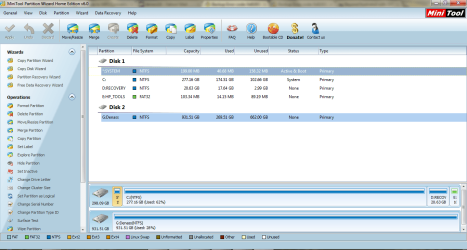
The problem may lie in the discrepancy between DMgmt showing System Reserved holding the System files while PW shows C being System partition.
When conflicts like this exist we resolve them by booting PW CD to let it settle the issue.
If PW CD does not show 199mb to be System Active partition, it can be repaired by making sure it is marked Active, boot the WIn7 DVD or Repair CD to run Startup REpair up to 3 separate times to reestablish it as the System partition booting Win7. System Repair Disc - Create
Startup Repair - Run 3 Separate Times
If this does not fix your issue, you can consider deleting the 199mb partition, marking Win7 Active then running the Repairs as given to write the System boot files to WIn7 partition which should solve the backup issue. However if you rely on the factory utilities some may become disabled without the 199mb partition.
Many tech enthusiasts find a clean-copy installation DVD for their version to clean reinstall Win7 without the preinstalled factory bloatware and utilities (worst of all on HP's) which have superior versions built into Win7. Reinstalling Windows 7
When conflicts like this exist we resolve them by booting PW CD to let it settle the issue.
If PW CD does not show 199mb to be System Active partition, it can be repaired by making sure it is marked Active, boot the WIn7 DVD or Repair CD to run Startup REpair up to 3 separate times to reestablish it as the System partition booting Win7. System Repair Disc - Create
Startup Repair - Run 3 Separate Times
If this does not fix your issue, you can consider deleting the 199mb partition, marking Win7 Active then running the Repairs as given to write the System boot files to WIn7 partition which should solve the backup issue. However if you rely on the factory utilities some may become disabled without the 199mb partition.
Many tech enthusiasts find a clean-copy installation DVD for their version to clean reinstall Win7 without the preinstalled factory bloatware and utilities (worst of all on HP's) which have superior versions built into Win7. Reinstalling Windows 7

Perhaps you should use Macrium to make an image of the entire Hard Disk Drive and store that created image externally, before you change the factory partition structure; have you already created the Factory Recovery disk set?
Imaging with free Macrium
Imaging with free Macrium
My Computer
- Computer Manufacturer/Model Number
- * BFK Customs *
- OS
- W 7 64-bit Ultimate
- CPU
- Intel Q9550 Yorkfield
- Motherboard
- ASUS P5Q Pro
- Memory
- 8GB Dominator 8500C5D
- Graphics Card(s)
- ATI : XFX 5870
- Sound Card
- Realtek HD Audio 7-1
- Monitor(s) Displays
- 1x 47" LCD HDMI & 3x 26" LCD HDMI
- Screen Resolution
- 1920x1080P & 1920x1200
- Hard Drives
- 1x 80GB Intel X25-M G2 SSD : 1x 500GB & 1x 640GB WD Caviar Black(s)
- PSU
- Corsair 620HX
- Case
- Cooler Master RC-690
- Cooling
- Tuniq Tower 120, 2x 140mm and 3x 120mm case fans
- Keyboard
- Microsoft 500
- Mouse
- Razer Diamondback 3G
- Internet Speed
- 14 Mb/s
- Other Info
- 1x Koutech 3Gb/s SATA HDD Hot Swap Rack
Hi, guys
@ gregrocker, PW CD shows the system partition as active and it didnt register any conflict. I want to consider now deleting the partition. I will need a tutorial on how to do that, pls. @Bare Foot Kid: I can still use windows to create a system image and I have done so. will that be ok? I have the Factory Recovery Disks.
@ gregrocker, PW CD shows the system partition as active and it didnt register any conflict. I want to consider now deleting the partition. I will need a tutorial on how to do that, pls. @Bare Foot Kid: I can still use windows to create a system image and I have done so. will that be ok? I have the Factory Recovery Disks.
My Computer
- OS
- windows 7 ultimate x64
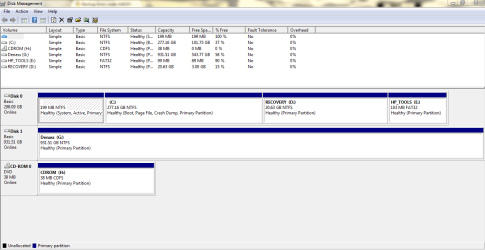
Hello mate, use the info below to post a snip of Windows 7 disk management so we can see it before we make any specific recomendations about removing the SysResv partition, I don't mean Partition Wizard.
In the Windows start menu right click computer and click manage, in the left pane of the "Computer Management" window that opens click disk management and post a maximized snip of that.
In the Windows start menu right click computer and click manage, in the left pane of the "Computer Management" window that opens click disk management and post a maximized snip of that.
My Computer
- Computer Manufacturer/Model Number
- * BFK Customs *
- OS
- W 7 64-bit Ultimate
- CPU
- Intel Q9550 Yorkfield
- Motherboard
- ASUS P5Q Pro
- Memory
- 8GB Dominator 8500C5D
- Graphics Card(s)
- ATI : XFX 5870
- Sound Card
- Realtek HD Audio 7-1
- Monitor(s) Displays
- 1x 47" LCD HDMI & 3x 26" LCD HDMI
- Screen Resolution
- 1920x1080P & 1920x1200
- Hard Drives
- 1x 80GB Intel X25-M G2 SSD : 1x 500GB & 1x 640GB WD Caviar Black(s)
- PSU
- Corsair 620HX
- Case
- Cooler Master RC-690
- Cooling
- Tuniq Tower 120, 2x 140mm and 3x 120mm case fans
- Keyboard
- Microsoft 500
- Mouse
- Razer Diamondback 3G
- Internet Speed
- 14 Mb/s
- Other Info
- 1x Koutech 3Gb/s SATA HDD Hot Swap Rack
- Local time
- 8:41 AM
- Messages
- 50,634
Both the Factory Recovery and the HP tools partition may lose their links if you delete the System partition. This is why it's normally best to do it during a clean reinstall where you wipe the HD, although you could later delete those two partitions once you see what it leaves you. You will lose the Repair console on F8 Advanced Boot Options.
To recover the 199mb System partition boot files and disk space into Win7, you will need PW CD and the Win7 DVD or System Repair Disc - Create.
First back up your files and a System image so you can start over if necessary.
Next boot free Partition Wizard bootable CD, rightclick on System to Delete, click OK.
Then rightclick on C to Modify>Set to Active, OK.
Now click on the Win7 HD to highlight it, then from Disk tab select Rebuild MBR, Apply all steps.
See if WIn7 will boot, if not boot into the Win7 DVD REpair console or Repair CD to run Startup Repair - Run 3 Separate Times until Win7 starts.
To recover the 199mb System partition boot files and disk space into Win7, you will need PW CD and the Win7 DVD or System Repair Disc - Create.
First back up your files and a System image so you can start over if necessary.
Next boot free Partition Wizard bootable CD, rightclick on System to Delete, click OK.
Then rightclick on C to Modify>Set to Active, OK.
Now click on the Win7 HD to highlight it, then from Disk tab select Rebuild MBR, Apply all steps.
See if WIn7 will boot, if not boot into the Win7 DVD REpair console or Repair CD to run Startup Repair - Run 3 Separate Times until Win7 starts.
Recovering the first partition on a HDD / SSD into the C: Windows partition, to include the "System Reserved" partition is outlined in this tutorial at the link below starting at Step One and be sure to post back with any further questions you may have and to keep us informed.
My Computer
- Computer Manufacturer/Model Number
- * BFK Customs *
- OS
- W 7 64-bit Ultimate
- CPU
- Intel Q9550 Yorkfield
- Motherboard
- ASUS P5Q Pro
- Memory
- 8GB Dominator 8500C5D
- Graphics Card(s)
- ATI : XFX 5870
- Sound Card
- Realtek HD Audio 7-1
- Monitor(s) Displays
- 1x 47" LCD HDMI & 3x 26" LCD HDMI
- Screen Resolution
- 1920x1080P & 1920x1200
- Hard Drives
- 1x 80GB Intel X25-M G2 SSD : 1x 500GB & 1x 640GB WD Caviar Black(s)
- PSU
- Corsair 620HX
- Case
- Cooler Master RC-690
- Cooling
- Tuniq Tower 120, 2x 140mm and 3x 120mm case fans
- Keyboard
- Microsoft 500
- Mouse
- Razer Diamondback 3G
- Internet Speed
- 14 Mb/s
- Other Info
- 1x Koutech 3Gb/s SATA HDD Hot Swap Rack
Ok. thanks guys. So recovering the system partition using this method will solve the backup problem, but both the Recovery and HP Tools Partitions might lose their links? What are my other options? Cos this is simply trading one problem for another.
My Computer
- OS
- windows 7 ultimate x64
- Local time
- 8:41 AM
- Messages
- 50,634
Recovering the boot files into Win7 partition has solved the backup issue in the past, but we cannot guarantee it will work for you as there may be other issues.
Your best approach would be to find a Win7 installation DVD to clean reinstall without the corrupting factory bloatware and useless Utilities which hamper Win7 performance - worst of all on HP's. Reinstalling Windows 7
Your best approach would be to find a Win7 installation DVD to clean reinstall without the corrupting factory bloatware and useless Utilities which hamper Win7 performance - worst of all on HP's. Reinstalling Windows 7

GunnyTeufulhund
New member
Thanks to all of you. I just joined in order to say thanks for all your efforts on this subject.
There is a total dearth of information concerning this subject. I thought I was going to have to Clone a drive and do a bare metal install in order to repair a customers rig. You folks really pulled my fat out of the fire.
My final decision (after reading the thread completely) was to convert the "System Reserved" partition from an active "Primary" partition to a logical partition. Then reboot to a Win 7 disk and run Start-up Repair until Windows booted from the HDD. I have the luxury of Acronis Disk Director. However, the conversion could have been accomplished any of the ways mentioned in the thread. I felt that doing it this way was a good idea as it would preserve the DATA within the System Reserved partition. It worked a charm. His rig is backing up ( System as well as Docs & Settings ) as we speak.
I wish I could buy you folks a couple of well deserved rounds.
There is a total dearth of information concerning this subject.
I thought I was going to have to Clone a drive and do a bare metal install in order to repair a customers rig. You folks really pulled my fat out of the fire.My final decision (after reading the thread completely) was to convert the "System Reserved" partition from an active "Primary" partition to a logical partition. Then reboot to a Win 7 disk and run Start-up Repair until Windows booted from the HDD. I have the luxury of Acronis Disk Director. However, the conversion could have been accomplished any of the ways mentioned in the thread. I felt that doing it this way was a good idea as it would preserve the DATA within the System Reserved partition. It worked a charm.
His rig is backing up ( System as well as Docs & Settings ) as we speak.I wish I could buy you folks a couple of well deserved rounds.
My Computer
- Computer Manufacturer/Model Number
- HP DV7-4270us (lappy) / Custom Whitebox (desktop)
- OS
- 7Ult x64
- CPU
- AMD Phenom II P960 / AMD Phenom II X4 925
- Motherboard
- HP 1641 / Gigabyte GA-880GM-USB3
- Memory
- 4GB Elpidia PC3-10700 / 8GB G.Skill PC3-10700
- Graphics Card(s)
- ATI Mobility Radeon HD 6370 s / ATI Radeon HD 4250
- Sound Card
- IDT Hi Def (Beats Audio) / Realtek Hi Def
- Monitor(s) Displays
- Duh (Laptop) / Acer 211H
- Hard Drives
- Laptop 640GB (5400RPM)
Desktop 1.5TB (7200RPM)
- PSU
- Laptop HP / Antec EarthWatts EA-500D
- Case
- Laptop HP / HEC 63RABB Black Steel ATX Mid Tower
- Cooling
- HP Crap / ThermalTake
- Local time
- 8:41 AM
- Messages
- 50,634
Interesting approach. What files are in SysReserved that need preserving? You can see them using your Disk manager. There should only be boot files and a SysVol file used for imaging when SYsReserved exists.
As there is no longer SysReserved in the mix, you can delete and recover the space if needed.
As there is no longer SysReserved in the mix, you can delete and recover the space if needed.
GunnyTeufulhund
New member
Absolutely none. The reason I opted not to delete the Sys. Reserv. Partition was one of safety. Not that I wasn't fairly confident of the results. After having followed this thread. However. Should something fail. I have the adapters to remove the drive from the clients computer and connect it to one of my rigs. At which time I can convert the Sys. Res. partition back to an "active" Primary partition. No Harm No Foul.
Since things went off without a hitch. I just simply deleted the useless partition and re-sized C: to incorporate the extra space.
His rig is a custom "white box" I assembled for him. It's running a 1.5TB drive similar to mine and contains damn near 520GB. I created a "System Recovery" partition on the HDD after having installed his OS, programs and utilities, transferred all his old DATA, etc... I really didn't relish the thought of having to retrace any steps. Not to mention that his problems started with a corrupted installation of Acronis True Image Home 2012 . He had not attempted to use MS Backup until then. I played holy hell solving that mess and was attempting to be extra cautious .
Since things went off without a hitch. I just simply deleted the useless partition and re-sized C: to incorporate the extra space.
His rig is a custom "white box" I assembled for him. It's running a 1.5TB drive similar to mine and contains damn near 520GB. I created a "System Recovery" partition on the HDD after having installed his OS, programs and utilities, transferred all his old DATA, etc... I really didn't relish the thought of having to retrace any steps. Not to mention that his problems started with a corrupted installation of Acronis True Image Home 2012 . He had not attempted to use MS Backup until then. I played holy hell solving that mess and was attempting to be extra cautious .
My Computer
- Computer Manufacturer/Model Number
- HP DV7-4270us (lappy) / Custom Whitebox (desktop)
- OS
- 7Ult x64
- CPU
- AMD Phenom II P960 / AMD Phenom II X4 925
- Motherboard
- HP 1641 / Gigabyte GA-880GM-USB3
- Memory
- 4GB Elpidia PC3-10700 / 8GB G.Skill PC3-10700
- Graphics Card(s)
- ATI Mobility Radeon HD 6370 s / ATI Radeon HD 4250
- Sound Card
- IDT Hi Def (Beats Audio) / Realtek Hi Def
- Monitor(s) Displays
- Duh (Laptop) / Acer 211H
- Hard Drives
- Laptop 640GB (5400RPM)
Desktop 1.5TB (7200RPM)
- PSU
- Laptop HP / Antec EarthWatts EA-500D
- Case
- Laptop HP / HEC 63RABB Black Steel ATX Mid Tower
- Cooling
- HP Crap / ThermalTake
- Local time
- 8:41 AM
- Messages
- 50,634
Very wise, Gunny.
We also don't have users delete SysReserved or System partition/HD until we make sure the System boot files are written to the Active partition and Win7 starts up.
Sometimes it simply won't work when manual efforts have been taken to edit the BCD, Win7 has been tweaked into a mess, or GRUB was on the HD.
Nice work.
We also don't have users delete SysReserved or System partition/HD until we make sure the System boot files are written to the Active partition and Win7 starts up.
Sometimes it simply won't work when manual efforts have been taken to edit the BCD, Win7 has been tweaked into a mess, or GRUB was on the HD.
Nice work.
Similar threads
- Replies
- 1
- Views
- 4K


- Replies
- 2
- Views
- 4K
- Replies
- 8
- Views
- 3K
- Replies
- 11
- Views
- 10K