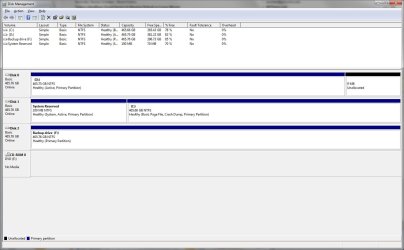
It appears XP is booting off the System REserved partition since it's marked System Active. XP should not be marked Active in this case.
Did you install Win7 with XP plugged in and it started to a Dual Boot menu? It would have been better to unplug XP during Win7 install and then boot either via the BIOS Boot order or one-time BIOS BOot Menu key. This keeps the HD's independent to come and go as you please, wherease they are now interlocked by allowing Windows to configure the Dual Boot Menu.
I already reported that I had 3.5 months trouble free after going to dual boot.
Why do you think dual boot has anything to do with it?
What I can do is list what changed on or slightly before 8/31:
-Windows Update and Adobe Flash Player update are on automatic.
-Since 8/31 I have run Primetest95 c. 6 times. In some runs one CPU or the other (can be either) makes no progress, or stops making progress after a while, or spontaneously resumes after making no progress for hours. Cold boot also gets both going. No actual errors. The fact that it can be either CPU says to me that it is not the CPU (E8400). The fact that it can resume not only on cold boot but also spontaneously says to me not mobo (P5Q Pro). So I think OS.
-Tried chkdsk and sfc /scannow, but both rejected: "You must be an administrator running a console session." I am admin (there is only one account). Dunno why command prompt might not qualify as a "console session."
-XP has
not been booted since June.
I would unplug Win7 HD, run an XP Repair Install to get it booting on its own, then plug back in Win7.
Too dangerous.
Remove the XP listing in msconfig>Boot, boot preferred HD by setting it to boot first in BIOS setup, boot other HD using one-time BIOS BOot Menu key.
-Can remove XP from list.
-C: is already the first boot device.
-Does "one-time BIOS Boot Menu key' means the usual F8 (or is F12?) to interrupt boot? Will this work without XP repair install?
I would also plug Win7 HD into DIsk0 and XP into Disk1. Now you have the cleanest possible configuration.
Do you mean just switch the SATA cables?
If backup still fails, uninstall Comodo completely and install MS Security Essentials with the Win7 firewall.
I finally get this--you think I have Comodo
anti-virus. Don't; hadn't heard of it until the above got me to look. I used Comodo
backup as a check on whether Windows Backup was the source of my problem.
I use Symantec AV, plus Malwarebytes. Since 8/31 full AV scans that used to take 2-3 hours now take 30-40 hours. They do complete successfully. Symantec and Malwarebytes are updated manually every few days.
If Win7 backup won't work then we can troubleshoot further or use the more highly recommended
http://www.sevenforums.com/backup-restore/43219-image-your-system-free-macrium.html, Paragon 11 freeware or if you have WD/Seagate their premium Acronis cloning/imaging apps.
Willing to attempt, but if I understand right we are not there yet.