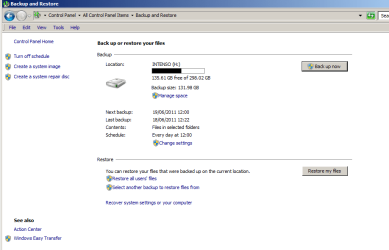
Backup

What does it show now in the same screenshot from above after you had unchecked those 3 boxes under "Data Files"?

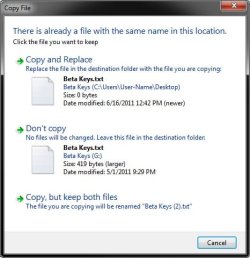
Strange, usually you should get a prompt (something like below) asking if you wanted to replace the file/folder or not when they have the same name.
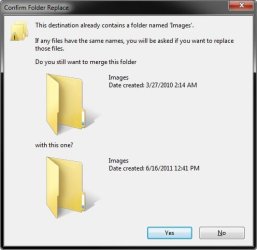
Replace-1.jpgReplace-2.jpg
 

My Computer My Computer

Computer type
PC/Desktop
Computer Manufacturer/Model Number
Self built custom
OS
64-bit Windows 11 Pro for Workstations
CPU
Intel i7-8700K OC'd to 5 GHz
Motherboard
ASUS ROG Maximus XI Formula Z390
Memory
64 GB (4x16GB) G.SKILL TridentZ RGB DDR4 3600 MHz
Graphics Card(s)
ASUS ROG-STRIX-GTX1080TI-O11G-GAMING
Sound Card
Integrated
Monitor(s) Displays
2 x Samsung Odyssey G7 27"
Screen Resolution
2560x1440
Hard Drives
1TB Samsung 990 PRO M.2,
4TB Samsung 990 PRO PRO M.2,
TerraMaster F8 SSD Plus NAS
PSU
Seasonic Prime Titanium 850W
Case
Thermaltake Core P3
Cooling
Corsair Hydro H115i
Keyboard
Logitech wireless K800
Mouse
Logitech MX Master 4
Internet Speed
2 Gb/s Download and 100 Mb/s Upload
Antivirus
Malwarebyte Anti-Malware Premium
Browser
Google Chrome
Other Info
Logitech Z625 speaker system,
Logitech BRIO 4K Pro webcam,
HP Color LaserJet Pro MFP M477fdn,
APC SMART-UPS RT 1000 XL - SURT1000XLI,
Galaxy S23 Plus phone
You're right. Normally I do get that prompt. But not with this external hard drive specifically, which unless you know about it, means that you are unaware that you're not updating the copy. No idea why it happens.

Okay, this update was supposed, today, to take effect at 7pm. Now, the computer was switched off at 7pm. Does the PC have to be on in order for the updated two files from the desktop to transfer across to this external drive?

If it doesn't have to be switched on (the computer) all I can say is that nothing's happened. The two old folders on the external drive are still there ... and not the two updates on the desktop that we've been discussing all this time. So things are now as they were yesterday, despite all this stuff we've done.

I don't know if it makes a difference. But normally (without this backup thing) as I said before you need to first DELETE the old file before replacing it with the updated on on the external drive. Perhaps that applies here (backup and restore function). But if you have to go to all this trouble, the backup and restore facility is pretty pointless and very disappointing since it's supposed to save all this messing about.
 

My Computer My Computer

OS
64 bit
Yeah, the computer will need to be turned on for it to work. :)
 

My Computer My Computer

Computer type
PC/Desktop
Computer Manufacturer/Model Number
Self built custom
OS
64-bit Windows 11 Pro for Workstations
CPU
Intel i7-8700K OC'd to 5 GHz
Motherboard
ASUS ROG Maximus XI Formula Z390
Memory
64 GB (4x16GB) G.SKILL TridentZ RGB DDR4 3600 MHz
Graphics Card(s)
ASUS ROG-STRIX-GTX1080TI-O11G-GAMING
Sound Card
Integrated
Monitor(s) Displays
2 x Samsung Odyssey G7 27"
Screen Resolution
2560x1440
Hard Drives
1TB Samsung 990 PRO M.2,
4TB Samsung 990 PRO PRO M.2,
TerraMaster F8 SSD Plus NAS
PSU
Seasonic Prime Titanium 850W
Case
Thermaltake Core P3
Cooling
Corsair Hydro H115i
Keyboard
Logitech wireless K800
Mouse
Logitech MX Master 4
Internet Speed
2 Gb/s Download and 100 Mb/s Upload
Antivirus
Malwarebyte Anti-Malware Premium
Browser
Google Chrome
Other Info
Logitech Z625 speaker system,
Logitech BRIO 4K Pro webcam,
HP Color LaserJet Pro MFP M477fdn,
APC SMART-UPS RT 1000 XL - SURT1000XLI,
Galaxy S23 Plus phone
But what happens if you set it to work at 3am? In other words, unless you happen to be on your PC at 3am in the morning ... and you also have to remember to be on your computer at the precise time. If you are on vacation, then, it doesn't work either. And when you say it has to be "on" you mean that it actually has to have windows on, rather than it just being on standby (power on but the PC not actually switched on)? Essentially it means that you either have to remember to be working on your PC at the right time, or to at least have it fully switched on even if you may be watching the TV and so aren't actually using it?
 
Last edited:

My Computer My Computer

OS
64 bit
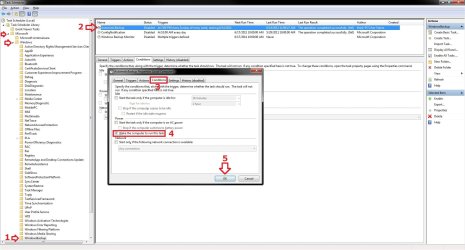
By default, the computer must be turned on and running for the scheduled backup to run. If not, then it will notify you the next time the computer is on that you missed the scheduled backup and for you to run it then.

If you use sleep mode (not hibernate) instead of turning off (shutting down) the computer, then you could go into Task Scheduler (taskschd.msc), and follow the numbered steps in the screenshot below to set the AutomaticBackup task to wake the computer to run.

Task.jpg
 

My Computer My Computer

Computer type
PC/Desktop
Computer Manufacturer/Model Number
Self built custom
OS
64-bit Windows 11 Pro for Workstations
CPU
Intel i7-8700K OC'd to 5 GHz
Motherboard
ASUS ROG Maximus XI Formula Z390
Memory
64 GB (4x16GB) G.SKILL TridentZ RGB DDR4 3600 MHz
Graphics Card(s)
ASUS ROG-STRIX-GTX1080TI-O11G-GAMING
Sound Card
Integrated
Monitor(s) Displays
2 x Samsung Odyssey G7 27"
Screen Resolution
2560x1440
Hard Drives
1TB Samsung 990 PRO M.2,
4TB Samsung 990 PRO PRO M.2,
TerraMaster F8 SSD Plus NAS
PSU
Seasonic Prime Titanium 850W
Case
Thermaltake Core P3
Cooling
Corsair Hydro H115i
Keyboard
Logitech wireless K800
Mouse
Logitech MX Master 4
Internet Speed
2 Gb/s Download and 100 Mb/s Upload
Antivirus
Malwarebyte Anti-Malware Premium
Browser
Google Chrome
Other Info
Logitech Z625 speaker system,
Logitech BRIO 4K Pro webcam,
HP Color LaserJet Pro MFP M477fdn,
APC SMART-UPS RT 1000 XL - SURT1000XLI,
Galaxy S23 Plus phone
Okay, but it still isn't working. I'm on the PC now and I was on it at noon when it was supposed to back up to my Intenso external hard drive. Those two folders I selected from the desktop (see above) were recently updated and I needed to save the updates. Checked at 12.30pm, still working on the computer, and the old files are still on the Intenso, and not the updated files from the desktop that should have replaced them. In other words, it hasn't worked. What next?
 

My Computer My Computer

OS
64 bit
I've adjusted the settings and the update of files on the external drive still hasn't worked using the Backup and Restore function .. .
 

My Computer My Computer

OS
64 bit
Is the external HDD drive turned on as well?

Double check to make sure that the scheduled backup is turned on, and that the AM/PM is set correct for the time. I know, but it is a common mistake that's easily made by anyone. :)
 

My Computer My Computer

Computer type
PC/Desktop
Computer Manufacturer/Model Number
Self built custom
OS
64-bit Windows 11 Pro for Workstations
CPU
Intel i7-8700K OC'd to 5 GHz
Motherboard
ASUS ROG Maximus XI Formula Z390
Memory
64 GB (4x16GB) G.SKILL TridentZ RGB DDR4 3600 MHz
Graphics Card(s)
ASUS ROG-STRIX-GTX1080TI-O11G-GAMING
Sound Card
Integrated
Monitor(s) Displays
2 x Samsung Odyssey G7 27"
Screen Resolution
2560x1440
Hard Drives
1TB Samsung 990 PRO M.2,
4TB Samsung 990 PRO PRO M.2,
TerraMaster F8 SSD Plus NAS
PSU
Seasonic Prime Titanium 850W
Case
Thermaltake Core P3
Cooling
Corsair Hydro H115i
Keyboard
Logitech wireless K800
Mouse
Logitech MX Master 4
Internet Speed
2 Gb/s Download and 100 Mb/s Upload
Antivirus
Malwarebyte Anti-Malware Premium
Browser
Google Chrome
Other Info
Logitech Z625 speaker system,
Logitech BRIO 4K Pro webcam,
HP Color LaserJet Pro MFP M477fdn,
APC SMART-UPS RT 1000 XL - SURT1000XLI,
Galaxy S23 Plus phone
I'll only be able to check tomorrow, since I was out when the scheduled saving was due today. I had to go out, which is part of the problem I was mentioning. It WAS on standby, though, but I don't think the posters who said that simply having it on standby is enough. The machine seems to have to be fully turned on for Backup to work and if it's not fully turned on, nothing happens. And now I've switched it on again, as you can see, there has NOT been a message popping up to remind me that the backup did not take place. So I still don't know what will happen until tomorrow.
 

My Computer My Computer

OS
64 bit
I've used the "Backup Now" button and the updated desktop files (2) have NOT been saved on the external drive as they should have. The external drive only contains the old version of the same files and no error message appear, as though it was going through fine. What next?
 

My Computer My Computer

OS
64 bit
It appears that you will need to have the computer turned fully on at the time you want to create your backups then. :(
 

My Computer My Computer

Computer type
PC/Desktop
Computer Manufacturer/Model Number
Self built custom
OS
64-bit Windows 11 Pro for Workstations
CPU
Intel i7-8700K OC'd to 5 GHz
Motherboard
ASUS ROG Maximus XI Formula Z390
Memory
64 GB (4x16GB) G.SKILL TridentZ RGB DDR4 3600 MHz
Graphics Card(s)
ASUS ROG-STRIX-GTX1080TI-O11G-GAMING
Sound Card
Integrated
Monitor(s) Displays
2 x Samsung Odyssey G7 27"
Screen Resolution
2560x1440
Hard Drives
1TB Samsung 990 PRO M.2,
4TB Samsung 990 PRO PRO M.2,
TerraMaster F8 SSD Plus NAS
PSU
Seasonic Prime Titanium 850W
Case
Thermaltake Core P3
Cooling
Corsair Hydro H115i
Keyboard
Logitech wireless K800
Mouse
Logitech MX Master 4
Internet Speed
2 Gb/s Download and 100 Mb/s Upload
Antivirus
Malwarebyte Anti-Malware Premium
Browser
Google Chrome
Other Info
Logitech Z625 speaker system,
Logitech BRIO 4K Pro webcam,
HP Color LaserJet Pro MFP M477fdn,
APC SMART-UPS RT 1000 XL - SURT1000XLI,
Galaxy S23 Plus phone
But that doesn't address why, when I use (computer fully on) the "Back Up Now" button and it later tells me it backup up successfully. But it hasn't. I know because the old folders and files are still on the external hard drive, and not the updates.
 

My Computer My Computer

OS
64 bit
It's an incremental backup, so it will add to the existing backup folders. If you go through the process of restoring the backup only to the point of selecting what you want to restore, you should see the new ones as well. :)
 

My Computer My Computer

Computer type
PC/Desktop
Computer Manufacturer/Model Number
Self built custom
OS
64-bit Windows 11 Pro for Workstations
CPU
Intel i7-8700K OC'd to 5 GHz
Motherboard
ASUS ROG Maximus XI Formula Z390
Memory
64 GB (4x16GB) G.SKILL TridentZ RGB DDR4 3600 MHz
Graphics Card(s)
ASUS ROG-STRIX-GTX1080TI-O11G-GAMING
Sound Card
Integrated
Monitor(s) Displays
2 x Samsung Odyssey G7 27"
Screen Resolution
2560x1440
Hard Drives
1TB Samsung 990 PRO M.2,
4TB Samsung 990 PRO PRO M.2,
TerraMaster F8 SSD Plus NAS
PSU
Seasonic Prime Titanium 850W
Case
Thermaltake Core P3
Cooling
Corsair Hydro H115i
Keyboard
Logitech wireless K800
Mouse
Logitech MX Master 4
Internet Speed
2 Gb/s Download and 100 Mb/s Upload
Antivirus
Malwarebyte Anti-Malware Premium
Browser
Google Chrome
Other Info
Logitech Z625 speaker system,
Logitech BRIO 4K Pro webcam,
HP Color LaserJet Pro MFP M477fdn,
APC SMART-UPS RT 1000 XL - SURT1000XLI,
Galaxy S23 Plus phone
Can you explain?? What physically do I do?
 

My Computer My Computer

OS
64 bit

My Computer My Computer

Computer type
PC/Desktop
Computer Manufacturer/Model Number
Self built custom
OS
64-bit Windows 11 Pro for Workstations
CPU
Intel i7-8700K OC'd to 5 GHz
Motherboard
ASUS ROG Maximus XI Formula Z390
Memory
64 GB (4x16GB) G.SKILL TridentZ RGB DDR4 3600 MHz
Graphics Card(s)
ASUS ROG-STRIX-GTX1080TI-O11G-GAMING
Sound Card
Integrated
Monitor(s) Displays
2 x Samsung Odyssey G7 27"
Screen Resolution
2560x1440
Hard Drives
1TB Samsung 990 PRO M.2,
4TB Samsung 990 PRO PRO M.2,
TerraMaster F8 SSD Plus NAS
PSU
Seasonic Prime Titanium 850W
Case
Thermaltake Core P3
Cooling
Corsair Hydro H115i
Keyboard
Logitech wireless K800
Mouse
Logitech MX Master 4
Internet Speed
2 Gb/s Download and 100 Mb/s Upload
Antivirus
Malwarebyte Anti-Malware Premium
Browser
Google Chrome
Other Info
Logitech Z625 speaker system,
Logitech BRIO 4K Pro webcam,
HP Color LaserJet Pro MFP M477fdn,
APC SMART-UPS RT 1000 XL - SURT1000XLI,
Galaxy S23 Plus phone
But this seems to relate to restoration. I don't want to restore folders and files, I want to update them. I fact, restoring them is exactly not what I need to do.
 

My Computer My Computer

OS
64 bit
Tutorials and tips give you a great starting point but everyone needs to actually experiment/play with what they want to do.
Just make sure you backup your "most valuable" data the old fashioned way of drag and drop then play with file/folder backup program.
Add one little text file to your documents, select make a backup. Then browse into the backup with the backup program. Go searching for files until you find the new file and convince yourself that it did add to your backup.
 

My Computer My Computer

Computer type
PC/Desktop
Computer Manufacturer/Model Number
Own build
OS
Windows 7x64 Home Premium SP1
CPU
Intel i7 2600k
Motherboard
ASUS P8Z68 Deluxe
Memory
G.Skill Ripjaws (DDR3-1600) 2x4GB
Graphics Card(s)
Nvidia GeForce GTS 450; Intel HD Graphics 3000(GT2+)
Monitor(s) Displays
Dell Ultrasharp IPS panel U2311H, Samsung SyncMaster P2350
Screen Resolution
1920x1080
Hard Drives
Samsung 850 Pro SSD 256GB, Samsung SSD 840 120GB, Seagates 1TB Barracuda ST31000528AS x2
PSU
Seasonic M12II 520W
Case
Lian Li Lancool PC-K60
Cooling
Case: 1x120mm, 3x140mm CPU: Hyper 212+
Keyboard
Logitech MK520 (wireless)
Mouse
Logitech MK520
Internet Speed
6-7 Mbps
Antivirus
Norton Security Premium, Malwarebytes on 2 (MSE on 3rd PC)
Browser
FireFox
Other Info
Audio: Logitech Z523 2.1
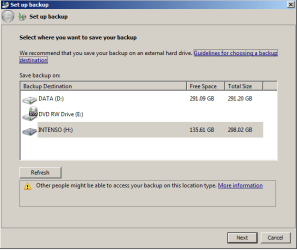
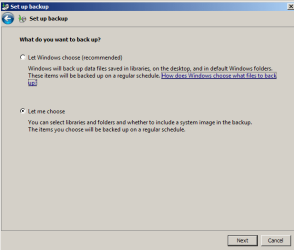
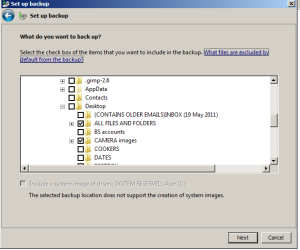
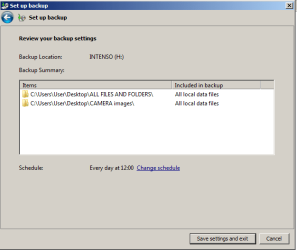
If we can go back a little, here are the settings I'm presently using. Although I can't see where I'm going wrong, perhaps you can spot the problem? The two ticked folders are the ones I need to update on the external hard drive they are supposed to be going to. What I don't understand is how I've ended up with all these difficulties over something that Windows has designed to be very simple to use by someone like me, and presumably that other users don't have to spend all this time over ...
 

Attachments

  • 1.png
    1.png
    11.2 KB · Views: 0
  • 2.png
    2.png
    9.3 KB · Views: 0
  • 3.png
    3.png
    12 KB · Views: 0
  • 4.png
    4.png
    8.6 KB · Views: 0

My Computer My Computer

OS
64 bit
But this seems to relate to restoration. I don't want to restore folders and files, I want to update them. I fact, restoring them is exactly not what I need to do.

The point was for you to go through part of the process to only view the files in your actual backup to see if the files you selected earlier are actually there or not. I know you didn't want to actually restore them. ;)
 

My Computer My Computer

Computer type
PC/Desktop
Computer Manufacturer/Model Number
Self built custom
OS
64-bit Windows 11 Pro for Workstations
CPU
Intel i7-8700K OC'd to 5 GHz
Motherboard
ASUS ROG Maximus XI Formula Z390
Memory
64 GB (4x16GB) G.SKILL TridentZ RGB DDR4 3600 MHz
Graphics Card(s)
ASUS ROG-STRIX-GTX1080TI-O11G-GAMING
Sound Card
Integrated
Monitor(s) Displays
2 x Samsung Odyssey G7 27"
Screen Resolution
2560x1440
Hard Drives
1TB Samsung 990 PRO M.2,
4TB Samsung 990 PRO PRO M.2,
TerraMaster F8 SSD Plus NAS
PSU
Seasonic Prime Titanium 850W
Case
Thermaltake Core P3
Cooling
Corsair Hydro H115i
Keyboard
Logitech wireless K800
Mouse
Logitech MX Master 4
Internet Speed
2 Gb/s Download and 100 Mb/s Upload
Antivirus
Malwarebyte Anti-Malware Premium
Browser
Google Chrome
Other Info
Logitech Z625 speaker system,
Logitech BRIO 4K Pro webcam,
HP Color LaserJet Pro MFP M477fdn,
APC SMART-UPS RT 1000 XL - SURT1000XLI,
Galaxy S23 Plus phone
Step 3 of the tutorial says:

3. If Backup is Not Configured Click on the Set up backup button. (See screenshot below)

But if you look at this screen shot, that option isn't available here.

And can you see anything wrong with these settings? I ask, since all appears in order. Wouldn't the default settings arrange things so that there are no problems? And what are the default setting on this function?

I just find it hard to believe that for the beginner, and doing an apparently straightforward task like this one, there is all these issues. After all, the "back up now" button's there for users to just press for a backup to be performed, job done, period. And not to not do an updated backup ... which wouldn't make any sense, since that's what the button's for.

Not criticising you. I have a friend with a MAC computer, and he doesn't report any problems whatsoever in using a similar function to this one on his PC.
 

Attachments

  • 1.png
    1.png
    17.5 KB · Views: 5
Last edited:

My Computer My Computer

OS
64 bit
Back
Top