Solved Balanced Active Power Plan?

Alexey2912

New member
Member
VIP
Local time
7:44 AM
Messages
1,351
Location
Honolulu
Hi,

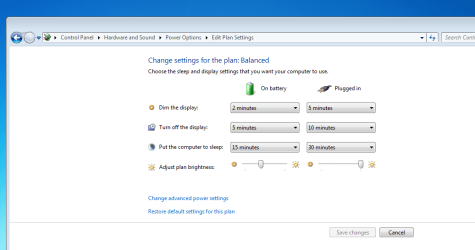
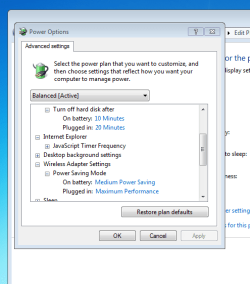
Are these the correct defaults for Balanced Power Plan as shown in the attached shots?

Thanks.
 

Attachments

  • 1.PNG
    1.PNG
    24.3 KB · Views: 0
  • 2.PNG
    2.PNG
    16.2 KB · Views: 29

My Computers

System One System Two

  • Computer type
    Laptop
    Computer Manufacturer/Model Number
    Dell
    OS
    W7 Pro 32bit
    CPU
    Intel(R) Core(TM)2 CPU T7200 @ 2.00GHz
    Motherboard
    Dell Inc. 0CF456
    Memory
    4.00 GB
    Graphics Card(s)
    NVIDIA GTX 7980 512 MB
    Sound Card
    (1) HD Pro Webcam C910 (2) Bluetooth Stereo Audio (3) Si
    Hard Drives
    SSD
    Browser
    Brave
  • Computer type
    PC/Desktop
    System Manufacturer/Model Number
    Dell XPS Special Edition 8940
    OS
    W10 Pro
    CPU
    core i7 11th gen, 11700, 2.5-4.9 GHZ
    Memory
    32 GBB, 2 X16 GB @2933 MHz.
    Graphics Card(s)
    NVIDIA GeForce RTX 3070 8GB GDDR6
    Monitor(s) Displays
    Dell UltraSharp 32 4K monitor.
    Hard Drives
    1. 1TB M.2 PCIe NVMe SSD.

    2. 1TB 7200 rpm 3.5" SATA Hard Drive.
    PSU
    500W.
    Case
    Mineral White Bezel Chassis.
Those are the settings that I see when I click on the link named "Restore default setting for this plan".

So, I guess the answer to your question is: yes.
 

My Computer

Computer type
Laptop
Computer Manufacturer/Model Number
Employer provided Dell Latitude
OS
W7 Pro SP1 64bit
CPU
i7
Memory
8GB
Graphics Card(s)
Intel HD Graphics
Hard Drives
crappy SSD
Antivirus
Employer mandated Symantec Endpoint Protection
Browser
Pale Moon 64bit, IE11 64bit & Chrome 64bit
Thanks for replying. Is the lap supposed to go on sleep after 15 and 30 mins respectively in Balanced Power Plan or Never sleep both for plugged in and on battery?
 

My Computers

System One System Two

  • Computer type
    Laptop
    Computer Manufacturer/Model Number
    Dell
    OS
    W7 Pro 32bit
    CPU
    Intel(R) Core(TM)2 CPU T7200 @ 2.00GHz
    Motherboard
    Dell Inc. 0CF456
    Memory
    4.00 GB
    Graphics Card(s)
    NVIDIA GTX 7980 512 MB
    Sound Card
    (1) HD Pro Webcam C910 (2) Bluetooth Stereo Audio (3) Si
    Hard Drives
    SSD
    Browser
    Brave
  • Computer type
    PC/Desktop
    System Manufacturer/Model Number
    Dell XPS Special Edition 8940
    OS
    W10 Pro
    CPU
    core i7 11th gen, 11700, 2.5-4.9 GHZ
    Memory
    32 GBB, 2 X16 GB @2933 MHz.
    Graphics Card(s)
    NVIDIA GeForce RTX 3070 8GB GDDR6
    Monitor(s) Displays
    Dell UltraSharp 32 4K monitor.
    Hard Drives
    1. 1TB M.2 PCIe NVMe SSD.

    2. 1TB 7200 rpm 3.5" SATA Hard Drive.
    PSU
    500W.
    Case
    Mineral White Bezel Chassis.
Sleep after 15 and 30 mins is correct for the default settings.
 

My Computer

Computer type
Laptop
Computer Manufacturer/Model Number
Employer provided Dell Latitude
OS
W7 Pro SP1 64bit
CPU
i7
Memory
8GB
Graphics Card(s)
Intel HD Graphics
Hard Drives
crappy SSD
Antivirus
Employer mandated Symantec Endpoint Protection
Browser
Pale Moon 64bit, IE11 64bit & Chrome 64bit

My Computers

System One System Two

  • Computer type
    Laptop
    Computer Manufacturer/Model Number
    Dell
    OS
    W7 Pro 32bit
    CPU
    Intel(R) Core(TM)2 CPU T7200 @ 2.00GHz
    Motherboard
    Dell Inc. 0CF456
    Memory
    4.00 GB
    Graphics Card(s)
    NVIDIA GTX 7980 512 MB
    Sound Card
    (1) HD Pro Webcam C910 (2) Bluetooth Stereo Audio (3) Si
    Hard Drives
    SSD
    Browser
    Brave
  • Computer type
    PC/Desktop
    System Manufacturer/Model Number
    Dell XPS Special Edition 8940
    OS
    W10 Pro
    CPU
    core i7 11th gen, 11700, 2.5-4.9 GHZ
    Memory
    32 GBB, 2 X16 GB @2933 MHz.
    Graphics Card(s)
    NVIDIA GeForce RTX 3070 8GB GDDR6
    Monitor(s) Displays
    Dell UltraSharp 32 4K monitor.
    Hard Drives
    1. 1TB M.2 PCIe NVMe SSD.

    2. 1TB 7200 rpm 3.5" SATA Hard Drive.
    PSU
    500W.
    Case
    Mineral White Bezel Chassis.

My Computer

Computer type
Laptop
Computer Manufacturer/Model Number
Employer provided Dell Latitude
OS
W7 Pro SP1 64bit
CPU
i7
Memory
8GB
Graphics Card(s)
Intel HD Graphics
Hard Drives
crappy SSD
Antivirus
Employer mandated Symantec Endpoint Protection
Browser
Pale Moon 64bit, IE11 64bit & Chrome 64bit
Thanks for the reply.

Could it be the cooler fan tray on which the lap is placed and is attached to to lap via usb?

At times it goes to sleep but mostly doesn't cause the tray needs power from the lap to keep running cause is attached to it?
 

My Computers

System One System Two

  • Computer type
    Laptop
    Computer Manufacturer/Model Number
    Dell
    OS
    W7 Pro 32bit
    CPU
    Intel(R) Core(TM)2 CPU T7200 @ 2.00GHz
    Motherboard
    Dell Inc. 0CF456
    Memory
    4.00 GB
    Graphics Card(s)
    NVIDIA GTX 7980 512 MB
    Sound Card
    (1) HD Pro Webcam C910 (2) Bluetooth Stereo Audio (3) Si
    Hard Drives
    SSD
    Browser
    Brave
  • Computer type
    PC/Desktop
    System Manufacturer/Model Number
    Dell XPS Special Edition 8940
    OS
    W10 Pro
    CPU
    core i7 11th gen, 11700, 2.5-4.9 GHZ
    Memory
    32 GBB, 2 X16 GB @2933 MHz.
    Graphics Card(s)
    NVIDIA GeForce RTX 3070 8GB GDDR6
    Monitor(s) Displays
    Dell UltraSharp 32 4K monitor.
    Hard Drives
    1. 1TB M.2 PCIe NVMe SSD.

    2. 1TB 7200 rpm 3.5" SATA Hard Drive.
    PSU
    500W.
    Case
    Mineral White Bezel Chassis.

My Computer

Computer type
Laptop
Computer Manufacturer/Model Number
Employer provided Dell Latitude
OS
W7 Pro SP1 64bit
CPU
i7
Memory
8GB
Graphics Card(s)
Intel HD Graphics
Hard Drives
crappy SSD
Antivirus
Employer mandated Symantec Endpoint Protection
Browser
Pale Moon 64bit, IE11 64bit & Chrome 64bit
I appreciate your expert assistance.
 

My Computers

System One System Two

  • Computer type
    Laptop
    Computer Manufacturer/Model Number
    Dell
    OS
    W7 Pro 32bit
    CPU
    Intel(R) Core(TM)2 CPU T7200 @ 2.00GHz
    Motherboard
    Dell Inc. 0CF456
    Memory
    4.00 GB
    Graphics Card(s)
    NVIDIA GTX 7980 512 MB
    Sound Card
    (1) HD Pro Webcam C910 (2) Bluetooth Stereo Audio (3) Si
    Hard Drives
    SSD
    Browser
    Brave
  • Computer type
    PC/Desktop
    System Manufacturer/Model Number
    Dell XPS Special Edition 8940
    OS
    W10 Pro
    CPU
    core i7 11th gen, 11700, 2.5-4.9 GHZ
    Memory
    32 GBB, 2 X16 GB @2933 MHz.
    Graphics Card(s)
    NVIDIA GeForce RTX 3070 8GB GDDR6
    Monitor(s) Displays
    Dell UltraSharp 32 4K monitor.
    Hard Drives
    1. 1TB M.2 PCIe NVMe SSD.

    2. 1TB 7200 rpm 3.5" SATA Hard Drive.
    PSU
    500W.
    Case
    Mineral White Bezel Chassis.
Does the laptop go to sleep if you click Sleep ?

Is it just a problem that AUTO sleep does not work ?
 

My Computer

Computer type
PC/Desktop
Computer Manufacturer/Model Number
home built
OS
Multi-Boot W7_Pro_x64 W8.1_Pro_x64 W10_Pro_x64 +Linux_VMs +Chromium_VM
CPU
AMD Athlon II x4 620
Motherboard
Gigabyte GA-MA785G-UD3H
Memory
6GB GSkill DDR2 800
Graphics Card(s)
AMD 4670 GPU + AMD 4200 IGP
Sound Card
on board Realtek ALC889A
Monitor(s) Displays
RCA 40" LCD TV, Insignia 32" LCD TV, HP 15" LCD monitor
Screen Resolution
1680 x 1050
Hard Drives
OCZ Vertex 3 120GB,
Samsung F3 1TB (3),
Several others - WD, Seagate, Hitachi, ...
PSU
Corsair 500 W
Case
Rosewill mid tower
Cooling
CM 90mm rifle
Keyboard
Gyration wireless, Logitech wireless, Dell USB wired
Mouse
Gyration wireless, Logitech wireless, V7 USB wired
Internet Speed
Spectrum - 100Mbps D / 10Mbps U
Antivirus
Avast, MBAM3, EMET, WinPatrol
Browser
Pale Moon, Firefox, IE
Other Info
2 multi-boot PC's
Mainly HTPC/Office/Gen purpose (no gaming).
Trendnet USB KVM.
LG DVD burner/Blue Ray Player.
Tray system for removable SATA backup drives.

Not currently OCd, under-volted.
I use Hybrid sleep, rarely re-boot or shutdown.

Hauppauge HD-PVR, Avermedia PCIe TV Tuner, Hauppauge PCI TV Tuner.
Where would the click sleep be?
 

My Computers

System One System Two

  • Computer type
    Laptop
    Computer Manufacturer/Model Number
    Dell
    OS
    W7 Pro 32bit
    CPU
    Intel(R) Core(TM)2 CPU T7200 @ 2.00GHz
    Motherboard
    Dell Inc. 0CF456
    Memory
    4.00 GB
    Graphics Card(s)
    NVIDIA GTX 7980 512 MB
    Sound Card
    (1) HD Pro Webcam C910 (2) Bluetooth Stereo Audio (3) Si
    Hard Drives
    SSD
    Browser
    Brave
  • Computer type
    PC/Desktop
    System Manufacturer/Model Number
    Dell XPS Special Edition 8940
    OS
    W10 Pro
    CPU
    core i7 11th gen, 11700, 2.5-4.9 GHZ
    Memory
    32 GBB, 2 X16 GB @2933 MHz.
    Graphics Card(s)
    NVIDIA GeForce RTX 3070 8GB GDDR6
    Monitor(s) Displays
    Dell UltraSharp 32 4K monitor.
    Hard Drives
    1. 1TB M.2 PCIe NVMe SSD.

    2. 1TB 7200 rpm 3.5" SATA Hard Drive.
    PSU
    500W.
    Case
    Mineral White Bezel Chassis.
Click on the TaskBar Start button (lower left corner) > Shutdown arrow > Sleep
 

My Computer

Computer type
PC/Desktop
Computer Manufacturer/Model Number
home built
OS
Multi-Boot W7_Pro_x64 W8.1_Pro_x64 W10_Pro_x64 +Linux_VMs +Chromium_VM
CPU
AMD Athlon II x4 620
Motherboard
Gigabyte GA-MA785G-UD3H
Memory
6GB GSkill DDR2 800
Graphics Card(s)
AMD 4670 GPU + AMD 4200 IGP
Sound Card
on board Realtek ALC889A
Monitor(s) Displays
RCA 40" LCD TV, Insignia 32" LCD TV, HP 15" LCD monitor
Screen Resolution
1680 x 1050
Hard Drives
OCZ Vertex 3 120GB,
Samsung F3 1TB (3),
Several others - WD, Seagate, Hitachi, ...
PSU
Corsair 500 W
Case
Rosewill mid tower
Cooling
CM 90mm rifle
Keyboard
Gyration wireless, Logitech wireless, Dell USB wired
Mouse
Gyration wireless, Logitech wireless, V7 USB wired
Internet Speed
Spectrum - 100Mbps D / 10Mbps U
Antivirus
Avast, MBAM3, EMET, WinPatrol
Browser
Pale Moon, Firefox, IE
Other Info
2 multi-boot PC's
Mainly HTPC/Office/Gen purpose (no gaming).
Trendnet USB KVM.
LG DVD burner/Blue Ray Player.
Tray system for removable SATA backup drives.

Not currently OCd, under-volted.
I use Hybrid sleep, rarely re-boot or shutdown.

Hauppauge HD-PVR, Avermedia PCIe TV Tuner, Hauppauge PCI TV Tuner.
Apologize for my ignorance, yes it goes to sleep.
 

My Computers

System One System Two

  • Computer type
    Laptop
    Computer Manufacturer/Model Number
    Dell
    OS
    W7 Pro 32bit
    CPU
    Intel(R) Core(TM)2 CPU T7200 @ 2.00GHz
    Motherboard
    Dell Inc. 0CF456
    Memory
    4.00 GB
    Graphics Card(s)
    NVIDIA GTX 7980 512 MB
    Sound Card
    (1) HD Pro Webcam C910 (2) Bluetooth Stereo Audio (3) Si
    Hard Drives
    SSD
    Browser
    Brave
  • Computer type
    PC/Desktop
    System Manufacturer/Model Number
    Dell XPS Special Edition 8940
    OS
    W10 Pro
    CPU
    core i7 11th gen, 11700, 2.5-4.9 GHZ
    Memory
    32 GBB, 2 X16 GB @2933 MHz.
    Graphics Card(s)
    NVIDIA GeForce RTX 3070 8GB GDDR6
    Monitor(s) Displays
    Dell UltraSharp 32 4K monitor.
    Hard Drives
    1. 1TB M.2 PCIe NVMe SSD.

    2. 1TB 7200 rpm 3.5" SATA Hard Drive.
    PSU
    500W.
    Case
    Mineral White Bezel Chassis.

My Computer

Computer type
PC/Desktop
Computer Manufacturer/Model Number
home built
OS
Multi-Boot W7_Pro_x64 W8.1_Pro_x64 W10_Pro_x64 +Linux_VMs +Chromium_VM
CPU
AMD Athlon II x4 620
Motherboard
Gigabyte GA-MA785G-UD3H
Memory
6GB GSkill DDR2 800
Graphics Card(s)
AMD 4670 GPU + AMD 4200 IGP
Sound Card
on board Realtek ALC889A
Monitor(s) Displays
RCA 40" LCD TV, Insignia 32" LCD TV, HP 15" LCD monitor
Screen Resolution
1680 x 1050
Hard Drives
OCZ Vertex 3 120GB,
Samsung F3 1TB (3),
Several others - WD, Seagate, Hitachi, ...
PSU
Corsair 500 W
Case
Rosewill mid tower
Cooling
CM 90mm rifle
Keyboard
Gyration wireless, Logitech wireless, Dell USB wired
Mouse
Gyration wireless, Logitech wireless, V7 USB wired
Internet Speed
Spectrum - 100Mbps D / 10Mbps U
Antivirus
Avast, MBAM3, EMET, WinPatrol
Browser
Pale Moon, Firefox, IE
Other Info
2 multi-boot PC's
Mainly HTPC/Office/Gen purpose (no gaming).
Trendnet USB KVM.
LG DVD burner/Blue Ray Player.
Tray system for removable SATA backup drives.

Not currently OCd, under-volted.
I use Hybrid sleep, rarely re-boot or shutdown.

Hauppauge HD-PVR, Avermedia PCIe TV Tuner, Hauppauge PCI TV Tuner.
Microsoft Windows [Version 6.1.7601]
Copyright (c) 2009 Microsoft Corporation. All rights reserved.

C:\Users\XPS>powercfg -requests
DISPLAY:
None.

SYSTEM:
None.

AWAYMODE:
None.


C:\Users\XPS>
 

My Computers

System One System Two

  • Computer type
    Laptop
    Computer Manufacturer/Model Number
    Dell
    OS
    W7 Pro 32bit
    CPU
    Intel(R) Core(TM)2 CPU T7200 @ 2.00GHz
    Motherboard
    Dell Inc. 0CF456
    Memory
    4.00 GB
    Graphics Card(s)
    NVIDIA GTX 7980 512 MB
    Sound Card
    (1) HD Pro Webcam C910 (2) Bluetooth Stereo Audio (3) Si
    Hard Drives
    SSD
    Browser
    Brave
  • Computer type
    PC/Desktop
    System Manufacturer/Model Number
    Dell XPS Special Edition 8940
    OS
    W10 Pro
    CPU
    core i7 11th gen, 11700, 2.5-4.9 GHZ
    Memory
    32 GBB, 2 X16 GB @2933 MHz.
    Graphics Card(s)
    NVIDIA GeForce RTX 3070 8GB GDDR6
    Monitor(s) Displays
    Dell UltraSharp 32 4K monitor.
    Hard Drives
    1. 1TB M.2 PCIe NVMe SSD.

    2. 1TB 7200 rpm 3.5" SATA Hard Drive.
    PSU
    500W.
    Case
    Mineral White Bezel Chassis.
Well then requests isn't your problem.
From an elevated command prompt use this command to get a report.
powercfg -energy

Post the report and I'll look at it and see if I can find anything.
You may have to save the report to somewhere like the desktop before you can copy/paste it ...
Been a while since I used a energy report, and I'm on Win8 right now.
 

My Computer

Computer type
PC/Desktop
Computer Manufacturer/Model Number
home built
OS
Multi-Boot W7_Pro_x64 W8.1_Pro_x64 W10_Pro_x64 +Linux_VMs +Chromium_VM
CPU
AMD Athlon II x4 620
Motherboard
Gigabyte GA-MA785G-UD3H
Memory
6GB GSkill DDR2 800
Graphics Card(s)
AMD 4670 GPU + AMD 4200 IGP
Sound Card
on board Realtek ALC889A
Monitor(s) Displays
RCA 40" LCD TV, Insignia 32" LCD TV, HP 15" LCD monitor
Screen Resolution
1680 x 1050
Hard Drives
OCZ Vertex 3 120GB,
Samsung F3 1TB (3),
Several others - WD, Seagate, Hitachi, ...
PSU
Corsair 500 W
Case
Rosewill mid tower
Cooling
CM 90mm rifle
Keyboard
Gyration wireless, Logitech wireless, Dell USB wired
Mouse
Gyration wireless, Logitech wireless, V7 USB wired
Internet Speed
Spectrum - 100Mbps D / 10Mbps U
Antivirus
Avast, MBAM3, EMET, WinPatrol
Browser
Pale Moon, Firefox, IE
Other Info
2 multi-boot PC's
Mainly HTPC/Office/Gen purpose (no gaming).
Trendnet USB KVM.
LG DVD burner/Blue Ray Player.
Tray system for removable SATA backup drives.

Not currently OCd, under-volted.
I use Hybrid sleep, rarely re-boot or shutdown.

Hauppauge HD-PVR, Avermedia PCIe TV Tuner, Hauppauge PCI TV Tuner.
Microsoft Windows [Version 6.1.7601]
Copyright (c) 2009 Microsoft Corporation. All rights reserved.

C:\Users\XPS>powercfg -energy
Enabling tracing for 60 seconds...
Observing system behavior...
Analyzing trace data...
Analysis complete.

Energy efficiency problems were found.

9 Errors
12 Warnings
22 Informational

See C:\Users\XPS\energy-report.html for more details.

C:\Users\XPS>
 

My Computers

System One System Two

  • Computer type
    Laptop
    Computer Manufacturer/Model Number
    Dell
    OS
    W7 Pro 32bit
    CPU
    Intel(R) Core(TM)2 CPU T7200 @ 2.00GHz
    Motherboard
    Dell Inc. 0CF456
    Memory
    4.00 GB
    Graphics Card(s)
    NVIDIA GTX 7980 512 MB
    Sound Card
    (1) HD Pro Webcam C910 (2) Bluetooth Stereo Audio (3) Si
    Hard Drives
    SSD
    Browser
    Brave
  • Computer type
    PC/Desktop
    System Manufacturer/Model Number
    Dell XPS Special Edition 8940
    OS
    W10 Pro
    CPU
    core i7 11th gen, 11700, 2.5-4.9 GHZ
    Memory
    32 GBB, 2 X16 GB @2933 MHz.
    Graphics Card(s)
    NVIDIA GeForce RTX 3070 8GB GDDR6
    Monitor(s) Displays
    Dell UltraSharp 32 4K monitor.
    Hard Drives
    1. 1TB M.2 PCIe NVMe SSD.

    2. 1TB 7200 rpm 3.5" SATA Hard Drive.
    PSU
    500W.
    Case
    Mineral White Bezel Chassis.
Power Efficiency Diagnostics Report

Computer Name XPS-PC
Scan Time 2014-06-02T14:42:56Z
Scan Duration 60 seconds
System Manufacturer Dell Inc.
System Product Name MXG061
BIOS Date 06/27/2007
BIOS Version A07
OS Build 7601
Platform Role PlatformRoleMobile
Plugged In true
Process Count 55
Thread Count 823
Report GUID {4370f88b-5187-44ab-a671-638e45f4ec45}
Analysis Results

Errors

Power Policy:802.11 Radio Power Policy is Maximum Performance (On Battery)
The current power policy for 802.11-compatible wireless network adapters is not configured to use low-power modes.
USB Suspend:USB Device not Entering Suspend
The USB device did not enter the Suspend state. Processor power management may be prevented if a USB device does not enter the Suspend state when not in use.
Device Name USB Input Device
Host Controller ID PCI\VEN_8086&DEV_27C8
Host Controller Location PCI bus 0, device 29, function 0
Device ID USB\VID_0A5C&PID_4503
Port Path 1,4,3
USB Suspend:USB Device not Entering Suspend
The USB device did not enter the Suspend state. Processor power management may be prevented if a USB device does not enter the Suspend state when not in use.
Device Name Logitech USB Camera (HD Pro Webcam C910)
Host Controller ID PCI\VEN_8086&DEV_27CC
Host Controller Location PCI bus 0, device 29, function 7
Device ID USB\VID_046D&PID_0821
Port Path 4
USB Suspend:USB Device not Entering Suspend
The USB device did not enter the Suspend state. Processor power management may be prevented if a USB device does not enter the Suspend state when not in use.
Device Name Generic USB Hub
Host Controller ID PCI\VEN_8086&DEV_27C8
Host Controller Location PCI bus 0, device 29, function 0
Device ID USB\VID_0A5C&PID_4500
Port Path 1,4
USB Suspend:USB Device not Entering Suspend
The USB device did not enter the Suspend state. Processor power management may be prevented if a USB device does not enter the Suspend state when not in use.
Device Name Generic USB Hub
Host Controller ID PCI\VEN_8086&DEV_27C8
Host Controller Location PCI bus 0, device 29, function 0
Device ID USB\VID_413C&PID_A005
Port Path 1
USB Suspend:USB Device not Entering Suspend
The USB device did not enter the Suspend state. Processor power management may be prevented if a USB device does not enter the Suspend state when not in use.
Device Name USB Root Hub
Host Controller ID PCI\VEN_8086&DEV_27C8
Host Controller Location PCI bus 0, device 29, function 0
Device ID USB\VID_8086&PID_27C8
Port Path
USB Suspend:USB Device not Entering Suspend
The USB device did not enter the Suspend state. Processor power management may be prevented if a USB device does not enter the Suspend state when not in use.
Device Name USB Root Hub
Host Controller ID PCI\VEN_8086&DEV_27CC
Host Controller Location PCI bus 0, device 29, function 7
Device ID USB\VID_8086&PID_27CC
Port Path
USB Suspend:USB Device not Entering Suspend
The USB device did not enter the Suspend state. Processor power management may be prevented if a USB device does not enter the Suspend state when not in use.
Device Name USB Input Device
Host Controller ID PCI\VEN_8086&DEV_27C8
Host Controller Location PCI bus 0, device 29, function 0
Device ID USB\VID_0A5C&PID_4502
Port Path 1,4,2
CPU Utilization:Processor utilization is high
The average processor utilization during the trace was high. The system will consume less power when the average processor utilization is very low. Review processor utilization for individual processes to determine which applications and services contribute the most to total processor utilization.
Average Utilization (%) 5.46
Warnings

Platform Timer Resolution:Platform Timer Resolution
The default platform timer resolution is 15.6ms (15625000ns) and should be used whenever the system is idle. If the timer resolution is increased, processor power management technologies may not be effective. The timer resolution may be increased due to multimedia playback or graphical animations.
Current Timer Resolution (100ns units) 10000
Maximum Timer Period (100ns units) 156001
Platform Timer Resolution:Outstanding Timer Request
A program or service has requested a timer resolution smaller than the platform maximum timer resolution.
Requested Period 10000
Requesting Process ID 6088
Requesting Process Path \Device\HarddiskVolume2\Program Files\Google\Chrome\Application\chrome.exe
Platform Timer Resolution:Outstanding Timer Request
A program or service has requested a timer resolution smaller than the platform maximum timer resolution.
Requested Period 10000
Requesting Process ID 2336
Requesting Process Path \Device\HarddiskVolume2\Program Files\Google\Chrome\Application\chrome.exe
Platform Timer Resolution:Outstanding Timer Request
A program or service has requested a timer resolution smaller than the platform maximum timer resolution.
Requested Period 10000
Requesting Process ID 1096
Requesting Process Path \Device\HarddiskVolume2\Program Files\Google\Chrome\Application\chrome.exe
Platform Timer Resolution:Outstanding Timer Request
A program or service has requested a timer resolution smaller than the platform maximum timer resolution.
Requested Period 10000
Requesting Process ID 2984
Requesting Process Path \Device\HarddiskVolume2\Program Files\Google\Chrome\Application\chrome.exe
Platform Timer Resolution:Outstanding Timer Request
A program or service has requested a timer resolution smaller than the platform maximum timer resolution.
Requested Period 100000
Requesting Process ID 1044
Requesting Process Path \Device\HarddiskVolume2\Windows\System32\svchost.exe
Power Policy:802.11 Radio Power Policy is Maximum Performance (Plugged In)
The current power policy for 802.11-compatible wireless network adapters is not configured to use low-power modes.
CPU Utilization:Individual process with significant processor utilization.
This process is responsible for a significant portion of the total processor utilization recorded during the trace.
Process Name I8kfanGUI.exe
PID 3472
Average Utilization (%) 0.71
Module Average Module Utilization (%)
\??\C:\Windows\system32\drivers\fanio.sys 0.61
\SystemRoot\system32\ntkrnlpa.exe 0.05
\Device\HarddiskVolume2\Program Files\I8kfanGUI\I8kfanGUI.exe 0.02
CPU Utilization:Individual process with significant processor utilization.
This process is responsible for a significant portion of the total processor utilization recorded during the trace.
Process Name chrome.exe
PID 2440
Average Utilization (%) 0.56
Module Average Module Utilization (%)
\SystemRoot\system32\ntkrnlpa.exe 0.26
\Device\HarddiskVolume2\Program Files\Google\Chrome\Application\35.0.1916.114\chrome.dll 0.17
\Device\HarddiskVolume2\Windows\System32\ntdll.dll 0.03
CPU Utilization:Individual process with significant processor utilization.
This process is responsible for a significant portion of the total processor utilization recorded during the trace.
Process Name chrome.exe
PID 1096
Average Utilization (%) 0.52
Module Average Module Utilization (%)
\Device\HarddiskVolume2\Program Files\Google\Chrome\Application\35.0.1916.114\chrome_child.dll 0.38
0.07
\SystemRoot\system32\ntkrnlpa.exe 0.02
CPU Utilization:Individual process with significant processor utilization.
This process is responsible for a significant portion of the total processor utilization recorded during the trace.
Process Name System
PID 4
Average Utilization (%) 0.31
Module Average Module Utilization (%)
\SystemRoot\system32\ntkrnlpa.exe 0.15
\SystemRoot\system32\halmacpi.dll 0.10
\SystemRoot\System32\Drivers\cng.sys 0.02
CPU Utilization:Individual process with significant processor utilization.
This process is responsible for a significant portion of the total processor utilization recorded during the trace.
Process Name Skype.exe
PID 200
Average Utilization (%) 0.25
Module Average Module Utilization (%)
\Device\HarddiskVolume2\Program Files\Skype\Phone\Skype.exe 0.15
\SystemRoot\system32\ntkrnlpa.exe 0.03
\SystemRoot\System32\win32k.sys 0.02
Information

Platform Timer Resolution:Timer Request Stack
The stack of modules responsible for the lowest platform timer setting in this process.
Requested Period 10000
Requesting Process ID 6088
Requesting Process Path \Device\HarddiskVolume2\Program Files\Google\Chrome\Application\chrome.exe
Calling Module Stack \Device\HarddiskVolume2\Windows\System32\ntdll.dll
\Device\HarddiskVolume2\Windows\System32\winmm.dll
\Device\HarddiskVolume2\Program Files\Google\Chrome\Application\35.0.1916.114\chrome_child.dll
Platform Timer Resolution:Timer Request Stack
The stack of modules responsible for the lowest platform timer setting in this process.
Requested Period 10000
Requesting Process ID 2336
Requesting Process Path \Device\HarddiskVolume2\Program Files\Google\Chrome\Application\chrome.exe
Calling Module Stack \Device\HarddiskVolume2\Windows\System32\ntdll.dll
\Device\HarddiskVolume2\Windows\System32\winmm.dll
\Device\HarddiskVolume2\Program Files\Google\Chrome\Application\35.0.1916.114\chrome_child.dll
Unknown Module
Platform Timer Resolution:Timer Request Stack
The stack of modules responsible for the lowest platform timer setting in this process.
Requested Period 10000
Requesting Process ID 1096
Requesting Process Path \Device\HarddiskVolume2\Program Files\Google\Chrome\Application\chrome.exe
Calling Module Stack \Device\HarddiskVolume2\Windows\System32\ntdll.dll
\Device\HarddiskVolume2\Windows\System32\winmm.dll
\Device\HarddiskVolume2\Program Files\Google\Chrome\Application\35.0.1916.114\chrome_child.dll
\Device\HarddiskVolume2\Program Files\Google\Chrome\Application\chrome.exe
\Device\HarddiskVolume2\Windows\System32\kernel32.dll
\Device\HarddiskVolume2\Windows\System32\ntdll.dll
Platform Timer Resolution:Timer Request Stack
The stack of modules responsible for the lowest platform timer setting in this process.
Requested Period 10000
Requesting Process ID 2984
Requesting Process Path \Device\HarddiskVolume2\Program Files\Google\Chrome\Application\chrome.exe
Calling Module Stack \Device\HarddiskVolume2\Windows\System32\ntdll.dll
\Device\HarddiskVolume2\Windows\System32\winmm.dll
\Device\HarddiskVolume2\Windows\System32\d3d9.dll
\Device\HarddiskVolume2\Program Files\Google\Chrome\Application\35.0.1916.114\libglesv2.dll
\Device\HarddiskVolume2\Program Files\Google\Chrome\Application\35.0.1916.114\libegl.dll
\Device\HarddiskVolume2\Program Files\Google\Chrome\Application\35.0.1916.114\chrome_child.dll
Platform Timer Resolution:Timer Request Stack
The stack of modules responsible for the lowest platform timer setting in this process.
Requested Period 10000
Requesting Process ID 1044
Requesting Process Path \Device\HarddiskVolume2\Windows\System32\svchost.exe
Calling Module Stack \Device\HarddiskVolume2\Windows\System32\ntdll.dll
\Device\HarddiskVolume2\Windows\System32\mmcss.dll
\Device\HarddiskVolume2\Windows\System32\ntdll.dll
\Device\HarddiskVolume2\Windows\System32\mmcss.dll
\Device\HarddiskVolume2\Windows\System32\sechost.dll
\Device\HarddiskVolume2\Windows\System32\kernel32.dll
\Device\HarddiskVolume2\Windows\System32\ntdll.dll
Power Policy:Active Power Plan
The current power plan in use
Plan Name Custom
Plan GUID {47c8dfc6-44b7-472c-a51c-394ea02d1222}
Power Policy:Power Plan Personality (On Battery)
The personality of the current power plan when the system is on battery power.
Personality Balanced
Power Policy:Video Quality (On Battery)
Enables Windows Media Player to optimize for quality or power savings when playing video.
Quality Mode Balance Video Quality and Power Savings
Power Policy:Power Plan Personality (Plugged In)
The personality of the current power plan when the system is plugged in.
Personality Balanced
Power Policy:Video quality (Plugged In)
Enables Windows Media Player to optimize for quality or power savings when playing video.
Quality Mode Optimize for Video Quality
System Availability Requests:Analysis Success
Analysis was successful. No energy efficiency problems were found. No information was returned.
Battery:Battery Information
Battery ID 1875SMPDELL D55517
Manufacturer SMP
Serial Number 1875
Chemistry LION
Long Term 1
Design Capacity 79920
Last Full Charge 64080
Platform Power Management Capabilities:Supported Sleep States
Sleep states allow the computer to enter low-power modes after a period of inactivity. The S3 sleep state is the default sleep state for Windows platforms. The S3 sleep state consumes only enough power to preserve memory contents and allow the computer to resume working quickly. Very few platforms support the S1 or S2 Sleep states.
S1 Sleep Supported false
S2 Sleep Supported false
S3 Sleep Supported true
S4 Sleep Supported true
Platform Power Management Capabilities:Adaptive Display Brightness is supported.
This computer enables Windows to automatically control the brightness of the integrated display.
Platform Power Management Capabilities:Processor Power Management Capabilities
Effective processor power management enables the computer to automatically balance performance and energy consumption.
Group 0
Index 0
Idle (C) State Count 3
Performance (P) State Count 4
Throttle (T) State Count 8
Platform Power Management Capabilities:Processor Power Management Capabilities
Effective processor power management enables the computer to automatically balance performance and energy consumption.
Group 0
Index 1
Idle (C) State Count 3
Performance (P) State Count 4
Throttle (T) State Count 8

 

My Computers

System One System Two

  • Computer type
    Laptop
    Computer Manufacturer/Model Number
    Dell
    OS
    W7 Pro 32bit
    CPU
    Intel(R) Core(TM)2 CPU T7200 @ 2.00GHz
    Motherboard
    Dell Inc. 0CF456
    Memory
    4.00 GB
    Graphics Card(s)
    NVIDIA GTX 7980 512 MB
    Sound Card
    (1) HD Pro Webcam C910 (2) Bluetooth Stereo Audio (3) Si
    Hard Drives
    SSD
    Browser
    Brave
  • Computer type
    PC/Desktop
    System Manufacturer/Model Number
    Dell XPS Special Edition 8940
    OS
    W10 Pro
    CPU
    core i7 11th gen, 11700, 2.5-4.9 GHZ
    Memory
    32 GBB, 2 X16 GB @2933 MHz.
    Graphics Card(s)
    NVIDIA GeForce RTX 3070 8GB GDDR6
    Monitor(s) Displays
    Dell UltraSharp 32 4K monitor.
    Hard Drives
    1. 1TB M.2 PCIe NVMe SSD.

    2. 1TB 7200 rpm 3.5" SATA Hard Drive.
    PSU
    500W.
    Case
    Mineral White Bezel Chassis.
As attachment.

The browser report wouldn't get uploaded?

At the moment am using a Custom created Power Plan.
 

My Computers

System One System Two

  • Computer type
    Laptop
    Computer Manufacturer/Model Number
    Dell
    OS
    W7 Pro 32bit
    CPU
    Intel(R) Core(TM)2 CPU T7200 @ 2.00GHz
    Motherboard
    Dell Inc. 0CF456
    Memory
    4.00 GB
    Graphics Card(s)
    NVIDIA GTX 7980 512 MB
    Sound Card
    (1) HD Pro Webcam C910 (2) Bluetooth Stereo Audio (3) Si
    Hard Drives
    SSD
    Browser
    Brave
  • Computer type
    PC/Desktop
    System Manufacturer/Model Number
    Dell XPS Special Edition 8940
    OS
    W10 Pro
    CPU
    core i7 11th gen, 11700, 2.5-4.9 GHZ
    Memory
    32 GBB, 2 X16 GB @2933 MHz.
    Graphics Card(s)
    NVIDIA GeForce RTX 3070 8GB GDDR6
    Monitor(s) Displays
    Dell UltraSharp 32 4K monitor.
    Hard Drives
    1. 1TB M.2 PCIe NVMe SSD.

    2. 1TB 7200 rpm 3.5" SATA Hard Drive.
    PSU
    500W.
    Case
    Mineral White Bezel Chassis.
Have a Logitech C910 webcam attached via usb too.

Haven't done a reboot in the last 36 hrs.
 

My Computers

System One System Two

  • Computer type
    Laptop
    Computer Manufacturer/Model Number
    Dell
    OS
    W7 Pro 32bit
    CPU
    Intel(R) Core(TM)2 CPU T7200 @ 2.00GHz
    Motherboard
    Dell Inc. 0CF456
    Memory
    4.00 GB
    Graphics Card(s)
    NVIDIA GTX 7980 512 MB
    Sound Card
    (1) HD Pro Webcam C910 (2) Bluetooth Stereo Audio (3) Si
    Hard Drives
    SSD
    Browser
    Brave
  • Computer type
    PC/Desktop
    System Manufacturer/Model Number
    Dell XPS Special Edition 8940
    OS
    W10 Pro
    CPU
    core i7 11th gen, 11700, 2.5-4.9 GHZ
    Memory
    32 GBB, 2 X16 GB @2933 MHz.
    Graphics Card(s)
    NVIDIA GeForce RTX 3070 8GB GDDR6
    Monitor(s) Displays
    Dell UltraSharp 32 4K monitor.
    Hard Drives
    1. 1TB M.2 PCIe NVMe SSD.

    2. 1TB 7200 rpm 3.5" SATA Hard Drive.
    PSU
    500W.
    Case
    Mineral White Bezel Chassis.
Back
Top