Bar graphs for disk memory in My Computer disappeared

Karmakas

New member
Local time
2:10 PM
Messages
3
Hello. The bar graphs which display the free and total memory of disks in My Computer have disappeared. The bars are usually below the icons of the disks. Is there a way to re-enable them?

I think this happened after a new anti-malware program deleted some registry keys. I tried importing those keys back into the registry and even reverting to earlier backups of the registry but it didn't work.
 

My Computer My Computer

Computer type
PC/Desktop
OS
Windows 7 Professional SP1 64bit
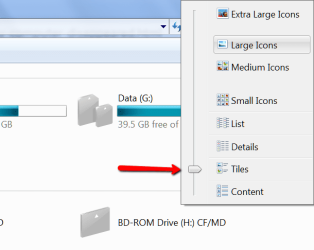
Are you set to "Tiles".
 

Attachments

  • 2015-12-12_1241.png
    2015-12-12_1241.png
    15.3 KB · Views: 7

My Computer My Computer

Computer Manufacturer/Model Number
HP, Dell, Gateway, Toshiba - 4 laptops and 2 desktops
OS
Vista, Windows7, Mint Mate, Zorin, Windows 8
CPU
from 1.6GHz Duo to i7
Monitor(s) Displays
2x HP w2207
Hard Drives
5x HDD, 7x SSD, 12x Externals
Keyboard
with trackball - no mices
Mouse
Trackball mice
Internet Speed
DSL 6000
Yes the bars are missing from the "Tiles" view. They appear in the "Details" view though...
 

My Computer My Computer

Computer type
PC/Desktop
OS
Windows 7 Professional SP1 64bit
Strange - I guess you win a few and you lose a few
 

My Computer My Computer

Computer Manufacturer/Model Number
HP, Dell, Gateway, Toshiba - 4 laptops and 2 desktops
OS
Vista, Windows7, Mint Mate, Zorin, Windows 8
CPU
from 1.6GHz Duo to i7
Monitor(s) Displays
2x HP w2207
Hard Drives
5x HDD, 7x SSD, 12x Externals
Keyboard
with trackball - no mices
Mouse
Trackball mice
Internet Speed
DSL 6000
Back
Top