Bar graphs for disk memory in My Computer disappeared

Karmakas

New member
Local time
4:49 PM
Messages
3
Hello. The bar graphs which display the free and total memory of disks in My Computer have disappeared. The bars are usually below the icons of the disks. Is there a way to re-enable them?

I think this happened after a new anti-malware program deleted some registry keys. I tried importing those keys back into the registry and even reverting to earlier backups of the registry but it didn't work.
 

My Computer My Computer

At a glance

Windows 7 Professional SP1 64bit
Computer type
PC/Desktop
OS
Windows 7 Professional SP1 64bit
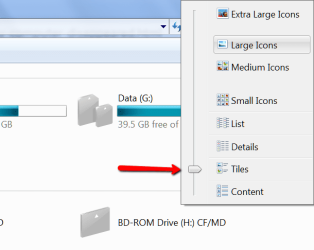
Are you set to "Tiles".
 

Attachments

  • 2015-12-12_1241.png
    2015-12-12_1241.png
    15.3 KB · Views: 7

My Computer My Computer

At a glance

Vista, Windows7, Mint Mate, Zorin, Windows 8from 1.6GHz Duo to i7
Computer Manufacturer/Model Number
HP, Dell, Gateway, Toshiba - 4 laptops and 2 desktops
OS
Vista, Windows7, Mint Mate, Zorin, Windows 8
CPU
from 1.6GHz Duo to i7
Monitor(s) Displays
2x HP w2207
Hard Drives
5x HDD, 7x SSD, 12x Externals
Keyboard
with trackball - no mices
Mouse
Trackball mice
Internet Speed
DSL 6000
Yes the bars are missing from the "Tiles" view. They appear in the "Details" view though...
 

My Computer My Computer

At a glance

Windows 7 Professional SP1 64bit
Computer type
PC/Desktop
OS
Windows 7 Professional SP1 64bit
Strange - I guess you win a few and you lose a few
 

My Computer My Computer

At a glance

Vista, Windows7, Mint Mate, Zorin, Windows 8from 1.6GHz Duo to i7
Computer Manufacturer/Model Number
HP, Dell, Gateway, Toshiba - 4 laptops and 2 desktops
OS
Vista, Windows7, Mint Mate, Zorin, Windows 8
CPU
from 1.6GHz Duo to i7
Monitor(s) Displays
2x HP w2207
Hard Drives
5x HDD, 7x SSD, 12x Externals
Keyboard
with trackball - no mices
Mouse
Trackball mice
Internet Speed
DSL 6000
Back
Top