

I was having an issue in battlefield 3, the only way I could make the mouse pointer line up with the in game menus was to point it at a location far down and to the right of the actual buttons. It was annoying me to death.
Anyhow the first solution was to disable all visual features in windows, but that's lame.
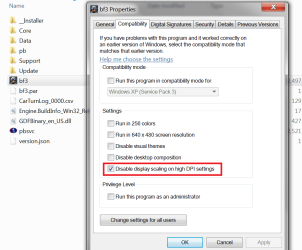
I finally discovered that by right clicking the program icon - properties - compatibility and ticking 'disable display scaling on high dpi settings' (pictured below) finally solved it.
I don't expect this is a very common problem, but I figure it has to be affecting someone else out there using high resolution settings so I thought I would share the fix.
Anyhow the first solution was to disable all visual features in windows, but that's lame.
I finally discovered that by right clicking the program icon - properties - compatibility and ticking 'disable display scaling on high dpi settings' (pictured below) finally solved it.
I don't expect this is a very common problem, but I figure it has to be affecting someone else out there using high resolution settings so I thought I would share the fix.
Attachments
My Computer
- Computer Manufacturer/Model Number
- Insane hobo technologies. ;-)
- OS
- Windows 7 x64
- CPU
- Intel i7 2600k
- Motherboard
- Asrock z68 extreme 4 gen 3
- Memory
- G.skill Ripjaw 16gigs @ 1866
- Graphics Card(s)
- Nvidia gtx580 (evga)
- Sound Card
- Integrated HD audio + hdmi
- Monitor(s) Displays
- 24" ASUS widescreen + 42" insignia
- Screen Resolution
- 1080p (1920x1080)
- Hard Drives
- 128 Samsung 830
256 Samsung 840
3 x 1tb storage drive (various)
1 western digital 1tb (eSATA)
1 Seagate 1tb (eSATA)
- PSU
- 1 kilowatt SLI/Crossfire rated Silverstone modular
- Case
- NZXT Phantom + additional 220 fan
- Cooling
- Zalmann
- Keyboard
- Microsoft wireless 3000 (v2)
- Mouse
- MS - wireless 5000 (bluetrack)
- Internet Speed
- depends on if you ask me or my provider.
- Other Info
- The above information is provided as is, and the author assumes no responsibility for issues it may cause with your sanity or fanboyism.


