Solved bcd/bcdedit problems and others after Acronis DD11

System Repair ran SFC and had an error it couldn't fix, so I ran SFC. Is this possibly an IE or Java(JScript) problem that SFC detects?

CSI 000002dc [SR] Cannot verify component files for Microsoft-Windows-IE-JScriptDebugUI, Version = 9.4.8112.16446, pA = PROCESSOR_ARCHITECTURE_INTEL (0), Culture neutral, VersionScope = 1 nonSxS, PublicKeyToken = {l:8 b:31bf3856ad364e35}, Type neutral, TypeName neutral, PublicKey neutral, manifest is damaged (FALSE)
Start a new thread for that
 

My Computer My Computer

At a glance

Microsoft Windows 7 Home Premium 64-bits 7601...Intel(R) Core(TM) i3 CPU M 370 @ 2.40GHz4,00 GBATI Mobility Radeon HD 5400 Series
Computer type
Laptop
Computer Manufacturer/Model Number
ACER ASPIRE 5742G
OS
Microsoft Windows 7 Home Premium 64-bits 7601 Multiprocessor Free Service Pack 1
CPU
Intel(R) Core(TM) i3 CPU M 370 @ 2.40GHz
Motherboard
Acer Aspire 5742G
Memory
4,00 GB
Graphics Card(s)
ATI Mobility Radeon HD 5400 Series
Sound Card
(1) AMD High Definition Audio Device (2) Realtek High Defi
Screen Resolution
1366 x 768 x 32 bits (4294967296 colors) @ 60 Hz
Hard Drives
WDC WD5000BEVT-22ZAT0
When I create a manual restore point it says it was created successfully. But if I close restore window, reopen, it says Current Usage: 0 bytes(no restore points)and CCleaner system restore tab is also empty. How can we troubleshoot this now?

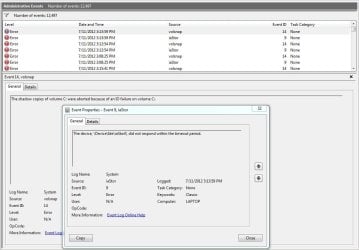
And everytime I try to create a Restore I get 2 errors in Event Viewer
EventViewer.JPG

I already clicked turn Off/On System Protection, but it didn't fix it.
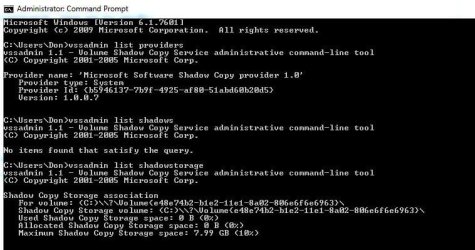
Also tried this for info.
VSSadmin.JPG
 

My Computer My Computer

At a glance

Windows 7 SP1 Home Premium x64Intel Core i7 720QMKingston 8 GBATI Mobility Radeon HD 5870
Computer Manufacturer/Model Number
Aus G73JH-RBBX05
OS
Windows 7 SP1 Home Premium x64
CPU
Intel Core i7 720QM
Motherboard
Asus (Intel HM55 Chipset)
Memory
Kingston 8 GB
Graphics Card(s)
ATI Mobility Radeon HD 5870
Sound Card
Realtek
Monitor(s) Displays
LG
Screen Resolution
1600X900
Hard Drives
Crucial M4 256GB
(Seagate Momentus ST9500420AS)Currently Disabled
Mouse
Razer Naga
Internet Speed
Cable
I was surprised it took a full day for new issues to crop up since you only patched the boot problem and didn't fix what is clearly deeper corruption.

This is because you have evident corruption that requires the automated approaches - starting with Startup Repair x3, then Repair Install, likely even a possible Clean Reinstall following the best practices to install and maintain it perfectly.
 
If anyone has any ideas other then offering for me to try a "Repair" or "Clean" Install, I would appreciate it. Thanks
 

My Computer My Computer

At a glance

Windows 7 SP1 Home Premium x64Intel Core i7 720QMKingston 8 GBATI Mobility Radeon HD 5870
Computer Manufacturer/Model Number
Aus G73JH-RBBX05
OS
Windows 7 SP1 Home Premium x64
CPU
Intel Core i7 720QM
Motherboard
Asus (Intel HM55 Chipset)
Memory
Kingston 8 GB
Graphics Card(s)
ATI Mobility Radeon HD 5870
Sound Card
Realtek
Monitor(s) Displays
LG
Screen Resolution
1600X900
Hard Drives
Crucial M4 256GB
(Seagate Momentus ST9500420AS)Currently Disabled
Mouse
Razer Naga
Internet Speed
Cable
With a volsnap error like that, you might have bad sectors - try running checkdisk with /r switch.

If it reports any probs - you may find the manufacturer utility can hide them - seatools for dos is pretty good http://www.seagate.com/support/downloads/

Or you might as well run seatools first - save a bit of time.
 

My Computers My Computers

  • At a glance

    7 X64i5 84002x8gb 3200mhz
    Computer type
    PC/Desktop
    OS
    7 X64
    CPU
    i5 8400
    Motherboard
    gigabyte b365m ds3h
    Memory
    2x8gb 3200mhz
    Hard Drives
    various
    PSU
    pure power 11 400w cm
    Case
    Coolermaster
    Cooling
    cryorig m9i
  • At a glance

    7x64g54008gb ddr4 2400
    Computer type
    PC/Desktop
    OS
    7x64
    CPU
    g5400
    Motherboard
    ga b365m ds3h
    Memory
    8gb ddr4 2400
    PSU
    xfx pro 450w
I ran chkdsk /r again, no errors, but last week there were errors that were fixed- 180 KB in bad sectors. The errors were on my Crucial M4 SSD, which is like 3 weeks old.

I still have no idea what this SFC error means...
CSI 000002dc [SR] Cannot verify component files for Microsoft-Windows-IE-JScriptDebugUI, Version = 9.4.8112.16446, pA = PROCESSOR_ARCHITECTURE_INTEL (0), Culture neutral, VersionScope = 1 nonSxS, PublicKeyToken = {l:8 b:31bf3856ad364e35}, Type neutral, TypeName neutral, PublicKey neutral, manifest is damaged (FALSE)
 

My Computer My Computer

At a glance

Windows 7 SP1 Home Premium x64Intel Core i7 720QMKingston 8 GBATI Mobility Radeon HD 5870
Computer Manufacturer/Model Number
Aus G73JH-RBBX05
OS
Windows 7 SP1 Home Premium x64
CPU
Intel Core i7 720QM
Motherboard
Asus (Intel HM55 Chipset)
Memory
Kingston 8 GB
Graphics Card(s)
ATI Mobility Radeon HD 5870
Sound Card
Realtek
Monitor(s) Displays
LG
Screen Resolution
1600X900
Hard Drives
Crucial M4 256GB
(Seagate Momentus ST9500420AS)Currently Disabled
Mouse
Razer Naga
Internet Speed
Cable

My Computers My Computers

  • At a glance

    7 X64i5 84002x8gb 3200mhz
    Computer type
    PC/Desktop
    OS
    7 X64
    CPU
    i5 8400
    Motherboard
    gigabyte b365m ds3h
    Memory
    2x8gb 3200mhz
    Hard Drives
    various
    PSU
    pure power 11 400w cm
    Case
    Coolermaster
    Cooling
    cryorig m9i
  • At a glance

    7x64g54008gb ddr4 2400
    Computer type
    PC/Desktop
    OS
    7x64
    CPU
    g5400
    Motherboard
    ga b365m ds3h
    Memory
    8gb ddr4 2400
    PSU
    xfx pro 450w
snapman, what...how? And I can't use regedit to do this?
 

My Computer My Computer

At a glance

Windows 7 SP1 Home Premium x64Intel Core i7 720QMKingston 8 GBATI Mobility Radeon HD 5870
Computer Manufacturer/Model Number
Aus G73JH-RBBX05
OS
Windows 7 SP1 Home Premium x64
CPU
Intel Core i7 720QM
Motherboard
Asus (Intel HM55 Chipset)
Memory
Kingston 8 GB
Graphics Card(s)
ATI Mobility Radeon HD 5870
Sound Card
Realtek
Monitor(s) Displays
LG
Screen Resolution
1600X900
Hard Drives
Crucial M4 256GB
(Seagate Momentus ST9500420AS)Currently Disabled
Mouse
Razer Naga
Internet Speed
Cable
You could use regedit find function - but it is very slow and only finds one at a time.

Regscanner is vastly superior.

You are searching for the word snapman

It is the acronis driver - might be filters still left in the system hive.
 

My Computers My Computers

  • At a glance

    7 X64i5 84002x8gb 3200mhz
    Computer type
    PC/Desktop
    OS
    7 X64
    CPU
    i5 8400
    Motherboard
    gigabyte b365m ds3h
    Memory
    2x8gb 3200mhz
    Hard Drives
    various
    PSU
    pure power 11 400w cm
    Case
    Coolermaster
    Cooling
    cryorig m9i
  • At a glance

    7x64g54008gb ddr4 2400
    Computer type
    PC/Desktop
    OS
    7x64
    CPU
    g5400
    Motherboard
    ga b365m ds3h
    Memory
    8gb ddr4 2400
    PSU
    xfx pro 450w
No "snapman" found
 

My Computer My Computer

At a glance

Windows 7 SP1 Home Premium x64Intel Core i7 720QMKingston 8 GBATI Mobility Radeon HD 5870
Computer Manufacturer/Model Number
Aus G73JH-RBBX05
OS
Windows 7 SP1 Home Premium x64
CPU
Intel Core i7 720QM
Motherboard
Asus (Intel HM55 Chipset)
Memory
Kingston 8 GB
Graphics Card(s)
ATI Mobility Radeon HD 5870
Sound Card
Realtek
Monitor(s) Displays
LG
Screen Resolution
1600X900
Hard Drives
Crucial M4 256GB
(Seagate Momentus ST9500420AS)Currently Disabled
Mouse
Razer Naga
Internet Speed
Cable
I am out of ideas, then.

From your posts, does seem like DD11 uninstall led to the issues.
 

My Computers My Computers

  • At a glance

    7 X64i5 84002x8gb 3200mhz
    Computer type
    PC/Desktop
    OS
    7 X64
    CPU
    i5 8400
    Motherboard
    gigabyte b365m ds3h
    Memory
    2x8gb 3200mhz
    Hard Drives
    various
    PSU
    pure power 11 400w cm
    Case
    Coolermaster
    Cooling
    cryorig m9i
  • At a glance

    7x64g54008gb ddr4 2400
    Computer type
    PC/Desktop
    OS
    7x64
    CPU
    g5400
    Motherboard
    ga b365m ds3h
    Memory
    8gb ddr4 2400
    PSU
    xfx pro 450w
When I create a manual restore point it says it was created successfully. But if I close restore window, reopen, it says Current Usage: 0 bytes(no restore points)and CCleaner system restore tab is also empty. How can we troubleshoot this now?

And everytime I try to create a Restore I get 2 errors in Event Viewer
View attachment 220995

I already clicked turn Off/On System Protection, but it didn't fix it.
Also tried this for info.
View attachment 220999
vssadmin list writers
and event 14 screenshot please
 

My Computer My Computer

At a glance

Microsoft Windows 7 Home Premium 64-bits 7601...Intel(R) Core(TM) i3 CPU M 370 @ 2.40GHz4,00 GBATI Mobility Radeon HD 5400 Series
Computer type
Laptop
Computer Manufacturer/Model Number
ACER ASPIRE 5742G
OS
Microsoft Windows 7 Home Premium 64-bits 7601 Multiprocessor Free Service Pack 1
CPU
Intel(R) Core(TM) i3 CPU M 370 @ 2.40GHz
Motherboard
Acer Aspire 5742G
Memory
4,00 GB
Graphics Card(s)
ATI Mobility Radeon HD 5400 Series
Sound Card
(1) AMD High Definition Audio Device (2) Realtek High Defi
Screen Resolution
1366 x 768 x 32 bits (4294967296 colors) @ 60 Hz
Hard Drives
WDC WD5000BEVT-22ZAT0

My Computer My Computer

At a glance

Microsoft Windows 7 Home Premium 64-bits 7601...Intel(R) Core(TM) i3 CPU M 370 @ 2.40GHz4,00 GBATI Mobility Radeon HD 5400 Series
Computer type
Laptop
Computer Manufacturer/Model Number
ACER ASPIRE 5742G
OS
Microsoft Windows 7 Home Premium 64-bits 7601 Multiprocessor Free Service Pack 1
CPU
Intel(R) Core(TM) i3 CPU M 370 @ 2.40GHz
Motherboard
Acer Aspire 5742G
Memory
4,00 GB
Graphics Card(s)
ATI Mobility Radeon HD 5400 Series
Sound Card
(1) AMD High Definition Audio Device (2) Realtek High Defi
Screen Resolution
1366 x 768 x 32 bits (4294967296 colors) @ 60 Hz
Hard Drives
WDC WD5000BEVT-22ZAT0
Goto "device manager" and expand branch "IDE ATA/ATAPI-controllers"
post screenshot
 

My Computer My Computer

At a glance

Microsoft Windows 7 Home Premium 64-bits 7601...Intel(R) Core(TM) i3 CPU M 370 @ 2.40GHz4,00 GBATI Mobility Radeon HD 5400 Series
Computer type
Laptop
Computer Manufacturer/Model Number
ACER ASPIRE 5742G
OS
Microsoft Windows 7 Home Premium 64-bits 7601 Multiprocessor Free Service Pack 1
CPU
Intel(R) Core(TM) i3 CPU M 370 @ 2.40GHz
Motherboard
Acer Aspire 5742G
Memory
4,00 GB
Graphics Card(s)
ATI Mobility Radeon HD 5400 Series
Sound Card
(1) AMD High Definition Audio Device (2) Realtek High Defi
Screen Resolution
1366 x 768 x 32 bits (4294967296 colors) @ 60 Hz
Hard Drives
WDC WD5000BEVT-22ZAT0
Kaktussoft, okay so I did a Repair Install and I'm able to create a restore point but after I reboot it's gone. Does my bcdedit /enum all look ok?

Windows Boot Manager
--------------------
identifier {bootmgr}
device partition=\Device\HarddiskVolume1
description Windows Boot Manager
locale en-US
inherit {globalsettings}
default {current}
resumeobject {37f80449-b1eb-11e1-b46b-ceaaa976d188}
displayorder {current}
toolsdisplayorder {memdiag}
timeout 30
Windows Boot Loader
-------------------
identifier {141888de-cbe6-11e1-b2ed-e0cb4e979823}
device ramdisk=[C:]\Recovery\141888de-cbe6-11e1-b2ed-e0cb4e979823\Winre.wim,{141888df-cbe6-11e1-b2ed-e0cb4e979823}
path \windows\system32\winload.exe
description Windows Recovery Environment
inherit {bootloadersettings}
osdevice ramdisk=[C:]\Recovery\141888de-cbe6-11e1-b2ed-e0cb4e979823\Winre.wim,{141888df-cbe6-11e1-b2ed-e0cb4e979823}
systemroot \windows
nx OptIn
winpe Yes
Windows Boot Loader
-------------------
identifier {current}
device partition=C:
path \Windows\system32\winload.exe
description Windows 7
locale en-US
inherit {bootloadersettings}
recoverysequence {141888de-cbe6-11e1-b2ed-e0cb4e979823}
recoveryenabled Yes
osdevice partition=C:
systemroot \Windows
resumeobject {37f80449-b1eb-11e1-b46b-ceaaa976d188}
nx OptIn
Windows Boot Loader
-------------------
identifier {37f8044b-b1eb-11e1-b46b-ceaaa976d188}
device ramdisk=[C:]\Recovery\37f8044b-b1eb-11e1-b46b-ceaaa976d188\Winre.wim,{37f8044c-b1eb-11e1-b46b-ceaaa976d188}
path \windows\system32\winload.exe
description Windows Recovery Environment
inherit {bootloadersettings}
osdevice ramdisk=[C:]\Recovery\37f8044b-b1eb-11e1-b46b-ceaaa976d188\Winre.wim,{37f8044c-b1eb-11e1-b46b-ceaaa976d188}
systemroot \windows
nx OptIn
winpe Yes
Resume from Hibernate
---------------------
identifier {37f80449-b1eb-11e1-b46b-ceaaa976d188}
device partition=C:
path \Windows\system32\winresume.exe
description Windows Resume Application
locale en-US
inherit {resumeloadersettings}
filedevice partition=C:
filepath \hiberfil.sys
debugoptionenabled No
Windows Memory Tester
---------------------
identifier {memdiag}
device partition=\Device\HarddiskVolume1
path \boot\memtest.exe
description Windows Memory Diagnostic
locale en-US
inherit {globalsettings}
badmemoryaccess Yes
EMS Settings
------------
identifier {emssettings}
bootems Yes
Debugger Settings
-----------------
identifier {dbgsettings}
debugtype Serial
debugport 1
baudrate 115200
RAM Defects
-----------
identifier {badmemory}
Global Settings
---------------
identifier {globalsettings}
inherit {dbgsettings}
{emssettings}
{badmemory}
Boot Loader Settings
--------------------
identifier {bootloadersettings}
inherit {globalsettings}
{hypervisorsettings}
Hypervisor Settings
-------------------
identifier {hypervisorsettings}
hypervisordebugtype Serial
hypervisordebugport 1
hypervisorbaudrate 115200
Resume Loader Settings
----------------------
identifier {resumeloadersettings}
inherit {globalsettings}
Device options
--------------
identifier {141888df-cbe6-11e1-b2ed-e0cb4e979823}
description Ramdisk Options
ramdisksdidevice partition=C:
ramdisksdipath \Recovery\141888de-cbe6-11e1-b2ed-e0cb4e979823\boot.sdi
Device options
--------------
identifier {37f8044c-b1eb-11e1-b46b-ceaaa976d188}
description Ramdisk Options
ramdisksdidevice partition=C:
ramdisksdipath \Recovery\37f8044b-b1eb-11e1-b46b-ceaaa976d188\boot.sdi
 

My Computer My Computer

At a glance

Windows 7 SP1 Home Premium x64Intel Core i7 720QMKingston 8 GBATI Mobility Radeon HD 5870
Computer Manufacturer/Model Number
Aus G73JH-RBBX05
OS
Windows 7 SP1 Home Premium x64
CPU
Intel Core i7 720QM
Motherboard
Asus (Intel HM55 Chipset)
Memory
Kingston 8 GB
Graphics Card(s)
ATI Mobility Radeon HD 5870
Sound Card
Realtek
Monitor(s) Displays
LG
Screen Resolution
1600X900
Hard Drives
Crucial M4 256GB
(Seagate Momentus ST9500420AS)Currently Disabled
Mouse
Razer Naga
Internet Speed
Cable
vssadmin list writers results:

Writer name: 'Task Scheduler Writer'
Writer Id: {d61d61c8-d73a-4eee-8cdd-f6f9786b7124}
Writer Instance Id: {1bddd48e-5052-49db-9b07-b96f96727e6b}
State: [1] Stable
Last error: No error
Writer name: 'VSS Metadata Store Writer'
Writer Id: {75dfb225-e2e4-4d39-9ac9-ffaff65ddf06}
Writer Instance Id: {088e7a7d-09a8-4cc6-a609-ad90e75ddc93}
State: [1] Stable
Last error: No error
Writer name: 'Performance Counters Writer'
Writer Id: {0bada1de-01a9-4625-8278-69e735f39dd2}
Writer Instance Id: {f0086dda-9efc-47c5-8eb6-a944c3d09381}
State: [1] Stable
Last error: No error
Writer name: 'System Writer'
Writer Id: {e8132975-6f93-4464-a53e-1050253ae220}
Writer Instance Id: {c51a726f-1be9-4384-873e-6a002376ef28}
State: [1] Stable
Last error: No error
Writer name: 'ASR Writer'
Writer Id: {be000cbe-11fe-4426-9c58-531aa6355fc4}
Writer Instance Id: {c61eaf96-78f1-4f9b-b7cb-1851df18c59a}
State: [1] Stable
Last error: No error
Writer name: 'Registry Writer'
Writer Id: {afbab4a2-367d-4d15-a586-71dbb18f8485}
Writer Instance Id: {90ee7780-481f-4659-b7d9-a601813e740f}
State: [1] Stable
Last error: No error
Writer name: 'COM+ REGDB Writer'
Writer Id: {542da469-d3e1-473c-9f4f-7847f01fc64f}
Writer Instance Id: {8903c3f0-592a-463a-8032-9e1c41cc51a4}
State: [1] Stable
Last error: No error
Writer name: 'Shadow Copy Optimization Writer'
Writer Id: {4dc3bdd4-ab48-4d07-adb0-3bee2926fd7f}
Writer Instance Id: {1ebb7a62-44d5-49a2-8efd-d30cd57f4d9c}
State: [1] Stable
Last error: No error
Writer name: 'MSSearch Service Writer'
Writer Id: {cd3f2362-8bef-46c7-9181-d62844cdc0b2}
Writer Instance Id: {f6fbcac2-fc58-407d-9533-832a6dbee5c0}
State: [5] Waiting for completion
Last error: No error
Writer name: 'WMI Writer'
Writer Id: {a6ad56c2-b509-4e6c-bb19-49d8f43532f0}
Writer Instance Id: {0db580e0-20ee-4f83-bb64-7f4c4404c7b6}
State: [5] Waiting for completion
Last error: No error
 

My Computer My Computer

At a glance

Windows 7 SP1 Home Premium x64Intel Core i7 720QMKingston 8 GBATI Mobility Radeon HD 5870
Computer Manufacturer/Model Number
Aus G73JH-RBBX05
OS
Windows 7 SP1 Home Premium x64
CPU
Intel Core i7 720QM
Motherboard
Asus (Intel HM55 Chipset)
Memory
Kingston 8 GB
Graphics Card(s)
ATI Mobility Radeon HD 5870
Sound Card
Realtek
Monitor(s) Displays
LG
Screen Resolution
1600X900
Hard Drives
Crucial M4 256GB
(Seagate Momentus ST9500420AS)Currently Disabled
Mouse
Razer Naga
Internet Speed
Cable
Why did you do a reapir install??? Eventid 9 is just a problem with the driver! Solution: C300 Disk Freeze-ups in Windows 7 solved... - Crucial Community

First try if F8->recovery environment works. Then

bcdedit/delete {37f8044b-b1eb-11e1-b46b-ceaaa976d188}
bcdedit/delete {37f8044c-b1eb-11e1-b46b-ceaaa976d188}

They are useless boot menu items. This is not related to system restore problem btw
 
Last edited:

My Computer My Computer

At a glance

Microsoft Windows 7 Home Premium 64-bits 7601...Intel(R) Core(TM) i3 CPU M 370 @ 2.40GHz4,00 GBATI Mobility Radeon HD 5400 Series
Computer type
Laptop
Computer Manufacturer/Model Number
ACER ASPIRE 5742G
OS
Microsoft Windows 7 Home Premium 64-bits 7601 Multiprocessor Free Service Pack 1
CPU
Intel(R) Core(TM) i3 CPU M 370 @ 2.40GHz
Motherboard
Acer Aspire 5742G
Memory
4,00 GB
Graphics Card(s)
ATI Mobility Radeon HD 5400 Series
Sound Card
(1) AMD High Definition Audio Device (2) Realtek High Defi
Screen Resolution
1366 x 768 x 32 bits (4294967296 colors) @ 60 Hz
Hard Drives
WDC WD5000BEVT-22ZAT0
I don't know much about vssadmin list writers

Writer name: 'MSSearch Service Writer'
Writer Id: {cd3f2362-8bef-46c7-9181-d62844cdc0b2}
Writer Instance Id: {f6fbcac2-fc58-407d-9533-832a6dbee5c0}
State: [5] Waiting for completion
Last error: No error
Writer name: 'WMI Writer'
Writer Id: {a6ad56c2-b509-4e6c-bb19-49d8f43532f0}
Writer Instance Id: {0db580e0-20ee-4f83-bb64-7f4c4404c7b6}
State: [5] Waiting for completion
Last error: No error
----------------
Is it always State [5]? Wait a few minutes and run nothing. then do the vssadmin command. Still State [5]?

Check for errors in event log when restore point is gone.

Code:
vssadmin list shadows
post output
 

My Computer My Computer

At a glance

Microsoft Windows 7 Home Premium 64-bits 7601...Intel(R) Core(TM) i3 CPU M 370 @ 2.40GHz4,00 GBATI Mobility Radeon HD 5400 Series
Computer type
Laptop
Computer Manufacturer/Model Number
ACER ASPIRE 5742G
OS
Microsoft Windows 7 Home Premium 64-bits 7601 Multiprocessor Free Service Pack 1
CPU
Intel(R) Core(TM) i3 CPU M 370 @ 2.40GHz
Motherboard
Acer Aspire 5742G
Memory
4,00 GB
Graphics Card(s)
ATI Mobility Radeon HD 5400 Series
Sound Card
(1) AMD High Definition Audio Device (2) Realtek High Defi
Screen Resolution
1366 x 768 x 32 bits (4294967296 colors) @ 60 Hz
Hard Drives
WDC WD5000BEVT-22ZAT0
Check eventlog for errors. Most likely volsnap and iastor stuff
 

My Computer My Computer

At a glance

Microsoft Windows 7 Home Premium 64-bits 7601...Intel(R) Core(TM) i3 CPU M 370 @ 2.40GHz4,00 GBATI Mobility Radeon HD 5400 Series
Computer type
Laptop
Computer Manufacturer/Model Number
ACER ASPIRE 5742G
OS
Microsoft Windows 7 Home Premium 64-bits 7601 Multiprocessor Free Service Pack 1
CPU
Intel(R) Core(TM) i3 CPU M 370 @ 2.40GHz
Motherboard
Acer Aspire 5742G
Memory
4,00 GB
Graphics Card(s)
ATI Mobility Radeon HD 5400 Series
Sound Card
(1) AMD High Definition Audio Device (2) Realtek High Defi
Screen Resolution
1366 x 768 x 32 bits (4294967296 colors) @ 60 Hz
Hard Drives
WDC WD5000BEVT-22ZAT0
I did a Repair Install because my restore point were dissappearing 5 second after I successfully created them. After Repair Install, they now dissappear after a reboot I believe.
I know about the Crucial iastor "Fix", thanks, but I'm currently using msahci driver so I don't have the freeze issue.
Yes, F8->recovery environment works.
I'm currently rebooting to see if "vssadmin list writers" still shows State [5]...

edit-For some reason my restore points are now NOT dissappearing after reboot, but I did nothing to fix it, weird.
A lot of the Writers show State: [5] Waiting for completion, only After I create a Restore Point, which I don't know if it is supposed to?

Writer name: 'Task Scheduler Writer'
Writer Id: {d61d61c8-d73a-4eee-8cdd-f6f9786b7124}
Writer Instance Id: {1bddd48e-5052-49db-9b07-b96f96727e6b}
State: [1] Stable
Last error: No error
Writer name: 'VSS Metadata Store Writer'
Writer Id: {75dfb225-e2e4-4d39-9ac9-ffaff65ddf06}
Writer Instance Id: {088e7a7d-09a8-4cc6-a609-ad90e75ddc93}
State: [1] Stable
Last error: No error
Writer name: 'Performance Counters Writer'
Writer Id: {0bada1de-01a9-4625-8278-69e735f39dd2}
Writer Instance Id: {f0086dda-9efc-47c5-8eb6-a944c3d09381}
State: [1] Stable
Last error: No error
Writer name: 'System Writer'
Writer Id: {e8132975-6f93-4464-a53e-1050253ae220}
Writer Instance Id: {8bcf0734-8ce0-4521-bfa2-6a321036b075}
State: [1] Stable
Last error: No error
Writer name: 'ASR Writer'
Writer Id: {be000cbe-11fe-4426-9c58-531aa6355fc4}
Writer Instance Id: {01f110e0-bc03-4969-98d5-0a9d55646351}
State: [1] Stable
Last error: No error
Writer name: 'WMI Writer'
Writer Id: {a6ad56c2-b509-4e6c-bb19-49d8f43532f0}
Writer Instance Id: {25f26eda-9ecf-439f-915b-079939c4b950}
State: [5] Waiting for completion
Last error: No error
Writer name: 'Registry Writer'
Writer Id: {afbab4a2-367d-4d15-a586-71dbb18f8485}
Writer Instance Id: {6456125d-08dd-4d59-a227-16e306ace4e7}
State: [5] Waiting for completion
Last error: No error
Writer name: 'Shadow Copy Optimization Writer'
Writer Id: {4dc3bdd4-ab48-4d07-adb0-3bee2926fd7f}
Writer Instance Id: {ae6003ab-832a-4f7e-8398-e5504379142a}
State: [5] Waiting for completion
Last error: No error
Writer name: 'COM+ REGDB Writer'
Writer Id: {542da469-d3e1-473c-9f4f-7847f01fc64f}
Writer Instance Id: {a5520bef-8965-43df-b4d3-a10e68ddd0a4}
State: [5] Waiting for completion
Last error: No error
Writer name: 'MSSearch Service Writer'
Writer Id: {cd3f2362-8bef-46c7-9181-d62844cdc0b2}
Writer Instance Id: {6f804c92-1aaf-4cd8-802d-881c94556e20}
State: [5] Waiting for completion
Last error: No error
 
Last edited:

My Computer My Computer

At a glance

Windows 7 SP1 Home Premium x64Intel Core i7 720QMKingston 8 GBATI Mobility Radeon HD 5870
Computer Manufacturer/Model Number
Aus G73JH-RBBX05
OS
Windows 7 SP1 Home Premium x64
CPU
Intel Core i7 720QM
Motherboard
Asus (Intel HM55 Chipset)
Memory
Kingston 8 GB
Graphics Card(s)
ATI Mobility Radeon HD 5870
Sound Card
Realtek
Monitor(s) Displays
LG
Screen Resolution
1600X900
Hard Drives
Crucial M4 256GB
(Seagate Momentus ST9500420AS)Currently Disabled
Mouse
Razer Naga
Internet Speed
Cable
Back
Top