Solved bcd/bcdedit problems and others after Acronis DD11

Please check State: [5] Waiting for completion if it still exist.

  • after reboot
  • just after creating restore point
  • 15 minutes after creating restore point
Don't know if it's normal but I never saw it on my laptop.

Once again check you event log for errors. atapi errors?
 

My Computer My Computer

At a glance

Microsoft Windows 7 Home Premium 64-bits 7601...Intel(R) Core(TM) i3 CPU M 370 @ 2.40GHz4,00 GBATI Mobility Radeon HD 5400 Series
Computer type
Laptop
Computer Manufacturer/Model Number
ACER ASPIRE 5742G
OS
Microsoft Windows 7 Home Premium 64-bits 7601 Multiprocessor Free Service Pack 1
CPU
Intel(R) Core(TM) i3 CPU M 370 @ 2.40GHz
Motherboard
Acer Aspire 5742G
Memory
4,00 GB
Graphics Card(s)
ATI Mobility Radeon HD 5400 Series
Sound Card
(1) AMD High Definition Audio Device (2) Realtek High Defi
Screen Resolution
1366 x 768 x 32 bits (4294967296 colors) @ 60 Hz
Hard Drives
WDC WD5000BEVT-22ZAT0
Why did you do a reapir install??? Eventid 9 is just a problem with the driver! Solution: C300 Disk Freeze-ups in Windows 7 solved... - Crucial Community

I advised a Repair Install and then if necessary Clean Reinstall because there is clearly a deep level of corruption in the OS which will not be solved by running endless commands in another 10 page thread that leads nowhere.

If the Repair Install did not solve the Restore Points corruption it means it is not within the OS since that was reinstalled, but a program setting which is carried over during a Repair Install.

You can continue to suffer through another one of these ten page threads running endless commands which may patch one problem to then have another pop up a day later as you've been experiencing, or you can prepare now to get the vastly superior http://www.sevenforums.com/tutorials/219487-clean-reinstall-factory-oem-windows-7-a.html#post1839164 following the same steps in this tutorial to install and maintain it perfectly. Then save a backup image so you never have to reinstall again.
 
Why did you do a reapir install??? Eventid 9 is just a problem with the driver! Solution: C300 Disk Freeze-ups in Windows 7 solved... - Crucial Community

I advised a Repair Install and then if necessary Clean Reinstall because there is clearly a deep level of corruption in the OS which will not be solved by running endless commands in another 10 page thread that leads nowhere.

If the Repair Install did not solve the Restore Points corruption it means it is not within the OS since that was reinstalled, but a program setting which is carried over during a Repair Install.

You can continue to suffer through another one of these ten page threads running endless commands which may patch one problem to then have another pop up a day later as you've been experiencing, or you can prepare now to get the vastly superior http://www.sevenforums.com/tutorials/219487-clean-reinstall-factory-oem-windows-7-a.html#post1839164 following the same steps in this tutorial to install and maintain it perfectly. Then save a backup image so you never have to reinstall again.
Even better do a clean install as dual boot and test. I think the problems are hardware related!
 

My Computer My Computer

At a glance

Microsoft Windows 7 Home Premium 64-bits 7601...Intel(R) Core(TM) i3 CPU M 370 @ 2.40GHz4,00 GBATI Mobility Radeon HD 5400 Series
Computer type
Laptop
Computer Manufacturer/Model Number
ACER ASPIRE 5742G
OS
Microsoft Windows 7 Home Premium 64-bits 7601 Multiprocessor Free Service Pack 1
CPU
Intel(R) Core(TM) i3 CPU M 370 @ 2.40GHz
Motherboard
Acer Aspire 5742G
Memory
4,00 GB
Graphics Card(s)
ATI Mobility Radeon HD 5400 Series
Sound Card
(1) AMD High Definition Audio Device (2) Realtek High Defi
Screen Resolution
1366 x 768 x 32 bits (4294967296 colors) @ 60 Hz
Hard Drives
WDC WD5000BEVT-22ZAT0
That's a good idea. Shrink C by about 20gb in Disk Mgmt: Partition or Volume - Shrink

Boot the Win7 installer to Clean Reinstall to the new space allowing the installer to format the partition.

Install and set it up according to best practices in tutorial only so you have a perfect baseline install, then see if problems replicate.

However this test will still lack a cleaned boot sector which may also be interfering. Diskpart Clean Command

What hardware do you think could cause these problems?
 
That's a good idea. Shrink C by about 20gb in Disk Mgmt: Partition or Volume - Shrink

Boot the Win7 installer to Clean Reinstall to the new space allowing the installer to format the partition.

Install and set it up according to best practices in tutorial only so you have a perfect baseline install, then see if problems replicate.

However this test will still lack a cleaned boot sector which may also be interfering. Diskpart Clean Command

What hardware do you think could cause these problems?
See post #82
 

My Computer My Computer

At a glance

Microsoft Windows 7 Home Premium 64-bits 7601...Intel(R) Core(TM) i3 CPU M 370 @ 2.40GHz4,00 GBATI Mobility Radeon HD 5400 Series
Computer type
Laptop
Computer Manufacturer/Model Number
ACER ASPIRE 5742G
OS
Microsoft Windows 7 Home Premium 64-bits 7601 Multiprocessor Free Service Pack 1
CPU
Intel(R) Core(TM) i3 CPU M 370 @ 2.40GHz
Motherboard
Acer Aspire 5742G
Memory
4,00 GB
Graphics Card(s)
ATI Mobility Radeon HD 5400 Series
Sound Card
(1) AMD High Definition Audio Device (2) Realtek High Defi
Screen Resolution
1366 x 768 x 32 bits (4294967296 colors) @ 60 Hz
Hard Drives
WDC WD5000BEVT-22ZAT0
Please check State: [5] Waiting for completion if it still exist.

  • after reboot
  • just after creating restore point
  • 15 minutes after creating restore point
Don't know if it's normal but I never saw it on my laptop.Once again check you event log for errors. atapi errors?

Yes, an atapi and volsnap error

(After 15 Minutes)Only these are state 5:
Writer name: 'MSSearch Service Writer'
Writer Id: {cd3f2362-8bef-46c7-9181-d62844cdc0b2}
Writer Instance Id: {f9dc1d01-a394-49ee-802a-f0d653390f87}
State: [5] Waiting for completion
Last error: No error
Writer name: 'WMI Writer'
Writer Id: {a6ad56c2-b509-4e6c-bb19-49d8f43532f0}
Writer Instance Id: {d375f23c-3acf-4d45-aeb5-2427d5d5fcb8}
State: [5] Waiting for completion
Last error: No error
 

My Computer My Computer

At a glance

Windows 7 SP1 Home Premium x64Intel Core i7 720QMKingston 8 GBATI Mobility Radeon HD 5870
Computer Manufacturer/Model Number
Aus G73JH-RBBX05
OS
Windows 7 SP1 Home Premium x64
CPU
Intel Core i7 720QM
Motherboard
Asus (Intel HM55 Chipset)
Memory
Kingston 8 GB
Graphics Card(s)
ATI Mobility Radeon HD 5870
Sound Card
Realtek
Monitor(s) Displays
LG
Screen Resolution
1600X900
Hard Drives
Crucial M4 256GB
(Seagate Momentus ST9500420AS)Currently Disabled
Mouse
Razer Naga
Internet Speed
Cable
Please check State: [5] Waiting for completion if it still exist.

  • after reboot
  • just after creating restore point
  • 15 minutes after creating restore point
Don't know if it's normal but I never saw it on my laptop.Once again check you event log for errors. atapi errors?

Yes, an atapi and volsnap error

(After 15 Minutes)Only these are state 5:
Writer name: 'MSSearch Service Writer'
Writer Id: {cd3f2362-8bef-46c7-9181-d62844cdc0b2}
Writer Instance Id: {f9dc1d01-a394-49ee-802a-f0d653390f87}
State: [5] Waiting for completion
Last error: No error
Writer name: 'WMI Writer'
Writer Id: {a6ad56c2-b509-4e6c-bb19-49d8f43532f0}
Writer Instance Id: {d375f23c-3acf-4d45-aeb5-2427d5d5fcb8}
State: [5] Waiting for completion
Last error: No error
State: [5] Waiting for completion
for ever? even after 1 hour wait and doing about nothing? Also after a reboot?
 

My Computer My Computer

At a glance

Microsoft Windows 7 Home Premium 64-bits 7601...Intel(R) Core(TM) i3 CPU M 370 @ 2.40GHz4,00 GBATI Mobility Radeon HD 5400 Series
Computer type
Laptop
Computer Manufacturer/Model Number
ACER ASPIRE 5742G
OS
Microsoft Windows 7 Home Premium 64-bits 7601 Multiprocessor Free Service Pack 1
CPU
Intel(R) Core(TM) i3 CPU M 370 @ 2.40GHz
Motherboard
Acer Aspire 5742G
Memory
4,00 GB
Graphics Card(s)
ATI Mobility Radeon HD 5400 Series
Sound Card
(1) AMD High Definition Audio Device (2) Realtek High Defi
Screen Resolution
1366 x 768 x 32 bits (4294967296 colors) @ 60 Hz
Hard Drives
WDC WD5000BEVT-22ZAT0
Still Yes, an atapi and volsnap errors under have disk load?
 

My Computer My Computer

At a glance

Microsoft Windows 7 Home Premium 64-bits 7601...Intel(R) Core(TM) i3 CPU M 370 @ 2.40GHz4,00 GBATI Mobility Radeon HD 5400 Series
Computer type
Laptop
Computer Manufacturer/Model Number
ACER ASPIRE 5742G
OS
Microsoft Windows 7 Home Premium 64-bits 7601 Multiprocessor Free Service Pack 1
CPU
Intel(R) Core(TM) i3 CPU M 370 @ 2.40GHz
Motherboard
Acer Aspire 5742G
Memory
4,00 GB
Graphics Card(s)
ATI Mobility Radeon HD 5400 Series
Sound Card
(1) AMD High Definition Audio Device (2) Realtek High Defi
Screen Resolution
1366 x 768 x 32 bits (4294967296 colors) @ 60 Hz
Hard Drives
WDC WD5000BEVT-22ZAT0
Please do what was advice in port #104 to prove problems asre also there on a fresh win7
But most important is ... make full backup to be sure everything has been saved!

So make it dual boot with a fresh install
 

My Computer My Computer

At a glance

Microsoft Windows 7 Home Premium 64-bits 7601...Intel(R) Core(TM) i3 CPU M 370 @ 2.40GHz4,00 GBATI Mobility Radeon HD 5400 Series
Computer type
Laptop
Computer Manufacturer/Model Number
ACER ASPIRE 5742G
OS
Microsoft Windows 7 Home Premium 64-bits 7601 Multiprocessor Free Service Pack 1
CPU
Intel(R) Core(TM) i3 CPU M 370 @ 2.40GHz
Motherboard
Acer Aspire 5742G
Memory
4,00 GB
Graphics Card(s)
ATI Mobility Radeon HD 5400 Series
Sound Card
(1) AMD High Definition Audio Device (2) Realtek High Defi
Screen Resolution
1366 x 768 x 32 bits (4294967296 colors) @ 60 Hz
Hard Drives
WDC WD5000BEVT-22ZAT0
FWI, after an hour still State: [5], but after reboot all are State: [1] Stable. Also after reboot my restore points are still there. I can't figure out when exactly they are dissappearing and what is causing this.
 

My Computer My Computer

At a glance

Windows 7 SP1 Home Premium x64Intel Core i7 720QMKingston 8 GBATI Mobility Radeon HD 5870
Computer Manufacturer/Model Number
Aus G73JH-RBBX05
OS
Windows 7 SP1 Home Premium x64
CPU
Intel Core i7 720QM
Motherboard
Asus (Intel HM55 Chipset)
Memory
Kingston 8 GB
Graphics Card(s)
ATI Mobility Radeon HD 5870
Sound Card
Realtek
Monitor(s) Displays
LG
Screen Resolution
1600X900
Hard Drives
Crucial M4 256GB
(Seagate Momentus ST9500420AS)Currently Disabled
Mouse
Razer Naga
Internet Speed
Cable
Given the iastor error first confirm you have run a full Disk Check with both boxes checked, and boot the HD maker's HD Diagnostic to run it's extended CD scan.

As suggested be sure to back up your files and a Win7 system image first.
 
iastor errors are gone. They were from intel driver, I'm using MS driver now.

I ran chkdsk /r and found no errors.

sfc /scannow also found no errors.

I have an SSD(Crucial M4) so I cannot run HD Diagnostics(that I know of).
 

My Computer My Computer

At a glance

Windows 7 SP1 Home Premium x64Intel Core i7 720QMKingston 8 GBATI Mobility Radeon HD 5870
Computer Manufacturer/Model Number
Aus G73JH-RBBX05
OS
Windows 7 SP1 Home Premium x64
CPU
Intel Core i7 720QM
Motherboard
Asus (Intel HM55 Chipset)
Memory
Kingston 8 GB
Graphics Card(s)
ATI Mobility Radeon HD 5870
Sound Card
Realtek
Monitor(s) Displays
LG
Screen Resolution
1600X900
Hard Drives
Crucial M4 256GB
(Seagate Momentus ST9500420AS)Currently Disabled
Mouse
Razer Naga
Internet Speed
Cable
Were there other hardware concerns Kaktussoft?

If not then I'd proceed with the reinstall to a test partition to see if problems persist. But if they do remember that cleaning the boot sector can make the difference in cases like this, and you'd only be able to do that by wiping the HD with Diskpart Clean Command which requires starting fresh.
 
Were there other hardware concerns Kaktussoft?

If not then I'd proceed with the reinstall to a test partition to see if problems persist. But if they do remember that cleaning the boot sector can make the difference in cases like this, and you'd only be able to do that by wiping the HD with Diskpart Clean Command which requires starting fresh.
No other hardware concerns!

cleaning the boot sector... are you refering to "volume boot sector" or "master boot record"? Boot stuff is very simple btw.... mbr code looks for active partition and starts its "volume boot record". volume boot record starts bootmgr that loads boot menu (bcd file).

And mbr and volume boot record and even bootmgr can easily be refreshed by winre.

This works without problems now!! Why are you refering to it? It can be a rootkit virus but that's unlikely
 

My Computer My Computer

At a glance

Microsoft Windows 7 Home Premium 64-bits 7601...Intel(R) Core(TM) i3 CPU M 370 @ 2.40GHz4,00 GBATI Mobility Radeon HD 5400 Series
Computer type
Laptop
Computer Manufacturer/Model Number
ACER ASPIRE 5742G
OS
Microsoft Windows 7 Home Premium 64-bits 7601 Multiprocessor Free Service Pack 1
CPU
Intel(R) Core(TM) i3 CPU M 370 @ 2.40GHz
Motherboard
Acer Aspire 5742G
Memory
4,00 GB
Graphics Card(s)
ATI Mobility Radeon HD 5400 Series
Sound Card
(1) AMD High Definition Audio Device (2) Realtek High Defi
Screen Resolution
1366 x 768 x 32 bits (4294967296 colors) @ 60 Hz
Hard Drives
WDC WD5000BEVT-22ZAT0
Cleaning the boot sector solves many installation problems, conflicts with other HD's which prevent booting, even failure to post. I always recommend it when there have been boot problems to give a clean slate for reinstall.
 
Cleaning the boot sector solves many installation problems, conflicts with other HD's which prevent booting, even failure to post. I always recommend it when there have been boot problems to give a clean slate for reinstall.
Do you mean MBR or "volume boot record"?

And mbr and volume boot record and even bootmgr can easily be refreshed by winre.
 

My Computer My Computer

At a glance

Microsoft Windows 7 Home Premium 64-bits 7601...Intel(R) Core(TM) i3 CPU M 370 @ 2.40GHz4,00 GBATI Mobility Radeon HD 5400 Series
Computer type
Laptop
Computer Manufacturer/Model Number
ACER ASPIRE 5742G
OS
Microsoft Windows 7 Home Premium 64-bits 7601 Multiprocessor Free Service Pack 1
CPU
Intel(R) Core(TM) i3 CPU M 370 @ 2.40GHz
Motherboard
Acer Aspire 5742G
Memory
4,00 GB
Graphics Card(s)
ATI Mobility Radeon HD 5400 Series
Sound Card
(1) AMD High Definition Audio Device (2) Realtek High Defi
Screen Resolution
1366 x 768 x 32 bits (4294967296 colors) @ 60 Hz
Hard Drives
WDC WD5000BEVT-22ZAT0
I mean whatever Clean command wipes that solves about half of our install problems.

We once recommended Clean All but now mostly recommend Clean based on this Diskpart Clean All debate thread.

Perhaps you'd like to comment there authoritatively on what it does or doesn't do, because it works so often that it is undeniable.
 
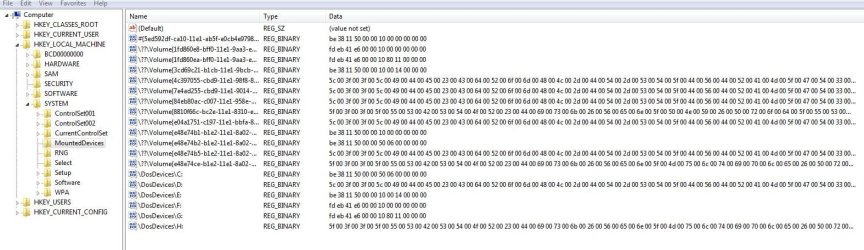
Quick question. I have old, no longer used entries in this key HKEY_LOCAL_MACHINE\SYSTEM\MountedDevices
Is there a way to remove old drives like F: and G: and the corressponding Volumes??
I don't know what the top one with "#" is??
RegeditMounted.JPG
Could removing old stuff fix any of my issues?
 

My Computer My Computer

At a glance

Windows 7 SP1 Home Premium x64Intel Core i7 720QMKingston 8 GBATI Mobility Radeon HD 5870
Computer Manufacturer/Model Number
Aus G73JH-RBBX05
OS
Windows 7 SP1 Home Premium x64
CPU
Intel Core i7 720QM
Motherboard
Asus (Intel HM55 Chipset)
Memory
Kingston 8 GB
Graphics Card(s)
ATI Mobility Radeon HD 5870
Sound Card
Realtek
Monitor(s) Displays
LG
Screen Resolution
1600X900
Hard Drives
Crucial M4 256GB
(Seagate Momentus ST9500420AS)Currently Disabled
Mouse
Razer Naga
Internet Speed
Cable
You have seen it multiple times so it must be true
Master boot record - Wikipedia, the free encyclopedia

What was the problem with MBR in most cases? boot code, disk signature, partition table?

bootrec/fixmbr rewrites the bootcode
disk signature not that important,
partition table corruption is another issue. Can be seen with disk management, partition wizard etc.

I want to understand why diskpart clean is necessary. Just for my knowlegde
 

My Computer My Computer

At a glance

Microsoft Windows 7 Home Premium 64-bits 7601...Intel(R) Core(TM) i3 CPU M 370 @ 2.40GHz4,00 GBATI Mobility Radeon HD 5400 Series
Computer type
Laptop
Computer Manufacturer/Model Number
ACER ASPIRE 5742G
OS
Microsoft Windows 7 Home Premium 64-bits 7601 Multiprocessor Free Service Pack 1
CPU
Intel(R) Core(TM) i3 CPU M 370 @ 2.40GHz
Motherboard
Acer Aspire 5742G
Memory
4,00 GB
Graphics Card(s)
ATI Mobility Radeon HD 5400 Series
Sound Card
(1) AMD High Definition Audio Device (2) Realtek High Defi
Screen Resolution
1366 x 768 x 32 bits (4294967296 colors) @ 60 Hz
Hard Drives
WDC WD5000BEVT-22ZAT0
Quick question. I have old, no longer used entries in this key HKEY_LOCAL_MACHINE\SYSTEM\MountedDevices
Is there a way to remove old drives like F: and G: and the corressponding Volumes??
I don't know what the top one with "#" is??
View attachment 221524
Could removing old stuff fix any of my issues?
You can delete # entry . Is safe!
First look at dosdevices\F and dosdevices\G data starts with fd. Above are more keys with exactly same data
Delete dosdevices\F and dosdevices\G and the keys with exact same data as well.

Check to be sure that all drives have drive letters.
But why????
 

My Computer My Computer

At a glance

Microsoft Windows 7 Home Premium 64-bits 7601...Intel(R) Core(TM) i3 CPU M 370 @ 2.40GHz4,00 GBATI Mobility Radeon HD 5400 Series
Computer type
Laptop
Computer Manufacturer/Model Number
ACER ASPIRE 5742G
OS
Microsoft Windows 7 Home Premium 64-bits 7601 Multiprocessor Free Service Pack 1
CPU
Intel(R) Core(TM) i3 CPU M 370 @ 2.40GHz
Motherboard
Acer Aspire 5742G
Memory
4,00 GB
Graphics Card(s)
ATI Mobility Radeon HD 5400 Series
Sound Card
(1) AMD High Definition Audio Device (2) Realtek High Defi
Screen Resolution
1366 x 768 x 32 bits (4294967296 colors) @ 60 Hz
Hard Drives
WDC WD5000BEVT-22ZAT0
Back
Top