
You are using an out of date browser. It may not display this or other websites correctly.
You should upgrade or use an alternative browser.
You should upgrade or use an alternative browser.
Best lightweight .FLAC converter?
- Thread starter prep
- Start date

Try this one ( Format Factory - Free media file format converter ). I have never used it with flac but it might work.
My Computer
At a glance
Vista, Windows7, Mint Mate, Zorin, Windows 8from 1.6GHz Duo to i7
- Computer Manufacturer/Model Number
- HP, Dell, Gateway, Toshiba - 4 laptops and 2 desktops
- OS
- Vista, Windows7, Mint Mate, Zorin, Windows 8
- CPU
- from 1.6GHz Duo to i7
- Monitor(s) Displays
- 2x HP w2207
- Hard Drives
- 5x HDD, 7x SSD, 12x Externals
- Keyboard
- with trackball - no mices
- Mouse
- Trackball mice
- Internet Speed
- DSL 6000

I would give CDEX a try (in the settings you can switch from default Lame engine to the internal FLAC.dll)
If that isn't what you're looking for:
Here is a blog entry which describes in great detail how to set up CDEX (which really is an excellent free ripper) to convert to Flac through an external encoder.
BTW:What's wrong with the FLAC SourceForge version? Installer gets stuck like this:
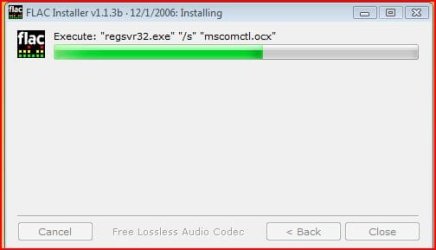
In that case simply unpack the installer with 7zip or Uniextract and copy the files you need manually
-DG
If that isn't what you're looking for:
Here is a blog entry which describes in great detail how to set up CDEX (which really is an excellent free ripper) to convert to Flac through an external encoder.
BTW:What's wrong with the FLAC SourceForge version? Installer gets stuck like this:
In that case simply unpack the installer with 7zip or Uniextract and copy the files you need manually
-DG
My Computer
At a glance
Windows 7 Ultimate x86DualCore AMD Athlon 64 X2, 2600 MHz 5200+Samsung 2GB DDR2Onboard NVIDIA GeForce 6150SE nForce 430
- Computer Manufacturer/Model Number
- HP m8000n
- OS
- Windows 7 Ultimate x86
- CPU
- DualCore AMD Athlon 64 X2, 2600 MHz 5200+
- Motherboard
- Asus M2N68-LA (Narra)
- Memory
- Samsung 2GB DDR2
- Graphics Card(s)
- Onboard NVIDIA GeForce 6150SE nForce 430
- Sound Card
- Onboard nVIDIA nForce 6100-430 (MCP61P)
- Monitor(s) Displays
- Westinghouse 19" LED
- Screen Resolution
- 1280x1024
- Hard Drives
- SATA II Seagate Barracuda 500GB
USB II WD Elements 500GB
USB II WD My Book 1TB
USB II WD My Book 2TB
- PSU
- Stock (HP)
- Case
- Stock (HP)
- Cooling
- Stock
- Keyboard
- Logitech Classic KB 200
- Mouse
- Standard HP opticle USB mouse

- Local time
- 6:31 PM
- Messages
- 7,146
what exactly do you want to do?
rip cd's to flac?
convert flac to mp3?
super is pretty simple and lite, and will convert flac to mp3, or try 'cd to flac ripper'.
flac is a great format for ripping cd's, as you lose zero sound quality, unlike mp3's.
(of course, there is no point converting mp3s into flac, you won't gain quality.)
rip cd's to flac?
convert flac to mp3?
super is pretty simple and lite, and will convert flac to mp3, or try 'cd to flac ripper'.
flac is a great format for ripping cd's, as you lose zero sound quality, unlike mp3's.
(of course, there is no point converting mp3s into flac, you won't gain quality.)
My Computer
At a glance
- Computer Manufacturer/Model Number
- mickey megabyte 1234
- OS
- ultimate 64 sp1
- CPU
- i5 2500K [email protected]
- Motherboard
- MSI P67A-GD53
- Memory
- 8 gigs GSkill Ripjaws 1600
- Graphics Card(s)
- amd hd6950
- Sound Card
- creative x-fi gamer
- Monitor(s) Displays
- samsung 24"
- Screen Resolution
- 1920x1080
- Hard Drives
- ocz vertex 2e 60 gig, samsung f3 1tb, buffalo 2tb ext
- PSU
- antec 550
- Case
- antec three hundred
- Cooling
- i'm a cooling fan
- Keyboard
- saitek eclipse ii
- Mouse
- logitech g3
- Internet Speed
- about 4 Mbps
- Other Info
- i love win7

My Computer
At a glance
Windows 7 Home Premium (64 bit)Intel I5 2500K 3.3Ghz Stock8Gig Kingston DDRIII HyperX Blue 1333 MhzAMD Sapphire 7870 2GB
- Computer type
- PC/Desktop
- Computer Manufacturer/Model Number
- Self Built
- OS
- Windows 7 Home Premium (64 bit)
- CPU
- Intel I5 2500K 3.3Ghz Stock
- Motherboard
- Asus P8H 61-M LE USB 3
- Memory
- 8Gig Kingston DDRIII HyperX Blue 1333 Mhz
- Graphics Card(s)
- AMD Sapphire 7870 2GB
- Sound Card
- Creative Fatality Pro
- Monitor(s) Displays
- 27" BENQ LED
- Screen Resolution
- 1920X1080
- Hard Drives
- 1 x OCZ Agility 3 120GB SSD
1 x Seagate 250GB
1 x Western Digital 1000GB
1 x HP 500GB
- PSU
- 700W Coolermaster Stealth Pro etc
- Case
- Coolermaster Scout
- Cooling
- Some fans
- Keyboard
- Some Logitech type.
- Mouse
- Logitech MX518
- Internet Speed
- Wireless 8mb
- Other Info
- Canon Scanner
Epson Printer
Nikon DSLR 3000
Wacom Tablet

I use dbpoweramp
works pretty good + does more than just flac
I also use Shark007 codec to play flac in wmp12.
works pretty good + does more than just flac
I also use Shark007 codec to play flac in wmp12.
My Computer
At a glance
Windows 7 Ultimate 64bitIntel Core i7-2600K Sandy Bridge 3.4GHz (@4.5...G.SKILL Ripjaws X Series 16GB 1600Mhz (4 x 4G...x2 EVGA GeForce GTX 760's w/ACXCoolers in SLI...
- Computer type
- PC/Desktop
- Computer Manufacturer/Model Number
- Jeepmann/Custom Built
- OS
- Windows 7 Ultimate 64bit
- CPU
- Intel Core i7-2600K Sandy Bridge 3.4GHz (@[email protected])
- Motherboard
- Asus Maximus IV Extreme LGA 1155 Intel P67
- Memory
- G.SKILL Ripjaws X Series 16GB 1600Mhz (4 x 4GB) (Stock)
- Graphics Card(s)
- x2 EVGA GeForce GTX 760's w/ACXCoolers in SLI Surround
- Sound Card
- On-Board
- Monitor(s) Displays
- 3x Acer 24" HDMI Widescreen LCD Monitor
- Screen Resolution
- 3@ 1920x1080 (5760x1080 In Surround)
- Hard Drives
- Samsung 830 128gb ssd
Western Digital Caviar Black 640GB 7200 RPM
Western Digital Caviar Black 500GB 7200 RPM
Seagate 2tb 7200 RPM
- PSU
- COOLER MASTER Silent Pro 1000W
- Case
- COOLER MASTER HAF X Black
- Cooling
- CORSAIR Hydro H70
- Keyboard
- Logitech G510
- Mouse
- Zalman M300
- Internet Speed
- 100mbps-ish Down & 5mbps-ish Up
- Other Info
- I installed the stock 140mm case fan outside of case then installed the H70+ 1 of its 120mm fans inside case. Used the 2nd 120mm from the H70 to go in the Gpu tunnel.
230mm Front,200mm side,200mm top,120mm Gpu tunnel,120mm&140mm on H70.
Thanks for the suggestions, I will have to study each. I wan to take flac files, with .cue, create MP3's for my iPod. I have a lot of shows/tracks in flac, that need to be divided into separate tracks
My Computer
At a glance
Windows 7 Home Premium X64
- OS
- Windows 7 Home Premium X64

+1 for dbPowerAmp
My Computer
At a glance
Windows 10 Professional 64-bitRyzen 9 5900XG.Skill 3600Mhz CL16 16GB × 4EVGA GeForce RTX 3070 Ti FTW3 Ultra Gaming
- Computer type
- PC/Desktop
- Computer Manufacturer/Model Number
- Custom build
- OS
- Windows 10 Professional 64-bit
- CPU
- Ryzen 9 5900X
- Motherboard
- Gigabyte X570 Aorus Master
- Memory
- G.Skill 3600Mhz CL16 16GB × 4
- Graphics Card(s)
- EVGA GeForce RTX 3070 Ti FTW3 Ultra Gaming
- Sound Card
- On-board
- Monitor(s) Displays
- Dell Alienware AW3418DW
- Screen Resolution
- 3440x1440
- Hard Drives
- 1×Sabrent Rocket 4 Plus 2TB nvme SSD (System, internal)
2x4TB Western Digital Blue (Internal)
1x4TB HDST 7200RPM (Internal)
- PSU
- Seasonic Focus Plus 850W Platinum
- Case
- Corsair 680X
- Cooling
- Stock fans + 3× Corsair QL120, Corsair H100i Platinum
- Keyboard
- Logitech K350
- Mouse
- Logitech M510
- Internet Speed
- 120Mbits dl - 20Mbits up
- Antivirus
- ESET NOD32 Antivirus
- Browser
- Firefox (latest version)
- Other Info
- Headphones : Audio-Technica ATH-M50x
Scanner : Canon Canoscan LiDE 220 + Plustek OptiBook 4800

Hi there
this is free and works a treat ( although it says in the title mp3 converter it converts various formats including TO and FROM FLAC fom a number of different codecs.
Koyote Soft
I use this for creating MP3 files when I want to use a portable music player.
For CD ripping directly into FLAC I find WINAMP fine -- and it tags automatically using info from GRACENOTE CDDB so saves effort there too.
I keep my music on the computer in FLAC - I want the original UNCOMPRESSED quality.
Portable pocket sized self powered usb disks as large as 1TB are cheap and readily available.
For re-tagging / re-arranging etc this works a treat too. Also can import tag data directly from online DB's.
http://www.mp3tag.de/en/
Cheers
jimbo
this is free and works a treat ( although it says in the title mp3 converter it converts various formats including TO and FROM FLAC fom a number of different codecs.
Koyote Soft
I use this for creating MP3 files when I want to use a portable music player.
For CD ripping directly into FLAC I find WINAMP fine -- and it tags automatically using info from GRACENOTE CDDB so saves effort there too.
I keep my music on the computer in FLAC - I want the original UNCOMPRESSED quality.
Portable pocket sized self powered usb disks as large as 1TB are cheap and readily available.
For re-tagging / re-arranging etc this works a treat too. Also can import tag data directly from online DB's.
http://www.mp3tag.de/en/
Cheers
jimbo
My Computer
At a glance
Linux CENTOS 7 / various Windows OS'es and se...Intel i7 Intel i58GB, 16GBOn Motherboard
- Computer type
- PC/Desktop
- Computer Manufacturer/Model Number
- Custom built, several laptops HP/ASUS
- OS
- Linux CENTOS 7 / various Windows OS'es and servers
- CPU
- Intel i7 Intel i5
- Memory
- 8GB, 16GB
- Graphics Card(s)
- On Motherboard
- Sound Card
- Realtek HD audio
- Monitor(s) Displays
- Apple Cinema display, Samsung LCD
- Screen Resolution
- 1920 X 1080
- Hard Drives
- 4 X 1TB SATA
- Mouse
- Toshiba wireless laser
- Internet Speed
- > 20MB up
Flac Format Question
Hi Jimbo,
I'm from San Diego, California and I have a question 4 you. So you keep your music in FLAC because you want the original UNCOMPRESSED quality. Do you burn CDs? And how do you burn them? I, too, want the original uncompressed quality which is why I download CDs in FLAC format and then convert to WAV and burn CDs. Do you burn CDs in Flac format?
Marsha
Hi Jimbo,
I'm from San Diego, California and I have a question 4 you. So you keep your music in FLAC because you want the original UNCOMPRESSED quality. Do you burn CDs? And how do you burn them? I, too, want the original uncompressed quality which is why I download CDs in FLAC format and then convert to WAV and burn CDs. Do you burn CDs in Flac format?
Marsha
Hi there
this is free and works a treat ( although it says in the title mp3 converter it converts various formats including TO and FROM FLAC fom a number of different codecs.
Koyote Soft
I use this for creating MP3 files when I want to use a portable music player.
For CD ripping directly into FLAC I find WINAMP fine -- and it tags automatically using info from GRACENOTE CDDB so saves effort there too.
I keep my music on the computer in FLAC - I want the original UNCOMPRESSED quality.
Portable pocket sized self powered usb disks as large as 1TB are cheap and readily available.
For re-tagging / re-arranging etc this works a treat too. Also can import tag data directly from online DB's.
Mp3tag - the universal Tag Editor (ID3v2, MP4, OGG, FLAC, ...)
Cheers
jimbo
My Computer
At a glance
Windows 7 Pro, 64 Bit
- OS
- Windows 7 Pro, 64 Bit

If you are wanting to separate the songs with the cue files then what you need is a small, free program named Medieval Cue Splitter (Medieval CUE Splitter (PC)). It is the best.
Please be warned that very often the accompanying cue files are not written properly. In those cases while the MCS can handle these slightly defective files better than other programs there may still be some files that it cannot handle. In that case you have to open these cue files in Notepad/Wordpad to edit them and make them workable.
Please be warned that very often the accompanying cue files are not written properly. In those cases while the MCS can handle these slightly defective files better than other programs there may still be some files that it cannot handle. In that case you have to open these cue files in Notepad/Wordpad to edit them and make them workable.
Thanks for the suggestions, I will have to study each. I wan to take flac files, with .cue, create MP3's for my iPod. I have a lot of shows/tracks in flac, that need to be divided into separate tracks
My Computer
At a glance
Windows 7 Pro with SP1 32bit2 gigs of RAMIntel(R) 82845G/GL/GE/PE/GV Graphics Controller
- Computer Manufacturer/Model Number
- Custom Built
- OS
- Windows 7 Pro with SP1 32bit
- Motherboard
- Intel D845GVS1 X86-based PC
- Memory
- 2 gigs of RAM
- Graphics Card(s)
- Intel(R) 82845G/GL/GE/PE/GV Graphics Controller
- Sound Card
- Realtek AC'97 Audio
- Monitor(s) Displays
- Samsung SyncMaster 931BF Black 19" LCD Monitor
- Screen Resolution
- 1280X960
- Hard Drives
- 1. SAMSUNG SP0822N ATA Device ~ 80 GigaBytes
2. Seagate FreeAgent Go USB Device ~ 500 GigaBytes
- Keyboard
- COMPAQ Standard PS/2 Keyboard
- Mouse
- iBall Laser Precise Speedster
- Internet Speed
- 4 mb/sec
Hello Marsha,
As for your query, presumably you want to make Audio CDs (CDAs) from lossless Flacs and Apes. I do it all the time with a small free program named Burrrn (Burrrn - Download). It is an excellent little program. It can also read the accompanying cue file and split the the work into individual tracks before burning.
Amarnath Wanchoo
As for your query, presumably you want to make Audio CDs (CDAs) from lossless Flacs and Apes. I do it all the time with a small free program named Burrrn (Burrrn - Download). It is an excellent little program. It can also read the accompanying cue file and split the the work into individual tracks before burning.
Amarnath Wanchoo
Hi Jimbo,
I'm from San Diego, California and I have a question 4 you. So you keep your music in FLAC because you want the original UNCOMPRESSED quality. Do you burn CDs? And how do you burn them? I, too, want the original uncompressed quality which is why I download CDs in FLAC format and then convert to WAV and burn CDs. Do you burn CDs in Flac format?
Marsha
My Computer
At a glance
Windows 7 Pro with SP1 32bit2 gigs of RAMIntel(R) 82845G/GL/GE/PE/GV Graphics Controller
- Computer Manufacturer/Model Number
- Custom Built
- OS
- Windows 7 Pro with SP1 32bit
- Motherboard
- Intel D845GVS1 X86-based PC
- Memory
- 2 gigs of RAM
- Graphics Card(s)
- Intel(R) 82845G/GL/GE/PE/GV Graphics Controller
- Sound Card
- Realtek AC'97 Audio
- Monitor(s) Displays
- Samsung SyncMaster 931BF Black 19" LCD Monitor
- Screen Resolution
- 1280X960
- Hard Drives
- 1. SAMSUNG SP0822N ATA Device ~ 80 GigaBytes
2. Seagate FreeAgent Go USB Device ~ 500 GigaBytes
- Keyboard
- COMPAQ Standard PS/2 Keyboard
- Mouse
- iBall Laser Precise Speedster
- Internet Speed
- 4 mb/sec
Hey guys/gals... This Thread is from mid/late 2010 and was last posted in about a Year and five months ago!! (except yours)
You might want to start new threads for your questions.
You might want to start new threads for your questions.
My Computer
At a glance
Windows 7 Ultimate 64bitIntel Core i7-2600K Sandy Bridge 3.4GHz (@4.5...G.SKILL Ripjaws X Series 16GB 1600Mhz (4 x 4G...x2 EVGA GeForce GTX 760's w/ACXCoolers in SLI...
- Computer type
- PC/Desktop
- Computer Manufacturer/Model Number
- Jeepmann/Custom Built
- OS
- Windows 7 Ultimate 64bit
- CPU
- Intel Core i7-2600K Sandy Bridge 3.4GHz (@[email protected])
- Motherboard
- Asus Maximus IV Extreme LGA 1155 Intel P67
- Memory
- G.SKILL Ripjaws X Series 16GB 1600Mhz (4 x 4GB) (Stock)
- Graphics Card(s)
- x2 EVGA GeForce GTX 760's w/ACXCoolers in SLI Surround
- Sound Card
- On-Board
- Monitor(s) Displays
- 3x Acer 24" HDMI Widescreen LCD Monitor
- Screen Resolution
- 3@ 1920x1080 (5760x1080 In Surround)
- Hard Drives
- Samsung 830 128gb ssd
Western Digital Caviar Black 640GB 7200 RPM
Western Digital Caviar Black 500GB 7200 RPM
Seagate 2tb 7200 RPM
- PSU
- COOLER MASTER Silent Pro 1000W
- Case
- COOLER MASTER HAF X Black
- Cooling
- CORSAIR Hydro H70
- Keyboard
- Logitech G510
- Mouse
- Zalman M300
- Internet Speed
- 100mbps-ish Down & 5mbps-ish Up
- Other Info
- I installed the stock 140mm case fan outside of case then installed the H70+ 1 of its 120mm fans inside case. Used the 2nd 120mm from the H70 to go in the Gpu tunnel.
230mm Front,200mm side,200mm top,120mm Gpu tunnel,120mm&140mm on H70.
Hi there
This is the EASIEST method
1) Rip CD's with Winamp into FLAC -- the advantage of Winamp is that it gets info from gracenote even when playing FLAC directly on the computer.
2) You can re-create the original CD's in their entirety (either as "physical CD's" or as "Virtual CD's") by using NERO with the free mega plugin to burn the Flac format to the standard CDA -- the re-created CD is 100% the same in quality etc etc as the original.
I have one of those smaller 3TB external drives where I just store ALL my CD's now in the original format as virtual ISO's -- Disk space is still relatively cheap (and actually beginning to get cheaper again). This serves as a Music CD archive. The FLAC files I have on line on the computer.
I don't like Ipods so as a music player I use a Sandisk Sansa clip (8GB internal memory, 32GB external with one of those micro SDHC cards --like a mobile phone). This player plays FLAC directly so no mp3 conversion required or needed.
The device only costs around 50 USD too so if it gets broken etc --cheap enough to get another one.
Link for the Nero plugin:
Download Nero Mega Plugin Pack 1.0 Free - A package that will give you more features than the Enterprise Edition - Softpedia
Cheers
jimbo
This is the EASIEST method
1) Rip CD's with Winamp into FLAC -- the advantage of Winamp is that it gets info from gracenote even when playing FLAC directly on the computer.
2) You can re-create the original CD's in their entirety (either as "physical CD's" or as "Virtual CD's") by using NERO with the free mega plugin to burn the Flac format to the standard CDA -- the re-created CD is 100% the same in quality etc etc as the original.
I have one of those smaller 3TB external drives where I just store ALL my CD's now in the original format as virtual ISO's -- Disk space is still relatively cheap (and actually beginning to get cheaper again). This serves as a Music CD archive. The FLAC files I have on line on the computer.
I don't like Ipods so as a music player I use a Sandisk Sansa clip (8GB internal memory, 32GB external with one of those micro SDHC cards --like a mobile phone). This player plays FLAC directly so no mp3 conversion required or needed.
The device only costs around 50 USD too so if it gets broken etc --cheap enough to get another one.
Link for the Nero plugin:
Download Nero Mega Plugin Pack 1.0 Free - A package that will give you more features than the Enterprise Edition - Softpedia
Cheers
jimbo
My Computer
At a glance
Linux CENTOS 7 / various Windows OS'es and se...Intel i7 Intel i58GB, 16GBOn Motherboard
- Computer type
- PC/Desktop
- Computer Manufacturer/Model Number
- Custom built, several laptops HP/ASUS
- OS
- Linux CENTOS 7 / various Windows OS'es and servers
- CPU
- Intel i7 Intel i5
- Memory
- 8GB, 16GB
- Graphics Card(s)
- On Motherboard
- Sound Card
- Realtek HD audio
- Monitor(s) Displays
- Apple Cinema display, Samsung LCD
- Screen Resolution
- 1920 X 1080
- Hard Drives
- 4 X 1TB SATA
- Mouse
- Toshiba wireless laser
- Internet Speed
- > 20MB up
Anyway it is alive again, so we might as well continue from here.
Hey guys/gals... This Thread is from mid/late 2010 and was last posted in about a Year and five months ago!! (except yours)
You might want to start new threads for your questions.
My Computer
At a glance
Windows 7 Pro with SP1 32bit2 gigs of RAMIntel(R) 82845G/GL/GE/PE/GV Graphics Controller
- Computer Manufacturer/Model Number
- Custom Built
- OS
- Windows 7 Pro with SP1 32bit
- Motherboard
- Intel D845GVS1 X86-based PC
- Memory
- 2 gigs of RAM
- Graphics Card(s)
- Intel(R) 82845G/GL/GE/PE/GV Graphics Controller
- Sound Card
- Realtek AC'97 Audio
- Monitor(s) Displays
- Samsung SyncMaster 931BF Black 19" LCD Monitor
- Screen Resolution
- 1280X960
- Hard Drives
- 1. SAMSUNG SP0822N ATA Device ~ 80 GigaBytes
2. Seagate FreeAgent Go USB Device ~ 500 GigaBytes
- Keyboard
- COMPAQ Standard PS/2 Keyboard
- Mouse
- iBall Laser Precise Speedster
- Internet Speed
- 4 mb/sec
turningpointup
New member
- Local time
- 12:31 PM
- Messages
- 1
I prefer iDealshare VideoGo. It can split FLAC into MP3, WAV, WMA, AAC, AC3, M4A, etc
And i like its split and conversion without quality loss and its batch conversion function.
And i like its split and conversion without quality loss and its batch conversion function.
My Computer
At a glance
Windows 7
- Computer type
- PC/Desktop
- OS
- Windows 7

Pretty old thread, but I suggest Freemake Audio Converter.
My Computer
At a glance
OpenBSD 6.8AMD A10-7850K APU @ 4300MHz8GB G-Skill Ripjaws @ 2133MHzI have an APU
- Computer type
- PC/Desktop
- Computer Manufacturer/Model Number
- Custom Build
- OS
- OpenBSD 6.8
- CPU
- AMD A10-7850K APU @ 4300MHz
- Motherboard
- ASRock FM2A58M-VG3+ R2.0
- Memory
- 8GB G-Skill Ripjaws @ 2133MHz
- Graphics Card(s)
- I have an APU
- Monitor(s) Displays
- LG 24M35
- Screen Resolution
- 1920x1080@74Hz
- Hard Drives
- 931GB Seagate ST31000524NS 45W8867 59Y1812IBM
- PSU
- Cooler Master 750W
- Case
- Bitfenix NOVA
- Cooling
- 120mm fan
- Keyboard
- Microsoft Digital Media Keyboard 1.0A
- Mouse
- Logitech G403
- Internet Speed
- 40Mbps
- Browser
- Firefox
- Other Info
- Headset: Audio-Technica M50X
"Conversion without quality loss" is obviously a statement which cannot be true, unless the output format is also "lossless" (e.g. WAV, M4A) in which case these would be bit-identical in "quality" to the original FLAC. All other formats you mention are "lossy", which by definition cannot be bit-identical and therefore cannot possibly be talked about as "without quality loss" no matter how good the conversion/quality parameter are in coming from FLAC. Lossy formats "sound pretty good", but a statement like "conversion without quality loss" is simply untrue.I prefer iDealshare VideoGo. It can split FLAC into MP3, WAV, WMA, AAC, AC3, M4A, etc
And i like its split and conversion without quality loss and its batch conversion function.
And of course, if your created your FLAC files directly from the original source CD or WAV, then your FLAC files are "bit-perfect lossless duplicates" of the original CD tracks, just physically smaller in size due to the improved compression method of FLAC. But if the source for your FLAC originals was some other non-perfect "lossy" source in the first place (e.g. MP3, which for some reason you converted to FLAC), well hopefully that isn't true.
My Computer
At a glance
Windows 7 Pro x64 (1), Win7 Pro X64 (2)i5-3350p 3.1Ghz/6MB-cache (1); E8400 3.0Ghz/6...8GB PC3-12800 DDR3 (1); 4GB PC3-10600 DDR3 (2)ATI HD7750 (1), (see TV cards); ATI R7 250 (2)
- Computer type
- PC/Desktop
- Computer Manufacturer/Model Number
- Home-built, two systems (1) and (2)
- OS
- Windows 7 Pro x64 (1), Win7 Pro X64 (2)
- CPU
- i5-3350p 3.1Ghz/6MB-cache (1); E8400 3.0Ghz/6MB-cache (2)
- Motherboard
- ASUS P8Z77-V Pro (1); ASUS P5Q3 (2)
- Memory
- 8GB PC3-12800 DDR3 (1); 4GB PC3-10600 DDR3 (2)
- Graphics Card(s)
- ATI HD7750 (1), (see TV cards); ATI R7 250 (2)
- Sound Card
- Realtek ALC892 HD Audio (1); Realtek ALC1200 HD Audio (2)
- Monitor(s) Displays
- Eizo HD2441W LCD, Eizo S2433W (1); Eizo 24" S2433W (2)
- Screen Resolution
- 1920x1200, 1920x1200 (1); 1920x1200 (2)
- Hard Drives
- (1) 1TB SATA-II (7200RPM), 2x2TB SATA-III (7200RPM), 250GB SATA-III (10000RPM) for OS; 2x2TB external USB 3.0
(2) 320GB SATA-II (7200RPM), 750GB SATA-II (7200RPM), 150GB SATA-II (10000RPM) for OS; 2TB external USB 3.0
- PSU
- Nesteq ECS-6001 600W (1); Nesteq ECS-5001 500W (2)
- Case
- Acousti-Case 360 (1) and (2)
- Cooling
- Noctua NH-U12P SE2 for CPU, 2x120mm case fans (1) and (2)
- Keyboard
- IBM PS/2 (1) and (2)
- Mouse
- Logitech MX Revolution wireless (1); Microsoft wired (2)
- Internet Speed
- 100mbps down / 10mbps up
- Antivirus
- Microsoft Security Essentials; Malwarebyte Anti-Malware Pro
- Browser
- Firefox
- Other Info
- Ceton InfiniTV 4-tuner cablecard-enabled TV card as well as Hauppauge HVR-2250 OTA/ATSC 2-tuner TV card in (1), running under Win7 WMC
Similar threads
- Replies
- 16
- Views
- 8K
- Replies
- 8
- Views
- 2K

- Replies
- 1
- Views
- 976

- Replies
- 7
- Views
- 18K
- Replies
- 7
- Views
- 2K