Solved BF4

China Rising release trailer


I thought the standard map's looked really nice but they've done a wicked job on the newer one's too. I've foud myself just trecking about checking out the scenery :p
 

My Computer

Computer type
PC/Desktop
Computer Manufacturer/Model Number
Custom build
OS
Win7 Home Premium x64 SP1
CPU
i7 4770k
Motherboard
Asus maximus VI Hero
Memory
8Gb Kingston HyperX Beast 2400MHz @2133MHz 11-12-11-30
Graphics Card(s)
MSI GTX 780ti Gaming Oc x2
Sound Card
Onboard ROG SupremeFX
Monitor(s) Displays
Asus VG248QE
Screen Resolution
3840X1080 144Hz
Hard Drives
Samung Evo 256Gb, OCZ Agility4 128Gb
1x1TB hitachi storage
PSU
EVGA Supernova 1000w Platinum
Case
Corsair Air 540
Cooling
Corsair H100i
Keyboard
Coolermaster Quickfire Pro
Mouse
Corsair M65 RGB
Internet Speed
74mb dwn/16up
Antivirus
MSE,Malwarebytes
Browser
Chrome
Looks nice Ryan :cool:

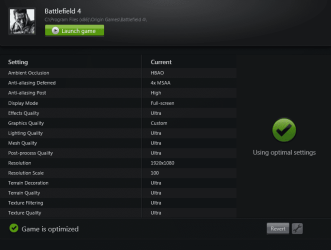
Here is a shot of how the game is set now with it "Optimized" for me. :)
 

Attachments

  • bf4settings.PNG
    bf4settings.PNG
    65.9 KB · Views: 1

My Computer

OS
Windows 7 Professional 64 bit
It will look really nice at those settings chap :D
I have to run with HBAO off as it causes to much heat lol but I can't see the difference anyway. With it on my gpu's will hit about 76c in game but off they stay around 60-65c give or take a degree or 2.
How are you finding that Geforce Experience? It was really buggy at first so I've never installed it but it has Shadow play now which is sounding pretty decent for recording game play with minimal hit on performance.
 

My Computer

Computer type
PC/Desktop
Computer Manufacturer/Model Number
Custom build
OS
Win7 Home Premium x64 SP1
CPU
i7 4770k
Motherboard
Asus maximus VI Hero
Memory
8Gb Kingston HyperX Beast 2400MHz @2133MHz 11-12-11-30
Graphics Card(s)
MSI GTX 780ti Gaming Oc x2
Sound Card
Onboard ROG SupremeFX
Monitor(s) Displays
Asus VG248QE
Screen Resolution
3840X1080 144Hz
Hard Drives
Samung Evo 256Gb, OCZ Agility4 128Gb
1x1TB hitachi storage
PSU
EVGA Supernova 1000w Platinum
Case
Corsair Air 540
Cooling
Corsair H100i
Keyboard
Coolermaster Quickfire Pro
Mouse
Corsair M65 RGB
Internet Speed
74mb dwn/16up
Antivirus
MSE,Malwarebytes
Browser
Chrome
China Rising release trailer


I thought the standard map's looked really nice but they've done a wicked job on the newer one's too. I've foud myself just trecking about checking out the scenery :p

Looks good. I dind't drop the coin for premium so I have to wait 2 weeks.


Looks nice Ryan :cool:

Here is a shot of how the game is set now with it "Optimized" for me. :)


I bet it runs amazing on your rig Paul. Post a screenshot or two:p
 

My Computer

Computer type
PC/Desktop
Computer Manufacturer/Model Number
Dude Build
OS
Windows 10 Pro X64
CPU
Intel(R) Core(TM) i5-3570K CPU OC@ 4.5GHZ Turbo
Motherboard
MSI Z77A-G45 Gaming
Memory
8.00 GB DDR3 1600Mhz
Graphics Card(s)
MSI Gaming X GTX 1070
Sound Card
Realtek High Definition
Monitor(s) Displays
Dell S23O9W, HP L1710
Screen Resolution
DELL-1920 x 1080 HP-1280 x1024
Hard Drives
Crucial m4 256 SSD, WD 7200RPM 500GB WD 1TB
PSU
Seasonic X650 GOLD
Case
Zalman Z12
Cooling
Antec Kuhler 920
Keyboard
Logitech
Mouse
MSI DS100 Interceptor
Internet Speed
50 down and 5 up
Antivirus
MSE
Browser
Chrome, IE 11
Other Info
Logitech X-620 Speakers
He's right. Talking about being bit by a whole basket full of snakes, I was downloading yesterdau and had 67% downloaded. While working on the computer, I bumped the power cord which shut the whole thing down. When I started back up there was nothing there, nada! I looked everywhere, so had to start over.

Geez-us I bloody hate that non-resuming downloads. I presume the air was full of curses?


***
With the new 780's I was able to move up to 5760x1200, all ultra settings and x2MSAA and stay around the 50-70 FPS average with odd dips. Vram usage is around 2700Mb. If I venture online I'll knock a few settings down for extra smooth.

Do you have the annoying SLI flickering though Ryan? I can't believe nvidia weren't reasy for it this time after BC2 and BF3
 

My Computer

Computer type
PC/Desktop
Computer Manufacturer/Model Number
Systems by SmartEyeball
OS
8 Pro x64
CPU
i7 3770K 4.6GHz
Motherboard
ASUS P8Z77 WS
Memory
16GB G.Skill Trident X 2666mhz
Graphics Card(s)
x2 EVGA 780 Ti Superclocked SLI
Sound Card
SB X-FI Surround 5.1 PRO USB / ATH-AD900 Headphones
Monitor(s) Displays
x3 Dell U2410 / 58" Samsung
Screen Resolution
5760*1200/ 1920*1200
Hard Drives
2x Intel 520 240GB (RAID 0) * 2x WD Caviar Blacks 2TB (RAID 0) * 2TB WD Caviar Black * Sony Optirac DVD
PSU
Silverstone Strider Evolution 1200W
Case
Thermaltake Level 10 GT Snow Edition
Cooling
Noctua NH-D14
Keyboard
Topre Realforce // Ducky Shine MX Black // Filco Ninja TKL
Mouse
Thermaltake Theron (Highly Recommended) + Razer Imperator
Antivirus
MSE
Browser
IE, FF, WaterFox
Other Info
GT Extreme V2 Sim Racing Cockpit + 40" LCD and K/B Mouse stand ▼
Fanatec CSR Elite Wheel + Clubsport V1 Pedals + CSR shifter/7G-H ▼Saitek X52 Pro ▼ TrackIR 5 Pro
Buttkicker v2 Seat Rumbler with Dedicated 5.1 and Sub Woofer attached to frame ▼
=
Bloody Big Grin
With the new 780's I was able to move up to 5760x1200, all ultra settings and x2MSAA and stay around the 50-70 FPS average with odd dips. Vram usage is around 2700Mb. If I venture online I'll knock a few settings down for extra smooth.

Do you have the annoying SLI flickering though Ryan? I can't believe nvidia weren't reasy for it this time after BC2 and BF3

I found that the SP is harder on your Gpu than the MP so you may not have to lower your settings chap.
The only flickering I see is some distant textures like chain link fences flickering but nothing major. I updated from 331.65 to 331.82 yesterday but started to get direct X error's so have just gone back to 331.65.
 
Last edited:

My Computer

Computer type
PC/Desktop
Computer Manufacturer/Model Number
Custom build
OS
Win7 Home Premium x64 SP1
CPU
i7 4770k
Motherboard
Asus maximus VI Hero
Memory
8Gb Kingston HyperX Beast 2400MHz @2133MHz 11-12-11-30
Graphics Card(s)
MSI GTX 780ti Gaming Oc x2
Sound Card
Onboard ROG SupremeFX
Monitor(s) Displays
Asus VG248QE
Screen Resolution
3840X1080 144Hz
Hard Drives
Samung Evo 256Gb, OCZ Agility4 128Gb
1x1TB hitachi storage
PSU
EVGA Supernova 1000w Platinum
Case
Corsair Air 540
Cooling
Corsair H100i
Keyboard
Coolermaster Quickfire Pro
Mouse
Corsair M65 RGB
Internet Speed
74mb dwn/16up
Antivirus
MSE,Malwarebytes
Browser
Chrome
Interesting. On 331.65 up to 331.93, I'm getting really bad flickering with any sort of smoke effect and the odd texture thing as well. Happened with my 670's too. Wonder if it's HBAO, since I have it enabled and you don't. Might have a look later.
 

My Computer

Computer type
PC/Desktop
Computer Manufacturer/Model Number
Systems by SmartEyeball
OS
8 Pro x64
CPU
i7 3770K 4.6GHz
Motherboard
ASUS P8Z77 WS
Memory
16GB G.Skill Trident X 2666mhz
Graphics Card(s)
x2 EVGA 780 Ti Superclocked SLI
Sound Card
SB X-FI Surround 5.1 PRO USB / ATH-AD900 Headphones
Monitor(s) Displays
x3 Dell U2410 / 58" Samsung
Screen Resolution
5760*1200/ 1920*1200
Hard Drives
2x Intel 520 240GB (RAID 0) * 2x WD Caviar Blacks 2TB (RAID 0) * 2TB WD Caviar Black * Sony Optirac DVD
PSU
Silverstone Strider Evolution 1200W
Case
Thermaltake Level 10 GT Snow Edition
Cooling
Noctua NH-D14
Keyboard
Topre Realforce // Ducky Shine MX Black // Filco Ninja TKL
Mouse
Thermaltake Theron (Highly Recommended) + Razer Imperator
Antivirus
MSE
Browser
IE, FF, WaterFox
Other Info
GT Extreme V2 Sim Racing Cockpit + 40" LCD and K/B Mouse stand ▼
Fanatec CSR Elite Wheel + Clubsport V1 Pedals + CSR shifter/7G-H ▼Saitek X52 Pro ▼ TrackIR 5 Pro
Buttkicker v2 Seat Rumbler with Dedicated 5.1 and Sub Woofer attached to frame ▼
=
Bloody Big Grin
Interesting. On 331.65 up to 331.93, I'm getting really bad flickering with any sort of smoke effect and the odd texture thing as well. Happened with my 670's too. Wonder if it's HBAO, since I have it enabled and you don't. Might have a look later.

Yeah during the beta with HBAO enabled all the smoke flickered. It was unplayable like that so I turned it off but I have tried it since and haven't seen the same effect, It just causes more heat for me.
 

My Computer

Computer type
PC/Desktop
Computer Manufacturer/Model Number
Custom build
OS
Win7 Home Premium x64 SP1
CPU
i7 4770k
Motherboard
Asus maximus VI Hero
Memory
8Gb Kingston HyperX Beast 2400MHz @2133MHz 11-12-11-30
Graphics Card(s)
MSI GTX 780ti Gaming Oc x2
Sound Card
Onboard ROG SupremeFX
Monitor(s) Displays
Asus VG248QE
Screen Resolution
3840X1080 144Hz
Hard Drives
Samung Evo 256Gb, OCZ Agility4 128Gb
1x1TB hitachi storage
PSU
EVGA Supernova 1000w Platinum
Case
Corsair Air 540
Cooling
Corsair H100i
Keyboard
Coolermaster Quickfire Pro
Mouse
Corsair M65 RGB
Internet Speed
74mb dwn/16up
Antivirus
MSE,Malwarebytes
Browser
Chrome
Dice to stop developing all dlc's for BF4
Publisher Electronic Arts announced that DICE is halting development of all future projects and expansions until it sorts out issues currently affecting the PC and console versions of Battlefield 4.

"We know we still have a ways to go with fixing the game,” an EA spokesperson told PC Gamer in a statement. “It is absolutely our #1 priority. The team at DICE is working non-stop to update the game." The spokesperson also asserted a commitment to fix player issues. "We know many of our players are frustrated, and we feel your pain. We will not stop until this is right.”
DICE halts development of all future projects as it shifts focus to Battlefield 4 issues | PC Gamer
 

My Computer

Computer type
PC/Desktop
Computer Manufacturer/Model Number
Custom build
OS
Win7 Home Premium x64 SP1
CPU
i7 4770k
Motherboard
Asus maximus VI Hero
Memory
8Gb Kingston HyperX Beast 2400MHz @2133MHz 11-12-11-30
Graphics Card(s)
MSI GTX 780ti Gaming Oc x2
Sound Card
Onboard ROG SupremeFX
Monitor(s) Displays
Asus VG248QE
Screen Resolution
3840X1080 144Hz
Hard Drives
Samung Evo 256Gb, OCZ Agility4 128Gb
1x1TB hitachi storage
PSU
EVGA Supernova 1000w Platinum
Case
Corsair Air 540
Cooling
Corsair H100i
Keyboard
Coolermaster Quickfire Pro
Mouse
Corsair M65 RGB
Internet Speed
74mb dwn/16up
Antivirus
MSE,Malwarebytes
Browser
Chrome
Dice to stop developing all dlc's for BF4
Publisher Electronic Arts announced that DICE is halting development of all future projects and expansions until it sorts out issues currently affecting the PC and console versions of Battlefield 4.

"We know we still have a ways to go with fixing the game,” an EA spokesperson told PC Gamer in a statement. “It is absolutely our #1 priority. The team at DICE is working non-stop to update the game." The spokesperson also asserted a commitment to fix player issues. "We know many of our players are frustrated, and we feel your pain. We will not stop until this is right.”
DICE halts development of all future projects as it shifts focus to Battlefield 4 issues | PC Gamer


Good to hear and it really is about time. There are certain servers where I have constant crashing/freezing issues and other servers where I can play several straight matches without an issue.
It is very frustrating when you are in the middle of a match only to freeze up and have to restart the game :mad::mad:
 

My Computer

Computer type
PC/Desktop
Computer Manufacturer/Model Number
Self built
OS
Windows 7 Home Premium x64 SP1
CPU
Core i5 3570K 3.4GHz
Motherboard
Asus P8Z77-V
Memory
16GB Corsair Vengeance 1600MHz
Graphics Card(s)
EVGA GTX 970 4GB
Sound Card
Realtek High Definition Audio
Monitor(s) Displays
1. HP 2511X 2. Viewsonic VX2439wm
Screen Resolution
1. 1920x1080 2. 1920x1080
Hard Drives
1. Silicon Power S60 240GB 2. WD 1TB 3. WD 3TB 4. ESATA external 2TB
PSU
Corsair HXi HX850i
Case
ThermalTake Overseer RX-1 Full Tower
Cooling
Air
Keyboard
Corsair K70
Mouse
Logitech G9x
Internet Speed
Cable
Dice to stop developing all dlc's for BF4
Publisher Electronic Arts announced that DICE is halting development of all future projects and expansions until it sorts out issues currently affecting the PC and console versions of Battlefield 4.

"We know we still have a ways to go with fixing the game,” an EA spokesperson told PC Gamer in a statement. “It is absolutely our #1 priority. The team at DICE is working non-stop to update the game." The spokesperson also asserted a commitment to fix player issues. "We know many of our players are frustrated, and we feel your pain. We will not stop until this is right.”
DICE halts development of all future projects as it shifts focus to Battlefield 4 issues | PC Gamer


Good to hear and it really is about time. There are certain servers where I have constant crashing/freezing issues and other servers where I can play several straight matches without an issue.
It is very frustrating when you are in the middle of a match only to freeze up and have to restart the game :mad::mad:
Yeah it's definitely a good thing I just hope it doesn't take them too long. I don't really get any crashes now though so am one of the lucky ones.
 

My Computer

Computer type
PC/Desktop
Computer Manufacturer/Model Number
Custom build
OS
Win7 Home Premium x64 SP1
CPU
i7 4770k
Motherboard
Asus maximus VI Hero
Memory
8Gb Kingston HyperX Beast 2400MHz @2133MHz 11-12-11-30
Graphics Card(s)
MSI GTX 780ti Gaming Oc x2
Sound Card
Onboard ROG SupremeFX
Monitor(s) Displays
Asus VG248QE
Screen Resolution
3840X1080 144Hz
Hard Drives
Samung Evo 256Gb, OCZ Agility4 128Gb
1x1TB hitachi storage
PSU
EVGA Supernova 1000w Platinum
Case
Corsair Air 540
Cooling
Corsair H100i
Keyboard
Coolermaster Quickfire Pro
Mouse
Corsair M65 RGB
Internet Speed
74mb dwn/16up
Antivirus
MSE,Malwarebytes
Browser
Chrome
I found this and thought it may help some here. You guys may know this, I didn't know many of them

Some pretty cool finds here & edit: many more good finds throughout the thread that could not fit in this post...
___________
Gamespur Article: Battlefield 4: Tons of Little Known Tips And Tricks That Players Should Use [gamepur.com] -
By Sehran Sun, 2013-11-03 14:45
Here is massive list of little known tips and tricks that players should used to get upper hand in Battlefield 4 against enemy.
* Pressing E on a dead soldier when medic will automatically switch you to the defibrellator paddles and revive (brings back weapon after revive). - CryptiKau
* Shoot once and don't reload in the LAV to get an extra 12 rounds to regenerate in your ammo pool. - kahoona
* Press F5 and F6 on the attack boat to eject in a jet ski! - 1ildevil
* You can repair reactive armor... You use the repair tool on the side where the reactive armor has been blown off, and eventually the armor will reappear. (or) you may need to repair the vehicle past 100% - rdmx & Zapatopi
* F switches weapons in vehicles/boats. - Zeigy
* In BF4, you can't suffer from reload syndrome because every magazine you reload subtracts from your total ammo. If you noticed you run out of ammo so fast in BF4, that's why.
* Mouse over enemy and hit Q to spot
* Double tap WW to run and you don't have to hold the shift key. Or set your sprint key to auto sprint, so that you don't have to hold any buttons
* There is a brand new cover mechanic that is explained very briefly in the first campaign mission. If you are crouched behind a bipod friendly cover object, you can just use the right mouse button to quickly peak your weapon over it in the ready position. Its much faster than toggling crouch and best yet is that you can center your reticle before hand to put a bead on a target very quickly.
* This is a no brainer that I missed some how. No more running around your starting area racing people for a chance to get into a vehicle. If you want a certain one, just wait in the deploy map before hitting deploy and click on the vehicle icon of what you want, you will spawn right in the drivers seat if its blue. You can also click on the grey icons to see what is available for use on that particular map.
* There is no compass in Hardcore modes, but if you look at the map early on and find the direction of the farthest objective, its much easier to discern location information via radio. When I hear there is a baddy to the west I just look for Objective C for instance via my UI, which I knew was East and do an about face.
* When you see "heavy enemy presence nearby" that's your commander telling you a cruise missle is about to drop on you. Run like hell.
* Call out objectives for your squad as a squadleader. Everyone gets more points / push if you have the objective marked. Everyone gets bonuses for following the order & killing people along the way. Roughly 200+ score per minute.
* You can actually hold a grenade with the pin pulled indefinitely. You can even put it away (without blowing your face off) by switching weapons while you have the pin pulled. Simply press the grenade throw button and then hold the fire button once the animation starts. Your soldier will stick his hand out like he's posing for the Highsman. Jumping will cause you to throw it, but having the pin pulled decreases the time needed to throw, although sprint is disabled.
* Also, this creates a dead man grenade as it drops at your feet if you die. Good for holding points or M-COMs.
* Accept orders given by the commander, even if you don't follow them. It makes for free points for both of you.
* Crouch while swimming and you will dive.
* The AK-12 and its carbine variant AKU-12 both have an increased RoF in burst fire mode.
* If your solider is "angled" behind cover, you can just press on the aim button (ADS) and it'll automatically "aim out" at your target. You can un-ADS to get back into cover. All of this without using your WASD (or moving) keys.
* Tap fire with belt-fed LMGs. Pretty much just 2-3 round bursts will help engage enemies at medium to long range.
* If you are out of rounds while using the mortar, just press and hold E to pick it up and re-deploy, your mortar will go back to full ammo.
* If you have an XP boost active while playing commander, you'll get the boost points but no time will be taken from the boosts duration.
* When you are a squadleader (star behind your name), you have the ability to command your squadmates to either defend or attack by looking at an objective and pressing 'Q'.
* On the deployment screen, double click a spawn point instead of having to press the deploy button.
* Flying choppers over areas can blow up dust to give cover to your guys capping points.
* you can zero your sniper rifle and DRM. This means adjusting your crosshair to a specific distance with bullet drop. Use the PLD and aim at your target to measure distance (RNG = range). Then press V (default key) with your sniper rifle, to configure the range of the shot.
* Double click on a tank to auto spawn, but realize you've forgotten to equip the repair tool? Click your gadget slot and you'll go to the equipment screen, take your time and get your repair tool out, and once you click deploy you'll auto spawn into the tank
* USAS-12 + frags battle pickup is the only super weapon in the game that can be resupplied with ammunition.

 

My Computers

System One System Two

  • Computer type
    PC/Desktop
    Computer Manufacturer/Model Number
    ALWAYS UNDER CONSTRUCTION
    OS
    Windows 11 Pro
    CPU
    Ryzen 9 5900X
    Motherboard
    Asus X570 Crosshair Viii Hero
    Memory
    32GB G Skill DDR4-3600
    Graphics Card(s)
    EVGA RTX 3080 FTW 3 Ultra
    Sound Card
    On Board/Sennheiser PC37X Headset
    Monitor(s) Displays
    3 X Asus 27"
    Screen Resolution
    2560x1440
    Hard Drives
    2 X 1 TB NVME drives
    PSU
    EVGA 850
    Case
    Phanteks Eclipse P400A
    Cooling
    EVGA 280 AIO
    Keyboard
    Logitech G510s/ Logitech G13
    Mouse
    Logitech G502
    Internet Speed
    24/1
    Antivirus
    ESET/MBAM Pro/SAS Pro
    Browser
    Chrome/ Firefox/ Edge
  • Computer type
    Laptop
    System Manufacturer/Model Number
    Dell 16 Plus
    OS
    Windows 11 Pro
    CPU
    Intel Ultra 9 288V
    Memory
    32 GB LPDDR5X 8533
    Monitor(s) Displays
    16" Mini-LED HDR600 Touch 90 Hz
    Screen Resolution
    2560X1600
    Hard Drives
    1 TB NVME
Nice find Steve. Reading about pulling the pin on the grenade had me hoping we could cook them. How's the download coming?
 

My Computer

Computer type
PC/Desktop
Computer Manufacturer/Model Number
Dude Build
OS
Windows 10 Pro X64
CPU
Intel(R) Core(TM) i5-3570K CPU OC@ 4.5GHZ Turbo
Motherboard
MSI Z77A-G45 Gaming
Memory
8.00 GB DDR3 1600Mhz
Graphics Card(s)
MSI Gaming X GTX 1070
Sound Card
Realtek High Definition
Monitor(s) Displays
Dell S23O9W, HP L1710
Screen Resolution
DELL-1920 x 1080 HP-1280 x1024
Hard Drives
Crucial m4 256 SSD, WD 7200RPM 500GB WD 1TB
PSU
Seasonic X650 GOLD
Case
Zalman Z12
Cooling
Antec Kuhler 920
Keyboard
Logitech
Mouse
MSI DS100 Interceptor
Internet Speed
50 down and 5 up
Antivirus
MSE
Browser
Chrome, IE 11
Other Info
Logitech X-620 Speakers
I finished it yesterday. only 3 days, of course, I had to do it twice almost. But, it's done now and I'm playing the campaign, or at least played an hour or so.
 

My Computers

System One System Two

  • Computer type
    PC/Desktop
    Computer Manufacturer/Model Number
    ALWAYS UNDER CONSTRUCTION
    OS
    Windows 11 Pro
    CPU
    Ryzen 9 5900X
    Motherboard
    Asus X570 Crosshair Viii Hero
    Memory
    32GB G Skill DDR4-3600
    Graphics Card(s)
    EVGA RTX 3080 FTW 3 Ultra
    Sound Card
    On Board/Sennheiser PC37X Headset
    Monitor(s) Displays
    3 X Asus 27"
    Screen Resolution
    2560x1440
    Hard Drives
    2 X 1 TB NVME drives
    PSU
    EVGA 850
    Case
    Phanteks Eclipse P400A
    Cooling
    EVGA 280 AIO
    Keyboard
    Logitech G510s/ Logitech G13
    Mouse
    Logitech G502
    Internet Speed
    24/1
    Antivirus
    ESET/MBAM Pro/SAS Pro
    Browser
    Chrome/ Firefox/ Edge
  • Computer type
    Laptop
    System Manufacturer/Model Number
    Dell 16 Plus
    OS
    Windows 11 Pro
    CPU
    Intel Ultra 9 288V
    Memory
    32 GB LPDDR5X 8533
    Monitor(s) Displays
    16" Mini-LED HDR600 Touch 90 Hz
    Screen Resolution
    2560X1600
    Hard Drives
    1 TB NVME
"We know we still have a ways to go with fixing the game,” an EA spokesperson told PC Gamer in a statement. "We know many of our players are frustrated, and we feel your pain. We will not stop until this is right.”

I hate to sound like a broken record but seriously... why are they allowed to sale a broken ANYTHING these days?

Instead of burning the midnight oil after you have the money of the customer... how's about burning the midnight oil to finish your product before you take money from A customer?


Sure, I know, you can not get a Game to work 100% from inception, even though we sell cars that work from the turn of a key (Go figure) but I believe we have taken this concept just a tad to far don't you think?:(

Anyways, at least I am happy the Campaign is not that broken according to the few that have already played it/ ;)

Anyways Dude, again... the issue with the Binoculars, is it only solvable when you keybind the Zoon to Click? :eek: :confused:

@essenbe, it just dawned on me you are also in Florida... where the heck are you that your Internet is so bad? And Don't get me wrong, I am in Miami and Comcast or AT&T suck horses sometimes.
 

My Computer

Computer type
PC/Desktop
Computer Manufacturer/Model Number
Custom Built... Intel/Nvidia/ASRock
OS
Windows 7 x64 (Ultimate)
CPU
Intel i5-4670K
Motherboard
ASRock Z87 Extreme 6
Memory
8GBs Ripjaws 2133Mhz
Graphics Card(s)
Asus GTX660 (2GBs)
Sound Card
Onboard Realtek HD
Monitor(s) Displays
Acer AL2216W
Screen Resolution
1680 x 1050
Hard Drives
Samsung 840 SSD 120GBs
Samsung 750GB 32MB cache
1.5 TB
PSU
PC Cooling 750w Silencer
Case
Thermaltake Spedo Advance
Cooling
Std Cooler
Keyboard
Logitech G15
Mouse
Logitech G9
Internet Speed
Comcast 20Mbit
Antivirus
Avast
Browser
Firefox
With me, the binoculars are bound to Q. Hold Q, look through the binoculars at what you want to hit, put the binoculars down, then start tapping Q. I have no idea why that makes it work, but it does for me, most of the time anyway.
 

My Computers

System One System Two

  • Computer type
    PC/Desktop
    Computer Manufacturer/Model Number
    ALWAYS UNDER CONSTRUCTION
    OS
    Windows 11 Pro
    CPU
    Ryzen 9 5900X
    Motherboard
    Asus X570 Crosshair Viii Hero
    Memory
    32GB G Skill DDR4-3600
    Graphics Card(s)
    EVGA RTX 3080 FTW 3 Ultra
    Sound Card
    On Board/Sennheiser PC37X Headset
    Monitor(s) Displays
    3 X Asus 27"
    Screen Resolution
    2560x1440
    Hard Drives
    2 X 1 TB NVME drives
    PSU
    EVGA 850
    Case
    Phanteks Eclipse P400A
    Cooling
    EVGA 280 AIO
    Keyboard
    Logitech G510s/ Logitech G13
    Mouse
    Logitech G502
    Internet Speed
    24/1
    Antivirus
    ESET/MBAM Pro/SAS Pro
    Browser
    Chrome/ Firefox/ Edge
  • Computer type
    Laptop
    System Manufacturer/Model Number
    Dell 16 Plus
    OS
    Windows 11 Pro
    CPU
    Intel Ultra 9 288V
    Memory
    32 GB LPDDR5X 8533
    Monitor(s) Displays
    16" Mini-LED HDR600 Touch 90 Hz
    Screen Resolution
    2560X1600
    Hard Drives
    1 TB NVME
When you hit the Q key do the Binocs appear in your eyes... IIRC, when my friend hit the key nothing seem to appear in front of his eyes. Also, this may work for you because you have bind your zoom to click-and-hold instead of just press-and-zoom in until you press-and-zoom out again?
 

My Computer

Computer type
PC/Desktop
Computer Manufacturer/Model Number
Custom Built... Intel/Nvidia/ASRock
OS
Windows 7 x64 (Ultimate)
CPU
Intel i5-4670K
Motherboard
ASRock Z87 Extreme 6
Memory
8GBs Ripjaws 2133Mhz
Graphics Card(s)
Asus GTX660 (2GBs)
Sound Card
Onboard Realtek HD
Monitor(s) Displays
Acer AL2216W
Screen Resolution
1680 x 1050
Hard Drives
Samsung 840 SSD 120GBs
Samsung 750GB 32MB cache
1.5 TB
PSU
PC Cooling 750w Silencer
Case
Thermaltake Spedo Advance
Cooling
Std Cooler
Keyboard
Logitech G15
Mouse
Logitech G9
Internet Speed
Comcast 20Mbit
Antivirus
Avast
Browser
Firefox
Hold the Q key down for binoculars. Try that.
 

My Computers

System One System Two

  • Computer type
    PC/Desktop
    Computer Manufacturer/Model Number
    ALWAYS UNDER CONSTRUCTION
    OS
    Windows 11 Pro
    CPU
    Ryzen 9 5900X
    Motherboard
    Asus X570 Crosshair Viii Hero
    Memory
    32GB G Skill DDR4-3600
    Graphics Card(s)
    EVGA RTX 3080 FTW 3 Ultra
    Sound Card
    On Board/Sennheiser PC37X Headset
    Monitor(s) Displays
    3 X Asus 27"
    Screen Resolution
    2560x1440
    Hard Drives
    2 X 1 TB NVME drives
    PSU
    EVGA 850
    Case
    Phanteks Eclipse P400A
    Cooling
    EVGA 280 AIO
    Keyboard
    Logitech G510s/ Logitech G13
    Mouse
    Logitech G502
    Internet Speed
    24/1
    Antivirus
    ESET/MBAM Pro/SAS Pro
    Browser
    Chrome/ Firefox/ Edge
  • Computer type
    Laptop
    System Manufacturer/Model Number
    Dell 16 Plus
    OS
    Windows 11 Pro
    CPU
    Intel Ultra 9 288V
    Memory
    32 GB LPDDR5X 8533
    Monitor(s) Displays
    16" Mini-LED HDR600 Touch 90 Hz
    Screen Resolution
    2560X1600
    Hard Drives
    1 TB NVME
I scroll down, goes through weapons. Then you will get binos. Looks like this
bf4 2013-12-05 22-41-47-83.jpg
 

My Computer

Computer type
PC/Desktop
Computer Manufacturer/Model Number
Dude Build
OS
Windows 10 Pro X64
CPU
Intel(R) Core(TM) i5-3570K CPU OC@ 4.5GHZ Turbo
Motherboard
MSI Z77A-G45 Gaming
Memory
8.00 GB DDR3 1600Mhz
Graphics Card(s)
MSI Gaming X GTX 1070
Sound Card
Realtek High Definition
Monitor(s) Displays
Dell S23O9W, HP L1710
Screen Resolution
DELL-1920 x 1080 HP-1280 x1024
Hard Drives
Crucial m4 256 SSD, WD 7200RPM 500GB WD 1TB
PSU
Seasonic X650 GOLD
Case
Zalman Z12
Cooling
Antec Kuhler 920
Keyboard
Logitech
Mouse
MSI DS100 Interceptor
Internet Speed
50 down and 5 up
Antivirus
MSE
Browser
Chrome, IE 11
Other Info
Logitech X-620 Speakers
Dude, I guess it depends on how you have your key bindings set.
 

My Computers

System One System Two

  • Computer type
    PC/Desktop
    Computer Manufacturer/Model Number
    ALWAYS UNDER CONSTRUCTION
    OS
    Windows 11 Pro
    CPU
    Ryzen 9 5900X
    Motherboard
    Asus X570 Crosshair Viii Hero
    Memory
    32GB G Skill DDR4-3600
    Graphics Card(s)
    EVGA RTX 3080 FTW 3 Ultra
    Sound Card
    On Board/Sennheiser PC37X Headset
    Monitor(s) Displays
    3 X Asus 27"
    Screen Resolution
    2560x1440
    Hard Drives
    2 X 1 TB NVME drives
    PSU
    EVGA 850
    Case
    Phanteks Eclipse P400A
    Cooling
    EVGA 280 AIO
    Keyboard
    Logitech G510s/ Logitech G13
    Mouse
    Logitech G502
    Internet Speed
    24/1
    Antivirus
    ESET/MBAM Pro/SAS Pro
    Browser
    Chrome/ Firefox/ Edge
  • Computer type
    Laptop
    System Manufacturer/Model Number
    Dell 16 Plus
    OS
    Windows 11 Pro
    CPU
    Intel Ultra 9 288V
    Memory
    32 GB LPDDR5X 8533
    Monitor(s) Displays
    16" Mini-LED HDR600 Touch 90 Hz
    Screen Resolution
    2560X1600
    Hard Drives
    1 TB NVME
Back
Top