Solved BIOS battery backup issue...

Cr00zng

New member
Pro User
Local time
4:51 PM
Messages
568
AFAIK, the purpose of the BIOS battery backup is to provide power to the BIOS chip for storing the BIOS setting when the computer is shutdown. It seems that on my machine, it no longer functioning as it should.

Starting up the desktop stops at the BIOS screen that asks for running setup or take the default values for the BIOS settings. Selecting the default values does boot Windows, but it also detected lot of changes and my drives, including the SSD, show up now as IDE/ATAPI interfaces. Windows did ask for reboot that didn't take place as of yet and everything seems to be working just fine.

The question is, will the unintentional change from AHCI to IDE have any issues when the system is rebooted? If the machine will boot just fine, can the BIOS settings changed back to AHCI? I seem to recall that there might be an issue with Windows when changing the hardware control type in the BIOS.
TIA...
 

My Computer

Computer type
PC/Desktop
Computer Manufacturer/Model Number
Custom built at Home
OS
Windows 7 64-bit, Windows 8.1 64-bit, OSX El Capitan, Windows 10 (VMware)
CPU
Intel i5-3350P 3.1 GHz
Motherboard
Gigabyte GA-Z77X-UP5 TH
Memory
16 GBs GSkill Sniper
Graphics Card(s)
Radeon HD 7850
Sound Card
VIA HD Audio
Monitor(s) Displays
Dell U2410 24"
Screen Resolution
1920x1200
Hard Drives
1 x Intel 520 240 GBs
1 x Seagate 1TBs SATA 2.0,
1 x Seagate 1TBs eSATA 2.0
PSU
Thermaltake 850W
Case
Antec P183
Cooling
Noctua NH-D14 Heatsink 2 x 120mm fans, 4 x 120mm case fans
Keyboard
Dell Multimedia keyboard
Mouse
Logitech Trackball
Internet Speed
28.5 Mb/s
It sounds as if the battery is dead.
It's not going to save any settings properly in that state, you should try swapping out the battery it's only 3 or 4 bucks.

I've seen this battery die on computers ranging from days to a decade old.
generally they do last several years without trouble though.
 

My Computer

Computer Manufacturer/Model Number
Insane hobo technologies. ;-)
OS
Windows 7 x64
CPU
Intel i7 2600k
Motherboard
Asrock z68 extreme 4 gen 3
Memory
G.skill Ripjaw 16gigs @ 1866
Graphics Card(s)
Nvidia gtx580 (evga)
Sound Card
Integrated HD audio + hdmi
Monitor(s) Displays
24" ASUS widescreen + 42" insignia
Screen Resolution
1080p (1920x1080)
Hard Drives
128 Samsung 830
256 Samsung 840
3 x 1tb storage drive (various)
1 western digital 1tb (eSATA)
1 Seagate 1tb (eSATA)
PSU
1 kilowatt SLI/Crossfire rated Silverstone modular
Case
NZXT Phantom + additional 220 fan
Cooling
Zalmann
Keyboard
Microsoft wireless 3000 (v2)
Mouse
MS - wireless 5000 (bluetrack)
Internet Speed
depends on if you ask me or my provider.
Other Info
The above information is provided as is, and the author assumes no responsibility for issues it may cause with your sanity or fanboyism.
Thanks Magus...

It seems that shutting off the power strip for the machine and accessories caused the battery to die "prematurely".

The question is, will the rebooting have any issues?
 

My Computer

Computer type
PC/Desktop
Computer Manufacturer/Model Number
Custom built at Home
OS
Windows 7 64-bit, Windows 8.1 64-bit, OSX El Capitan, Windows 10 (VMware)
CPU
Intel i5-3350P 3.1 GHz
Motherboard
Gigabyte GA-Z77X-UP5 TH
Memory
16 GBs GSkill Sniper
Graphics Card(s)
Radeon HD 7850
Sound Card
VIA HD Audio
Monitor(s) Displays
Dell U2410 24"
Screen Resolution
1920x1200
Hard Drives
1 x Intel 520 240 GBs
1 x Seagate 1TBs SATA 2.0,
1 x Seagate 1TBs eSATA 2.0
PSU
Thermaltake 850W
Case
Antec P183
Cooling
Noctua NH-D14 Heatsink 2 x 120mm fans, 4 x 120mm case fans
Keyboard
Dell Multimedia keyboard
Mouse
Logitech Trackball
Internet Speed
28.5 Mb/s

My Computer

Computer type
PC/Desktop
Computer Manufacturer/Model Number
Home Built - Jan 2013
OS
Windows 7 64 Bit Home Premium SP1
CPU
i7-3820
Motherboard
Asus P9X79-PRO - Bios 4608
Memory
GSkill F3-14900CL9Q - 16GB
Graphics Card(s)
EVGA GeForce GTX660 - Driver 352.86
Sound Card
On board Realtek ALC898
Monitor(s) Displays
Acer S271HL
Screen Resolution
1920 x 1080
Hard Drives
#1- Samsung 840 Pro Series
#2- Western Digital WD1002FAEX Sata3 Black
#3- Western Digital WD1002FAEX Sata3 Black
PSU
Corsair CMPSU-850TX-V2 - 850 watt (by Seasonic)
Case
Corsair Obsidian 550D
Cooling
Standard 3 120mm case fans, Cooler Master Hyper 212 EVO
Keyboard
MS KC-0405
Mouse
Intellimouse 5-button
Internet Speed
56 Mbits/Sec (on a good day)
Antivirus
Avast & Malwarebytes
Browser
Firefox
Other Info
Asus DVD - DRW-24B1ST 24X
I did reboot and the machine seems to be OK in IDE mode. The SSD and and the external eSATA drive are connected to the Marvel controller (SATA III) and show up as SCSI disk drives, the same as under AHCI. The four internal SATA HDDs show up as ATA devices.

The machine seems to be slower than used to be, or I'm just paying more attention to it. The updated WEI score in all categories is the same as it's been under AHCI.

Since TRIM is not supported by the Marvel controller, the SSD drive has GC, there seems to be no reason to switch back to AHCI. I'll run the machine in IDE mode until the BIOS battery is replaced. I've never experienced a BIOS battery dying ever, much less on the Asus MB...

Thanks guys for you help...
 

My Computer

Computer type
PC/Desktop
Computer Manufacturer/Model Number
Custom built at Home
OS
Windows 7 64-bit, Windows 8.1 64-bit, OSX El Capitan, Windows 10 (VMware)
CPU
Intel i5-3350P 3.1 GHz
Motherboard
Gigabyte GA-Z77X-UP5 TH
Memory
16 GBs GSkill Sniper
Graphics Card(s)
Radeon HD 7850
Sound Card
VIA HD Audio
Monitor(s) Displays
Dell U2410 24"
Screen Resolution
1920x1200
Hard Drives
1 x Intel 520 240 GBs
1 x Seagate 1TBs SATA 2.0,
1 x Seagate 1TBs eSATA 2.0
PSU
Thermaltake 850W
Case
Antec P183
Cooling
Noctua NH-D14 Heatsink 2 x 120mm fans, 4 x 120mm case fans
Keyboard
Dell Multimedia keyboard
Mouse
Logitech Trackball
Internet Speed
28.5 Mb/s
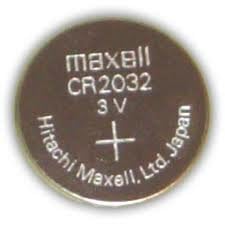
This,

cr2032.jpg

is what you need and can be bought anywhere watch batteries are sold.
 

My Computer

Computer type
PC/Desktop
Computer Manufacturer/Model Number
Me
OS
Win 7 Ultimate x64
CPU
FX-8350 @ 4.6 GHz so far
Motherboard
Asus M5A97 EVO
Memory
ADATA XPG V1 Series Black 8GB DDR3 1600
Graphics Card(s)
Sapphire R9 270x Dual-X
Sound Card
Xonar DGX w/ Corsair Vengence 1300
Monitor(s) Displays
Acer S232HL Abid
Screen Resolution
1920x1080
Hard Drives
120 GB OCZ Vertex 3
500 GB Seagate 7200.12
PSU
Antec Earthwatts 650W Green
Case
Antec Three Hundred
Cooling
Cooler Master 212 EVO
Keyboard
Logitech G510
Mouse
Logitech G500s
Internet Speed
35000/3000
Thanks Stormy...
 

My Computer

Computer type
PC/Desktop
Computer Manufacturer/Model Number
Custom built at Home
OS
Windows 7 64-bit, Windows 8.1 64-bit, OSX El Capitan, Windows 10 (VMware)
CPU
Intel i5-3350P 3.1 GHz
Motherboard
Gigabyte GA-Z77X-UP5 TH
Memory
16 GBs GSkill Sniper
Graphics Card(s)
Radeon HD 7850
Sound Card
VIA HD Audio
Monitor(s) Displays
Dell U2410 24"
Screen Resolution
1920x1200
Hard Drives
1 x Intel 520 240 GBs
1 x Seagate 1TBs SATA 2.0,
1 x Seagate 1TBs eSATA 2.0
PSU
Thermaltake 850W
Case
Antec P183
Cooling
Noctua NH-D14 Heatsink 2 x 120mm fans, 4 x 120mm case fans
Keyboard
Dell Multimedia keyboard
Mouse
Logitech Trackball
Internet Speed
28.5 Mb/s
Actually, I've ended up getting a DL2032 battery, which is the same as the CR2032.

Instead of using the CR letters, lithium(C) shape(R), Duracell marks theirs as Duracell(D), Lithium(L). The 2032 indicates the size and voltage of the battery (O.D 20mm, W 3.2mm, 3V), with polarity marked on top.

One more thing that I didn't want to or need to learn:sarc:
 

My Computer

Computer type
PC/Desktop
Computer Manufacturer/Model Number
Custom built at Home
OS
Windows 7 64-bit, Windows 8.1 64-bit, OSX El Capitan, Windows 10 (VMware)
CPU
Intel i5-3350P 3.1 GHz
Motherboard
Gigabyte GA-Z77X-UP5 TH
Memory
16 GBs GSkill Sniper
Graphics Card(s)
Radeon HD 7850
Sound Card
VIA HD Audio
Monitor(s) Displays
Dell U2410 24"
Screen Resolution
1920x1200
Hard Drives
1 x Intel 520 240 GBs
1 x Seagate 1TBs SATA 2.0,
1 x Seagate 1TBs eSATA 2.0
PSU
Thermaltake 850W
Case
Antec P183
Cooling
Noctua NH-D14 Heatsink 2 x 120mm fans, 4 x 120mm case fans
Keyboard
Dell Multimedia keyboard
Mouse
Logitech Trackball
Internet Speed
28.5 Mb/s
But we learned it too! Lithium batteries - nice!
Thanks for the info.
 

My Computer

Computer type
PC/Desktop
Computer Manufacturer/Model Number
Home Built - Jan 2013
OS
Windows 7 64 Bit Home Premium SP1
CPU
i7-3820
Motherboard
Asus P9X79-PRO - Bios 4608
Memory
GSkill F3-14900CL9Q - 16GB
Graphics Card(s)
EVGA GeForce GTX660 - Driver 352.86
Sound Card
On board Realtek ALC898
Monitor(s) Displays
Acer S271HL
Screen Resolution
1920 x 1080
Hard Drives
#1- Samsung 840 Pro Series
#2- Western Digital WD1002FAEX Sata3 Black
#3- Western Digital WD1002FAEX Sata3 Black
PSU
Corsair CMPSU-850TX-V2 - 850 watt (by Seasonic)
Case
Corsair Obsidian 550D
Cooling
Standard 3 120mm case fans, Cooler Master Hyper 212 EVO
Keyboard
MS KC-0405
Mouse
Intellimouse 5-button
Internet Speed
56 Mbits/Sec (on a good day)
Antivirus
Avast & Malwarebytes
Browser
Firefox
Other Info
Asus DVD - DRW-24B1ST 24X
Unfortunately, I am still learning...:(

If I shutdown the computer, it starts up just fine as long as the power strip feeding my gear is kept on.

If I shutdown the computer and flip the switch on the power strip, the BIOS does not retain its settings. The power strip feeds the PC, the monitor, eSATA drive, network switch, and speakers. It seemed simpler to kill the the power for all, instead of individually shutting down everything.
Upon boot, the screen shows:

Please enter Setup to recover BIOS setting

Press F1 to run setup
Press F2 to continue with default setting
Pressing F1 and entering the setup shows the correct time/date and all of the devices are detected. AFAICS, these are the settings that are changed:

  1. Storage type: ACHI to IDE
  2. Boot order: Disk 5 to Disk 0
Note: The SSD is connected to the Marvell chip and shows up as Disk 5 in Windows. Disk 0 is the HDD connected to on board SATA II port 0.

Change the boot order, save settings, and Windows boots just fine, albeit a bit slower than with ACHI settings. Once in Windows, the system runs just fine without noticeable performance decrease. The AHCI had not been enabled yet to prevent Windows going bunkers with "Found new devices..." and reboots.

I did flush the BIOS to the latest version, but that did not make any difference. When the power is killed after shutting down the PC, the BIOS settings are not retained.

About six month ego, the BIOS did loose the boot order settings couple of times. Instead of entering setup, pressing F8 and selecting the SSD drive (Drive 5) to boot had fixed the problem then.

In retrospect, it seems that the Asus motherboard BIOS is progressively getting worse; the next phase may even be no post whatsoever. Other than changing the motherboard, is there anything else that could be done to revive this POC?

I hate learn about the BIOS... especially on my own system...:shock:
 

My Computer

Computer type
PC/Desktop
Computer Manufacturer/Model Number
Custom built at Home
OS
Windows 7 64-bit, Windows 8.1 64-bit, OSX El Capitan, Windows 10 (VMware)
CPU
Intel i5-3350P 3.1 GHz
Motherboard
Gigabyte GA-Z77X-UP5 TH
Memory
16 GBs GSkill Sniper
Graphics Card(s)
Radeon HD 7850
Sound Card
VIA HD Audio
Monitor(s) Displays
Dell U2410 24"
Screen Resolution
1920x1200
Hard Drives
1 x Intel 520 240 GBs
1 x Seagate 1TBs SATA 2.0,
1 x Seagate 1TBs eSATA 2.0
PSU
Thermaltake 850W
Case
Antec P183
Cooling
Noctua NH-D14 Heatsink 2 x 120mm fans, 4 x 120mm case fans
Keyboard
Dell Multimedia keyboard
Mouse
Logitech Trackball
Internet Speed
28.5 Mb/s
This is a 'simple' problem. The BIOS chip does not retain settings because it is losing power or shorting out.

Batteries are cheap enough to try another one just for kicks and grins. This time get a CR2032. It should not make any difference, but stranger things have occurred.

Another thing occurred to me:
Check you motherboard (refer to you manual if you have one) and find the CMOS Reset jumper. There are 3 pins. Normally the jumper is set on pins 1-2. To clear the CMOS settings you would move the jumper to 2-3 (with power off and battery out) to clear and then back to 1-2 to run. But if the jumper is loose (not pushed in all the way), incorrect, or missing that might explain the behavior with a good battery.

Otherwise you are shopping for repairs (at a computer shop) or a new motherboard.
 

My Computer

Computer type
PC/Desktop
Computer Manufacturer/Model Number
Home Built - Jan 2013
OS
Windows 7 64 Bit Home Premium SP1
CPU
i7-3820
Motherboard
Asus P9X79-PRO - Bios 4608
Memory
GSkill F3-14900CL9Q - 16GB
Graphics Card(s)
EVGA GeForce GTX660 - Driver 352.86
Sound Card
On board Realtek ALC898
Monitor(s) Displays
Acer S271HL
Screen Resolution
1920 x 1080
Hard Drives
#1- Samsung 840 Pro Series
#2- Western Digital WD1002FAEX Sata3 Black
#3- Western Digital WD1002FAEX Sata3 Black
PSU
Corsair CMPSU-850TX-V2 - 850 watt (by Seasonic)
Case
Corsair Obsidian 550D
Cooling
Standard 3 120mm case fans, Cooler Master Hyper 212 EVO
Keyboard
MS KC-0405
Mouse
Intellimouse 5-button
Internet Speed
56 Mbits/Sec (on a good day)
Antivirus
Avast & Malwarebytes
Browser
Firefox
Other Info
Asus DVD - DRW-24B1ST 24X
Thanks TV.... I'll try the jumper and the new battery. Although, just some random thoughts...

If the battery cannot retain two BIOS settings, others seem to be fine including time/date, it does not seem to be battery issues; especially, when the battery just had been replaced. While measuring voltage does not indicate strength of the battery, the old, unmarked battery shows 3.15V; pretty much the same as the new Duracell one.

The motherboard does have jumpers as you described and will try that with and without the battery. Based on the manual for this board, with the battery in and changing the jumper, the BIOS is not cleared at times. I fail to see how the BIOS would be cleared when the battery is not connected, but I'll take their word without questioning.

Shopping for repair is out of question; I've built this machine by myself and pretty comfortable with ripping it apart and putting it together. It's a pain working on it since replacing the BIOS battery requires removing the video card and the jumper is hidden behind the cables, but I am OK.

Replacing the motherboard is also out of question. It's hard to find the same board, Newegg and other "trusted sources" does not sell it anymore. Less known sources sell it for around 300 bucks, which is a ripoff. The current i5-760 CPU (first generation) is getting old anyway and rather just build a new machine from scratch.
 

My Computer

Computer type
PC/Desktop
Computer Manufacturer/Model Number
Custom built at Home
OS
Windows 7 64-bit, Windows 8.1 64-bit, OSX El Capitan, Windows 10 (VMware)
CPU
Intel i5-3350P 3.1 GHz
Motherboard
Gigabyte GA-Z77X-UP5 TH
Memory
16 GBs GSkill Sniper
Graphics Card(s)
Radeon HD 7850
Sound Card
VIA HD Audio
Monitor(s) Displays
Dell U2410 24"
Screen Resolution
1920x1200
Hard Drives
1 x Intel 520 240 GBs
1 x Seagate 1TBs SATA 2.0,
1 x Seagate 1TBs eSATA 2.0
PSU
Thermaltake 850W
Case
Antec P183
Cooling
Noctua NH-D14 Heatsink 2 x 120mm fans, 4 x 120mm case fans
Keyboard
Dell Multimedia keyboard
Mouse
Logitech Trackball
Internet Speed
28.5 Mb/s
A bit of (excessive?) precision:

The BIOS is stored in an EEPROM chip. It's completely nonvolatile; you can unplug the chip from the PC, and the BIOS is retained indefinitely.

The BIOS settings are retained in CMOS. That's volatile, but it takes very little power to maintain. The CMOS cell usually lasts for years. I usually replace a motherboard before its CMOS batter dies.

I'm not sure what might be causing your problem. I believe that most PCs won't boot if the ClearRTC (CMOS clearing) jumper is in the wrong position. I hope that you don't have a defective board.
 

My Computer

Computer Manufacturer/Model Number
homegrown
OS
Windows 7 Pro X64 SP1
CPU
Intel Core I7-3930k
Motherboard
Asus P9X79 Pro
Memory
16 GB Gskill DDR3-2133
Graphics Card(s)
eVGA GTX680
Sound Card
Creative X-Fi Titanium
Monitor(s) Displays
As PA246Q
Screen Resolution
1920 X 1200
Hard Drives
Corsair Force GT, 120 GB
WDC 1.5TB Caviar Black
PSU
PCP&C Silencer 750 Crossfire
Case
Silverstone FT02
Cooling
Noctua NH-D14
Keyboard
cheap Logitech USB
Mouse
Microsoft Intellimouse Explorer (old optical) USB
Internet Speed
6Mb cable
Other Info
Pioneer BDR-205
Samsung SH-203B
Monsoon 5.1 speakers
Just a though. One of my motherboards has the jumper in the instruction that came with the motherboard wrong. Went on line and got the correct jumper position. Next try to use a non Marvell SATA port if you have one.
 

My Computer

Computer type
PC/Desktop
Computer Manufacturer/Model Number
Home made Desktop
OS
Windows 10 Pro. 64/ version 1709 Windows 7 Pro/64
CPU
Intel i7-6800K @ 4.3
Motherboard
ASUS X-99 Deluxe II
Memory
Corsair Platinum 16 gig @2400
Graphics Card(s)
EVGA GTX 1070 OC
Monitor(s) Displays
Asus 27" LED LCD/VE278Q
Screen Resolution
1920-1080 or 1280-720 HDMI
Hard Drives
INTEL SSD 730-240 Gb Sata 3.0/
PSU
EVGA Platium 1200W
Case
Phanteks Luxe Tempered Glass 8 fans/ one radiator
Cooling
XSPC/ Water Cooled CPU
Keyboard
Das 4 Professional
Mouse
Logitech M705/MX Anywhere 2-S
Internet Speed
100 mbits
Antivirus
Microsoft Security Essentials/ Malwarebytes Premium 3.0/ SAS
Browser
I.E. 11 default/Firefox/ ISP Time Warner Cable/Spectrum
Other Info
LG BluRay Burner/
Sound system-KLipsch-THX/
Icy Dock ssd Hot Swap bays.
A bit of (excessive?) precision:

The BIOS is stored in an EEPROM chip. It's completely nonvolatile; you can unplug the chip from the PC, and the BIOS is retained indefinitely.

The BIOS settings are retained in CMOS. That's volatile, but it takes very little power to maintain. The CMOS cell usually lasts for years. I usually replace a motherboard before its CMOS batter dies.

I'm not sure what might be causing your problem. I believe that most PCs won't boot if the ClearRTC (CMOS clearing) jumper is in the wrong position. I hope that you don't have a defective board.
Thanks bobkn for the lesson...

So, the EEPROM holds the BIOS configuration and the default settings for the motherboard. When updating or flushing the BIOS, it is the EEPROM that gets the new version. In another word, the EEPROM is non-volatile RAM, or NVRAM.

CMOS on the other hand could be viewed as volatile RAM, where "non-default" BIOS settings are stored, or lost if the battery fails. These settings are are not normally changed during the BIOS update or flush.

I think you're correct, with the ClearRTC in the wrong position the PC would not boot...
 
Last edited:

My Computer

Computer type
PC/Desktop
Computer Manufacturer/Model Number
Custom built at Home
OS
Windows 7 64-bit, Windows 8.1 64-bit, OSX El Capitan, Windows 10 (VMware)
CPU
Intel i5-3350P 3.1 GHz
Motherboard
Gigabyte GA-Z77X-UP5 TH
Memory
16 GBs GSkill Sniper
Graphics Card(s)
Radeon HD 7850
Sound Card
VIA HD Audio
Monitor(s) Displays
Dell U2410 24"
Screen Resolution
1920x1200
Hard Drives
1 x Intel 520 240 GBs
1 x Seagate 1TBs SATA 2.0,
1 x Seagate 1TBs eSATA 2.0
PSU
Thermaltake 850W
Case
Antec P183
Cooling
Noctua NH-D14 Heatsink 2 x 120mm fans, 4 x 120mm case fans
Keyboard
Dell Multimedia keyboard
Mouse
Logitech Trackball
Internet Speed
28.5 Mb/s
Just a though. One of my motherboards has the jumper in the instruction that came with the motherboard wrong. Went on line and got the correct jumper position. Next try to use a non Marvell SATA port if you have one.
This PC is almost two years old and running just fine until lately. Once the BIOS, or more correctly the CMOS is reprogrammed, the system works just fine. The Marvell SATA port that has its own BIOS and works just fine during the boot process and within Windows.

While I didn't have time to clear the CMOS via the jumper, unintentionally that had been done already. Couple of days ego the CMOS battery had been changed, that did a "ClearRTC". That was the only time when the time/date had been lost; other times it is the storage type and the boot order that are changed.

On the surface, it does seem that the PC has a bad motherboard. The "easy part had been done already like, change CMOS battery, ClearRTC, flush the EEPROM, or BIOS, without remediating the issue.
 

My Computer

Computer type
PC/Desktop
Computer Manufacturer/Model Number
Custom built at Home
OS
Windows 7 64-bit, Windows 8.1 64-bit, OSX El Capitan, Windows 10 (VMware)
CPU
Intel i5-3350P 3.1 GHz
Motherboard
Gigabyte GA-Z77X-UP5 TH
Memory
16 GBs GSkill Sniper
Graphics Card(s)
Radeon HD 7850
Sound Card
VIA HD Audio
Monitor(s) Displays
Dell U2410 24"
Screen Resolution
1920x1200
Hard Drives
1 x Intel 520 240 GBs
1 x Seagate 1TBs SATA 2.0,
1 x Seagate 1TBs eSATA 2.0
PSU
Thermaltake 850W
Case
Antec P183
Cooling
Noctua NH-D14 Heatsink 2 x 120mm fans, 4 x 120mm case fans
Keyboard
Dell Multimedia keyboard
Mouse
Logitech Trackball
Internet Speed
28.5 Mb/s
During my "training" session about the BIOS, or rather the EEPROM and CMOS, it became evident that the EEPROM should not be flushed within Windows. Nor should it be flushed utilizing Asus Update within Windows. The recommended method is "Asus EZ Flush2" within the CMOS configuration, or the "bupdater.exe" DOS utility.

The EEPROM had been flushed via "Asus EZ Flush2" and upon reboot, it came up with this message:
New CPU installed, please enter setup to configure your system
Pressed "F1", checked the configuration, saved it, and rebooted. The first reboot resulted in a "reset" where system in itself killed the power for 5-10 seconds. Interestingly, there had been no changes made to any other settings within the CMOS; the date/time, storage type, boot order, etc remained the same.

The system had been shutdown, power killed to the box for 5-10 minutes, turned the power strip switch on, and booted the PC. The system passed the BIOS screen and booted Windows, without any interaction with the BIOS.

On the surface, it does seem like that the issue had been resolved; however, the real test is still remaining. The power strip switch will be shut off overnight; if it boots just fine in the morning, then this issue is resolved.
 

My Computer

Computer type
PC/Desktop
Computer Manufacturer/Model Number
Custom built at Home
OS
Windows 7 64-bit, Windows 8.1 64-bit, OSX El Capitan, Windows 10 (VMware)
CPU
Intel i5-3350P 3.1 GHz
Motherboard
Gigabyte GA-Z77X-UP5 TH
Memory
16 GBs GSkill Sniper
Graphics Card(s)
Radeon HD 7850
Sound Card
VIA HD Audio
Monitor(s) Displays
Dell U2410 24"
Screen Resolution
1920x1200
Hard Drives
1 x Intel 520 240 GBs
1 x Seagate 1TBs SATA 2.0,
1 x Seagate 1TBs eSATA 2.0
PSU
Thermaltake 850W
Case
Antec P183
Cooling
Noctua NH-D14 Heatsink 2 x 120mm fans, 4 x 120mm case fans
Keyboard
Dell Multimedia keyboard
Mouse
Logitech Trackball
Internet Speed
28.5 Mb/s
Cr00zng
Please keep us posted how things are working.
I also use Asus easy flash and it works great for me as along as I format the memory stick to Fat 32 first.
 

My Computer

Computer type
PC/Desktop
Computer Manufacturer/Model Number
Home made Desktop
OS
Windows 10 Pro. 64/ version 1709 Windows 7 Pro/64
CPU
Intel i7-6800K @ 4.3
Motherboard
ASUS X-99 Deluxe II
Memory
Corsair Platinum 16 gig @2400
Graphics Card(s)
EVGA GTX 1070 OC
Monitor(s) Displays
Asus 27" LED LCD/VE278Q
Screen Resolution
1920-1080 or 1280-720 HDMI
Hard Drives
INTEL SSD 730-240 Gb Sata 3.0/
PSU
EVGA Platium 1200W
Case
Phanteks Luxe Tempered Glass 8 fans/ one radiator
Cooling
XSPC/ Water Cooled CPU
Keyboard
Das 4 Professional
Mouse
Logitech M705/MX Anywhere 2-S
Internet Speed
100 mbits
Antivirus
Microsoft Security Essentials/ Malwarebytes Premium 3.0/ SAS
Browser
I.E. 11 default/Firefox/ ISP Time Warner Cable/Spectrum
Other Info
LG BluRay Burner/
Sound system-KLipsch-THX/
Icy Dock ssd Hot Swap bays.
Well, the issue has not been resolved and I doubt that it will be anytime soon...

Shutting off the power strip at night resulted in BIOS error and asking for running the setup. At this time, none of the BIOS settings were changed; the storage type, boot order, etc., were correct. After saving the BIOS without making any changes, the machine booted just fine.

I've rebooted the box, got into the BIOS again, change the storage type from IDE to ACHI, saved it, and booted to Windows. The OS started up just fine and didn't even asked for reboot. The system is running in AHCI mode, and the performance improvement is quite noticeable both during bootup time and general use.

I am curious as to why shutting off the power to the box has this issue? Everything points to the battery backup for the CMOS, or BIOS, but that doesn't make much sense.

Both the original, about two years old, and the new batteries are good. Shutting down the PC shuts of the power supply and there should be no power to the motherboard going through the power supply. Shutting off the power strip shouldn't make any difference, as far as the power supply and the BIOS battery backup is concerned. It's a weird issue...
 

My Computer

Computer type
PC/Desktop
Computer Manufacturer/Model Number
Custom built at Home
OS
Windows 7 64-bit, Windows 8.1 64-bit, OSX El Capitan, Windows 10 (VMware)
CPU
Intel i5-3350P 3.1 GHz
Motherboard
Gigabyte GA-Z77X-UP5 TH
Memory
16 GBs GSkill Sniper
Graphics Card(s)
Radeon HD 7850
Sound Card
VIA HD Audio
Monitor(s) Displays
Dell U2410 24"
Screen Resolution
1920x1200
Hard Drives
1 x Intel 520 240 GBs
1 x Seagate 1TBs SATA 2.0,
1 x Seagate 1TBs eSATA 2.0
PSU
Thermaltake 850W
Case
Antec P183
Cooling
Noctua NH-D14 Heatsink 2 x 120mm fans, 4 x 120mm case fans
Keyboard
Dell Multimedia keyboard
Mouse
Logitech Trackball
Internet Speed
28.5 Mb/s
I think trying a different power strip would be the next thing to do. I don't use power strips. I use surge protectors and I shut them off several times a day. The only thing I can think of is the power strip has a partial power to ground short causing the problem. You could also try just plugging the computer into the wall outlet; when done shut the computer down and unplug it from the wall. Plug it back in again and boot your computer and see if their/there is still a problem.
If I have missed this action already has been done I apologize.
 

My Computer

Computer type
PC/Desktop
Computer Manufacturer/Model Number
Home made Desktop
OS
Windows 10 Pro. 64/ version 1709 Windows 7 Pro/64
CPU
Intel i7-6800K @ 4.3
Motherboard
ASUS X-99 Deluxe II
Memory
Corsair Platinum 16 gig @2400
Graphics Card(s)
EVGA GTX 1070 OC
Monitor(s) Displays
Asus 27" LED LCD/VE278Q
Screen Resolution
1920-1080 or 1280-720 HDMI
Hard Drives
INTEL SSD 730-240 Gb Sata 3.0/
PSU
EVGA Platium 1200W
Case
Phanteks Luxe Tempered Glass 8 fans/ one radiator
Cooling
XSPC/ Water Cooled CPU
Keyboard
Das 4 Professional
Mouse
Logitech M705/MX Anywhere 2-S
Internet Speed
100 mbits
Antivirus
Microsoft Security Essentials/ Malwarebytes Premium 3.0/ SAS
Browser
I.E. 11 default/Firefox/ ISP Time Warner Cable/Spectrum
Other Info
LG BluRay Burner/
Sound system-KLipsch-THX/
Icy Dock ssd Hot Swap bays.
Back
Top